clausona
Health Pass
- License — License: MIT
- Description — Repository has a description
- Active repo — Last push 0 days ago
- Community trust — 30 GitHub stars
Code Fail
- rm -rf — Recursive force deletion command in package.json
- process.env — Environment variable access in src/commands.ts
Permissions Pass
- Permissions — No dangerous permissions requested
This is a CLI tool that allows developers to easily switch between multiple Claude Code profiles on a single machine. It uses shell hooks and symlinks to share configurations, plugins, and MCP servers across different accounts.
Security Assessment
Overall Risk: Medium. The application accesses system environment variables, which is standard for managing CLI configurations, but it also contains a recursive force deletion command (`rm -rf`) in its package scripts. This is a significant flag, though it is likely used for uninstalling or cleaning up profile directories rather than acting maliciously. No hardcoded secrets or dangerous background permissions were found. However, it relies on executing shell commands, and the recommended installation method (`curl | bash`) bypasses manual code review before execution.
Quality Assessment
The project appears to be in active development (last pushed 0 days ago) and has garnered a decent amount of community trust for a specialized tool, boasting 30 GitHub stars. It is properly licensed under the MIT license, ensuring clear open-source usage rights. The documentation is thorough and provides a clear, user-friendly walkthrough of the available commands.
Verdict
Use with caution. While actively maintained and generally safe, inspect the `rm -rf` script in `package.json` before running to ensure it only targets intended profile directories.
CLI tool to manage multiple Claude Code profiles
clausona
Switch between multiple Claude Code accounts on one machine — plugins, MCP servers, and settings stay shared.
Why
You have multiple Claude Code accounts (personal, work, different orgs), but switching between them on a single machine is tedious:
- Switching is manual. You need to log out, log back in, or juggle
CLAUDE_CONFIG_DIRyourself. - Settings don't carry over. Each account gets its own config directory, so your MCP servers, plugins, permissions, and settings have to be set up from scratch — every time.
clausona fixes both. Switch profiles with one command — your entire environment carries over.
csn use work # switch to work account — done
No re-login. No reinstalling plugins. Just switch and go.
csnis a shorthand alias forclausona, registered automatically on install.
Features
- One-command switching —
clausona use <name>and you're on a different account - Shared environment — MCP servers, plugins, permissions, and settings are symlinked across all profiles. Set up once, use everywhere.
- Pure Claude Code — no wrapping, no proxying, no background process. Claude Code runs directly and unmodified. Fully compatible with oh-my-claudecode, Cline, and any other tool in your stack.
- Lightweight — a single shell hook and a few symlinks. No daemon, no server, no runtime overhead.
- Usage tracking — per-profile cost and token usage, tracked locally
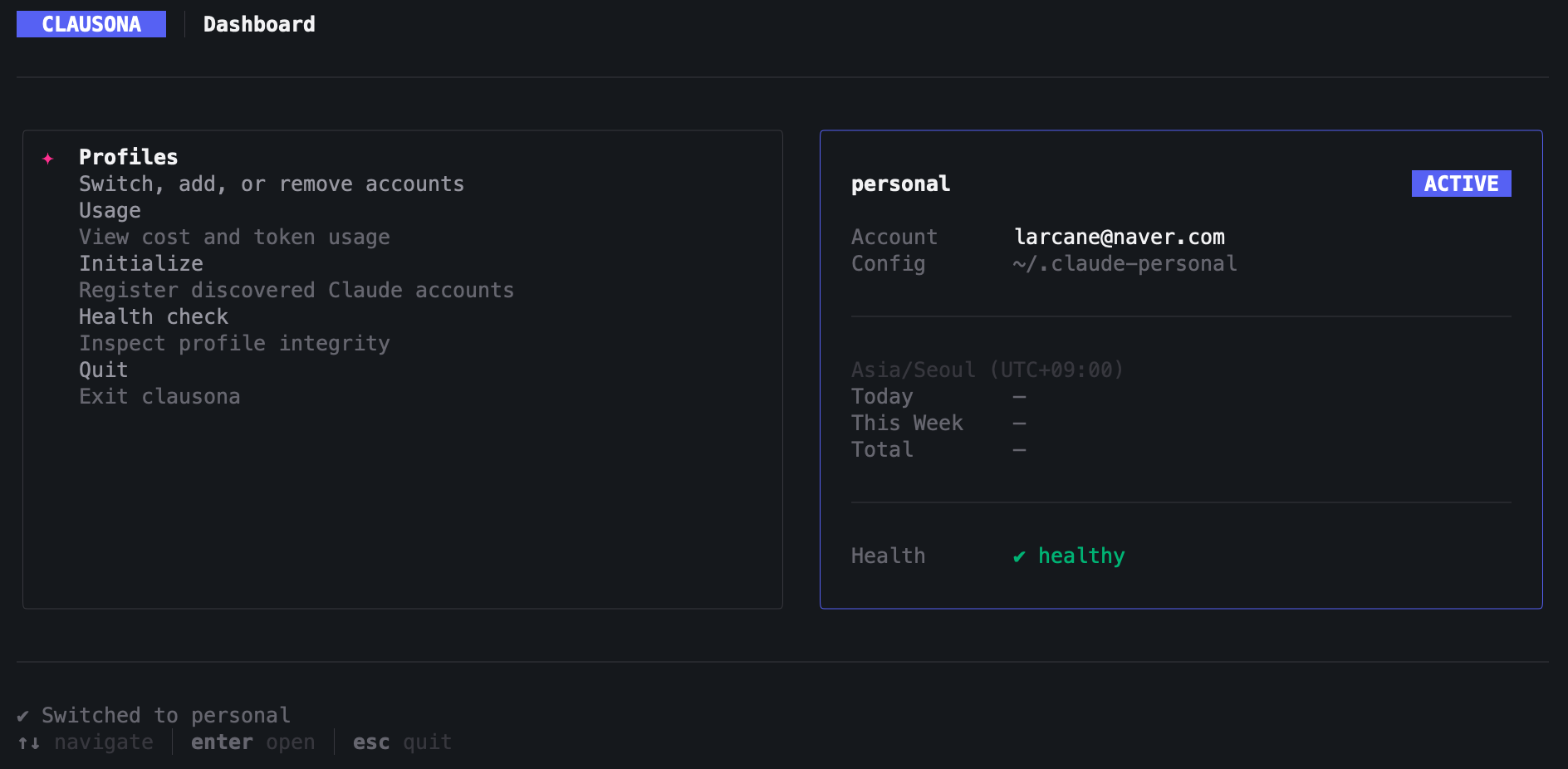
- Interactive dashboard — TUI for managing profiles, viewing usage, and running health checks
Install
Requirements: Node.js >= 20, Claude Code CLI
Platform: macOS, zsh
curl -fsSL https://github.com/larcane97/clausona/releases/latest/download/install.sh | bash
Quick Start
clausona init        # discover existing Claude Code accounts
clausona use work    # switch to a profile
clausona list        # see all profiles with weekly usage
clausona             # open the interactive dashboard
Commands
| Command | Description |
|---|---|
clausona |
Interactive TUI dashboard |
clausona init |
Discover and register Claude Code accounts |
clausona add <name> [--from <path>] [--merge-sessions] |
Add a profile manually |
clausona remove <name> |
Remove a profile |
clausona use [name] |
Switch active profile |
clausona run <profile> [-- claude-args...] |
Run Claude Code with a specific profile |
clausona list [--json] |
List all profiles with usage |
clausona usage [name] [--period=today|week|month|all] |
View cost and token usage |
clausona current [--json] |
Show active profile |
clausona config <name> --merge-sessions | --separate-sessions |
Configure session mode |
clausona doctor [--json] |
Check profile health |
clausona repair <name> |
Fix broken shared links |
clausona login <name> |
Re-authenticate a profile |
clausona uninstall |
Uninstall clausona completely |
How It Works
Profile Switching
A claude() shell wrapper is registered via eval "$(clausona shell-init)":
- Before each
claudeinvocation — reads~/.clausona/profiles.jsonand setsCLAUDE_CONFIG_DIRto the active profile's config directory - After each
claudeinvocation — detects usage changes via fingerprint comparison and records cost/token usage per profile
clausona use work
↓
claude             ← wrapper sets CLAUDE_CONFIG_DIR, then runs claude
↓
_track-usage       ← on exit, records any new cost/token usage
Shared Environment
When you register a new profile, clausona symlinks shared resources from your primary ~/.claude into the new profile's config directory:
~/.claude-work/            (new profile)
├── .claude.json           ← own auth credentials (NOT shared)
├── projects/              ← own session history (NOT shared by default)
├── mcp-servers/  →  ~/.claude/mcp-servers    (symlink to primary)
├── plugins/      →  ~/.claude/plugins        (symlink to primary)
├── settings.json →  ~/.claude/settings.json  (symlink to primary)
└── ...
Only .claude.json stays profile-specific. Everything else is shared automatically.
Session separation is the default: each profile keeps its own projects/ directory, so /resume only shows that profile's conversations. To share session history across profiles, pass --merge-sessions when adding or initializing.
Data Storage
All data stays local on your machine.
~/.clausona/
├── profiles.json    # registered profiles and active selection
├── usage.json       # per-profile usage history
└── backups/         # backups of imported profile directories

~/.claude-<name>/        # profile config directories (created by `clausona add`)
Contributing
Issues and pull requests are welcome at github.com/larcane97/clausona.
License
MIT
Reviews (0)
Sign in to leave a review.
Leave a reviewNo results found