last9-mcp-server
Health Pass
- License — License: Apache-2.0
- Description — Repository has a description
- Active repo — Last push 0 days ago
- Community trust — 53 GitHub stars
Code Fail
- child_process — Shell command execution capability in bin/cli.js
- process.env — Environment variable access in bin/cli.js
- child_process — Shell command execution capability in bin/download-binary.js
- execSync — Synchronous shell command execution in bin/download-binary.js
- fs.rmSync — Destructive file system operation in bin/download-binary.js
- fs module — File system access in bin/download-binary.js
Permissions Pass
- Permissions — No dangerous permissions requested
No AI report is available for this listing yet.
Last9 MCP Server
Last9 MCP Server
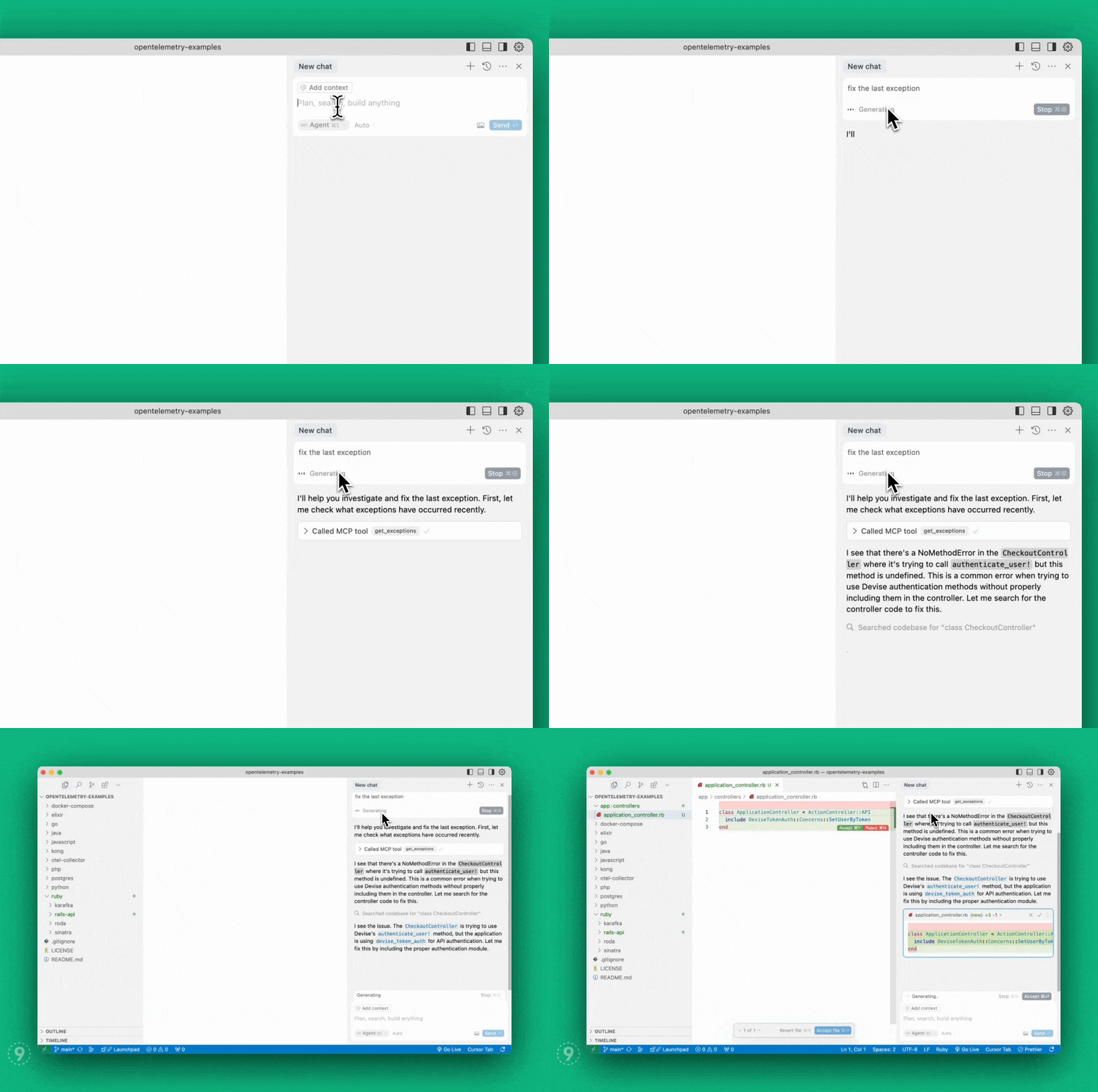 A
A
Model Context Protocol server implementation
for Last9 that enables AI agents to seamlessly bring
real-time production context — logs, metrics, and traces — into your local
environment to auto-fix code faster.
- View demo
- Read our
announcement blog post
Table of Contents
Quick Start (Hosted MCP)
The fastest way to get started. No local binary, no tokens — authentication is
handled via OAuth in your browser.
Find your org slug in your Last9 URL: app.last9.io/<org_slug>/...
Claude Code
claude mcp add --transport http last9 https://app.last9.io/api/v4/organizations/<org_slug>/mcp
Then type /mcp, select the last9 server, and authenticate via OAuth.
Cursor
- Open Cursor Settings > MCP
- Click Add New MCP Server
- Paste the config below and save
{
  "mcpServers": {
    "last9": {
      "type": "http",
      "url": "https://app.last9.io/api/v4/organizations/<org_slug>/mcp"
    }
  }
}
Click Connect and complete OAuth authorization in your browser.
VS Code
Requires v1.99+. See the
VS Code MCP documentation
for details.
- Open Command Palette: MCP: Add Server
- Enter the server URL with your org slug
- Complete OAuth authorization in your browser
Or manually add to settings.json:
{
  "mcp": {
    "servers": {
      "last9": {
        "type": "http",
        "url": "https://app.last9.io/api/v4/organizations/<org_slug>/mcp"
      }
    }
  }
}
Windsurf
- Navigate to Settings > Cascade > Open MCP Marketplace
- Click the gear icon to edit
mcp_config.json - Paste the config below and save
{
  "mcpServers": {
    "last9": {
      "serverUrl": "https://app.last9.io/api/v4/organizations/<org_slug>/mcp"
    }
  }
}
Complete OAuth authorization in your browser when prompted.
Claude Web/Desktop
- Go to Settings > Connectors
- Click Add custom connector
- Enter
last9as the name - Paste the server URL:
https://app.last9.io/api/v4/organizations/<org_slug>/mcp - Complete OAuth authorization in your browser
Note: Requires admin access to your Claude organization.
Self-Hosted Setup (STDIO)
Use this if your MCP client does not support HTTP transport or you need to run a
local server process.
Install
Homebrew:
brew install last9/tap/last9-mcp
NPM:
npm install -g @last9/mcp-server@latest
# Or run directly with npx
npx -y @last9/mcp-server@latest
GitHub Releases (Windows / manual install):
Download from
GitHub Releases:
| Platform | Archive |
|---|---|
| Windows (x64) | last9-mcp-server_Windows_x86_64.zip |
| Windows (ARM64) | last9-mcp-server_Windows_arm64.zip |
| Linux (x64) | last9-mcp-server_Linux_x86_64.tar.gz |
| Linux (ARM64) | last9-mcp-server_Linux_arm64.tar.gz |
| macOS (x64) | last9-mcp-server_Darwin_x86_64.tar.gz |
| macOS (ARM64) | last9-mcp-server_Darwin_arm64.tar.gz |
Credentials
You need a Refresh Token with Write permissions. Only admins can create
them.
- Go to API Access
- Click Generate Token with Write permissions
- Copy the token
Client Configuration
Most MCP clients use the same JSON structure. Pick the config that matches how
you installed:
Homebrew:
{
  "mcpServers": {
    "last9": {
      "command": "/opt/homebrew/bin/last9-mcp",
      "env": {
        "LAST9_REFRESH_TOKEN": "<last9_refresh_token>"
      }
    }
  }
}
NPM:
{
  "mcpServers": {
    "last9": {
      "command": "npx",
      "args": ["-y", "@last9/mcp-server@latest"],
      "env": {
        "LAST9_REFRESH_TOKEN": "<last9_refresh_token>"
      }
    }
  }
}
Where to paste this config:
| Client | Config location |
|---|---|
| Claude Web/Desktop | Settings > Developer > Edit Config (claude_desktop_config.json) |
| Cursor | Settings > Cursor Settings > MCP > Add New Global MCP Server |
| Windsurf | Settings > Cascade > MCP Marketplace > gear icon (mcp_config.json) |
| VS Code | Wrap in { "mcp": { "servers": { ... } } } in settings.json — details |
{
  "mcp": {
    "servers": {
      "last9": {
        "type": "stdio",
        "command": "/opt/homebrew/bin/last9-mcp",
        "env": {
          "LAST9_REFRESH_TOKEN": "<last9_refresh_token>"
        }
      }
    }
  }
}
For NPM, replace "command" with "command": "npx" and add"args": ["-y", "@last9/mcp-server@latest"].
After downloading from
GitHub Releases,
extract and use the full path:
{
  "mcpServers": {
    "last9": {
      "command": "C:\\Users\\<user>\\AppData\\Local\\Programs\\last9-mcp-server.exe",
      "env": {
        "LAST9_REFRESH_TOKEN": "<last9_refresh_token>"
      }
    }
  }
}
On Windows, NPM is easier (no path management), or use the
hosted HTTP transport to skip local installation
entirely.
Environment Variables
LAST9_REFRESH_TOKEN(required): Refresh Token from
API Access.LAST9_DATASOURCE: Datasource/cluster name. Defaults to your org's default
datasource.LAST9_API_HOST: API host. Defaults toapp.last9.io.LAST9_MAX_GET_LOGS_ENTRIES: Max entries for chunkedget_logsrequests.
Default:5000.LAST9_DEBUG_CHUNKING: Settrueto emit chunk-planning logs forget_logs,get_service_logs, andget_traces.LAST9_DISABLE_TELEMETRY: Defaults totrue. Setfalseto enable
OpenTelemetry tracing.OTEL_SDK_DISABLED: Standard OTel env var. OverridesLAST9_DISABLE_TELEMETRY.OTEL_EXPORTER_OTLP_ENDPOINT: OTLP collector endpoint. Only needed if
telemetry is enabled.OTEL_EXPORTER_OTLP_HEADERS: OTLP exporter auth headers. Only needed if
telemetry is enabled.
Available Tools
Observability & APM:
get_exceptions— List of exceptionsget_service_summary— Service throughput, error rate, response timeget_service_environments— Available environments for servicesget_service_performance_details— Detailed performance metrics for a serviceget_service_operations_summary— Operations summary for a serviceget_service_dependency_graph— Service dependency graph
Prometheus/PromQL:
prometheus_range_query— Range queries for metrics dataprometheus_instant_query— Instant queries for metrics dataprometheus_label_values— Label values for PromQL queriesprometheus_labels— Available labels for PromQL queries
Logs:
get_logs— JSON-pipeline log queriesget_service_logs— Raw log entries for a serviceget_log_attributes— Available log attributesget_drop_rules— Log drop rules from Control Planeadd_drop_rule— Create a log drop rule
Traces:
get_traces— JSON pipeline trace queriesget_service_traces— Traces by trace ID or service nameget_trace_attributes— Available trace attributes
Change Events & Alerts:
get_change_events— Deployments, config changes, rollbacksget_alert_config— Alert rule configurationsget_alerts— Currently active alerts
Time Input Standard
- Canonical precedence: absolute times (
start_time_iso/end_time_iso, ortime_iso) >lookback_minutes. - For relative windows, prefer
lookback_minutes. - For absolute windows, use RFC3339/ISO8601 (
2026-02-09T15:04:05Z). - If both relative and absolute inputs are provided, absolute inputs take
precedence. - Legacy
YYYY-MM-DD HH:MM:SSis accepted only for compatibility.
Deep Links
Most tools return a deep_link field — a direct URL to the relevant Last9
dashboard view.
Attribute Caching
The server caches log and trace attribute names at startup (10-second timeout)
and refreshes every 2 hours. These are embedded into tool descriptions so AI
assistants see up-to-date field names.
get_exceptions
Retrieves server-side exceptions over a specified time range.
limit(integer, optional): Max exceptions to return. Default: 20.lookback_minutes(integer, recommended): Minutes to look back. Default: 60.start_time_iso/end_time_iso(string, optional): Absolute time range in
RFC3339.service_name(string, optional): Filter by service name.span_name(string, optional): Filter by span name.deployment_environment(string, optional): Filter by environment.
get_service_summary
Service summary with throughput, error rate, and response time (p95).
start_time_iso/end_time_iso(string, optional): Absolute time range.env(string, optional): Environment filter. Defaults toprod.
get_service_environments
Returns available environments for services.
start_time_iso/end_time_iso(string, optional): Absolute time range.
All other APM tools require an
envparameter from this tool's output. If
empty, use"".
get_service_performance_details
Detailed performance metrics: throughput, error rate, p50/p90/p95/avg/max
response times, apdex, availability.
service_name(string, required): Service name.lookback_minutes(integer, optional): Default: 60.start_time_iso/end_time_iso(string, optional): Absolute time range.env(string, optional): Defaults toprod.
get_service_operations_summary
Operations summary: HTTP endpoints, DB queries, messaging, HTTP client calls.
service_name(string, required): Service name.lookback_minutes(integer, optional): Default: 60.start_time_iso/end_time_iso(string, optional): Absolute time range.env(string, optional): Defaults toprod.
get_service_dependency_graph
Dependency graph with throughput, response times, and error rates for
incoming/outgoing/infrastructure components.
service_name(string, optional): Service name.lookback_minutes(integer, optional): Default: 60.start_time_iso/end_time_iso(string, optional): Absolute time range.env(string, optional): Defaults toprod.
prometheus_range_query
PromQL range query. Check labels first with prometheus_labels.
query(string, required): The PromQL query.start_time_iso/end_time_iso(string, optional): Defaults to last 60
minutes.
prometheus_instant_query
PromQL instant query. Use rollup functions like sum_over_time,avg_over_time.
query(string, required): The PromQL query.time_iso(string, optional): Defaults to now.
prometheus_label_values
Label values for a PromQL filter query.
match_query(string, required): PromQL filter query.label(string, required): Label name.start_time_iso/end_time_iso(string, optional): Defaults to last 60
minutes.
prometheus_labels
Labels for a PromQL match query.
match_query(string, required): PromQL filter query.start_time_iso/end_time_iso(string, optional): Defaults to last 60
minutes.
get_logs
Advanced log queries using JSON pipeline syntax.
logjson_query(array, required): JSON pipeline query.lookback_minutes(integer, recommended): Default: 5.start_time_iso/end_time_iso(string, optional): Absolute time range.limit(integer, optional): Max rows. Server default: 5000.index(string, optional):physical_index:<name>orrehydration_index:<block_name>.
get_service_logs
Raw log entries for a service.
service(string, required): Service name.lookback_minutes(integer, optional): Default: 60.limit(integer, optional): Default: 20.env(string, optional): Environment filter.severity_filters(array, optional): e.g.["error", "warn"]. OR logic.body_filters(array, optional): e.g.["timeout", "failed"]. OR logic.start_time_iso/end_time_iso(string, optional): Absolute time range.index(string, optional): Explicit log index.
Multiple filter types combine with AND; each array uses OR.
get_log_attributes
Available log attributes for a time window.
lookback_minutes(integer, optional): Default: 15.start_time_iso/end_time_iso(string, optional): Absolute time range.region(string, optional): AWS region.index(string, optional): Explicit log index.
get_drop_rules
Gets drop rules for logs from
Last9 Control Plane. No parameters.
add_drop_rule
Create a drop rule at Last9 Control Plane.
name(string, required): Rule name.filters(array, required): Filter conditions. Each filter has:key(string):resource.attributes[key_name]orattributes[key_name].value(string): Value to match.operator(string):equalsornot_equals.conjunction(string):and.
get_traces
Advanced trace queries using JSON pipeline syntax.
Use this for broad searches and aggregations. For an exact trace ID lookup,
prefer get_service_traces with trace_id.
tracejson_query(array, required): JSON pipeline query.start_time_iso/end_time_iso(string, optional): Absolute time range.lookback_minutes(integer, optional): Default: 60.limit(integer, optional): Default: 5000.
get_service_traces
Traces by trace ID or service name (exactly one required).
Prefer this tool whenever you already have an exact trace_id.
If a trace_id lookup returns empty data, ask for a specific time window and retry with
explicit time bounds or a larger lookback_minutes.
trace_id(string, optional): Specific trace ID.service_name(string, optional): Service name.lookback_minutes(integer, optional): Default: 4320 fortrace_id, 60 forservice_name.start_time_iso/end_time_iso(string, optional): Absolute time range.limit(integer, optional): Default: 10.env(string, optional): Environment filter.
get_trace_attributes
Available trace attributes for a time window.
lookback_minutes(integer, optional): Default: 15.start_time_iso/end_time_iso(string, optional): Absolute time range.region(string, optional): AWS region.
get_change_events
Change events (deployments, config changes, rollbacks, etc.).
start_time_iso/end_time_iso(string, optional): Absolute time range.lookback_minutes(integer, optional): Default: 60.service(string, optional): Filter by service.environment(string, optional): Filter by environment.event_name(string, optional): Filter by event type.
Call without event_name first to get available_event_names.
get_alert_config
Alert rule configurations with filtering.
search_term(string, optional): Free-text search across rule name, group,
data source, tags.rule_name(string, optional): Filter by rule name.severity(string, optional): Filter by severity.rule_type(string, optional):staticoranomaly.alert_group_name/alert_group_type/data_source_name(string,
optional): Group filters.tags(array, optional): Tag filters. All must match.
All filters combine with AND.
get_alerts
Currently active alerts.
time_iso(string, optional): Evaluation time in RFC3339.timestamp(integer, optional): Unix timestamp (deprecated).window(integer, optional): Lookback in seconds. Default: 900. Range:
60-86400.lookback_minutes(integer, optional): Alternative towindow. Range:
1-1440.
Development
Running in HTTP mode, testing with curl, building from sourceRunning in HTTP Mode
export LAST9_REFRESH_TOKEN="your_refresh_token"
export LAST9_HTTP=true
export LAST9_PORT=8080  # Optional, defaults to 8080
./last9-mcp-server
The server starts on http://localhost:8080/mcp.
Testing with curl
The MCP Streamable HTTP protocol requires an initialize handshake first. Do
not set Mcp-Session-Id on the first request.
# Step 1: Initialize
SESSION_ID=$(curl -si -X POST http://localhost:8080/mcp \
    -H "Content-Type: application/json" \
    -d '{
      "jsonrpc": "2.0",
      "id": 1,
      "method": "initialize",
      "params": {
        "protocolVersion": "2024-11-05",
        "capabilities": {},
        "clientInfo": {"name": "curl-test", "version": "1.0"}
      }
    }' | grep -i "^Mcp-Session-Id:" | awk '{print $2}' | tr -d '\r')
echo "Session: $SESSION_ID"

# Step 2: Send initialized notification
curl -s -X POST http://localhost:8080/mcp \
    -H "Content-Type: application/json" \
    -H "Mcp-Session-Id: $SESSION_ID" \
    -d '{"jsonrpc": "2.0", "method": "notifications/initialized", "params": {}}'

# Step 3: List tools
curl -s -X POST http://localhost:8080/mcp \
    -H "Content-Type: application/json" \
    -H "Mcp-Session-Id: $SESSION_ID" \
    -d '{"jsonrpc": "2.0", "id": 2, "method": "tools/list", "params": {}}'

# Step 4: Call a tool
curl -s -X POST http://localhost:8080/mcp \
    -H "Content-Type: application/json" \
    -H "Mcp-Session-Id: $SESSION_ID" \
    -d '{
      "jsonrpc": "2.0",
      "id": 3,
      "method": "tools/call",
      "params": {
        "name": "get_service_logs",
        "arguments": {
          "service": "your-service-name",
          "lookback_minutes": 30,
          "limit": 10
        }
      }
    }'
Building from Source
git clone https://github.com/last9/last9-mcp-server.git
cd last9-mcp-server
go build -o last9-mcp-server
LAST9_HTTP=true ./last9-mcp-server
Note: LAST9_HTTP=true is for local development only. For normal usage,
prefer the hosted HTTP endpoint.
Testing
See TESTING.md for detailed testing instructions.
Badges
Reviews (0)
Sign in to leave a review.
Leave a reviewNo results found