last9-mcp-server
Health Gecti
- License — License: Apache-2.0
- Description — Repository has a description
- Active repo — Last push 0 days ago
- Community trust — 53 GitHub stars
Code Basarisiz
- child_process — Shell command execution capability in bin/cli.js
- process.env — Environment variable access in bin/cli.js
- child_process — Shell command execution capability in bin/download-binary.js
- execSync — Synchronous shell command execution in bin/download-binary.js
- fs.rmSync — Destructive file system operation in bin/download-binary.js
- fs module — File system access in bin/download-binary.js
Permissions Gecti
- Permissions — No dangerous permissions requested
Bu listing icin henuz AI raporu yok.
Last9 MCP Server
Last9 MCP Server
 A
A
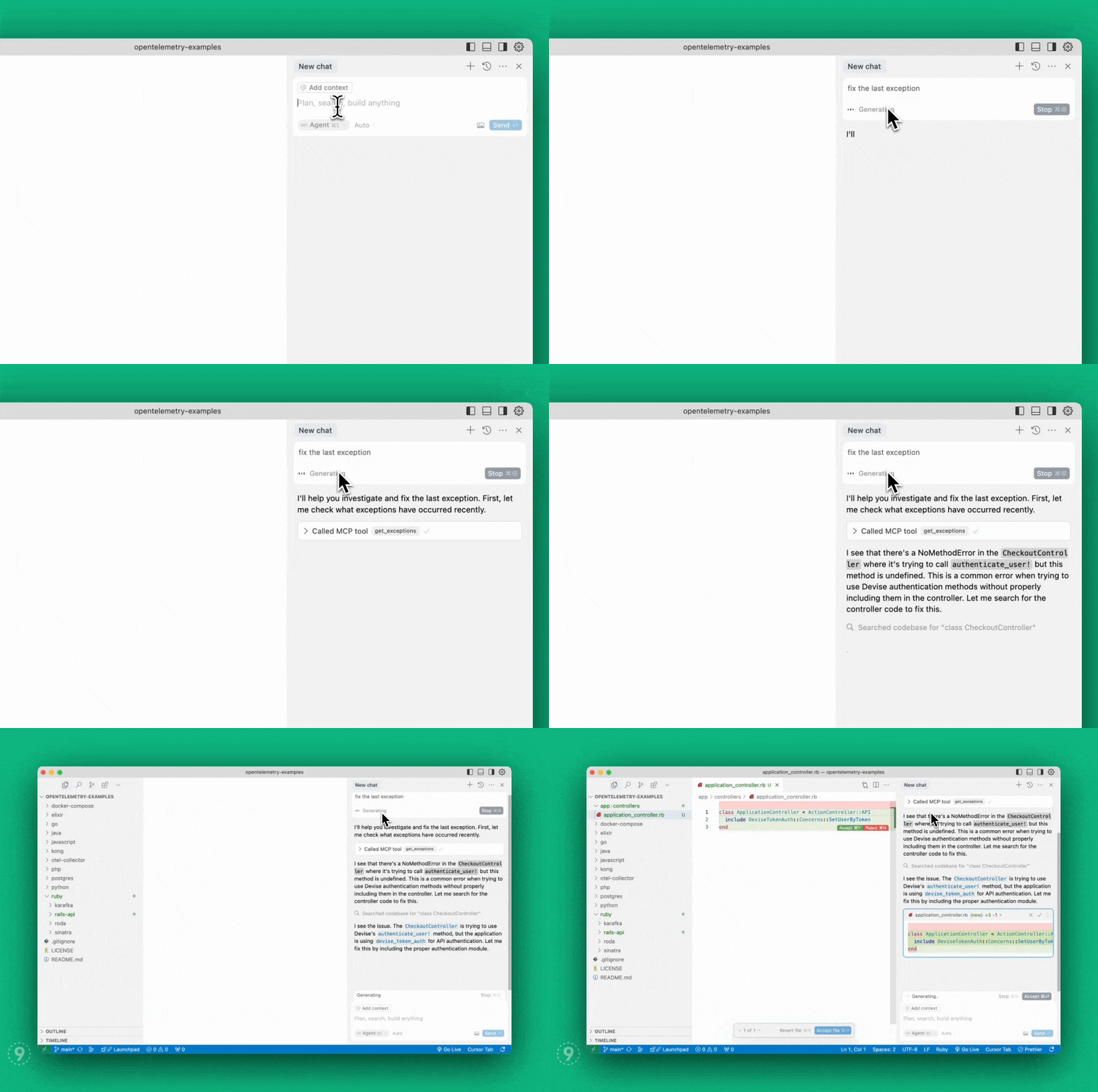
Model Context Protocol server implementation
for Last9 that enables AI agents to seamlessly bring
real-time production context — logs, metrics, and traces — into your local
environment to auto-fix code faster.
- View demo
- Read our
announcement blog post
Table of Contents
Quick Start (Hosted MCP)
The fastest way to get started. No local binary, no tokens — authentication is
handled via OAuth in your browser.
Find your org slug in your Last9 URL: app.last9.io/<org_slug>/...
Claude Code
claude mcp add --transport http last9 https://app.last9.io/api/v4/organizations/<org_slug>/mcp
Then type /mcp, select the last9 server, and authenticate via OAuth.
Cursor
- Open Cursor Settings > MCP
- Click Add New MCP Server
- Paste the config below and save
{
  "mcpServers": {
    "last9": {
      "type": "http",
      "url": "https://app.last9.io/api/v4/organizations/<org_slug>/mcp"
    }
  }
}
Click Connect and complete OAuth authorization in your browser.
VS Code
Requires v1.99+. See the
VS Code MCP documentation
for details.
- Open Command Palette: MCP: Add Server
- Enter the server URL with your org slug
- Complete OAuth authorization in your browser
Or manually add to settings.json:
{
  "mcp": {
    "servers": {
      "last9": {
        "type": "http",
        "url": "https://app.last9.io/api/v4/organizations/<org_slug>/mcp"
      }
    }
  }
}
Windsurf
- Navigate to Settings > Cascade > Open MCP Marketplace
- Click the gear icon to edit
mcp_config.json - Paste the config below and save
{
  "mcpServers": {
    "last9": {
      "serverUrl": "https://app.last9.io/api/v4/organizations/<org_slug>/mcp"
    }
  }
}
Complete OAuth authorization in your browser when prompted.
Claude Web/Desktop
- Go to Settings > Connectors
- Click Add custom connector
- Enter
last9as the name - Paste the server URL:
https://app.last9.io/api/v4/organizations/<org_slug>/mcp - Complete OAuth authorization in your browser
Note: Requires admin access to your Claude organization.
Self-Hosted Setup (STDIO)
Use this if your MCP client does not support HTTP transport or you need to run a
local server process.
Install
Homebrew:
brew install last9/tap/last9-mcp
NPM:
npm install -g @last9/mcp-server@latest
# Or run directly with npx
npx -y @last9/mcp-server@latest
GitHub Releases (Windows / manual install):
Download from
GitHub Releases:
| Platform | Archive |
|---|---|
| Windows (x64) | last9-mcp-server_Windows_x86_64.zip |
| Windows (ARM64) | last9-mcp-server_Windows_arm64.zip |
| Linux (x64) | last9-mcp-server_Linux_x86_64.tar.gz |
| Linux (ARM64) | last9-mcp-server_Linux_arm64.tar.gz |
| macOS (x64) | last9-mcp-server_Darwin_x86_64.tar.gz |
| macOS (ARM64) | last9-mcp-server_Darwin_arm64.tar.gz |
Credentials
You need a Refresh Token with Write permissions. Only admins can create
them.
- Go to API Access
- Click Generate Token with Write permissions
- Copy the token
Client Configuration
Most MCP clients use the same JSON structure. Pick the config that matches how
you installed:
Homebrew:
{
  "mcpServers": {
    "last9": {
      "command": "/opt/homebrew/bin/last9-mcp",
      "env": {
        "LAST9_REFRESH_TOKEN": "<last9_refresh_token>"
      }
    }
  }
}
NPM:
{
  "mcpServers": {
    "last9": {
      "command": "npx",
      "args": ["-y", "@last9/mcp-server@latest"],
      "env": {
        "LAST9_REFRESH_TOKEN": "<last9_refresh_token>"
      }
    }
  }
}
Where to paste this config:
| Client | Config location |
|---|---|
| Claude Web/Desktop | Settings > Developer > Edit Config (claude_desktop_config.json) |
| Cursor | Settings > Cursor Settings > MCP > Add New Global MCP Server |
| Windsurf | Settings > Cascade > MCP Marketplace > gear icon (mcp_config.json) |
| VS Code | Wrap in { "mcp": { "servers": { ... } } } in settings.json — details |
{
  "mcp": {
    "servers": {
      "last9": {
        "type": "stdio",
        "command": "/opt/homebrew/bin/last9-mcp",
        "env": {
          "LAST9_REFRESH_TOKEN": "<last9_refresh_token>"
        }
      }
    }
  }
}
For NPM, replace "command" with "command": "npx" and add"args": ["-y", "@last9/mcp-server@latest"].
After downloading from
GitHub Releases,
extract and use the full path:
{
  "mcpServers": {
    "last9": {
      "command": "C:\\Users\\<user>\\AppData\\Local\\Programs\\last9-mcp-server.exe",
      "env": {
        "LAST9_REFRESH_TOKEN": "<last9_refresh_token>"
      }
    }
  }
}
On Windows, NPM is easier (no path management), or use the
hosted HTTP transport to skip local installation
entirely.
Environment Variables
LAST9_REFRESH_TOKEN(required): Refresh Token from
API Access.LAST9_DATASOURCE: Datasource/cluster name. Defaults to your org's default
datasource.LAST9_API_HOST: API host. Defaults toapp.last9.io.LAST9_MAX_GET_LOGS_ENTRIES: Max entries for chunkedget_logsrequests.
Default:5000.LAST9_DEBUG_CHUNKING: Settrueto emit chunk-planning logs forget_logs,get_service_logs, andget_traces.LAST9_DISABLE_TELEMETRY: Defaults totrue. Setfalseto enable
OpenTelemetry tracing.OTEL_SDK_DISABLED: Standard OTel env var. OverridesLAST9_DISABLE_TELEMETRY.OTEL_EXPORTER_OTLP_ENDPOINT: OTLP collector endpoint. Only needed if
telemetry is enabled.OTEL_EXPORTER_OTLP_HEADERS: OTLP exporter auth headers. Only needed if
telemetry is enabled.
Available Tools
Observability & APM:
get_exceptions— List of exceptionsget_service_summary— Service throughput, error rate, response timeget_service_environments— Available environments for servicesget_service_performance_details— Detailed performance metrics for a serviceget_service_operations_summary— Operations summary for a serviceget_service_dependency_graph— Service dependency graph
Prometheus/PromQL:
prometheus_range_query— Range queries for metrics dataprometheus_instant_query— Instant queries for metrics dataprometheus_label_values— Label values for PromQL queriesprometheus_labels— Available labels for PromQL queries
Logs:
get_logs— JSON-pipeline log queriesget_service_logs— Raw log entries for a serviceget_log_attributes— Available log attributesget_drop_rules— Log drop rules from Control Planeadd_drop_rule— Create a log drop rule
Traces:
get_traces— JSON pipeline trace queriesget_service_traces— Traces by trace ID or service nameget_trace_attributes— Available trace attributes
Change Events & Alerts:
get_change_events— Deployments, config changes, rollbacksget_alert_config— Alert rule configurationsget_alerts— Currently active alerts
Time Input Standard
- Canonical precedence: absolute times (
start_time_iso/end_time_iso, ortime_iso) >lookback_minutes. - For relative windows, prefer
lookback_minutes. - For absolute windows, use RFC3339/ISO8601 (
2026-02-09T15:04:05Z). - If both relative and absolute inputs are provided, absolute inputs take
precedence. - Legacy
YYYY-MM-DD HH:MM:SSis accepted only for compatibility.
Deep Links
Most tools return a deep_link field — a direct URL to the relevant Last9
dashboard view.
Attribute Caching
The server caches log and trace attribute names at startup (10-second timeout)
and refreshes every 2 hours. These are embedded into tool descriptions so AI
assistants see up-to-date field names.
get_exceptions
Retrieves server-side exceptions over a specified time range.
limit(integer, optional): Max exceptions to return. Default: 20.lookback_minutes(integer, recommended): Minutes to look back. Default: 60.start_time_iso/end_time_iso(string, optional): Absolute time range in
RFC3339.service_name(string, optional): Filter by service name.span_name(string, optional): Filter by span name.deployment_environment(string, optional): Filter by environment.
get_service_summary
Service summary with throughput, error rate, and response time (p95).
start_time_iso/end_time_iso(string, optional): Absolute time range.env(string, optional): Environment filter. Defaults toprod.
get_service_environments
Returns available environments for services.
start_time_iso/end_time_iso(string, optional): Absolute time range.
All other APM tools require an
envparameter from this tool's output. If
empty, use"".
get_service_performance_details
Detailed performance metrics: throughput, error rate, p50/p90/p95/avg/max
response times, apdex, availability.
service_name(string, required): Service name.lookback_minutes(integer, optional): Default: 60.start_time_iso/end_time_iso(string, optional): Absolute time range.env(string, optional): Defaults toprod.
get_service_operations_summary
Operations summary: HTTP endpoints, DB queries, messaging, HTTP client calls.
service_name(string, required): Service name.lookback_minutes(integer, optional): Default: 60.start_time_iso/end_time_iso(string, optional): Absolute time range.env(string, optional): Defaults toprod.
get_service_dependency_graph
Dependency graph with throughput, response times, and error rates for
incoming/outgoing/infrastructure components.
service_name(string, optional): Service name.lookback_minutes(integer, optional): Default: 60.start_time_iso/end_time_iso(string, optional): Absolute time range.env(string, optional): Defaults toprod.
prometheus_range_query
PromQL range query. Check labels first with prometheus_labels.
query(string, required): The PromQL query.start_time_iso/end_time_iso(string, optional): Defaults to last 60
minutes.
prometheus_instant_query
PromQL instant query. Use rollup functions like sum_over_time,avg_over_time.
query(string, required): The PromQL query.time_iso(string, optional): Defaults to now.
prometheus_label_values
Label values for a PromQL filter query.
match_query(string, required): PromQL filter query.label(string, required): Label name.start_time_iso/end_time_iso(string, optional): Defaults to last 60
minutes.
prometheus_labels
Labels for a PromQL match query.
match_query(string, required): PromQL filter query.start_time_iso/end_time_iso(string, optional): Defaults to last 60
minutes.
get_logs
Advanced log queries using JSON pipeline syntax.
logjson_query(array, required): JSON pipeline query.lookback_minutes(integer, recommended): Default: 5.start_time_iso/end_time_iso(string, optional): Absolute time range.limit(integer, optional): Max rows. Server default: 5000.index(string, optional):physical_index:<name>orrehydration_index:<block_name>.
get_service_logs
Raw log entries for a service.
service(string, required): Service name.lookback_minutes(integer, optional): Default: 60.limit(integer, optional): Default: 20.env(string, optional): Environment filter.severity_filters(array, optional): e.g.["error", "warn"]. OR logic.body_filters(array, optional): e.g.["timeout", "failed"]. OR logic.start_time_iso/end_time_iso(string, optional): Absolute time range.index(string, optional): Explicit log index.
Multiple filter types combine with AND; each array uses OR.
get_log_attributes
Available log attributes for a time window.
lookback_minutes(integer, optional): Default: 15.start_time_iso/end_time_iso(string, optional): Absolute time range.region(string, optional): AWS region.index(string, optional): Explicit log index.
get_drop_rules
Gets drop rules for logs from
Last9 Control Plane. No parameters.
add_drop_rule
Create a drop rule at Last9 Control Plane.
name(string, required): Rule name.filters(array, required): Filter conditions. Each filter has:key(string):resource.attributes[key_name]orattributes[key_name].value(string): Value to match.operator(string):equalsornot_equals.conjunction(string):and.
get_traces
Advanced trace queries using JSON pipeline syntax.
Use this for broad searches and aggregations. For an exact trace ID lookup,
prefer get_service_traces with trace_id.
tracejson_query(array, required): JSON pipeline query.start_time_iso/end_time_iso(string, optional): Absolute time range.lookback_minutes(integer, optional): Default: 60.limit(integer, optional): Default: 5000.
get_service_traces
Traces by trace ID or service name (exactly one required).
Prefer this tool whenever you already have an exact trace_id.
If a trace_id lookup returns empty data, ask for a specific time window and retry with
explicit time bounds or a larger lookback_minutes.
trace_id(string, optional): Specific trace ID.service_name(string, optional): Service name.lookback_minutes(integer, optional): Default: 4320 fortrace_id, 60 forservice_name.start_time_iso/end_time_iso(string, optional): Absolute time range.limit(integer, optional): Default: 10.env(string, optional): Environment filter.
get_trace_attributes
Available trace attributes for a time window.
lookback_minutes(integer, optional): Default: 15.start_time_iso/end_time_iso(string, optional): Absolute time range.region(string, optional): AWS region.
get_change_events
Change events (deployments, config changes, rollbacks, etc.).
start_time_iso/end_time_iso(string, optional): Absolute time range.lookback_minutes(integer, optional): Default: 60.service(string, optional): Filter by service.environment(string, optional): Filter by environment.event_name(string, optional): Filter by event type.
Call without event_name first to get available_event_names.
get_alert_config
Alert rule configurations with filtering.
search_term(string, optional): Free-text search across rule name, group,
data source, tags.rule_name(string, optional): Filter by rule name.severity(string, optional): Filter by severity.rule_type(string, optional):staticoranomaly.alert_group_name/alert_group_type/data_source_name(string,
optional): Group filters.tags(array, optional): Tag filters. All must match.
All filters combine with AND.
get_alerts
Currently active alerts.
time_iso(string, optional): Evaluation time in RFC3339.timestamp(integer, optional): Unix timestamp (deprecated).window(integer, optional): Lookback in seconds. Default: 900. Range:
60-86400.lookback_minutes(integer, optional): Alternative towindow. Range:
1-1440.
Development
Running in HTTP mode, testing with curl, building from sourceRunning in HTTP Mode
export LAST9_REFRESH_TOKEN="your_refresh_token"
export LAST9_HTTP=true
export LAST9_PORT=8080  # Optional, defaults to 8080
./last9-mcp-server
The server starts on http://localhost:8080/mcp.
Testing with curl
The MCP Streamable HTTP protocol requires an initialize handshake first. Do
not set Mcp-Session-Id on the first request.
# Step 1: Initialize
SESSION_ID=$(curl -si -X POST http://localhost:8080/mcp \
    -H "Content-Type: application/json" \
    -d '{
      "jsonrpc": "2.0",
      "id": 1,
      "method": "initialize",
      "params": {
        "protocolVersion": "2024-11-05",
        "capabilities": {},
        "clientInfo": {"name": "curl-test", "version": "1.0"}
      }
    }' | grep -i "^Mcp-Session-Id:" | awk '{print $2}' | tr -d '\r')
echo "Session: $SESSION_ID"

# Step 2: Send initialized notification
curl -s -X POST http://localhost:8080/mcp \
    -H "Content-Type: application/json" \
    -H "Mcp-Session-Id: $SESSION_ID" \
    -d '{"jsonrpc": "2.0", "method": "notifications/initialized", "params": {}}'

# Step 3: List tools
curl -s -X POST http://localhost:8080/mcp \
    -H "Content-Type: application/json" \
    -H "Mcp-Session-Id: $SESSION_ID" \
    -d '{"jsonrpc": "2.0", "id": 2, "method": "tools/list", "params": {}}'

# Step 4: Call a tool
curl -s -X POST http://localhost:8080/mcp \
    -H "Content-Type: application/json" \
    -H "Mcp-Session-Id: $SESSION_ID" \
    -d '{
      "jsonrpc": "2.0",
      "id": 3,
      "method": "tools/call",
      "params": {
        "name": "get_service_logs",
        "arguments": {
          "service": "your-service-name",
          "lookback_minutes": 30,
          "limit": 10
        }
      }
    }'
Building from Source
git clone https://github.com/last9/last9-mcp-server.git
cd last9-mcp-server
go build -o last9-mcp-server
LAST9_HTTP=true ./last9-mcp-server
Note: LAST9_HTTP=true is for local development only. For normal usage,
prefer the hosted HTTP endpoint.
Testing
See TESTING.md for detailed testing instructions.
Badges
Yorumlar (0)
Yorum birakmak icin giris yap.
Yorum birakSonuc bulunamadi