Rojo-Manager
Health Warn
- License — License: MIT
- Description — Repository has a description
- Active repo — Last push 0 days ago
- Low visibility — Only 6 GitHub stars
Code Fail
- rm -rf — Recursive force deletion command in package-macos.sh
Permissions Pass
- Permissions — No dangerous permissions requested
No AI report is available for this listing yet.
A tray app that runs the Rojo servers for your Roblox projects, with an MCP server so AI agents can run them too.
Rojo Manager




A tray app for Windows and macOS that runs the Rojo servers for all your Roblox projects, with an MCP server so AI agents can run them too.
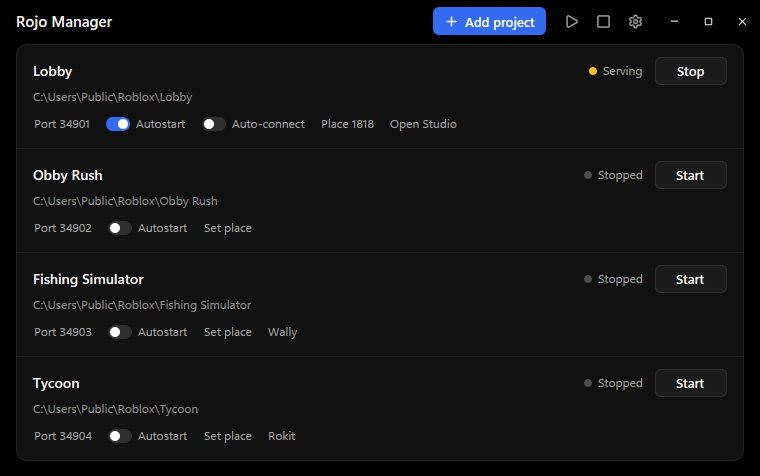
- Start, stop, and watch a Rojo server per project, each on its own port, from the window or the tray menu.
- Link a project to its place, open it in Studio with one click, and let Rojo connect on its own.
- Install Rojo, Rokit, Wally, and other tools, and a project's pinned tools and packages.
- Crashed servers restart, failures show as notifications, and app updates install with one click.
- Agents can do all of it through the bundled MCP server, and run Luau in Studio.
Questions, feedback, and release updates are on the DevForum thread.
Download and run
Windows 10 or 11, x64. Download RojoManager-1.1.0-windows-x64.zip from Releases, extract it, and double-click RojoManager.exe. There is no installer and no administrator access is needed. The download is not code signed yet, so Windows SmartScreen may block the first run: click More info, then Run anyway.
macOS 11 or later (beta). Download RojoManager-1.1.0-macos.zip, open it, and move Rojo Manager.app to Applications. It runs in the menu bar. The app is not notarized yet, so macOS blocks the first launch: open System Settings > Privacy & Security and click Open Anyway.
Projects
Click Add project to add a folder with a *.project.json file, make a new project with rojo init, or convert a .rbxl place into a project (Rojo 7.7 or later). Each project gets a free port. Click Start.
- Set place links the project to a Roblox place: paste a place ID or link, and Open Studio opens it. Type
localfor an unpublished place file the manager builds from the project. - Auto-connect connects Rojo on its own while that place is open in Studio and the server runs.
- Accept and Abort show when Rojo waits for its first sync to be confirmed, with what accepting would add, change, and remove.
- Pull writes what Studio has back into the project's files with
rojo syncback, for work done in Studio. It lists the files first. Studio's version wins, so files for instances Studio does not have are removed. Needs Rojo 7.7 or later and Lune. - Idle close closes the place's Studio after that many minutes with nothing happening in it. Unsaved changes there are lost. Settings can turn it off for every project and for agents.
- Show Studio shows a Studio window that an agent opened hidden. One that belongs to no project gets a Show banner instead. Playtests in a hidden Studio keep the mouse unlocked, so Studio can't move your cursor to it in first person or shift lock. Settings > Agents leaves that to the agent that opened it (it keeps the cursor unless the agent needs mouse lock), or makes it always or never happen.
- A history icon restores instances Rojo removed from Studio. The last 20 backups are kept per project.
- Autostart starts the server with the manager, and Sourcemap keeps
sourcemap.jsoncurrent for luau-lsp. - Wally, Rokit, and Aftman install the project's packages and pinned tools. Settings > Tools installs and updates global tools through Rokit.
- Remove takes the project off the list and keeps its files, except a local place file the manager built.
The sync preview, Pull, Idle close, backups, and keeping your cursor need the bridge plugin described under Agents.
Closing the window leaves the manager and its servers running in the tray. A dot on the tray icon is yellow while a server runs, green while Studio is connected, and red when a port is taken. Quit in the tray menu stops the servers.
Agents
AI agents can run your Rojo servers, open places in Studio, connect the Rojo plugin, and run Luau in Studio through the MCP server that ships with the app. A short setup on first launch walks through the steps below, and Settings > Agents has them too.
- In Settings > Agents, click Install next to Studio plugin with agent bridge, then restart Studio. Turn off the Creator Store Rojo in Studio so only one Rojo runs.
- Under Add to an agent, click Claude Code or Codex, or Other for the config to paste into any other MCP client.
| Tool | What it does |
|---|---|
list_projects |
Projects with their server state, port, linked place, and Rojo's status in Studio |
rojo_server |
Starts, stops, or restarts a project's server |
open_place |
Opens a project's place, a place ID, a saved version of a place, a .rbxl file, or a new baseplate in Studio, optionally connecting Rojo, without a window (Windows only), or with an idle close |
rojo_session |
Connects or disconnects Rojo, accepts or aborts the first sync, restores backups, and pulls from Studio |
lane |
Gives an agent its own copy of a project, with its own server and Studio, for parallel work |
server_logs |
Reads a project's recent Rojo output |
studio_output |
Reads Studio's Output for an open place |
manage_project |
Adds, creates, converts, changes, or removes projects |
updates |
Checks for and installs app and bridge updates |
app_settings |
Reads or changes the app's settings |
get_connected_instances |
Lists the Studio windows the bridge reaches |
close_studio |
Closes a Studio window, losing unsaved changes there |
execute_luau |
Runs Luau in a Studio window with plugin permissions |
get_connected_instances, close_studio, execute_luau, and studio_output can each be turned off in Settings > Agents, for when another Studio MCP already gives your agents the same tools. Settings and the setup note which of your agents' Studio MCPs have them.
Rojo Manager owns every server, so the window always shows what an agent did. Agents reach it through a local API protected by a random token. The bridge is the official Rojo plugin with a small module added on your machine, and it talks to the manager on localhost:34871.
Updates and data
The app checks for a newer release on launch and offers Update now, which installs it and restarts with the same servers running. Beta versions are GitHub pre-releases and are never offered.
Projects and settings are in %LOCALAPPDATA%\RojoManager on Windows and ~/Library/Application Support/RojoManager on macOS. The app has no account and no analytics. It contacts GitHub for releases and Roblox's public APIs to look up a place you link.
To uninstall, turn off startup in Settings, quit from the tray menu, and delete the application folder and the data folder. On Windows, also delete the Rojo Manager shortcut from the Start menu.
Develop and build
The app is written in Rust, with a native window drawn by GPUI and GPUI Kit. On Windows you need Rust with the MSVC toolchain and the Windows SDK.
cargo test --workspace
cargo build --release --workspace
cargo install cargo-about
.\package.ps1
cargo run -p rojo-manager runs the app, and ROJO_MANAGER_DATA_DIR points it at a separate data folder for testing. On macOS, build for aarch64-apple-darwin and x86_64-apple-darwin, then run ./package-macos.sh.
License
MIT. Bundled dependencies keep their own licenses, included in the download's licenses folder. Rojo Manager is an independent project and is not affiliated with Roblox or the Rojo maintainers.
The files in rojo_bridge modify the Rojo plugin and are licensed under the MPL-2.0, like Rojo. Neither the app nor this repository contains Rojo. Rojo, its plugin, and Lune are downloaded from their official GitHub releases on your machine.
Reviews (0)
Sign in to leave a review.
Leave a reviewNo results found