taskuary
Health Uyari
- License — License: MIT
- Description — Repository has a description
- Active repo — Last push 0 days ago
- Low visibility — Only 5 GitHub stars
Code Gecti
- Code scan — Scanned 12 files during light audit, no dangerous patterns found
Permissions Gecti
- Permissions — No dangerous permissions requested
Bu listing icin henuz AI raporu yok.
Automate your job: local-first AI task hub. Email, Teams, Slack & reports -> one timeline -> AI triage -> your coding agents (Claude Code, Codex, Gemini) do the work, you approve.
Taskuary


Automate your job.
Your inbox and your coding agents in one place. Email, Teams, Slack, GitHub issues and
scheduled reports land on one timeline; AI triage says what is real work; the coding CLI
you already use does it; you approve the result. Runs entirely on your machine.
Why
Work arrives as messages, but work is tasks — and you are the translation layer. You
read the mail, decide what it means, open the ticket, do the thing, and write back. The
first and last steps are where the day goes.
Taskuary automates the ends and leaves you the middle. Triage reads everything and files
the noise. Real work becomes a task and goes to your agent, which works in your repos and
reports back with the diff. Replies come back as drafts. Nothing sends, closes, or ships
without you — and nothing leaves your machine except the calls you configured.
Get started
pip install git+https://github.com/ldbumble/taskuary
taskuary        # opens http://127.0.0.1:7787
Python 3.10+ is all you need. Then, in Connectors — a minute or two each:
- AI — paste an Anthropic / OpenAI / Azure OpenAI key. Triage is now on. (A small,
cheap model is the right pick here; the expensive one goes in step 3.) - A channel — Outlook, Teams, or Slack. Mail starts landing on the Timeline.
- Your coding CLI — pick a preset (Claude Code, Codex, Gemini, Cursor, Copilot), Save,
Test. Add a GitHub PAT and repos are discovered for you. - Reports (optional) — point at SQL Server / MCP / SQLite / REST / RSS and schedule a
query with an AI prompt; the summary lands on your Timeline.
No cloud key at all? Set Settings → Triage & routing → Triage brain to your CLI agent
and skip step 1 — one brain does everything, slower and pricier per message. See
One brain or two.
Prefer a desktop app? pip install "taskuary[desktop] @ git+https://github.com/ldbumble/taskuary"
then taskuary-desktop — the same UI in a native window. A prebuilt single-fileTaskuary.exe is attached to every CI run.
The workspace
One tab per question, two lines each; the details live in the app's own help text.
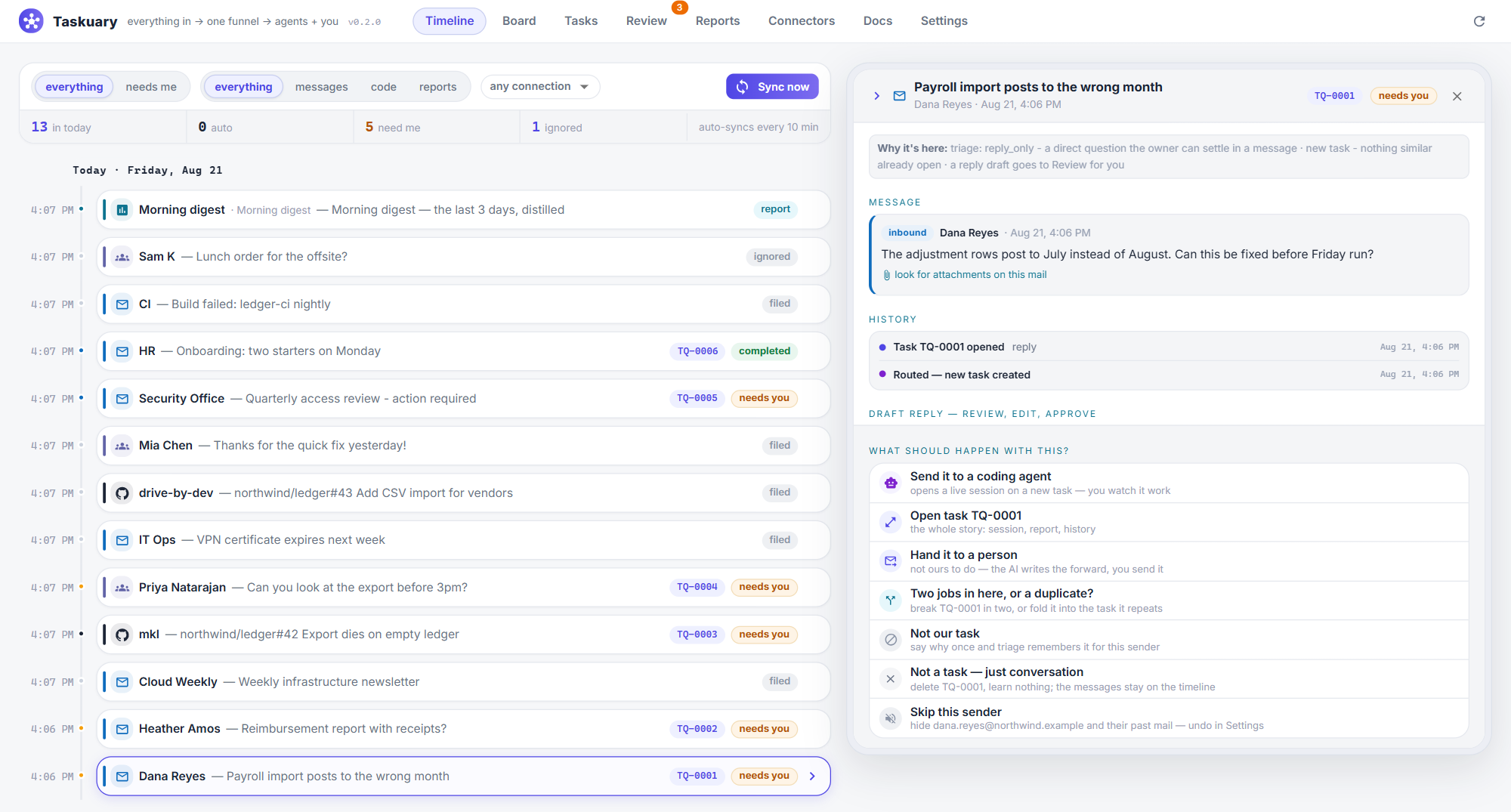
- Timeline — everything inbound on one day-grouped rail, chips saying what each row IS
and whether it needs you. Click a row: the whole message (stored whole, not a preview),
its attachments drawn inline — half of "see below" mail is the screenshot — and every way
out: approve the drafted reply, send it to a coding agent, hand it to a person, split or
merge, "not our task" (which teaches triage for next time). - Board — the agent kanban: Queued / Working / Waiting on you / Done, by what is TRUE
right now — a live session counts as working, and a session gone quiet moves its card to
waiting on you with the question showing. Cards working now show a live peephole. - Tasks — the page is a terminal: your CLI in the task's repo, prompt typed in and
sent, and you keep talking. Taskuary picks the checkout from the SOUL.md repo map (one
click to override); the prompt carries the ask, the mail, the files and the rules, so the
agent never re-fetches what it was handed. Done — wrap it up reads the transcript,
writes the report and drafts the reply — the agent is asked nothing, and both still work
after the terminal itself is long gone. Pause keeps a handover note the next session is
seeded with. The kind is a control: "this is not a coding task" is one dropdown, and
sayingreplyroutes it into Review instead of a repo. - Review — the decision queue. Approve & send sends whatever is in the box on the
channel it arrived on, in-thread; a refused send says so right there and keeps the text.
A reply drafted before an agent looked at the problem waits as held and comes back
rewritten from what the agent actually found. - Reports — sources at the top (SQL, REST, MCP…), one AI prompt at the bottom, a
schedule. The rows come back as an .xlsx and a bar chart the summarizing model
itself chose the columns for; capped slices are named as capped so the AI never calls a
truncated slice "all of them". Preview runs the whole pipeline first. - Connectors — a catalog with a wizard per card. Every connection has roles you
choose: trigger (inbound work), feed (shown, never triaged), report, tool (agents
may use it), notify (Taskuary pushes pings TO it). Nothing is polled without a role. - Docs — SOUL.md / CODER.md / DIGEST.md, the plain-markdown rules injected into every
run; they maintain themselves as connectors and repos appear. Your name lives in ONE
field here and fills every{{owner}}mention across the documents. - Settings — triage knobs with plain-English help, deterministic routing policies that
no model confidence can override, the learned memory, notification level, and one-click
audit-chain verification.
Two principles hold everywhere: nothing sends or ships without your approval, and
agents work where you can watch — a real terminal, never a hidden run. Out of the box
it works the mail (auto-dispatch + auto-draft, both switchable); triage is AI-gated, so
with no AI connected messages file visibly instead of heuristics spraying tasks.
Telegram & WhatsApp — the funnel in your pocket
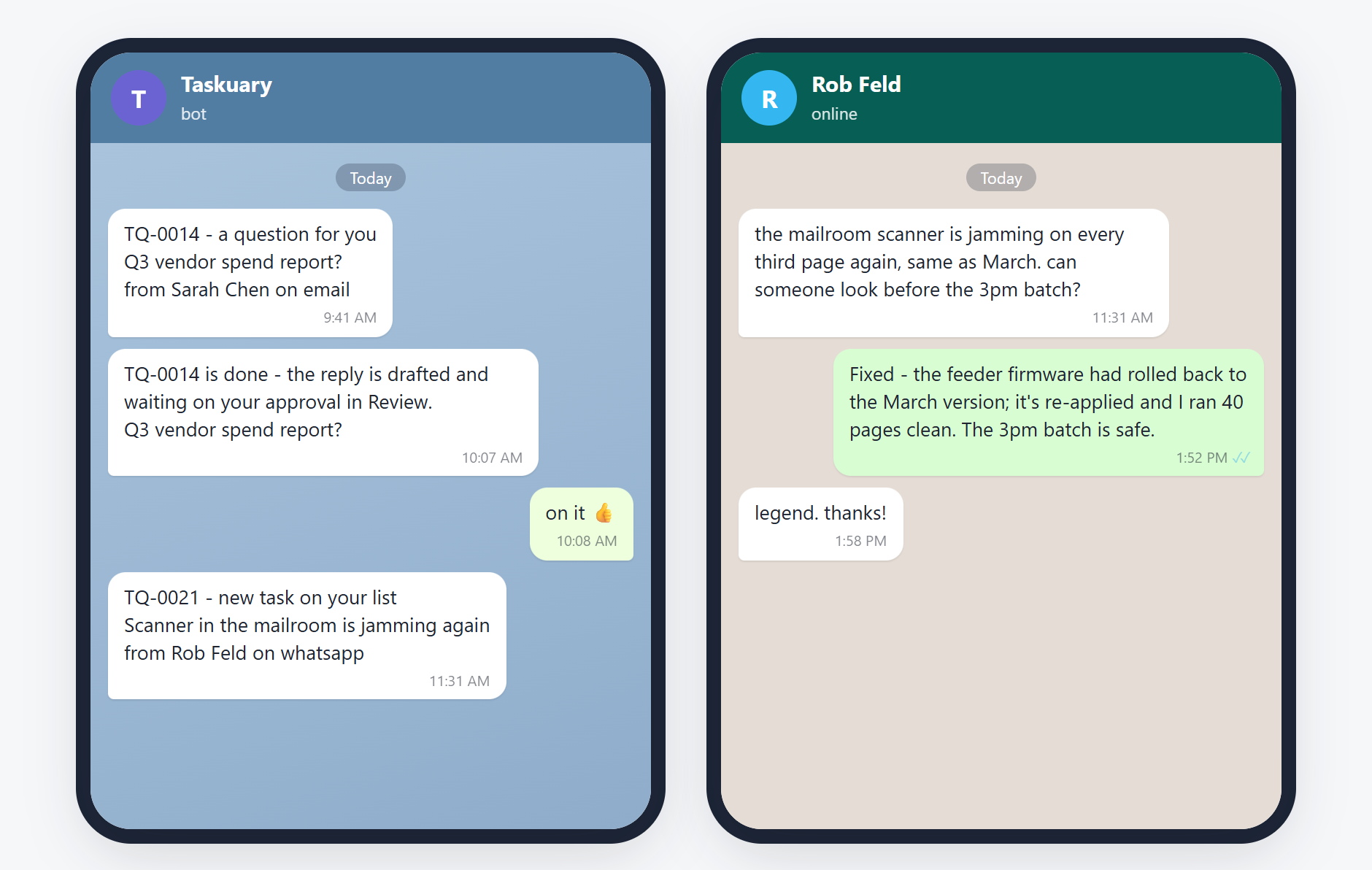
The phone's side of it (the message text is exactly what Taskuary sends). What the same moment
looks like inside the app: the timeline view.
The personal messengers work both directions, and each direction is a role you switch on:
- In (trigger) — message your Telegram bot, or anyone messages your WhatsApp, and it
lands on the Timeline through the same triage as mail: a question gets a drafted reply
(unsigned and short, because it is chat), a job becomes a task, a photo of the broken thing
reaches the vision triage and draws in the panel. Approving sends the answer back into the
same chat. Telegram is built in — a @BotFather token and nothing else. WhatsApp runs
through a small bridge beside the app (cd taskuary/whatsapp && npm install && node bridge.mjs, pair once by QR or phone code) so the heavy unofficial-protocol dependency
never enters Taskuary itself. - Out (notify) — the Timeline pushed to you, instead of you polling the tab. Give the
connector the notify role, name the chat in its config, and Taskuary pings it: by default
(needs_me) only what is actually waiting on you — a question to answer, a task nobody was
dispatched at, and the one that matters most, "the work is done, the reply is drafted and
waiting in Review". Set the level to all for every new item, off for silence. Events
that happened in the notify chat itself are never echoed back into it.
One channel can wear both roles at once: ask for something from your phone, an agent works
it, and the "done — approve the reply" ping arrives back on the same phone.
One brain or two
Two different jobs, two very different price tags: triage reads one message and answers
in a line (thousands of times a month), coding rewrites your repositories (a few times a
day). Taskuary lets you split them or tier them:
| setup | triage / drafts / summaries | coding sessions | when |
|---|---|---|---|
| Two brains (recommended) | a small cloud model — Anthropic / OpenAI / Azure OpenAI / OpenRouter connector, fractions of a cent per message | your CLI agent, its full model | you have (or can get) one cheap API key |
| One brain, two gears | the same CLI, downshifted to its light model (set it on the agent: haiku, gemini-2.5-flash…) |
the same CLI, its main model | one subscription, no API key — Claude Max, Codex |
| One brain, one gear | the CLI at full model | the CLI at full model | works, but every newsletter costs a frontier-model run |
| Local brain | an open-source model on your own machine — the Ollama connector, or any OpenAI-compatible server (LM Studio, llama.cpp, vLLM) | your CLI agent, or a CLI wrapping the same local model | no key, no cloud, no mail leaving the box |
Suggested setup: connect an Anthropic key with claude-haiku-4-5 as the triage brain
(Settings → Triage & routing), keep claude as the coder with its default model — or, with
no API key at all, set the coder's light model to haiku (Connectors → AI CLI agents →
Edit) and point the triage brain at cli: coder. Either way the expensive model only ever
runs when there is real work in a real repository, and the cheap one handles the reading:
intent triage, reply drafts, report summaries, the morning digest, the lessons distilled
into LEARNED.md.
It learns your job from your verdicts
Triage lives or dies on knowing you: what you're responsible for, who you answer to,
how you write, what deserves a task. You can type all of that into SOUL.md — most people
won't. So Taskuary learns it from use: every correction you make teaches it, and the
lessons land where you can read, edit, or delete them.
The specific layer — standing notes. "Not our task" on any timeline item writes a
note — editable before it's saved, scoped to that sender, their whole domain, or everyone —
and every later message is classified with that note in hand. The classic case: colleagues
cc'ing you on a thread that is theirs to handle. Say it once; triage stops opening tasks
for it. Their mail keeps arriving (that's what Skip this sender is for) — only the
judgement is learned. Settings → Agent memory lists every note; toggle one off and it stops
being injected, while staying on the record.
The general layer — LEARNED.md. The same verdicts also teach in general. Editing a
draft before sending says how you actually write; rejecting one says what should never have
been drafted; reclassifying a task as a question, or promoting a message triage filed, says
where triage misjudges your work. Each correction is distilled — on the cheap triage
brain, seconds after the verdict — into a hypothesis in LEARNED.md (Docs tab), and a
periodic reflection pass consolidates: patterns confirmed across separate episodes get
promoted into the active profile, contradicted ones weaken and die. The active profile is
injected into every triage call, reply draft, and agent run.
The design borrows what the agent-memory literature agrees on (ExpeL, PRELUDE, Generative
Agents' reflection):
- Strength + provenance on every learned line —
[s:4 | ev: rv12,mem3 | seen: …]says
how often a pattern held and which of your verdicts taught it, so a wrong inference is
traceable and one delete removes it. Lines you write carry no tag and are never touched. - One episode is a guess, not a rule — hypotheses are never injected; they graduate only
after holding across separate episodes from different people or threads. - Rules that hide things need your yes — anything whose effect is "treat as fyi, never a
task" waits under Proposed rules until you adopt it, because a wrong ignore-rule
silences the very corrections that would revoke it. - You stay sovereign —
LEARNED.mdis a plain markdown doc you can edit like the
others,SOUL.mdalways outranks it, and Learn from your verdicts (Settings) turns the
whole loop off.
The four documents, at a glance
Two you write, two the system writes — and each feeds exactly the AI calls it belongs in.
Triage runs thousands of times on the cheap model, so it reads only what changes a verdict
(SOUL, LEARNED, the notes — never the digest); the expensive CLI runs get the full stack.
flowchart LR
    subgraph yours["you write these"]
        SOUL[SOUL.md<br/>the constitution]
        CODER[CODER.md<br/>the coder's rules]
    end
    subgraph system["the system writes these — yours to edit"]
        LEARNED[LEARNED.md<br/>your learned profile]
        DIGEST[DIGEST.md<br/>rolling working memory]
    end
    TRIAGE([intent triage<br/>light model · every message])
    DRAFT([reply drafts<br/>light model])
    RUN([headless agent runs<br/>your CLI · full model])
    LIVE([live sessions<br/>your CLI · full model])
    SOUL --> TRIAGE & DRAFT & RUN
    SOUL -. repo map picks the checkout .-> LIVE
    LEARNED --> TRIAGE & DRAFT & RUN
    DIGEST --> RUN
    CODER --> RUN & LIVE
    TRIAGE -. your verdicts teach .-> LEARNED
    DRAFT -. your edits teach .-> LEARNED
| document | written by | read by | what it drives |
|---|---|---|---|
SOUL.md |
you (the connections block and repo map maintain themselves) | triage + drafts (light model) and agent runs (your CLI); its repo map routes live sessions | what counts as a task, voice, escalation rules, which repo owns what |
CODER.md |
you | agent runs and live sessions (your CLI, full model) | how the coder works, closes out, and answers the sender |
LEARNED.md |
the system, from your verdicts — hot lessons per correction, consolidated by reflection; yours to edit, SOUL.md outranks it |
triage, drafts, agent runs (active sections only — hypotheses stay home) | your style, your responsibilities, what deserves a task for you |
DIGEST.md |
the system, once a day (light model) | agent runs (your CLI) | what's in flight today, who waits on whom |
Memory notes (Settings → Agent memory) ride alongside: sender-scoped verdicts injected into
triage, drafts, and runs — the specific layer under LEARNED.md's general one.
Bring your own agent — and pick its model
Every run surface (Board dialog, task page, "send to coding agent") asks two questions:
which CLI works it, and which model that CLI runs. The model list comes from the
CLI — opus / sonnet / haiku and the full claude-* ids for Claude Code, thegpt-5-codex family for Codex, and so on — and "the agent's default model" leaves it to
the profile. Under the hood it is one flag appended to the command (--model by default,model_arg if your CLI spells it differently), so a per-run choice never edits your saved
profile.
Any CLI that reads a prompt on stdin works. The presets ship the right headless flags —
the important one being the auto-approve flag (--dangerously-skip-permissions,--full-auto, --yolo, …): without it a headless agent hangs waiting for an approval
click that never comes. The built-in Test runs one tiny prompt through your CLI to
prove the wiring before it goes live. Claude Code's JSON output is parsed natively,
which enables resumable message-the-agent sessions; plain-text CLIs work too.
Integrations
| type | status | notes |
|---|---|---|
outlook / teams / slack |
✅ | inbound channels → Timeline through AI triage |
gmail / imap |
✅ | any mailbox that speaks IMAP — Gmail (App Password), a domain.com address, Yahoo, an ISP. In through triage, approved replies back over the provider's own SMTP, in-thread |
telegram |
✅ | a bot token from @BotFather and nothing else — chats in through triage, approved replies back into the chat, photos reach the vision triage |
whatsapp |
✅ | your own account, via a small Baileys bridge that runs beside the app (cd taskuary/whatsapp && npm install && node bridge.mjs, pair once by QR or code). The heavy dependency deliberately lives there, not in Taskuary — unofficial protocol, use a number you'd risk |
github |
✅ | PAT → auto repo discovery, issue loop, repo map in SOUL.md; optional inbound trigger (new issues → Timeline → triage) |
anthropic / openai / azure_openai |
✅ | AI for triage + report summaries |
openrouter |
✅ | one key, the whole catalog — open-weights Llama / Qwen / Mistral and every closed model, as the triage brain |
ollama |
✅ | local open-source models, no key and no cloud — Ollama out of the box, base_url reaches LM Studio / llama.cpp / vLLM |
mssql |
✅ | connect once; build AI-summarized reports on the Reports tab |
winrm |
✅ | run PowerShell on any machine you can RDP into; output → Timeline |
mcp |
✅ | any MCP server's tool as a scheduled report |
sqlite / rest / rss |
✅ | scheduled reports, AI summaries optional |
postgres mysql snowflake sharepoint_list google_sheets s3_object graphql smb_file prometheus jira |
🗺 planned | one ~15-line executor away — PRs welcome |
Anything can also push items in: POST /api/ingest/push with{subject, body, from_email, channel} — cron jobs, webhooks, other apps. The full API is
browsable at /api/docs while the server runs.
Development
git clone https://github.com/ldbumble/taskuary && cd taskuary
pip install -e .[dev,mssql,desktop]
taskuary --debug            # verbose console; every run also logs to ~/.taskuary/taskuary.log

pytest -q                   # 113 tests, ~20s, no network or credentials needed

cd website                  # the React UI (React 18 + MUI, Vite)
npm install
npm run dev                 # dev server, proxies /api to a running taskuary on :7787
npm run build               # emits taskuary/web/ (committed - pip installs need no node)

pip install -e .[build]
pyinstaller taskuary.spec   # dist/Taskuary.exe - single-file desktop build
Data lives in ~/.taskuary/ (override with TASKUARY_HOME): taskuary.db (SQLite),config.toml, taskuary.log. For LAN use set [server].token in config and send it as
the X-Taskuary-Token header. CI runs the test matrix on Windows / Linux / macOS ×
py3.10 / 3.12 plus the web and exe builds on every push.
Status / roadmap
Early (v0.2.0) and moving fast.
- AI-gated triage, review queue, resumable agent sessions, hash-chained audit
- Reports tab: source → query → AI summary → Timeline pipelines
- Connectors catalog with setup wizards: channels, AI, GitHub, SQL Server
- Agent presets (Claude Code, Codex, Gemini, Cursor, Copilot) with one-click Test
- Desktop app + single-file Windows exe
- Interactive agent terminal (pty + websocket + xterm.js) and hand-anything-to-an-agent
- Per-connection roles (trigger / report / tool), GitHub issues as an inbound trigger
- Configurable triage brain — a cloud key or your CLI agent — and
/api/tools/run - Self-learning triage: LEARNED.md distilled from your verdicts, with strength + evidence per line
- Git worktree isolation per task attempt
- More ingest channels and report connectors (table above)
- Tray + notifications for the desktop shell
Contributing
The single best first PR is a report connector — ~15 lines turns any system
(Postgres, Google Sheets, Jira, Prometheus…) into an AI-summarized Timeline report.
CONTRIBUTING.md has the recipe, the repo map, and the dev setup;
good first issues
are seeded and waiting. Tests run offline in ~2 seconds — no credentials needed to hack
on the funnel. Please read the Code of Conduct; security issues go
through SECURITY.md, not a public issue.
Looking for collaborators
Taskuary is early and I'd rather build it with people than alone. I'm looking for a few
regulars, not one-off drive-bys — though a single good PR is very welcome too.
Where help goes furthest right now:
- Connectors — every row marked 🗺 in the table above, plus whatever system runs your
day. One executor function and you own that integration. - Non-Windows polish — the terminal, desktop shell, and agent presets get the most
testing on Windows. macOS and Linux users who hit rough edges (and fix them) are gold. - Agent CLIs beyond the presets — if your CLI needs different flags to run headless,
that's a preset PR and a paragraph in the README. - Design and UX — this was built by one person with strong opinions and no designer.
Argue with them. - Real-world war stories — run it on your own inbox for a week and open an issue about
what broke, what felt wrong, or what you kept doing by hand anyway. That feedback shapes
the roadmap more than feature requests do.
Want a bigger piece? Say so in an issue — worktree isolation, a notifications/tray shell,
and a plugin API for connectors are all on the roadmap and all up for grabs. Interested in
maintaining an area long-term? Open an issue titled maintainer: <area> and let's talk.
Credits
Patterns borrowed with gratitude from Buzz (hash-chained audit), Macro (unified
memory), and vibe-kanban (local-server app model, agents in worktrees). MIT licensed.
Yorumlar (0)
Yorum birakmak icin giris yap.
Yorum birakSonuc bulunamadi