FiveDollars
Health Warn
- No license — Repository has no license file
- Description — Repository has a description
- Active repo — Last push 0 days ago
- Low visibility — Only 6 GitHub stars
Code Pass
- Code scan — Scanned 4 files during light audit, no dangerous patterns found
Permissions Pass
- Permissions — No dangerous permissions requested
No AI report is available for this listing yet.
FiveDollars API Client Free | lightweight Postman alternative.
HTTP · SQL · AI agents. One window, fully local.
A free, privacy-first alternative to Postman and Insomnia, with a SQL client and a
cockpit for your coding agents built in. No account, no proxy, no cloud.
Native on macOS, Windows, and Linux. Also in the browser and inside VS Code.




Docs · Website · VS Code extension · Releases · Report an issue
English · Português (Brasil)
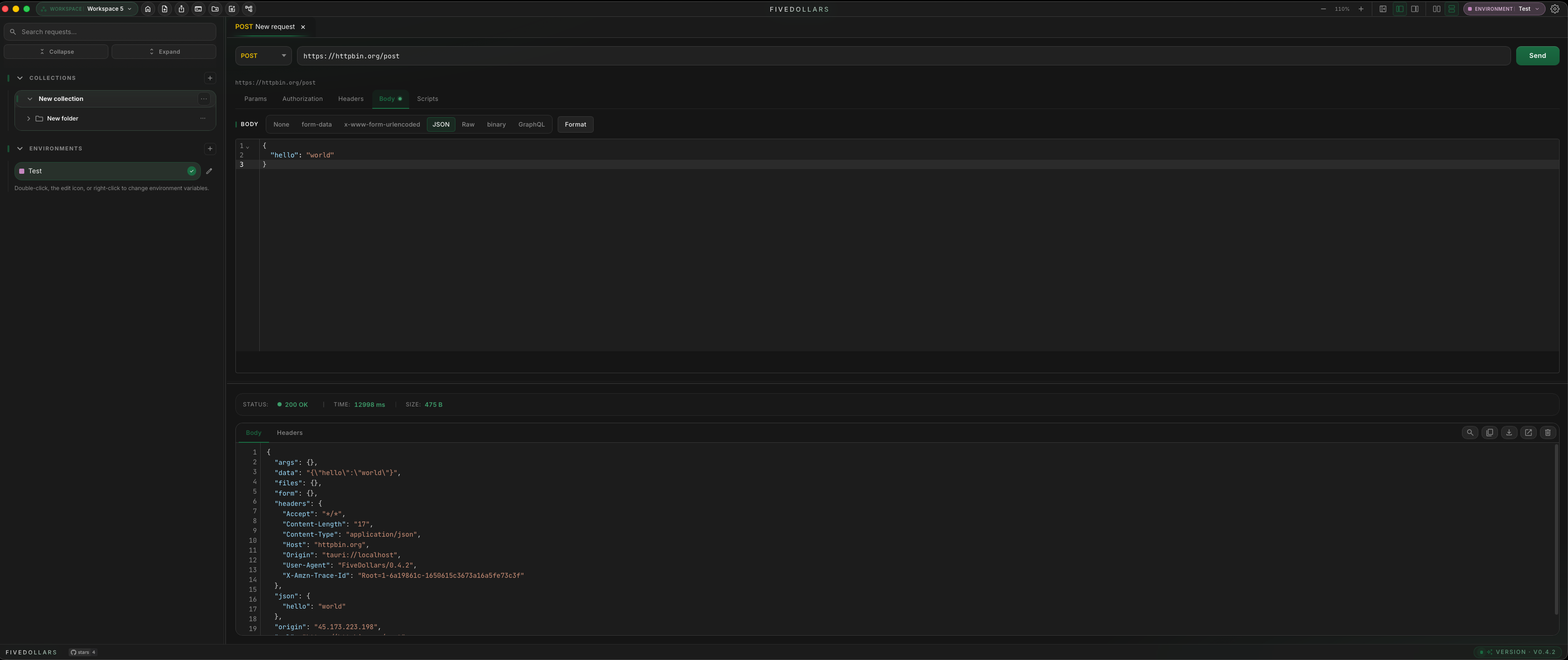
Three tools in one window
🌐 HTTP clientThe everyday API client, without the account.
|
🗄️ SQL clientQuery the database behind the request.
|
🤖 FiveCodingA cockpit for your coding agents.
|
Why FiveDollars
| 🆓 Free | The core client is free on desktop and web. No account, no trial, no seat pricing. |
| 🔒 Local-first | Collections, environments, and tokens live on your disk. Works offline. Requests go straight to the target, no proxy. |
| 🖥️ Everywhere | Native desktop (Tauri + Rust), browser app, and a VS Code / Cursor extension share one workspace format. |
| 🤝 AI on your terms | AI features shell out to the claude, codex, or gemini CLI already on your machine. No API key, nothing routed through us. |
| 📦 Migrate in minutes | Import Postman, Insomnia, OpenAPI, HAR, cURL, and Hoppscotch. Export back to Postman v2.1. |
| 🔁 Git-native sync | Your workspace is a JSON file in your own repo. Pull requests become the review channel for API changes. |
Get started
| Platform | Install |
|---|---|
| macOS | Download the .dmg from fivedollars.dev/install |
| Windows | Download the .exe installer from fivedollars.dev/install |
| Linux | .AppImage or .deb from GitHub Releases |
| Browser | app.fivedollars.dev, nothing to install |
| VS Code / Cursor | code --install-extension LeandroDettmer.fivedollars |
| MCP for AI assistants | npx -y fivedollars-mcp (see MCP server) |
Beta and desktop-only: the SQL client, FiveCoding, in-app AI, and login
capture. They are hidden in the web app and in the VS Code extension.
HTTP client
Methods: GET, POST, PUT, PATCH, DELETE, HEAD, OPTIONS, CONNECT, TRACE, plus
WebSocket, SSE, and MQTT as first-class request types.
Bodies and params: headers, query params, path params, JSON, form data,
URL-encoded, raw, binary, GraphQL. Attach a file inline from a JSON body by
typing {key}; the Base64 payload is substituted only at send time.
Auth: Basic, Bearer, API key, JWT, Digest, OAuth 1.0, OAuth 2.0, Hawk, AWS
SigV4, NTLM, Akamai EdgeGrid, and ASAP, plus inherit, so a folder or collection
defines auth once and every request below picks it up. OAuth 2.0 takes a pasted
token; there is no built-in grant flow yet.
Workspace: drag a tab to the right for a VS Code-like split view, open several
windows on the same workspace, and reach everything from the command palette.
Collections & import
Organize requests into folders and collections, drag to reorder or move between
collections, nest folders, and run an entire folder at once.
Imports: Postman Collection v2.1, Insomnia (JSON and YAML),
OpenAPI / Swagger, HAR, cURL, and Hoppscotch. Exports back to
Postman v2.1, and generates Markdown documentation from a collection.
Environments
Define variables once and reuse them anywhere:
{{baseUrl}}
{{token}}
Usable in URLs, headers, query params, bodies, and auth fields. Each environment
carries a color tag so local, staging, and production stay visually distinct.
Mock-data helpers autocomplete as you type, and collection-scoped private
variables keep secrets out of the shared workspace.
Runner
Run a folder of requests sequentially or in parallel, with delays, across
multiple iterations, or data-driven from a JSON file (one run per row,
retrying only the rows that failed). Runs continue in the background while you
switch workspaces.
Scripts & tests
Sandboxed JavaScript before or after a request to refresh tokens, store
variables, parse responses, or chain calls.
const { token } = fv.response.json();
fv.environment.set("token", token);
APIs include fv.environment, fv.collectionVariables, and fv.response.json().
Prefer no code? Codeless tests build assertions from a field, an operator, and
an expected value. Contract drift flags a response that no longer matches the
shape the request used to return.
Diagram canvas
Wire a flow together visually and execute it.
| Node | What it does |
|---|---|
| Request | Runs an HTTP request; its response feeds the next node |
| SQL | Runs a query against a saved connection |
| Data list | Iterates a list with for-each |
| Login capture | Opens an embedded browser, you log in, the token is extracted |
| Agent | Dispatches a FiveCoding agent and waits for its report |
Extract variables with wildcard paths, branch with if/else, and keep inline notes,
all saved inside the collection. Agent steps run sequentially, even when drawn
in parallel.
Schedules
Schedule a request or a whole Runner sequence at a fixed time or on an interval
("every 30 minutes", "at 09:00"). Schedules run while the app is open; there
is no daemon and nothing runs in our cloud.
Git & sync
- Git sync. Sync a workspace with your own GitHub repository, stored at
.fivedollars/workspace.json. Pull, commit, and switch branches. - Encrypted sync via the GitHub API. End-to-end encrypted (Argon2id →
AES-256-GCM), works without git installed, including from mobile Safari. - Pair Device. Move a workspace to another device by scanning a QR code. The
key travels in the URL fragment and never reaches GitHub.
SQL client
Beta · desktop only
A TablePlus-style database client inside the app: connect to PostgreSQL, MySQL,
SQLite, or SQL Server, browse tables, views and indexes, and write SQL with
dialect-aware autocomplete.
- Run and read. Results in a grid,
EXPLAINrendered as a graph, and a query
history that keeps cached results. - Edit like a spreadsheet. Change cells in the result grid; edits are staged
and only applied when you commit them. - Guard rails. A confirmation step for dangerous statements:
DELETEorUPDATEwithout aWHERE,DROP, and friends. - Process list. Inspect running queries and kill the one holding the lock.
- Saved as one node. The whole tab, connection plus every query sub-tab,
saves as a single node in your collection. Passwords never touchdata.json. - AI-assisted SQL. Describe the query; the app drafts it with your schema and
indexes as context, warns when it looks expensive, and offersEXPLAINbefore
anything runs.
FiveCoding
Beta · desktop only
Up to 9 real terminals, side by side, running Claude Code, Codex, Gemini CLI,
or any command. Each one in its own folder, optionally on an isolated git
worktree. A "maestro" Claude can open the others, dispatch tasks, and collect
their reports through a local MCP.
- Real terminals. A true PTY with the agent's original TUI: shortcuts,
/commands, and colors work just like your terminal. - Isolated worktrees. Several agents on the same repo, each on its own
branch. Nobody steps on anyone's work. - Maestro & scouts. One Claude pilots the cockpit: opens terminals, sends
instructions, collects results. A Squad panel shows who dispatched whom. - Sessions that come back. Closed the app? On reopen, every terminal resumes
the conversation where it left off, scrollback included. - Cockpit in your collection. Save the whole grid as a collection node and
reopen the same setup in one click. - Live token meter and changes panel. Tokens add up in real time, and each
pane'sgit diffsits right next to the terminal that produced it. - Skills & plugins. Browse and install Claude Code plugins without leaving
the app. - FiveRemote. Scan a QR code and drive the terminals from your phone on the
same Wi-Fi.
Open it from the app header's "+" menu.
AI in the app
Beta · desktop only
FiveDollars uses the AI CLI you already have: claude, codex, or gemini.
No API key, no FiveDollars account, and nothing routed through our servers.
It can generate tests for a response, build a request from a plain-language
description, write SQL with your schema as context, and draft diagram flows.
Every result is shown as a preview first. The app never applies a change on its
own, and secrets never enter the prompt, only variable names.
MCP server
fivedollars-mcp lets AI assistants such as Claude and Cursor read and run your
saved requests and collections. Add it to your MCP configuration:
{
  "mcpServers": {
    "fivedollars": {
      "command": "npx",
      "args": ["-y", "fivedollars-mcp"]
    }
  }
}
Then ask things like:
- "List my collections"
- "Send the get-user request using staging"
- "Import this OpenAPI spec into a collection" (
import_from_specalso takes
Postman collections and raw cURL) - "Scan the routes in this repo and create the requests" (
import_from_source
reads Express, Fastify, NestJS, and FastAPI handlers) - "Open three agents and dispatch this task" (cockpit tools drive FiveCoding)
Anything an assistant creates lands in an MCP inbox for you to review before
it touches your workspace. Everything runs locally.
VS Code extension
Same UI as the desktop app, embedded in VS Code, Cursor, VSCodium, and other Open
VSX compatible editors. HTTP runs through the extension host: no CORS, no
stripped headers.
code --install-extension LeandroDettmer.fivedollars     # VS Marketplace
cursor --install-extension LeandroDettmer.fivedollars   # Open VSX
Then open the Command Palette and run FiveDollars: Open.
Privacy
- Collections and environments stay on your machine.
- Requests go directly to the target URL, with no proxy in the middle.
- AI runs through your local CLI. No prompt or response is sent to a FiveDollars server.
- GitHub tokens are stored in the OS keychain; database passwords go to the app's
secret store, never into the workspace file. - MCP reads local workspace data only.
- Optional telemetry can be disabled in settings.
See SECURITY.md for the security policy and how to report a
vulnerability.
Troubleshooting
| Issue | Solution |
|---|---|
| macOS reports the app is damaged | Run xattr -cr /Applications/FiveDollars.app |
| MCP cannot find the workspace | Open the app at least once to create workspace data |
| MCP tools do not appear | Restart Claude / Cursor after editing the MCP config |
| SQL or FiveCoding tab is missing | Both are desktop-only and hidden in the web app and VS Code extension |
| FiveCoding cannot start an agent | Make sure the CLI (claude, codex, gemini) is on your PATH |
Reviews (0)
Sign in to leave a review.
Leave a reviewNo results found