agentbox
Health Uyari
- License — License: MIT
- Description — Repository has a description
- Active repo — Last push 0 days ago
- Low visibility — Only 5 GitHub stars
Code Basarisiz
- rm -rf — Recursive force deletion command in .github/workflows/base-image.yml
- process.env — Environment variable access in desktop/scripts/dist.mjs
- network request — Outbound network request in desktop/scripts/preview.mjs
- process.env — Environment variable access in desktop/src/main/cli.ts
Permissions Gecti
- Permissions — No dangerous permissions requested
Bu listing icin henuz AI raporu yok.
Cursor-style cloud agents that run on your own machine: each agent gets its own Linux machine, desktop and branch, directed by a lead chat. Claude Code, Codex and OpenCode.
AgentBox
Run a team of AI coding agents on one project, each in a Linux machine of its own, and direct them from a chat.



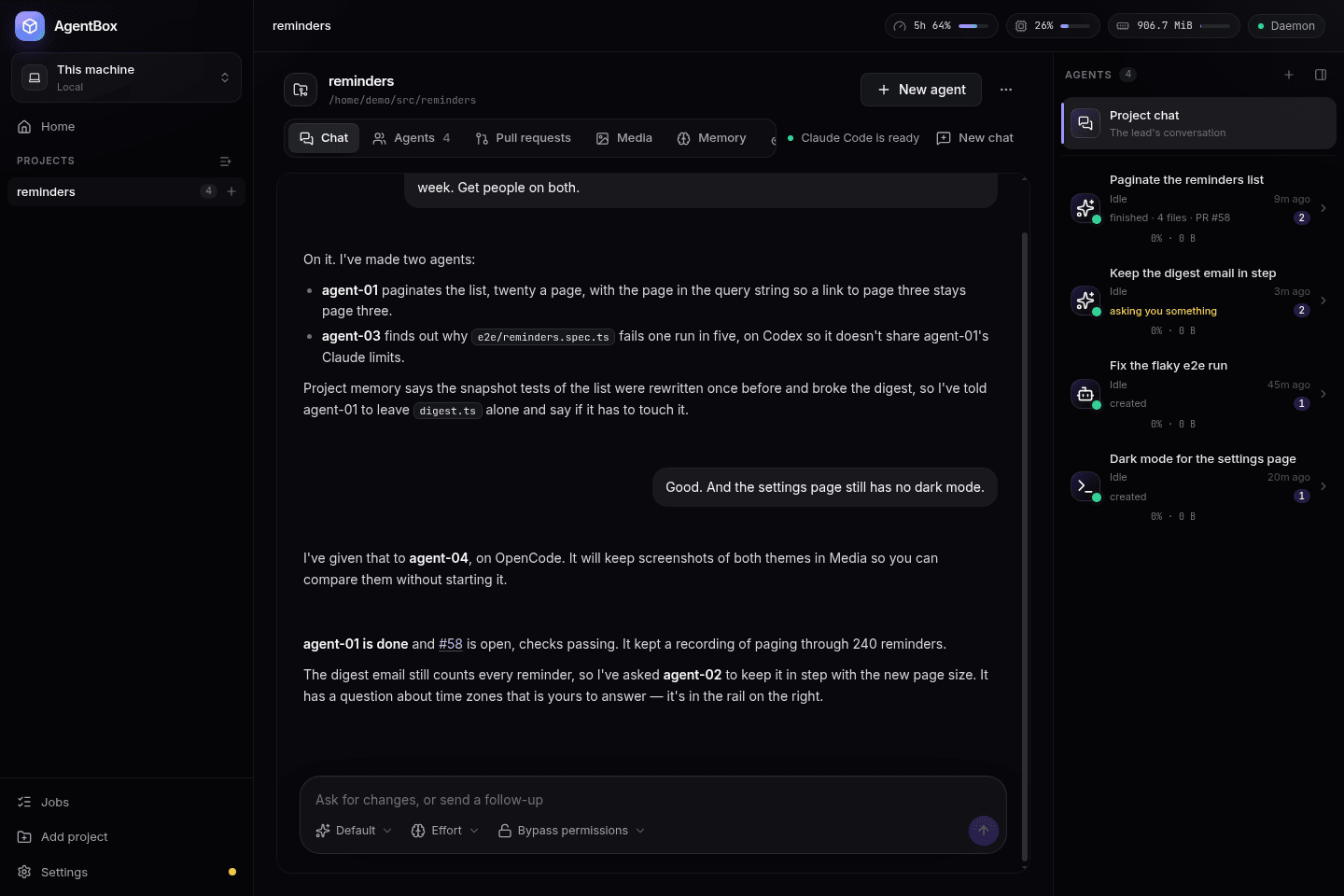
AgentBox gives each AI coding agent — Claude Code, Codex or OpenCode — a Linux machine of its
own: a git worktree on its own branch, Docker, a browser and desktop you can watch and take over,
and a place for the screenshots, recordings and test reports that prove its work. Several agents
work on the same project at once without stepping on each other's ports, databases or files. A
lead, the project's own chat, creates them, briefs them, answers their questions or passes them
to you, and tells you when they're done.
Everything here is driven from the desktop app: add a project, talk to its lead, watch an agent
work on its own desktop, and review what it built before merging.
Contents
- What it does
- Install
- Quick start
- Requirements and limitations
- Update check
- The command line
- Contributing
- Contributors
- License
What it does
- A machine per agent: an Incus container with its own
worktree, branch, network and desktop, so agents never collide on ports, files or databases.
Snapshot one, restore it, fork a new agent from it, or pause it with its memory intact. - Claude Code, Codex and OpenCode, in one chat, through ACP
adapters: tool calls, diffs, plans and subagents all show in one timeline. - A lead that directs the agents over MCP, on your machine rather than in a container of its
own, so a project you've never chatted with costs nothing. - Project memory that outlives the agents that made it, so every new agent starts briefed on
what the project already knows rather than from scratch. - A browser and a desktop per agent, driven by Playwright and a real mouse and keyboard, that
you watch live and can take over. - Proof, not promises: screenshots, recordings, test reports and logs in the Media tab.
- A token ledger and account limits in the Tokens tab.
- Preview URLs for any port an agent listens on, several Claude and GitHub accounts, project bases
new agents start from, an Android emulator per agent, and remote environments through a hub (a
separate, closed-source program — this repository only carries its side of the protocol, inhubapi/).
docs/ has the longer tour of how it's built, page by page.
Install
AgentBox runs on Linux, x86_64. Download the latest release from
Releases:
| File | What |
|---|---|
AgentBox-<version>-x86_64.AppImage |
The desktop app, with the agentbox command-line tool inside — runs on any distribution |
AgentBox-<version>-amd64.deb |
The desktop app, for Debian and Ubuntu |
AgentBox-<version>-x64.pacman |
The desktop app, for Arch and its derivatives |
SHA256SUMS |
Checksums: sha256sum -c SHA256SUMS |
chmod +x AgentBox-*-x86_64.AppImage
./AgentBox-*-x86_64.AppImage
Or sudo apt install ./AgentBox-<version>-amd64.deb on Debian and Ubuntu, orsudo pacman -U AgentBox-<version>-x64.pacman on Arch. AppImages need FUSE: install fuse2 (Arch),libfuse2 (Debian 12, Ubuntu 22.04) or libfuse2t64 (Ubuntu 24.04) if yours won't start.
The app's Settings walks you through the rest the first time it runs: installing
Incus (with your password, no logout needed), building the
agents' base image, and logging in to Claude Code, Codex or OpenCode.
macOS and Windows (alpha)
AgentBox also runs on a Mac, in a Linux VM it makes for you with Lima
(brew install lima first), and on Windows, in a WSL2 distro it sets up the same way: the
daemon, Incus and every agent are the Linux ones, and the app and agentbox command on your machine
just talk to them there. Both are newer than the Linux build and ship unsigned for now — on a Mac,
right-click AgentBox in Applications and choose Open the first time; on Windows, the installer
and antivirus may need an exception. Download AgentBox-<version>-mac-arm64.dmg or-mac-x64.dmg, or AgentBox-<version>-x64-setup.exe (installer) or -x64-portable.exe, from the
same Releases page.
Quick start
- Add project in the app, and pick a git repository.
- Talk to its lead, the project's chat: tell it what you want, and it creates the agents it
needs, on their own branches. - Open an agent's Desktop tab to watch it work — its browser, its terminal, its file
manager — and click Take control any time. - Check the Media tab for the screenshots, recordings and test reports it kept to show its
work, and the Pull requests tab to read and merge what it built.
Requirements and limitations
- Linux on x86_64, a Mac, or Windows with WSL2 — macOS and Windows are newer and less complete
than Linux (macOS and Windows (alpha)). - On Linux: Arch, Debian 12 or 13, Ubuntu 22.04 or newer, or Fedora; 8 GB of memory at least (each
running agent uses 1–2 GB), 4 cores and 30 GB of free disk; a user who can runsudo. - An account for the AI tool you use: Claude Code, Codex or OpenCode.
- The hub, for remote environments, lives in a separate repository that isn't public.
- Each release's notes list what it can't do yet
under Known limitations.
Update check
Once a day, and as it starts, the AgentBox daemon asks agentbox.linting.dev whether a newer
release is out. When one is, the app shows Update available in its sidebar andagentbox version prints a link to the release. Nothing is downloaded or installed. The same
request is how we count active installations.
What is sent is one HTTPS request with four query parameters, and nothing else:
GET https://agentbox.linting.dev/api/v1/latest?install=<uuid>&version=0.1.0&os=linux&arch=amd64
install: a random UUID, made the first time the check runs and kept in AgentBox's own database
(state.db). It is derived from nothing, so it can't be traced back to you or the machine. It
only lets repeated checks from one installation be counted once.version: the version of AgentBox.osandarch: the operating system and processor architecture, such aslinuxandamd64.
On a Mac or on Windows, where the daemon runs in a Linux VM or WSL2 distro,osisdarwinorwindows: the machine's, not the VM's.
What isn't sent: your name, username or hostname, anything about your projects, agents,
repositories or accounts, and any other ID or hardware detail. Like any web request, it comes from
your IP address. If the request fails or takes longer than 5 seconds, AgentBox ignores it and
tells nobody.
To turn it off, switch off Check for updates in the app under Settings → Environment,
or set AGENTBOX_NO_UPDATE_CHECK=1 or DO_NOT_TRACK=1 in the daemon's environment (restart it withagentbox daemon stop afterwards). Builds from source, which report version dev, never check.
The command line
Everything in the app has an agentbox equivalent, for servers and scripts:
agentbox add ~/src/my-app                               # a git repository becomes a project
agentbox chat my-app "Paginate the reminders list"      # ask its chat, which creates the agents it needs
agentbox diff my-app/agent-01                           # what an agent changed
agentbox media list my-app/agent-01                     # what it kept to show its work
agentbox --help lists the rest; docs/ has the architecture behind both.
Contributing
Bug fixes and small, focused improvements are welcome; for anything bigger, open an issue first.
CONTRIBUTING.md covers building the daemon, the CLI and the app, the tests, and
the project's conventions. AGENTS.md is the codebase tour that AgentBox's own agents
read, and a good one for people too.
Contributors
Thanks to everyone who has contributed to AgentBox, in order of their first contribution:
License
AgentBox is open source under the MIT License. Copyright (c) 2026 Leandro Ciric.
Yorumlar (0)
Yorum birakmak icin giris yap.
Yorum birakSonuc bulunamadi