fituna
Health Warn
- License — License: MIT
- Description — Repository has a description
- Active repo — Last push 0 days ago
- Low visibility — Only 5 GitHub stars
Code Warn
- network request — Outbound network request in fituna/cli.py
Permissions Pass
- Permissions — No dangerous permissions requested
No AI report is available for this listing yet.
Stop guessing your llama.cpp config. Give it a target tok/s and a quality budget, and it measures quantization levels and GPU offload on your own machine to find the lightest setup that actually hits the target.
한국어 | English

FiTuna
Stop guessing your llama.cpp config. Measure it.
Give it a model file, a target speed (tok/s) and a quality budget (%), and
it finds the llama.cpp configuration — quantization level, GPU offload and
context length — that actually hits those numbers on your machine: the
highest-quality quant that reaches your speed, with the fewest GPU layers
it needs, proven by real benchmarks.
pip install fituna


▶ Demo video · Korean reproduction guide for judges
Why
Running a local LLM through llama.cpp means making three choices: how hard to
compress the model (quantization level, Q2–Q8 — lower is faster but loses
quality), how many layers to put on the GPU (-ngl), and how long a context
to allow. That's dozens of combinations, and today most people search them by
trial and error.
What you actually want answered are three questions. ① Will this machine
hit my target speed? ② What is the quality loss, in percent? ③ Which config
keeps the most quality while still meeting the target? — and no tool answered them:
| ① Target speed | ② Quality loss | ③ Best passing config | |
|---|---|---|---|
| VRAM calculators | Only "does it fit" | Not addressed | Not addressed |
| Chatbot advice | Can propose a config; no repeated-measurement guarantee | General trends | No passing guarantee |
| NVIDIA AutoQuantize | No speed-target input | Addressed — but CUDA-only | CUDA-only |
| FiTuna | Measured verdict | Measured verdict | Binary-searched |
Runners like Ollama and LM Studio are absent from this table on purpose —
they execute a given config rather than answer these questions, a different
and complementary job. The config FiTuna finds can be handed straight to
Ollama via --export-ollama.
And once you actually measure, intuition keeps getting overturned: on an
Apple M3 Pro the "obviously best" Q8_0 failed the speed target, and the
answer wasn't a quant alone but Q4_K_M plus the minimal offload-ngl 33. No amount of spec-sheet reading produces that answer.
Try it in 2 minutes
The fastest way to see it work for yourself: a full pipeline run
(download → quantize → quality-gate → benchmark) on a small 258 MB model
finishes in about a minute on an M-series Mac. See the full flow first in the
demo video:
brew install llama.cpp [email protected]
python3.13 -m venv .venv
source .venv/bin/activate
pip install fituna
fituna fetch-corpus --lang en --out wiki.txt
fituna run --hf bartowski/SmolLM2-135M-Instruct-GGUF \
  --target-tps 240 \
  --max-quality-loss 5 \
  --ctx 2048 \
  --quality-corpus wiki.txt \
  --out ./out --resume
What each fituna run flag means:
| Flag | Meaning | |
|---|---|---|
--hf bartowski/SmolLM2-… |
The model to use — a HuggingFace repo; the F16 GGUF is downloaded automatically | required¹ |
--target-tps 240 |
Target generation speed (tok/s) | required |
--max-quality-loss 5 |
Quality-loss budget (%) — candidates worse than this are rejected | required |
--ctx 2048 |
Context length (how much conversation history to keep) | optional (default 4096) |
--quality-corpus wiki.txt |
Text for quality measurement — the file fetched just above | required |
--out ./out |
Output/cache directory | optional (default ./out) |
--resume |
Store and reuse measurements in the cache — recommended from the first run | optional |
¹ Already have a model file on disk? Use --model <path.gguf> instead of --hf.
Example result
When the command finishes, you get output like this (a real run on an
Apple M3 Pro):
FiTuna result: MEETS TARGET

  quant           : Q8_0        # <- the optimal quantization level it found
  ngl             : 26          # <- the minimum GPU offload layers meeting the target
  ctx             : 2048        # <- the verified context length

  prompt tok/s (pp): 2017.64
  gen tok/s    (tg): 261.78     # <- measured generation speed -- clears the 240 target

  perplexity      : 18.2931 (baseline 18.2407)
  quality loss    : 0.29%       # <- measured quality loss -- within the 5% budget

  artifact: out/SmolLM2-135M-Instruct-8078a5b74b5a-Q8_0.gguf  (144.8 MB -- already produced during the search)

  1) local API server (OpenAI-compatible):
       /opt/homebrew/bin/llama-server -m out/SmolLM2-135M-Instruct-8078a5b74b5a-Q8_0.gguf -ngl 26 -c 2048 --port 8080
  2) import into Ollama: re-run with --export-ollama to write a Modelfile beside the artifact
  3) terminal chat (interactive check):
       /opt/homebrew/bin/llama-cli -m out/SmolLM2-135M-Instruct-8078a5b74b5a-Q8_0.gguf -ngl 26 -c 2048
How to read it: the first line is the verdict — MEETS TARGET means a
configuration satisfying your target was found, followed by that
configuration (quant × ngl × ctx) and the measured evidence (speed and
quality loss). The quantized model on the artifact: line was already
produced during the search. Re-running the same command with --resume
reuses its stored measurements. Absolute numbers and the winning quant can
vary by machine and by run —
measured run-to-run variance.
Measured results
Three models of different sizes, each given a target. In all three runs the
"safe default" Q8_0 failed the speed target:
| Model | Target | What the "obvious" pick measured | What FiTuna found |
|---|---|---|---|
| Qwen3-4B-Instruct | 30 tok/s, ≤5% loss | Q8_0: 24.22 tok/s ❌ (and worse quality than Q6_K) | Q4_K_M @ ngl=33 → 30.81 tok/s, 1.73% ✅ |
| SmolLM2-135M | 240 tok/s, ≤5% loss | Q8_0: 205.91 tok/s ❌ | Q6_K → 249.50 tok/s, 0.53% ✅ (smaller Q4_K_M measured slower) |
| Midm-2.0-Mini (Korean) | 40 tok/s, ≤5% loss | Q8_0: 34.26 tok/s ❌ | Q4_K_M @ ngl=48 → 44.62 tok/s, 2.58% ✅ |
Apple M3 Pro, llama.cpp build 9960. Full logs and run-to-run variance:
docs/RESULTS.en.md · Scenarios:
docs/USE_CASES.en.md · Reproduce on NVIDIA/Linux (free T4):
Couldn't you just ask a chatbot?
We tested that question under the same conditions used in the result report.
FiTuna and three chatbots were given Qwen3-4B, a 30 tok/s speed target, and a
5% quality-loss budget. Each proposed configuration was then run three times
on the same Apple M3 Pro.
| Source | Proposed config | Measured generation speed¹ | Quality loss | Runs ≥30 tok/s |
|---|---|---|---|---|
| FiTuna | Q4_K_M, ngl=33 |
32.68 ± 1.71 tok/s | 1.75% | 3/3 |
| Claude Opus 5 | Q5_K_M, ngl=36 |
30.49 ± 0.88 tok/s | 1.53% | 2/3 |
| ChatGPT 5.6 Sol | Q4_K_M, ngl=28 |
28.92 ± 1.37 tok/s | 1.75% | 1/3 |
| Gemini 3.1 Pro | No config (query unsupported) | — | — | Not measurable |
¹ Mean ± between-run standard deviation over three independent runs, with
five internal measurements per run. Quality is the perplexity increase from
F16 on 32 WikiText-2 chunks.
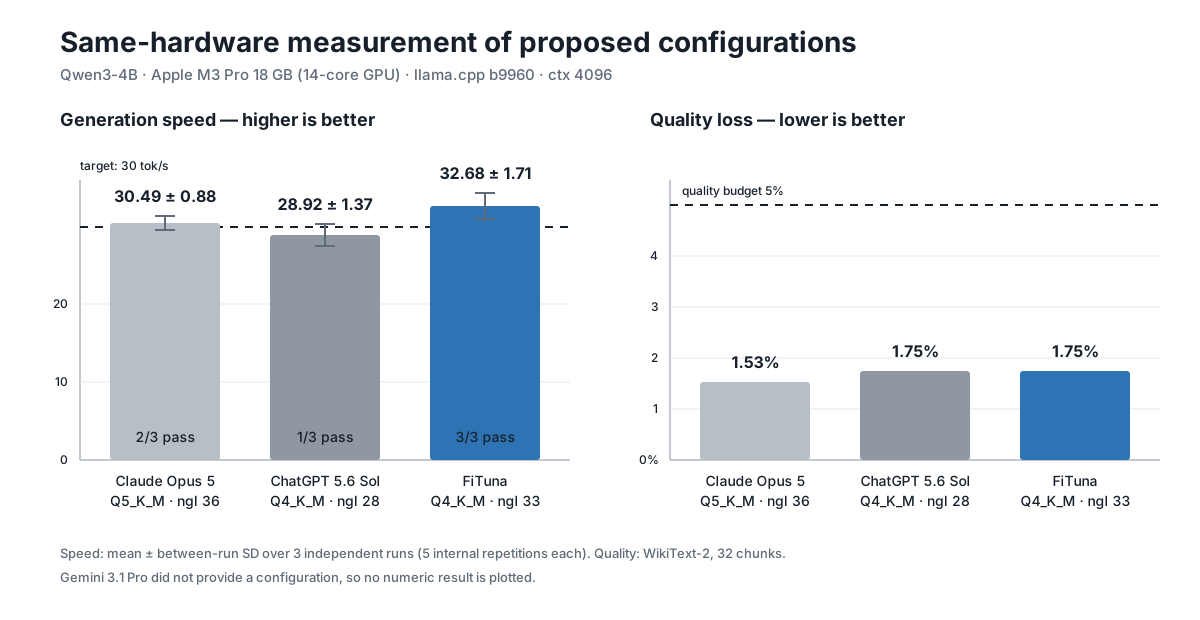
All three configurations that could be measured stayed within the quality
budget. Only FiTuna met the speed target on every run, while using three fewer
GPU-offloaded layers than Claude's proposal. ChatGPT proposed the smallest
offload but passed only once. This is not a general chatbot ranking; it shows
that a minimal passing configuration for one machine needs repeated
measurement. Full conditions, per-run values, and limitations:
docs/CHATBOT_COMPARISON.md
How it works
flowchart LR
    A["Input<br/>F16 GGUF<br/>target tok/s · quality budget"] --> B["Stage 1 · measure quality<br/>quantize every candidate,<br/>measure perplexity"]
    B --> C{"quality<br/>gate"}
    C -->|"fail (early-exit A)"| X["next candidate"]
    C -->|"pass · sort by measured quality"| D["Stage 2 · measure speed<br/>llama-bench"]
    D --> E{"target met at<br/>full offload?"}
    E -->|"miss (early-exit B)"| X
    E -->|met| F["binary-search ngl<br/>minimal offload"]
    F --> G["Artifacts<br/>quantized .gguf +<br/>llama-server command"]
    B -.store measurements.-> H[("sqlite3 cache<br/>--resume < 1 s")]
    D -.-> H
FiTuna works in two stages. Stage 1 quantizes every candidate and
measures its quality loss first — you can't rank candidates by a number you
haven't measured. Stage 2 then benchmarks them in that measured quality
order, dropping any quant that misses the target without wasting further
benches. Every measurement lands in an sqlite3 cache whose key includes the
llama.cpp build version, so upgrading the engine never silently reuses stale
numbers.
See how it works in detail: docs/ARCHITECTURE.md · Architecture (English)
Install
python3.13 -m venv .venv
source .venv/bin/activate
pip install fituna
Python 3.11+ is required. Any installed 3.11+ interpreter works — swap the
first line accordingly (e.g. python3.12). The macOS system python3 (3.9.6)
is too old; if you have no 3.11+ at all, brew install [email protected]. Zero
runtime dependencies. You also need llama.cpp:
brew install llama.cpp # macOS/Linux Homebrew
# llama.cpp from source (any platform; add -DGGML_CUDA=ON for NVIDIA)
git clone https://github.com/ggml-org/llama.cpp
cmake -S llama.cpp -B llama.cpp/build && cmake --build llama.cpp/build --config Release
# then add --llama-bin-dir llama.cpp/build/bin to fituna commands

# FiTuna for development
git clone https://github.com/leeyunseokarchive/fituna
python3.13 -m venv .venv && source .venv/bin/activate
pip install -e fituna
Commands
New here? fituna quickstart is the easiest entry — a wizard walks you from
environment check to a finished search without knowing any of the commands
below. Full options for each: fituna <command> -h.
| Command | Role |
|---|---|
fituna quickstart |
Six-step interactive wizard — environment check through search; shows the assembled fituna run command before executing it. Korean or English by locale (--lang ko|en); q quits at any prompt |
fituna run |
The search itself. --model <F16.gguf> or --hf repo[:file] (auto-download from HF), --json supported |
fituna doctor |
11 environment checks (binaries actually run, build can use your GPU), each failure with its fix |
fituna fetch-corpus |
Download a quality corpus (--lang en/ko, stdlib-only) |
fituna detect-hw |
Show detected GPU · VRAM · CPU · RAM |
fituna-mcp |
MCP server for AI agents (below) |
Quality loss is perplexity increase over a plain-text corpus, so it is only
meaningful on text resembling your workload. Any UTF-8 file works
(--quality-corpus):
fituna fetch-corpus --lang en --out wikitext-2-raw-test.txt        # wikitext-2
fituna fetch-corpus --lang ko --out kowiki-corpus.txt --rows 500   # Korean Wikipedia
In Run 3, switching the corpus alone changed the verdict the tool returned
(measurement and caveats).
Both presets are CC BY-SA 3.0; fetch-corpus prints the license notice on
completion.
The search quantizes every candidate that reaches the quality stage — ~12 GB
for four candidates of a 4B model. Files are reused across runs; --quant
narrows the candidate set to bound the space. Results are cached in sqlite3
keyed by model fingerprint × hardware × llama.cpp build version; --resume
re-answers in under a second. --quality-metric kld also writes a
reference-logits file from the F16 model to --out; it grows with vocabulary
size and --ppl-chunks (about 100 MB for 4 chunks of a 49k-vocabulary model).
The logits file is retained, including without --resume, so a later run can
reuse it with the cached baseline. The final human and JSON reports include
its path and size; delete it manually when it is no longer needed.
Zero dependencies means the modules import directly:
from fituna.hardware import detect_hardware

hw = detect_hardware()
print(f"{hw.gpu_vendor.value}: {hw.gpu_name}, {hw.vram_mb} MB VRAM")
# apple: Apple M3 Pro, 18432 MB VRAM
The search itself is fituna.search.search() — the ModelInfo,BinaryPaths and corpus path it needs are exactly what fituna run
assembles for you (search.py,
config.py).
MCP server — measured answers for AI agents
Ask a chatbot "which local model config fits my machine?" and you get a
guess derived from spec sheets. Connect FiTuna's MCP server and the agent
gets measured results instead:
claude mcp add fituna -- fituna-mcp # any MCP client with stdio transport
| Tool | Returns |
|---|---|
fituna_detect_hardware |
GPU vendor/name, VRAM, CPU cores, RAM |
fituna_recommend |
Measured search result — winning config, measured tok/s and quality loss, run command. ~1 s on repeat (cache) |
Stdlib-only JSON-RPC 2.0 over stdio, no SDK
(mcp_server.py).
Scope and limitations
FiTuna recommends, and stops there. The output is the quantized .gguf
already produced during the search, plus llama-server/llama-cli commands
you copy and run (and an Ollama Modelfile with --export-ollama) — actually
serving the model stays llama.cpp's job
(rationale). Current limitations:
- Results are valid only on the machine that ran them — FiTuna never extrapolates another machine's numbers from a spec sheet. Need a config for a different machine? Run FiTuna there (it's a cross-platform CLI). Machines disagreeing is exactly why measurement beats estimation — same model, opposite verdicts on M3 Pro vs T4
- Single GPU only — no
--tensor-split - No Windows AMD auto-detection — pass
--gpu amd --vram-mb <N> - Quality = perplexity on the corpus you choose — a proxy; measure on text resembling your workload.
--quality-metric kldadds KL divergence to the report, but the pass/fail gate is still perplexity (#49) - Verdicts depend on
--ppl-chunks— re-measure candidates close to your budget (measured effect) - Benchmarks are thermally sensitive — verdicts within a few tok/s of target are marginal (variance analysis)
- Real-hardware E2E covers macOS · Linux — Windows is unit-tested and CI-run
Roadmap
Ordered by how directly each item narrows the limitations above. Each item
is tracked on GitHub Issues.
- KLD as the quality gate —
--quality-metric kldnow
reports KL divergence; next, let it decide pass/fail (#49) - llama.cpp
--fitintegration — use upstream's memory auto-fit as a
sub-routine to seed the ngl search (#42) - Distributed measurement — quantize and score quality on a remote
server, then measure only speed on resource-constrained target devices (#41) - Edge devices (Raspberry Pi, Jetson) — run only
llama-benchon the
device, one candidate at a time, so a board too small for the full search
can still be measured (#56) --launchand LM Studio preset export — additional output formats,
keeping the same artifact boundary as--export-ollama(#19)- Multi-GPU (
--tensor-split) search — lift the single-GPU limitation (#11)
Contributing
The codebase is small, dependency-free and contract-first — start at
fituna/config.py. The full unit suite and a 3-OS ×
2-Python CI matrix guard it. See CONTRIBUTING.md and
docs/DEVELOPMENT.en.md.
License
MIT © FiTuna contributors ·
THIRD_PARTY_NOTICES.md · SBOM ·
Open-source usage ·
AI-assisted development disclosure ·
CHANGELOG.md · SECURITY.md
Reviews (0)
Sign in to leave a review.
Leave a reviewNo results found