nightcrew
Health Uyari
- License — License: MIT
- Description — Repository has a description
- Active repo — Last push 0 days ago
- Low visibility — Only 8 GitHub stars
Code Gecti
- Code scan — Scanned 4 files during light audit, no dangerous patterns found
Permissions Gecti
- Permissions — No dangerous permissions requested
Bu listing icin henuz AI raporu yok.
Keeps a lid-closed Windows laptop awake while Claude Code or Codex works, then restores your power settings and sleeps.



Close a Windows laptop and it goes to sleep, and whatever Claude Code or Codex
was doing stops with it. Nightcrew keeps the laptop working with the lid shut
for as long as an agent is busy, then lets it sleep the way it normally
would.
https://github.com/user-attachments/assets/200be945-4714-42fb-981e-1815e68ddf0e
- Automatic. It notices when an agent is working. No hooks, no plugin,
nothing to configure. - Only when needed. With no agent working, closing the lid does what it
always did. - Puts your settings back. It changes the lid action and the sleep timer
only while an agent works, and saves your own values first. - Optional: Efficiency mode. Off by default. Turn it on and, while you're
away, apps the agents don't need run at low priority. - Light. One 1.7 MB exe in the tray, using well under 1% of a CPU core.
Install
- Download
nightcrew.exefrom Releases. - Put it somewhere it can stay, such as
%LOCALAPPDATA%\Programs\Nightcrew,
and run it. A lantern appears in the tray, the panel opens once so you can
find it, and Nightcrew starts with Windows from then on.
The exe isn't code-signed, so the first run shows "Windows protected your PC".
Click More info, then Run anyway. With Smart App Control on, Windows
may block it outright. To check the download, compare its hash with thenightcrew.exe.sha256 file on the release, or verify its GitHub build
attestation:
Get-FileHash .\nightcrew.exe
gh attestation verify .\nightcrew.exe -R leikauskas/nightcrew
How it works
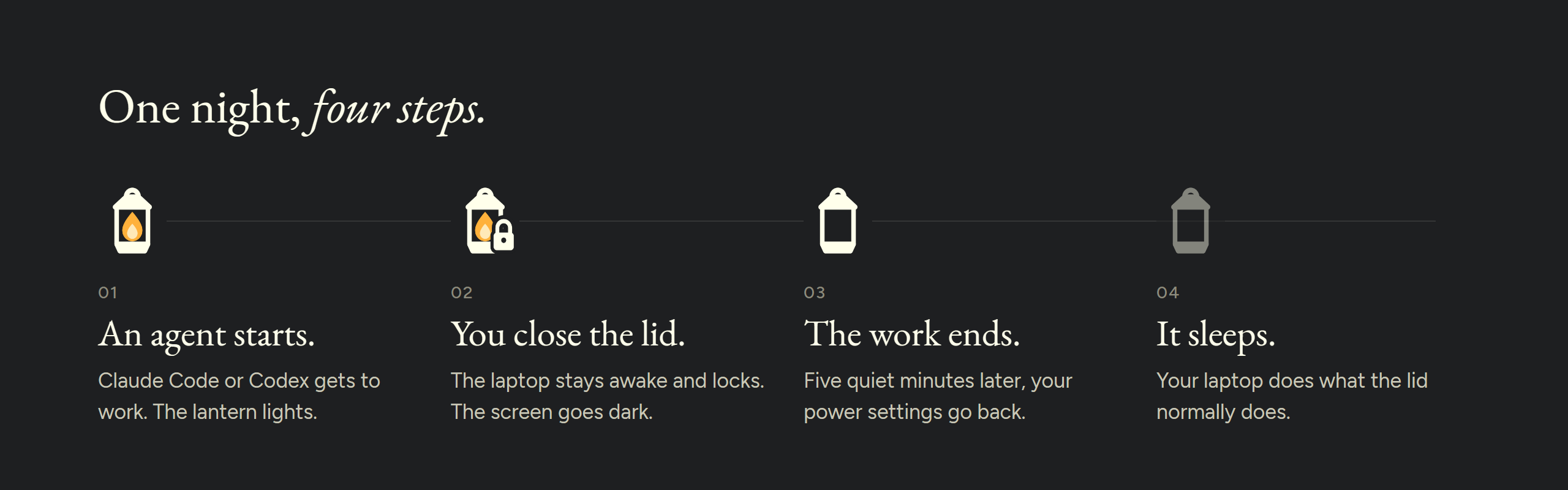
- An agent starts working. Every 10 seconds Nightcrew looks for a Claude
Code or Codex session that's growing, a build or script one of them
started, or heavy GPU use by one of them or their tools. For Claude Code it
also reads the status in~\.claude\sessions\<pid>.json(busy, idle or
waiting), so a long, quiet command still counts. That's the only file it
opens in~\.claude: session transcripts are watched for size only, and the
login.keyfiles are never touched. Nightcrew has no network code. The
lantern lights up. - You close the lid. The laptop keeps running and locks itself, unless
your lid action is Do nothing or Lock when lid closes is off. When the
work started, Nightcrew saved your power settings, then set the lid to Do
nothing and the sleep timer to Never. On battery the timer is your
lid-closed limit plus an hour instead, or Never if the limit is off. - Other apps can ease off. If you turned on Efficiency mode, apps the
agents don't need go into Efficiency mode five minutes later. Agents, what
they're connected to, terminals, editors, browsers with a Claude or Codex
connector and games are left alone. Everything's back to normal the moment
you open the lid. - The work ends. Five minutes after the last sign of work, your settings
go back. - It sleeps. Once nobody has touched the laptop for 5 minutes, it follows
your lid action: sleep, hibernate or nothing. If Windows hasn't gone to
sleep 5 minutes later, Nightcrew hibernates it.
Safety limits. With the lid closed, Nightcrew stops early and hibernates at
20% battery or after 8 untouched hours, even mid-task. You can change both.
What it changes, and how it puts it back
While an agent works, Nightcrew changes the active power plan only: the lid
action becomes Do nothing, and the sleep timer becomes Never (on battery, your
lid-closed limit plus an hour). No other power setting changes.
Before the first change, it saves your own values twice: in%LOCALAPPDATA%\Nightcrew\restore.json and in the registry underHKCU\Software\Nightcrew\Restore. It puts them back when the work ends, when
you pause or quit, when you sign out, and on the next start after a crash. If
Nightcrew is killed, a watchdog task puts them back within 5 minutes. A value
you change yourself in the meantime, such as the lid action, is saved as yours
and comes back when the work ends. Until then Nightcrew sets its own value
again, so closing the lid doesn't stop the work.
If both copies are lost, Nightcrew can't know your values, so it sets Windows'
defaults for your plan. It knows its own values by the battery timer: Windows
offers only whole minutes, and Nightcrew adds 7 seconds. With the lid-closed
limit off, that timer is Never and carries no mark, so only the two saved
copies can bring your values back.
Efficiency mode is off by default. If you turn it on, apps the agents don't
need run at low priority with Windows' EcoQoS while you're away, and go back
to normal when you return or the work ends. Nightcrew never suspends, freezes
or kills an app.
If your organization locks the power settings, Nightcrew stays idle and tells
you so.
The panel
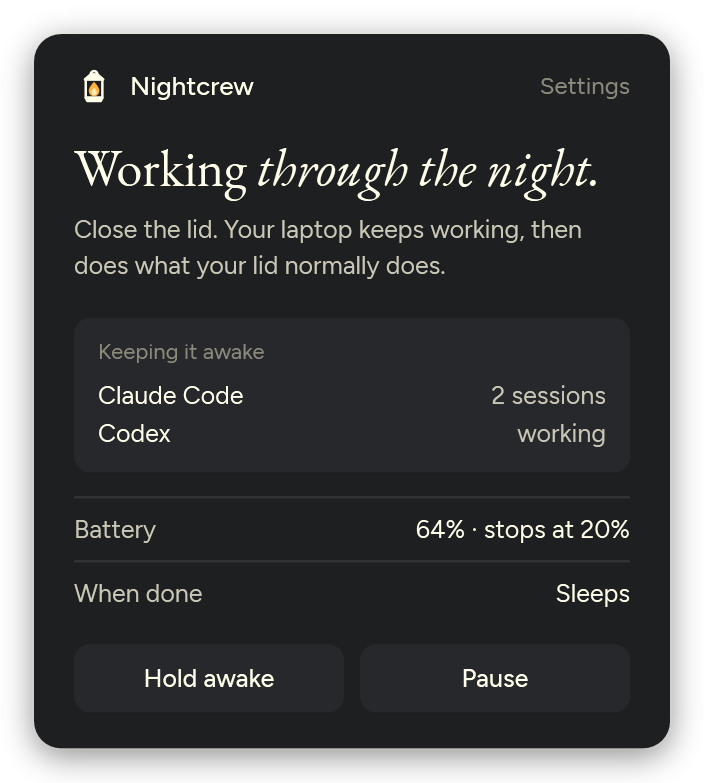
Click the lantern to see what's keeping the laptop awake, your battery, and
what happens when the work is done.
- Hold awake keeps the laptop awake until you turn it off, for anything
Nightcrew can't detect on its own. - Pause hands the lid back to Windows until you resume.
- Settings, or right-click the lantern: battery floor, lid-closed limit,
lock on lid close, stay awake for approvals, start at login, Efficiency mode
while away, and the tray mark. - Stay awake for approvals: with the lid closed, Claude Code waiting for
your approval or answer counts as work, so you can answer from your phone.
Claude Code only. With the lid open, Windows' own sleep timer applies. - Starting
nightcrew.exeagain opens the panel. - If an app keeps misbehaving after you've been away, add it under Keep at
full speed in Settings.
Good to know
- Only GPU use by an agent, or by a tool it started, counts as work. A game
or a video export doesn't.
Nightcrew knows Claude Code and Codex. Any other agent is covered with Hold
awake, or once you add it here. To teach Nightcrew about another agent, quit
Nightcrew, edit %LOCALAPPDATA%\Nightcrew\settings.json, and start it again:
- add its process name to
AgentProcessNames, so programs it starts count as
agent tools - add it to
SelfCpuAgentNamestoo if the agent works in its own process - add the folder where it writes
*.jsonlsession files toTranscriptRoots
A key you leave out keeps its default. The log, nightcrew.log, is in the
same folder. To see what Nightcrew would do without letting it change
anything, quit Nightcrew, run .\nightcrew.exe --dry-run in its folder and
read the log.
| Key | Default | Meaning |
|---|---|---|
GraceMinutes |
5 | How long work stays live after the last sign of work |
BatteryFloorPercent |
20 | Hibernate at this charge with the lid closed on battery; 0 = off |
LidClosedCapHours |
8 | Hibernate after this long with the lid closed and no input. While working, the battery sleep timer is this plus an hour. 0 = off (timer Never) |
AwayMinutes |
5 | Minutes without input before the lid action runs, before lid-closed time counts toward the limit, before the lock when work starts with the lid closed, and before apps go into Efficiency mode |
LockOnLidClose |
true | Lock the PC when the lid closes |
StartAtLogin |
true | Start Nightcrew when you sign in |
DryRun |
false | Log what Nightcrew would do without doing it |
TranscriptRoots |
Claude Code and Codex folders | Where session files are watched |
IgnorePathContains |
claude-mem-observer |
Session files whose path contains this are ignored |
AgentProcessNames |
claude, codex |
Agent processes; programs they start count as agent tools |
SelfCpuAgentNames |
codex |
Agents whose own CPU use counts |
SelfCpuPercent |
2 | CPU threshold for those agents, % of one core |
ToolCpuPercent |
10 | CPU threshold for agent tools, % of one core |
GpuPercent |
30 | GPU engine threshold, %, for agents and the tools they start |
SampleSeconds |
10 | Seconds between checks |
Mark |
lantern |
The tray mark: lantern or moon |
EfficiencyWhileAway |
false | Put apps the agents don't need into Efficiency mode while you're away |
LeaveAlone |
none | Process names never put into Efficiency mode (Settings > Keep at full speed) |
LeaveAloneLabels |
none | The names Settings shows for LeaveAlone entries |
ConnectorHostNames |
chrome-native-host, extension-host |
Browser connector helpers; their browser is left alone |
StayAwakeForApprovals |
true | With the lid closed, a Claude Code session waiting for you counts as work |
ClaudeSessionsDir |
%USERPROFILE%\.claude\sessions |
Where Claude Code keeps its session status files |
Update
Quit Nightcrew: right-click the lantern, then Quit Nightcrew. That puts
your settings back. Replace the exe with the new one, then start it.
From a script, run Start-Process .\nightcrew.exe -ArgumentList '--exit' -Wait
in its folder. PowerShell doesn't wait for .\nightcrew.exe --exit on its own.
Uninstall
Quit Nightcrew (right-click the lantern, then Quit Nightcrew), then run.\nightcrew.exe --uninstall in its folder. That puts your settings back,
takes any app out of Efficiency mode, and removes the startup entry, the
watchdog task, and, once your settings are back, Nightcrew's registry key
(HKCU\Software\Nightcrew). Then delete the exe, and %LOCALAPPDATA%\Nightcrew
if you want the settings and log gone too. Don't only delete the exe: the
watchdog task would stay behind.
Credits
- The cream ink, serif headline and lavender come from Wispr Flow's design
language. - Type is EB Garamond and
Figtree, both under the SIL Open
Font License. See THIRD-PARTY-NOTICES.md.
License
Yorumlar (0)
Yorum birakmak icin giris yap.
Yorum birakSonuc bulunamadi