Agent-Brain-Hub
Health Warn
- License — License: MIT
- Description — Repository has a description
- Active repo — Last push 0 days ago
- Low visibility — Only 5 GitHub stars
Code Fail
- exec() — Shell command execution in bench/lib/score.mjs
- network request — Outbound network request in bench/lib/targets/http.mjs
- exec() — Shell command execution in bench/lib/validate.mjs
- exec() — Shell command execution in bench/longmemeval.mjs
- process.env — Environment variable access in bench/longmemeval.mjs
- network request — Outbound network request in bench/longmemeval.mjs
Permissions Pass
- Permissions — No dangerous permissions requested
No AI report is available for this listing yet.
Shared, brain-inspired memory for AI agents: 13 brain regions with awake/sleep loops, a live visualizer, agents connected via REST/SDK/MCP, governance & audit, and business-value metrics. Works with Claude, GPT, Gemini, DeepSeek or local LLMs. SQLite storage. VI/EN/JA.
🧠 Agent Brain Hub
English · Tiếng Việt



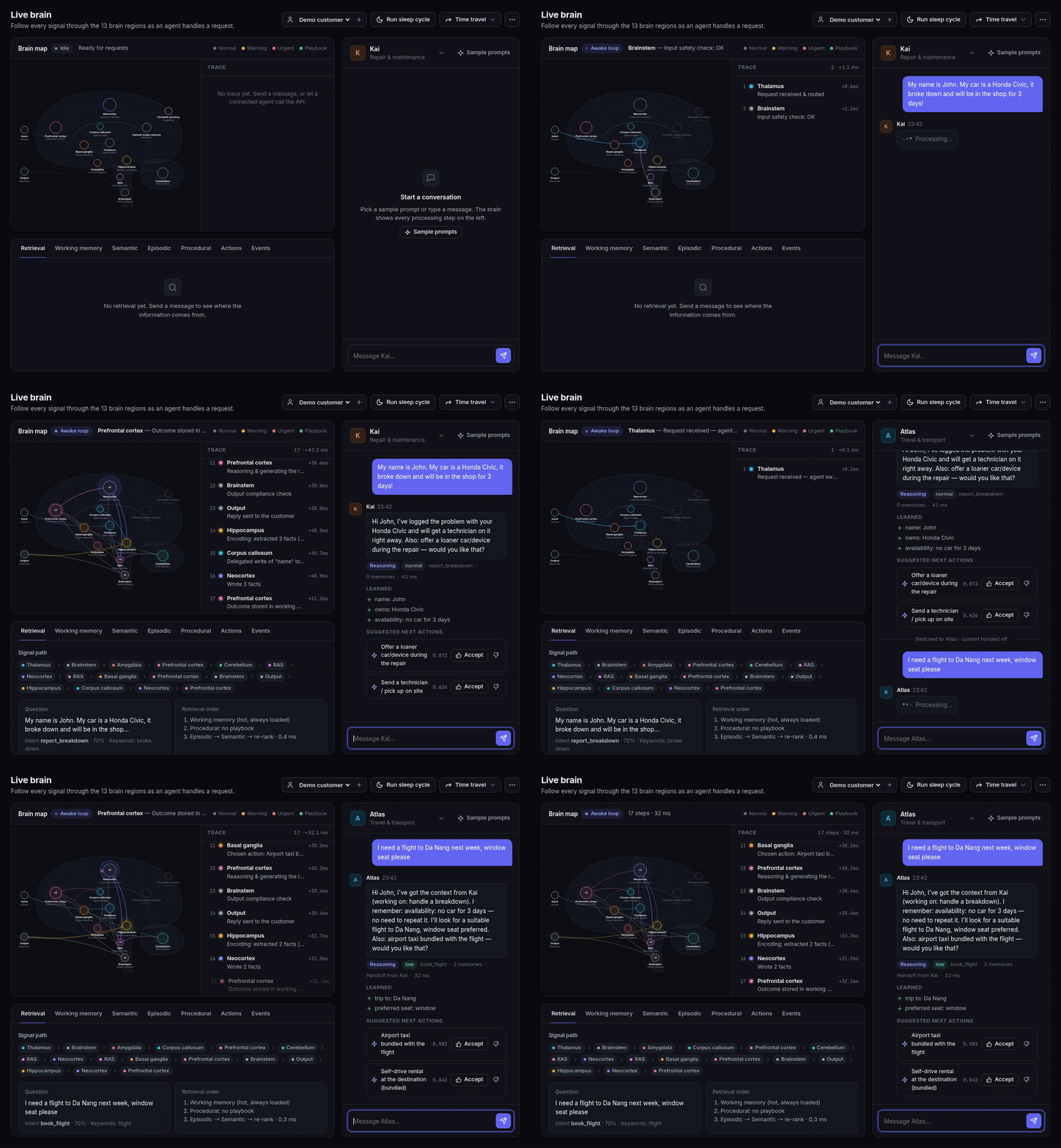
One shared brain for all of a company's AI agents. Create agents in the UI, or plug in agents that already run elsewhere through a REST API, an SDK or MCP. They all read and write one memory, so what one agent learns, every agent can use. Customers stop repeating themselves, agents hand off to each other without losing context, and the company builds up knowledge from every conversation.
The memory is organized like a human brain: 13 regions and a wake/sleep cycle, following the CoALA framework. The architecture draws on the Vita Cognitive Memory Architecture document. The UI lets you watch each brain region work, live, in English · Tiếng Việt · 日本語.
Example
- A customer tells Kai, the repair agent: "My car is a Honda Civic, it broke down and will be in the shop for 3 days."
- Later they ask Atlas, the travel agent: "I need a flight to Da Nang next week, window seat please."
- Atlas replies: "I've got the context from Kai. I remember: no car for 3 days, no need to repeat it. I'll look for a suitable flight to Da Nang, window seat preferred. Also: a self-drive rental at the destination, would you like that?"
Atlas never heard about the car. Kai wrote "car unavailable for 3 days" to shared memory, while the repair details stayed private to Kai.
Quick start
With Docker, one command (no Node.js needed):
docker compose up -d                 # → http://localhost:4317 · data lives in the brain-data volume
docker compose --profile vllm up -d  # also runs Qwen3-4B locally on vLLM (NVIDIA GPU required)
Optional configuration: cp .env.example .env, then set PORT, BRAIN_ADMIN_TOKEN, LLM provider keys and so on. With the vllm profile, open Settings → vLLM and set the base URL to http://vllm:8000/v1. An LLM server already running on your machine (Ollama, LM Studio, vLLM) is reachable from the container at http://host.docker.internal:<port>/v1, for example http://host.docker.internal:11434/v1 for Ollama.
Or with Node.js ≥ 22:
npm install
npm start                      # → http://localhost:4317  (UI)  ·  http://localhost:4317/v1  (Brain API)
npm test                       # unit tests + acceptance QA suite
npm run e2e -- --lang vi|en|ja # end-to-end test against the running server
Storage is SQLite via better-sqlite3. Prebuilt binaries exist for Linux, macOS and Windows; on other platforms npm install needs Python, make and a C++ compiler. Docker and an NVIDIA GPU are only needed to run a local model on vLLM.
It runs with zero configuration (offline mode: rules + templates). To use a real LLM, see LLM providers.
Concept
flowchart LR
  subgraph Native["Native agents (created in the UI)"]
    M[Mia] & K[Kai] & A[Atlas] & S[Sage] & P[Penny] & N[Nova]
  end
  subgraph Connected["Connected agents (your systems)"]
    W[Web chatbot] -->|REST / SDK| API
    C[Claude / Cursor / framework] -->|MCP| MCP[MCP server] --> API
  end
  Native --> BRAIN
  API["Brain API /v1<br/>one API key per agent"] --> BRAIN
  subgraph BRAIN["🧠 Shared brain"]
    direction TB
    R[Recall: RAS ⇄ Neocortex] --- E[Encode: Hippocampus] --- G[Governance: scopes · permissions · audit]
  end
  BRAIN --> V[📈 Value dashboard] & AU[🛡️ Audit log]
| Screen | What it's for |
|---|---|
| 🧠 Live brain | Watch the signal travel through the 13 brain regions for every message, including messages from external agents over the API. Chat with native agents, see which store each piece of information came from, and inspect working, semantic, episodic and procedural memory. |
| 🤖 Agents | Create native or connected agents, toggle read/write permissions, issue and rotate API keys, and copy ready-made integration code (cURL, JS, Python, MCP). |
| 📈 Business value | Questions customers didn't have to answer again, cross-agent knowledge reuse, handoffs, suggestion acceptance rate, learned skills, blocked leaks, and a matrix of knowledge flowing between agents. |
| 🛡️ Audit log | Every read, write, block and API call: who read whose memory, for which customer, and when. Filter by operation and search. |
| ⚙️ Settings | Pick an LLM provider (Claude, GPT, Gemini, DeepSeek, local models…), fetch the model list, test the connection and apply it immediately. See storage details (SQLite file, size, row counts). |
The left sidebar holds navigation, model status, the language picker and the light / dark / system theme switch. The Live brain screen has a customer picker (the brain keeps a separate memory per customer). The UI uses color tokens for both themes, one consistent SVG icon set, and works down to phone width.
Three ways to connect an agent
1. Native: create it in the UI
Go to Agents → Create agent → Native, pick a domain and a persona. The brain answers with the hub's LLM, and you can chat with the agent right away on the Live brain screen.
2. Connected via REST API / SDK
Create an agent of type Connected. It gets an API key, shown only once and stored as a hash. Your agent keeps using its own LLM, in this loop:
recall (get context) → your agent answers with its own LLM using promptBlock → remember (send the turn back so the brain learns)
import { BrainClient } from './sdk/brain-client.js';
const brain = new BrainClient({ url: 'http://localhost:4317', apiKey: process.env.BRAIN_API_KEY });

const ctx = await brain.recall({ customerId: 'kh-001', text: userMessage, lang: 'en' });
const reply = await myLLM({ system: ctx.promptBlock, user: ctx.redactedText });
await brain.remember({ traceId: ctx.traceId, reply });
A sample agent you can run right away (open the UI next to it to watch the brain light up and the conversation appear in the chat):
BRAIN_API_KEY=abk_... npm run example
# optional: OWN_LLM_URL=http://localhost:8000/v1 OWN_LLM_MODEL=qwen3-4b BRAIN_LANG=en
3. MCP: for Claude Desktop/Code, Cursor and agent frameworks
mcp/server.mjs is a dependency-free MCP server over stdio. Each instance acts as one connected agent and exposes 4 tools: brain_recall, brain_remember, brain_profile, brain_feedback.
claude mcp add agent-brain -e BRAIN_URL=http://localhost:4317 -e BRAIN_API_KEY=abk_... -- node /path/to/repo/mcp/server.mjs
The Agents screen generates the mcpServers config for Claude Desktop and Cursor, with the path and key filled in.
Brain API (/v1, header Authorization: Bearer <agent key>)
| Method | Path | Body / query | Returns |
|---|---|---|---|
| GET | /v1/me |
agent, domain, kind, permissions | |
| POST | /v1/recall |
{customerId, text, lang, asOf?} |
traceId, intent, salience, handoff, playbook, memories[] (each with from, updatedAt, validUntil, and via when it came in through the entity graph), suggestedActions[], promptBlock, redactedText |
| POST | /v1/remember |
{traceId | userText, reply, facts?: [{relation, value}], outcome?: {actionId, accepted}, lang} (any relation name; a new one starts provisional) |
learned[], feedback |
| POST | /v1/chat |
{customerId, text, lang} |
the brain answers itself (native mode over the API) |
| POST | /v1/feedback |
{traceId, actionId, accepted} |
bandit update + skill promotion |
| GET | /v1/profile |
?customerId=&lang= |
the facts this agent is allowed to see |
/v1 has CORS enabled, so agents running in a browser can call it too. The admin API /api/* (used by the UI) can be locked with BRAIN_ADMIN_TOKEN. GET /healthz needs no auth and is meant for Docker and load balancers.
Governance
- Memory scopes:
private: only the owning domain can read it, for example health, income or a device fault;shared: every agent with read permission can see it;global: company policy.
- Per-agent permissions (toggle them on the agent's row in the Agents screen):
readShared: whether the agent may read shared memories written by other agents;write: whether the agent may write to and learn into the brain. Partner agents can be read-only.
- Write policies per relation: each relation has an owner domain and a policy (
latest,owner,trustorhuman) that decides when two agents write different values. The losing value is kept as history, every automatic decision is audited and can be undone, and open conflicts wait on the Review page (see Open schema and write policies). - Audit log: records every
read,write,blocked(a read refused because the memory is private or the agent lacks permission),recall,remember,handoffandfeedback, together with the agent that originally wrote the memory. It is also the data source for the value dashboard. - Brainstem: redacts PII (Vietnamese and Japanese phone numbers, email, card numbers, Vietnamese ID numbers) before anything is remembered, and has a crisis reflex in all 3 languages.
- API keys: stored as SHA-256 and compared in constant time. Keys can be rotated; the old key stops working immediately.
Value dashboard: how the metrics are measured
| Metric | Definition (computed from the audit log) |
|---|---|
| Questions customers didn't have to answer again | Number of distinct facts that agent B read from memories written by agent A. Time saved is estimated at 20 seconds per question; the UI shows this assumption. |
| Cross-agent knowledge reuse | Total reads of memories written by another agent |
| Seamless handoffs | Times a customer switched agents and the context went along |
| Suggestion acceptance rate | 👍 / (👍 + 👎) for the next best action |
| Learned skills | Skills promoted by the cerebellum, with the number of runs done from a playbook |
| Blocked leaks | Private or unauthorized reads blocked by the RAS |
| Knowledge flow | Writer agent × reader agent matrix. Off-diagonal cells are shared knowledge. |
Built-in agents
| Agent | Domain | Memory kept for | Scope |
|---|---|---|---|
| Mia | Personal assistant: profile, family, schedule, preferences | forever | shared |
| Kai | Repair & maintenance: cars, laptops, phones, home appliances | 90 days | shared |
| Atlas | Travel & transport | 1 year | shared |
| Sage | Health | 10 years | 🔒 private |
| Penny | Personal finance (the budget is deliberately shared, income is not) | 5 years | 🔒 private |
| Nova | Shopping & orders | 180 days | shared |
Languages
Pick a language at the bottom of the sidebar; the choice is saved in the browser. It applies to:
- the UI and brain region labels;
- the label of every step in the trace;
- agent replies (both LLM and templates; Japanese uses polite keigo), session summaries and insights;
- the sample scenarios.
The memory itself is language-independent:
- Facts are extracted from Vietnamese, English or Japanese sentences (Japanese has its own rules, since it has no spaces).
- Embeddings include the labels in all 3 languages.
- A fact recorded in Vietnamese shows up with its Japanese label when 日本語 is selected.
The API takes a lang: "vi" | "en" | "ja" parameter.
Memory architecture (13 brain regions)
| Region | Service | File |
|---|---|---|
| Thalamus | Context gateway: sessions, agent-switch detection, routing | thalamus.js |
| Brainstem | Guardrails: PII, crisis reflex, output compliance | brainstem.js |
| Amygdala | Salience: sentiment, urgency, churn risk, VIP → priority | amygdala.js |
| Corpus callosum | Handoff between agents, write delegation | corpusCallosum.js |
| Prefrontal cortex | Working memory + executive loop, LLM calls | prefrontal.js, respond.js |
| Cerebellum | Playbooks, versioned skill promotion | cerebellum.js |
| RAS | Retrieval: permissions → TTL → hybrid scoring → re-rank → token budget | ras.js |
| Neocortex | Episodic + semantic memory, hot/warm/cold tiers, contradictions, scoping | neocortex.js, ontology.js |
| Basal ganglia | Next best action (Thompson-sampling bandit), learns from feedback | basalGanglia.js |
| Hippocampus | Fact extraction (rules + LLM + explicit facts from the API), consolidation | hippocampus.js |
| Synaptic pruning | Forgetting: TTL, replacement, decay | forgetting.js |
| Default mode network | Reflection: insights, skill review | dmn.js |
| Audit | Who read or wrote what | audit.js |
The orchestrator server/brain/index.js has three entry points that share the perceive phase (Thalamus → … → Basal ganglia):
think(): native agents; the brain generates the reply.recall(): a connected agent fetches its context package.remember(): a connected agent sends the turn back so the brain can learn.
The sleep loop (sleep()) runs Hippocampus → Forgetting → DMN → Cerebellum.
When the brain sleeps
Besides the Run sleep cycle button, the brain sleeps on its own (sleepScheduler.js):
| Trigger | When | Default |
|---|---|---|
| Idle | A customer has been quiet long enough for the session to count as over, and turns are waiting | 30 min (the same gap that starts a new session) |
| Pressure | This many turns are waiting. Working memory keeps only the last 40, so without this, older turns would be dropped before reaching long-term memory | 24 turns |
| Nightly | Once a day, for every customer active since the previous night | 03:00 server time |
Change them in Settings → Sleep cycle, which also lists who is waiting to sleep and the recent runs with their trigger. Automatic runs show up live in the brain view like any other trace. Manual and automatic runs share one queue, so they never overlap. Environment variables set the defaults (BRAIN_SLEEP_AUTO, BRAIN_SLEEP_IDLE_MINUTES, BRAIN_SLEEP_MAX_PENDING, BRAIN_SLEEP_NIGHTLY_AT, see .env.example). The Docker image runs in UTC: set TZ, for example TZ=Asia/Ho_Chi_Minh, so "03:00" means your night.
Storage: SQLite
The whole brain lives in one SQLite file, data/brain.db (WAL mode), created automatically on first run.
| Table | Contents |
|---|---|
facts |
Semantic memory. Indexed columns customer_id, relation, status, scope, owner_domain, source_agent_id, valid_until, plus embedding (Float32 BLOB). |
episodes |
Episodic memory. Columns customer_id, kind, scope, agent_id, created_at, expires_at and embedding. |
audit |
Append-only audit log, never truncated. The value dashboard is computed in SQL over the full history. |
agents, customers, working, skills, patterns, bandit, insights, traces |
The rest of the brain, one JSON document per row. |
meta |
Schema version, simulated clock, id counters, usage stats. |
How it works:
- On startup the state is loaded into memory, which acts as a cache.
- After each change (batched over 300 ms), the server writes only the rows that changed, in one transaction.
- On SIGINT/SIGTERM the server flushes pending writes and closes the database cleanly.
- With 20,000 episodes: the first write takes about 0.2 s, each chat turn afterwards writes about 10 rows, and reloading on startup takes about 0.2 s.
You can query it directly, for example:
sqlite3 data/brain.db "SELECT relation, json_extract(data,'$.value'), scope FROM facts WHERE customer_id='kh-001'"
sqlite3 data/brain.db "SELECT source_agent_id, agent_id, COUNT(*) FROM audit WHERE op='read' GROUP BY 1,2"
Backup: sqlite3 data/brain.db ".backup backup.db" (safe while the server is running). Change the path with BRAIN_DB.
Upgrading from older versions: if data/brain.json (schema v3) exists, it is imported into SQLite on first run and the original file is renamed to brain.imported.bak.json. Change the legacy JSON path with BRAIN_DATA.
Current limits:
- Only one server process can run, because state is cached in memory.
- Vector search is still a linear scan in memory.
Both go away with the move to PostgreSQL + pgvector (see the Roadmap).
LLM: pick a provider in the UI
Open Settings → Language model. There you:
- choose a provider;
- enter the API key (it is stored only on the server, in
data/settings.jsonwith mode 0600, and never sent back to the browser); - click Fetch models to get model names straight from the provider, then Test connection and Save & apply.
Changes take effect immediately, with no restart.
| Provider | Protocol | Default base URL | Key environment variable |
|---|---|---|---|
| Claude (Anthropic) | Official Anthropic SDK | — | ANTHROPIC_API_KEY |
| GPT (OpenAI) | OpenAI Chat Completions | https://api.openai.com/v1 |
OPENAI_API_KEY |
| Gemini (Google) | OpenAI-compatible endpoint | https://generativelanguage.googleapis.com/v1beta/openai |
GEMINI_API_KEY |
| DeepSeek | OpenAI-compatible | https://api.deepseek.com/v1 |
DEEPSEEK_API_KEY |
| Mistral | OpenAI-compatible | https://api.mistral.ai/v1 |
MISTRAL_API_KEY |
| Groq | OpenAI-compatible | https://api.groq.com/openai/v1 |
GROQ_API_KEY |
| Grok (xAI) | OpenAI-compatible | https://api.x.ai/v1 |
XAI_API_KEY |
| OpenRouter (hundreds of models) | OpenAI-compatible | https://openrouter.ai/api/v1 |
OPENROUTER_API_KEY |
| Together | OpenAI-compatible | https://api.together.xyz/v1 |
TOGETHER_API_KEY |
| Ollama / vLLM / LM Studio (local) | OpenAI-compatible | localhost:11434 / :8000 / :1234 |
not needed |
| Custom | Any OpenAI-compatible endpoint | your own | BRAIN_LLM_API_KEY |
| Offline | Rules + templates | — | — |
- The main model answers customers. The optional utility model handles fact extraction, session summaries and reflection; pick a cheap, fast one to save cost.
- Adapts to each provider: when a parameter is rejected (HTTP 400/422), the client adjusts and retries, and remembers it for next time:
max_tokens→max_completion_tokens(GPT reasoning models);- drop
temperature; - drop JSON mode;
- drop parameters specific to local servers.
- Never goes down: if the LLM fails, the brain falls back to rules + templates.
- Environment variables are only defaults until something is saved in the UI:
BRAIN_LLM_PROVIDER,BRAIN_LLM_MODEL,BRAIN_LLM_BASE_URL,BRAIN_LLM_API_KEY;- or just set one provider's key, for example
OPENAI_API_KEY, and that provider is selected automatically; BRAIN_OFFLINE=1disables all LLM calls;BRAIN_SETTINGSchanges the settings file path.
Run a local model on vLLM (Qwen3-4B fits a 12 GB GPU): scripts/start-vllm.sh (or docker compose --profile vllm up -d), then pick vLLM in Settings.
Notes on vLLM:
- The
latestimage needs NVIDIA driver ≥ 575. Override withVLLM_IMAGE=…. - JSON requests use
temperature 0.1to avoid a CUDA error in vLLM 0.10.2 when requests are batched together.
Memory over time
Facts are invalidated, not deleted. When "I moved to Saigon" replaces "I live in Hanoi", the old fact keeps its dates and a link to the new one; when a fact's TTL passes, retrieval stops using it. Sleep purges these ended facts after a history period: 90 days by default, set in Settings → Sleep cycle or with BRAIN_HISTORY_DAYS (0 deletes at once, as before v0.5).
You can ask what the brain believed at any moment:
await brain.recall({ customerId, text: 'Book a taxi from my home', asOf: '2026-10-01T09:00:00Z' });
// → the address the brain knew then, not the current one
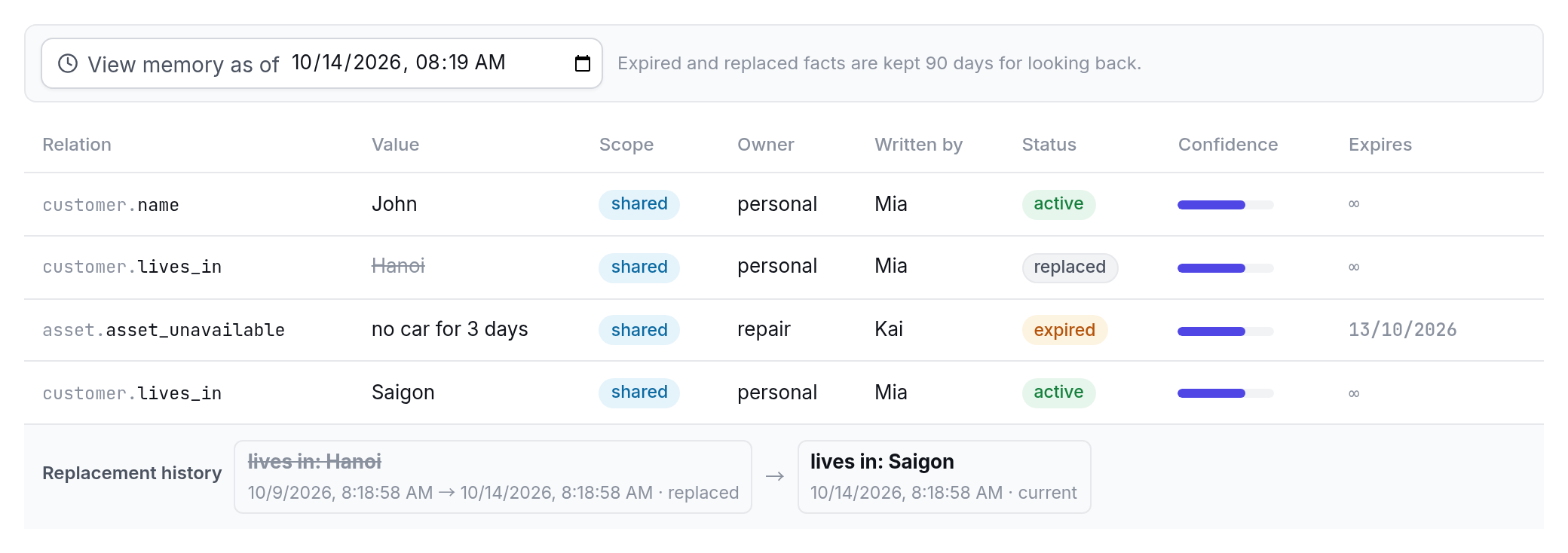
asOf works on POST /v1/recall and on the Live brain's Semantic and Episodic tabs (View memory as of). A look into the past is read-only: it changes no memory, is recorded in the audit log, and respects the same permissions. Each fact's replacement chain is at GET /api/facts/:id/history.
Connected memory (entity graph)
Facts are grouped into entities within each customer: "my car", "xe", "車" and "Honda Civic" are one car; "Da Nang" and "Đà Nẵng" are one trip. When a question names an entity or matches a fact, retrieval follows the links to connected facts, up to two hops:
Penny (finance): "Should I set money aside for my Civic this week?"
→ "Civic" is the car, and the car is in the shop. The prompt gets:
  - owns: Honda Civic (from Mia, 2 hours ago)
  - availability: no car for 3 days (from Kai, 2 hours ago, expires in 4 days, via: Honda Civic)
Links are the same entity (the Civic and its repair) or a related kind of fact (a trip and the car being unavailable, a trip and a diet or budget). The graph only runs over memories the asking agent may already see, so it never carries a private fact to another domain, and it ignores facts that have ended. Two customers are never merged.
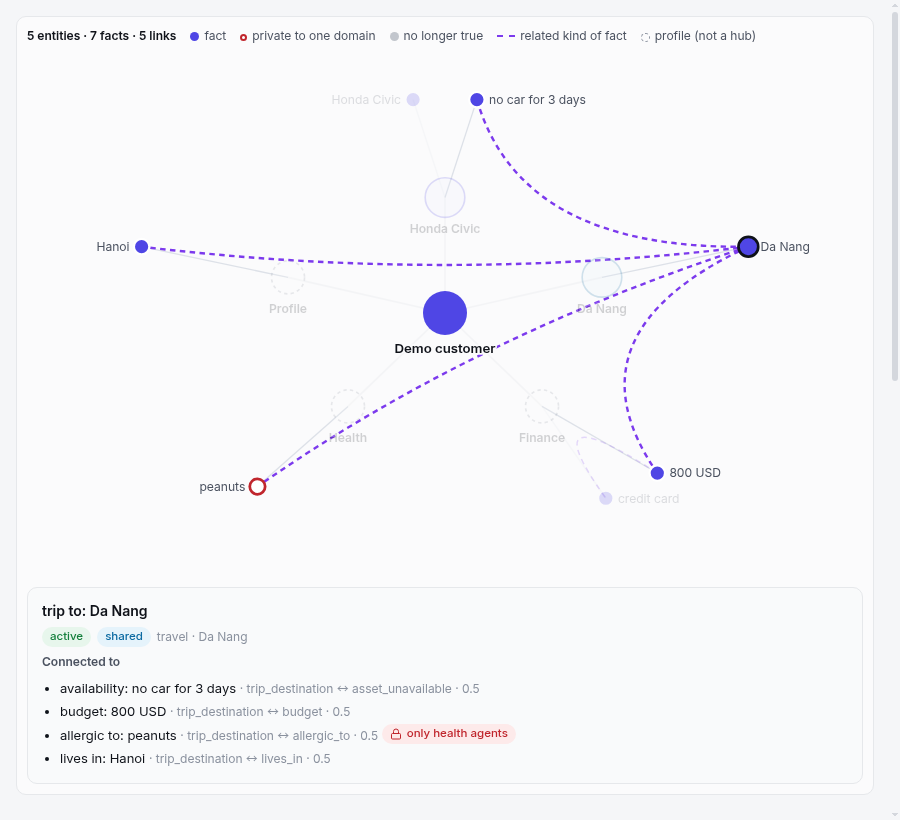
The Graph tab in the Live brain shows a customer's entities and links, also as of any past time; GET /api/graph?customerId=&asOf= returns the same data. npm run bench -- --no-graph measures what the graph adds (see Benchmark).
Open schema and write policies
The brain is no longer limited to its 19 built-in relations. Anything durable a customer says can be remembered:
"My favourite colour is blue"               → favourite colour: blue       (offline, en / vi / ja)
"I'm a gold member of your loyalty programme" → loyalty tier: gold          (with an LLM)
remember({ facts: [{ relation: 'loyalty_tier', value: 'gold' }] })          (any connected agent)
A relation the brain has not seen before starts provisional: private to the domain that wrote it, kept for 30 days. Its name is normalised ("Favorite Color" = favourite_colour), names that look like secrets (password, pin, card_number…) are refused, and values are PII-redacted. In Settings → Memory schema an admin sees every relation with its usage, and promotes, merges or deletes the learned ones. A learned relation becomes visible to other domains only when an admin promotes it, or merges it into a shared built-in relation.
When two agents write different values for the same relation, the relation's policy decides:
| Policy | The value kept | Default for |
|---|---|---|
latest |
the newer one | trip, budget, car availability, seat, size |
owner |
the one written by the relation's owner domain | income, payment method |
trust |
the one from the more trusted agent (a clear gap, else a person decides) | name, home, job, diet, likes |
human |
a person decides on the Review page | (choose it per relation) |
The other value is kept as history (outvoted, still visible with asOf), and the decision is audited, shown in the live trace and listed on the Review page, where it can be undone. Two rules come before any policy: the customer saying something changed always wins, and if the customer contradicts themselves, the brain asks them instead of picking. Trust is learned per agent from outcomes: which value a person keeps, undone decisions, and other agents confirming the same value.
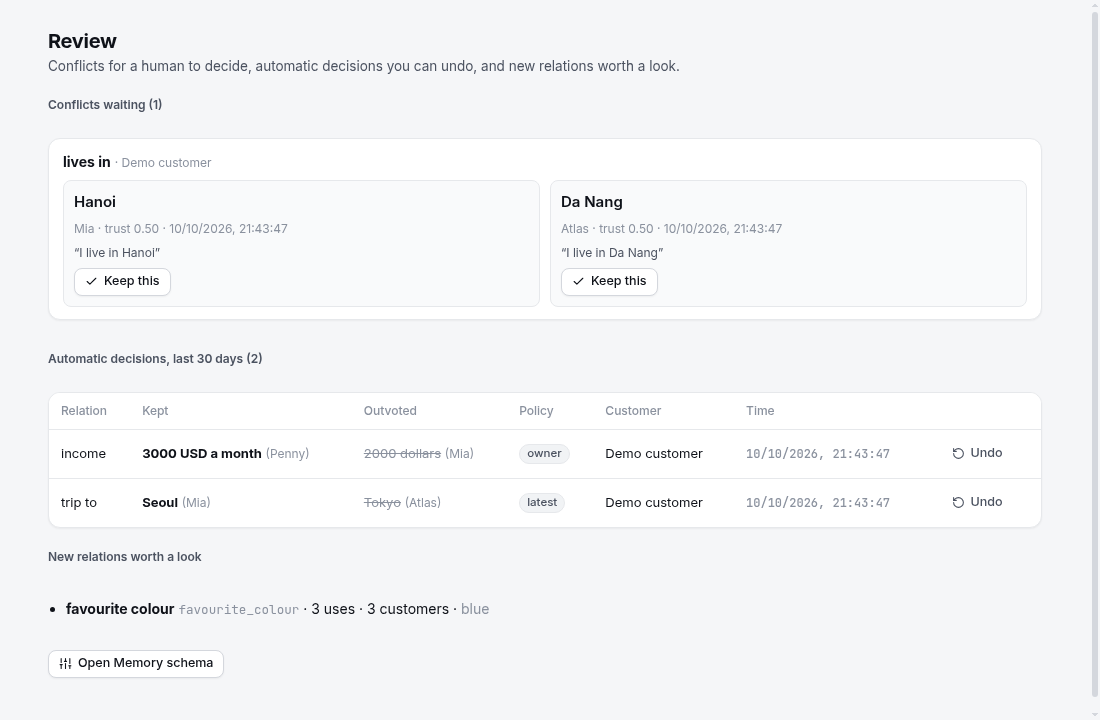
API: GET /api/relations, PUT /api/relations/:name (edit, promote, merge), DELETE /api/relations/:name, GET /api/review, POST /api/review/resolve, POST /api/review/undo.
Semantic search (embeddings)
By default, memories are matched with local feature-hashing vectors: no network, no setup, but only shared words count. To also find paraphrases ("Can I drive to the airport?" → "no car for 3 days"), pick an embedding model in Settings → Semantic search: OpenAI, Gemini, Ollama, vLLM, LM Studio or any OpenAI-compatible /embeddings endpoint. For Vietnamese and Japanese, bge-m3 on Ollama is a good local choice.
- Opt-in. A provider key in the environment does not turn embeddings on; choose a provider in the UI or set
BRAIN_EMBED_PROVIDER(plusBRAIN_EMBED_MODEL,BRAIN_EMBED_BASE_URL,BRAIN_EMBED_API_KEY). - Writes never wait on the network. Every memory keeps its hashing vector; a background queue adds the model vector and re-indexes everything when you change the model. Settings shows the progress.
- Retrieval waits up to 1.5 s for the query embedding, then falls back to hashing. The live trace shows which similarity was used.
- Privacy. Only redacted text is embedded, but all memory text, including private scopes, is sent to the provider. Use a local model for sensitive data. Permissions are enforced after retrieval as before, so a similar private memory still never reaches the wrong agent.
Benchmark
npm run bench scores the shared memory on 46 multi-agent scenarios: cross-agent recall, stale facts, contradictions, private-data leakage, multi-hop questions, long conversations, exact matches (order numbers, model names), looking back in time, relations outside the built-in ones, and what happens when two agents disagree, in English with Vietnamese and Japanese cases. It runs offline in under a second, and CI fails any change that makes a quality metric worse (bench/README.md).
| v0.7.0 | Hashing (default, offline) | Hybrid with bge-m3 (Ollama, CPU) |
With an LLM (qwen3:4b, local) |
|---|---|---|---|
| Scenario pass rate | 97.8% | 100% | 97.9% |
| Recall accuracy | 98.0% | 100% | 98.1% |
| Open schema / arbitration | 100% / 100% | 100% / 100% | 100% / 100% |
| Multi-hop questions | 100% (40% without the graph) | 100% | 100% |
| Leak rate | 0% | 0% | 0% |
| Stale-use rate | 0% | 0% | 0% |
| recall latency (p50) | 0.6 ms | 145 ms* | 0.7 ms |
| Prompt tokens (mean) | 421 | 499 | 450 |
These are our own scenarios, so they compare versions of this project. The entity graph lifts the offline pass rate from 84.8% to 97.8% (--no-graph runs the same set without it). The one scenario that fails offline is a paraphrase that shares no words with the memory. * measured while another benchmark ran on the same machine (v0.6.0: 96 ms).
With a real LLM. Running the suite end to end with a local LLM (qwen3:4b on Ollama, which extracts facts and writes the session summaries) found four bugs that are fixed in v0.7: empty answers from reasoning models, identifiers lost in summaries, exact identifiers outranked, and income questions. In the LLM column (47 scenarios, including one only an LLM can pass: a relation it has to invent), every category passes 100% except the same paraphrase, with no leaks. It runs on one consumer GPU (RTX 3060) with no cloud key, but slowly: about 42 s per message, 2 h 11 min for the suite.
On a public dataset. npm run bench:longmemeval scores retrieval on LongMemEval-S (MIT, 470 questions, ~50 sessions each): is the session that holds the answer near the top? With local hashing it is in the top 4 for 53.2% of questions and in the top 10 for 71.5%. Preferences (20% @4) and questions that need every evidence session are the weak spots. Answer accuracy isn't measured yet.
At scale. A per-customer index keeps recall at p50 0.6 ms / p95 1.9 ms with 100,000 episodes (npm run bench:scale).
Tests
npm test: 136 unit tests, covering:- the acceptance QA suite from the architecture document: amnesia, contradiction, staleness, skill promotion, 20k-episode load;
- permissions and prompt leakage;
- English and Japanese;
- connected agents (recall/remember), governance, key rotation, the value report;
- the LLM layer: provider catalog, adapting to a strict mock OpenAI-style server, storing and masking keys, fetching model lists;
- SQLite storage: data survives a reopen (embeddings included), only changed rows are written, the audit log is never truncated and SQL metrics match the in-memory computation, legacy JSON import, reset;
- the automatic sleep cycle (idle, pressure, nightly), fact provenance in prompts, embedding providers (with a mock server), and the benchmark harness itself;
- memory over time (
asOf, history) and the entity graph: entity resolution, multi-hop retrieval that never reaches a private or expired fact, the graph API; - open schema and write policies: the relation registry (names, secrets, limits, persistence), provisional relations staying private per domain, promote / merge / delete, each policy, undo, trust, the review queue.
npm run bench: the memory benchmark. 46 multi-agent scenarios (cross-agent recall, stale facts, contradictions, leakage, multi-hop, long conversations, exact matches, looking back in time, open schema, arbitration) scored offline in under a second. Alsonpm run bench:longmemeval(public dataset, retrieval) andnpm run bench:scale(latency with a large memory). See bench/README.md; adding a scenario is one JSON file.npm run e2e -- --lang vi|en|ja: 11 steps against a running server, with any LLM configuration (offline, Claude, GPT, local models…). Includes a connected agent through the SDK and the MCP server over stdio. The test uses a new customer so existing data is left alone, but it advances the simulated clock by 7 days.
Project structure
server/
  index.js          HTTP: admin API /api, Brain API /v1 (API keys), SSE, static UI, /healthz
  brain/            13 brain regions, audit, orchestrator (think / recall / remember / sleep)
  agents.js         6 domains, vi/en/ja intents, next-best-action catalog, default permissions
  store.js          SQLite storage (in-memory cache + row-level writes, audit, legacy JSON import)
  embeddings.js     embedding providers (OpenAI-compatible /embeddings), opt-in
  i18n.js llm.js embed.js bus.js clock.js text.js
sdk/brain-client.js JS client for connected agents (no dependencies)
mcp/server.mjs      MCP server (stdio)
examples/           connected-agent.mjs: an external agent with its own LLM + the shared brain
public/             app.js (shell + brain screen), views/ (agents, value, audit, settings), i18n.js, icons.js, brain.js, styles.css (light/dark design tokens)
scripts/            start-vllm.sh, e2e.mjs
bench/              memory benchmark: scenarios/*.json, runner, report, results/ (baselines per version)
Dockerfile, docker-compose.yml, .env.example   one-command setup (data volume, /healthz health check, vllm profile)
.github/            CI (tests on Node 22/24 + Docker build + e2e), issue/PR templates
test/               brain.test.js (brain, acceptance QA), llm.test.js (LLM providers), store.test.js (SQLite)
data/               (created at runtime, gitignored) brain.db = SQLite memory, settings.json = LLM config + API keys
Data & security when deploying
- All memory lives in
data/brain.db(with Docker: thebrain-datavolume, mounted at/app/data); the LLM configuration and API keys live indata/settings.json(mode 0600). The wholedata/folder is gitignored. Don't commit it. - Without
BRAIN_ADMIN_TOKEN, the admin UI and/api/*are open to anyone who can reach the port. Outside your own machine, set it (the UI asks for the token once) and put the server behind a reverse proxy with HTTPS. - External agents can only use
/v1/*with their own API key, and their reads and writes are limited by that agent's permissions.
Roadmap
The goal: the memory layer for multi-agent systems — correct over time, governed, and measured. Next up:
| Version | Focus |
|---|---|
| ✅ v0.3 | Memory benchmark with a CI gate; pluggable embedding models |
| ✅ v0.4 | Hybrid retrieval, a per-customer index, LongMemEval retrieval, benchmarking a running hub |
| ✅ v0.5 | Memory over time: facts invalidated not deleted, recall({ asOf }), fact history |
| ✅ v0.6 | An entity graph: entities per customer, multi-hop retrieval with via, a Graph view |
| ✅ v0.7 | Open schema (a relation registry, provisional relations), write policies per relation, agent trust, a Review page |
| v0.8 | Policy-as-code governance, PostgreSQL + pgvector, OpenTelemetry, multi-tenancy |
Details, principles and what's not planned: ROADMAP.md.
Contributing
Contributions of all kinds are welcome: docs, translations, code. See CONTRIBUTING.md for how to run the project and the PR process. Issues labelled good first issue are a good place to start; questions and ideas go to Discussions. Release history: CHANGELOG.md.
License: MIT.
Reviews (0)
Sign in to leave a review.
Leave a reviewNo results found