LocalLeaf
Health Uyari
- License — License: MIT
- Description — Repository has a description
- Active repo — Last push 0 days ago
- Low visibility — Only 5 GitHub stars
Code Uyari
- process.env — Environment variable access in desktop/e2e/ui-smoke.mjs
Permissions Gecti
- Permissions — No dangerous permissions requested
Bu listing icin henuz AI raporu yok.
Local-first LaTeX editor with an Overleaf-style interface. Native Rust + Tauri, uses your installed TeX, built-in MCP server for AI agents.

LocalLeaf
A local-first LaTeX editor with an Overleaf-style interface.
Native Rust + Tauri, compiles with the TeX engines already on your computer, and doubles as an MCP server for AI agents.
Download ·
Features ·
AI agents (MCP) ·
Build from source ·
Architecture
Why LocalLeaf
- Your files stay yours. A project is a plain folder on disk. No account, no upload, no sync service: works offline, on a plane, under NDA.
- The familiar workflow. File tree, outline, code editor, PDF preview, green Recompile button, clickable logs: if you know Overleaf, you already know LocalLeaf.
- Real TeX, not a reimplementation. LocalLeaf drives
pdflatex,xelatex,lualatexortectonicfrom your own installation, runsbibtex/biberand reruns LaTeX likelatexmk, so documents compile the same way they do on Overleaf. - Agent-ready. The app (and the standalone
texcraft-coreCLI) speaks the Model Context Protocol: an AI agent can compile, read and edit the project you have open, and you watch the changes arrive live.
Features
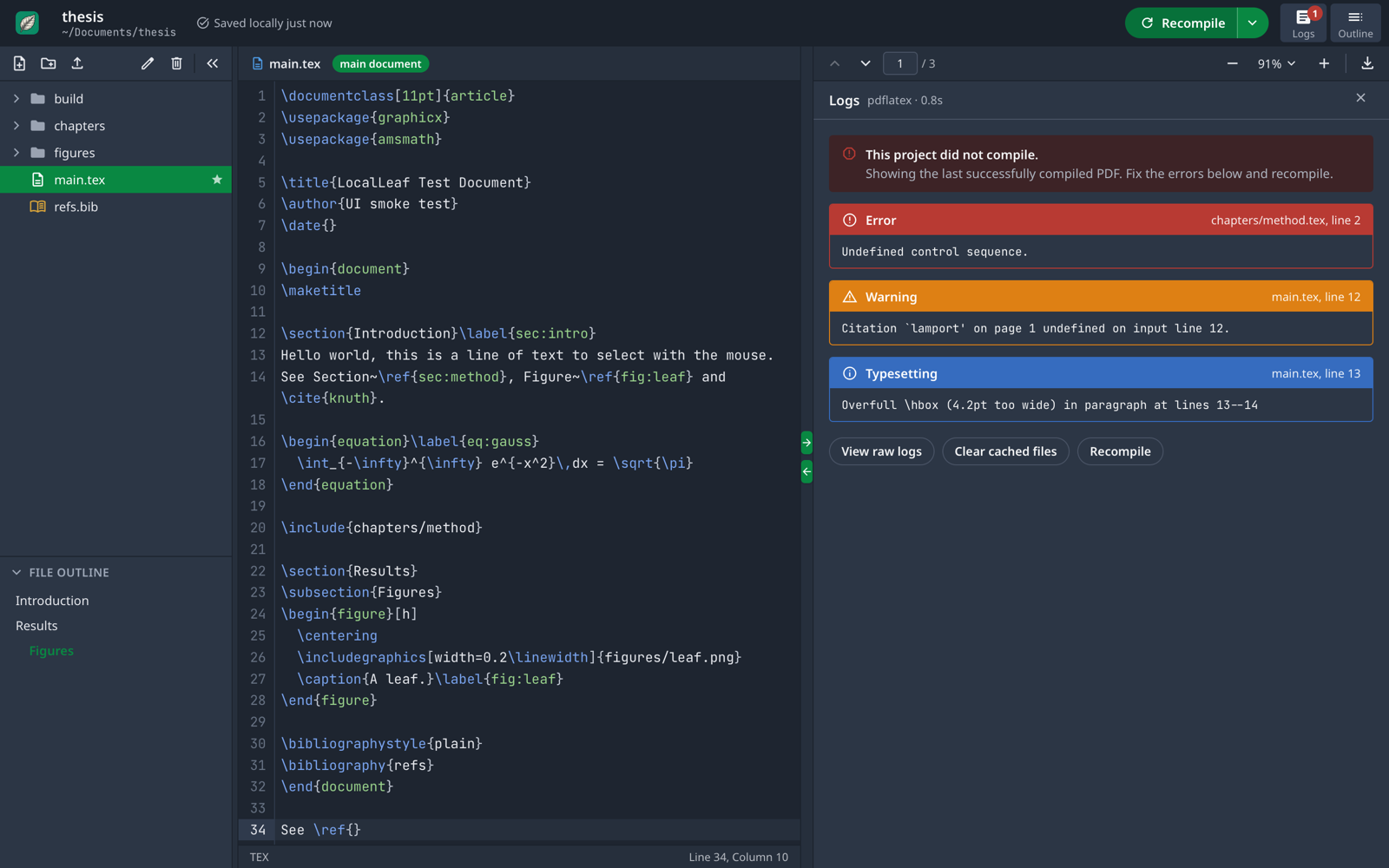
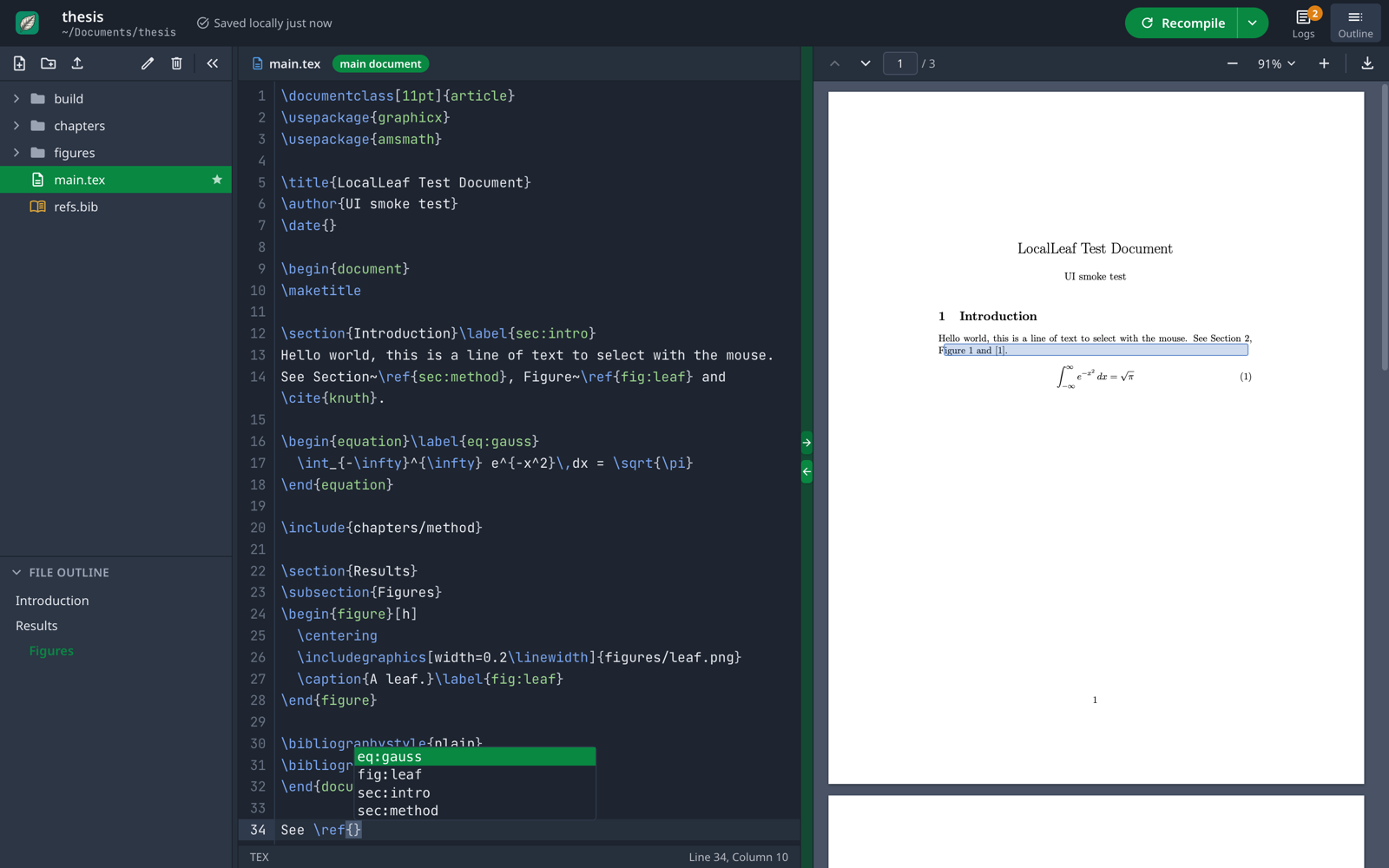
| Editor | CodeMirror 6 with LaTeX highlighting, autocompletion for commands, environments, \ref labels, \cite keys (from your .bib files), \includegraphics and \input paths; Vim and Emacs keybindings; five editor themes; JetBrains Mono. |
| PDF preview | PDF.js with continuous scroll, zoom, fit width/page, page navigation, selectable text and download. |
| SyncTeX | Jump from the cursor to the PDF and back (arrows on the divider, double-click in the PDF, or ⌥⌘→/⌥⌘←). |
| Logs | Errors, warnings and bad boxes as clickable cards that open the right file at the right line, with hints for common local issues (wrong engine for fontspec, missing fonts, files renamed by the OS). |
| Compile options | Engine choice, auto-compile, fast draft mode, stop-on-first-error, recompile from scratch. The engine a preamble needs is detected on first open. |
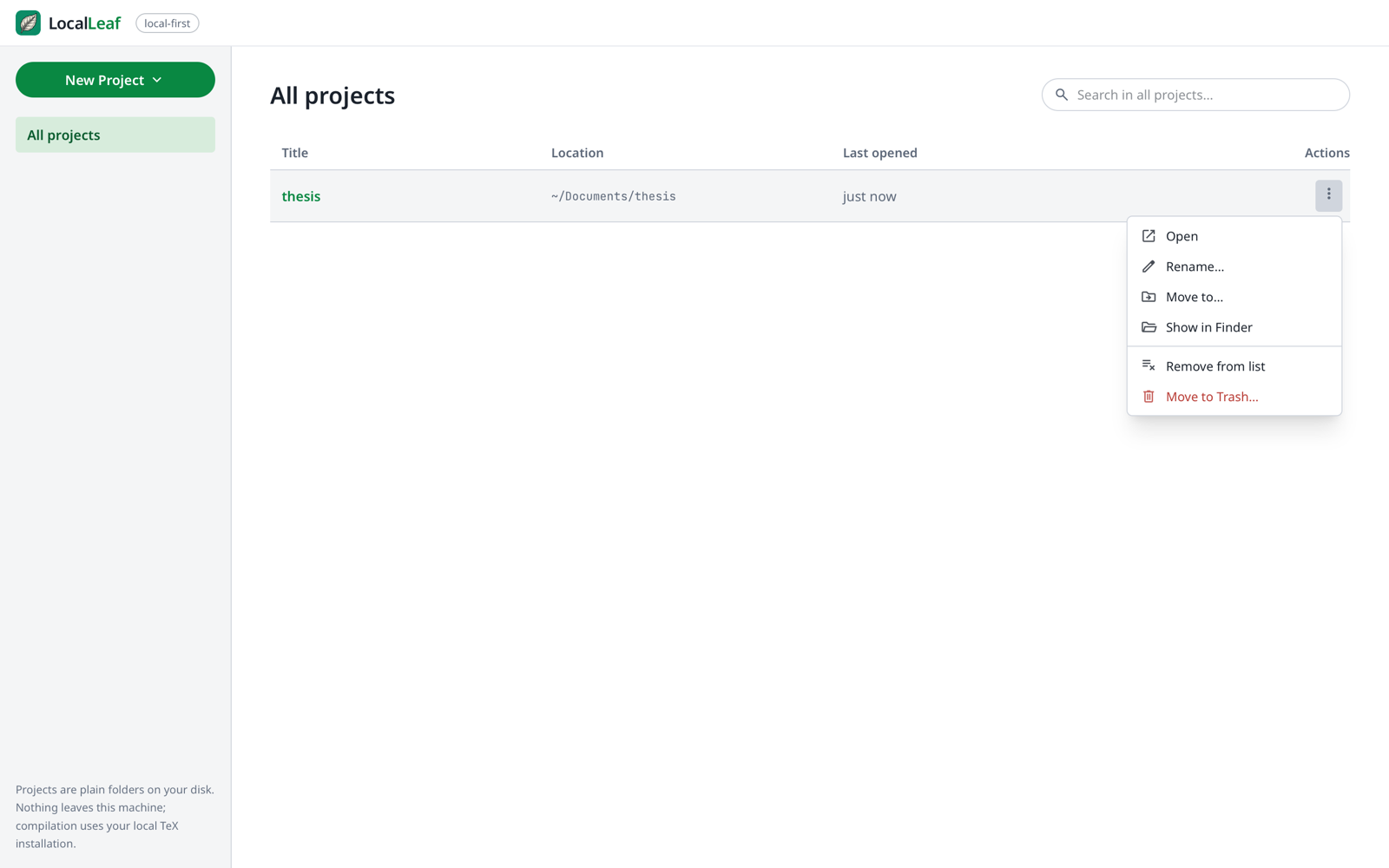
| Projects | Dashboard with search; per-project menu to open, rename, move (also across disks), reveal in Finder/Explorer, or move to the Trash. Per-project settings (main document, compiler, options) are stored in the project itself. |
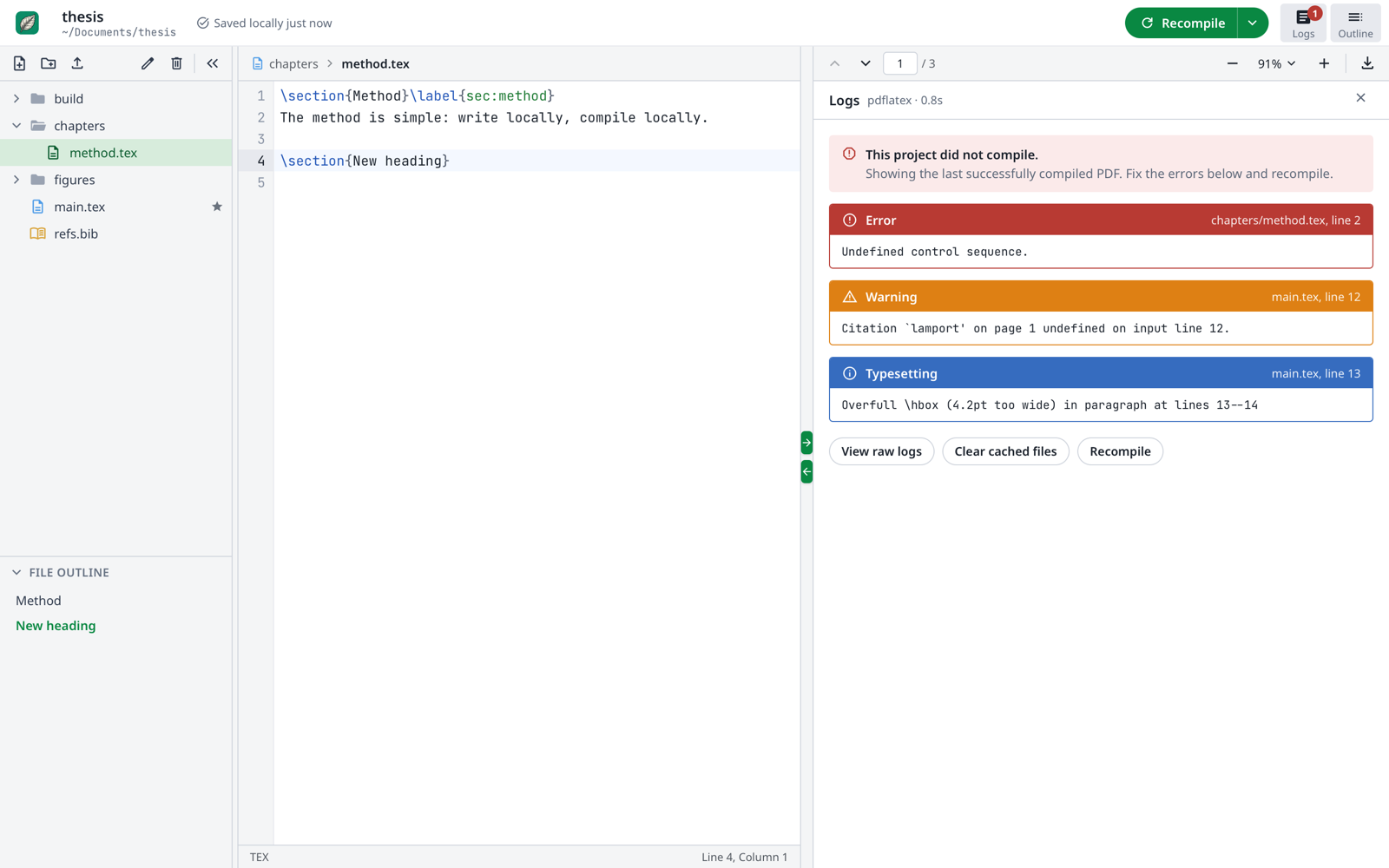
| Files | New file/folder, upload (or drag from Finder), rename, delete, drag-and-drop between folders, file outline of \sections. |
| Menu bar | Native menus with standard shortcuts: File, Edit, Insert (sections, lists, figures, tables, equations, citations…), View (layouts, panels, font size, theme), Project (compile, engine, SyncTeX, word count). |
| Local-first | Autosave to disk (also right before quitting), live reload when files change outside the app (another editor, git pull, an AI agent), and a prompt instead of a silent overwrite when a file changes on disk while you have unsaved edits. |
| Accessibility | Keyboard-navigable menus and dialogs, light and dark themes, adjustable editor font and size, optional system spell checking. |
 |
 |
 |
 |
Installation
Download the package for your system from the latest release.
| Platform | Package |
|---|---|
| macOS 11+ (Apple Silicon and Intel) | LocalLeaf_<version>_universal.dmg |
| Windows 10/11 x64 | LocalLeaf_<version>_x64-setup.exe (or .msi) |
| Linux x64 | .AppImage, .deb or .rpm |
| Command-line MCP server only | texcraft-core-<platform>.tar.gz / .zip |
[!NOTE]
The builds are not code-signed yet, so the OS will warn you the first time.
macOS: right-click LocalLeaf in Applications → Open → Open (or runxattr -dr com.apple.quarantine /Applications/LocalLeaf.app).
Windows: in the SmartScreen dialog choose More info → Run anyway.
Linux AppImage:chmod +x LocalLeaf_*.AppImagebefore running it.
You also need a TeX distribution
LocalLeaf does not bundle TeX; it uses the one on your system.
| System | Recommended |
|---|---|
| macOS | MacTeX (full), or brew install --cask mactex-no-gui |
| Windows | TeX Live or MiKTeX |
| Linux | sudo apt install texlive-full (Debian/Ubuntu) or sudo dnf install texlive-scheme-full (Fedora) |
| Any | Tectonic (brew install tectonic), a self-contained engine that downloads packages on demand |
SyncTeX navigation uses the synctex command that ships with TeX Live and MiKTeX. Settings → Compiler shows which engines LocalLeaf found.
[!TIP]
Coming from Overleaf? Download your project as a ZIP, unzip it and open the folder. If it doesn't compile, check Project → Compiler (Overleaf projects usingfontspecusually need XeLaTeX or LuaLaTeX) and that the fonts the document uses are installed. The logs explain both cases.
Usage
- New Project creates a folder with a
main.tex; Open Folder… (⌘O) opens any existing LaTeX project. - Write in the editor: files save automatically to disk.
- Press Recompile (⌘↵, or Ctrl+Enter on Windows/Linux). Build output goes to a hidden
.texcraft/build/folder inside the project, so your sources stay clean (add.texcraft/to your.gitignore). - Click an error in Logs to jump to it; use the SyncTeX arrows to move between code and PDF.
The main document is detected automatically (main.tex, or the first root file with \documentclass); change it with Project → Set Current File as Main Document or in Settings → Compiler. These per-project choices are saved in .texcraft/settings.json, where the MCP server reads them too. The full shortcut list is in Help → Keyboard Shortcuts.
| Action | Shortcut |
|---|---|
| Recompile / Save and recompile | ⌘↵ / ⌘S |
| Recompile from scratch | ⇧⌘↵ |
| Go to location in PDF / in code | ⌥⌘→ / ⌥⌘← |
| Bold / Italic / Toggle comment | ⌘B / ⌘I / ⌘/ |
| Find / Find and replace / Go to line | ⌘F / ⌥⌘F / ⌘L |
| Insert section / subsection / equation / link | ⌥⌘1 / ⌥⌘2 / ⌥⌘E / ⌘K |
| Layout: editor & PDF / editor / PDF | ⌘1 / ⌘2 / ⌘3 |
| File tree / Outline / Logs | ⌥⌘B / ⇧⌘O / ⇧⌘L |
| Editor font size | ⌘= / ⌘- / ⌘0 |
| New file / New project / Open folder | ⌘N / ⇧⌘N / ⌘O |
| Settings | ⌘, |
AI agents (MCP)
LocalLeaf exposes a project to AI agents through the Model Context Protocol, with four tools: compile_tex, read_project_file, write_project_file and list_available_engines. The agent works on the same files and settings as the editor: compile_tex with no arguments builds your main document with the compiler you chose, and its compilations take turns with yours. Files inside .git/ are off limits. With Claude Code, for example:
claude mcp add localleaf -- /Applications/LocalLeaf.app/Contents/MacOS/localleaf --mcp --root ~/Documents/thesis
The exact command for the open project is in Help → Connect an AI Agent. Edits made by the agent appear in the editor immediately, and the PDF refreshes when the agent recompiles. See docs/MCP.md for the tool reference and setup for other clients.
Building from source
Requirements: Rust (stable), Node.js 20+, a TeX distribution, and the Tauri prerequisites for your OS (Xcode Command Line Tools on macOS, WebView2 and MSVC on Windows, webkit2gtk-4.1 on Linux).
git clone https://github.com/leoaliperti/LocalLeaf.git
cd LocalLeaf

# Standalone CLI / MCP server
cargo build --release -p texcraft-core
./target/release/texcraft-core            # system check: lists detected TeX engines
./target/release/texcraft-core --mcp      # MCP server on stdio for the current folder

# Desktop app
cd desktop
npm install
npm run app                               # development (tauri dev)
npm run app -- -- ~/Documents/thesis      # development, opening a project directly
npm run app:build                         # installers in target/release/bundle/
npx tauri build --target universal-apple-darwin   # universal macOS build
Tests
cargo test --workspace                    # log parser, project sandbox, SyncTeX, folder moves
cd desktop && npm test                    # LaTeX source analysis
npm run typecheck
npm run dev &                             # UI smoke test in WebKit (bundled fixture project),
node e2e/ui-smoke.mjs                     # screenshots in desktop/e2e/screenshots
The release workflow builds and attaches the macOS, Windows and Linux packages whenever a GitHub release is published.
Project layout
LocalLeaf/
├── src/                    texcraft-core: library + CLI
│   ├── compiler.rs         runs TeX engines, bibtex/biber, reruns; parses logs
│   ├── project.rs          sandboxed file access inside a project folder
│   ├── synctex.rs          source ↔ PDF lookups via the synctex CLI
│   └── mcp_server.rs       MCP server (JSON-RPC 2.0 over stdio)
├── desktop/                LocalLeaf desktop app
│   ├── src/                Vue 3 + TypeScript + Tailwind UI (CodeMirror 6, PDF.js)
│   ├── src-tauri/          Tauri v2 backend: IPC commands, menu bar, file watcher
│   └── e2e/ui-smoke.mjs    WebKit UI smoke test
├── examples/smoke.rs       compiles a project and exercises SyncTeX
└── docs/                   MCP reference, architecture, screenshots
More detail in docs/ARCHITECTURE.md.
Roadmap
Planned work, including git versioning in the interface and installing missing LaTeX packages from the logs, is listed in ROADMAP.md.
Limitations
LocalLeaf is a single-user, local editor. It does not have Overleaf's real-time collaboration, track changes, comments, project history or rich-text (visual) editor. Use git for history and sharing. Windows and Linux builds are produced by CI and have had less hands-on testing than macOS; please open an issue if something doesn't work.
Contributing
Issues and pull requests are welcome. See CONTRIBUTING.md.
License and credits
LocalLeaf is released under the MIT License.
The interface is inspired by Overleaf. LocalLeaf is an independent project, not affiliated with or endorsed by Overleaf. Built with Tauri, Vue, CodeMirror, PDF.js (its text-layer stylesheet is included under the Apache-2.0 license), Material Symbols and JetBrains Mono.
Yorumlar (0)
Yorum birakmak icin giris yap.
Yorum birakSonuc bulunamadi