cerberus-term
Health Warn
- License — License: MIT
- Description — Repository has a description
- Active repo — Last push 0 days ago
- Low visibility — Only 5 GitHub stars
Code Fail
- fs module — File system access in .github/workflows/build.yml
- rm -rf — Recursive force deletion command in install.sh
Permissions Pass
- Permissions — No dangerous permissions requested
No AI report is available for this listing yet.
A GUI terminal multiplexer with remote control — native panes that run any CLI (Claude Code, Copilot, Codex, aider, a shell), your project's markdown rendered right in the pane, and approve, deny or prompt your AI sessions from your phone over Telegram. Notifications tested on macOS and Windows; Linux is unverified.

A GUI terminal multiplexer with remote control — split panes with the mouse or tmux-style keys and run whatever you like in each one: Claude Code, Copilot CLI, Codex, opencode, aider, a plain shell. Read the project's markdown right there in the pane, and when an AI session needs you, approve, deny or prompt it from your phone over Telegram, straight into the right pane.
native panes · no tmux · project docs in-app · permission prompts · risk-tagged commands · tabs · session restore · light/dark





Install · First run · Controls · Docs in the pane · From your phone · Config · Contributing
Your company won't enable remote control? No problem — Cerberus is your
three-headed guard dog, and it works the night shift for free. 🐕🦺
A multiplexer first: native panes, no tmux, every pane a pty Cerberus owns — and
whatever you'd type in a terminal runs in one. Claude Code in this pane, Copilot
CLI in that one, Codex, opencode, aider, a plain shell, a build watcher.
Every pane also carries its project's documentation. The document button lists
the markdown of whatever project that pane sits in and renders it over the
terminal — no browser, no second window, and the session underneath keeps
running. See your project's docs, in the pane.
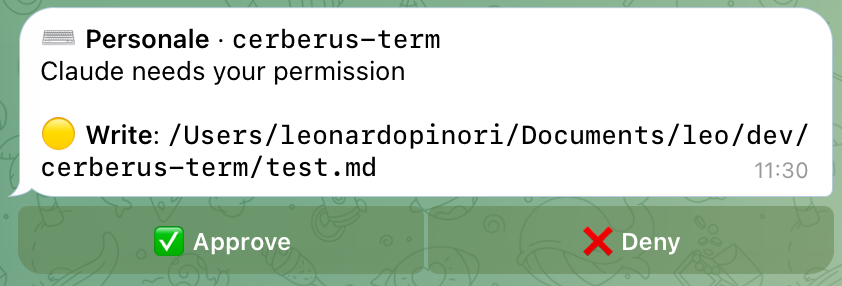
Then the remote half. When an AI session needs you — a permission prompt, waiting
for input — it pushes a Telegram notification. From your phone you
approve / deny, or type a prompt that lands in the right pane. Every
pending command is tagged with a risk icon 🟢 🟡 🔴 so you know what you're
approving. Approve something remotely and the result is pushed back to you. Which
agents can push, on which OS, is in what pushes where.
flowchart LR
    subgraph app["Cerberus (Electron)"]
        A["pane · claude<br/>└ notify.sh / notify.ps1"]
        B["pane · copilot<br/>└ copilot-notify.sh"]
        D["daemon 127.0.0.1:8898<br/>enrich + push"]
        A --> D
        B --> D
    end
    subgraph tg["Telegram"]
        T["🔔 + 🟢🟡🔴<br/>approve · deny · reply"]
    end
    D -->|push| T
    T -->|"keystroke / prompt"| A
Install
macOS and Linux — one line
curl -fsSL https://raw.githubusercontent.com/leodudedev/cerberus-term/main/install.sh | sh
Installs Cerberus.app into /Applications on macOS, or the AppImage into~/.local/share/cerberus-term plus a menu entry on Linux. Run the same command
again to update; the script checks the SHA-256 of what it downloads against theSHA256SUMS-*.txt published with the release, and refuses to touch an install
while the app is running.
Read it first if you'd rather — it's install.sh in this repo, and--version X.Y.Z pins a specific release.
Manual download
| OS | File |
|---|---|
| macOS (Apple Silicon) | Cerberus-mac-arm64.dmg |
| Windows | Cerberus-win-x64.exe |
| Linux (Debian/Ubuntu) | Cerberus-linux-amd64.deb |
| Linux (any distro) | Cerberus-linux-x86_64.AppImage |
Or see all assets on the releases page.
Builds aren't signed or notarized yet, and a browser download is what
attaches the Gatekeeper quarantine that makes macOS call the app
"damaged". Clear it once, then open normally:xattr -cr /Applications/Cerberus.appOn macOS 15 and later, "Open Anyway" lives in System Settings → Privacy &
Security; the old right-click → Open no longer works. The install script above
sidesteps all of this, becausecurldoesn't set the quarantine flag.Windows: dismiss the SmartScreen prompt — there's no equivalent shortcut
there. Signing and notarization are on the list.
Requirements
- macOS, Windows, or Linux. Panes are native on all three — ConPTY on
Windows, a pty elsewhere — so anything runs in a pane: Claude Code, Copilot
CLI, Codex, opencode, aider, a shell,htop, whatever you'd type in a
terminal. The Telegram half is the part that varies, because it depends on each
CLI's own hook support: see what pushes where. - An AI CLI in your
PATH. Claude Code,
GitHub Copilot CLI and
Codex CLI push out of the box: Cerberus
offers to register its notification hooks in their config the first time you
open it, and writes to nothing you don't tick — see
what the app writes for exactly what
changes. Codex also asks you, separately and inside Codex itself, to trust
the hook the first time it fires — see the note in that section. Any other
CLI still runs in a pane; it just won't push. - A Telegram bot for the remote half: talk to
@BotFather for a token, and to
@userinfobot for your chat ID. Without them
Cerberus is a plain multiplexer — nothing is pushed anywhere.
What pushes where
Panes work the same everywhere. What follows is only about the Telegram half, and
it says what has actually been exercised rather than what ought to work.
| Panes | Claude Code → Telegram | Copilot CLI → Telegram | Codex CLI → Telegram | |
|---|---|---|---|---|
| macOS | tested | tested | tested | tested |
| Windows 10/11 | tested | tested since 0.10.0 | not offered | not offered |
| Linux | tested headless, GUI not | plumbing tested, real CLI not | plumbing tested, real CLI not | plumbing tested, real CLI not |
- Windows got the hooks in 0.10.0, on a physical machine: consent, the four
Claude Code events, notifications, remote approve/deny, and the guard that
refuses to type intossh. Copilot CLI and Codex CLI are deliberately left
out — see below. - Linux is the honest gap. In a container the daemon, the registry, the pty
seam, the guard and all three hook scripts pass on a real Linux pty. What
nobody has done yet is run the app's window on a Linux desktop, or drive a
realclaude/copilot/codexthere — the code path is the same POSIX one
macOS uses, so this is unverified rather than doubtful. Reports welcome. - Codex CLI approvals answer natively, not via keystrokes: the hook itself
returns allow/deny to Codex, so there's no on-screen dialog to parse the way
Claude's and Copilot's are. Approve/Deny in Telegram has ~25s to arrive; past
that the hook abstains and Codex's own local prompt takes over as usual. The
same happens immediately, without the wait, whenever there is no notification
to answer — the project is muted, the push was below itsminRisk, or you
haven't set up a bot at all — so installing the Codex hooks without Telegram
costs you nothing.
First run
- Open the app. It asks, once, which agent CLIs may have their notification
hooks registered, naming the file it would edit for each. Ticking none is a
valid answer and is remembered; Settings can change it later. - Cmd+, (or menu → Settings…) → set your Telegram bot token and
chat ID, and pick the bot's language (English or Italian). Restart the app
so the bot starts polling with the new token. - In any pane run
claude. When the session needs you, you get a Telegram push
with 🟢 🟡 🔴 risk and Approve / Deny / prompt buttons that land in that pane.
What the app writes outside itself
Two places, and nothing else:
1. ~/.cerberus-term/hooks/ — notify.sh, copilot-notify.sh andcodex-notify.sh on macOS and Linux, notify.ps1 on Windows, copied here from
the app bundle on every launch, overwriting the previous copies. This
directory is the stable home for them: hooks run in every session of that CLI,
including ones outside Cerberus, so a path pointing inside the .app would break
them all the day you move or delete it.
2. The config of the agent CLIs you tick — currently~/.claude/settings.json, ~/.copilot/settings.json and ~/.codex/hooks.json.
Nothing is written to any of them until you say so: the first launch shows a
dialog listing the agents found on this machine, the exact file and events for
each, and you choose. Decline and the answer is remembered — you won't be asked
again, and nothing outside the app is touched.
An agent is only offered if its config folder already exists. If you don't have
Copilot, ~/.copilot is never created, and the same goes for ~/.claude and~/.codex. Settings lists every file by name with its real state, and is where
you change your mind later — including for an agent you install afterwards,
which shows up there unticked rather than being enabled on your behalf. Codex is
also withheld — with a reason shown in Settings — on a machine whose~/.codex/config.toml already configures hooks inline: writing ours on top
would make Codex warn about the collision on every launch, so we leave it to be
added by hand instead.
Entries are appended, in each CLI's own shape. Claude Code, underPreToolUse, PostToolUse, Notification and SessionEnd:
{ "matcher": "", "hooks": [{ "type": "command", "command": "/Users/you/.cerberus-term/hooks/notify.sh" }] }
Copilot CLI, under preToolUse, notification and agentStop:
{ "type": "command", "bash": "/Users/you/.cerberus-term/hooks/copilot-notify.sh", "timeoutSec": 5 }
Codex CLI, under PreToolUse, PostToolUse, PermissionRequest andSessionEnd in its own hooks.json (no matcher, so it fires on every tool):
{ "hooks": [{ "type": "command", "command": "/Users/you/.cerberus-term/hooks/codex-notify.sh", "timeout": 5, "statusMessage": "Cerberus" }] }
The timeout differs per event, because Codex kills a hook when it expires:PermissionRequest gets 35s — it has to outlive the window in which your
phone can answer it — while SessionEnd gets 3s, the most Codex allows
there before it clamps the value and warns about it on every startup.
On Windows the same Claude Code entry reads the PowerShell script and runs it in
the shell the CLI already started, which is both faster than spawning a second
PowerShell and immune to the execution policy that blocks script files by
default there:
{ "matcher": "", "hooks": [{ "type": "command", "command": "Invoke-Expression (Get-Content -Raw 'C:\\Users\\you\\.cerberus-term\\hooks\\notify.ps1')" }] }
Copilot CLI and Codex CLI are not offered on Windows yet. Copilot's field is
called bash, and nobody has measured what runs that value there — a
PowerShell line in a field that turns out to be literally bash would fail on
every tool call. Claude Code's command field was measured: it goes through
PowerShell. Codex is simply unmeasured there too. Until that experiment is
done for each, the target is excluded rather than guessed at.
Codex also requires one manual step, inside Codex itself. Non-managed
command hooks must be reviewed and trusted from Codex's own /hooks screen
before they run at all — Cerberus cannot do this for you, and there is no error
if you skip it, only silence. Settings shows awaiting trust next to Codex
until you do. Once trusted, refreshing the script on every launch does not
retrigger the review — only editing the hook definition itself would.
Nothing else in those files is touched — your model, your permissions, and any
hooks you or another tool registered stay exactly as they are, and ours is added
next to them rather than over them. Before the first write the whole file is
copied to settings.json.cerberus-bak, and the write itself goes through a temp
file and a rename, so an interrupted launch can't truncate it. Re-running is a
no-op once the entry is there.
Outside a Cerberus pane the scripts exit immediately — they're gated onCERBERUS_PANE_ID, which only our panes set — so a claude in VS Code or a
plain terminal is unaffected.
To opt out later: untick the agent under Agent CLI hooks in Settings.
That removes our entries from that file right away and stops re-adding them at
launch; a tickbox is needed rather than a one-off button because otherwise the
next start would just put them back. Or restore the .cerberus-bak files by
hand.
Without the hooks the app is still a working terminal multiplexer; what you lose
is everything that depends on a session reporting back — the pane flash on a
permission prompt, and the Telegram push.
Controls
| Action | Mouse / button | Keyboard |
|---|---|---|
| Split right / down | the split buttons in the pane header | Ctrl+B then % / " (or Cmd+D / Cmd+Shift+D) |
| Kill pane | the close button, or right-click the pane | Ctrl+B then x (or Cmd+K) |
| Zoom pane to the whole tab | the expand button | Ctrl+B then z |
| Focus pane | click | Ctrl+B then h/j/k/l or arrows |
| Resize | drag the divider | Ctrl+B then H/J/K/L |
| New / close tab | + / ✕ in the tab bar |
Cmd+T / Cmd+W |
| Next / previous tab | click the tab | Cmd+Shift+] / Cmd+Shift+[ |
| Jump to tab 1–9 | click the tab | Cmd+1 … Cmd+9 |
| Reorder tabs | drag the tab | — |
| Star this pane's cwd | the star button, or right-click the pane | — |
| Jump to a favorite | the heart button, or right-click the pane | — |
| Read the project's markdown | the document button in the pane header | ↑ ↓ and Enter in the list, Esc to close |
| Clear a pane's buffer | right-click the pane | — |
Edit .cerberus.json |
the sliders button in the pane header | — |
| Mute every Telegram push | ✈ at the right of the tab bar | — |
| Copy / paste | — | Cmd+C / Cmd+V (Ctrl+Shift+C / Ctrl+Shift+V) |
| Find in pane | menu → Edit → Find… | Cmd+F (Ctrl+Shift+F) |
| Find in the open document | the find button in the viewer bar | Cmd+F (Ctrl+Shift+F) |
| Stop loading a document's remote images | the globe button in the viewer bar | — |
| Newline without submitting | — | Shift+Enter |
| Settings | menu → Settings… | Cmd+, |
| Toggle theme | menu → View → Toggle Theme | Cmd+Shift+L |
| Keyboard shortcuts | ? at the right of the tab bar, or menu → Help |
Cmd+/ (Ctrl+Shift+/), or Ctrl+B then ? |
Where two keys are listed, the second is Windows/Linux: Ctrl+C, Ctrl+F and
friends are control characters the shell owns, so those bindings move toCtrl+Shift. The Ctrl+B leader arms for two seconds; Esc cancels it.
The ? panel is the complete list, resolved for the machine it's opened on, and
it carries a few bindings this table leaves out — split aliases, arrow resizing,
window and fullscreen keys.
Find searches the focused pane's scrollback: Enter and Shift+Enter walk the
matches, Aa and .* toggle case sensitivity and regex, Esc closes.
The document button reads the docs without leaving the pane — see
your project's docs, in the pane.
Dropping files onto a pane types their absolute paths into the session.
The layout, per-pane cwds, tabs, favorites, and theme are restored on relaunch.
Panes also survive a window reload — the shells keep running and reattach.
Leftover processes
Closing a pane kills its shell, and the hangup takes down whatever was running
in the foreground with it. What it can't take down is anything detached from
that shell — a nohuped build, a disowned job, a dev server started with &
in a pane you closed hours ago. Those keep running after the app is gone.
So on quit Cerberus looks: it notes what the panes were running, kills the
ptys, and a moment later checks who is still alive. Survivors are listed by
name and pid, and you decide — Leave running or Terminate (SIGTERM,
then SIGKILL for whoever ignores it). Tick Always do this to stop being
asked, or set it up front under Leftover processes on quit in Settings:
ask, terminate, or leave.
Real daemons are out of scope. A process that called setsid or double-forked
went out of its way to outlive its terminal, so it's left alone.
Do not disturb
The ✈ button at the right of the tab bar is a global do-not-disturb: while the
plane shows crossed out, no session pushes to Telegram, so you can work at the
keyboard undisturbed, and one click restores every session at once when you walk
away. Clicking it opens a dialog spelling out what changes and what doesn't.
The same button is where the bot reports a problem: if the connection to
Telegram goes down — the token was revoked, or a second Cerberus is polling with
it — the plane turns red and its tooltip says which. It stays clickable, because
do-not-disturb is a local switch and works either way.
It's independent of the per-project mute and of /mute from the chat —
turning it off leaves those exactly as they were. Panes still flash locally when
a session asks for a permission, and the state survives a restart. Without a bot
token and chat ID the button is dimmed and inert; set them in Settings and it
wakes up without a restart.
Your project's docs, in the pane
The document button in a pane header lists the markdown of the project that pane
is sitting in — the repo root plus whatever folders you configure (docs/,doc/, documenti/, .claude/ by default), most recently touched first, withCLAUDE.md, AGENTS.md and README.md pinned on top. Type to filter, arrows
and Enter to pick.
The document opens over the pane: headings, tables, syntax-highlighted code and
mermaid diagrams, in the app's own light/dark palette. Cmd+F searches inside
it, links between documents are followed in place with a back button, the expand
button takes it to the whole window, and Esc drops you back to the CLI.
The pane is never resized while a document is open, so whatever TUI is running
underneath never redraws — reading the spec doesn't disturb the agent working
against it. Nothing outside the project root is ever listed or read, and a
document's own screenshots are inlined from disk rather than fetched.
Images a document points at over the network — a README's badge row — are
pulled by the app outside the browser session, so no cookie of yours goes out
with them, over https only and capped in size and time. The globe button in the
viewer bar turns that off per machine, and remote images fall back to chips
carrying their alt text.
From your phone
Each notification carries the session, the risk icon, and the pending command:
| Button | What it does |
|---|---|
| ✅ Approve | accepts this one prompt |
| ♾️ Always | accepts, and stops asking for that tool in this session |
| ❌ Deny | sends Escape, cancelling the pending action |
Anything you type in the chat is forwarded to a session as a prompt: reply to
a notification to target that session, or send a bare message to reach the most
recent one. Slash commands the bot doesn't own (/model, /compact, …) are
forwarded to the CLI verbatim.
The bot's own commands:
| Command | Effect |
|---|---|
/mute [duration] |
mute the targeted project — /mute 2h, or no argument for indefinitely |
/unmute |
unmute the targeted project |
/muted |
list muted projects and when they come back |
Bot-facing text is available in English and Italian (Settings → language, orCERBERUS_LANG=it). Text coming from the CLI itself is passed through untouched,
in whatever language the session speaks.
Per-project config
Drop a .cerberus.json in a project (edit it via the pane's ⚙ gear) to override
the global settings for sessions running there. It's picked up from the pane's
cwd or any directory above it:
| Key | Meaning |
|---|---|
mute |
silence notifications for this project |
chatId |
route its pushes to a different Telegram chat |
minRisk |
only notify at/above this risk (safe | caution | danger) |
notifyIdle |
set to false to notify only on permissions, never on waiting-for-input |
docs.globs |
folders the document list scans, relative to the project root (replaces the global list) |
Security
The daemon binds loopback only (127.0.0.1) and is token-gated; Telegram
callbacks are checked against your allowed chat(s); CLI hooks are gated onCERBERUS_PANE_ID, so they fire only inside a Cerberus pane and coexist with any
tmux-based setup. Your bot token and session state are stored in plaintext,
like a .env — anyone with access to your user account can read them.
Full threat model, what the token gate does and does not defend against, and how
to report a vulnerability: SECURITY.md.
Development
pnpm install     # postinstall rebuilds node-pty for the Electron ABI
pnpm dev         # launch the app (HMR)
pnpm typecheck
pnpm test        # vitest, unit tests over src/core + the pure renderer modules
Tests live in tests/ and cover the Electron-free logic — risk classification,
escape-sequence stripping, permission-dialog parsing, the pane tree, and the
workspace snapshot migrations. typecheck and test both run in CI.
Build installers locally:
pnpm run dist          # current OS
pnpm run dist:mac      # / dist:win / dist:linux
Use
pnpm run pack/dist, notpnpm pack/dist—packcollides with a
pnpm builtin.
Running several agents
Two ways to run more than one agent at once, depending on whether the agents
need to ask you anything.
Named interactive sessions
Give each agent its own pane and its own name. Rename every Claude Code session
with /rename — orchestrator, backend, reviewer — and let them hand work
to each other however your agent supports it (a prompt, a shared file, a
message to another session). Nothing to set up on Cerberus's side: every pane
is a real session, so every permission prompt still reaches your phone, and the
name rides along in the header — 🦈 Claude · my-app · reviewer — so you know
which one is asking without opening the chat.
This is the simpler of the two and the one to reach for first.
Headless workers in follower panes
⚗️ Experimental. The API works but is young and may change. macOS and
Linux only.
For batch runs — a queue of claude -p jobs that never prompt — one interactive
session drives the queue and Cerberus shows each worker live in a read-only
follower pane that auto-tiles into a grid. The driver opens those panes through
the daemon's POST /pane; claude -p stream-json output is rendered readably
rather than as raw JSON. Workers run with CERBERUS_PANE_ID unset so they never
notify — only the driving session does, and its human gates (merge/push
approvals) still arrive on your phone.
The driver is agent-agnostic: each task carries its own command, so you can mix
Claude, Copilot, and plain scripts in one queue.
→ examples/ has the full walkthrough plusorchestrate.sh, a minimal crash-resumable driver you
can copy into a project and run.
Stack
Electron · xterm.js · node-pty · TypeScript · electron-vite · electron-builder ·
grammY (Telegram). The backend sits behind a thin TerminalBridge seam, so a
future Tauri/Rust swap is a module replacement, not a rewrite.
Contributing
Issues and pull requests are welcome — bug reports, platform quirks (Windows and
Linux especially), and hooks for other AI CLIs are all useful. See
CONTRIBUTING.md for setup, conventions, and how releases work.
Release notes live in CHANGELOG.md.
License
MIT — see LICENSE.
Reviews (0)
Sign in to leave a review.
Leave a reviewNo results found