ai-pulse
Health Gecti
- License — License: MIT
- Description — Repository has a description
- Active repo — Last push 0 days ago
- Community trust — 28 GitHub stars
Code Basarisiz
- rm -rf — Recursive force deletion command in Scripts/make-app.sh
- rm -rf — Recursive force deletion command in Scripts/make-gifs.sh
- process.env — Environment variable access in pi/aipulse-pi.ts
- network request — Outbound network request in pi/aipulse-pi.ts
Permissions Gecti
- Permissions — No dangerous permissions requested
Bu listing icin henuz AI raporu yok.
Ambient macOS light strip for AI coding agents — a Dock-adjacent pill of eight LEDs showing whether anything is working, waiting, finished, or broken
AI Pulse


Where it lives: the unused space beside the Dock — here on the right, streaking cyan while an agent works.
An ambient macOS light strip for AI coding agents, inspired by the
SidePulse hardware gadget — but as an app. A slim strip of eight virtual
LEDs floats in the unused space beside the Dock and shows, with a single
aggregate signal and no per-model distinction, whether anything is running,
waiting for you, finished, or broken:
 Working — a cyan comet streaks while an agent runs |
 Needs you — breathes orange when an agent waits for input or approval |
 Failed — double-blinks red when a session breaks |
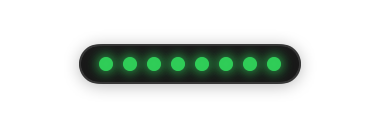 Finished — all eight settle to solid green |
 Idle — a slow aurora drifts while sessions sit quiet |
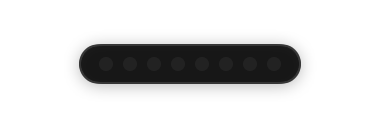 Off — dark when nothing is connected |
Reduce Motion replaces every animation with a static treatment. The
original per-agent icon pill remains available via Settings → Appearance →
Indicator style.
AI Pulse is not embedded in the Dock — macOS exposes no public API for
Dock accessories. It is a Dock-adjacent, borderless, nonactivating NSPanel
positioned from public screen geometry (NSScreen.frame vs visibleFrame).
No private APIs, no Accessibility/Screen Recording permissions, no injection.
Install
Grab AI-Pulse-<version>.zip from the
latest release, unzip,
move AI Pulse.app to /Applications, and launch. Releases are not yet
notarized, so on first launch right-click the app → Open (on macOS 15+,
also allow it under System Settings → Privacy & Security → Open Anyway).
The aipulse CLI ships inside the bundle atAI Pulse.app/Contents/Helpers/aipulse.
Releases are cut automatically when a PR merges: patch by default, minor or
major when the PR carries a release:minor / release:major label.
Requirements (building from source)
- macOS 14+
- Xcode 16+ / Swift 6 toolchain
Build, test, run
swift build                         # build everything (app, CLI, kit)
swift test                          # unit + integration tests (AIPulseKit)
swift run AIPulseApp                 # launch the pill (accessory app: no Dock icon)
swift run AIPulseApp --snapshot DIR  # render pill + hover card PNGs headlessly and exit
swift run aipulse health             # CLI: check the local event service
./Scripts/make-app.sh               # assemble + sign dist/AI Pulse.app
./Scripts/make-gifs.sh              # regenerate docs/ GIFs from headless frames (needs ffmpeg)
docs/pulse-social.gif is a larger, captioned cut of the same state cycle,
made for sharing.
For day-to-day use, run the bundled app rather than the bare binary: the
script signs it with your Apple Development identity, giving a stable code
signature so the Keychain trusts the app across rebuilds (bare swift run
binaries are ad-hoc signed and trigger a Keychain consent prompt after
every rebuild — that is also why AIPULSE_DEV_EPHEMERAL_TOKEN=1 exists for
dev loops). The CLI is embedded at AI Pulse.app/Contents/Helpers/aipulse.
(The app product is AIPulseApp because AIPulse and the aipulse CLI would
collide on case-insensitive filesystems.)
Publishing agent status
AI Pulse listens on 127.0.0.1:7455 (configurable in Settings). On launch it
stores a bearer token in the Keychain and writes ~/Library/Application Support/AIPulse/cli.json (mode 0600) so the aipulse CLI authenticates
without tokens ever appearing in shell commands:
aipulse agent upsert \
  --id "claude-code:$PWD:$SESSION_ID" \
  --name "Claude Code" --provider anthropic \
  --instance "$(basename "$PWD")" \
  --state working --message "Implementing Dock placement"

aipulse agent update \
  --id "claude-code:$PWD:$SESSION_ID" \
  --state waitingForInput --message "Waiting for permission" --sequence 2

aipulse agent remove --id "claude-code:$PWD:$SESSION_ID"
aipulse agents        # list everything the pill knows
Endpoints: POST /v1/agents/upsert, POST /v1/agents/{id}/event,DELETE /v1/agents/{id}, GET /v1/agents, GET /v1/health (health is the
only unauthenticated route). The server binds to the loopback interface
only, caps request sizes, validates every payload (AgentReducer +RequestValidator), rejects unsafe URL schemes, and never executes
anything received in an event.
Dev note: rebuilding the app changes its ad-hoc code signature, so Keychain
reads re-prompt per build; launch with AIPULSE_DEV_EPHEMERAL_TOKEN=1 during
development to skip the Keychain and use a per-run token instead.
Quit via the pill's right-click menu → Quit AI Pulse (or kill the process).
Structure
Sources/AIPulseKit— AppKit-free, fully unit-tested core:Domain/—Agent,AgentState,AgentAction(typed safe actions +
URL scheme allowlist),AgentEventPayload(wire model),AgentIntegrationLevel,StatusPriority(urgency sort).Store/AgentStore— single source of truth; all surfaces render from it.Placement/—ScreenSnapshot, best-effortDockGeometryinference,
purePlacementPolicy(gutter → adjacent → corner fallbacks, clamping).
Sources/AIPulse— the app:Presentation/Pill/— nonactivatingAIPulsePanel, SwiftUI capsule,
per-state icons (glyph + badge + ring, never color alone), hover card.Presentation/AgentList/,Presentation/Settings/— conventional
keyboard-accessible windows.Placement/DockPlacementController— debounced screen-change
observation; no polling.
Status
Milestones 1–3 are complete:
M1 — nonactivating panel, pill UI, mock agents, hover card, context menu.
M2 — bottom/left/right Dock placement, multi-display selection with a
Settings display picker, debounced screen/space-change observation,
off-screen clamping, opt-in auto-hidden-Dock following (best-effort, from
the Dock's public preference domain — read-only, no Dock interaction).M3 —
AgentReducerevent normalization (versioning, ID validation,
sequence/timestamp ordering, duplicate rejection, safe-action mapping),
centralizedStalenessPolicy(working agents stale after a configurable
silence, then demoted to disconnected after a longer one; agents whose
backing process has exited are demoted within one sweep via a PID
liveness check; completed agents expire after a configurable delay;
waiting, approval, and failed states never expire on timers), and persistence to~/Library/Application Support/AIPulse/agents.jsonwith restart restore:
unresolved attention states come back as-is, live-only states come back
asdisconnecteduntil their source reports again.M4 — loopback-only HTTP event service (
LocalHTTPServer), Keychain
bearer token + 0600 handshake file for the CLI, transport validation,
theaipulsepublisher CLI, and end-to-end integration tests. Verified
live: CLI → HTTP → reducer → store → pill in ~150 ms round-trip.M5 — Claude Code adapter (
ClaudeCodeAdapter+aipulse claude-hook),
built against the documented hook lifecycle: SessionStart→idle,
UserPromptSubmit/PreToolUse→working, PermissionRequest and
permission-prompt Notifications→approvalRequired, idle-prompt
Notifications→waitingForInput, Stop→completed, StopFailure→failed,
SessionEnd→removed. One pill entry per session per project. Prompt text,
tool inputs, and assistant output are never decoded, so they can never be
published. The hook always exits 0 and prints nothing.M6 — optional dynamic Dock icon (off by default; Settings →
Appearance). Aggregates the same AgentStore snapshot as the pill viaDockTileAggregator: failure > attention > working > neutral, with anNSDockTilecustom content view for the state treatment andbadgeLabel
showing the count of unacknowledged urgent agents. The floating pill and
the Dock icon are independently toggleable; the icon never bounces.
All six MVP milestones are complete, followed by the pivot to the
lights-first presentation (LightAggregator + LightStripView), keeping
the icon pill as an option.
pi integration
This repository ships pi/aipulse-pi.ts, a pi extension that mirrors the
active pi session onto the light strip exactly like the Claude Code
integration — same loopback API, no changes to AI Pulse needed. See
pi/README.md for the event mapping and install steps
(copy the extension to ~/.pi/agent/extensions/ and /reload).
Claude Code integration
This repository ships .claude/settings.json registering aipulse claude-hook for the relevant hook events (via the debug build path), so
Claude Code sessions in this repo appear in the pill automatically once the
app is running. For system-wide use:
swift build -c release
sudo cp .build/release/aipulse /usr/local/bin/
then register the same hooks in ~/.claude/settings.json, replacing the
command with plain aipulse claude-hook. Claude Code asks you to approve
project hooks the first time it loads them.
Privacy
AI Pulse displays status sent by local agent integrations. It does not read
prompts, terminal contents, editor contents, or application windows.
Contributing
Contributions are welcome — see CONTRIBUTING.md for the
project's design principles, testing expectations, and how to add a new
agent integration. docs/DEBUGGING.md covers the
debugging surface: environment variables, headless snapshots, log
streaming, on-disk state, and fixes for the common failure modes.
License
Yorumlar (0)
Yorum birakmak icin giris yap.
Yorum birakSonuc bulunamadi