copy-buttons
Health Gecti
- License — License: MIT
- Description — Repository has a description
- Active repo — Last push 0 days ago
- Community trust — 18 GitHub stars
Code Basarisiz
- spawnSync — Synchronous process spawning in dev/check-live.ts
- process.env — Environment variable access in dev/check-live.ts
- spawnSync — Synchronous process spawning in dev/check-readers.ts
- process.env — Environment variable access in dev/check-readers.ts
Permissions Gecti
- Permissions — No dangerous permissions requested
Bu listing icin henuz AI raporu yok.
Claude Code copy buttons: copy a reply, a code block or a table with one click
 copy-buttons
One-click copy buttons for Claude Code: on each code block and table while the pointer is over it, and at the end of every answer.
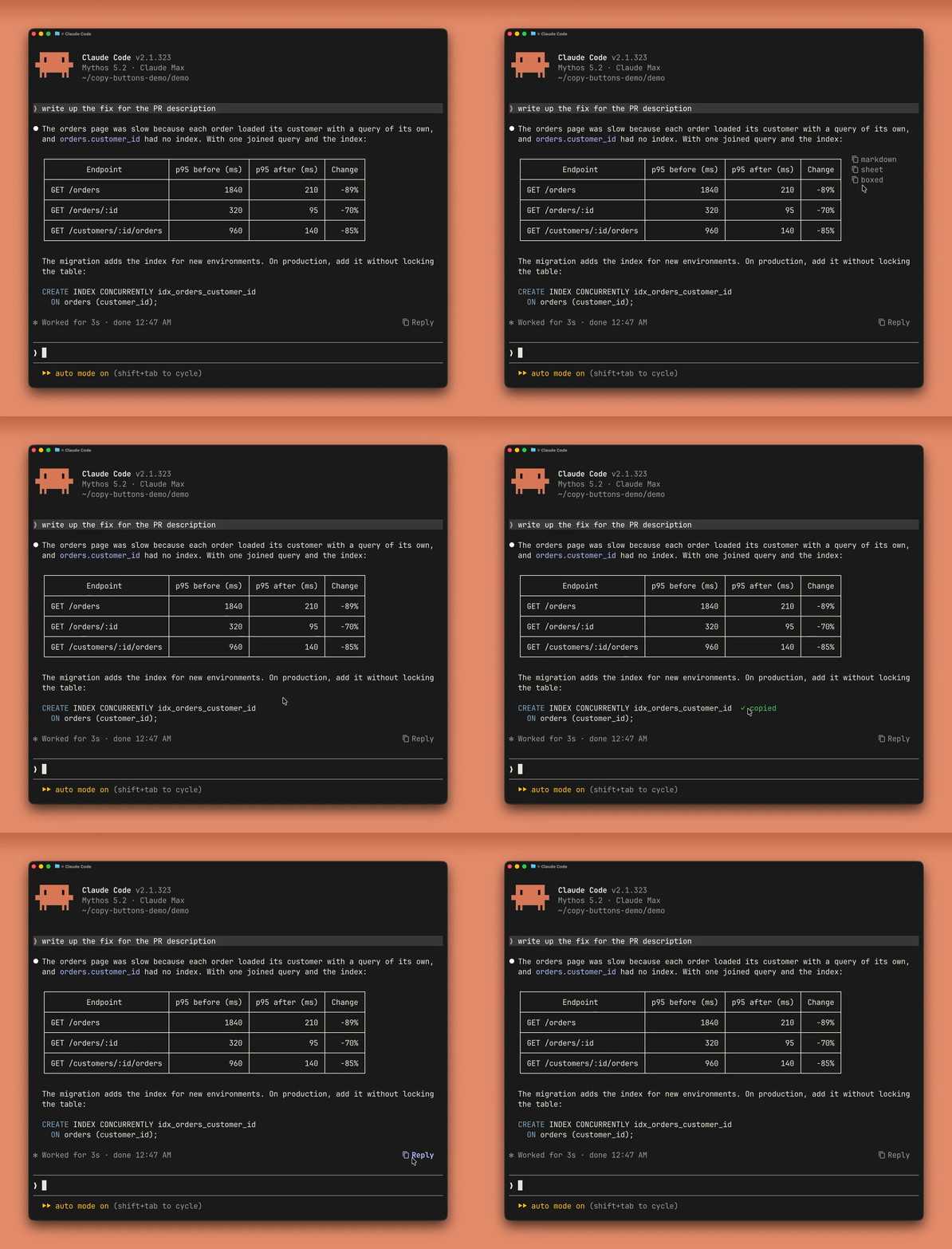
- A table:
markdowncopies it as Claude wrote it,sheetas rows to paste into Excel or Google Sheets,boxedwith its borders as drawn. - A code block:
copycopies just its code. - A reply:
Replycopies the Markdown Claude wrote. Click again for the text as shown on screen.
Install
/plugin install copy-buttons --marketplace leonasdev/copy-buttons
Answer y to add the marketplace, then pick a scope (user scope makes it work in every session).
[!NOTE]
Updates are not automatic for a marketplace you add yourself. Turn them on once:/plugin, the Marketplaces tab,copy-buttons, Enable auto-update. Or update by hand with/plugin marketplace update copy-buttons, then/reload-plugins.
Settings
Set them when installing, or later in /config.
| Setting | Options (default first) | What it does |
|---|---|---|
| Icon style | standard, nerd-font |
The icon before each button: ⧉, or the Nerd Font copy icon, which needs a Nerd Font. |
| Default Reply copy format | markdown, rendered |
What the first click on Reply copies. The second click copies the other. |
| Code & table buttons | hover, always, end-of-answer |
Where a code block's or table's buttons show: on it while the pointer is over it, on it all the time, or only at the end of the answer. |
Troubleshooting
The buttons vanished or moved after a Claude Code updateA new Claude Code can change how it draws an answer. Update the plugin: /plugin marketplace update copy-buttons, then /reload-plugins. If that does not fix it, please open an issue.
The buttons need Claude Code's fullscreen mode: add "tui": "fullscreen" to ~/.claude/settings.json and restart (without it, a tip says so once per session). In a long session they can take about a second to appear after Claude Code starts.
Only a turn's final answer gets buttons, not the text Claude writes between tool calls.
Nothing shows when the pointer is over a code block or tableYour terminal reports clicks but not pointer motion, so Claude Code never sees the pointer over it. Set Code & table buttons to end-of-answer in /config: each one's button then stays at the end of the answer, where a click is enough.
Its button is at the end of the answer instead when the plugin cannot follow how Claude Code draws the answer (a mermaid diagram, say, or a Claude Code update changing how it draws), or for a moment after the answer is first drawn. It is named by its file or language, or table; a table's copies its markdown first, then spreadsheet rows on a second click, and it boxed on a third. An empty code block has no button at all.
While a block's button is on screen (with the pointer over it, or all the time with always), a selection that takes in the button's row takes in its text. Start the selection from outside the block, or use the button. The same goes for a table.
Over SSH, copying reaches your computer's clipboard through OSC 52, and some terminals drop it without telling Claude Code. Allow OSC 52 (clipboard access) in your terminal's settings; in tmux, set -g set-clipboard on. Some terminals also limit how much text OSC 52 may carry.
The nerd-font icon needs a Nerd Font in your terminal. Install one, or set Icon style back to standard in /config.
Excel guesses each cell's format when pasting: 007 becomes 7, 1/2 becomes a date. Format the target cells as text first.
Known limitations
Tested with Claude Code 2.1.318 to 2.1.326. The plugin relies on how Claude Code draws answers and writes transcripts, and on a plugin API still in early access; a later update can break it. Please open an issue if one does.
- An answer with a
mermaiddiagram: its code blocks and tables have their buttons at the end of the answer, not on them. - A narrow window: a block's or table's button can cover the end of its first row while the pointer is over it.
- tmux with Devanagari (Hindi) text: a block's buttons and flash can look a row off.
- The Claude desktop app: the plugin does nothing there; the app has its own copy buttons.
Development
- How it works: docs/how-it-works.md.
- The checks, CI and releasing: docs/development.md.
Credits
Markdown is parsed with marked v15.0.12 (MIT), bundled in hooks/vendor/ with its license.
License
Yorumlar (0)
Yorum birakmak icin giris yap.
Yorum birakSonuc bulunamadi