claude-peak
Health Pass
- License — License: MIT
- Description — Repository has a description
- Active repo — Last push 0 days ago
- Community trust — 16 GitHub stars
Code Fail
- rm -rf — Recursive force deletion command in Formula/claude-peak.rb
- rm -rf — Recursive force deletion command in build.sh
- process.env — Environment variable access in remote-server/src/index.ts
Permissions Pass
- Permissions — No dangerous permissions requested
No AI report is available for this listing yet.
Claude Max usage monitor for macOS menu bar

Claude Peak
A macOS menu bar app that monitors Claude Max usage limits — with real-time flame animation that burns hotter as you consume more tokens.
Screenshots

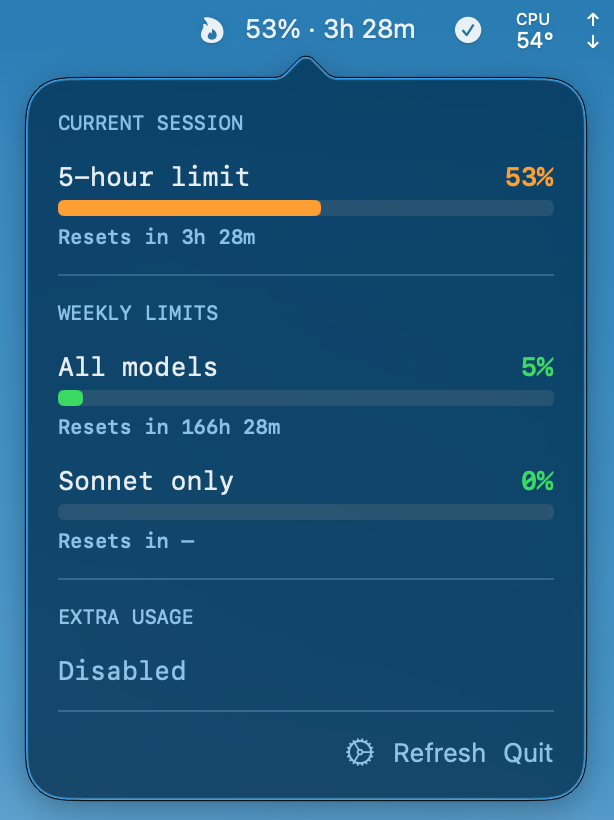
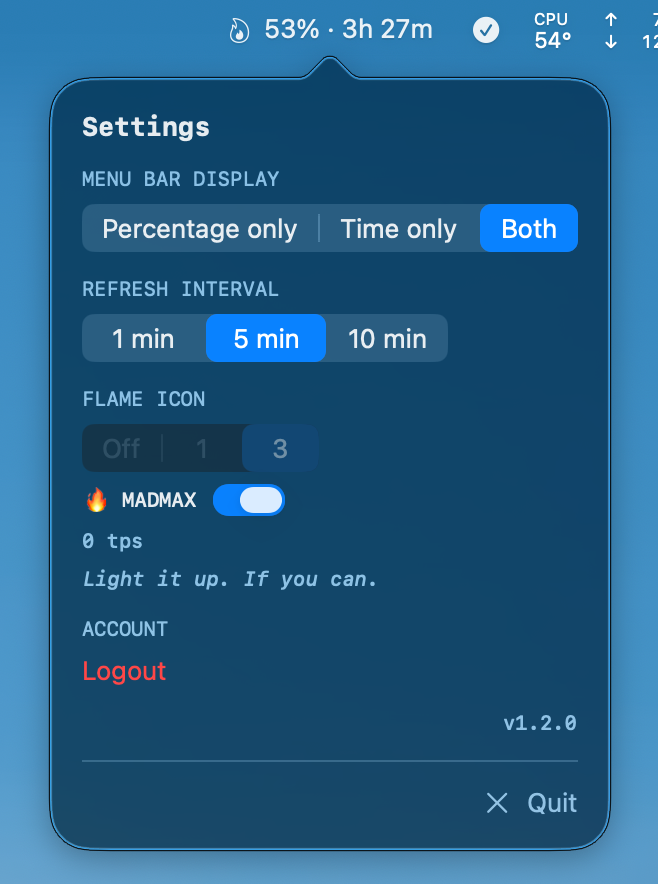
The menu bar displays the current 5-hour utilization (%) and time until reset. Click to see detailed usage.
When tokens are being consumed, a flame icon animates based on activity level.
Why Claude Peak?
| 🔥 Live flame animation | The only app that monitors JSONL token logs in real time — flames burn brighter as tps climbs |
| 🎮 MADMAX mode | Gamified with challenge messages from "Pathetic" to "WITNESS ME" |
| 🔐 One-click OAuth | No session keys, no DevTools — just login in your browser |
| ⚡ Pure Swift | No Electron, zero dependencies, 8 source files via SPM |
MADMAX Challenge
Enable MADMAX mode and push your token throughput to the limit. Each flame tier unlocks a new challenge message:
| Flames | tps | EN | 한국어 |
|---|---|---|---|
| 🔥 × 0 | 0 | Light it up. If you can. | 불 좀 붙혀봐. 춥다야. |
| 🔥 × 1–2 | 1 – 19,999 | That's it? Pathetic. | 겨우 이거? |
| 🔥 × 3–4 | 20,000 – 39,999 | Warming up... | 슬슬 가볼까 |
| 🔥 × 5–6 | 40,000 – 59,999 | Now we're cooking. | 제법인데? |
| 🔥 × 7–8 | 60,000 – 79,999 | FEEL THE BURN | 미쳤다!!! |
| 🔥 × 9 | 80,000 – 89,999 | ONE MORE. DO IT. | 거의 다 왔다!!! |
| 🔥 × 10 | 90,000+ | WITNESS ME | 나를 기억해!!! |
Can you hit 10 flames? Most people never get past "That's it? Pathetic."
Weekly Pace
Shows how your weekly usage is trending based on elapsed time vs utilization:
pace = actual utilization / (elapsed days ÷ 7 × 100)
| Pace | EN | 한국어 |
|---|---|---|
| < 0.3 | Go absolutely wild | 마구 난사해도 됨 |
| < 0.6 | Plenty of room | 여유 넘침 |
| < 0.85 | Cruising nicely | 적당히 쓰는 중 |
| < 1.1 | Right on pace | 딱 맞는 페이스 |
| < 1.4 | Getting warm | 슬슬 걱정된다잉 |
| < 1.7 | Burning hot | 이러다 거덜남 |
| ≥ 1.7 | Hit the brakes! | 거덜직전 |
Flame Modes
Four modes available in settings:
- Off — No flame icon
- 1 — Single flame, animates when tokens are active
- 3 (default) — Dynamic 1–3 flames based on tps
- MADMAX — Dynamic 1–10 flames (10,000 tps per flame)
| tps | Flames | Animation Speed |
|---|---|---|
| 0 | (small ember, static) | None |
| 0 – 30,000 | × 1 | 0.50s → 0.20s |
| 30,000 – 60,000 | × 2 | 0.30s → 0.15s |
| 60,000+ | × 3 | 0.20s → 0.08s |
| tps | Flames | Animation Speed |
|---|---|---|
| 0 | (small ember, static) | None |
| 1 – 9,999 | × 1 | 0.40s |
| 10,000 – 19,999 | × 2 | ↓ |
| ... | ... | ↓ |
| 90,000+ | × 10 | 0.06s |
Features
- Real-time flame animation — Monitors
~/.claude/projects/JSONL logs, animates flames based on token throughput - Remote server monitoring — Aggregate token activity from remote machines (e.g. via Tailscale) into a single flame display
- Menu bar display — 5-hour utilization %, time until reset (configurable)
- Detailed popover — 5-hour, 7-day (All models), 7-day (Sonnet) usage + reset timers
- Weekly pace indicator — Shows whether you're on track, have room to spare, or burning too fast
- Korean / English messages — Toggle message language in settings
- Settings — Display format, refresh interval (1/5/10 min), flame mode, message language, remote server
- OAuth PKCE — Browser-based auth with automatic token refresh
Installation
Homebrew (Recommended)
Pre-built bottles available — no Xcode required.
brew tap letsur-dev/claude-peak https://github.com/letsur-dev/claude-peak.git
brew install claude-peak

# Launch (auto-links to ~/Applications on first run)
claude-peak
Update:
brew update
brew upgrade claude-peak
If you see undefined local variable or tap-related errors:
brew untap letsur-dev/claude-peak
brew tap letsur-dev/claude-peak https://github.com/letsur-dev/claude-peak.git
brew reinstall claude-peak
Note: The URL is required because the repo name is
claude-peak, nothomebrew-claude-peak.
Build from Source
Requires Xcode or Command Line Tools with full Xcode.
git clone https://github.com/letsur-dev/claude-peak.git
cd claude-peak
./build.sh

# Launch
open ~/Applications/Claude\ Peak.app
Remote Server
Monitor Claude Code sessions running on remote machines. Token activity is fetched via HTTP and merged with local activity — flames reflect combined throughput.
Setup
On the remote machine (requires Node.js 18+):
npx claude-peak-server          # starts in background
npx claude-peak-server status   # check if running
npx claude-peak-server down     # stop
The server scans ~/.claude/projects/**/*.jsonl every 2 seconds and exposes:
GET /api/activity→{ tokensPerSecond, recentTokens: [{date, tokens}] }GET /health→{ ok: true }
Default port: 3200 (override with PORT env var).
On your Mac:
Settings → Remote Server → toggle ON → enter host and port → 🟢 = connected.
Connects via HTTP (direct network access required, e.g. Tailscale, LAN, VPN).
SSH-only environmentsIf only SSH access is available, use port forwarding:
ssh -L 3200:localhost:3200 your-server
Then set host to localhost in Settings.
Tech Details
Auth FlowOn first launch, click "Login with Claude" → sign in with your Claude account in the browser → tokens are saved automatically.
- App starts a local HTTP server (random port, IPv6)
- Opens
claude.ai/oauth/authorizein browser (with PKCE code_challenge) - After authentication, redirects to
http://localhost:PORT/callback?code=xxx - App exchanges the code for tokens at
platform.claude.com/v1/oauth/token - Tokens saved to
~/.config/claude-peak/tokens.json(0600 permissions)
Token Refresh:
- Automatically refreshes 5 minutes before access token expiry
- Prompts re-login on refresh failure
Usage Query
GET https://api.anthropic.com/api/oauth/usage
Headers:
  Authorization: Bearer {access_token}
  anthropic-beta: oauth-2025-04-20
  User-Agent: claude-code/2.0.32
Example response:
{
  "five_hour": { "utilization": 2.0, "resets_at": "2026-01-29T09:59:59Z" },
  "seven_day": { "utilization": 63.0, "resets_at": "2026-01-29T23:59:59Z" },
  "seven_day_sonnet": { "utilization": 0.0, "resets_at": null },
  "extra_usage": { "is_enabled": false }
}
utilization: 0–100 (percentage)resets_at: ISO 8601 timestamp or null
Token Refresh
POST https://platform.claude.com/v1/oauth/token
Content-Type: application/json

{
  "grant_type": "refresh_token",
  "refresh_token": "...",
  "client_id": "9d1c250a-e61b-44d9-88ed-5944d1962f5e",
  "scope": "user:profile user:inference"
}
- Keychain token expiration: Claude Code re-authenticates via browser OAuth each session, which can invalidate Keychain refresh tokens. A standalone OAuth flow is needed.
claude setup-tokenlimitations: Issues inference-only tokens (user:inferencescope only), which cannot access the usage API (requiresuser:profile).- OAuth redirect URI: Must be
http://localhost:PORT/callbackexactly.127.0.0.1or/oauth/callbackpaths are rejected. - IPv6: On macOS,
localhostmay resolve to::1(IPv6), so an IPv6 socket is required. - Token exchange: The
stateparameter is required for both the authorize and token exchange requests. - Utilization values: The API returns utilization as 0–100 integers (not 0–1 decimals).
- Field naming: The API response uses
resets_at(with plural 's'). - JSONL token logs: Claude Code creates per-session JSONL files under
~/.claude/projects/, with token usage recorded inmessage.usageof each line.
Reviews (0)
Sign in to leave a review.
Leave a reviewNo results found