artifact-site
Health Uyari
- License — License: Apache-2.0
- Description — Repository has a description
- Active repo — Last push 0 days ago
- Low visibility — Only 6 GitHub stars
Code Uyari
- process.env — Environment variable access in cli/src/archive.ts
Permissions Gecti
- Permissions — No dangerous permissions requested
Bu listing icin henuz AI raporu yok.
Self-hosted: drop an HTML file, a build folder, a zip or a PDF and get a sandboxed, versioned, shareable link. CLI + remote MCP for AI agents.
artifact-site
English | 简体中文




AI tools produce more finished work every day: interactive charts, analysis reports, web prototypes and slide decks. That work often ends up scattered across chat histories, local folders and different tools, with no shared place to browse, share or maintain it. Showing someone still means deploying it, sending files or taking a screenshot; finding the latest version later takes more work.
artifact-site brings that work onto your own server as links you can share, update and search. Think of it as a self-hosted workspace for your team's artifacts, similar to Claude Artifacts or OpenAI Sites: your chosen AI tools or internal tools create the work, and artifact-site publishes and manages it. Upload HTML, static sites or documents so your team can view them online, control access and keep revisions. Coding agents can publish, update, search and read existing work too.
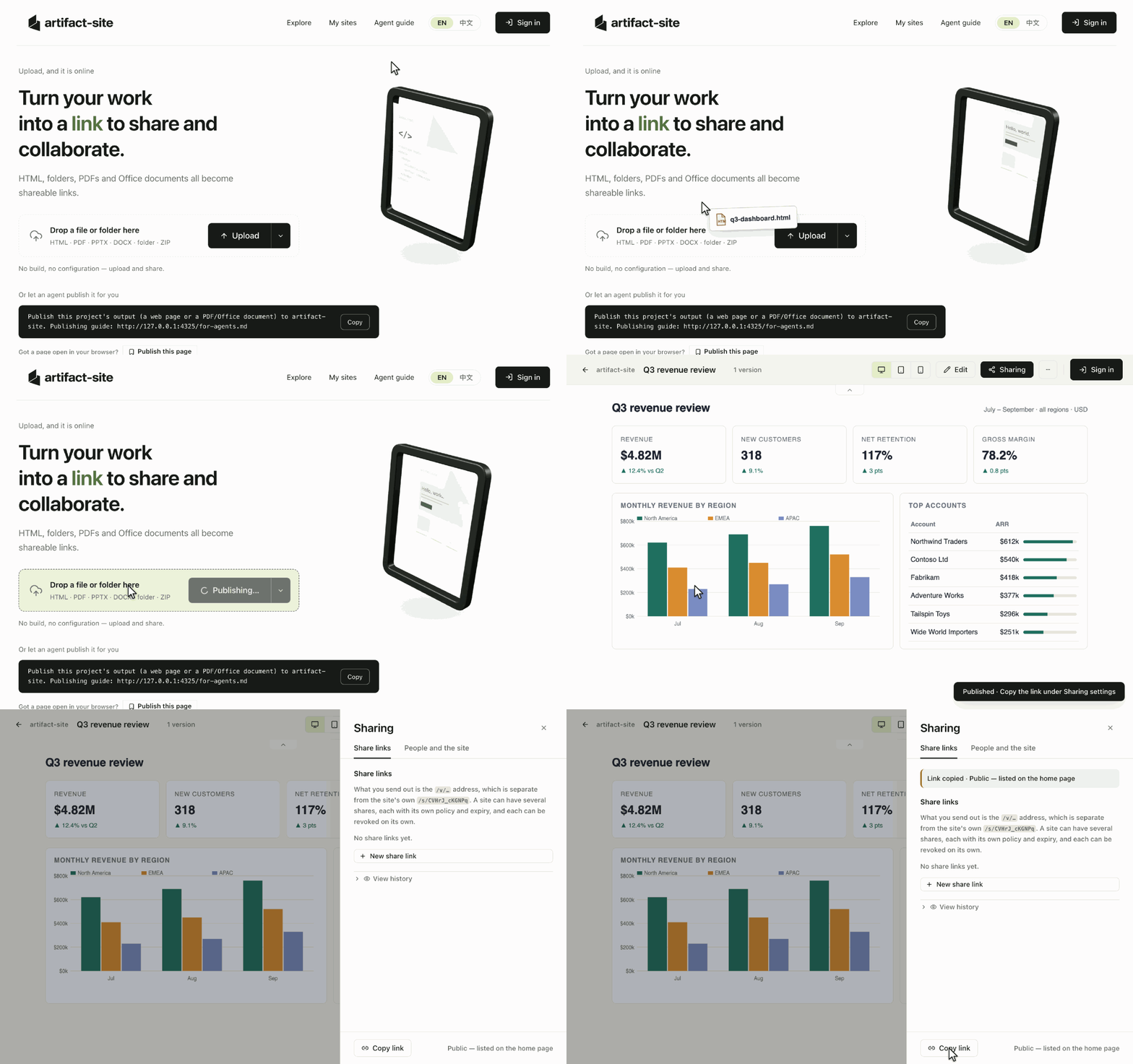
Drop a file, get a link, share it. View your published work online and choose who can open it in the sharing settings.
Why artifact-site
- Keep work in one place. Organize pages and documents in folders and find them with full-text search, including Chinese. Team members and agents can find the work they have permission to access.
- Drop it in and share it. Upload HTML, a build folder, a ZIP or a document to get a link. Large sites upload in chunks. Share with everyone, signed-in users, named people or passcode holders.
- Keep improving published work. Edit HTML text or source in the browser, or let an agent update the whole site. Each change keeps a version, with rollback and the option to save a copy.
- Let agents pick up where they left off. Publish and update through the guide, CLI or MCP, then search by content and read extractable text. For example, find a previous report and update it at the same address for your team to view.
Contents
- What you can publish
- Quick start (local deployment)
- Connect a coding agent
- Deploy for your team
- How it works
- Documentation
- Contributing
- License
What you can publish
| Content | What you can do |
|---|---|
| HTML, static site folders, ZIPs | Upload and preview single-page or multi-page sites, including build output such as dist/. HTML pages support visual text editing and source editing. |
| Read online, search and extract text. | |
| Office documents, such as PPTX and DOCX | Store and download originals; enable Gotenberg for online preview. |
Build web projects into static files before uploading; the platform does not run application backends or build jobs. PDF and Office documents do not support visual HTML editing, and scanned images are not automatically OCRed.
Hosted pages run in a sandbox and cannot use the platform's login session. External API connections require an origin allowlist. See the runtime limits and security design.
Quick start (local deployment)
With Git, Make, Docker 24+ and the Compose plugin 2.24+ installed, run these commands on a Linux machine. No Node installation, domain or identity provider is needed.
git clone https://github.com/lexmount/artifact-site.git && cd artifact-site
cp .env.example .env
make build up
Once started, open http://127.0.0.1:4300 and drop in HTML, a static site folder or a PDF to view your work. New sites are private by default; create a link with the desired access in Sharing before sending it to someone else.
The first run downloads dependencies and builds the image, then starts the app and Postgres. Use these commands in a fresh clone. The service is local-only by default; make down stops it and retains data. To make it reachable by your team, follow Deploy for your team.
printf '<!doctype html><meta charset="utf-8"><title>Hello</title><h1>Hello, artifact-site!</h1>' > hello.html
Drop hello.html onto the home page (or choose Upload). You should see “Hello, artifact-site!”. Copy a link from the sharing settings; local-deployment links only open on the same machine.
Connect a coding agent
Open Agent guide on your deployment to choose the prompt, CLI or MCP path. /for-agents#cli and /for-agents#mcp provide server-specific commands, authentication steps and client configuration. Remote MCP authenticates every request: ChatGPT, Claude and other OAuth-capable clients sign in through the server's own consent page, other clients carry a personal token. CLI publishing, updating, sharing and deleting require a token; publishing creates a public share by default. Use --share none (CLI) or share: false (MCP) to skip sharing.
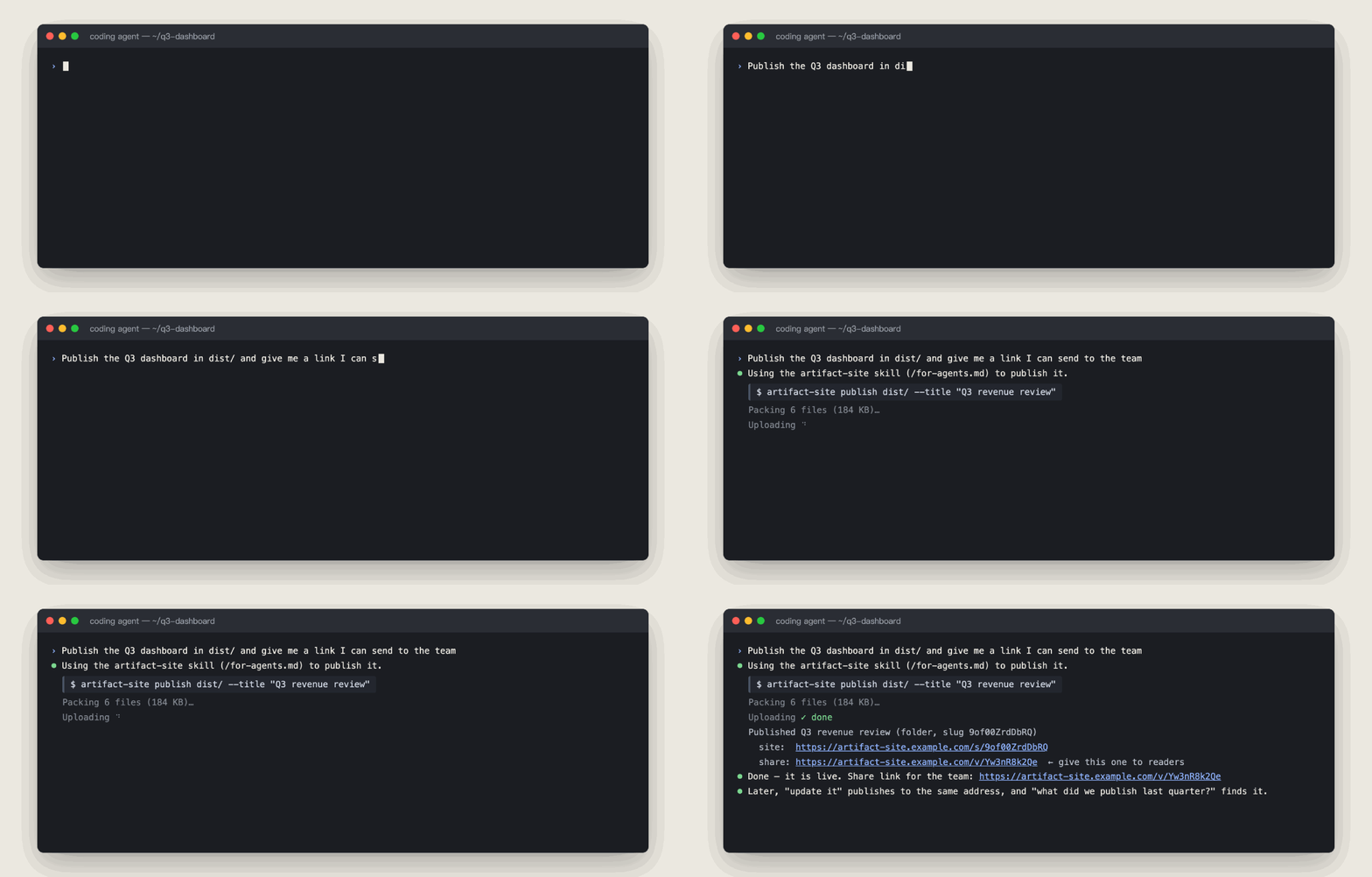
Or let your coding agent do it. With the agent guide (/for-agents.md), the CLI or the MCP server, "publish this and give me a link" is one instruction — and the site can be updated, searched and read the same way.
Give this instruction to Claude Code, Cursor, Codex or another coding agent that can read URLs, using a server address it can reach. The home page also provides a copy button with your server address filled in:
Publish this project's output to artifact-site. Publishing guide: https://your-server/for-agents.md
Team deployments with OIDC support device sign-in approval; the anonymous local setup above does not require it. The agent follows the guide and the server's publishing policy to choose authentication. A cloud agent cannot directly reach 127.0.0.1 on your computer.
The CLI requires Node 24+. Until the npm package is published, follow the CLI installation instructions to build and install it from source, then run:
artifact-site login --base https://your-server        # one-time device sign-in
artifact-site publish dist/ --title "Q3 dashboard"    # publish and return links
artifact-site find "quota"                           # search by content
artifact-site read YOUR_SITE_SLUG                    # replace with a site slug to read its text
The login example requires OIDC. Remote MCP is a separate, complete entry point athttps://your-server/mcp: no CLI installation is required. ChatGPT, Claude and any client that
implements MCP authorization connect with the address alone and sign in through the server's
OAuth consent page; for other clients, the deployment's /for-agents#mcp page creates a
personal token and copies the authenticated configuration. It supports publishing, updating,
search, read, sharing, versions, export and deletion, including binary files and directory
uploads through MCP tools.
See CLI commands and remote MCP setup and tools.
Deploy for your team
Start from .env.example and follow SELFHOST.md for a production deployment. Use a stable public address for ARTIFACT_PUBLIC_URL: sign-in callbacks, request-origin checks and the address given to agents derive from it:
- Set a reachable
ARTIFACT_PUBLIC_URLand configure a reverse proxy, or setARTIFACT_WITH_CADDY=onwithARTIFACT_DOMAINto enable Caddy and automatic certificates. - Choose a publishing policy.
loginrequires OIDC;tokenserves scripts or agents with a Bearer token;openlets anyone who can reach the service publish and suits trusted internal networks. Anonymous publishing supports separate quotas and expiry. - Connect Google or an OIDC provider such as Keycloak, Logto, Authentik, Okta or Auth0. Accounts own sites and folders; agents can receive long-lived tokens through device sign-in. The default
ARTIFACT_ENFORCE_OWNERSHIP=onenables account-based access control once OIDC is configured. Add administrators' verified sign-in emails toARTIFACT_ADMIN_EMAILSto enable the admin console. - Enable Office preview with
ARTIFACT_WITH_GOTENBERG=on. The admin console manages take-downs, quotas, anonymous-site expiry and policy switches. Choose default visibility and schedule backups.
The app ships as one Docker image with bundled Postgres in the single-host setup. To use an available prebuilt image, set ARTIFACT_IMAGE and run make pull. make doctor checks configuration; make backup and make restore handle backups and recovery. For multiple replicas, external Postgres and S3-compatible storage, see DEPLOY.md.
How it works
- Application and storage. Next.js serves the UI and API, Postgres stores metadata, and files live on local disk or S3-compatible storage. External database and object storage support multiple app replicas.
- Immutable versions. Each upload or edit writes a new file version, preserving historical content. Optimistic locking (
expected_version) detects concurrent update conflicts. - Content isolation. Previews use sandboxed iframes without
allow-same-originand a restrictive CSP to isolate uploaded content from the platform. Path checks and decompression limits defend against path traversal and ZIP bombs.
See ARCHITECTURE.md for the architecture, data model and request flows.
Documentation
| Document | What it covers |
|---|---|
| SELFHOST.md | Single-machine deployment with make up, backups, upgrades, FAQ |
| DEPLOY.md | Multi-replica deployment: external Postgres, object storage, OIDC |
| .env.example | Every setting, grouped and explained |
| ARCHITECTURE.md | System shape, data model, request paths, the sandbox |
| SECURITY.md | Threat model and how to report a vulnerability |
| cli/README.md | The CLI |
| src/content/publish-skill.md | The API contract and hosting limits, as served to agents |
| ROADMAP.md | What comes next: semantic search, comments on sites, and more |
| CHANGELOG.md | What changed, release by release |
Contributing
Local development requires Node 24+ and Docker:
npm install
make dev          # start a disposable Postgres and the development server
npm test          # unit tests, no external services needed
See CONTRIBUTING.md for the contribution process, DCO sign-off and CI requirements. Report bugs and ideas in issues; ask questions in discussions.
License
Licensed under either of
- Apache License, Version 2.0 (LICENSE-APACHE)
- MIT license (LICENSE-MIT)
at your option. Unless you explicitly state otherwise, any contribution intentionally submitted for inclusion in this project by you shall be dual-licensed as above, without any additional terms or conditions.
© 2025–2026 LexMount. Third-party components are listed in NOTICE.
Yorumlar (0)
Yorum birakmak icin giris yap.
Yorum birakSonuc bulunamadi