codex-webui
Health Gecti
- License — License: MIT
- Description — Repository has a description
- Active repo — Last push 0 days ago
- Community trust — 19 GitHub stars
Code Uyari
- process.env — Environment variable access in dev.ts
- process.env — Environment variable access in file-service.js
- process.env — Environment variable access in image-service.js
- process.env — Environment variable access in password-store.ts
Permissions Gecti
- Permissions — No dangerous permissions requested
Bu listing icin henuz AI raporu yok.
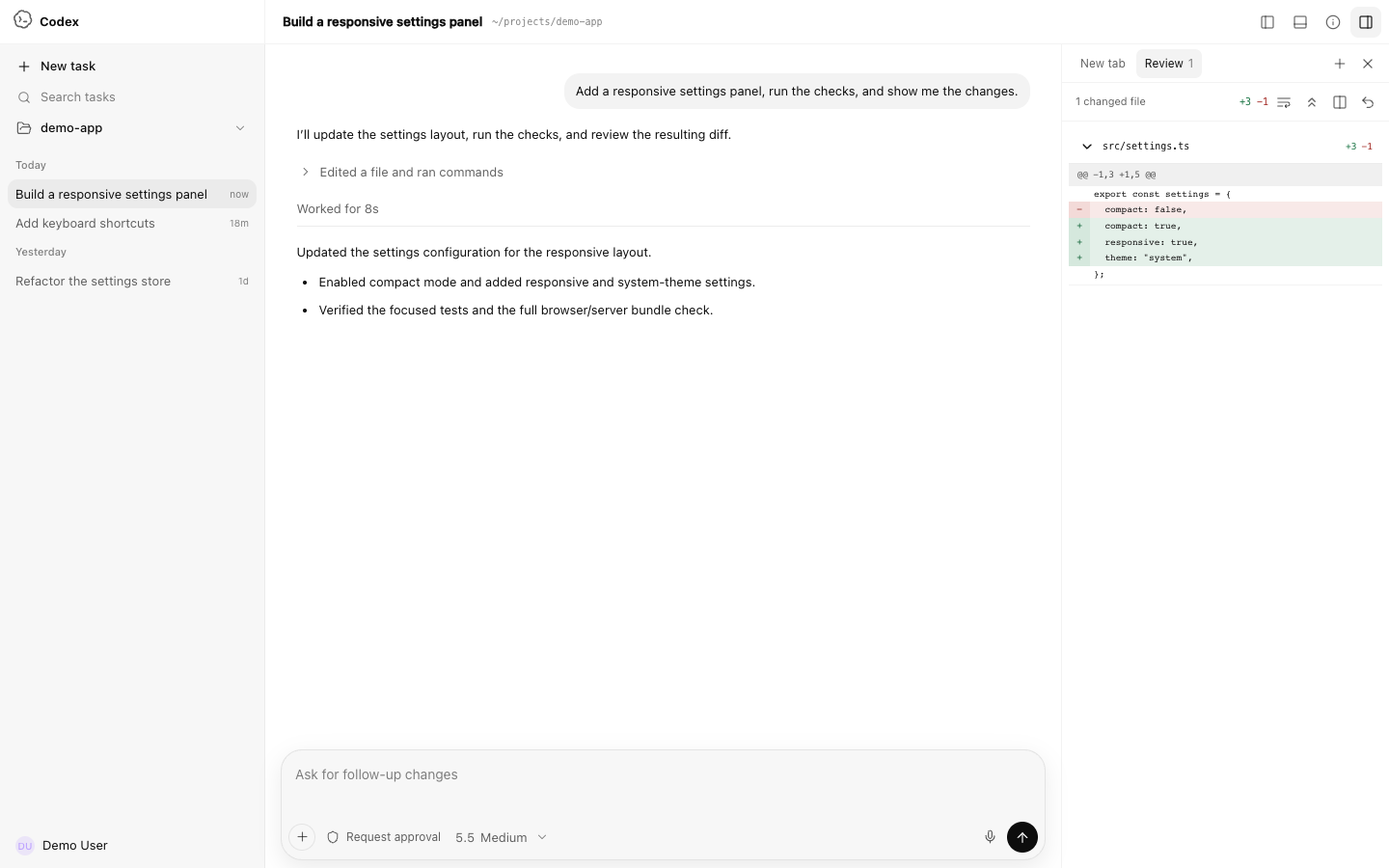
Unofficial local and LAN WebUI for the real Codex app-server, with approvals, streaming tools, review diffs, and mobile support.
Codex WebUI
A local, LAN-accessible WebUI for the real Codex app-server.
简体中文 · Contributing · Security


[!IMPORTANT]
This is an unofficial community project. It is not affiliated with, endorsed by, or maintained by OpenAI. OpenAI and Codex are trademarks of their respective owners.
Codex WebUI connects directly to codex app-server --stdio and exposes the local Codex experience through a responsive browser interface. It keeps real threads, models, streaming responses, tool activity, approval requests, diffs, and token usage instead of simulating them in a static frontend.
Highlights
- Real
codex app-server --stdiobridge over WebSocket - Real model catalog, reasoning effort options, threads, and streaming turns
- Command, file-change, network, and permission approval surfaces
- Approval scopes such as Allow once, Allow similar commands, and session-level approval
- Tool activity states driven by real item/turn notifications
- Unified and split diff review, word wrap, expand/collapse, Undo, and Reapply
- Safe Markdown, GFM, fenced code blocks, links, and KaTeX rendering
- Project-folder picker with restricted filesystem browsing
- Codex-style sidebar account identity with display name, same-origin avatar fallback, and plan
- Codex Desktop-style 46px header with separate Bottom Panel, Summary, and Task Side Panel controls; the Bottom Panel opens its native-style New tab launcher
- Real Bottom Panel PTY terminal powered by xterm.js, with 256-color ANSI output, terminal resize, and interactive Vim/control-key support
- Collapsed-by-default Summary panel matching the native Environment, Scheduled, Computer Use, Plan, Side tasks, and Sources sections; app-server data is shown when available and native-store-only sections use explicit unavailable or empty states instead of fabricated content
- Collapsed-by-default Task Side Panel mirroring the native New tab launcher: Review opens the real diff, Files links to the restricted project picker, and its native-bridge-only Terminal, Browser, and Side task entries show an explicit availability notice instead of a simulated tool
- Light and dark surfaces driven by shared Codex-style color tokens, including the monochrome transparent Codex Knot
- Windowed long conversations instead of rendering thousands of turns at once
- Responsive desktop and mobile layouts with full-screen Summary and Task Side Panel drawers on phones
- Localhost-only by default; authenticated LAN access is opt-in
Requirements
- Bun 1.3 or newer
- Node.js 20 or newer, used by the native PTY worker
- OpenAI Codex CLI, installed and authenticated
- Git, for Review Undo/Reapply
- macOS or Linux recommended; Windows has not been fully tested
Install Codex CLI if needed:
npm install -g @openai/codex
codex
Complete the Codex sign-in flow before starting this project.
Quick start
git clone https://github.com/lezi-fun/codex-webui.git
cd codex-webui
bun install
bun run start
Open:
http://127.0.0.1:8899
The default bind address is localhost. Use the folder button in the composer or sidebar to select the project Codex should work in.
LAN password login
To listen on your LAN, start the server without an authentication variable:
HOST=0.0.0.0 bun run start
The first LAN browser sees a password setup screen. After a password of at least 12 characters is confirmed, Codex WebUI stores only a salted scrypt credential in ~/.codex/codex-webui-auth.json, signs in that browser, and requires the password after a restart. Because the first reachable LAN client can claim this setup, complete it only on a trusted network.
For unattended deployments, provide the password at startup instead:
HOST=0.0.0.0 CODEX_WEBUI_PASSWORD='use-a-long-random-password' bun run start
Direct localhost access remains available without the password screen. LAN requests must set or enter a password before the main application bundle, HTTP APIs, or WebSocket bridges are available. Successful authentication uses a signed HttpOnly, SameSite=Strict session cookie.
CODEX_WEBUI_ACCESS_TOKEN remains available for compatibility with Basic/Bearer clients. CODEX_WEBUI_PASSWORD takes precedence over both the managed password and access token for browser login. Set CODEX_WEBUI_AUTH_STORE to move the managed credential file.
Configuration
Copy the example file if you want custom settings:
cp .env.example .env
Bun does not automatically load every .env convention in all execution contexts, so exporting variables explicitly is the most predictable option:
export HOST=0.0.0.0
export PORT=8899
export CODEX_WEBUI_ACCESS_TOKEN="$(openssl rand -hex 32)"
export CODEX_WEBUI_CWD="$HOME/projects/my-project"
export CODEX_WEBUI_REVIEW_ROOT="$HOME/projects/my-project"
bun run start
| Variable | Default | Description |
|---|---|---|
HOST |
127.0.0.1 |
HTTP/WebSocket bind address |
PORT |
8899 |
HTTP/WebSocket port |
CODEX_WEBUI_PASSWORD |
unset | Optional browser login password for LAN access; bypasses first-run setup |
CODEX_WEBUI_AUTH_STORE |
$CODEX_HOME/codex-webui-auth.json |
Salted managed password credential created by first-run setup |
CODEX_WEBUI_ACCESS_TOKEN |
unset | Compatibility secret for Basic/Bearer clients and browser login when no password is configured; username codex |
CODEX_WEBUI_CWD |
repository directory | Initial Codex working directory |
CODEX_WEBUI_REVIEW_ROOT |
CODEX_WEBUI_CWD |
Exact Git root allowed for Undo/Reapply |
CODEX_HOME |
~/.codex |
Codex state directory containing auth.json |
CODEX_AUTH_PATH |
$CODEX_HOME/auth.json |
Optional explicit Codex authentication file path |
PLAYWRIGHT_EXECUTABLE_PATH |
auto-detected | Optional Chrome/Edge path for browser tests |
Security model
Codex WebUI can approve command execution and file changes on your machine. Treat it like a local developer tool with shell access.
- Do not expose port
8899directly to the public Internet. - The default listener is
127.0.0.1. A non-localhost listener requires first-run password setup,CODEX_WEBUI_PASSWORD, orCODEX_WEBUI_ACCESS_TOKENbefore protected HTTP and WebSocket requests are accepted. - Browser RPC uses an explicit allowlist and cannot invoke app-server
fs/*,config/*, or account methods. - Static serving uses an asset allowlist and rejects symbolic links.
- Filesystem browsing canonicalizes paths and rejects symlinks that escape the user's home directory.
- Review Undo/Reapply uses server-owned app-server diffs, rejects client-supplied
cwd/diff data, symbolic-link patches, and sensitive targets such as.git,.env, andnode_modules. - Read approval prompts before allowing commands.
- Account identity combines app-server
account/readdata with Codex's authenticated profile endpoint. It is available only through direct localhost access; LAN clients receive the neutral Settings fallback. Email and raw avatar URLs are not exposed, avatars use a same-origin allowlisted proxy, andauth.jsontokens remain server-only. - Never paste credentials into issues, screenshots, or public logs.
See SECURITY.md for the reporting policy.
Review and approvals
The WebUI handles app-server requests instead of drawing fake approval cards:
item/commandExecution/requestApprovalitem/fileChange/requestApprovalitem/permissions/requestApproval
Review data is driven by turn/diff/updated. Unified diffs are parsed into files and hunks, and the Review panel supports:
- Unified / Split view
- Word wrapping
- Expand / Collapse all
- Git-backed Undo (
git apply --reverse) - Git-backed Reapply (
git apply)
Undo/Reapply is deliberately restricted to the configured repository root.
The shell mirrors Codex Desktop's separate Bottom Panel, Summary, and Task Side Panel controls. The Bottom Panel provides a real authenticated local PTY terminal, while the app-server bridge provides the Review flow and restricted local project selection. Native Desktop-only Task Side Panel Terminal, embedded Browser, and Side task tabs remain visible for structural parity but show a clear unavailable message instead of simulating those capabilities.
Architecture
flowchart LR
    Browser[Browser UI] <-->|WebSocket JSON-RPC| Server[Bun HTTP + WS server]
    Server <-->|stdio JSON-RPC| Codex[codex app-server]
    Browser <-->|Authenticated terminal WebSocket| PTY[Node PTY worker]
    PTY <-->|xterm-256color| Shell[Local login shell]
    Browser -->|Folder API| Server
    Browser -->|Review patch API| Server
    Server -->|git apply / reverse| Repo[Local Git repository]
Main files:
| Path | Responsibility |
|---|---|
server.ts |
HTTP server, WebSocket bridge, app-server process, folder/config/review APIs |
public/app.js |
Browser state, RPC, threads, approvals, activity, Review, project selection |
public/codex-surfaces.js |
Approval models, unified-diff parsing, split alignment, activity summaries |
public/rendering.js |
Sanitized Markdown and KaTeX rendering |
folder-service.js |
Restricted directory browsing |
review-service.js |
Validated Git Undo/Reapply operations |
tests/ |
Unit, integration, browser, mobile, and real approval tests |
public/app.bundle.js is generated automatically when the server starts and is not committed.
During development, bun run dev watches both server.ts and the browser entry graph rooted at public/app.js. Backend changes restart the server, while frontend changes rebuild public/app.bundle.js; reload the page to use the new bundle.
Build the browser bundle and a runnable dist/server.js:
bun run build
bun dist/server.js
Docker
The repository includes a Compose setup for a local container deployment. Set CODEX_BIN to an executable Codex CLI path before starting it; the path is mounted read-only into the container. The app starts in projectless mode by default and stores Codex state through the configured volume.
export CODEX_BIN="$HOME/.codex/packages/standalone/releases/VERSION/bin/codex"
export CODEX_WEBUI_REVIEW_ROOT="$HOME/projects/my-project"
docker compose up -d --build
The Compose example does not mount the host Docker socket. The image runs as the configured PUID/PGID user and receives runtime configuration through environment variables.
Testing
Install Playwright's Chromium if you do not already have a compatible Chrome/Edge binary:
bunx playwright install chromium
Run the portable unit suite:
bun run test:unit
Check both Bun and browser bundles:
bun run check
With a running server:
bun run test:browser
Tests that require a working, authenticated Codex installation:
bun run test:integration
bun run test:e2e
The real approval E2E asks Codex to execute a harmless command, waits for the actual approval request, clicks Allow once, verifies the result, and cleans up its temporary file.
Codex visual assets
The repository currently includes Codex-style brand and motion assets extracted from a local Codex.app installation to reproduce the desktop experience. Their source and status are documented in THIRD_PARTY_NOTICES.md. These assets are not covered by this repository's MIT license and may be removed or replaced if requested by the relevant rights holder.
Known limitations
- The Codex app-server protocol is evolving and may change between CLI versions.
- Browser tests need a compatible Chromium browser.
- Undo/Reapply currently operates on the complete aggregated diff, not one hunk at a time.
- Authentication and public-Internet deployment are intentionally out of scope.
Contributing
Please read CONTRIBUTING.md before submitting a pull request. Bug reports and feature requests can be opened through the repository's Issue templates.
License
Source code is available under the MIT License. Third-party components and optional local assets are covered by their own licenses and terms; see THIRD_PARTY_NOTICES.md.
Yorumlar (0)
Yorum birakmak icin giris yap.
Yorum birakSonuc bulunamadi