vincent
Health Uyari
- License — License: NOASSERTION
- Description — Repository has a description
- Active repo — Last push 0 days ago
- Low visibility — Only 5 GitHub stars
Code Gecti
- Code scan — Scanned 12 files during light audit, no dangerous patterns found
Permissions Gecti
- Permissions — No dangerous permissions requested
Bu listing icin henuz AI raporu yok.
Local-first orchestrator for AI coding-agent workloads

Vendor-independent control plane for executing native agent tooling.
A local-first orchestrator for AI coding-agent workloads — monitor and manage
many agent tasks on your machine from one central place.




Why • TUI Tour • What It Does • Install • Quickstart • Documentation • Build & Test • Contributing • Security
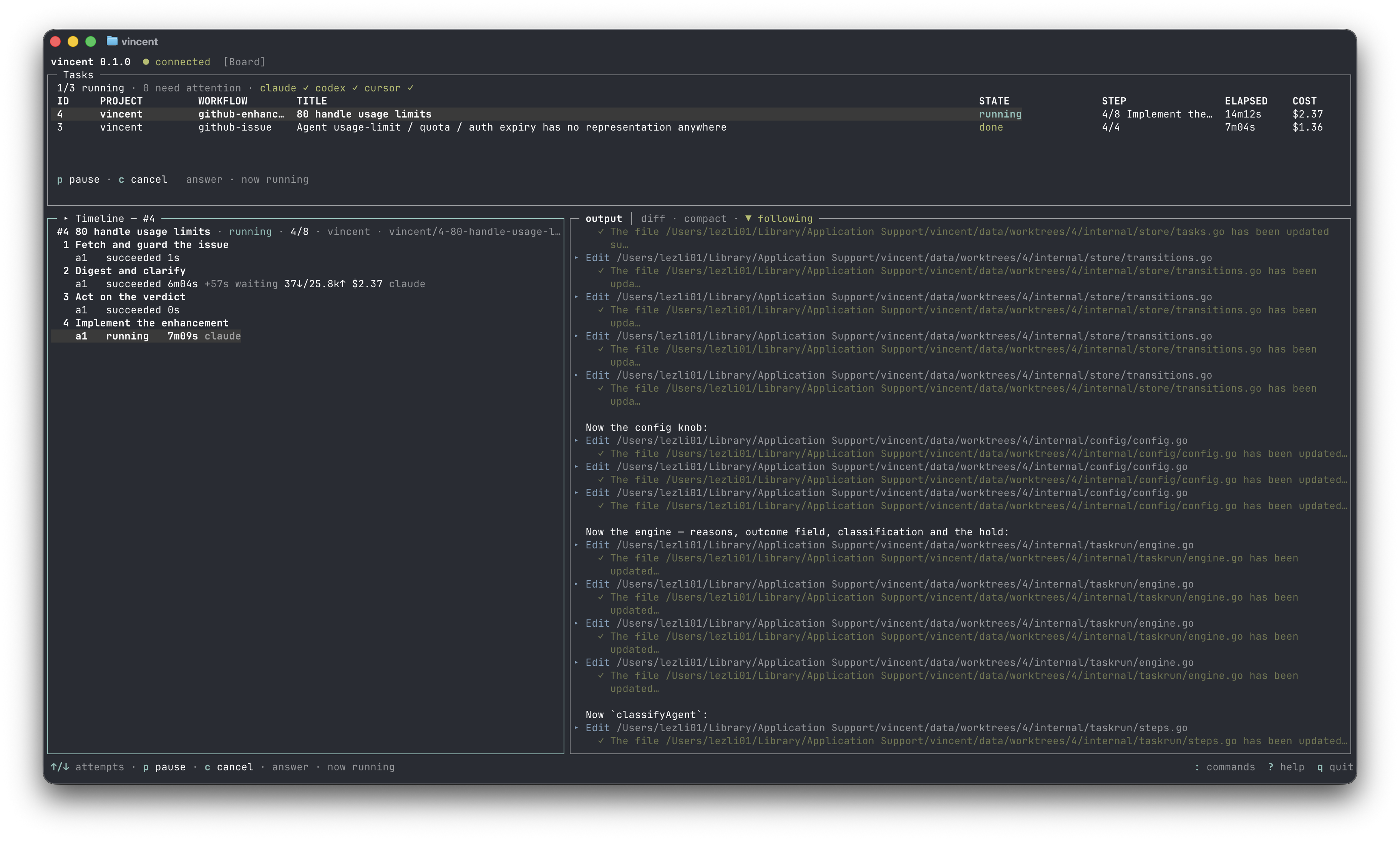
The TUI board — tasks with their state, step and cost; the step timeline of the selected task; and its agent's output streaming live. All of it read from the daemon over its localhost API.
Why vincent?
Coding agents are easy to start and hard to supervise: kick off a handful of
CLI runs across a few repositories and you are soon juggling terminals, losing
transcripts, and hand-managing branches. vincent turns that into a managed
workload — one place to register repositories, author workflows, launch tasks,
and see what every agent is doing, with work continuing when no client is
attached.
The name is an acronym, and every part of it maps to the system:
- Vendor-independent — supports multiple agent providers and CLIs.
- Control plane — the daemon owns state, workflows, scheduling, and
execution. - Executing — vincent runs workloads rather than merely observing them.
- Native agent tooling — it invokes locally installed tools such as
Claude Code, Codex, and Cursor.
All 70 tasks in the v0 breakdown are done. The
daemon, the workflow engine, the TUI, the CLI subcommands, OS service
registration and all three agent adapters are built, released as signed
binaries, and exercised on Windows, macOS and Linux in CI on every pull
request — unit tests, the race detector, the linter, and three end-to-end
acceptance gates that drive a real daemon over HTTP. Binaries on the
releases page are signed,
checksummed and attested.
It is source-available and dual-licensed — free for personal and
non-commercial use under the PolyForm Noncommercial License 1.0.0,
with a separate commercial license for business use —
and created by lezli01 at lezli01.is-a.dev.
Contributions are welcome — see Contributing.
TUI Tour
These are actual renders from vincent's Bubble Tea TUI using representative
workload data — not UI mockups.
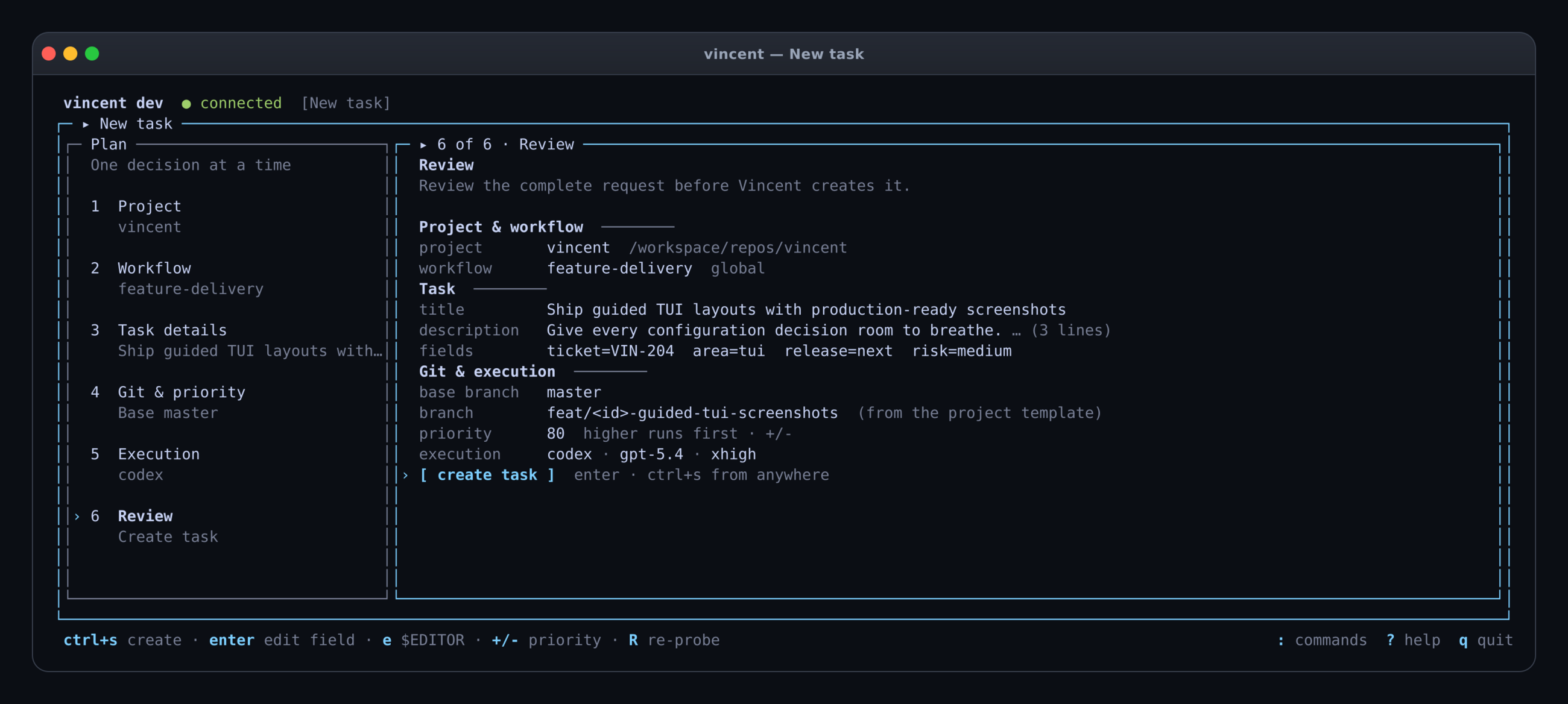
The guided task flow keeps all six decisions visible while giving the active review stage room to breathe.
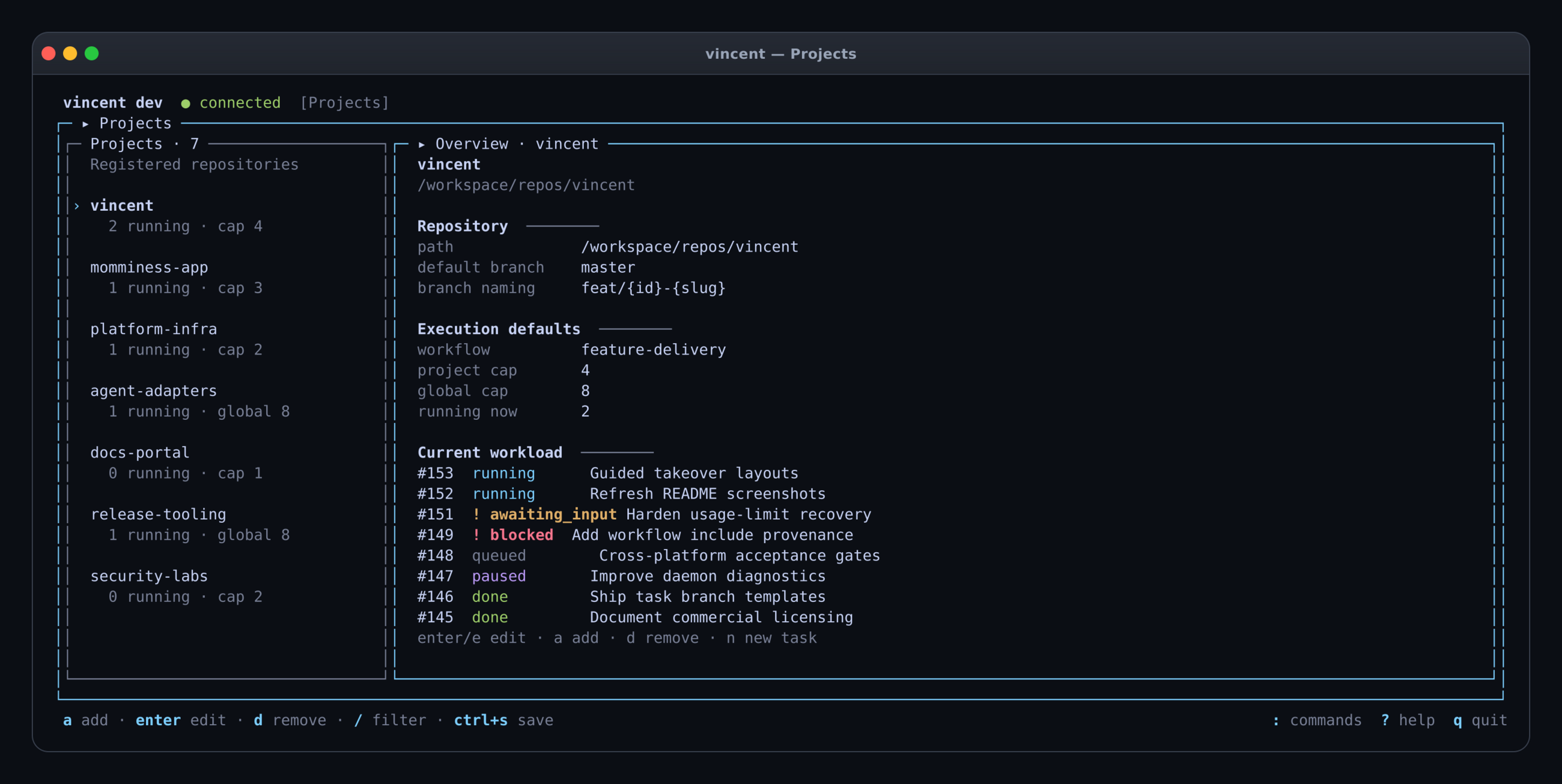
Projects pairs a persistent repository rail with defaults, concurrency limits, and the selected project's current workload.
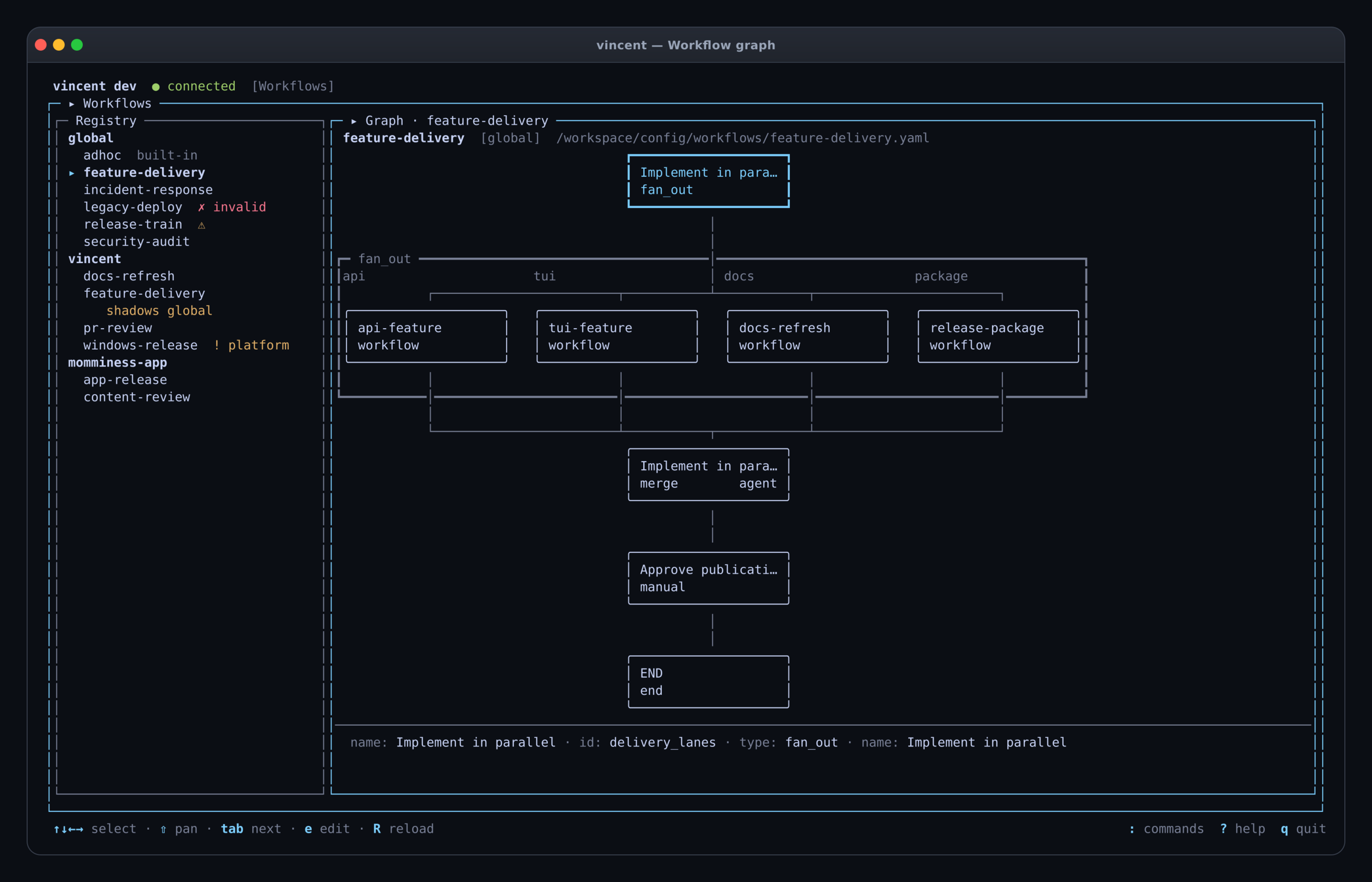
The workflow registry stays anchored beside the navigable graph, including fan-out lanes, merge behavior, and manual gates.
What It Does
A background daemon owns all state and execution: register local git
repositories, author reusable workflows (agent prompts, shell commands, manual
gates), and run any number of tasks, each isolated in its own git worktree.
Agent steps drive locally installed agent CLIs (Claude Code, Codex, and
Cursor) headlessly. The TUI is a thin client over the daemon's API, so work
keeps running when no client is attached.
- The daemon owns everything. Clients never touch git, the database or an
agent process — only the API. Killing every client changes nothing about
running work. - Crash-first. Every transition is persisted before it is acted on, so a
daemon that dies mid-step finalizes the attempt on restart, kills verified
orphans, and re-runs the step without consuming a retry. - Checks, not claims. A step succeeds when its
checkcommand agrees, not
when the agent says so — and a failed check retries with the failure appended
to the prompt. - Nothing is silently abandoned. A step that exhausts its retries blocks the
task and waits for a human, keeping its worktree, branch and transcripts. - Differences are documented, never faked. A capability an adapter lacks is
stated and ignored at run time; it is never emulated.
Agent CLIs
Each adapter runs the CLI you already have installed and authenticated;
vincent stores no credentials of its own. Select one per workflow, per step,
or per task (agent: claude / codex / cursor).
| Agent | Binary | Notes |
|---|---|---|
| Claude Code | claude |
Mid-run questions supported — a step can pause in awaiting_input and be answered from the TUI |
| Codex | codex |
Non-interactive once started; reports no cost |
| Cursor | cursor-agent |
Non-interactive; reports no cost |
Three things to know about the Cursor adapter specifically:
- Reasoning effort lives in the model id, not in the
effortfield —claude-sonnet-5-thinking-xhigh,gpt-5.4-mini-high. Cursor has no effort
flag, soeffort:is ignored on cursor steps. Runcursor-agent modelsto
see what your account offers. - A cursor step sets your saved CLI model. Cursor persists the
--model
it is given to~/.cursor/cli-config.json, so vincent always passes one
(defaulting toauto) to keep runs reproducible. The trade-off is that
running a cursor step overwrites the model you last picked in an
interactivecursor-agentsession. restrictedpermission mode needs macOS or Linux. Cursor's sandbox is
unavailable on Windows, so a restricted cursor step fails there withrestricted_unsupportedrather than silently running full-auto. That is
deliberate: a restricted mode that quietly isn't restricted is worse than
none.
Five ready-to-copy workflows ship in examples/;
Writing workflows is the authoring guide and
Agent CLIs covers the adapters in full.
Command line
vincent with no arguments opens the TUI (starting a daemon if none is
running). The subcommands are thin clients over the same API:
vincent daemon start                       # or stop / status
vincent service install                    # start at login, survive reboot
vincent project add /path/to/repo
vincent project ls
vincent task add --project 1 --title "Add a health endpoint"
vincent task ls --state running
vincent task show 7
vincent task cancel 7
vincent workflow ls
vincent workflow validate .vincent/workflows/feature-pr.yaml
Every subcommand takes --json for scripting. Exit codes are 0 success,1 the daemon answered and rejected the request, and 2 no daemon answered
— so a script can tell "start the daemon" from "fix your request" without
parsing stderr. The subcommands never auto-start a daemon; only the TUI does,
because that is an interactive session you asked for.
vincent workflow validate runs entirely locally against the built-in agent
catalogs — no daemon, no installed agent CLI — which makes it usable from CI
and pre-commit hooks.
vincent service install registers the daemon with your OS so it starts at
login and survives reboot — a launchd user agent, a systemd user unit, or a
Windows Scheduled Task. It runs as you on every platform, since the OS user
is vincent's trust boundary: an agent gets your privileges, your agent-CLI
logins and your git identity, and nothing more. No elevation is needed
anywhere. One platform note: on Linux, surviving logout also needs loginctl enable-linger, which the installer attempts and otherwise prints for you to
run.
The config and data directories are captured at install time, because a service
does not inherit the shell that installed it. On macOS and Linux your PATH
is captured too: those service managers supply their own minimal one, which
contains none of the places agent CLIs install to, so without this the daemon
would run and report every agent as missing. Install a CLI somewhere new and
you want vincent service install again to recapture it. Windows needs no
capture — the task runs in your logon session with your own PATH. If an agent
still will not resolve, point at it with agents.<name>.path in config.yaml,
which is absolute and never consults PATH.
On Windows it is a Scheduled Task and not a Windows Service, so it appears
in Task Scheduler as vincent and never in services.msc. It runs with no
visible window; vincent service status and vincent daemon status are how you
check on it. Install it from an ordinary prompt: a task registered by an
elevated one is owned by Administrators and leaves your own account unable to
replace or remove it, and both commands say so if you hit it.
Upgrading from a version that installed a Windows Service: it ran as
LocalSystem, which is why your TUI kept starting a daemon of its own.vincent service uninstall from an elevated prompt removes it — once — and
then vincent service install needs no elevation again.
Install
Homebrew (macOS)
brew install lezli01/tap/vincent
The cask clears the quarantine attribute for you, so the Gatekeeper prompt
described below does not apply to this path. Upgrades are brew upgrade vincent; brew uninstall --zap vincent also removes the LaunchAgent and~/Library/Application Support/vincent (config, database, transcripts).
Homebrew casks are macOS-only — on Linuxbrew, use the archive below.
Archive (all platforms)
Download the archive for your platform from the
latest release, unpack
it, and put vincent somewhere on your PATH. There is nothing else to
install — the binary is self-contained, with no runtime, no CGO and no
database server.
# macOS (Apple silicon) / Linux — adjust the asset name for your platform
tar -xzf vincent_*_darwin_arm64.tar.gz
sudo mv vincent /usr/local/bin/
vincent version
On Windows, unzip the archive and move vincent.exe somewhere on your PATH.
With a Go toolchain already installed, you can skip the archive entirely — this
builds from source, so it is not signed and not flagged, but it is also not
reproducible against a published checksum:
go install github.com/lezli01/vincent/cmd/vincent@latest
First launch will be flagged. Releases carry cosign signatures, checksums
and GitHub build attestations, but not OS code signing — Authenticode and
Apple notarization are recurring certificate costs this project does not take
on. So:
- macOS shows "cannot be opened because it is from an unidentified
developer" — for a downloaded archive, not forbrew install. Clear the
quarantine attribute once:xattr -d com.apple.quarantine /usr/local/bin/vincent - Windows shows a SmartScreen prompt: More info → Run anyway.
To verify a download instead of trusting it:
cosign verify-blob checksums.txt \
  --certificate checksums.txt.pem \
  --signature checksums.txt.sig \
  --certificate-identity-regexp 'https://github.com/lezli01/vincent/.*' \
  --certificate-oidc-issuer https://token.actions.githubusercontent.com
sha256sum -c checksums.txt --ignore-missing
You also need git and at least one agent CLI (claude, codex orcursor-agent) installed and logged in — vincent runs the CLI you already have
and stores no credentials of its own. Per-platform detail, build-from-source
and upgrade instructions:
Installation.
vincent is 0.x. The config file, workflow YAML schema, REST API and CLI
flags may change in any minor release — pin a version if you script against
them. Patch releases are fixes only, and the on-disk database migrates forward
automatically. Full policy and release history:
CHANGELOG.md.
Quickstart
[!WARNING]
Agents run full-auto by default: they can execute arbitrary commands as
you. This is the design (spec §16), not an oversight — unattended
orchestration is the point. The git worktree isolates tasks from each
other, not from your machine: an agent can still reach your home
directory, your credentials and the network. Nothing is pushed or merged
unless a workflow step does it, everything is transcripted, and any step can
be set topermission_mode: restricted. Run it on repositories you would
hand to a new contributor, and read the
Security model before pointing it at anything else.
Five minutes, one real task:
1. Register a repository. Any git repo with a clean working tree.
vincent project add /path/to/your/repo
vincent project ls
2. Add a workflow. Two places to put one:
- Global — available to every project. Drop it in the
workflows/folder
of your config directory:%APPDATA%\vincent\workflows\(Windows),~/Library/Application Support/vincent/workflows/(macOS),~/.config/vincent/workflows/(Linux). - Project — travels with the repo, and shadows a global file of the same
name:.vincent/workflows/inside the repo.
Either way the daemon picks it up on save; there is no restart or apply step.
Global is the easier start:
# Windows (PowerShell)
mkdir -Force $env:APPDATA\vincent\workflows
copy examples\feature-pr.yaml $env:APPDATA\vincent\workflows\

# macOS / Linux
mkdir -p ~/.config/vincent/workflows          # macOS: ~/Library/Application\ Support/vincent/workflows
cp examples/feature-pr.yaml ~/.config/vincent/workflows/
vincent workflow validate examples/feature-pr.yaml
vincent workflow ls              # global + built-in
vincent workflow ls --project 1  # add this project's own .vincent/workflows
feature-pr runs an agent, checks that the result still builds and passes
tests, stops at a human gate, and pushes only after you approve. The others
are fix-and-test (write a failing test, then
fix it), converge (loop until the suite is green),docs-update, andcursor-review.
Its check is go build ./... && go test ./..., so open the file and change
that line to whatever proves your repository still works before pointing it
somewhere else.
3. Run a task.
vincent task add --project 1 --workflow feature-pr \
  --title "Add a --version flag to the CLI"
vincent task ls
4. Watch it, then approve it.
vincent # the TUI: board, live output, diff, and the gate
The task appears on the board, runs in its own worktree on branchvincent/{id}-{slug} by default, and stops at the review gate. Read the diff in the
TUI, press a to approve, and the publish step pushes the branch. q quits
the TUI — the daemon and any running task keep going without it.
Everything the TUI does is also a subcommand (vincent task show 1,vincent task cancel 1), and everything either does is the same localhost
API. To keep the daemon running across reboots, vincent service install.
Next: writing your own workflows, or the
longer quickstart.
Documentation
Full documentation lives in docs/.
Start here
- Installation — download, verify, and
install an agent CLI - Quickstart — first task, end to end
- Concepts — daemon, project, workflow,
task, worktree
Guides
Platforms — Windows ·
macOS · Linux
Reference — CLI ·
Configuration ·
Files and directories ·
Workflow schema ·
Task lifecycle ·
HTTP API
Also — Security model · FAQ ·
Specification · Tasks ·
v0 ledger
Build & Test
vincent is a single Go module; Go 1.26 or newer is the only prerequisite.go.mod pins an exact patch toolchain that the default GOTOOLCHAIN=auto
fetches on the first build (004).
Build targets run via mage with zero install — CI
runs exactly these targets (list them all with go run mage.go -l):
go run mage.go build     # build the vincent binary into bin/
go run mage.go test      # run all tests
go run mage.go testrace  # run all tests with the race detector (needs cgo and a C compiler)
go run mage.go lint      # golangci-lint (pinned via go.mod tool directive)
The plain toolchain works too:
go build ./...   # compile every package
go test ./...    # run the full test suite
Tests are self-contained: they run against temporary SQLite databases,
throwaway git repositories, and a fake agent built from cmd/fakeagent on
the fly — no real agent CLI, network access, or running daemon required.
CI runs lint, the race-enabled tests, and the build on Linux, macOS, and
Windows, plus the phase acceptance gates — scripts/m1-gate.sh,scripts/m2-gate.sh, and scripts/m5-gate.sh — which drive a real daemon end
to end against the fake agent on all three platforms.
Contributing
Contributions of every size are welcome — bug reports, docs, test cases, and
features. Start here:
- Read the Contributing guide for development setup, build
and test commands, and the commit-message convention. - Be a good neighbor: this project follows a
Code of Conduct. - Found a bug or want a feature? Open an
issue.
All changes land via pull request to master, merged with merge commits (no
squashing), using Conventional Commits.
Details are in CONTRIBUTING.md.
Security
vincent executes AI agents in full-auto mode by default — a documented design
decision, not a vulnerability. In full-auto an agent can run arbitrary commands
as the invoking user, and a git worktree isolates collisions between tasks,
not privileges; the TUI shows this warning once on first run. The full picture —
the trust boundary, what restricted mode does per adapter, and how to tighten
a setup — is in the Security model.
Security reports are taken seriously — please report vulnerabilities
privately via GitHub's
security advisories
rather than a public issue. See SECURITY.md for details.
License
vincent is source-available and dual-licensed. The source is public and stays
public; what you may do with it depends on who you are and why you are running
it. This is not an OSI-approved open-source license — restricting commercial
use is incompatible with the Open Source Definition.
Personal and non-commercial use
vincent is free to use, modify, and run for personal and non-commercial purposes
under the PolyForm Noncommercial License 1.0.0. Personal projects,
study, research and experiment, and use by charities, educational institutions,
public research bodies and government institutions are all covered at no cost.
Commercial use
Commercial or business use requires a separate commercial license.
This includes using vincent as part of a company's internal software-development
workflow, engineering processes, AI/agentic development workflows, commercial
products, services, or other activities primarily intended for commercial
advantage — running it internally at a for-profit company counts, even though
vincent itself is not being sold.
For commercial licensing, see COMMERCIAL-LICENSE.md.
Previously released versions
Previously released versions remain available under the license under which they
were originally published: v0.2.0 and every earlier release were published
under the MIT License and stay usable under it. The first release published
after this change, and every release after it, are PolyForm Noncommercial 1.0.0
or commercial. See COMMERCIAL-LICENSE.md for the
cutover table.
© 2026 László Szabó (lezli01).
Yorumlar (0)
Yorum birakmak icin giris yap.
Yorum birakSonuc bulunamadi