factory-switcher
Health Gecti
- License — License: MIT
- Description — Repository has a description
- Active repo — Last push 0 days ago
- Community trust — 18 GitHub stars
Code Gecti
- Code scan — Scanned 3 files during light audit, no dangerous patterns found
Permissions Gecti
- Permissions — No dangerous permissions requested
Bu listing icin henuz AI raporu yok.
🔁 Native macOS menu-bar app to switch between your own Factory (Droid) accounts — quota at a glance, backup-first switching with auto-rollback. 菜单栏一键切换 Factory 多账号,额度一目了然,先备份再切换。




English · 简体中文
Your work account, your personal account, your side-project org —
one click apart, right from the menu bar.
Download · Quick start · How it works · FAQ
[!IMPORTANT]
Unofficial, community-built tool. It is not affiliated with or endorsed by Factory.
It only manages accounts you signed into through Factory's official login, it never switches automatically,
and it does not touch server-side quotas, billing or organization permissions. Use it in line with Factory's
terms and your organization's policies.
✨ Why
If you use Factory Droid with more than one account — say a company org and a personal one —
switching normally means signing out, going through the browser OAuth again and hoping you picked the right
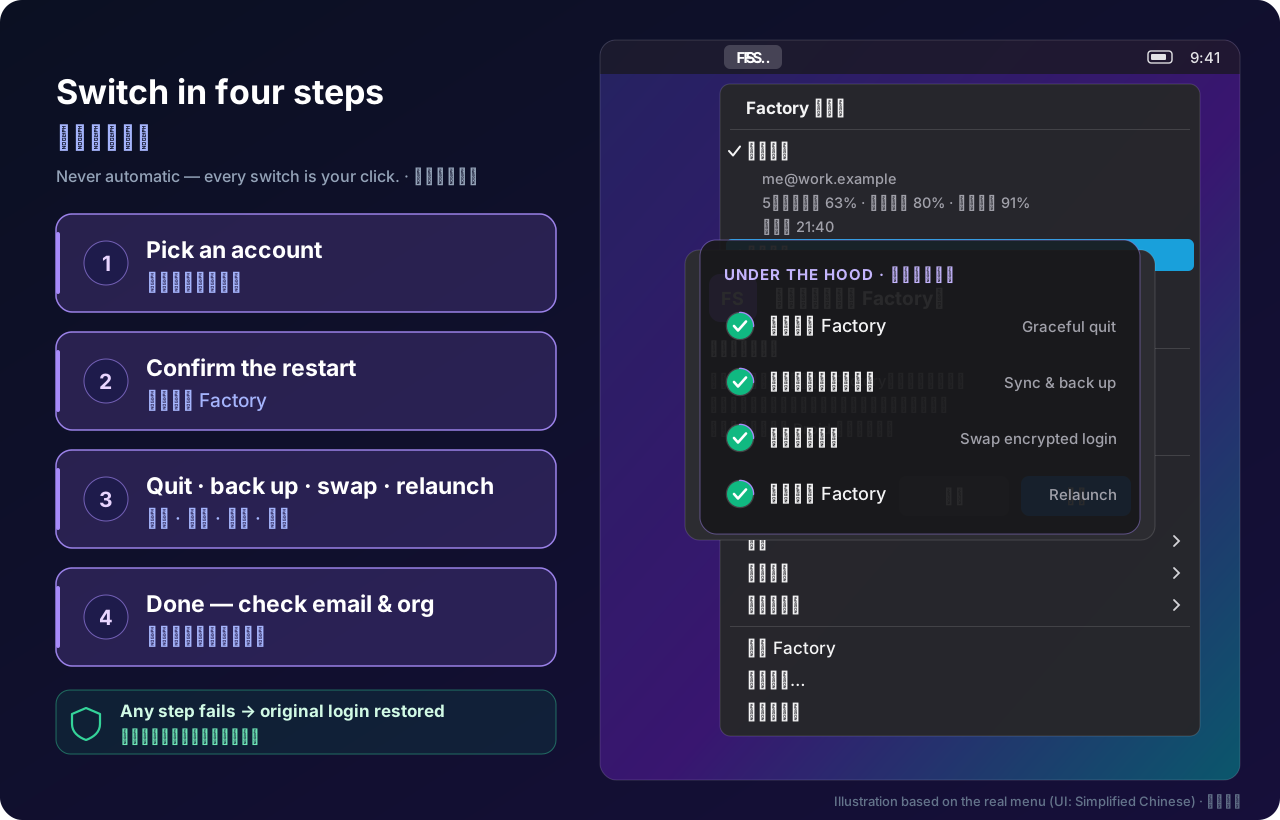
profile. Factory Switcher keeps an encrypted snapshot of each login you already have and swaps them for you,
safely, from a tiny FS icon in the menu bar.
🧰 Features
| Feature | What you get | |
|---|---|---|
| 🔁 | One-click switching | Pick a saved account → Factory quits gracefully, the login is swapped, Factory reopens. |
| 📊 | Quota at a glance | 5-hour, weekly and monthly remaining % for every account, plus reset times and extra-usage balance when the official API provides them. Refreshes every 5 min (optional). |
| 🔑 | Official login only | New accounts are added through the Droid CLI bundled inside your Factory.app, in an isolated home. Browser authorization stays 100% official. |
| 🛡️ | Backup first, roll back on failure | Every switch is backed up and verified before anything changes. Any failure restores the original login; interrupted runs can be recovered from the menu. |
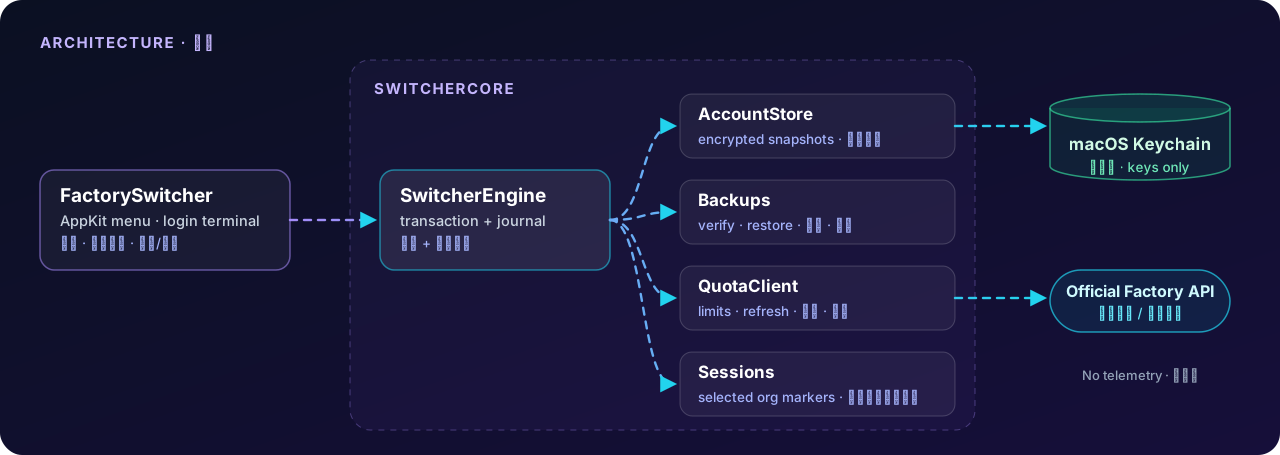
| 🔐 | Encrypted at rest | Login snapshots are AES-GCM encrypted; keys live in the macOS Keychain, never next to the files. Tokens are never printed or logged. |
| 💬 | Carry chosen sessions across accounts (opt-in) | Pick specific local conversations to continue under another account. Backed up first; untouched unless you select them. |
| 🪶 | Tiny & native | Swift + AppKit, ~1 MB, zero third-party dependencies, no telemetry, no Dock icon. |
🧭 How a switch stays safe
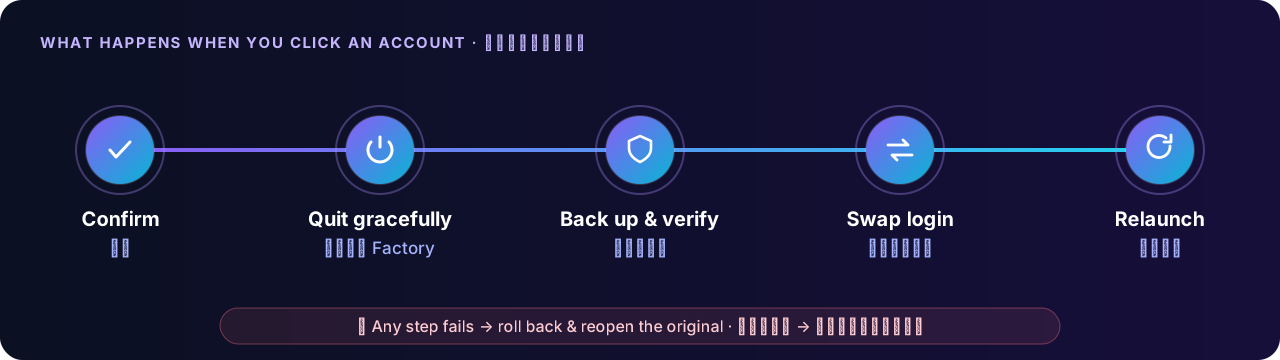
- Confirm — you see the target account and a reminder that running tasks will stop (can be turned off in Settings).
- Quit gracefully — Factory is asked to quit normally. Running terminal
droidsessions block the switch; nothing is ever force-killed. - Back up & verify — the latest (possibly just-rotated) tokens of the current account are saved, then a backup is written and checked.
- Swap login — the target's encrypted login and key are installed and verified.
- Relaunch — Factory reopens as the new account. If any step fails, the original login and session markers are restored.
📦 Install
Option A — Download (Apple Silicon)
- Grab
FactorySwitcher-*-arm64.zipfrom the latest release and unzip it. - Move
FactorySwitcher.appto a stable place, e.g.~/Applications. - Open it. Because the build is ad-hoc signed and not notarized, macOS will block the first launch:
go to System Settings → Privacy & Security, scroll down and click Open Anyway. - On first use macOS may ask for Keychain access. Allow it only for the switcher you trust.
[!NOTE]
Please don't disable Gatekeeper or strip security attributes to run it. If you'd rather not trust a downloaded
binary, building from source takes about a minute.
Option B — Build from source
Requires macOS 13+ and Xcode 16 / Swift 6 command-line tools.
git clone https://github.com/lhfer/factory-switcher.git
cd factory-switcher
swift test
bash scripts/build-app.sh   # → dist/FactorySwitcher.app
🚀 Quick start
- Launch the app — an FS item appears in the menu bar (no Dock icon, no window).
- 保存 / 同步当前账号 (Save / sync current account) — snapshots the account you're signed into now. Factory keeps running.
- 添加账号(官方登录)… (Add account — official login) — give it a label; a Terminal opens running Factory's own Droid in an isolated home. Authorize in the browser (tip: use a private window if it auto-signs you into the old account).
- When it says you're logged in, quit Droid in that terminal with Ctrl+C — not
/logout. The new account is saved automatically. - Click any saved account to switch. After Factory reopens, double-check the email/org shown in Factory before starting work.
[!WARNING]
Switching quits and reopens Factory — running tasks will be interrupted. Finish or save your work first, and
close anydroidsessions in your terminals.
[!NOTE]
The app's interface is currently Simplified Chinese only. English labels above are translations of the menu items.
The full user guide (Chinese) is indocs/USAGE.zh-CN.mdand also opens from the menu.
🔒 Privacy & local data
Network access is limited to the official login you start, the official billing-limits endpoint and, for idle
accounts, the official token refresh. No analytics, no telemetry, no uploads of your backups.
| What | Where |
|---|---|
| Labels, emails, user/org IDs, preferences | ~/.factory-switcher/state.json |
| Encrypted login snapshots | ~/.factory-switcher/accounts/ |
| Login backups, selected session copies, recovery journal | ~/.factory-switcher/backups/ |
| Isolated homes for official logins | ~/.factory-switcher/logins/ |
| Snapshot & backup encryption keys | macOS Keychain, service local.FactorySwitcher.keys |
Sensitive folders are 0700, files 0600. Session backups contain full conversation text and are not separately
encrypted, and labels/emails are plain metadata — they rely on file permissions. Turning on FileVault is recommended,
and don't put ~/.factory-switcher in a cloud-synced folder.
❓ FAQ
Does this give me more quota or bypass limits?No. It shows the official quota of each account you already own and lets you switch between them by hand. It never
switches automatically, never creates accounts and never modifies quotas, billing or org settings. Use multiple
accounts only where Factory's terms and your organization allow it.
That's your browser's existing session, not the switcher. Copy the authorization link Droid prints into a private /
incognito window and sign in with the account you want to add.
No — a switch quits and relaunches Factory. The switcher refuses to proceed while terminal droid processes are
running and never force-kills anything, but anything running inside Factory will stop.
Only conversations you explicitly select. The switcher backs them up and removes the org marker from their first line
so Droid can open them under the new account. Their content may then be sent to the new account's organization —
never mix confidential work conversations with personal accounts. You can restore the original markers from
Backup & restore.
Built and tested on Apple Silicon with macOS 13+ APIs. Intel and older systems are unverified — building from source
on Intel may work but isn't tested.
Quit the switcher and any login terminal, move ~/.factory-switcher to the Trash, then remove Keychain items with the
service local.FactorySwitcher.keys in Keychain Access. This drops all switcher backups. Do not delete~/.factory, your Factory sessions or the Factory CLI Keychain item.
🏗️ Under the hood
- 43 XCTests with synthetic JWTs, an in-memory keychain, fake process/network layers and temp directories —
covering AES-GCM interop, file permissions/locks/symlinks, rollback on every failure point, crash recovery,
token rotation and selective session sharing. Tests never touch a real account. SeeVALIDATION.md. - Compatible with the Factory.app 0.187 / Droid 0.230 storage formats that were current during development. If a
future format isn't recognized, the switcher stops instead of guessing.
🙏 Credits
The official-login isolation pattern and local format handling were informed by
droid-switcher by shariqriazz (MIT). This is an independent
Swift/AppKit implementation with no bundled code or binaries from that project — seeTHIRD_PARTY_NOTICES.md.
📄 License
MIT © 2026 lhfer. "Factory" and "Droid" belong to their respective owners.
Star History
Yorumlar (0)
Yorum birakmak icin giris yap.
Yorum birakSonuc bulunamadi