smartEMS-MultiAgent-Demo
Health Warn
- License — License: NOASSERTION
- Description — Repository has a description
- Active repo — Last push 0 days ago
- Low visibility — Only 6 GitHub stars
Code Pass
- Code scan — Scanned 12 files during light audit, no dangerous patterns found
Permissions Pass
- Permissions — No dangerous permissions requested
No AI report is available for this listing yet.
Multi-AI Agent Energy Management System with HILS simulation, Hybrid AI (ML+LLM), and MCP Runtime - Real-time visualization demo for smart grid optimization
Simulation-Integrated Multi-AI Agent Energy Platform (Demo)





HILS + Multi-Agent + Hybrid AI + MCP Runtime based Energy Management Visualization Demo
🇰🇷 프로젝트 개요 — HILS(Hardware-in-the-Loop Simulation) 기반 가상 EMS 환경에서 6개의 AI 에이전트(Forecaster, Optimizer, Scheduler, FaultDetection, HILSCoach, Orchestrator)가 공유 컨텍스트(MCP) 위에서 협업하며 PV/ESS/EV 등 분산전원(DER)을 최적 운영하는 과정을 시각화하는 에너지 관리 데모 플랫폼입니다. 실제 EMS 없이도 Streamlit 대시보드에서 에너지 최적화 AI의 동작 원리를 직관적으로 확인할 수 있습니다.
📸 Screenshots
Main Dashboard
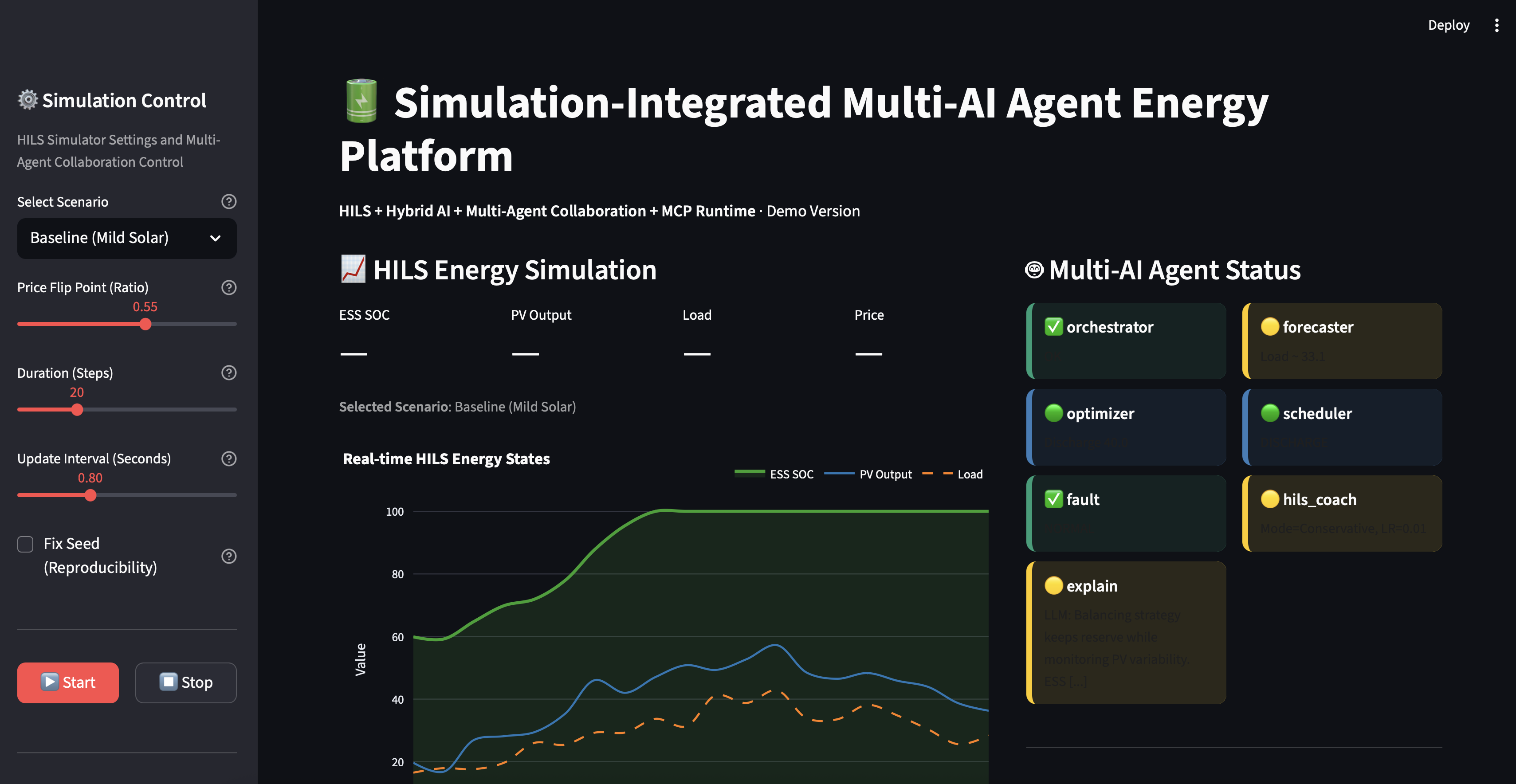
Real-time HILS energy simulation with 6 AI agents status monitoring
Hybrid AI Architecture
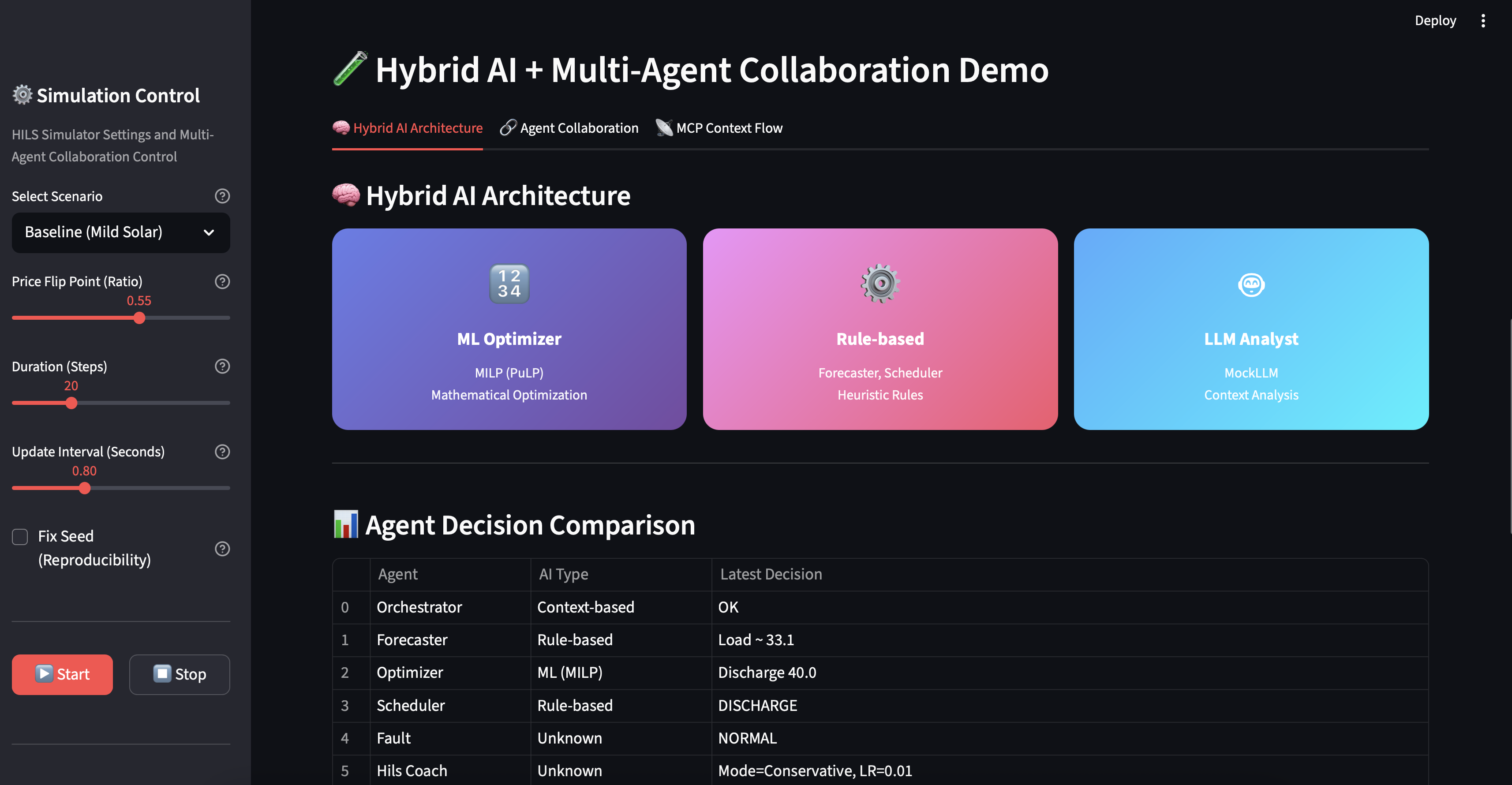
ML + Rule-based + LLM three-tier architecture visualization
Agent Collaboration Timeline
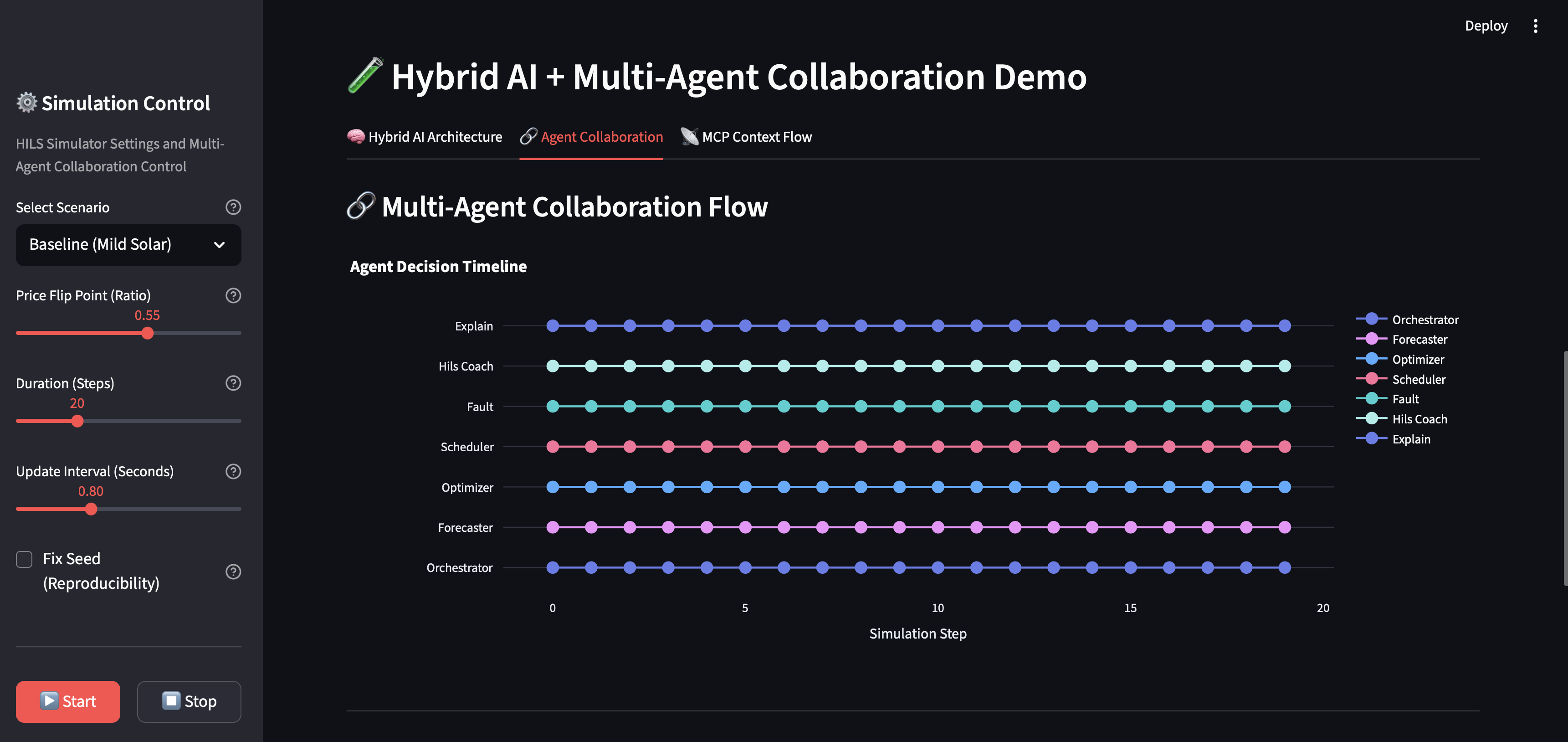
Multi-agent decision flow and collaboration patterns
Agent Execution Distribution
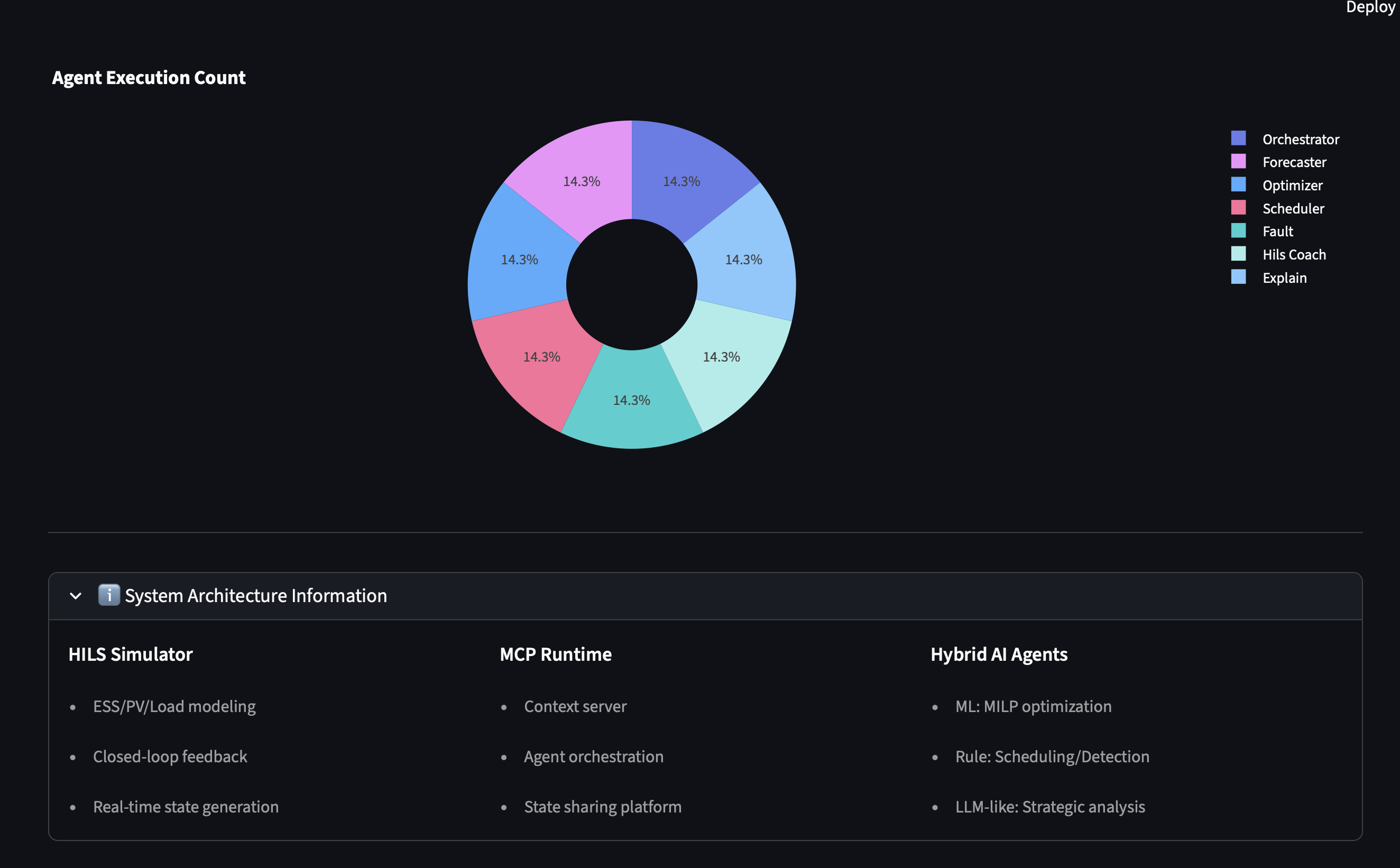
Activity distribution across different AI agents
Hybrid AI Insights
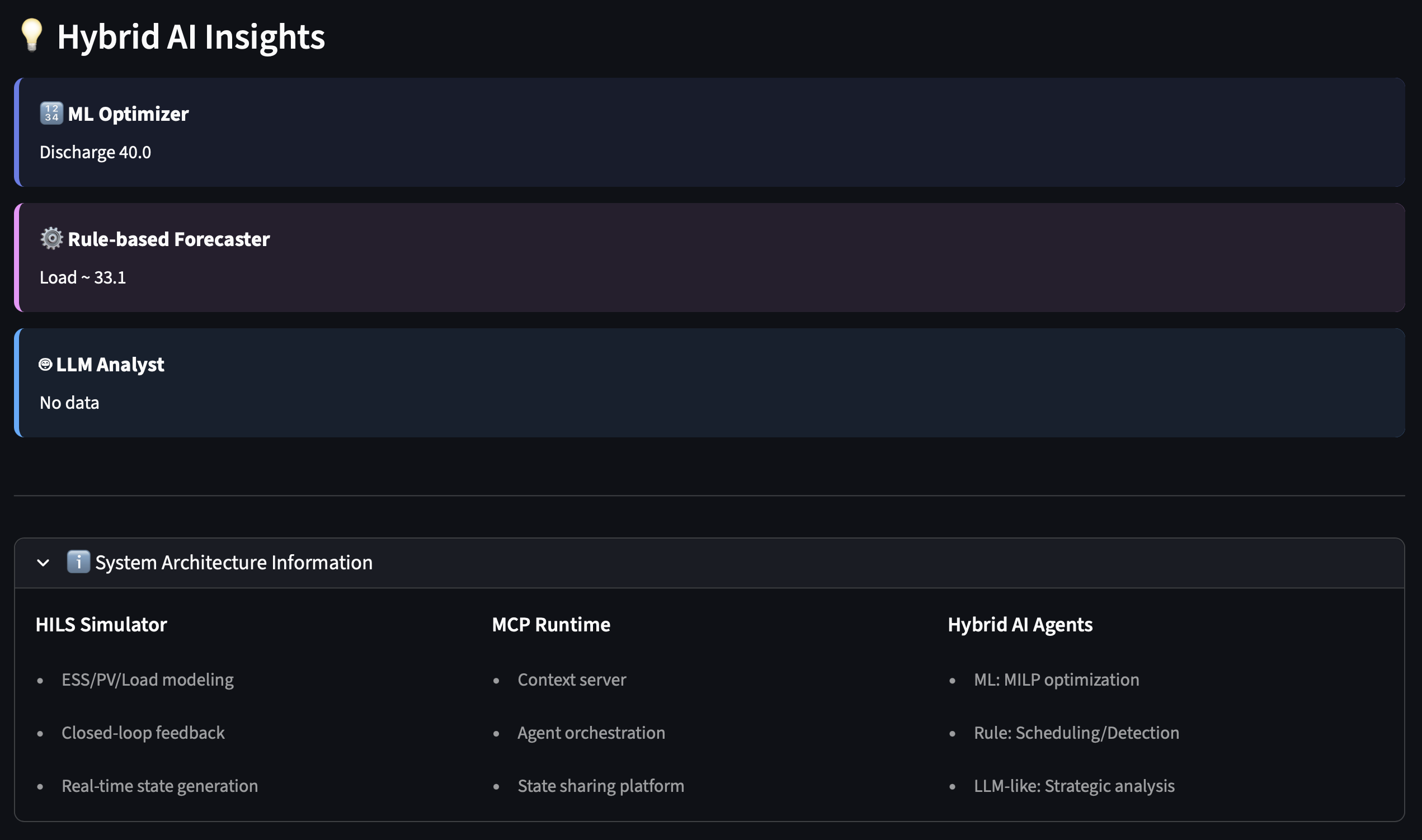
Real-time insights from ML Optimizer, Rule-based Forecaster, and LLM Analyst
MCP Context Flow
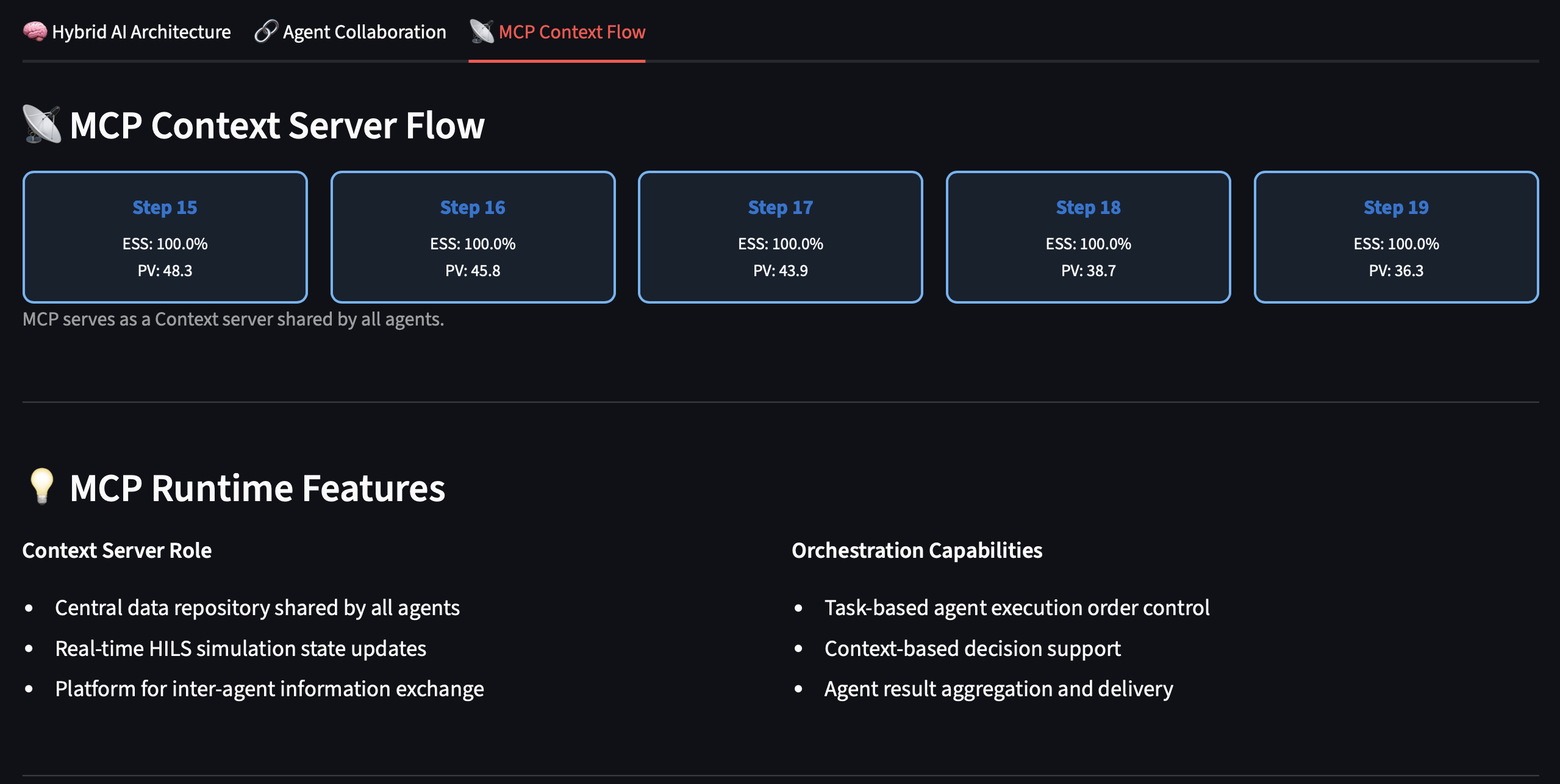
Context server data flow showing shared state across agents
🎯 Project Purpose
This project is a demonstration platform showcasing advanced energy management technologies:
- HILS (Hardware-in-the-Loop Simulation) based closed-loop simulator
- ML + LLM Hybrid AI agent architecture
- Multi-Agent Collaboration framework
- MCP (Model Context Protocol) based Context server structure
- DER (PV/ESS/EV) management and optimization workflow visualization
- Real-time visualization with Streamlit UI
Core Concept: A demo UI that visually demonstrates how energy optimization AI works without requiring an actual EMS system
🛠️ Tech Stack
| Category | Tech | Purpose |
|---|---|---|
| Language |  |
전체 시스템 구현 |
| Web UI |  |
실시간 대시보드 |
| Visualization |  |
에너지 차트/그래프 |
| Optimization |  |
ESS 충방전 MILP 최적화 |
| Simulation | SimPy 4.1+ · NumPy 1.26+ · Pandas 2.2+ | HILS 시뮬레이션 & 데이터 처리 |
| Testing | pytest 7.4+ | 단위 테스트 (17개, 100% 통과) |
| License | Custom License | 개인/교육용 무료, 상업용 라이선스 필요 |
📁 Project Structure
smartEMS-MultiAgent-Demo/
├── app.py                          # Main Streamlit application entry point
├── requirements.txt                # Python dependencies
├── README.md                       # Project documentation
│
├── src/                            # Source code directory
│   ├── __init__.py
│   ├── agents/                     # AI agent modules
│   │   ├── __init__.py
│   │   └── agents.py               # All AI agents (Forecaster, Optimizer, etc.)
│   ├── core/                       # Core system components
│   │   ├── __init__.py
│   │   ├── simulator.py            # HILS-based simulator
│   │   └── mcp_core.py             # MCP Runtime (Context + Orchestration)
│   └── ui/                         # UI components
│       ├── __init__.py
│       ├── ui_components.py        # Reusable UI components (charts, cards, logs)
│       ├── hybrid_ai_ui.py         # Hybrid AI + Collaboration visualization
│       └── utils.py                # Utility functions (logging, state management)
│
└── tests/                          # Test directory
    ├── __init__.py
    └── test_system.py              # Unit tests (17 tests, 100% pass rate)
🔄 System Workflow
[HILS Simulator]
    ↓ Calculate and generate ESS/PV/Load values
[MCP Runtime]
    ↓ Update context (time, ess_level, pv_output, load, price, etc.)
[Multi-AI Agents]
    ├─ Forecaster: Load/weather prediction
    ├─ Optimizer: MILP optimization
    ├─ Scheduler: Charge/discharge policy determination
    ├─ Fault Detection: Anomaly detection
    ├─ Orchestrator: Agent invocation order management
    └─ HILS Coach: HILS learning/tuning parameter calculation
[UI / Visualization]
    └─ Real-time energy graphs + Agent status dashboard + Log stream
🏗️ Core Technology Components
- HILS-based Closed-loop Structure: Real-time feedback loop for control algorithm verification
- ML + LLM Hybrid AI Agents: Combination of rule-based + optimization + LLM-style analysis
- Multi-Agent Collaboration: 6 agents collaborating through shared context
- Context Server-based MCP Structure: Platform for sharing state/history between agents
- DER Control Flow: Integrated optimization of PV/ESS/EV
- Extensible Tool Gateway Structure: Support for Modbus/OPC-UA integration (mocked in demo)
🚀 Quick Start
Installation
git clone https://github.com/lhg96/smartEMS-MultiAgent-Demo.git
cd smartEMS-MultiAgent-Demo

# (선택) 가상 환경 생성
python -m venv venv
source venv/bin/activate  # Windows: venv\Scripts\activate

pip install -r requirements.txt
Execution
streamlit run app.py
Browser will automatically open at http://localhost:8501
Testing
python -m pytest tests/test_system.py -v
All tests passing: 17/17 ✅
🤖 Agent Architecture
6 Core Agents
| Agent | Role | Technology |
|---|---|---|
| ForecasterAgent | Load/weather prediction | Stochastic modeling |
| OptimizerAgent | ESS charge/discharge optimization | MILP (PuLP) / Heuristic fallback |
| SchedulerAgent | Charge/discharge scheduling | Rule-based + SoC/ToU |
| FaultDetectionAgent | PV/ESS anomaly detection | Threshold-based detection |
| HILSCoachAgent | Learning parameter adjustment | Adaptive parameter tuning |
| OrchestratorAgent | Agent invocation management | Orchestration pattern |
Hybrid AI Structure
- ML-based: MILP optimization (Optimizer)
- Rule-based: Scheduling, anomaly detection
- LLM-like: MockLLMAgent (strategic analysis)
🎨 UI Structure
┌─────────────────────────────────────────────────┐
│  Sidebar: Simulation Control                    │
│  - Scenario selection                           │
│  - Step length / speed adjustment               │
│  - Start / Stop buttons                         │
└─────────────────────────────────────────────────┘

┌────────────────────────┬────────────────────────┐
│  Left: HILS Simulation │  Right Top: Agent Status│
│  - ESS SOC graph       │  - 6 agent cards        │
│  - PV Output           │  - Status icons         │
│  - Load                │                         │
│                        ├────────────────────────┤
│                        │  Right Bottom: Live Logs│
│                        │  - Step-by-step metrics │
│                        │  - CSV download         │
└────────────────────────┴────────────────────────┘

┌─────────────────────────────────────────────────┐
│  Hybrid AI + Multi-Agent Collaboration Demo     │
│  ├─ Tab 1: Hybrid AI Architecture               │
│  │   - ML / Rule-based / LLM 3-tier visualization│
│  │   - Agent Decision Comparison Table          │
│  │   - Hybrid AI Insights Panel                 │
│  ├─ Tab 2: Agent Collaboration                  │
│  │   - Multi-Agent Decision Timeline Graph      │
│  │   - Agent Activity Distribution Pie Chart    │
│  └─ Tab 3: MCP Context Flow                     │
│      - MCP Context Updates (recent 5 steps)     │
│      - Context Server role explanation          │
└─────────────────────────────────────────────────┘
📊 Key Features
Simulation Control
- 3 Scenarios: Baseline / High Price Late Peak / Volatile Market
- Customization: Step length (5-60), speed (0.2-2.0s), price flip ratio
- Reproducibility: Fixed seed option
Real-time Monitoring
- Energy Charts: ESS SOC, PV, Load (Plotly spline curves)
- Agent Status: Color coding (✅🟢🟡⚠️❌)
- Live Logs: Scrollable + CSV download
- Metrics: Real-time ESS/PV/Load/Price display
Hybrid AI Demo (New)
- AI Architecture Visualization: ML/Rule-based/LLM 3-tier structure
- Agent Decision Comparison: AI type and recent decisions table for each agent
- Collaboration Timeline: Multi-agent decision flow graph
- Activity Distribution: Agent call count pie chart
- MCP Context Flow: Context server data flow visualization
- Hybrid AI Insights: Recent judgments from ML/Rule/LLM layers
🔧 Code Quality
Documentation
- ✅ All modules/functions have docstrings
- ✅ Type hints
- ✅ Detailed comments
Error Handling
- ✅ Try-except blocks
- ✅ Logging system
- ✅ Graceful degradation
Testing
- ✅ 17 unit tests
- ✅ 100% pass rate
- ✅ Integration tests
📚 Module Roles
src/core/simulator.py
- ESS charge level simulation
- PV output random modeling
- Load modeling
- HILS feedback loop support
src/core/mcp_core.py
- Shared context storage for entire system
- Agent invocation and coordination (
orchestrate()) - MCP-like structure for state sharing between agents
src/agents/agents.py
- Implementation of 6 agents
- Hybrid AI structure (ML + Rule + LLM-like)
- Context-based collaboration
src/ui/ui_components.py
- Reusable UI components
- Charts, status cards, logs, metrics
src/ui/hybrid_ai_ui.py
- Hybrid AI architecture visualization
- Multi-agent collaboration timeline
- MCP context flow display
src/ui/utils.py
- Log formatting
- Session state management
- Helper functions
🐛 Troubleshooting
PuLP Optimization Error
pip install pulp
Streamlit Port Conflict
streamlit run app.py --server.port 8502
Test Failures
pip install -r requirements.txt --force-reinstall
python -m pytest tests/test_system.py -v
📝 Development Guide
Adding a New Agent
- Add new Agent class to
src/agents/agents.py - Inherit from
BaseAgentand implementrun()method - Add to agent dictionary in
app.py - Add tests to
tests/test_system.py
Adding New UI Components
- Create component function in
src/ui/ui_components.pyorsrc/ui/hybrid_ai_ui.py - Import and use in
app.py - Follow existing naming conventions (render_* functions)
Project Structure Guidelines
src/agents/: All AI agent implementationssrc/core/: Core business logic (simulator, MCP)src/ui/: All UI-related components and utilitiestests/: All test files withtest_prefix- Keep
app.pyas the main entry point, import fromsrc/
UI 수정 시
- 좌측 그래프:
ui_components.py→render_energy_chart() - 에이전트 카드:
ui_components.py→render_agent_status_cards() - 로그:
ui_components.py→render_live_logs()
🎓 학습 순서
- README.md 읽기 → 전체 개념 파악
- simulator.py 보기 → HILS 시뮬레이션 로직
- src/agents/agents.py - Understand each agent's role
- src/core/mcp_core.py - Check MCP orchestration
- app.py - Run and explore UI functionality
📄 License
Custom License - Free for Personal Use, Commercial License Required
This software is free to use for personal, educational, and non-commercial purposes. Commercial use requires a separate license agreement.
- ✅ Free: Personal use, education, research
- ❌ Requires License: Commercial use, production deployment, integration into commercial products
For commercial licensing inquiries, please contact: [email protected]
📞 Contact & Services
Development Consulting & Outsourcing Available
We provide professional consulting and development services for IoT, AI, and embedded systems projects.
👨💼 Project Manager Contact
- Email: [email protected]
- Homepage: https://www.okkorea.net
- LinkedIn: https://www.linkedin.com/in/aionlabs/
🛠️ Technical Expertise / 기술 전문 분야
- IoT System Design and Development / IoT 시스템 설계 및 개발
- Embedded Software Development / 임베디드 소프트웨어 개발 (Arduino, ESP32)
- AI Service Development / AI 서비스 개발 (LLM, MCP Agent)
- Cloud Service Architecture / 클라우드 서비스 구축 (Google Cloud Platform)
- Hardware Prototyping / 하드웨어 프로토타이핑
💼 Services / 서비스
Technical Consulting / 기술 컨설팅
- IoT project planning and design consultation / IoT 프로젝트 기획 및 설계 자문
- System architecture design / 시스템 아키텍처 설계
Development Outsourcing / 개발 외주
- Full-stack development from firmware to cloud / 펌웨어부터 클라우드까지 Full-stack 개발
- Proof of Concept (PoC) development / 개념 검증 개발
- Production-ready system development / 상용 시스템 개발
Reviews (0)
Sign in to leave a review.
Leave a reviewNo results found