erd-studio
Health Uyari
- License — License: MIT
- Description — Repository has a description
- Active repo — Last push 0 days ago
- Low visibility — Only 5 GitHub stars
Code Basarisiz
- process.env — Environment variable access in esbuild.js
- fs module — File system access in esbuild.js
- rimraf — Recursive directory removal in forge-app/package-lock.json
Permissions Gecti
- Permissions — No dangerous permissions requested
Bu listing icin henuz AI raporu yok.
Visual ERD designer for dbt — design your data warehouse on a canvas, in your repo, where your AI assistant can read it. Free and open source.

ERD Studio
Close the context gap between your data model and your AI assistant.



Free and open source — built in the open on GitHub. Issues, PRs, and stars welcome.
The problem
If you build data pipelines with dbt, your design lives in one tool (SqlDBM, Erwin, dbdiagram) and the actual code lives in another. That split creates three problems:
- The diagram drifts from the code. Change a column in dbt and the ERD doesn't notice. Change the ERD and the code doesn't notice. You're the only thing holding them together — and you forget.
- You can't refresh one part of the warehouse on its own schedule. Other ERD tools don't tag your dbt models by domain, so "rebuild just the customer area every hour" isn't a button — you have to wire it up by hand.
- Your AI can't read your model. Tools like SqlDBM keep the design behind a UI. Every prompt re-explains the same join keys, grain, and cardinality — and the AI still drifts.
That's why ERD Studio exists.
The solution
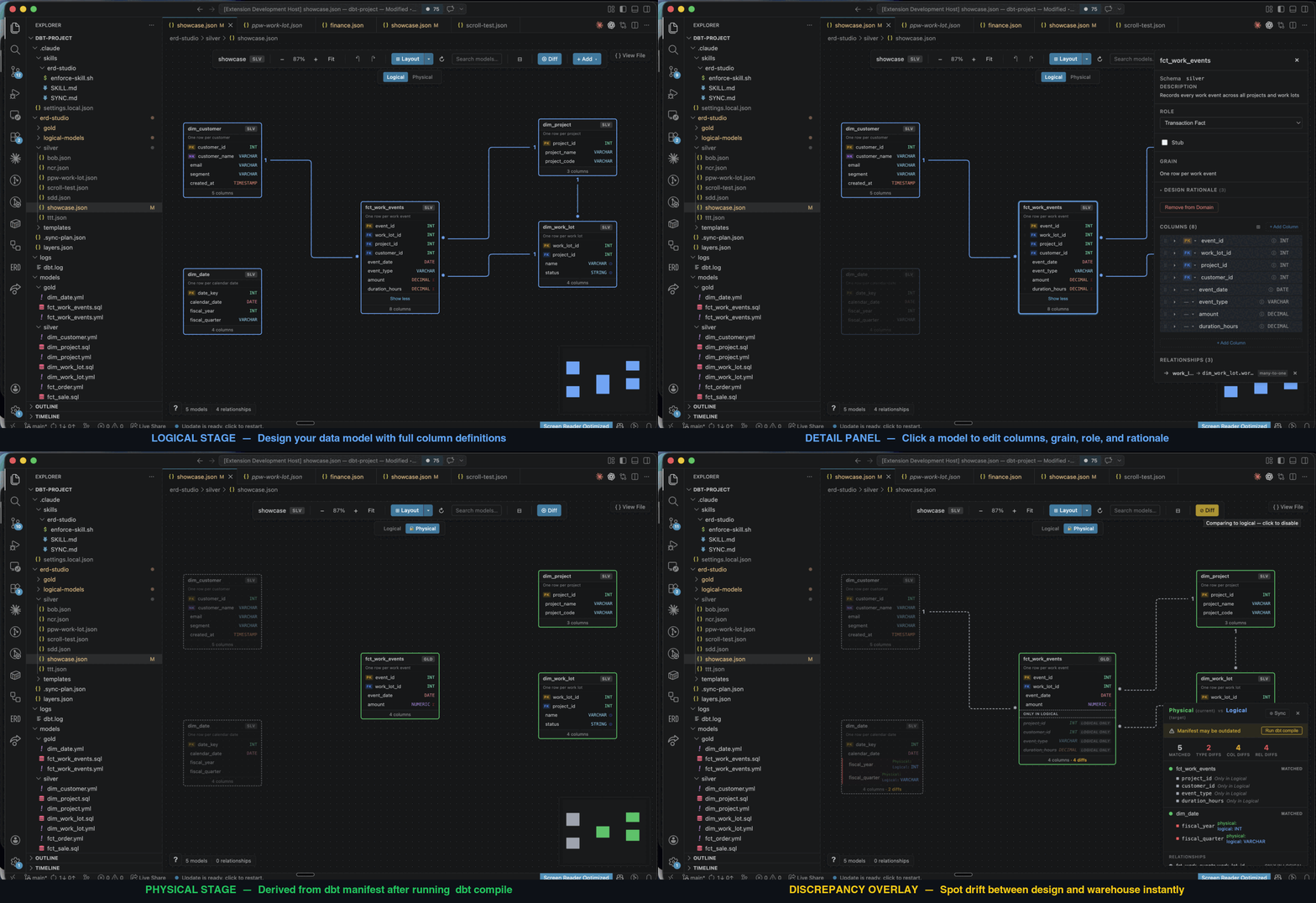
ERD Studio is a free and open source, AI-native alternative that puts the semantic model in the same repo as the SQL, as a visual canvas both you and the AI can read and write.
Under the hood, your model is plain YAML and JSON — AI reads it natively, git diffs it cleanly, and the canvas is just the human-readable view. No proprietary format, no lock-in.
Other ERD tools draw the boxes and arrows. ERD Studio captures the modelling decisions behind them — grain, SCD types, additivity, model roles, design rationale — as first-class fields the AI can read, not freeform notes locked behind a vendor UI.
Point the AI at your bronze layer. It profiles the sources, drafts an ERD on the canvas against your requirements and modelling style (Kimball, Inmon, etc.), and you refine it. The AI then writes the dbt models, schema YAML, and tests from the design you signed off on.
Already have dbt models? Point ERD Studio at your manifest.json — it reads your existing relationship and uniqueness tests to seed an ERD on day one.
No more brain-as-middleware.
The diagram is the prompt.
Today: built for medallion architectures on dbt projects. More frameworks coming.
Because the canvas lives in your repo, you also get:
Git version control on your designModel history and warehouse history commit together and stay in lockstep by default. |
Schedule a whole ERD as one dbt runERD Studio writes a |
Diff against realityCompare your design to what dbt actually built (read from your schema YAMLs and |
AI sync plans for driftWhen design and warehouse disagree, ERD Studio generates a JSON plan mapping every discrepancy to a concrete fix. Pick the source of truth per item; the AI executes it. |
Getting started
Prerequisites: VS Code 1.85+ • dbt project with dbt_project.yml (anywhere up to three folders deep in the workspace, or set erdStudio.projectPath) • a compiled manifest.json and/or dbt schema YAMLs for the Physical stage
Quick install: Cmd+P →
ext install liamwynne.erd-studio
- Install ERD Studio from the VS Code Marketplace.
- Open your dbt project in VS Code and click the ERD Studio icon in the Activity Bar.
- Initialize — follow the prompt to create the
.erd-studio/folder. - Install the AI harness — Cmd+Shift+P →
ERD Studio: Install AI Coding Harness. - Create a domain — Cmd+Shift+P →
ERD Studio: Create Semantic Domain. - Tell your AI what to build — describe the scope, point it at bronze, let it draft the ERD. Review on the canvas. Prompt it to generate the dbt code.
The harness installs the right file for your assistant:
| Assistant | Harness file |
|---|---|
 |
.claude/skills/erd-studio/SKILL.md |
 |
.github/instructions/erd-studio.instructions.md |
 |
.gemini/styleguide.md |
 |
AGENTS.md |
The baseline harness teaches your assistant the domain format and sync workflow, with a guard that blocks AI edits to .erd-studio/ until the spec is loaded. Layer your own skills, prompts, and style guides on top so the generated dbt reflects your team's conventions.
How it works — file format, folders, and lifecycle (click to expand)
A guide to the file format and lifecycle so you can edit by hand, debug AI output, and understand what the canvas is showing.
The mental model
ERD Studio stores your semantic model as plain text files in your dbt repo. The visual canvas is a renderer for those files — you can edit them in any text editor and the canvas updates, or edit on the canvas and the files update.
Two kinds of file do all the work:
- Model YAML — one file per table. Describes the table itself: columns, types, grain, role.
- Domain JSON — one file per diagram. References models by name, draws relationships between them, stores canvas positions.
A model is reusable across diagrams. dim_customer can appear in both your "Sales" and "Marketing" domains — there's still only one YAML for it. A domain is a single ERD view.
Folder layout
After setup, your dbt project gets:
your-dbt-project/
├── .erd-studio/
│   ├── layers.json              # Layer definitions (silver, gold, etc.)
│   ├── logical-models/          # Model definitions — one YAML per table
│   │   ├── dim_customer.yml
│   │   ├── dim_project.yml
│   │   └── fct_order.yml
│   ├── silver/                  # Domains in the silver layer
│   │   ├── customer-360.json
│   │   └── orders.json
│   ├── gold/                    # Domains in the gold layer
│   │   └── reporting.json
│   └── templates/               # Optional starting points for new models
│       ├── dimension.json
│       ├── fact.json
│       ├── bridge.json
│       └── scd2.json
├── selectors.yml                # Auto-generated dbt selectors (one per domain)
└── target/manifest.json         # Your dbt build artifact — ERD Studio reads it
Layer folders match what's in layers.json. You're not stuck with silver/gold — rename them to fit your warehouse (staging/mart, bronze/silver/gold/platinum, or your own scheme).
Anatomy of a model file
.erd-studio/logical-models/dim_customer.yml:
name: dim_customer
schema: silver
description: Customer master, deduplicated and SCD2-tracked.
grain: One row per customer (current + history)
modelRole: conformed-dim
columns:
  - name: customer_sk
    dataType: BIGINT
    description: Surrogate key
    isPrimaryKey: true
  - name: customer_id
    dataType: VARCHAR
    description: Source system identifier
    isNaturalKey: true
    scdType: 1
  - name: email
    dataType: VARCHAR
    scdType: 2
| Field | Purpose |
|---|---|
grain |
The "one row per ___" statement. The single most important design decision. |
modelRole |
Architecture role: conformed-dim, domain-dim, transaction-fact, periodic-snapshot, accumulating-snapshot, factless-fact, bridge, reference. |
isPrimaryKey |
Surrogate or business PK. |
isNaturalKey |
Business identifier (email, SKU, source system ID). |
isForeignKey |
Design intent — separate from the relationships you draw in the domain JSON. |
scdType |
0 fixed, 1 overwrite, 2 track history. |
additiveType |
For fact measures: additive, semi-additive, non-additive. |
rationale |
Optional. Free-text fields capturing why: purpose, design, grainChoice, roleChoice, scdStrategy, measures. |
Anatomy of a domain file
.erd-studio/silver/orders.json:
{
  "schemaVersion": 5,
  "domain": "orders",
  "layer": "silver",
  "description": "Order transactions and project dimensions",
  "logical": {
    "models": ["fct_order", "dim_project"],
    "relationships": [
      {
        "fromModel": "fct_order",
        "fromColumn": "project_id",
        "toModel": "dim_project",
        "toColumn": "project_id",
        "cardinality": "many-to-one"
      }
    ]
  },
  "viewConfig": {
    "positions": {
      "fct_order": { "x": 100, "y": 200 },
      "dim_project": { "x": 400, "y": 100 }
    }
  }
}
The thing to notice: logical.models is an array of strings — names of files in logical-models/. The domain doesn't duplicate columns; it just references the model. This is why you can edit dim_customer.yml once and have every domain that includes it pick up the change.
| Field | Purpose |
|---|---|
schemaVersion: 5 |
Required. The current format version. |
logical.models[] |
Names matching logical-models/{name}.yml. |
logical.relationships[] |
FK relationships drawn between models in this diagram. |
viewConfig.positions |
Canvas x/y per model. Updated when you drag. |
viewConfig.annotations |
Sticky-note "build notes" you can pin to the canvas. |
stubColumns[] |
Optional. Suppresses "missing physical columns" warnings for conformed dimensions where you only model the keys. |
The two stages
Open a domain on the canvas and you'll see a Logical / Physical toggle.
- Logical stage — what you and the AI designed. Reads from
logical-models/*.ymland the domain JSON. - Physical stage — what dbt actually built. Derived at runtime from your dbt schema YAMLs (
models/**/*.yml, always current, used first) andtarget/manifest.json(used for any model the YAMLs don't describe, and to enrich data types). Paths followmodel-paths/target-pathindbt_project.yml. Nothing is written to disk for the physical stage — it's recomputed each time you switch, and schema edits are blocked while you're viewing it (moving nodes and adding notes still work, since layout is shared).
Relationships and cardinality on the physical stage come from your existing dbt tests — relationships and unique / unique_combination_of_columns declared in either the YAMLs or the manifest (both tests: and data_tests:, including dbt 1.10 arguments: and versioned ref('model', v=2)). Model and column names match case-insensitively.
| dbt test on FK side | dbt test on PK side | Cardinality shown |
|---|---|---|
no unique test |
unique |
many-to-one |
unique |
unique |
one-to-one |
unique_combination_of_columns |
unique_combination_of_columns |
composite key |
So an existing dbt project with decent test coverage gets a useful Physical stage on day one — no extra config.
How the AI is wired in
When you run Install AI Coding Harness, ERD Studio writes the schema spec into the location your assistant looks at by default:
| Assistant | File written |
|---|---|
| Claude Code | .claude/skills/erd-studio/SKILL.md |
| GitHub Copilot | .github/instructions/erd-studio.instructions.md |
| Google Gemini | .gemini/styleguide.md |
| OpenAI Codex | AGENTS.md (appended) |
The spec teaches the AI:
- Which file to edit for each operation (column changes go in the YAML; relationship changes go in the JSON)
- The naming conventions (
dim_,fct_,ref_,brg_prefixes for dimensions, facts, references, bridges) - The full field reference (every key documented above)
For Claude Code, the install also adds a PreToolUse hook at .claude/settings.local.json that blocks the first edit to any .erd-studio/ file in a session until the assistant has loaded the skill. No half-read spec, no drift.
The harness embeds a version marker. When you upgrade ERD Studio, the extension detects out-of-date harness files and asks before updating them (Update All / Choose… / Dismiss) — nothing is overwritten silently. Files without the marker (ones you wrote yourself) are left alone, and only the marked ERD Studio section of AGENTS.md is replaced; the rest of that file is preserved.
Auto-generated outputs
Two things are written for you — don't hand-edit them.
selectors.yml lives at the dbt project root. ERD Studio writes one selector per domain:
selectors:
  - name: domain_silver_orders
    definition:
      union:
        - method: fqn
          value: fct_order
        - method: fqn
          value: dim_project
So dbt run --selector domain_silver_orders refreshes every model in your "orders" diagram. Regenerated whenever a domain changes. ERD Studio only touches selectors it generated — domain_* entries whose description ends with Managed by ERD Studio. — so anything you write yourself (even a domain_-prefixed one) is preserved across regenerations.
Discrepancy reports — toggle "Compare to Physical" on the canvas. ERD Studio runs a comparison between Logical and Physical and overlays the result:
| Status | Meaning |
|---|---|
| Matched | Same model / column / relationship on both sides |
| Extra | In source, not in target (e.g. you designed it, dbt hasn't built it) |
| Missing | In target, not in source (e.g. dbt has it, your model doesn't) |
| Type mismatch | Same column, different dataType |
| Cardinality mismatch | Same relationship, different cardinality |
Type comparison normalises common aliases (varchar/string, int/integer, timestamp_ntz/timestamp, etc.) so equivalent types don't show as mismatches.
For unrecoverable drift, the AI can generate a sync plan at .erd-studio/.sync-plan.json — every discrepancy mapped to a concrete action (add-to-logical, update-type-in-physical, etc.). You pick the source of truth per item; the AI executes it.
Editing by hand vs by AI vs on the canvas
All three write to the same files. Pick whichever fits the task.
| If you want to… | Easiest path |
|---|---|
| Add a column to one model | Edit the YAML directly. |
| Reshape a domain (add models, draw relationships) | The canvas. |
| Backfill many models from sources | Ask the AI ("read the bronze layer and draft a star schema for orders"). |
| Document a design decision | Edit the YAML's rationale field. |
| Change a cardinality on the diagram | The canvas, or the JSON's relationships[]. |
Undo/redo and git work as you'd expect — every canvas edit goes through VS Code's WorkspaceEdit API and is saved immediately, with the model YAML and the domain JSON changing (and undoing) together as one step. Files edited outside the canvas (by you, git, or an AI agent) are picked up automatically.
That's the whole system. Three folders, two file types, one diagram per JSON, one model per YAML.
Settings
| Setting | Default | What it does |
|---|---|---|
erdStudio.projectPath |
(auto-detect) | dbt project root, absolute or relative to the workspace. Needs a window reload when changed (you'll be prompted). |
erdStudio.semanticDir |
.erd-studio |
Where the ERD files live, relative to the project root. Needs a window reload when changed. |
erdStudio.claudeSync.skipPermissions |
false |
Pass --dangerously-skip-permissions when Execute with Claude applies a sync plan. The launch command is always shown for confirmation first. |
The pre-rename dbtSemantic.* settings and command IDs still work as fallbacks, so old keybindings and workspace settings carry over.
Reporting a bug
ERD Studio: Report a Bug (command palette, the sidebar title bar, the canvas toolbar, or the button on any error screen) opens a prefilled GitHub issue in your browser — title, description, steps, and diagnostics (extension and VS Code versions, OS, a summary of the open domain, and recent errors). From a canvas it also captures a screenshot to your clipboard so you can paste it straight into the issue. Nothing is sent until you review and submit on GitHub.
Open source (MIT) • Made for the dbt community
View source • Report a bug • Start a discussion
Yorumlar (0)
Yorum birakmak icin giris yap.
Yorum birakSonuc bulunamadi