skills-hub
Health Uyari
- License — License: MIT
- Description — Repository has a description
- Active repo — Last push 0 days ago
- Low visibility — Only 6 GitHub stars
Code Gecti
- Code scan — Scanned 5 files during light audit, no dangerous patterns found
Permissions Gecti
- Permissions — No dangerous permissions requested
Bu listing icin henuz AI raporu yok.
One local library for all your AI agent skills — manage, toggle, group and update them from a single zero-dependency web UI (Claude Code / Codex / any agent).
Skills Hub
One library for all your AI agent skills — manage, toggle, and update them from a single local web UI.
Skills Hub keeps every skill (a folder with a SKILL.md) in one local library and links it into wherever your agents look for skills — Claude Code (~/.claude/skills), Codex (~/.codex/skills), generic Agents (~/.agents/skills), or any project directory. Edit once, effective everywhere; delete a link, the skill stays safe in the library.
- Single-file, no npm/pip install - Python 3.9+ and Git are the only requirements. One file, one command.
- Local-first — a loopback-only HTTP server (
127.0.0.1:7799). Nothing leaves your machine. - Cross-platform — macOS / Linux (symlinks), Windows (symlink → junction → copy fallback).
- Everything is undoable — every change is committed to a local git history; deletes go to a trash folder, never
rm -rf. - Bilingual UI — auto-detects Chinese/English from your browser, switch anytime from the top-right corner.
Quick start
git clone https://github.com/Liang-HZ/skills-hub.git
cd skills-hub
python3 webui.py          # opens http://127.0.0.1:7799
Windows: double-click start-windows.bat (or py webui.py).
Optional native desktop window: pip install pywebview && python3 desktop.py.
The UI needs three sentences to understand:
- All your skills live in this machine's library — deleting a toggle never deletes the skill, edits apply everywhere.
- Each skill has a row of toggles: green = usable there (Claude global / Codex global / a specific project).
- Nothing touches the network unless you click a button that says so.
What it does
| Tab | What you do there |
|---|---|
| Skills | Create, edit, import, adopt stray skills found on your machine (native directory picker or type a path); toggle where each one is enabled |
| Sets | Group skills you always use together; enable/disable a whole set in one click |
| Usage | See what's enabled where (global roots and every project), clean up dead projects |
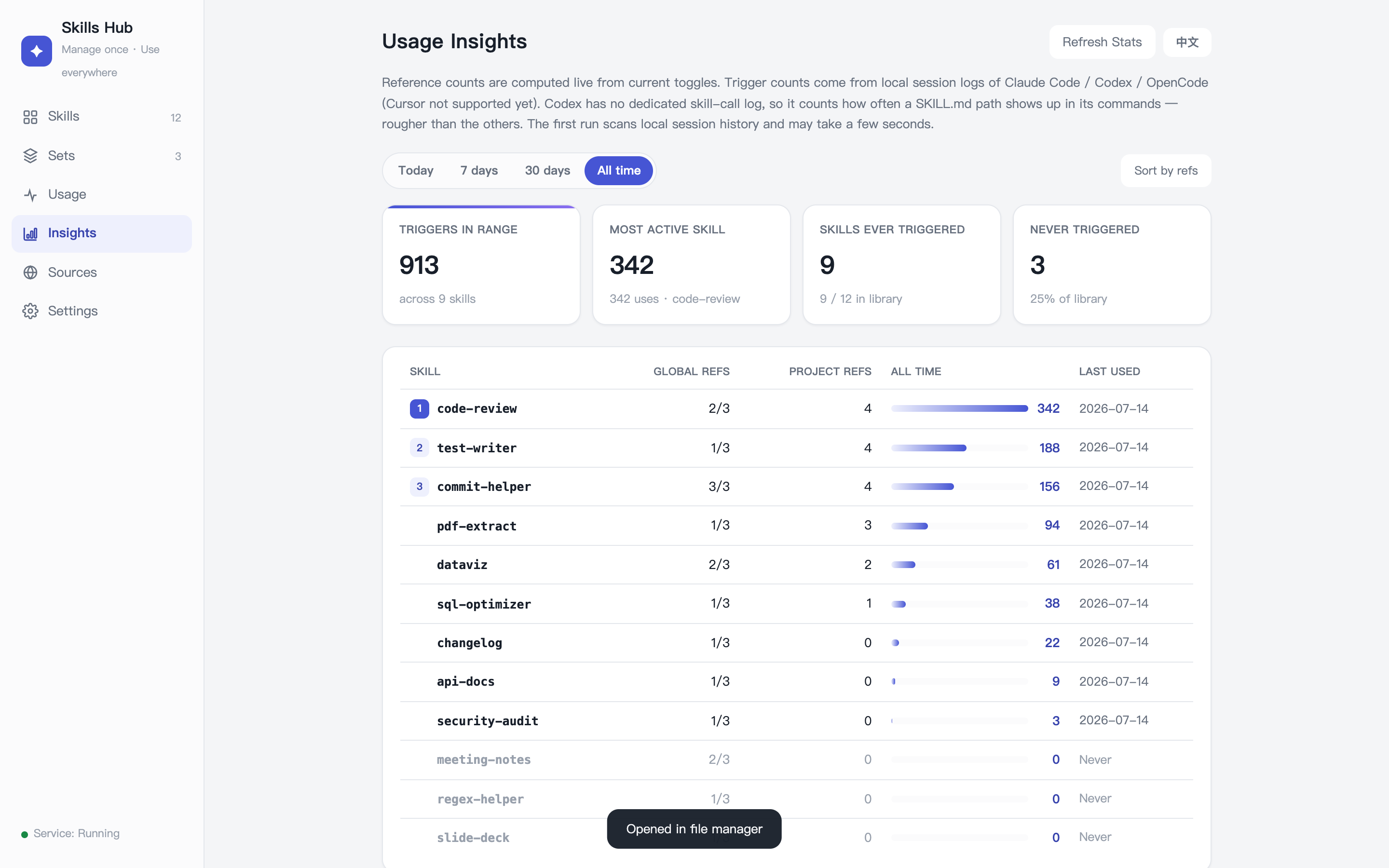
| Insights | Rank skills by references and by how often they were actually triggered, over today / 7d / 30d / all time |
| Sources | Clone third-party skill repos into an isolated vendor/ area, cherry-pick skills as snapshots, and update them manually |
| Settings | Behavior options |
Usage stats: where the numbers come from
Two independent measures, both computed locally — nothing is uploaded, and every data source is read-only:
- References — how many places currently have the skill switched on (global roots + per-project). Derived live from the toggles; nothing extra is stored.
- Triggers — how often a skill was actually invoked, by incrementally scanning each agent's own local session logs into
.state/usage.sqlite3(Python's stdlibsqlite3; no new dependency). Signal quality differs per agent, so the source is stated rather than blurred together:
| Agent | Source | Signal |
|---|---|---|
| Claude Code | ~/.claude/projects/**/*.jsonl |
Exact — a structured Skill tool call per invocation |
| OpenCode | ~/.local/share/opencode/opencode.db |
Exact — the built-in skill tool call |
| Codex | ~/.codex/sessions/**/*.jsonl |
Heuristic — Codex has no dedicated skill tool, so this counts commands that reference a .../<name>/SKILL.md path. Rougher than the others (reading a skill and acting on it look the same) |
| Cursor | — | Not supported yet: its local store is an unofficial, reverse-engineered state.vscdb format that could break silently on upgrade |
Scanning is incremental (byte offsets for log files, a rowid high-water mark for OpenCode), so nothing is double-counted and a half-written record is never parsed. The first run walks your existing history and may take a few seconds; after that it's instant.
The sovereignty model for third-party skills
Third-party repos are cloned into vendor/<source>/ — an inert inbox that is never live. Importing a skill copies a snapshot of it into your library. Updating is two separate, explicit authorizations:
- Check — only now does a
git fetchhappen. You see the new commits and exactly which files of which imported skills changed. The check issues a one-time, short-lived token bound to that source at that commit. - Update — consumes the token and fast-forwards to exactly the commit you reviewed. It cannot re-resolve "latest" behind your back.
All git commands the manager runs use an isolated empty core.hooksPath, so no repository or global git hook can turn a management action into code execution.
What it deliberately does NOT do
Skills Hub is a manager, not a security scanner:
- It does not judge whether a skill is safe, and never runs a skill's own scripts, installers, or examples.
- It does not auto-download anything — sources, updates, dependencies, models. Every network action is behind an explicit button labeled as such.
- It shows you diffs and provenance so you can decide. Read third-party skills before enabling them.
Write APIs are protected server-side (loopback host + same-origin + JSON content-type + per-session CSRF token), so a malicious web page can't drive your manager.
Data layout
library/               your skills (the single source of truth)
library/.origins.json  provenance of each skill (own / tracking upstream / detached copy)
sets/                  skill groups, one name per line
vendor/                isolated clones of third-party repos (never live)
targets.txt            registry of project dirs that use skills
attic/trash/           where "deleted" skills actually go
usage_log.py           trigger-count scanner (reads agent session logs, aggregates into .state/)
.state/                local derived data (usage stats cache) — gitignored, rebuildable
Your skills and sets are auto-committed to the local git history (only library/ and sets/), which is your undo path. To keep your data outside the code checkout, set SKILLS_HUB_ROOT=/path/to/data — the app will initialize a separate data repo there and git pull upgrades stay trivial.
Run it at login
See docs/autostart.md for launchd (macOS), systemd (Linux), and Task Scheduler (Windows) recipes.
CLI (macOS/Linux)
skillctl is a bash equivalent of the toggles: skillctl list | sets | status | enable <target> <skill|@set> | disable | add | new.
Tests
python3 -m unittest discover -s tests
The regression suite pins the product boundary: no code execution paths, no network without an explicit click, token-gated updates, CSRF enforcement.
License
Yorumlar (0)
Yorum birakmak icin giris yap.
Yorum birakSonuc bulunamadi