libre-webui
Health Gecti
- License — License: Apache-2.0
- Description — Repository has a description
- Active repo — Last push 0 days ago
- Community trust — 60 GitHub stars
Code Basarisiz
- fs module — File system access in backend/package.json
- network request — Outbound network request in backend/package.json
- exec() — Shell command execution in backend/scripts/clearEncryptedData.ts
Permissions Gecti
- Permissions — No dangerous permissions requested
Bu listing icin henuz AI raporu yok.
A local-first workspace for chat, private knowledge, artifacts, and isolated model-driven work. Self-hosted. Provider-flexible. Apache 2.0.
Libre WebUI
Your AI stack should answer to you.
A local-first workspace for chat, private knowledge, artifacts, and isolated model-driven work.
Self-hosted. Provider-flexible. Apache 2.0.
Run local. Bring the providers you choose. Keep control of the interface around them.





Website · Documentation · Download · Quick start
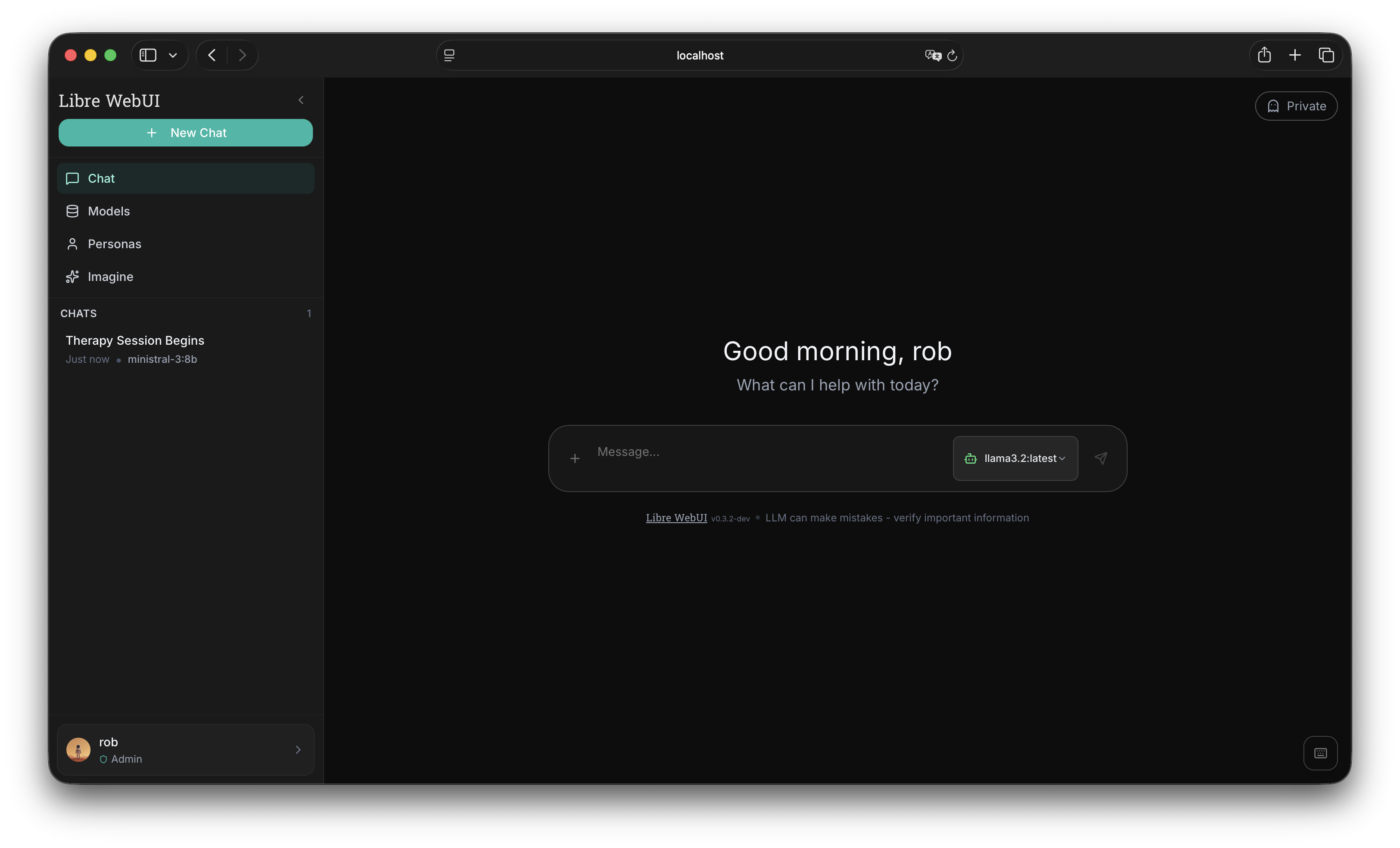
What Libre WebUI is
A complete AI workspace you run yourself. Chat with local models through
Ollama or with any provider you choose to connect, give a
model a sandboxed workspace where it can actually build something, search your
own documents, generate images and speech, and keep every conversation on
hardware you control.
The interface works like a browser. Home is your launcher; chats, Work
sessions, and pages open as tabs beside it; ⌘K searches everything you have.
Nothing is buried three menus deep.
It is Apache 2.0, ships without telemetry, and is built so you can leave. If
this project ever stops serving you, your installation and your fork do not need
anyone's permission.
Quick start
You need Node.js 22.22 or newer. Docker is optional — only
Work needs a sandbox runtime
(Docker locally, or Kubernetes when deployed with the Helm chart).
npx libre-webui@latest
Open http://localhost:8080. The first account created
on a fresh install becomes the administrator.
For private local inference, install Ollama and pull a
model:
ollama pull gemma4:12b
That is enough to start. No cloud account is required. When you do want a remote
model, add only the provider you choose.
If Docker is missing, Libre WebUI starts normally and Work reports a clear
Runtime unavailable state rather than running commands on your host.
What you can do
| Work the way you browse | Home launcher, tabs for chats and Work sessions, ⌘K to jump anywhere |
| Talk to the model you want | Local Ollama, Ollama Cloud, bundled providers, or any compatible endpoint |
| Use the agent you subscribe to | An installed Claude Code or Codex CLI, as a chat model, with no API key |
| Give every task a workspace | Files, a terminal, a diff, and a live preview inside an isolated container |
| Bring your own context | Chat with PDF and plain-text documents by keyword or embeddings |
| Turn answers into artifacts | Sandboxed HTML, SVG, JSON, code, and multi-file previews beside the chat |
| Create with more than text | Image generation, provider-backed speech, and reusable personas |
| Make the interface yours | Light and dark themes, adaptive accents, 25 locales including Arabic RTL |
| Operate it your way | Local accounts and roles, optional OAuth, Docker, Kubernetes, npm, desktop |
| Extend without lock-in | Chat, embedding, image, and speech providers through the plugin layer |
Freedom should survive success
An AI interface can be self-hosted today and still become a gatekeeper
tomorrow. Libre WebUI is built so your freedom does not depend on a company
remaining benevolent.
Run it. Inspect it. Change it. Fork it. Connect it to something else. Or leave
it behind. The code is Apache 2.0, local inference is the default path, remote
providers are opt-in, and the project charter puts independence and inclusive
participation into writing.
Open source is a license. Libre is an operating principle.
Do not trust the pitch. Inspect the
license,
charter,
source, and
CI.
| What stays yours | Libre WebUI's approach | Verify it |
|---|---|---|
| Data path | Self-hosted by default; remote inference only when you select it | Deployment docs |
| Model choice | Local Ollama plus optional provider plugins and compatible endpoints | Plugin architecture |
| Code | Use, modify, redistribute, and fork under Apache 2.0 | License |
| Project direction | The charter rejects funding control over roadmap, license, or community | Charter |
| Participation | Everyone is welcome regardless of background, identity, or geography | Charter |
| Exit | Your installation and your fork do not need our permission | Source |
Local-first is a real boundary
Libre WebUI ships without application telemetry or analytics. When you use
Ollama locally, prompts and responses stay on infrastructure you control. If you
select a remote provider, that provider receives the requests you choose to send
it; Libre WebUI does not pretend otherwise.
For shared and public deployments, the backend includes local accounts with
bcrypt hashing and JWT sessions, admin and user roles, login and signup rate
limits, optional Cloudflare Turnstile, optional GitHub and Hugging Face OAuth,
application-layer AES-256-GCM encryption for sensitive values such as
credentials, and persistent SQLite storage with configurable data directories.
Application-layer encryption is not full-disk or end-to-end encryption. Use
HTTPS, access-controlled storage, stable secrets, and disk encryption where your
threat model requires them. Start with the
authentication guide and
encryption guide.
Models, providers, and agents
Ollama is the default local path, not a lock-in strategy. Libre WebUI bundles an
MLX LM plugin for native Apple Silicon inference plus provider definitions
spanning chat, images, embeddings, and speech — OpenAI, Anthropic, Google
Gemini, Groq, Kimi Code by Moonshot AI, Mistral, OpenRouter, Hugging Face,
GitHub Models, ComfyUI, ElevenLabs, Qwen3-TTS, Kyutai TTS, and any
OpenAI-compatible service.
Credentials come from deployment-wide environment variables or encrypted,
user-scoped settings. Plugins can declare static model lists and use live
discovery when a provider exposes a compatible model-list endpoint.
A coding agent you already pay for can answer in chat directly. If claude orcodex is installed on the server, administrators see an Agents group in
the model selector and can hold a normal conversation using the subscription
that CLI is already signed in with — no API key. The CLI runs as the Libre WebUI
server user and inherits that user's agent credentials, so treat it as
equivalent to granting those agents shell access, and setAGENT_CLI_MODELS_ENABLED=false to turn it off.
Connect a provider → ·
Use an installed agent →
Work: one persistent environment per task
Work gives a tool-capable model a real place to build. Describe what you want,
and the task keeps its own conversation, provider route, files, tool activity,
and preview — so returning to it a week later returns to exactly where it was.
Work task
   ├── durable conversation and run history in SQLite
   ├── dedicated persistent volume mounted at /workspace
   ├── disposable, policy-checked sandbox for commands
   └── Files · Activity · Terminal · Preview workspace pane
The model can read, write, move, delete, and search files, run bounded shell
commands, and start or stop a browser preview. You get a syntax-highlighted
editor, a red/green diff of what changed in the last turn, conflict-aware saves,
and a real interactive terminal attached to the same container — under the same
policy as the model's own tools, so it is a window into the sandbox rather than
a way around it.
Runs stream assistant text, tool calls, results, usage, and state changes live.
Reasoning appears only when the provider returns it; Libre WebUI cannot reveal a
model's hidden chain-of-thought. When a run exhausts its round budget it asks
for a final progress handoff and ends in a yellow Needs input state instead
of reporting false success — a follow-up run continues in the same workspace.
Choosing a remote route shows a one-time disclosure, because an autonomous run
can make many paid calls and can send conversation context and tool results,
including file contents, to that provider. You should know that before a run
starts, not after the bill.
On the sandbox. Work is admins-only by default — an administrator can open
it to all users, and access is re-checked on every request — and it never falls
back to host execution. Containers run as a non-root user with a read-only
root filesystem, dropped capabilities, no-new-privileges, resource limits
with swap pinned to the memory cap, and only the task volume mounted.
Networked tasks join a managed bridge with inter-container communication
disabled. The whole policy is hashed into a container label and re-verified
before reuse, so a container predating a hardening change is recreated rather
than reused. Administrators can define named runtime policies — image,
resource limits, workspace size, idle timeout — that tasks are created under;
the hardening profile is not a policy field, so a policy can size a sandbox
but never weaken it.
Two honest limits: containers are not virtual machines, and Work tasks have
outbound internet egress by design.
A task can instead be bound to a real folder on your machine, when a deployment
opts in with WORK_HOST_WORKSPACES_ENABLED. Requested paths are resolved
through symlinks, checked against an allowlist of roots, and credential
directories are refused — but it ships off, because pointing an agent at your
real files is a deliberate narrowing of the sandbox and should be a decision you
make on purpose.
Agents: broader automation, runtime kept separate
The Agents section is the control surface for
Libre Claw, an optional
admin-controlled local agent runtime. Libre WebUI provides the authenticated
view of durable runs, timelines, approvals, schedules, usage, and configuration;
Libre Claw owns the tools, memory, permission model, and execution.
It is deliberately not Work. Work is native and focused on one isolated project
workspace; Libre Claw is the optional daemon for broader file, shell, git,
browser, HTTP, web-search, MCP, memory, and automation workflows. The WebUI
backend never executes its shell or browser tools — it proxies authenticated
admin actions to the separately running daemon, where approvals stay
authoritative.
How it fits together
Browser or desktop client
          │
          ▼
  Libre WebUI interface
   React + TypeScript
          │
          ▼
  Express API + WebSocket ─────► SQLite
          │
          ├────────► Ollama (local models)
          ├────────► selected provider plugins
          ├────────► Docker or Kubernetes (Work task sandboxes)
          └────────► Libre Claw (optional agent runtime)
Deploy on your terms
| Path | Command or link | Best for |
|---|---|---|
| npm | npx libre-webui@latest |
Fast local start; Work available when Docker is installed |
| Docker + Ollama | docker compose up -d |
Persistent stack; Work enabled through host Docker |
| External Ollama | docker compose -f docker-compose.external-ollama.yml up -d |
An Ollama you already run |
| NVIDIA Docker | docker compose -f docker-compose.gpu.yml up -d |
Local GPU inference |
| Kubernetes | helm install libre-webui oci://ghcr.io/libre-webui/charts/libre-webui |
Cluster deployment; --set work.enabled=true runs Work sandboxes as Pods — no Docker socket anywhere |
| Desktop client | GitHub Releases | Electron UI over a separately managed backend |
| Source | npm install && npm run dev |
Development |
Docker commands assume you have cloned this repository. Production deployments
should set stable JWT_SECRET and ENCRYPTION_KEY values, persist the data
directory, back up the database and key together, and terminate public traffic
with HTTPS.
Every fresh installation allows exactly one local administrator to be created.
After that bootstrap, public local and OAuth registration remains disabled
unless ENABLE_SIGNUP=true is set deliberately.
The Docker socket is the security decision to understand. Repository
Compose files mount it so Work functions out of the box. That grants Libre
WebUI root-equivalent control of the host and makes every Libre WebUI
administrator a host administrator. Remove the mount when Work is not
wanted — or keep Work without handing the app the socket:docker compose -f docker-compose.socket-proxy.yml up -druns Work through
a filtered API proxy on an internal network, and the Kubernetes backend
needs no socket at all.
On Linux, set the socket group in .env:
echo "DOCKER_GID=$(docker run --rm -v /var/run/docker.sock:/var/run/docker.sock \
  alpine stat -c '%g' /var/run/docker.sock)" >> .env
Ollama is reachable only on the internal Compose network. If host applications
also need it, add -f docker-compose.ollama-host.yml; that override binds
Ollama to 127.0.0.1 unless you deliberately choose another address.
The WebUI itself also binds to 127.0.0.1 by default. SetWEBUI_BIND_ADDRESS only when a trusted LAN or a host reverse proxy must reach
the Compose port; Internet deployments should use the private deployment
profile instead of publishing it directly.
Documentation
Full documentation lives at
docs.librewebui.org.
Build with us
Libre WebUI is for people who want excellent AI software and the freedom to
outgrow its maintainers.
- Fork and clone the repository.
- Create a branch from
dev. - Run
npm install && npm run dev. - Add tests and documentation with your change.
- Open a pull request against
dev.
You can also help by
reporting bugs, improving
documentation, translating the interface, or contributing provider definitions.
All participation follows the
Contributor Covenant 2.1
and the
Libre WebUI Community & Ethical Charter.
Report security issues privately through the
security policy,
never through a public issue.
Built from experience, for independence
Libre WebUI is built around a hard-earned lesson: source availability alone does
not guarantee shared power. Our response is constructive — compete by shipping
better software and stronger commitments that anyone can inspect.
That means local-first defaults without forbidding the cloud, commercial support
without changing the core license, and a community where identity, background,
or geography never determines who belongs. Kroonen AI maintains Libre WebUI
under the project's public charter, which accepts donations or grants only when
they do not control the roadmap, license, or community.
Freedom should not be a phase in a startup's growth plan. It should be part of
the architecture.
Stewardship and support
Kroonen AI funds development and provides professional
deployment, integration, security review, training, customization, and
SLA-backed support. Commercial services do not change the Apache 2.0 license of
the core project.
For enterprise work, contact [email protected]. To support independent
development directly,
sponsor Libre WebUI.
Every release tag is published to both
GitHub and a
Forgejo mirror, so
neither index is a single point of failure. Maintainers can find the procedure
in the
release automation guide.
Project links
| Website | librewebui.org |
| Documentation | docs.librewebui.org |
| Releases | GitHub · Forgejo |
| GitHub | github.com/libre-webui/libre-webui |
| Forgejo mirror | git.kroonen.ai/libre-webui/libre-webui |
| Hugging Face | huggingface.co/libre-webui |
| Sponsor | github.com/sponsors/libre-webui |
If Libre WebUI gives you more control, give it a star.
Stars help independent software get discovered without buying attention.

Apache 2.0 · Copyright © 2025–present Kroonen AI, Inc. and Libre WebUI contributors
Built by Kroonen AI and the open-source community
Yorumlar (0)
Yorum birakmak icin giris yap.
Yorum birakSonuc bulunamadi