Quosparr
Health Pass
- License — License: AGPL-3.0
- Description — Repository has a description
- Active repo — Last push 0 days ago
- Community trust — 288 GitHub stars
Code Fail
- network request — Outbound network request in Scripts/Tests/test-workflow-drafts.py
- Hardcoded secret — Potential hardcoded credential in Scripts/Tests/test-workflow-drafts.py
- rm -rf — Recursive force deletion command in Scripts/codesign-helpers.sh
- rm -rf — Recursive force deletion command in Scripts/export-app-icons.sh
Permissions Pass
- Permissions — No dangerous permissions requested
No AI report is available for this listing yet.
🐦 Native menu bar & tray app for macOS, Windows and Linux: track Codex, Claude Code and Grok quotas, resets, API-equivalent cost and local sessions, with multi-account and API relay switching | 原生 macOS、Windows、Linux 菜单栏与托盘应用,统一查看 Codex、Claude Code、Grok 额度、重置动态、API 等价成本与本机会话,支持多账号与中转 API 切换
English · 简体中文 · 繁體中文 · 한국어 · 日本語 · Русский · Français

Quosparr
Named from Quota + Sparrow
A small sparrow perched in your menu bar, keeping watch over your Codex, Claude, and Grok quota.
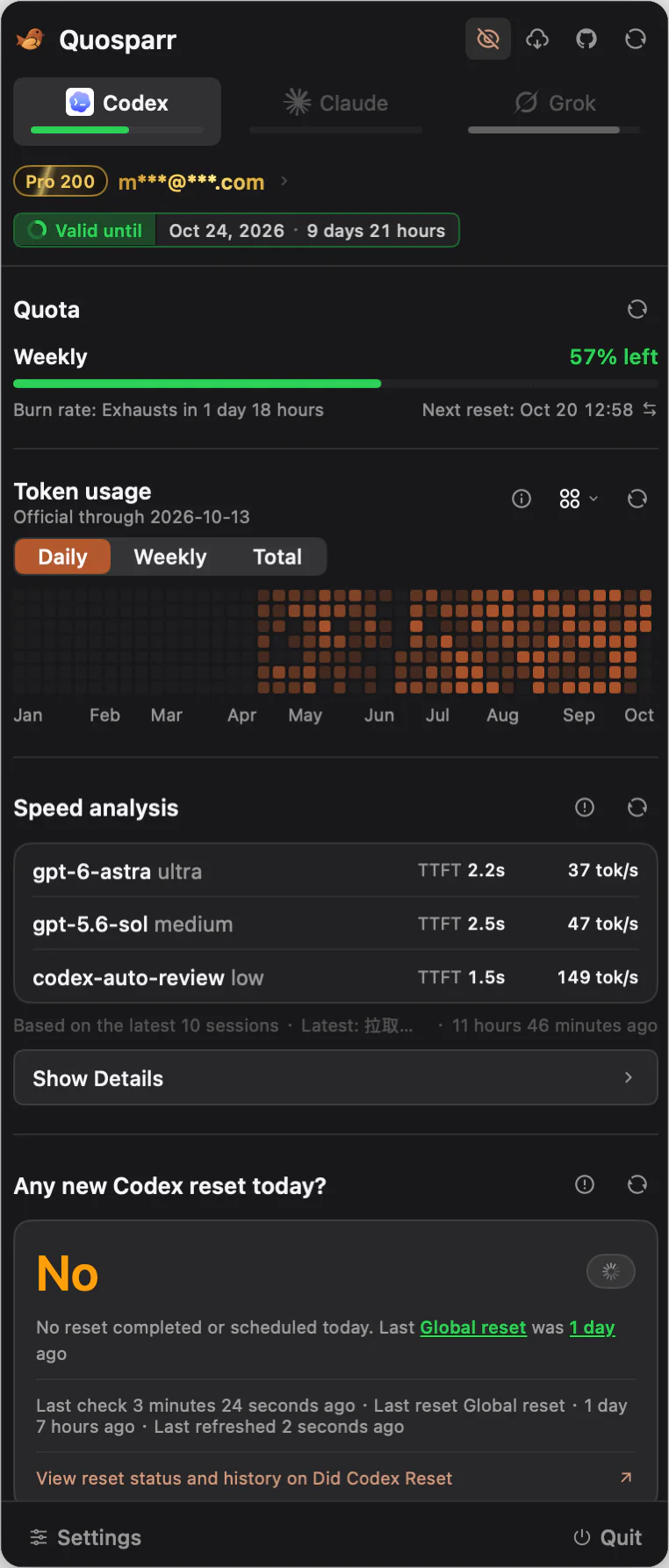
Quosparr is a native menu bar / system tray app for macOS, Windows, and Linux. It shows Codex, Claude Code, and Grok subscription quota, reset credits, API-equivalent cost, and local sessions, with separate account management for each provider.
Highlights
Codex
- Remaining quota for the 5-hour, weekly, and additional windows, plus the current account, subscription tier, and expiration.
- Reset credit count, status, and expiration time.
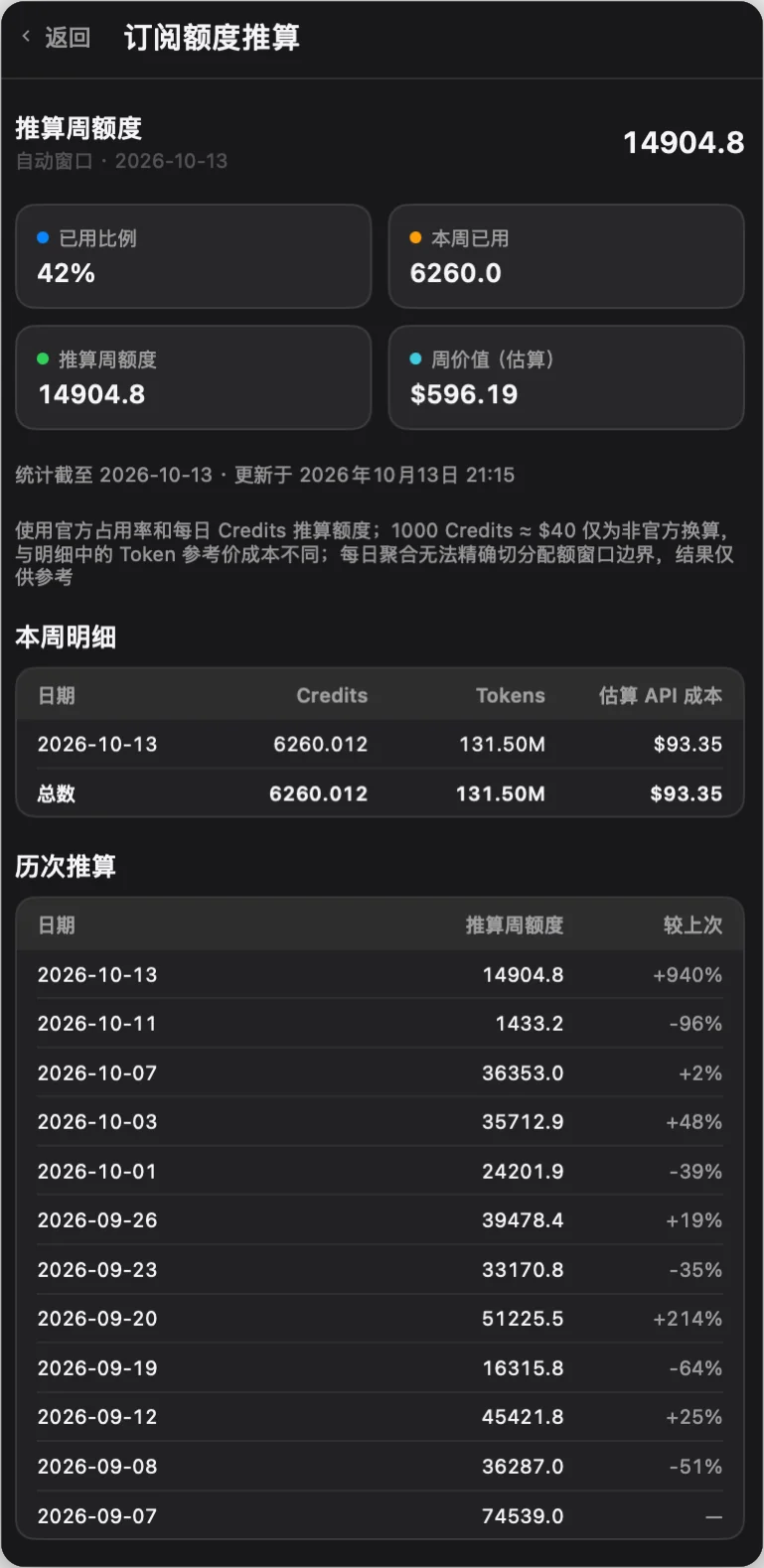
- Weekly allowance estimate from the official weekly percent and daily Credits, compared with previous weeks to spot quota cuts.
- Codex Reset Updates: whether Codex rate limits have reset today, with its own refresh interval (data from Did Codex Reset).
- Provider accounts: browser sign-in, import local
auth.json, paste token / JSON (including/auth/session), import files, or add an API key. Switching after confirmation atomically writes~/.codex/auth.json. - API accounts: a Base URL plus API key (empty Base URL means the official OpenAI API), with an optional model fetched from the site. Switching writes
auth.jsonand thequosparrprovider inconfig.toml(backed up first), and the balance of new-api-style or OpenAI-compatible relays shows in the account list, panel, status bar, floating window, and widget. A key login whoseconfig.tomlalready selects a relay is picked up with that site and model. Editing the account in use can replace its key (empty keeps it) and asks whether to rewrite the config files now; restart Codex afterwards. - Recent sessions, projects, and status, plus repair of the local session index.
Claude
- Claude Code subscription usage for the 5-hour window, the 7-day window, per-model weekly windows, and extra usage. This reading is not a documented public billing API.
- Local token usage, API-equivalent cost (
anthropic-builtin-2026-10-14), recent sessions, and output speed from Claude Code session logs. Each reply is counted once. Unknown models are not given an exact cost. The logs have no time-to-first-token, so that column is an em dash and speed uses end-to-end time. - Subscription accounts: import the current login, paste credentials, or import a file, then switch. In-app login asks you to run
claude auth loginand import again. Quosparr does not refresh the current account; runclaudeonce if the login expires. Other managed accounts refresh into their library copies only. - On macOS the official credential stays in the Keychain and is read and written through
/usr/bin/security. On Windows and Linux it is<config>/.credentials.json. A switch replaces onlyclaudeAiOauth, keeps MCP tokens, and updates onlyoauthAccountin.claude.json. A running Claude Code process is not terminated and may write the previous login back, so the app warns before switching. - API accounts: a Base URL plus API key, with optional Opus / Sonnet / Haiku / Fable model mapping fetched from the site. Switching writes only
ANTHROPIC_BASE_URL,ANTHROPIC_AUTH_TOKEN, and the mapping intosettings.json(backed up first) and leaves the subscription login untouched; switching back removes them. The relay balance shows wherever Claude quota does. A relay already set insettings.jsonis imported automatically. Editing the account in use can replace its key (empty keeps it) and asks whether to rewritesettings.jsonnow; restart Claude Code afterwards.
Grok
- Included quota, Build / Imagine / Chat breakdown, weekly / monthly periods, prepaid balance, and on-demand usage via the official CLI chat-proxy billing API.
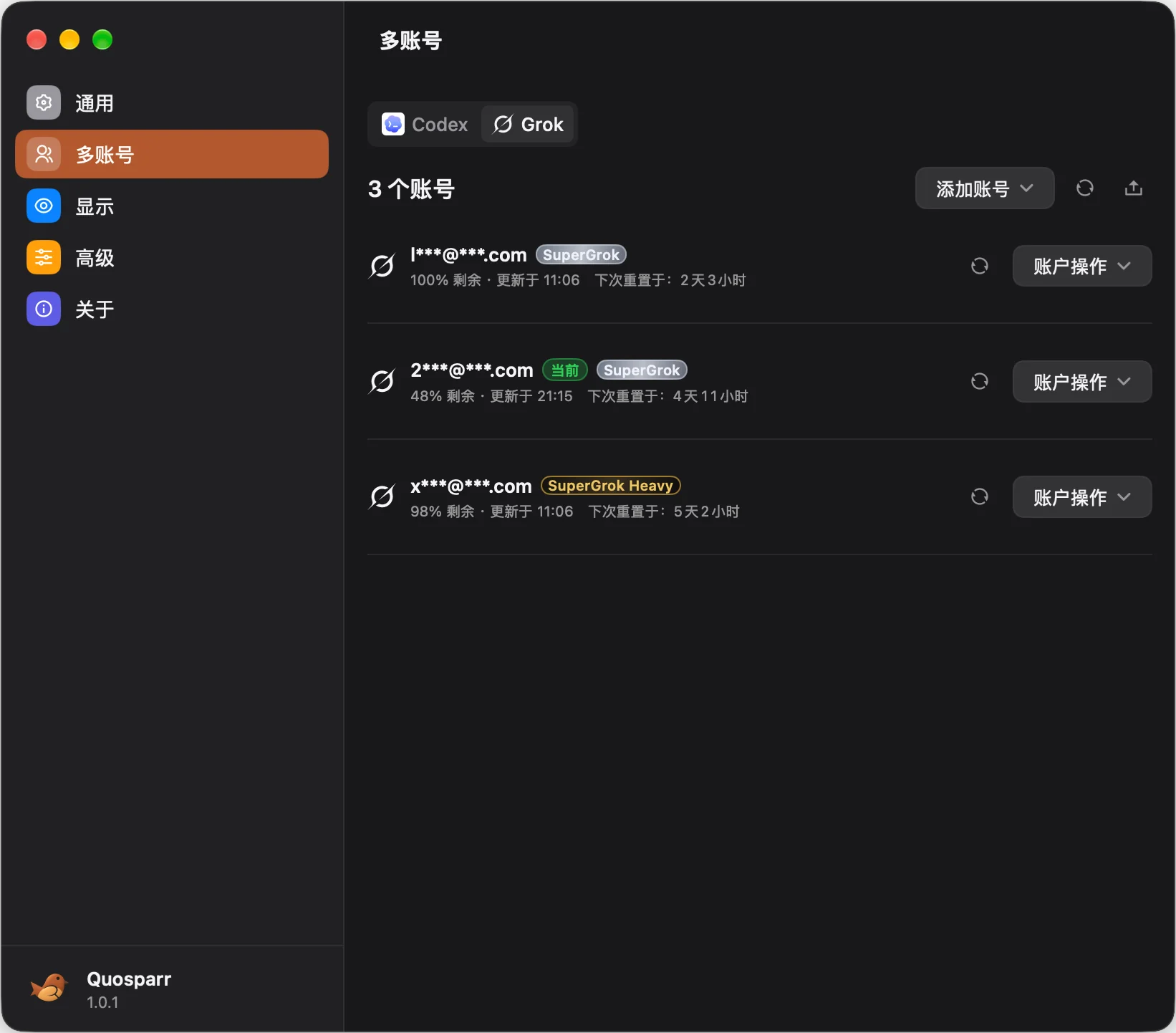
- Multiple OAuth / SuperGrok accounts with isolated sign-in, current-login import, credential paste, refresh, aliases, ordering, and explicit switching.
- Recent sessions from local Grok CLI logs.
All providers
- Always-visible
Codex | Claude | Groktabs. The menu bar can follow the panel or show up to two providers. An existing “Codex + Grok” choice stays that pair. - An optional always-on-top desktop floating window shows the remaining quota of up to three providers in four styles: capsule, card, rings, or battery. Click it to open the panel, drag it to move it, and right-click it for more options. Opacity, position lock, and whether it stays above full-screen apps are configurable.
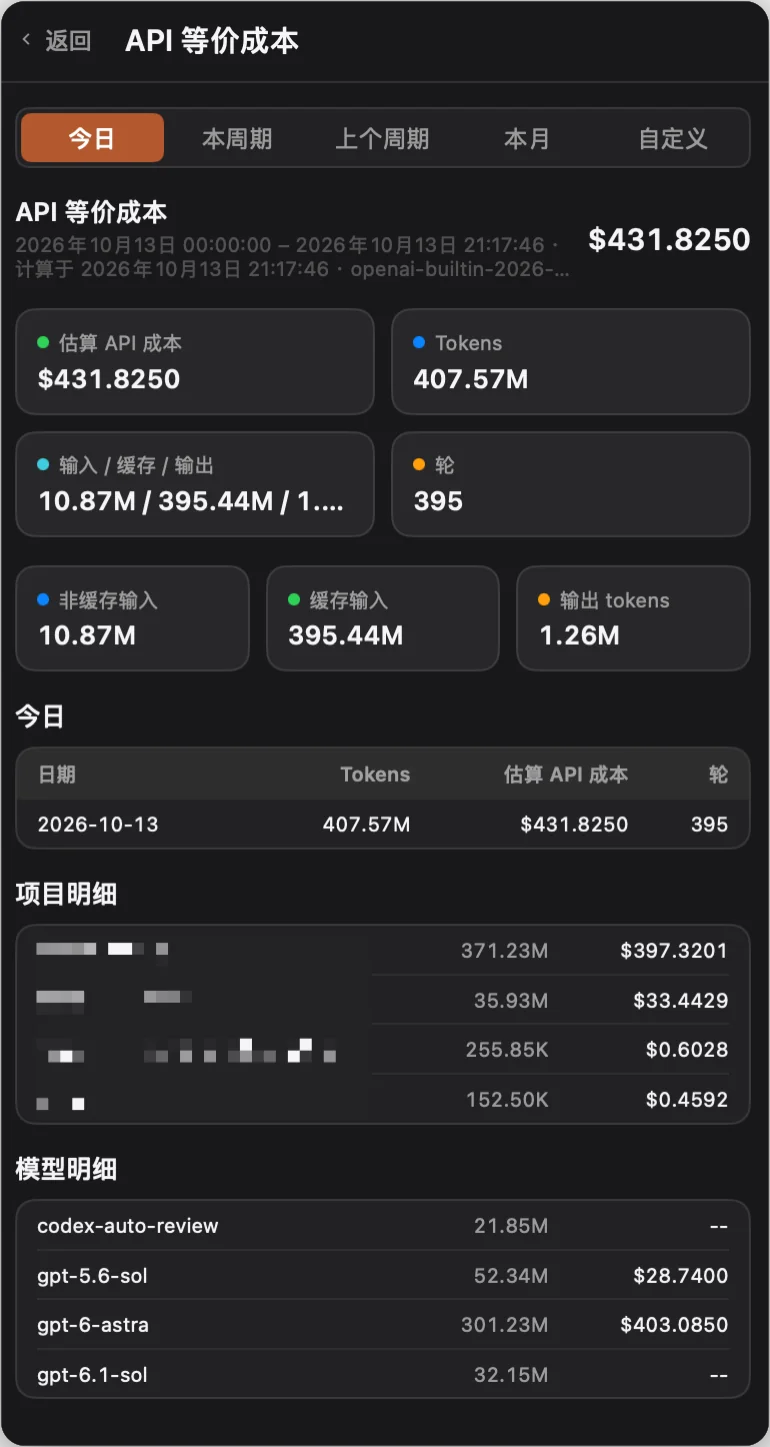
- API-equivalent cost and token usage for today, the current cycle, the previous cycle, this month, or a custom range.
- Year-to-date token usage chart as a heatmap, line, or bar chart (daily / weekly / cumulative).
- Light, dark, and system appearance; English, 简体中文, 繁體中文, 한국어, 日本語, Русский, Français.
- Built-in updates, and desktop widgets on macOS 14+.
Screenshots
| Main panel | API-equivalent cost | Subscription quota estimate |
|---|---|---|
 |
 |
 |
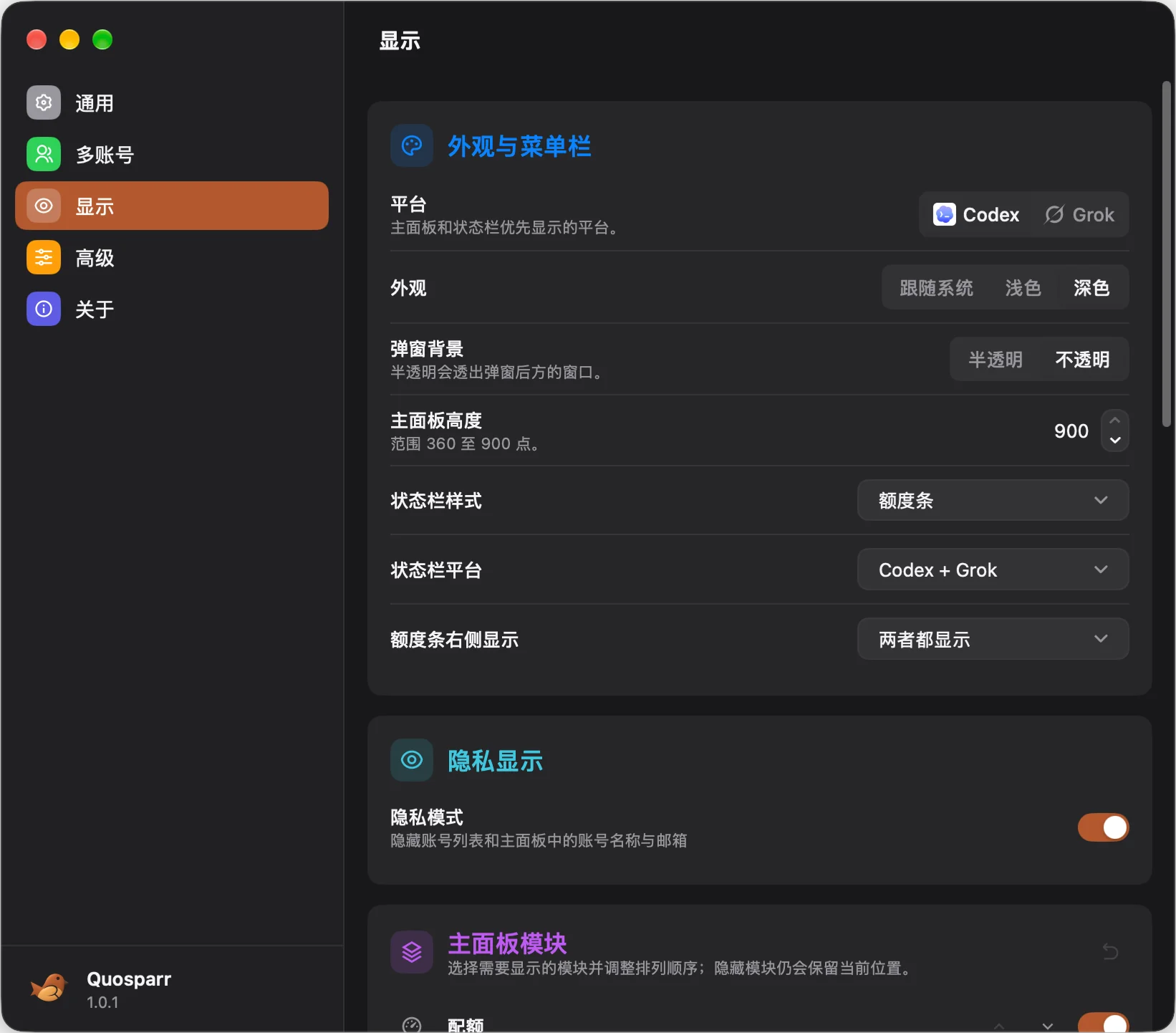
| Provider accounts | Display settings | |
 |
 |
|
| Windows settings and Grok panel | ||
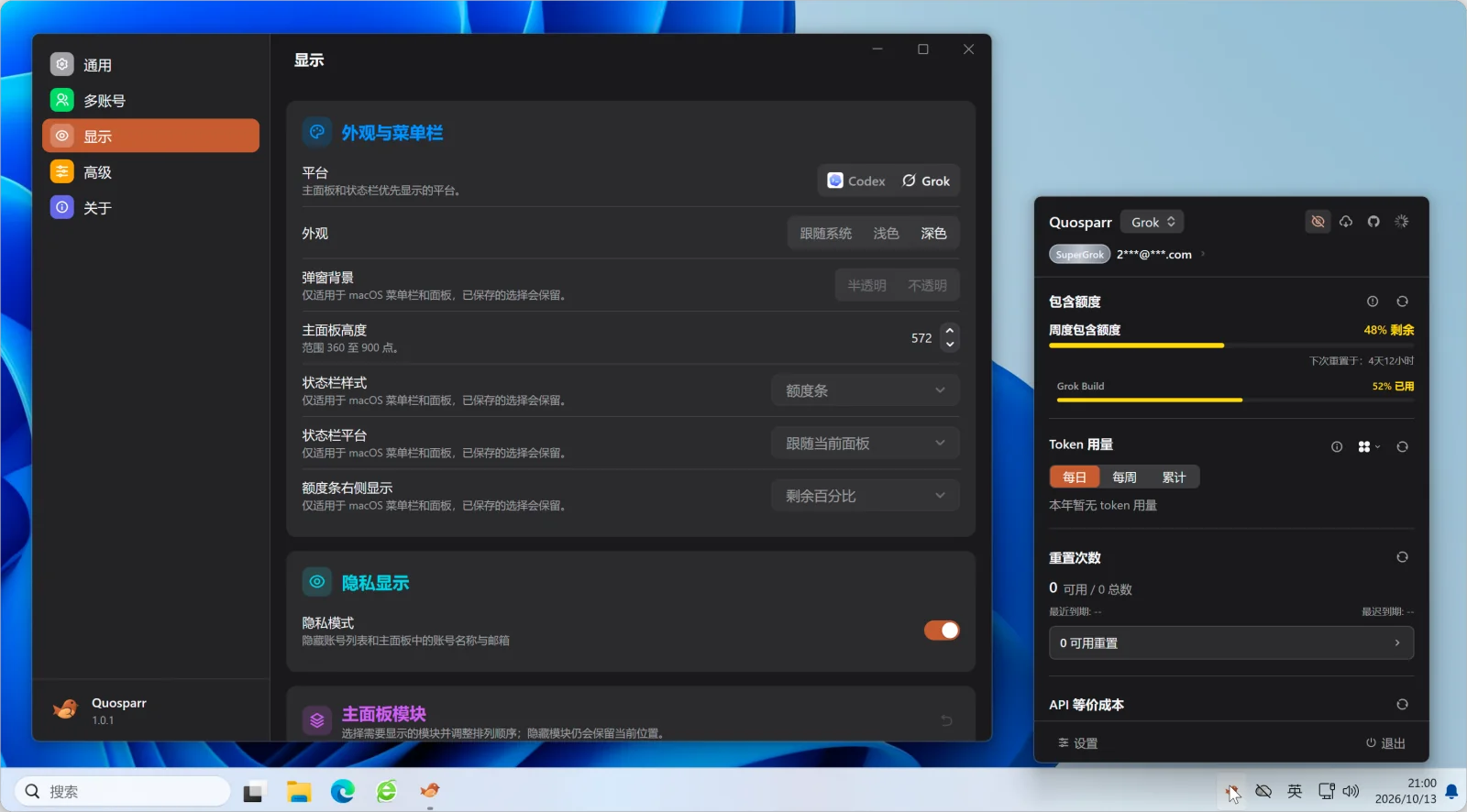 |
The screenshots show the v1 interface on macOS and Windows.
Installation
Download from GitHub Releases and pick the package for your system and CPU:
| System | Package | How to install |
|---|---|---|
| macOS 12+ (Apple Silicon / Intel) | Quosparr-macos-arm64.dmg / Quosparr-macos-x86_64.dmg, or the .zip with the same name |
Drag Quosparr.app into Applications |
| Windows 10 / 11 (amd64 / arm64) | Quosparr.Setup.<version>.<arch>.exe |
Per-user install into %LOCALAPPDATA%\Programs\Quosparr; no administrator rights needed |
| Linux (amd64 / arm64) | quosparr-<version>-linux-<arch>.tar.gz with install.sh, or quosparr_<version>_<arch>.deb |
Run sh install.sh next to the tarball to install into ~/.local, or install the deb with your package manager |
Every package ships the SQLite runtime for its architecture, so the first launch never downloads anything. On first launch, Quosparr enables launch at login by default; change it in Control Panel → General → Launch at login.
Homebrew installation is not available yet; use the DMG or ZIP for now.
If you used CodexRunway before, see the upgrade guide.
macOS security prompts
macOS builds are currently ad-hoc signed and not notarized. If macOS says the developer cannot be verified, right-click Quosparr.app and choose Open, or go to System Settings → Privacy & Security and click Open Anyway.
If macOS says the app is damaged, it is usually the download quarantine attribute. After moving the app into Applications, run:
xattr -dr com.apple.quarantine /Applications/Quosparr.app
Linux requirements
Linux needs GTK3, AppIndicator, a desktop with tray support, and a working Secret Service session (for example GNOME Keyring or KWallet) to store proxy credentials. The deb declares these dependencies and is updated through the package manager.
Requirements
Codex installed and used on this machine is recommended. Codex data comes from
CODEX_HOME(default~/.codex, or%USERPROFILE%\.codexon Windows).Only the
filecredential store is supported (the default whencli_auth_credentials_storeis unset in Codexconfig.toml).keyring,auto, andephemeralare reported as unsupported and block importing and switching accounts.The Claude panel uses the official Claude Code CLI.
CLAUDE_CONFIG_DIRis used when set, otherwise~/.claude. Subscription usage needs a Claude.ai login. An API key or gateway does not provide that usage. Afterclaude auth loginthe current login is added automatically, and a later login with another account is added as well. You can also paste credential JSON or import a file.The Grok panel requires the official Grok CLI:
curl -fsSL https://x.ai/cli/install.sh | bashGrok accounts and quota support OAuth / SuperGrok and compatible legacy sessions only. Run
grok login --oauth, sign in from the app, import the current login, or paste credential JSON. API-key-only logins are not added as managed accounts.GROK_HOMEis used when set, otherwise~/.grok.
Desktop Widgets
Widgets require macOS 14 or later; Windows and Linux do not have them. Four widget types are available: quota overview, token trend, a key metric, and Codex Reset Updates. Each widget can select Codex, Claude, Grok, or a pair: Codex + Claude, Codex + Grok, or Grok + Claude. A widget already set to Codex + Grok keeps that pair. Tapping it opens the matching page.
The snapshot lives at ~/.quosparr/widget-snapshot.json with 0600 permissions and contains only non-secret derived data: no email, account ID, token, auth JSON, or raw event text. The main app is the only writer; widgets only read it.
Network Proxy
In Control Panel → General → Network, choose Follow System, HTTP, or SOCKS5; custom proxies support username and password. The setting covers app-initiated Codex, Claude, and Grok requests, CLI operations, public status and pricing feeds, and software updates. The system proxy is not changed, and browser sign-in pages and already-running external CLIs keep their own settings.
Changes apply only after Save Proxy Settings. Test Connection fetches the test site (default https://github.com, customizable) with the current draft, without sending account credentials or saving the draft. Proxy passwords are stored in the macOS Keychain, Windows Credential Manager, or Linux Secret Service. Invalid settings, unavailable credentials, or a failed custom proxy never fall back to a direct connection.
Privacy
- Quosparr keeps its own data in
~/.quosparrand writes no app cache into~/.codex. Only non-secret derived data is stored by default. - Provider account credentials are the only exception: they are stored under
~/.quosparr/accounts/<id>/auth.json(directory0700, file0600, written atomically; Windows uses an ACL that only the current user can access). The account index contains no tokens. - Official
~/.codex/auth.jsonis written only for an OAuth refresh or when you confirm an account switch. Refreshing a non-current account updates only its library copy. - Claude credentials are read from the macOS Keychain through
/usr/bin/security, or from<config>/.credentials.jsonon Windows and Linux. Managed copies live at~/.quosparr/accounts/claude-<stable-id>/auth.jsonand contain onlyclaudeAiOauth. The indexclaude-index.jsonhas no tokens. A switch keeps MCP tokens and replaces onlyoauthAccountin.claude.json. The current account is not refreshed by Quosparr. - API account keys are stored only in the managed copy (
~/.quosparr/accounts/<id>/auth.jsonorclaude-api-<id>/auth.json); the indexes keep the Base URL, models, and cached balance. Balance and model requests go only to the site you entered, through the proxy settings. Editedconfig.tomlandsettings.jsonfiles are backed up to~/.quosparr/backups; the first write tosettings.jsonsorts its keys. - Grok credentials are read from
$GROK_HOME/auth.json; managed copies live at~/.quosparr/accounts/grok-<stable-id>/auth.json. A Grok switch replaces only OAuth / compatible legacy scopes and keeps API-key and unknown scopes. It is guaranteed only for new sessions; running Grok processes are not terminated and may write the previous account back, so the app warns before switching. - Session repair only touches
session_index.jsonland backs it up first. Files under~/.codex/sessionsand~/.codex/archived_sessionsare never deleted. - API-equivalent cost is computed from local session logs. Session contents are not uploaded.
- Tokens and API keys are never written to logs, self-check output, or issue templates.
- Codex Reset Updates and update checks fetch only public data; no account, token, or session content is sent.
Data Sources
- Codex quota / reset credits / official usage: official ChatGPT / Codex backend APIs, using your local credentials. Official usage belongs to the current account and may lag or be revised.
- Weekly quota estimate: unofficial, extrapolated from the weekly percent and daily Credits (1000 Credits ≈ $40, version
credits-usd-2026-08-26). Only derived Credits and percents are saved inquota-estimate-history.json. - Codex API-equivalent cost: local session logs priced with the built-in table
openai-builtin-2026-09-27; the online official table usesopenai-docs-versions. Unknown models are not reported as exact costs. - Claude Code subscription usage: an undocumented OAuth usage endpoint for the signed-in Claude Code subscription. It is not described as an official billing API. No browser cookies, no Claude Desktop data, and no Console API bill.
- Claude API-equivalent cost: local Claude Code session logs priced with
anthropic-builtin-2026-10-14. Replies are counted once by message id. Cache writes are split into 5-minute and 1-hour rates, and Fast mode has its own rates. Unknown models are not reported as exact costs. Days use the local time zone. - Grok quota: only the official CLI chat-proxy
/v1/billing?format=creditsendpoint. No browser cookies, no quota inferred from local logs, and no API billing mixed in. - Grok API-equivalent cost: local
turn_completedusage priced withxai-builtin-2026-09-27, covering input, cached, output, and long-context rates.costUsdTicksis subscription accounting and is not used as API-equivalent cost. - Codex Reset Updates: the public feed at didcodexreset.com/api/status.json. Unofficial, advisory only, and may be delayed.
- In the chart, “Official stats (all devices)” belongs to the current account, while “Local logs (all sessions)” scans this machine and may span accounts. They are not a subset of each other and should not be subtracted; Codex daily values for both use UTC days.
Development
The main app is written in Go with mygo native UI; the Go and mygo versions are pinned in go.mod. The macOS widget extension remains in Swift.
go test ./...
go vet ./...
go build ./...
Run against a temporary HOME and a separate preferences domain so your real accounts and settings are untouched:
QUOSPARR_TEST_HOME="$(mktemp -d)"
HOME="$QUOSPARR_TEST_HOME" QUOSPARR_PREFS_DOMAIN=com.quosparr.app.v1-test go run .
HOME="$QUOSPARR_TEST_HOME" QUOSPARR_PREFS_DOMAIN=com.quosparr.app.v1-test go run . --self-check
The self-check makes no network request and reads no credentials. It currently covers the version, platform, own-directory permissions, locks, and whether Codex auth and the session index exist; other diagnostics are listed as not ported yet.
Build a macOS development package (updater disabled; optionally ARCH=arm64 or ARCH=x86_64):
V1_DEVELOPMENT_PACKAGE=1 bash Scripts/package-v1-app.sh
See docs/v1-release.md for Windows / Linux packaging and release checks, and CONTRIBUTORS.md for contribution notes.
Community
License
This project follows the repository LICENSE.
Reviews (0)
Sign in to leave a review.
Leave a reviewNo results found