claude-e
Health Uyari
- License — License: MIT
- Description — Repository has a description
- Active repo — Last push 0 days ago
- Low visibility — Only 5 GitHub stars
Code Basarisiz
- spawnSync — Synchronous process spawning in scripts/postinstall.cjs
- process.env — Environment variable access in scripts/postinstall.cjs
- fs module — File system access in scripts/postinstall.cjs
- spawnSync — Synchronous process spawning in scripts/publish-dry-run.mjs
- process.env — Environment variable access in scripts/publish-dry-run.mjs
- process.env — Environment variable access in scripts/star-prompt.cjs
- fs module — File system access in scripts/star-prompt.cjs
Permissions Gecti
- Permissions — No dangerous permissions requested
Bu listing icin henuz AI raporu yok.
PTY-backed claude -p-style executor for Claude Code, packaged as the claude-e npm CLI
claude-e


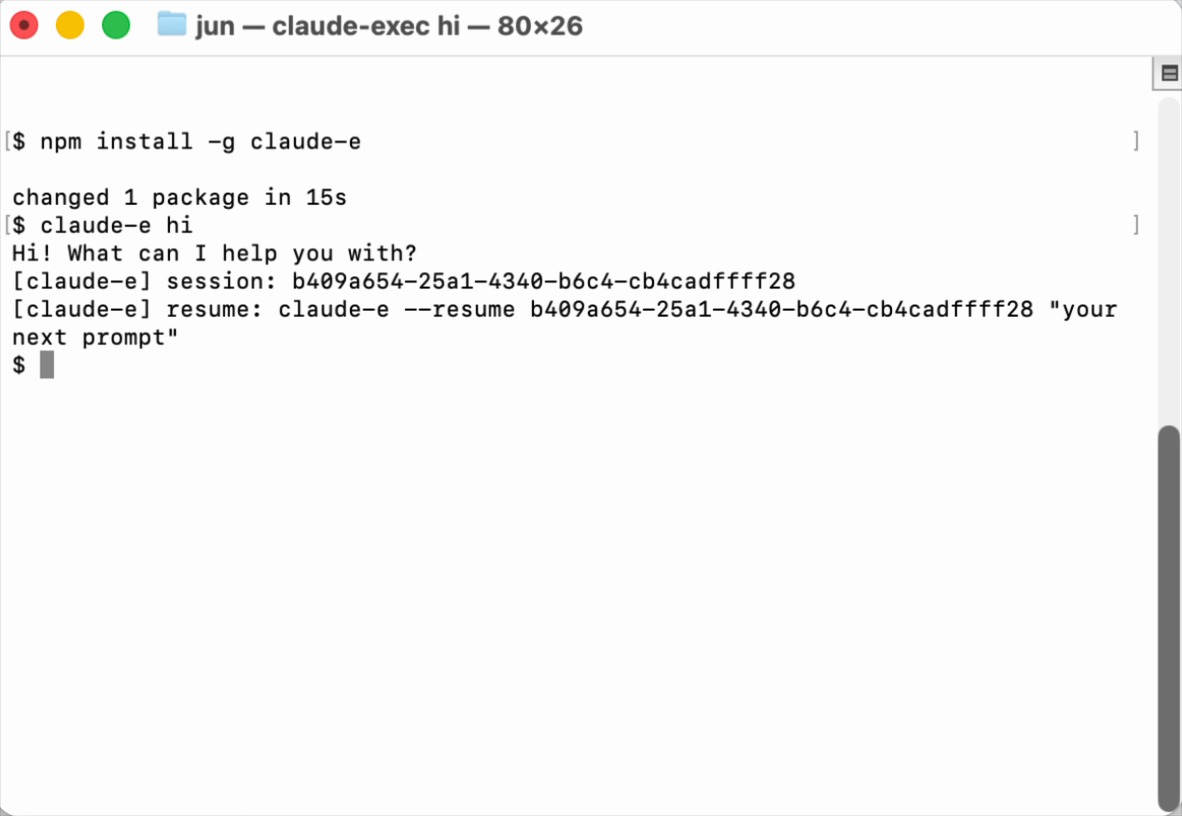
claude-e is a PTY-backed execution wrapper for Claude Code.
It gives Claude a claude -p-style command surface while still driving the
interactive Claude Code runtime underneath. That matters when an agent system
needs the real interactive Claude behavior, but also needs a predictable
single-command interface, JSON output, timeouts, resume wiring, and explicit
binary resolution.
npm install -g claude-e

claude-e "your prompt here"
claude-e p --model opus "explain quicksort to a 10-year-old"
claude-e --tool "use 10 tools and summarize the results"
claude-e --output-format json "summarize this commit" < commit.diff
claude-e --output-format stream-json "audit src/" --verbose | jq .
Why This Exists
Claude Code is strongest as an interactive tool. Agent runtimes often need the
opposite shape: spawn one process, send one prompt, collect structured output,
classify failures, and move on.
claude-e bridges that gap:
| Need | What claude-e does |
|---|---|
claude -p-like usage |
Accepts prompt args, piped stdin, p / print, -p, and --print. |
| Real Claude Code behavior | Uses a PTY and injects the prompt through the interactive path. |
| Agent-friendly output | Normalizes transcript replay into text, json, or stream-json. |
| Embedding stability | Supports run / exec, JSONL runtime events, timeout exit codes, and resume. |
| Launchd/server safety | Lets callers pass an explicit --claude-bin instead of relying on PATH. |
| Unattended tools | Enables Claude permission bypass and workspace/folder trust handling by default. |
| Terminal progress | --tool, --t, or -t prints compact tool-use lines on stderr. |
| cli-jaw migration | Keeps claude-exec, claude-i, and jaw-claude-i compatibility bins. |
Install
npm install -g claude-e
After installation, the CLI is available directly:
claude-e "your prompt here"
claude-e --tool "use 10 tools"
claude-e --help
Optional one-shot usage without a global install:
npx claude-e "your prompt here"
From source:
git clone https://github.com/lidge-jun/claude-e.git
cd claude-e
npm install
cargo build --release --locked
The npm package builds the Rust release binary during postinstall. It also
asks once for a GitHub star when npm is running interactively with an
authenticated gh CLI; non-interactive installs print the repository URL
instead. Set CLAUDE_E_SKIP_STAR_PROMPT=1 to suppress the star request.
Set CLAUDE_E_SKIP_POSTINSTALL=1 to skip all postinstall work. SetCLAUDE_E_SKIP_BUILD=1 or CLAUDE_EXEC_SKIP_BUILD=1 only when another
packaging layer provides the binary; the star request can still run in that
mode unless it is skipped separately.
Command Surface
The short command is the public face:
claude-e "your prompt here"
claude-e p "your prompt here"
claude-e print "your prompt here"
claude-e -p "your prompt here"
The long command remains available for compatibility:
claude-exec "your prompt here"
claude-exec run --claude-bin "$(command -v claude)" -- --model opus
claude-exec exec --claude-bin "$(command -v claude)" -- --model opus
The package currently exposes four bins from the same Rust entrypoint:
| Bin | Status | Purpose |
|---|---|---|
claude-e |
Primary | Short npm command and claude -p-style surface. |
claude-exec |
Compatibility | Long descriptive alias retained for existing integrations. |
claude-i |
Transitional | Existing cli-jaw provider/runtime compatibility. |
jaw-claude-i |
Legacy | Existing cli-jaw helper name compatibility. |
Print-Compatible Examples
Plain text:
claude-e "write a two-line commit summary"
Terminal tool progress:
claude-e --tool "use 10 tools and summarize what happened"
claude-e --t --model opus "inspect this repo with tools"
--tool / --t / -t prints compact tool_use and tool_result progress
lines to stderr. Stdout stays reserved for the final answer or selected output
format, so pipes and JSON consumers are not broken.
JSON result:
git diff --cached | claude-e --output-format json "summarize this staged diff"
Stream JSON:
claude-e --output-format stream-json "audit src/" --verbose | jq .
For streaming UIs, prefer --output-format stream-json. It preserves the
Claude-like assistant/user records, including tool calls, tool results, and the
final synthesized result event.
Explicit Claude binary:
CLAUDE_EXEC_CLAUDE_BIN="$(command -v claude)" \
  claude-e --model opus "explain this repo architecture"
Session-shaped run:
claude-e \
  --session-id 00000000-0000-4000-8000-000000000001 \
  --output-format stream-json \
  "continue this investigation from the existing Claude session"
Every print-compatible run tracks the Claude session id. In text mode,claude-e prints a resume footer to stderr:
[claude-e] session: 6a304357-e92d-47e7-a56d-c54065e12be1
[claude-e] resume: claude-e --resume 6a304357-e92d-47e7-a56d-c54065e12be1 "your next prompt"
Resume with:
claude-e --resume 6a304357-e92d-47e7-a56d-c54065e12be1 "continue from there"
Use --no-session-footer when the terminal footer is not wanted.
PTY Runtime Mode
Agent systems can use the explicit runtime command:
printf 'Say hello in one short sentence.\n' \
  | claude-e run \
      --jsonl \
      --output-format stream-json \
      --timeout-ms 600000 \
      --claude-bin "$(command -v claude)" \
      -- \
      --model claude-opus-4-6
exec is a visible alias for run:
printf 'Say hello.\n' \
  | claude-e exec --claude-bin "$(command -v claude)" -- --model opus
Supported Flags
Wrapper-owned flags:
| Flag | Behavior |
|---|---|
--input-format text|stream-json |
Reads plain stdin or extracts user text from JSONL messages. |
--output-format text|json|stream-json |
Selects transcript output normalization. |
--timeout-ms |
Runtime timeout in milliseconds. |
--claude-bin |
Claude CLI binary or absolute path. |
--cwd |
Working directory for the Claude PTY process. |
--cols, --rows |
PTY dimensions. |
--session-id |
Uses a specific session id in print-compatible mode. |
--resume, -r |
Resumes a Claude session in the PTY path. |
--no-session-persistence |
Suppresses generated session ids. |
--json-schema |
Appends a JSON-only schema instruction to the prompt. |
--auto-accept-workspace-trust |
Accepts Claude's pre-SessionStart workspace/folder trust prompt. Enabled by default. |
--no-auto-accept-workspace-trust |
Disables automatic workspace/folder trust handling in print-compatible mode. |
--tool, --t, -t |
Prints compact terminal tool progress to stderr. |
--no-session-footer |
Hides the final stderr resume footer in print-compatible mode. |
Forwarded Claude flags include --model, --effort, --permission-mode,--add-dir, --allowed-tools, --disallowed-tools, --tools, --mcp-config,--settings, --system-prompt, --append-system-prompt, --plugin-dir,--plugin-url, browser flags, MCP debug flags, and related Claude global
controls.
Print-only compatibility flags such as --verbose,--include-partial-messages, --include-hook-events,--replay-user-messages, --fallback-model, and --max-budget-usd are
accepted so command shapes port cleanly from print-mode Claude.
Unless the caller already supplied --permission-mode,--permission-mode=..., --dangerously-skip-permissions, or--allow-dangerously-skip-permissions, claude-e appends--dangerously-skip-permissions to the underlying Claude invocation. This keeps
non-interactive tool use from hanging on permission prompts.
Output Contract
Default print-compatible mode suppresses wrapper diagnostics from stdout and
returns the requested user-facing format.
Explicit run / exec mode emits JSONL. Runtime lifecycle records use the
existing cli-jaw compatibility envelope:
{"type":"jaw_runtime","event":"runtime_started","runId":"run_12345678"}
Claude transcript records are tailed and normalized into Claude-like stream JSON.
On completion, the wrapper can synthesize a result record from the last assistant
message.
Exit Codes
| Code | Meaning |
|---|---|
0 |
Normal completion. |
1 |
Underlying Claude exited unsuccessfully without a more specific wrapper classification. |
2 |
Graceful interrupt; session metadata can be resumable. |
4 |
Claude spawn or PTY write failure. |
5 |
SessionStart hook failure, timeout, or early Claude exit before SessionStart. |
6 |
Runtime timeout. |
7 |
Prompt injection transcript verification failure. |
11 |
Claude StopFailure hook. |
13 |
Hook temp dir or settings generation failure. |
16 |
stdin read, size, empty prompt, or prompt sanitization failure. |
Development
npm run fmt:check
npm run test
npm run build
npm run verify
Smoke test with local Claude auth:
bash scripts/smoke.sh
Release
Dry-run the exact npm publish surface:
npm run publish:dry-run
Release helpers:
npm run release:check   # full local release dry run
npm run release:npm     # publish the current package version
npm run release:patch   # bump patch, commit, tag, publish, create GitHub Release
npm run release:minor   # bump minor, commit, tag, publish, create GitHub Release
npm run release:major   # bump major, commit, tag, publish, create GitHub Release
npm run release:preview # publish preview dist-tag prerelease
GitHub Actions only runs Rust verification and npm dry-runs. Actual npm
publishing is intentionally local-only: run npm run release:npm for the
current version or a semver release helper when you explicitly want to publish.
When npm is not authenticated, the release scripts start npm login --auth-type=web so npm can use its normal browser login flow in your local
terminal before publishing.
Architecture Docs
- structure/INDEX.md
- structure/cli_surface.md
- structure/runtime_contract.md
- structure/cli_jaw_migration.md
- devlog/_plan/260516_claude_exec_extraction/00_overview.md
License
MIT
Yorumlar (0)
Yorum birakmak icin giris yap.
Yorum birakSonuc bulunamadi