cli-jaw
Health Gecti
- License — License: MIT
- Description — Repository has a description
- Active repo — Last push 0 days ago
- Community trust — 208 GitHub stars
Code Uyari
- process.env — Environment variable access in .github/workflows/pr-screenshot-gate.yml
- fs module — File system access in .github/workflows/pr-screenshot-gate.yml
- network request — Outbound network request in .github/workflows/pr-screenshot-gate.yml
- process.env — Environment variable access in bin/agent-driven.ts
- process.env — Environment variable access in bin/cli-jaw.ts
Permissions Gecti
- Permissions — No dangerous permissions requested
This tool is a personal AI assistant and MCP server that acts as a unified interface for five major AI engines (Claude, Codex, Gemini, OpenCode, Copilot), bundling 108 distinct skills into a single command-line interface.
Security Assessment
Overall Risk: High. The application heavily modifies the system and accesses sensitive data to achieve its functionality. It frequently executes synchronous shell commands (`execSync`, `spawnSync`) across multiple modules, including chat, clone, doctor, launchd, and MCP configurations. The `doctor` command performs destructive file system operations (`fs.rmSync`), while the `clone` and `doctor` commands explicitly access the user's home directory. Additionally, outbound network requests are made in the chat, browser, and employee modules. While no hardcoded secrets were detected, the tool accesses system environment variables extensively. Because it relies heavily on executing system commands blindly, the overall security risk is elevated, especially if deployed outside a sandboxed environment.
Quality Assessment
Overall Quality: High. The project appears to be highly maintained and professionally structured. It utilizes strict TypeScript, is compatible with Docker for safe isolation, and claims an impressive automated test suite with 888 passing tests. It is licensed under the permissive MIT license. With active development (last pushed 0 days ago) and 61 GitHub stars, it demonstrates a solid baseline of community trust and ongoing engagement.
Verdict
Use with caution. While the project is well-coded and actively maintained, developers should run this tool inside an isolated environment like Docker due to its aggressive use of system shell executions and destructive file operations.
🦈 2-line install personal AI assistant. 11 AI runtime surfaces (Claude, Codex, Cursor, Gemini, Grok, Antigravity, OpenCode, Copilot), 200+ skills, zero ban risk.
One assistant, one memory, one dashboard for the AI coding CLIs you already pay for.
Claude, Codex, Cursor, Grok, Copilot, OpenCode, Kiro, Antigravity and Pi — working together as a team.




# existing users who want minimal changes: JAW_SAFE=1 npm install -g cli-jaw
npm install -g cli-jaw
jaw dashboard



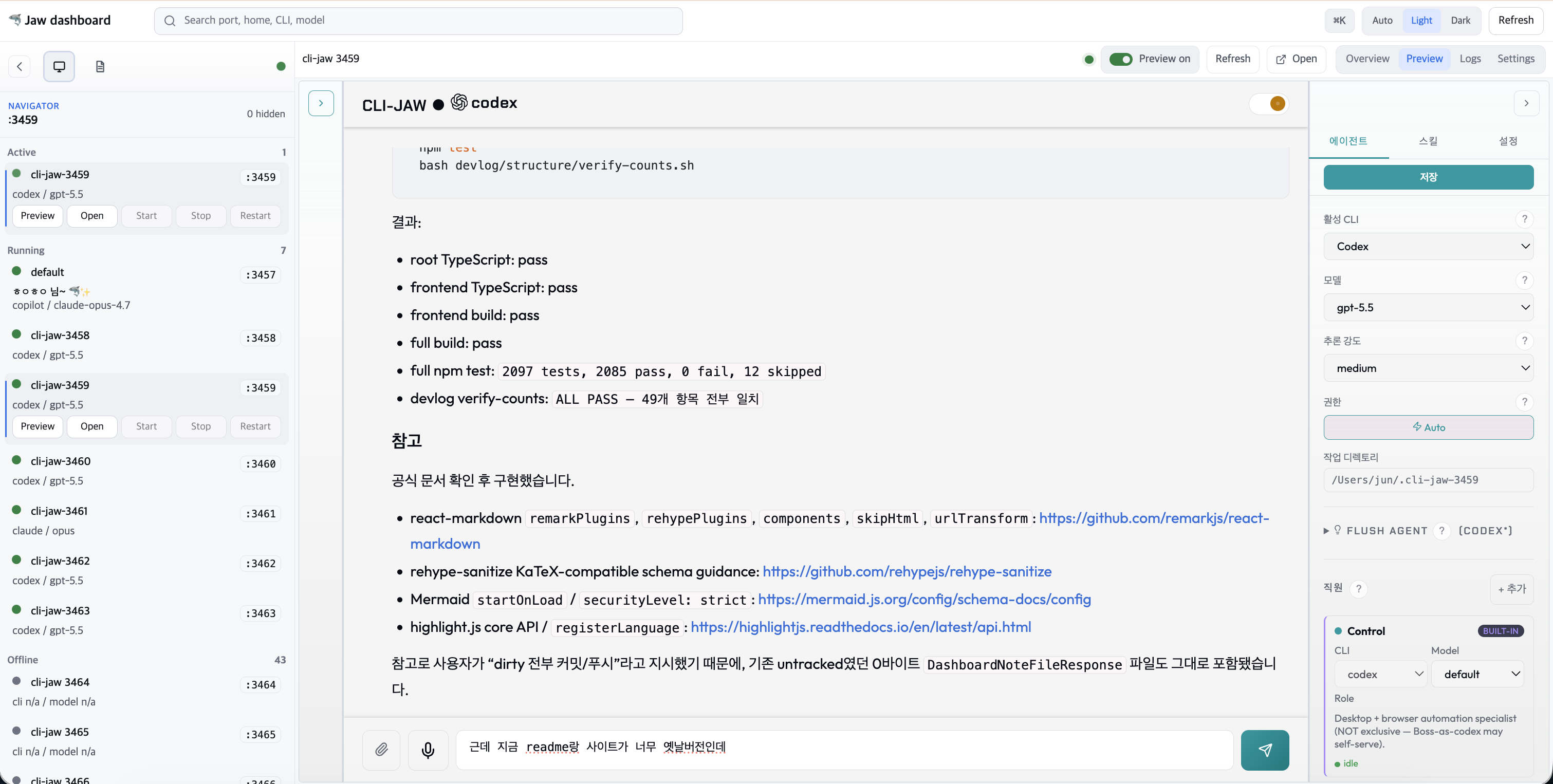
Every agent in one placeStart, stop and preview every running instance from the manager dashboard. |
 |
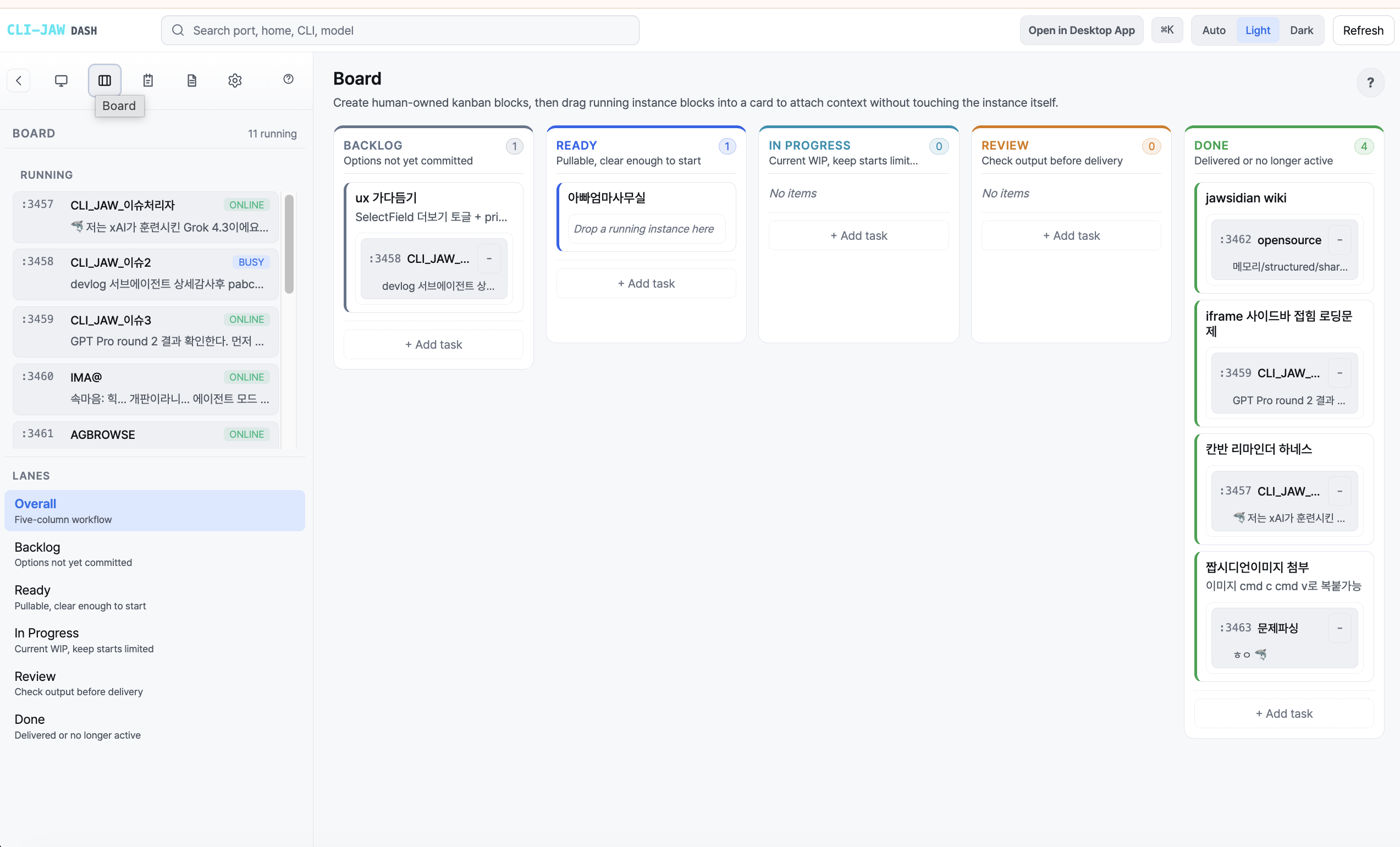
A board for the workKanban lanes, a priority matrix and reminders track what each session is doing. |
 |
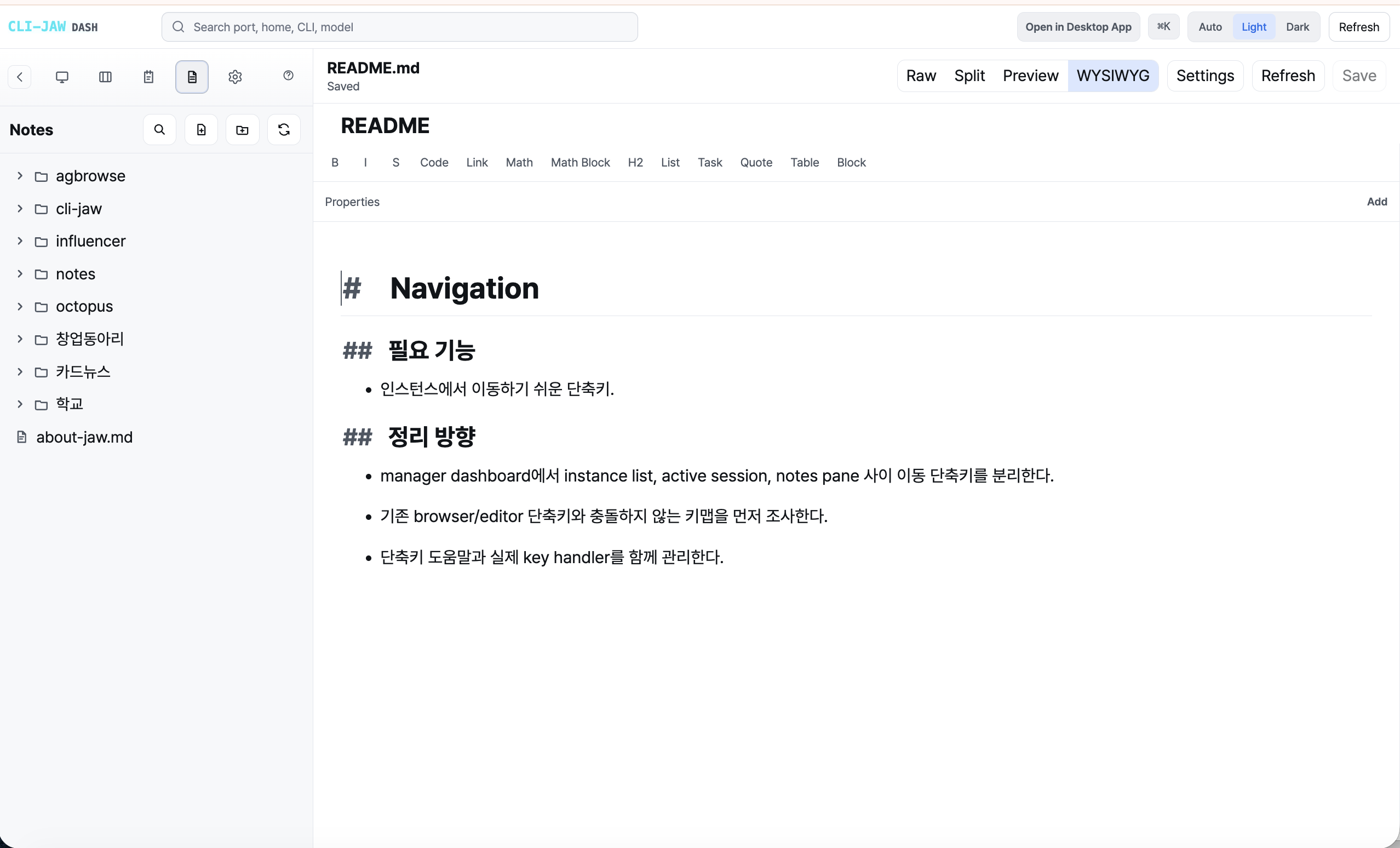
Notes that agents can readA built-in Markdown workspace with WYSIWYG editing, math and Mermaid diagrams. |
 |
English · 한국어 · 中文 · 日本語 · 📖 Website · Docs
What is CLI-JAW?
CLI-JAW unifies the AI coding CLIs you already use into one assistant with one memory and one dashboard. Your main CLI (the "Boss") calls the others as "employees", so you stop copy-pasting between apps and give orders from a single place.
- No API keys needed — routes through subscriptions you already pay for
- No per-token billing — flat monthly cost, same as what you already have
- Runs locally — your code never leaves your machine
- Reach it anywhere — Web, desktop app, terminal, Telegram, Discord or Slack
The native Code API (/api/code) provides isolated Codex, Claude, Cursor, and Grok sessions with durable transcripts and native resume. See native Code sessions.
Install
Safe install — for existing users who want minimal changes# macOS / Linux
JAW_SAFE=1 npm install -g cli-jaw # skips optional tool/runtime setup
jaw init # interactive setup later when you're ready
Windows support. WSL is the recommended, stable path. A native PowerShell installer also exists, but it is still beta:
irm https://raw.githubusercontent.com/lidge-ai/cli-jaw/main/scripts/install.ps1 | iex
Requires Node.js 22.4+.
The manager dashboard runs on 24576, and each agent web UI on 3457. If a restrictive execution policy blocks jaw.ps1, use the .cmd entry point instead of loosening the policy:
jaw.cmd doctor
Native Windows autostart is registered through the windows-startup backend. jaw service install also covers macOS (launchd) and Linux (systemd).
Either way cli-jaw now tells the two apart precisely: jaw doctor --json reportsplatform as windows-native or wsl, and each gets its own diagnostics. Native
Windows no longer receives "reinstall inside WSL" advice just because WSL interop
is configured on the machine.
# macOS / Linux / WSL with Node.js 22+ already installed
npm install -g cli-jaw
jaw dashboard
Windows npm install recovery — npm 12+ blocked scripts or PowerShell execution policynpm 12+? npm now blocks dependency install scripts by default. If you see
npm warn allow-scripts, install with the scripts approved:npm install -g cli-jaw --allow-scripts=cli-jaw
npm 12+ may finish a global install while blocking CLI-JAW's dependencypostinstall. Approve only this package and reinstall, or save the approval for
future upgrades:
npm install -g cli-jaw --allow-scripts=cli-jaw
npm config set allow-scripts=cli-jaw --location=user
jaw doctor
If PowerShell reports that jaw.ps1 cannot be loaded because script execution
is disabled, choose one of these bounded workarounds:
Set-ExecutionPolicy -Scope CurrentUser RemoteSigned
jaw.cmd doctor
node "$(npm prefix -g)\node_modules\cli-jaw\dist\bin\cli-jaw.js" doctor
jaw.ps1 is PowerShell's npm shim and is subject to execution policy;jaw.cmd is the equivalent cmd shim and does not use that policy. The directnode form bypasses both shims. jaw doctor reports a blocked/stale install,
leftover npm staging directories, and the current PowerShell policy; it also
prints the matching recovery guidance.
That's it. Open http://localhost:24576 for the manager dashboard. Per-instance agent Web UIs still run from http://localhost:3457 when you start jaw serve. Requires Node.js 22.4+.
First time? The default npm install initializes CLI-JAW and attempts native Claude setup. Other AI CLIs are optional; install them all during npm setup with
CLI_JAW_INSTALL_CLI_TOOLS=1 npm install -g cli-jawon macOS/Linux. On Windows, use the WSL install path below.
macOS one-click — don't have Node.js? This installs everythingRetired runtimes. Claude E (
claude-e) and the AI-E multiplexer (ai-e) have been removed. A saved selection stays visible as retired and cannot execute; choose an available runtime. Details: runtime integration.
curl -fsSL https://raw.githubusercontent.com/lidge-ai/cli-jaw/main/scripts/install.sh | bash
source "${ZDOTDIR:-$HOME}/.zshrc" 2>/dev/null || true
bash "$(npm root -g)/cli-jaw/scripts/verify-fresh-install.sh"
# 1. Install WSL (PowerShell as Admin)
wsl --install
Restart, open Ubuntu, then:
# 2. Install CLI-JAW + all dependencies
curl -fsSL https://raw.githubusercontent.com/lidge-ai/cli-jaw/main/scripts/install-wsl.sh | bash
source ~/.bashrc
jaw dashboard
bash "$(npm root -g)/cli-jaw/scripts/verify-fresh-install.sh"
From Windows PowerShell into WSL, run commands through a login shell so the WSL profile PATH is loaded:
wsl.exe -d Ubuntu -- bash -lc "jaw dashboard"
jaw serve preserves the stdout and stderr streams it inherits and also appends
both streams to <JAW_HOME>\logs\serve.log. At startup, a file already at 5 MiB
is rotated once to serve.log.1. Native Windows still does not have a registeredjaw service logging backend. PowerShell'sStart-Process -RedirectStandardOutput/-RedirectStandardError creates or
truncates its target files on every launch, so do not point those options at
the instance-owned serve.log.
If separate operator-owned stdout/stderr files are needed, run the redirection
inside a child PowerShell process instead. This example appends them under<JAW_HOME>\logs without the Start-Process truncate default:
$jawHome = 'C:\jaw\worker-a'
$port = 3458
$logDir = Join-Path $jawHome 'logs'
$outLog = Join-Path $logDir 'serve.out.log'
$errLog = Join-Path $logDir 'serve.err.log'
New-Item -ItemType Directory -Force -Path $logDir -ErrorAction Stop | Out-Null
foreach ($path in @($outLog, $errLog)) {
    # OpenOrCreate preserves existing content while proving that the child can append.
    $probe = [IO.File]::Open($path, 'OpenOrCreate', 'Write', 'ReadWrite')
    $probe.Dispose()
}

$jaw = (Get-Command jaw.cmd -ErrorAction Stop).Source
$childCommand = "& '$jaw' --home '$jawHome' serve --port $port --no-open 1>> '$outLog' 2>> '$errLog'"
$encoded = [Convert]::ToBase64String([Text.Encoding]::Unicode.GetBytes($childCommand))
Start-Process -FilePath powershell.exe -ArgumentList '-NoProfile', '-EncodedCommand', $encoded -WindowStyle Hidden | Out-Null
Read each stream from a separate PowerShell terminal (Get-Content -Wait
occupies its terminal). These commands use explicit paths because variables
from the launch terminal are not available in a new PowerShell session:
# Terminal 1
Get-Content -LiteralPath 'C:\jaw\worker-a\logs\serve.out.log' -Tail 100 -Wait

# Terminal 2
Get-Content -LiteralPath 'C:\jaw\worker-a\logs\serve.err.log' -Tail 100 -Wait
Lifecycle commands are home-scoped and verify <JAW_HOME>\jaw.pid.json
before signalling:
& $jaw --home $jawHome service stop --port $port
& $jaw --home $jawHome service restart --port $port
A standalone service restart safely relaunches the instance detached, but
cannot recreate the operator's file redirection. To preserve file capture,stop, optionally rotate the closed logs, and run the launch block again:
$pidFile = Join-Path $jawHome 'jaw.pid.json'
$serverProcess = $null
if (Test-Path -LiteralPath $pidFile -PathType Leaf) {
    $record = Get-Content -LiteralPath $pidFile -Raw -ErrorAction Stop | ConvertFrom-Json
    $serverProcess = Get-Process -Id ([int]$record.pid) -ErrorAction SilentlyContinue
}

& $jaw --home $jawHome service stop --port $port
if ($LASTEXITCODE -ne 0) {
    throw "jaw service stop failed with exit code $LASTEXITCODE"
}
if ($serverProcess) {
    try {
        if (-not $serverProcess.WaitForExit(5000)) {
            throw "jaw serve pid $($serverProcess.Id) did not exit within 5000ms"
        }
    } finally {
        $serverProcess.Dispose()
    }
}

$stamp = Get-Date -Format 'yyyyMMdd-HHmmss'
foreach ($path in @($outLog, $errLog)) {
    if (Test-Path -LiteralPath $path) {
        Move-Item -LiteralPath $path -Destination "$path.$stamp" -ErrorAction Stop
    }
}
# Run the Start-Process launch block above again.
Do not use Get-Process node | Stop-Process; it can terminate unrelated
cli-jaw instances and AI runtime processes.
Run this on a clean VM before publishing installer changes. It writes environment snapshots, installer logs, the exact collector/installer/verifier scripts that ran, their SHA-256 hashes, verifier logs, and new-shell PATH probes into ~/cli-jaw-fresh-install-evidence-*.
# macOS Terminal
COLLECTOR=/tmp/cli-jaw-collect-fresh-install-evidence.sh
curl -fsSL https://raw.githubusercontent.com/lidge-ai/cli-jaw/main/scripts/collect-fresh-install-evidence.sh -o "$COLLECTOR"
bash "$COLLECTOR" --target macos

# Ubuntu inside WSL
COLLECTOR=/tmp/cli-jaw-collect-fresh-install-evidence.sh
bash "$COLLECTOR" --target wsl
From Windows PowerShell, enter the supported WSL path:
wsl.exe -d Ubuntu -- bash -lc 'COLLECTOR=/tmp/cli-jaw-collect-fresh-install-evidence.sh; curl -fsSL https://raw.githubusercontent.com/lidge-ai/cli-jaw/main/scripts/collect-fresh-install-evidence.sh -o "$COLLECTOR"; bash "$COLLECTOR" --target wsl'
If the collector says powershell.exe is not available inside WSL, run this from Windows PowerShell before auditing:
wsl.exe -d Ubuntu -- bash -lc 'EVIDENCE_DIR="$(ls -dt ~/cli-jaw-fresh-install-evidence-* | head -1)"; { echo "command=wsl.exe -d Ubuntu -- bash -lc jaw --version"; jaw --version; } | tee "$EVIDENCE_DIR/33-powershell-to-wsl-probe.log"'
For an unmerged branch or local VM checkout, pass the local installer and verifier explicitly:
bash scripts/collect-fresh-install-evidence.sh --target macos --install-script scripts/install.sh --verifier-script scripts/verify-fresh-install.sh
bash scripts/collect-fresh-install-evidence.sh --target wsl --install-script scripts/install-wsl.sh --verifier-script scripts/verify-fresh-install.sh
Audit each collected directory before treating it as target evidence:
EVIDENCE_DIR="$(ls -dt ~/cli-jaw-fresh-install-evidence-* | head -1)"
AUDITOR="$(npm root -g)/cli-jaw/scripts/audit-fresh-install-evidence.mjs"
node "$AUDITOR" "$EVIDENCE_DIR" --target macos
node "$AUDITOR" "$EVIDENCE_DIR" --target wsl

# For a local checkout, audit with the checkout's auditor:
node scripts/audit-fresh-install-evidence.mjs "$EVIDENCE_DIR" --target macos
node scripts/audit-fresh-install-evidence.mjs "$EVIDENCE_DIR" --target wsl
Before publishing installer changes, run the matrix gate with both strict evidence directories:
GATE="$(npm root -g)/cli-jaw/scripts/verify-release-evidence.mjs"
node "$GATE" --macos /path/to/macos-evidence --wsl /path/to/wsl-evidence

# For a local checkout:
node scripts/verify-release-evidence.mjs --macos /path/to/macos-evidence --wsl /path/to/wsl-evidence
The matrix gate rejects evidence collected with stale collector, installer, or verifier scripts; archived evidence scripts must match the current package or checkout that runs the gate.
When scripts/promote-to-main.sh, scripts/release-preview.sh, or npm publish detects installer-sensitive changes since the previous tag, it runs this same matrix gate before any git push or npm publish. Set the evidence directories before starting a release:
CLI_JAW_MACOS_EVIDENCE_DIR=/path/to/macos-evidence \
CLI_JAW_WSL_EVIDENCE_DIR=/path/to/wsl-evidence \
bash scripts/promote-to-main.sh
scripts/promote-to-main.sh promotes only an already-certified preview head. It refuses to start unless a successful test.yml push run exists for that exact preview SHA. With no argument it promotes the live origin/preview head; an optional SHA argument must equal that same head, so it acts as an assertion rather than a way to promote an older commit.
The script dispatches the npm publish and then exits without checking whether the publish succeeded, and it cannot be re-run afterwards. Recovery for a partially completed release — npm publish missing, GitHub release missing, a bad version on latest, or a red commit on main — is documented in structure/infra.md § 릴리스 파이프라인과 부분 실패 복구.
docker compose up -d # → http://localhost:3457
Authenticate
You only need one. Pick whichever subscription you already have:
# Free options (no credit card needed)
copilot login        # GitHub Copilot (free tier available)
opencode             # OpenCode — free models available
kiro                 # AWS Kiro (free tier with AWS account)

# Paid (monthly subscription you already pay for)
claude auth login    # Anthropic Claude Pro or higher
codex login          # OpenAI ChatGPT Pro or higher
cursor-agent login   # Cursor
grok login --oauth   # xAI Grok / Grok Heavy
Check everything at once: jaw doctor
🦈 CLI-JAW Doctor — 13 checks

 ✅ Node.js        v22.15.0
 ✅ Claude CLI      installed
 ✅ Codex CLI       installed
 ✅ Cursor CLI      installed
 ✅ OpenCode CLI    installed
 ✅ Copilot CLI     installed
 ✅ Database        jaw.db OK
 ✅ Skills          29 active, 238 reference
 ✅ MCP (plugins)   3 servers configured
 ✅ Memory          structured/ exists
 ✅ Server          port 3457 available
What you get
Employees: your CLI calls the others
You talk to one AI (the "Boss"). When it needs specialized work, it dispatches tasks to employees — each running its own CLI and model — and reviews their output before answering you.
You: "Fix the frontend styling and update the API endpoint"

Boss (Claude)
  ├── Frontend employee (OpenCode) → "Fix the CSS grid layout in dashboard.tsx"
  ├── Backend employee (Codex)     → "Update /api/users to return pagination metadata"
  └── Synthesizes both results for you
jaw dispatch --agent "Backend" --task "Run read-only verification" --watch
jaw dispatch --virtual "security" --task "Review this branch for auth and secret leaks" --watch
PABCD: plan, audit, build, check, done
For complex tasks CLI-JAW runs a structured workflow. You approve every transition; read-only workers verify the plan and the result.
| Phase | What happens |
|---|---|
| P — Plan | Boss writes a diff-level plan and stops for your review |
| A — Audit | A read-only worker checks the plan is feasible |
| B — Build | Boss implements; a read-only worker verifies |
| C — Check | Type-check, docs update, consistency check |
| D — Done | Summary of all changes, back to idle |
State survives restarts. Start with jaw orchestrate or /pabcd, resume with /continue, and keep long objectives alive with /goal. See PABCD.
Memory, skills and MCP
- Three memory layers — recent session history, structured notes flushed from conversations, and a searchable soul/task snapshot:
jaw memory search "how did we set up the API auth?" - 200+ skills — office documents (PDF, DOCX, XLSX, PPTX, HWP), browser and desktop automation, media, GitHub, Notion and dev guides:
jaw skill install <name> - One MCP config for every engine —
jaw mcp install @anthropic/context7syncs Claude, Codex, Kiro, OpenCode, Copilot and Antigravity at once
Browser and desktop automation
Drive Chrome through the DevTools Protocol, click by description with jaw browser vision-click "Login button", control desktop apps through Codex Computer Use on macOS and Windows, and ask ChatGPT, Gemini or Grok web UIs with jaw browser web-ai.
Messaging
Chat with your agent from Telegram (voice messages, forum topics, scheduled heartbeat jobs), Discord and Slack (Socket Mode, threads, file relay, mention watching). Enable several channels at once; the home channel receives proactive sends.
Telegram setup (3 steps)- Message @BotFather →
/newbot→ copy the token jaw init --telegram-token YOUR_TOKENor use Web UI settings- Send any message to your bot. Chat ID is auto-saved on first message
jaw slack setup— prints the app manifest, opens the Slack app page, validates both tokens live and writes the settings/invite @cli-jawin each channel the bot should read, then restartjaw serve
Group DMs need the message.mpim event and mpim:history scope. For containers, SLACK_BOT_TOKEN, SLACK_APP_TOKEN, SLACK_TEAM_ID and SLACK_CHANNEL_IDS own their fields at runtime. Details: Slack tools.
Desktop app
The Electron app boots the manager dashboard, ships a bundled Node.js sidecar, and lives in your menu bar. Download it from GitHub Releases:
- macOS (Apple Silicon) — open the DMG and drag CLI-JAW into Applications. Builds are Developer ID signed, notarized and stapled, and update in-app.
- Windows (x64) — run the Setup
.exe. It is unsigned, so SmartScreen may ask you to confirm. - Linux (x64) — make the AppImage executable and run it.
After first launch, accept Install CLI command (or use the tray item Install CLI to Terminal) to get jaw in your terminal without a global npm install.
AI runtimes
No per-token API billing. Route through subscriptions you already pay for.
| CLI | Default model | Auth | Cost |
|---|---|---|---|
| Pi | grok-composer-2.5-fast |
Settings profile API key, local proxy, or PI_CODING_AGENT_BIN |
Local/API endpoints through an isolated profile |
| Claude | claude-opus-4-8 |
claude auth login |
Claude Pro subscription or higher |
| Antigravity | AGY-selected | checked by agy at run time |
Experimental print-mode runtime |
| Codex | gpt-5.5 |
codex login |
ChatGPT Pro subscription or higher |
| Codex App | gpt-5.5 |
codex login |
ChatGPT Pro subscription or higher |
| Cursor | composer-2.5 |
cursor-agent login or CURSOR_API_KEY |
Cursor subscription |
| Grok | grok-build |
grok login --oauth |
Grok subscription |
| Kiro | registry-selected | kiro |
AWS Kiro free tier |
| OpenCode | opencode-go/kimi-k2.6 |
opencode |
Free models available |
| Copilot | claude-sonnet-4.6 |
copilot login |
Free tier available |
If one engine is rate-limited the next picks up (/fallback). Switch engines live with /cli codex and models with /model gpt-5.5 — from Web, Terminal, Telegram, Discord, or Slack.
CLI
# Core
jaw dashboard                     # launch manager dashboard
jaw serve                         # start an agent server (http://localhost:3457)
jaw chat                          # terminal chat UI
jaw ask "question"                # one prompt, one answer — no TTY needed
jaw doctor                        # installation and runtime diagnostics

# Instances
jaw clone ~/project                           # clone instance to new directory
jaw --home ~/project serve --port 3458        # run a second instance
jaw service install                           # auto-start on boot (macOS launchd / Linux systemd)
jaw --home ~/project service restart --port 3458  # restart only this instance

# Agents and workflow
jaw employee list
jaw dispatch --agent "Backend" --task "..." --watch
jaw orchestrate                   # PABCD workflow
jaw goal status                   # persistent goals

# Skills, MCP, memory, browser
jaw skill list
jaw mcp install <package>
jaw memory search <query>
jaw browser fetch "https://example.com" --json
Each instance created with jaw clone has its own settings, memory, database and MCP config, and the manager dashboard sees them all. Remote and headless hosts: structure/remote-headless.md. Full command reference: CLI docs.
Documentation
| Topic | Where |
|---|---|
| Website and quickstart | lidge-ai.github.io/cli-jaw |
| Guides, concepts, reference | Developer docs |
| Architecture | docs/ARCHITECTURE.md · structure/ |
| Slack tools and local API | docs/slack-tools.md |
| Runtime integration (including retired runtimes) | structure/runtime-integration.md |
Development
npm run build          # tsc → dist/
npm run build:frontend # vite → public/dist/
npm run dev            # tsx server.ts (hot-reload)
npm test               # node:test driver (tests/run.mts)
npm run gate:all       # release/docs parity gates
npm run electron:dev   # desktop app with hot reload
Troubleshooting
| Problem | Solution |
|---|---|
cli-jaw: command not found |
npm install -g cli-jaw again. macOS/Linux/WSL: check ~/.local/bin or npm prefix -g + /bin is in $PATH. From Windows PowerShell, invoke WSL through a login shell: wsl.exe -d Ubuntu -- bash -lc "jaw dashboard". |
npm warn allow-scripts ... |
npm >= 12 blocks dependency install scripts: npm install -g cli-jaw --allow-scripts=cli-jaw, or persist with npm config set allow-scripts=cli-jaw --location=user. Already installed? jaw init finishes setup. |
| pnpm/bun blocked build scripts | pnpm 11+: pnpm add -g --allow-build=cli-jaw cli-jaw. bun: bun add -g --trust cli-jaw. |
| Fresh install verifier fails | Fix the reported PATH or executable-bit issue, then rerun bash "$(npm root -g)/cli-jaw/scripts/verify-fresh-install.sh". |
Error: node version |
Upgrade to Node.js 22.4+: nvm install 22 |
NODE_MODULE_VERSION mismatch |
npm run ensure:native |
EADDRINUSE: port 3457 |
Another instance is running. Use --port 3458 or stop it first |
| Telegram / Discord / Slack auth fails | Run jaw doctor, check tokens, restart jaw serve |
| Employee dispatch hangs | jaw employee list, make sure the employee CLI is authenticated (jaw doctor), retry with jaw dispatch --watch |
Contributing
Public code and product docs live here. Private planning and history live only in a separate sibling clone of cli-jaw-internal; request access through an issue. Do not create private records in this checkout, including devlog, _plan, _fin, or .jwc aliases, or include private record paths in public docs/source. Follow local pre-push setup and checks before uploading changes.
- Fork and branch from
dev npm run build && npm run build:frontend && npm test- For release-sensitive changes, also run
npm run gate:all - Submit a PR
MIT License · Built by developers who got tired of tab-switching between AI apps.
Yorumlar (0)
Yorum birakmak icin giris yap.
Yorum birakSonuc bulunamadi