dsh-model-switch
Health Gecti
- License — License: MIT
- Description — Repository has a description
- Active repo — Last push 0 days ago
- Community trust — 10 GitHub stars
Code Uyari
- network request — Outbound network request in lib/client.js
Permissions Gecti
- Permissions — No dangerous permissions requested
Bu listing icin henuz AI raporu yok.
dsh plugin: flexible model switch for sub‑agent & plan execution. 为子代理和计划执行选择更合适的模型。
dsh-model-switch
English | 中文
Use the right model for each stage of work in DeepSeek Harness.
The main conversation, subagents, and plan execution serve different purposes. dsh-model-switch lets each of them use a suitable model without changing the normal DSH workflow.
Why use it
- Match models to tasks — keep your preferred model in the main conversation and use another model for subagents or plan execution.
- Avoid repeated switching — save defaults once instead of changing models before every task.
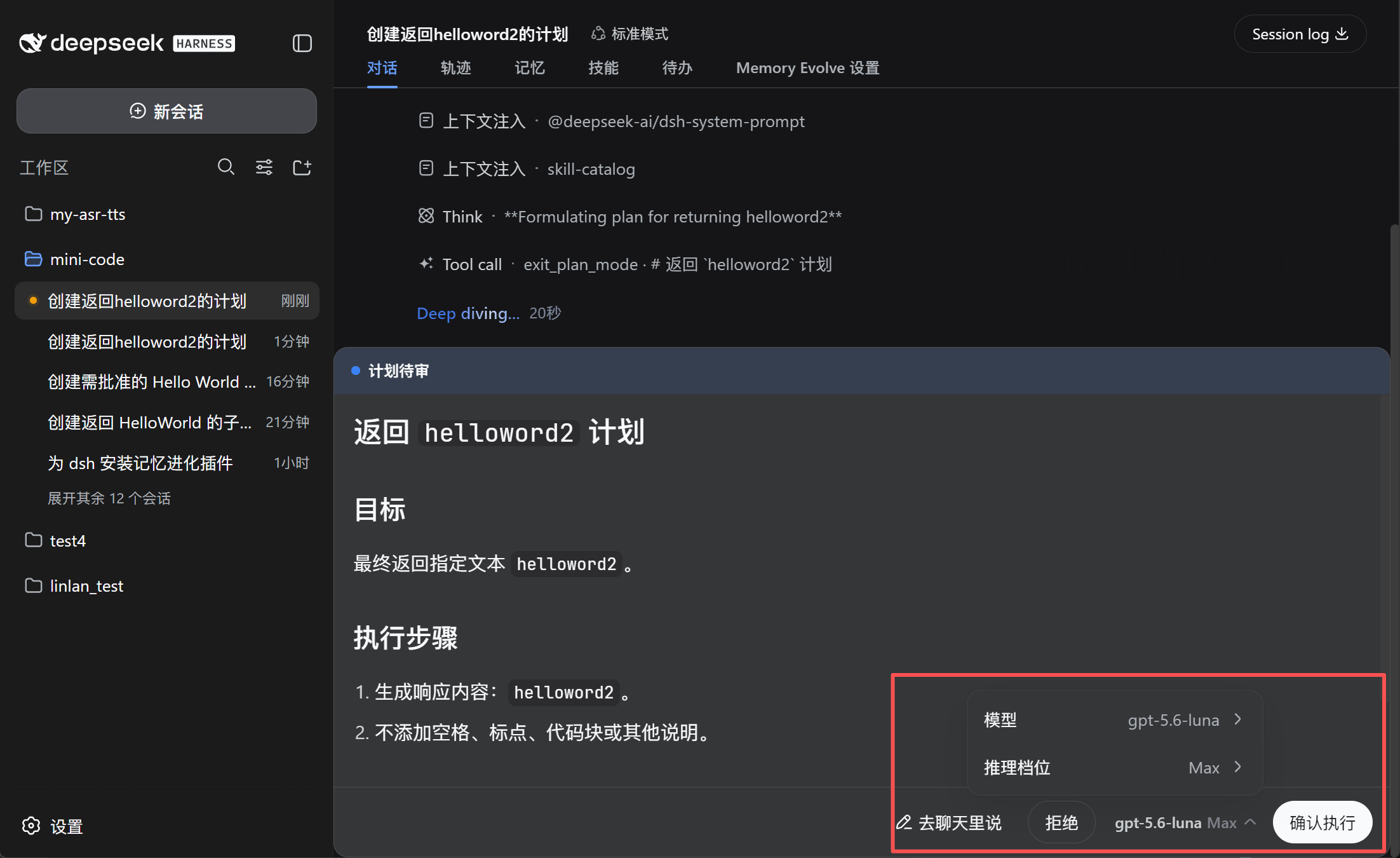
- Confirm before execution — review or change the model directly in the plan approval panel.
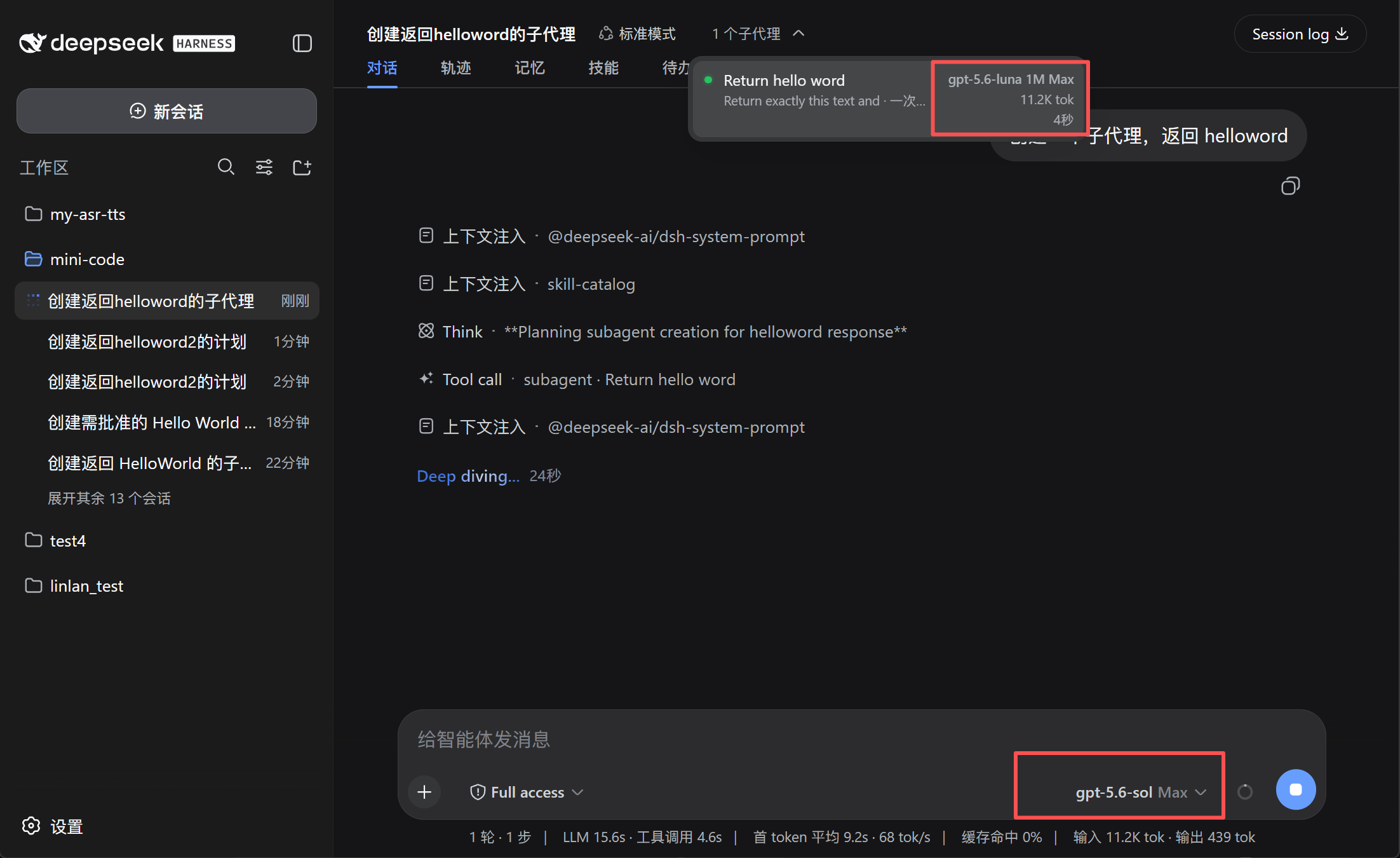
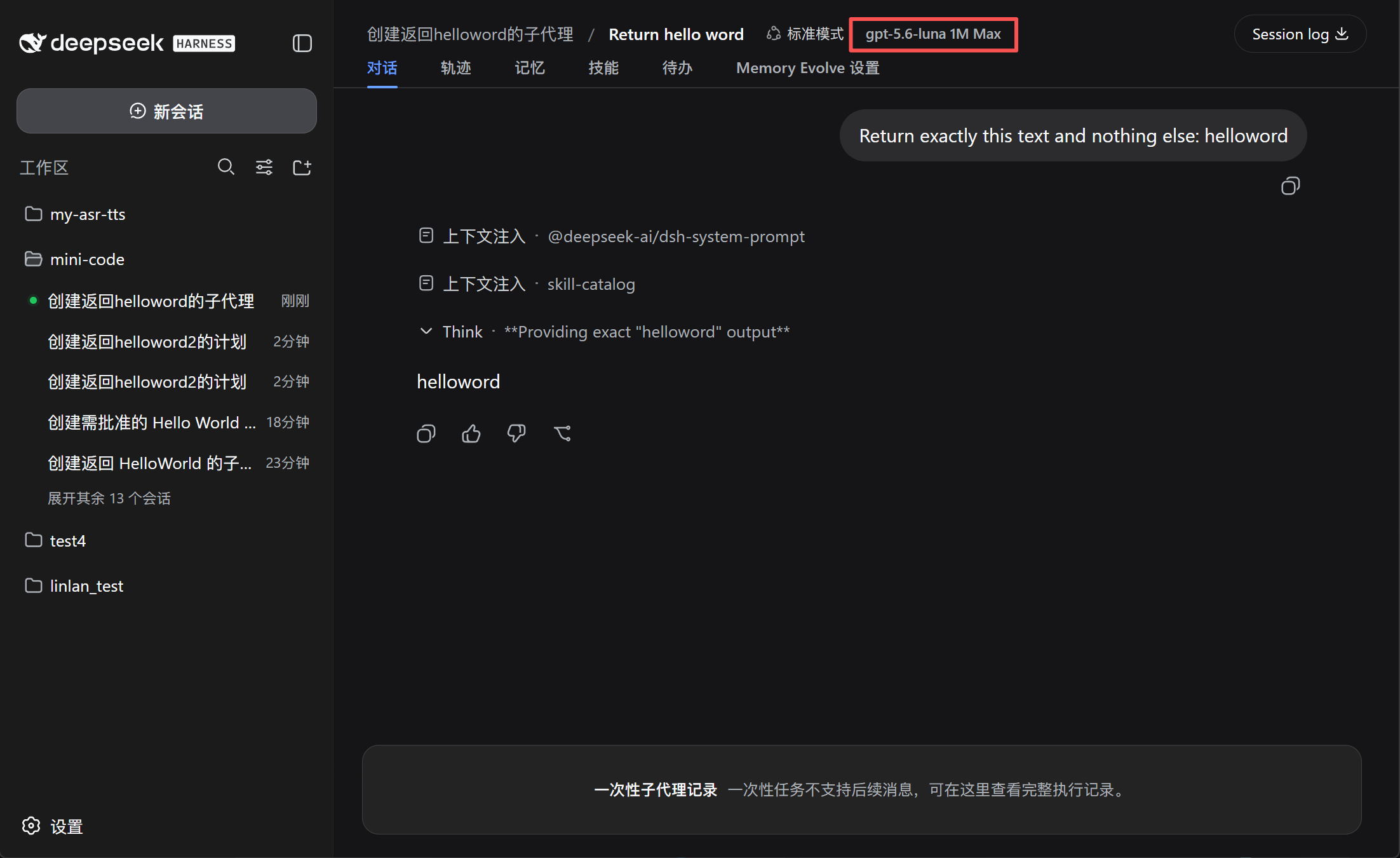
- See what subagents use — display the model, context window, and reasoning effort, such as
GPT-5.6 Sol 1M Max. - Keep the main model unchanged — after plan execution, DSH restores the previous main-session model.
Preview
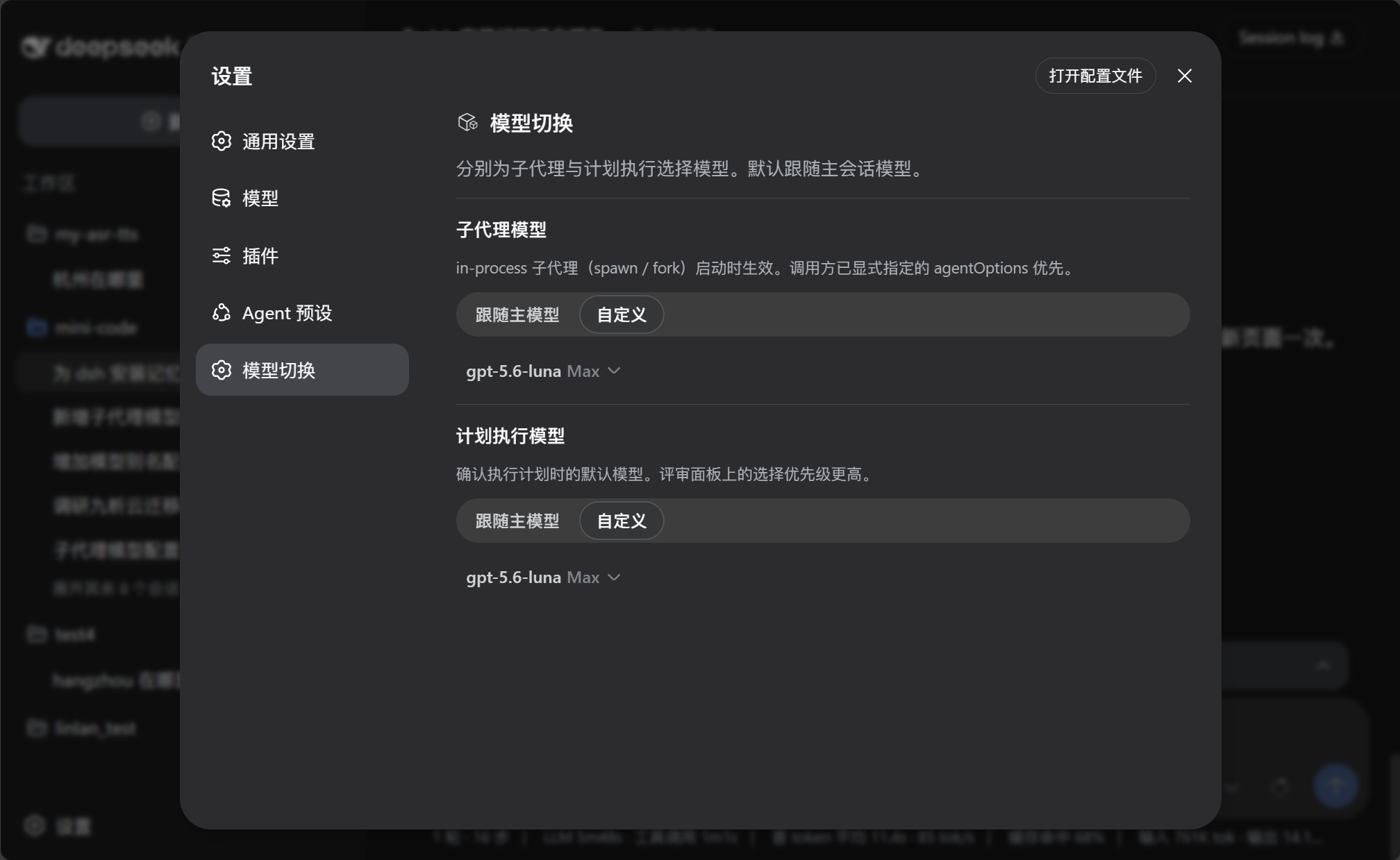
Configure model defaults
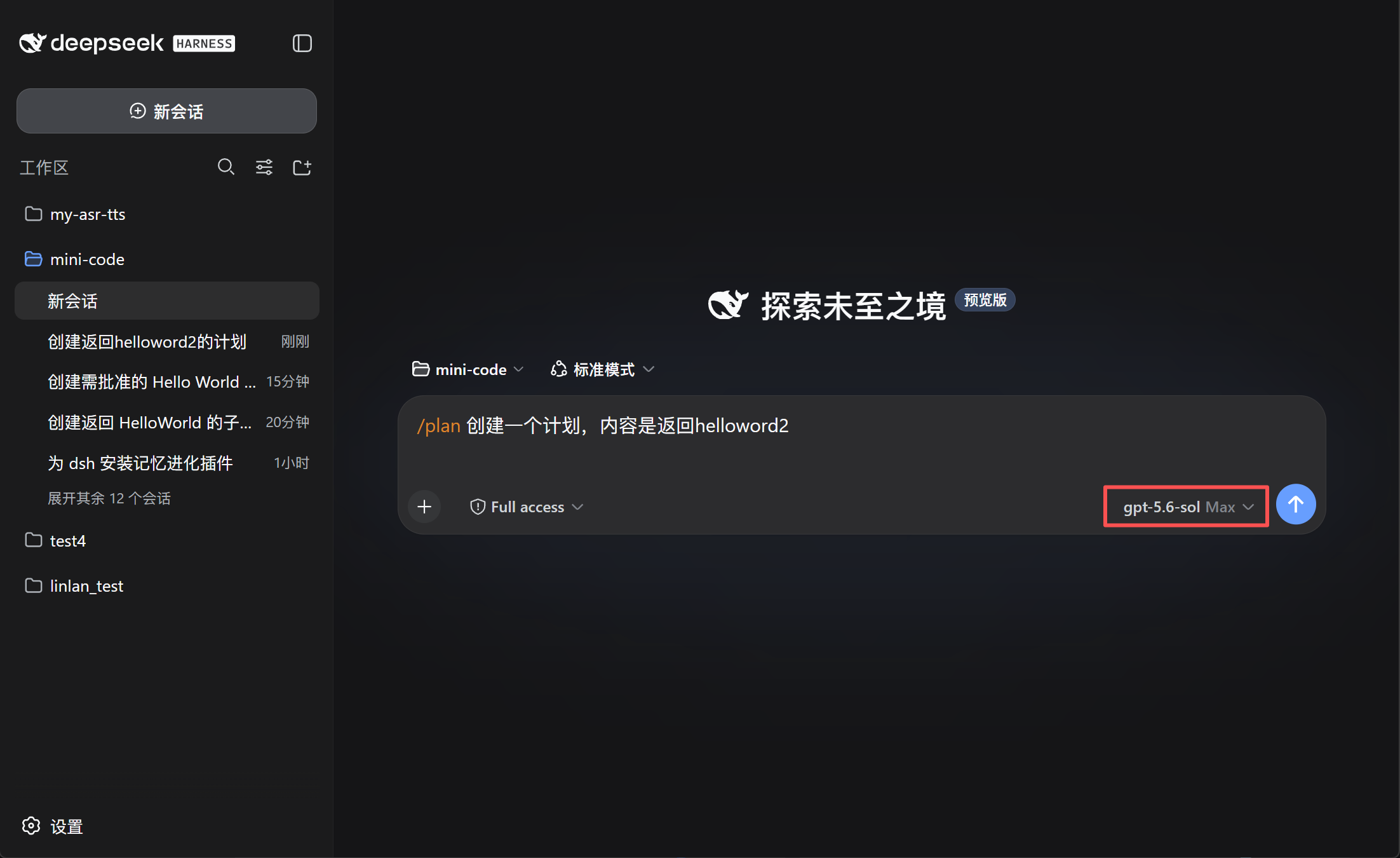
Choose the model for plan execution
 |
 |
See the model used by subagents
 |
 |
Install
Use the GitHub spec. This plugin is not published as an npm package, so do not use @lincong1987/dsh-model-switch.
dsh plugin --profile web add github:lincong1987/dsh-model-switch
Replace web with the profile DSH is actually running. DeepSeek Harness Desktop typically uses desktop.
Restart DSH after installation.
Update DSH
This plugin requires DeepSeek Harness 0.1.2-alpha.4 or later. DSH has no dsh update command — install the version you want the same way you originally installed it.
- Check the installed version and what npm currently publishes:
dsh --version
npm view @deepseek-ai/dsh dist-tags
As of 2026-09-02, latest and next point to 0.1.1-rc.2, while the alpha tag points to 0.1.2-alpha.4 (this plugin's current target). Pin the exact version (@0.1.2-alpha.4) when reproducibility matters.
- npx (Web):
npx --yes @deepseek-ai/[email protected] web
- Global npm install:
npm install -g @deepseek-ai/[email protected]
dsh --version
Then restart dsh web. DSH needs Node.js ^22.19.0 or >=24.
- Desktop: Fully Exit from the tray, then use Check for Updates in the app (or install a newer Desktop build). Desktop ships its own packaged
dsh; updating npm ornpxdoes not replace that copy. After Desktop finishes updating, restart it.
DSH is still a developer preview and may change on-disk formats between releases. Back up ~/.dsh (Windows: %USERPROFILE%\.dsh) before jumping versions. In particular, 0.1.0-rc.8 changed the SQLite storage format incompatibly, and 0.1.2-alpha.3 removed the optional SQLite session backend entirely (existing data is kept but needs an older version to export); treat local sessions as non-portable when crossing those boundaries.
After DSH is on a compatible version, reinstall this plugin as described below.
Reinstall / after a DSH update
Reinstall the plugin when this repository has a new release, or after you upgrade DeepSeek Harness. The plugin tracks a specific DSH version (currently 0.1.2-alpha.4 or later), so a host upgrade should be followed by a plugin reinstall.
- Update DSH first (see Update DSH; skip this step if only the plugin changed).
- Reinstall with
--forceso DSH refreshes the GitHub source:
dsh plugin --profile web add --force github:lincong1987/dsh-model-switch
- Restart DSH.
On Desktop, run one plugin add at a time. Fully Exit from the tray (closing the window is not enough), wait until Desktop finishes starting, then reinstall, then Exit and reopen again. If install fails with another plugin install recovery transaction is pending, quit Desktop, wait, and retry once. If it is still pending, quit Desktop, delete %APPDATA%\DSH Desktop\plugin-install-recovery, reopen Desktop, then run a single add --force.
To bypass the Desktop wrapper, run the matching DSH CLI in a normal terminal:
npx --yes @deepseek-ai/[email protected] plugin --profile desktop add --force github:lincong1987/dsh-model-switch
Use
- Open Settings → Model switch.
- Configure the Subagent model and Plan execution model:
- Follow main model uses the current conversation model.
- Custom lets you choose a model and reasoning effort.
- When reviewing a plan, confirm or change the execution model before selecting Approve.
The model selected in the plan review panel takes priority over the saved plan-execution setting.
Compatibility
Requires DeepSeek Harness 0.1.2-alpha.4 or later. Settings are stored in the host settings document through the plugin's registered model-switch namespace.
Subagent model switching applies to in-process subagents such as spawn and fork. External-process agents may manage their models independently.
DSH 0.1.2-alpha.1 also introduced a native, agent-driven model selection for subagents (the agent picks provider/model/effort within its authorization). This plugin is complementary: it enforces a fixed, user-configured routing policy instead, and adds the plan-execution model switch, restore, and session model badges.
Community

Links
License
MIT
Yorumlar (0)
Yorum birakmak icin giris yap.
Yorum birakSonuc bulunamadi