linedesk
Health Pass
- License — License: MIT
- Description — Repository has a description
- Active repo — Last push 0 days ago
- Community trust — 11 GitHub stars
Code Pass
- Code scan — Scanned 12 files during light audit, no dangerous patterns found
Permissions Pass
- Permissions — No dangerous permissions requested
No AI report is available for this listing yet.
The open-source AI receptionist for businesses. Answers every call, books the appointment and hands over to a person when needed. You own the code and the data.

The open-source AI receptionist for businesses
Answers every call, books the appointment and hands over to a person when needed.
You own the code and the data. Every call lands in a fast, keyboard-first inbox.


Website · Docs · Self-hosting · Contributing · Roadmap · Contact
Set it up with your AI agent. Paste this into Claude Code, Codex or any coding agent with a shell:
Please set up Linedesk for me: linedesk.ai/self-host.md
Or run the install script yourself on a new Ubuntu or Debian server (self-hosting guide):
curl -fsSL https://raw.githubusercontent.com/linedesk/linedesk/HEAD/scripts/install.sh | sudo sh
Linedesk picks up the phone for a business: a natural-sounding assistant that knows the business, books appointments into its calendar, takes messages and puts urgent callers through to the right person. Afterwards every call is in one inbox with a summary, next steps, the transcript and the recording. Run it on your own server with your own provider accounts, or use Linedesk Cloud.
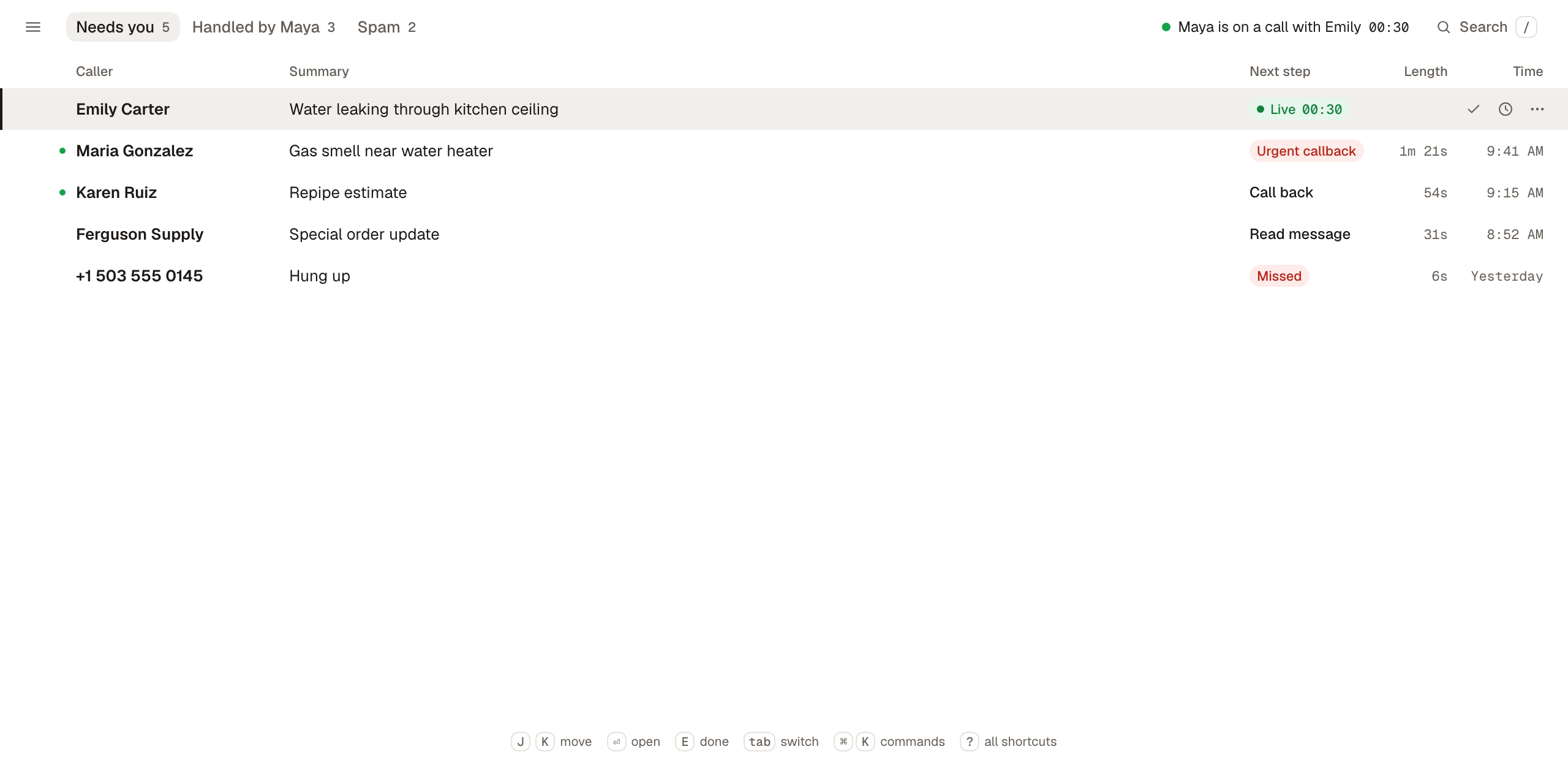
The inbox, shown in the design prototype with demo data.
What it does
On the phone
- Answers every call with a natural voice, around the clock, and knows your business: services, prices, opening hours, FAQs, documents, or simply your website.
- Books appointments straight into your calendar, with your appointment types, working hours and buffers.
- Hands over to a person. Transfers go to named teammates under rules you write in plain language, each with a fallback. Urgent calls are flagged and can go to an on-call phone.
- Recognises returning callers, greets them by name and knows their last calls and upcoming bookings.
- Takes details reliably: names, numbers, addresses, emails and dates are confirmed step by step, with keypad input where it helps.
- Speaks the caller's language: the assistant can answer in many languages, and the app is translated into six.
After the call
- One inbox for all calls: summary, next steps, transcript and recording, built for working through quickly with the keyboard. Works offline and installs as an app.
- Push notifications and emails for new calls, urgent ones first, on desktop and phone.
- Contacts with call history, CSV import, merging of duplicates and blocking of spam callers.
- Team: invite people, assign calls, see who is handling what. Agencies can run workspaces for their clients from one partner team.
- Your business tools: every finished call goes to HubSpot, Jobber or a Slack channel, or anywhere through Zapier.
For developers
- API: every change in the app is an action you can also call over HTTP, described in OpenAPI.
- MCP server, so AI tools such as Claude or ChatGPT can work with your calls and bookings, and an AI agent can set up a whole install.
- Signed webhooks for finished calls, new bookings and taken messages, plus a during-call lookup so the assistant can ask your own system.
Bring your own providers
Linedesk is not tied to one vendor. You use your own accounts and pay their list prices; every provider is connected in the app (Server admin › Providers), with a connection test:
| Supported | |
|---|---|
| Phone carrier | Telnyx or Twilio; a business can also connect its own carrier account |
| Speech to text | AssemblyAI, Deepgram, ElevenLabs Scribe, OpenAI |
| Language model | OpenAI, OpenRouter (any model), Anthropic, Google Gemini, Groq, Mistral |
| Voice | ElevenLabs, Cartesia |
| Speech to speech (optional) | OpenAI Realtime, instead of the three stages above |
| Transcript after the call (optional) | OpenAI, Deepgram, AssemblyAI, ElevenLabs Scribe |
| Calendar | Google Calendar, Microsoft 365, iCloud and other CalDAV calendars, Calendly, Cal.com |
| Any SMTP service, Amazon SES, Resend, Postmark, SendGrid, Brevo, Mailgun, Gmail | |
| Sign-in | Email code, password, passkeys, Google, Microsoft, GitHub or your own OpenID Connect |
| Call recordings | Local disk or any S3-compatible bucket (AWS S3, Cloudflare R2, Hetzner, Backblaze B2, MinIO) |
| Billing your own customers (optional) | Stripe, with your own account and prices |
Connect your AI tool (MCP)
Linedesk has a remote MCP server, so Claude, ChatGPT, Cursor and other MCP clients can work with your workspace: read
calls and their summaries, find contacts, see and change bookings, and change your assistant's settings.
- Address:
https://app.linedesk.ai/mcp(Streamable HTTP). On your own install:https://<your-address>/mcp. - Sign-in: OAuth 2.1. Add the address as a custom connector in your AI tool, sign in with your Linedesk account
and pick the workspace. No API key to copy. The connector acts with your role in that workspace. - Adding it: Claude in one link,
Add to Claude
(confirm, then Connect; Claude Team or Enterprise: the owner adds it under
organization connectors).
ChatGPT cannot add one by itself: in ChatGPT's plugins click Add › Add custom MCP
server, paste the address and choose OAuth. Cursor and VS Code install it in one click from Workspace settings ›
Integrations › MCP; Claude Code, Codex and Gemini CLI with one command from there. - Tools: every action of the app (the same registry the web app uses), plus
calls_list,calls_get,contacts_search,workspaces_listandapi_get. Each tool says whether it only reads or also changes data. - Listed in: the official MCP registry as
ai.linedesk/linedesk.
Languages
Linedesk speaks English, Español, Português, Français, Deutsch and 日本語. Translations are made by AI and improved by people. See a bad translation? Fix it in a pull request or open a Translation improvement issue. Missing your language? Ask for it. How it works: docs/translations.md.
Quick start
Linedesk Cloud: sign up at linedesk.ai and we run it for you.
Self-hosted: on a new Ubuntu or Debian server, one command installs Docker, the code, the settings with random secrets and HTTPS, and ends with the address and a one-time setup code. scripts/install.sh is short; read it before you pipe it into a shell.
curl -fsSL https://raw.githubusercontent.com/linedesk/linedesk/HEAD/scripts/install.sh | sudo sh
Or by hand on any machine with Docker (Compose v2.24 or newer) and about 2 GB of free RAM:
git clone https://github.com/linedesk/linedesk.git && cd linedesk
scripts/setup.sh                 # makes .env with a random value for every secret
docker compose up -d --build
docker compose logs api | grep -A3 "setup code"
Open PUBLIC_URL (default http://localhost), enter the setup code and connect your providers in the app. Real phone calls need a server with a public IP; on your own computer everything else works, including test calls in the browser.
- Where to get a server, which size, the one-command install and your own domain: docs/hosting.md
- Settings, HTTPS and reverse proxies, ports and firewall, memory, updates, backups and restore: docs/self-hosting.md
- Before you take real calls: your responsibilities when you run Linedesk (recording consent, AI disclosure, callers' data, emergencies)
Development quickstart
Requirements: Node 22.18 or newer (it runs the TypeScript files directly), pnpm 10, Docker.
pnpm install
scripts/setup.sh                                # makes .env with a random value for every secret, SECRETS_KEY included
pnpm db:up && pnpm db:migrate && pnpm db:seed   # Postgres + Electric; the seed prints the demo sign-in
pnpm dev                                        # API on 3100, web app on http://localhost:5173
pnpm --filter @linedesk/agent simulate          # a simulated call lands in the inbox, no provider keys needed
Use scripts/setup.sh, not a plain cp .env.example .env: the copy leaves SECRETS_KEY empty, and then nothing can be connected under Server admin › Providers (or set it yourself: openssl rand -base64 32).
The demo sign-in uses a password. Without the seed, the API prints a setup code to its log (the terminal running pnpm dev); the sign-in page asks for it and makes you the first admin. Email codes go nowhere until email is connected (Server admin › Providers); for local development uncomment EMAIL_TO_LOG=true in .env to print them to the API log. There is no open sign-up: people get an account through an invitation or a server admin.
The simulator dials the install's only Linedesk number (the seed's demo number). With none or several, pass the number: pnpm --filter @linedesk/agent simulate --to +1… (or set SIM_TO_NUMBER in .env). Simulated calls show in the inbox like real ones but never count as a real call in setup progress or usage.
Your own test data in every local stack and worktree: pnpm db:seed -- --user <your email> once, then pnpm dev:snapshot; a new local database starts from that snapshot. More in CONTRIBUTING.md.
What's here
| Path | What it is |
|---|---|
apps/api |
API server (Hono): sign-in, the action registry (the one write path), read sync, MCP |
apps/web |
The inbox: a local-first, keyboard-first web app (installable) |
apps/agent |
The voice assistant (LiveKit Agents) and a call simulator |
packages/ |
Database schema, actions, sync, telephony, calendar, billing and CRM adapters, translations |
integrations/ |
The HubSpot, Jobber, Slack and Zapier apps |
prototypes/inbox-html/ |
The reference design as a single-file clickable prototype. Run: cd prototypes/inbox-html && python3 -m http.server 4173 |
docs/ |
Architecture, API, self-hosting, design principles and more |
Demo data is fictional (Brightwater Plumbing & Heating, Portland; assistant "Maya").
Get involved
- Contribute: read CONTRIBUTING.md and CLAUDE.md (the conventions, for people and AI agents alike). Bigger changes start with an issue.
- Questions and help: SUPPORT.md.
- Security: never in a public issue; see SECURITY.md.
- What comes next: ROADMAP.md.
- Everyone in the project follows the Code of Conduct.
License
Copyright © 2026 Sauerbier & Gutberlet GmbH and contributors. Licensed under the MIT license; third-party notices in NOTICE.
Exception: the audio files in apps/api/assets/voice-previews/ are not covered by the MIT license; see the
README in that folder.
"Linedesk" and the Linedesk logo are trademarks of Sauerbier & Gutberlet GmbH; see TRADEMARK.md. Legal notice.
Reviews (0)
Sign in to leave a review.
Leave a reviewNo results found