kalshi-agent
Health Gecti
- License — License: MIT
- Description — Repository has a description
- Active repo — Last push 0 days ago
- Community trust — 12 GitHub stars
Code Uyari
- process.env — Environment variable access in src/auth/encryption.ts
- process.env — Environment variable access in src/auth/magicLink.ts
- process.env — Environment variable access in src/auth/routes.ts
- network request — Outbound network request in src/auth/routes.ts
- crypto private key — Private key handling in src/auth/routes.ts
- crypto private key — Private key handling in src/auth/types.ts
- process.env — Environment variable access in src/claude/client.ts
- crypto private key — Private key handling in src/claude/client.ts
- process.env — Environment variable access in src/index.ts
Permissions Gecti
- Permissions — No dangerous permissions requested
Bu listing icin henuz AI raporu yok.
A prediction market trading agent for Kalshi, accessible via iMessage. Built on Linq Blue and Claude.
Kalshi Agent
A prediction market trading agent for Kalshi, accessible via iMessage. Built on Linq Blue and powered by Claude (Anthropic).
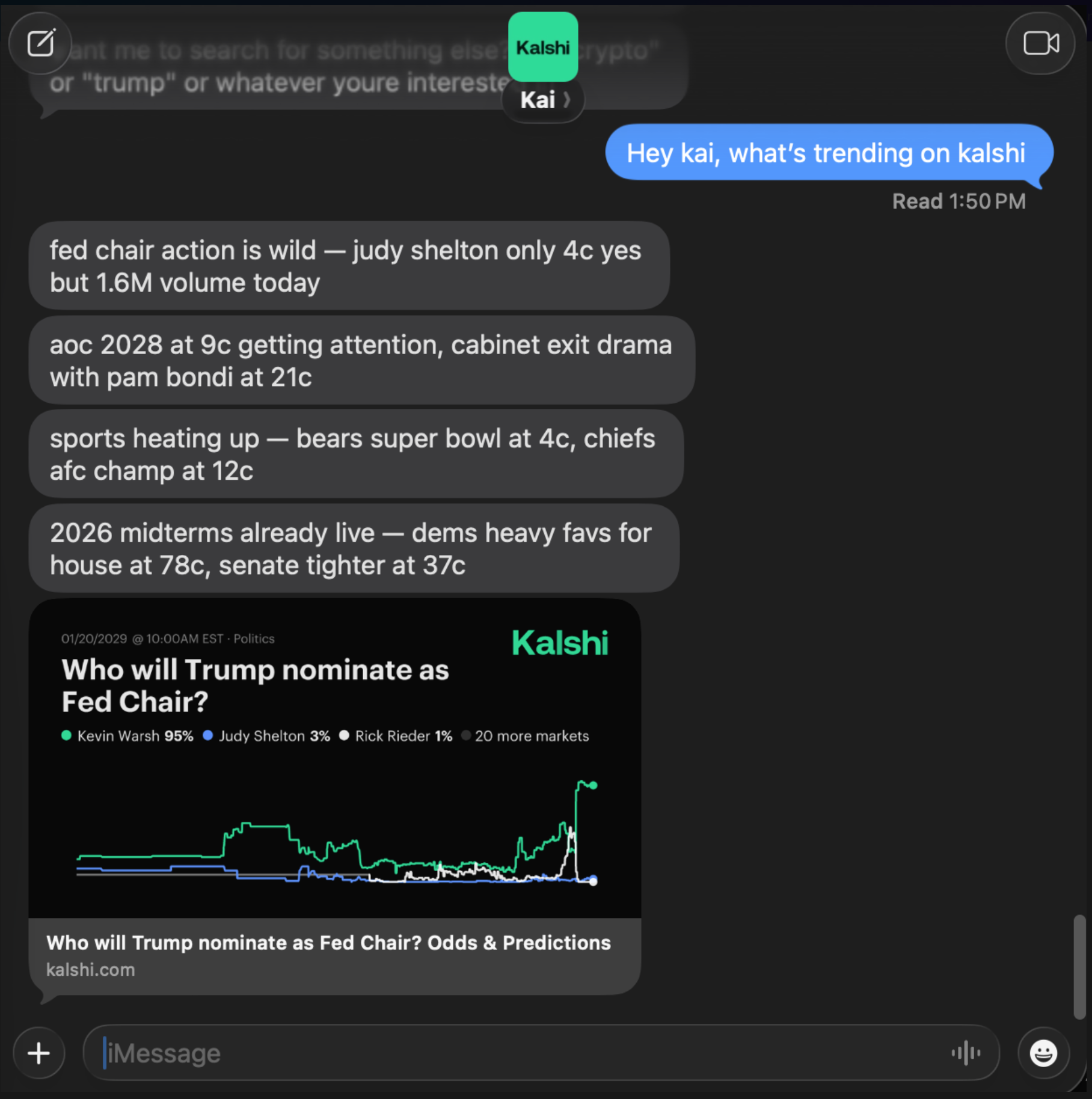
What it does
- Trade via text — buy, sell, and cancel orders on Kalshi through iMessage
- Search & analyze markets — browse trending markets, check prices, volume, and orderbook depth
- Portfolio tracking — check balance, positions, and P&L with a text
- Multi-user onboarding — each user connects their own Kalshi account via a magic link, no shared credentials
Architecture
User ──iMessage──▶ Linq Blue ──webhook──▶ kalshi-agent ──▶ Claude (Anthropic)
                                              │                    │
                                              │     ◀── tools ◀────┘
                                              │     (market search,
                                              │      trading, web
                                              │      search)
                                              │                    │
                                              ▼                    ▼
User ◀─iMessage── Linq Blue ◀───API──── Response          Kalshi API
Quick Start
Prerequisites
- Node.js 20+
- ngrok (for local development)
- Linq Blue account (free sandbox)
- Kalshi account with API access
- Anthropic API key
Setup
# Clone the repo
git clone https://github.com/linq-team/kalshi-agent.git
cd kalshi-agent

# Install dependencies
npm install

# Copy environment template
cp .env.example .env
Edit .env and fill in your keys. At minimum you need:
ANTHROPIC_API_KEY— from console.anthropic.comLINQ_API_TOKEN— from your Linq Blue dashboardLINQ_AGENT_BOT_NUMBERS— your Linq Blue phone number
Generate an encryption key for credential storage:
node -e "console.log(require('crypto').randomBytes(32).toString('hex'))"
Paste the output into CREDENTIAL_ENCRYPTION_KEY in your .env.
Run
# Start the dev server
npm run dev

# In another terminal, expose via ngrok
ngrok http 3000
Copy the ngrok URL and set it as your webhook URL in the Linq Blue dashboard. Then text your Linq Blue number — you'll get a magic link to connect your Kalshi account, and you're trading.
Environment Variables
| Variable | Required | Description |
|---|---|---|
ANTHROPIC_API_KEY |
Yes | Claude API key |
LINQ_API_TOKEN |
Yes | Linq Blue partner token |
LINQ_AGENT_BOT_NUMBERS |
Yes | Your Linq Blue phone number(s), comma-separated |
BASE_URL |
Yes | Public URL for magic link generation (e.g. your ngrok URL) |
CREDENTIAL_ENCRYPTION_KEY |
Yes | 64 hex chars for encrypting stored Kalshi credentials |
KALSHI_API_KEY_ID |
No | Default Kalshi API key ID (for public market data before users onboard) |
KALSHI_PRIVATE_KEY_PATH |
No | Path to default Kalshi private key .pem |
PORT |
No | Server port (default: 3000) |
NODE_ENV |
No | Set to production for HTTPS enforcement |
ALLOWED_SENDERS |
No | Lock to specific phone numbers during dev, comma-separated |
IGNORED_SENDERS |
No | Phone numbers to ignore, comma-separated |
How it works
- User texts the Linq Blue number via iMessage
- Linq Blue sends a webhook to your server
- If the user hasn't onboarded, they get a magic link to connect their Kalshi account
- The agent sends the message to Claude with Kalshi tools available
- Claude can search markets, check prices, place trades, view portfolio — all via tool use
- The response is sent back through Linq Blue as iMessage(s)
Everything runs locally
There is no remote database or external auth service. Everything lives on your machine (or your single deployment):
- User credentials — Kalshi API keys are encrypted with AES-256-GCM and stored in-memory on the server process. They exist only in RAM and are lost on restart.
- Conversation history — kept in-memory per chat with a 1-hour TTL. No persistence layer needed.
- User profiles — names and facts Claude learns about users are stored in-memory on the server.
- Onboarding — when a new user texts the bot, they receive a magic link pointing to your server's
/auth/setuppage. They paste their Kalshi API key ID and private key into the form, which submits directly to your server. Credentials never leave your infrastructure.
Project Structure
src/
├── index.ts              # Express server, webhook handler, main flow
├── auth/                 # Magic link onboarding, credential encryption
│   ├── routes.ts         # /auth/setup page and credential submission
│   ├── encryption.ts     # AES-256-GCM credential encryption
│   ├── magicLink.ts      # Token generation and verification
│   ├── db.ts             # In-memory user store
│   └── userContext.ts    # Load decrypted credentials per request
├── claude/
│   └── client.ts         # Claude API, system prompt, Kalshi tools
├── kalshi/
│   ├── client.ts         # Full Kalshi REST API client
│   ├── signing.ts        # RSA-PSS request signing
│   └── types.ts          # Kalshi API type definitions
├── linq/
│   └── client.ts         # Linq Blue API (send messages, reactions, effects)
├── state/
│   └── conversation.ts   # Conversation history and user profiles (in-memory)
├── utils/
│   └── redact.ts         # Phone number redaction for logs
└── webhook/
    ├── handler.ts        # Webhook processing and phone filtering
    └── types.ts          # Webhook event types
Commands
Users can text these commands:
| Command | Description |
|---|---|
/clear |
Reset conversation history |
/forget me |
Erase everything Kai knows about you |
/help |
Show available commands |
/portfolio |
Quick portfolio check |
/markets |
Trending/active markets |
Deployment
Docker
docker build -t kalshi-agent .
docker run -p 3000:3000 --env-file .env kalshi-agent
Railway / Fly.io
Set your environment variables in the platform dashboard and deploy. The included Dockerfile and Procfile handle the rest. Set BASE_URL to your deployment URL for magic links to work.
Built with
- Linq Blue — iMessage/RCS API
- Claude (Anthropic) — AI reasoning and tool use
- Kalshi API — prediction market trading
License
MIT
Yorumlar (0)
Yorum birakmak icin giris yap.
Yorum birakSonuc bulunamadi