agent-rules
Health Pass
- License — License: Apache-2.0
- Description — Repository has a description
- Active repo — Last push 0 days ago
- Community trust — 51 GitHub stars
Code Pass
- Code scan — Scanned 12 files during light audit, no dangerous patterns found
Permissions Pass
- Permissions — No dangerous permissions requested
This tool provides a collection of predefined rules, instructions, and security best practices designed to be loaded into agentic coding environments like Cursor, GitHub Copilot, and Claude CLI. It runs as an interactive CLI that generates customized configuration files for your preferred AI tools.
Security Assessment
The overall risk is Low. The automated code scan checked 12 files and found no dangerous patterns, hardcoded secrets, or requests for dangerous system permissions. Because it is designed to generate configuration files, it operates locally. While it requires basic standard permissions to write files to your project directory and parse command-line arguments, it does not access sensitive user data, execute background shell commands, or make unauthorized network requests.
Quality Assessment
The project demonstrates strong health and maintenance indicators. It uses the permissive Apache-2.0 license and is highly active, with its most recent code push happening today. It has earned a moderate level of community trust with 51 GitHub stars and provides professional security disclosure policies. The author maintains standard CI/CD pipelines and code coverage checks, indicating a reliable and well-maintained open-source project.
Verdict
Safe to use—a straightforward, actively maintained utility that poses minimal security risks while improving AI coding workflows.
Rules and instructions for agentic coding tools like Cursor, Claude CLI, Gemini CLI, Qodo, Cline and more
agent-rules
Rules and instructions for agentic coding tools like Cursor, GitHub Copilot, Claude CLI and Gemini CLI.



Usage
Interactive Mode
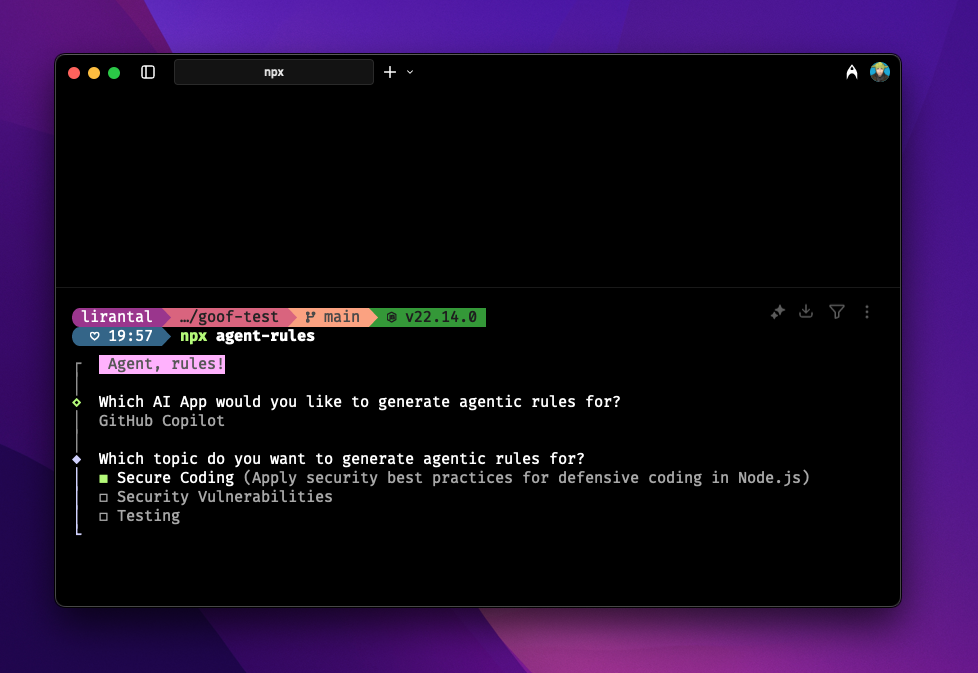
npx agent-rules
This will start an interactive session where you can select the AI app and topics.
Supported AI Apps
| AI App | Supported |
|---|---|
| GitHub Copilot | ✅ |
| Cursor | ✅ |
| Claude CLI | ✅ |
| Gemini CLI | ✅ |
Command Line Interface
You can also use command line flags to skip the interactive prompts:
# Generate rules for a specific AI app and topic
npx agent-rules --app cursor --topics secure-code

# Generate rules for multiple topics
npx agent-rules --app github-copilot --topics secure-code --topics testing

# Include MCP (Model Context Protocol) configuration
npx agent-rules --app github-copilot --topics testing --mcp

# Include custom commands (prompts)
npx agent-rules --app github-copilot --topics secure-code --commands

# Combine multiple features
npx agent-rules --app github-copilot --topics secure-code --mcp --commands

# Use short flags
npx agent-rules -a claude-code -t security-vulnerabilities -m -c

# Show help
npx agent-rules --help

# Show version
npx agent-rules --version
Available Options
Flags:
-a, --app <app>- AI app to generate rules for-t, --topics <topics>- Topics to generate rules for (can be specified multiple times)-m, --mcp- Include MCP (Model Context Protocol) server configuration-c, --commands- Include custom commands/prompts-h, --help- Show help message-v, --version- Show version number
AI Apps:
github-copilot- GitHub Copilotcursor- Cursorclaude-code- Claude Codegemini- Gemini CLI
Topics:
secure-code- Secure coding practicessecurity-vulnerabilities- Security vulnerability scanning and fixestesting- Testing strategy and guidelines
Features
📋 Instructions & Rules
Scaffold AI-specific coding instructions and best practices rules into your project:
- Security-focused coding practices
- Vulnerability detection and remediation
- Testing strategies and guidelines
🔌 MCP (Model Context Protocol) Configuration
Automatically configure MCP servers for enhanced agentic coding capabilities:
- GitHub Copilot: Configures
.vscode/mcp.json - Gemini CLI: Configures
.gemini/settings.json - Non-destructive merging with existing configurations
Learn more in the MCP Feature Documentation.
⚡ Custom Commands & Prompts
Scaffold reusable commands and prompts for your AI coding assistant:
- GitHub Copilot: Deploys to
.github/prompts/as prompt files - Pre-built commands for common workflows (e.g., implementing GitHub issues)
- Easily extensible with your own custom commands
Learn more in the Commands Feature Documentation.
Rules
Current category of rules available:
- Secure coding practices, based on Liran Tal's Node.js Secure Coding
- Security vulnerabilities, based on Snyk.io
- Testing strategy and test code guidelines, built from Yoni Goldberg's JavaScript Testing and Liran Tal's testing strategy
Contributing
Please consult CONTRIBUTING for guidelines on contributing to this project.
Author
agent-rules © Liran Tal, Released under the Apache-2.0 License.
Reviews (0)
Sign in to leave a review.
Leave a reviewNo results found