automcp
Health Uyari
- License — License: Apache-2.0
- Description — Repository has a description
- Active repo — Last push 0 days ago
- Low visibility — Only 5 GitHub stars
Code Gecti
- Code scan — Scanned 12 files during light audit, no dangerous patterns found
Permissions Gecti
- Permissions — No dangerous permissions requested
This utility scans your project's package.json file, resolves each dependency to its GitHub repository, and automatically generates corresponding Model Context Protocol (MCP) server configurations for coding agents like Cursor or VS Code.
Security Assessment
Overall Risk: Low
The automated code scan of 12 files found no dangerous patterns, hardcoded secrets, or requests for elevated permissions. The documentation explicitly states it has zero runtime dependencies, relying only on Node.js built-ins, which minimizes the supply chain attack surface. Network requests are inherently required because the tool resolves package names to their online GitHub repositories. It modifies local agent configuration files, though it safely provides a `--dry-run` flag and promises not to overwrite existing settings.
Quality Assessment
The project is highly mature from a structural standpoint, despite having low community visibility (only 5 GitHub stars). It is legally safe to use, distributed under the permissive Apache-2.0 license, and demonstrates excellent software health. The repository is actively maintained, with the most recent push occurring today. Furthermore, the project includes standard professional safeguards such as CI testing, code coverage, and a responsible security disclosure policy.
Verdict
Safe to use—the code is clean, well-structured, and offers a safe dry-run mode, making it a reliable choice for developers despite its current low star count.
AutoMCP scaffolds your Model Context Protocol config from package.json deps
automcp
AutoMCP detects your package manifest file and automatically adds relevant MCP (Model Context Protocol) servers to the coding agents it detects


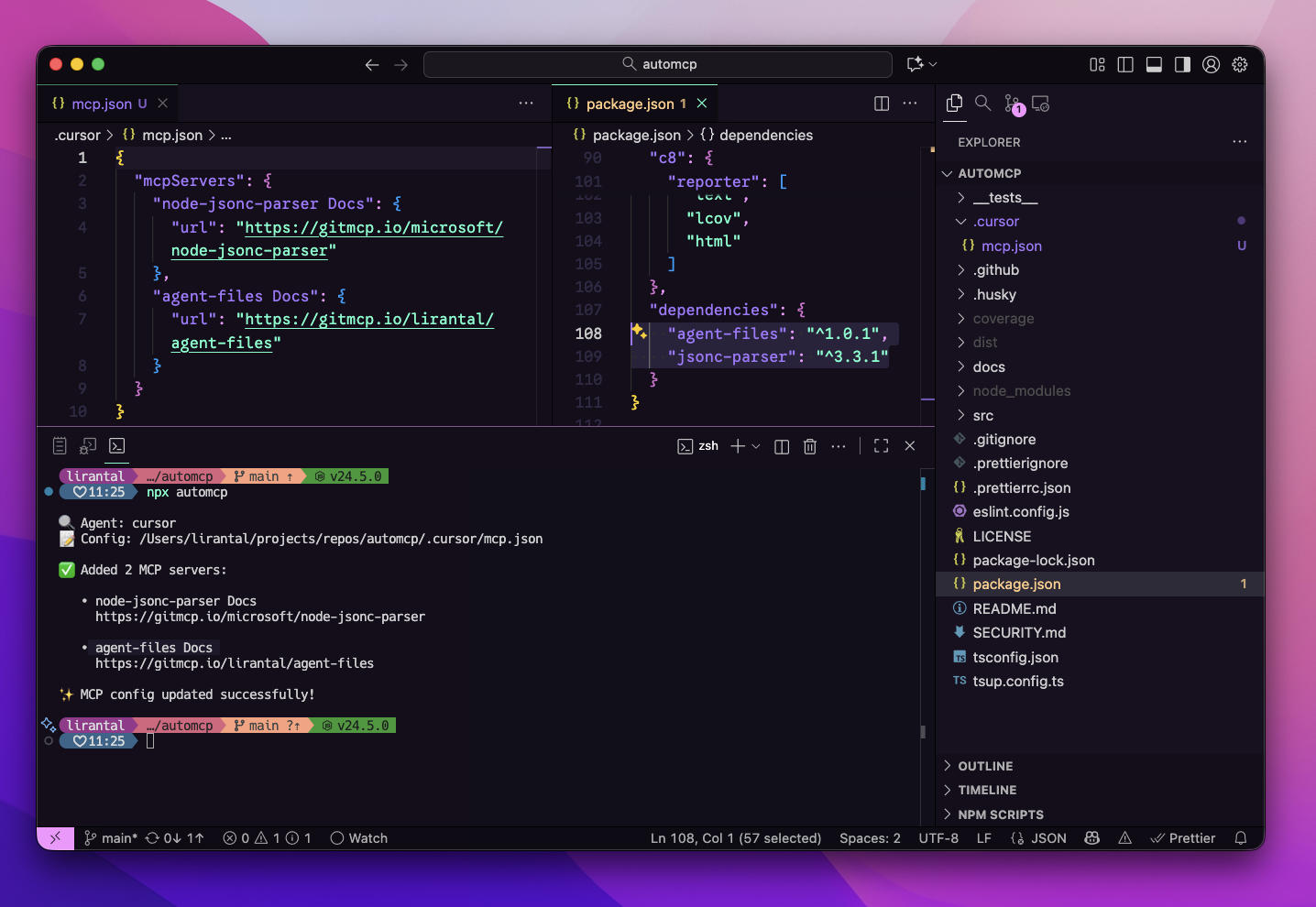
Features
- 🔍 Auto-detects your coding agent (Cursor, VS Code, Claude Desktop)
- 📦 Scans your project dependencies from package.json
- 🔗 Resolves each package to its GitHub repository
- 🌐 Generates GitMCP server URLs automatically
- ✅ Never overwrites existing MCP server configurations
- 🚫 Prevents duplicates via smart URL normalization
- 🏃 Fast concurrent resolution with connection pooling
- 🧪 Dry-run mode to preview changes safely
- 🎯 Zero runtime dependencies — uses only Node.js built-ins
Install
You can run automcp with npx (no install required) or add it to your project.
npx automcp
# or
npm add -D automcp
Usage: CLI
https://github.com/user-attachments/assets/305f75f8-0fec-4dd2-886c-d5f23a5e8a7e
npx automcp [options]
Options
--dry-run: Show planned changes without writing--agent <name>: Override detected agent (e.g., cursor, vscode)--config <path>: Override MCP config file path--include-dev: Include devDependencies (default: false)--silent: Minimal output--json: JSON summary output-h,--help: Show help-v,--version: Show version
Examples
# Preview changes only
npx automcp --dry-run

# Explicitly target Cursor and a custom config path
npx automcp --agent cursor --config ~/.cursor/mcp.json

# Include devDependencies
npx automcp --include-dev

# JSON output for CI/automation
npx automcp --json
Understanding --agent and --config Flags
The --agent and --config flags are flexible and work independently or together. You don't need to provide both!
Usage Patterns
| Command | Agent Detection | Config Path | When to Use |
|---|---|---|---|
npx automcp |
Auto-detected from .cursor/ or .vscode/ |
Auto-detected | ✅ Recommended: Let AutoMCP detect everything |
npx automcp --agent cursor |
Use "cursor" | Auto-resolves to .cursor/mcp.json |
When you have multiple agents and want to target one |
npx automcp --config /path/to/mcp.json |
Inferred from path | Use specified path | When config is in a custom location |
npx automcp --agent cursor --config /custom/path.json |
Use "cursor" | Use specified path | Full manual control |
How Each Flag Works
Using --agent alone:
- Resolves the config path automatically based on the agent name
cursor→.cursor/mcp.jsonin your projectvscode→.vscode/mcp.jsonin your project- Creates the file if it doesn't exist
Using --config alone:
- Infers the agent name from the path
- Path contains "cursor" → agent = "cursor"
- Path contains "vscode" → agent = "vscode"
- Path contains "claude" → agent = "claude-desktop"
- Otherwise → agent = "unknown"
Using both together:
- Explicitly sets both values with no auto-detection
- Useful for custom setups or non-standard paths
Examples
# Let AutoMCP detect both (most common)
npx automcp

# Target Cursor specifically, auto-resolve config path
npx automcp --agent cursor

# Use a custom config path, agent inferred as "cursor"
npx automcp --config ~/.cursor/mcp.json

# Use a custom config path, agent inferred as "unknown"
npx automcp --config /tmp/my-mcp-config.json

# Explicitly set both for full control
npx automcp --agent cursor --config /custom/location/mcp.json
How It Works
- Detects your coding agent (Cursor, VS Code) and locates its local project MCP config file
- Reads your package.json dependencies
- Resolves each dependency to its GitHub repository via
npm view - Builds GitMCP URLs in the format
https://gitmcp.io/owner/repo - Updates your MCP config without overwriting existing entries or creating duplicates
Note: AutoMCP only updates local project configurations (e.g.,
.cursor/mcp.jsonor.vscode/mcp.jsonin your project directory). It does not modify global agent configurations in your home directory.
Quick Start
# Run in your project directory
cd my-project
npx automcp

# Preview changes first
npx automcp --dry-run

# Include devDependencies
npx automcp --include-dev
Real-World Example
Given a project with these dependencies:
{
  "dependencies": {
    "express": "^4.18.0",
    "lodash": "^4.17.21",
    "axios": "^1.6.0"
  }
}
Running npx automcp will:
- Detect your agent (e.g., Cursor at
.cursor/mcp.jsonin your project) - Resolve GitHub repos:
- express → expressjs/express
- lodash → lodash/lodash
- axios → axios/axios
- Add to your MCP config:
{
  "mcpServers": {
    "express Docs": {
      "url": "https://gitmcp.io/expressjs/express"
    },
    "lodash Docs": {
      "url": "https://gitmcp.io/lodash/lodash"
    },
    "axios Docs": {
      "url": "https://gitmcp.io/axios/axios"
    }
  }
}
Supported Agents
AutoMCP looks for agent configurations in the following locations:
- Cursor —
.cursor/mcp.json(in your project directory) - VS Code —
.vscode/mcp.json(in your project directory)
Use --agent and --config flags to override auto-detection or to specify a custom config location.
Important: AutoMCP only updates local project configurations. If no local agent configuration is found (e.g., no
.cursor/or.vscode/directory in your project), the tool will exit without making changes. This prevents accidental updates to global configurations.
Troubleshooting
Agent not detected
npx automcp --agent cursor --config ~/.cursor/mcp.json
Permission errors
Ensure you have write access to the MCP config directory.
Non-GitHub packages skipped
Only packages with GitHub repositories are supported. Packages without a repository field or with non-GitHub URLs will be skipped.
URL resolution timeouts
The CLI runs npm view with a 10-second timeout per package. Slow network or large dependency lists may take time.
Output Example
Standard output:
🔍 Agent: cursor
📝 Config: /Users/username/.cursor/mcp.json

✅ Added 3 MCP servers:

   • express Docs
     https://gitmcp.io/expressjs/express

   • lodash Docs
     https://gitmcp.io/lodash/lodash

   • axios Docs
     https://gitmcp.io/axios/axios

✨ MCP config updated successfully!
With dry-run:
🔍 Agent: cursor
📝 Config: /Users/username/.cursor/mcp.json
🧪 Dry-run mode: no files will be modified

✅ Added 5 MCP servers:

   • express Docs
     https://gitmcp.io/expressjs/express

   • lodash Docs
     https://gitmcp.io/lodash/lodash

💡 Run without --dry-run to apply these changes.
With duplicates:
🔍 Agent: cursor
📝 Config: /Users/username/.cursor/mcp.json

⏭️  Skipped 2 duplicates:

   • express Docs
     https://gitmcp.io/expressjs/express

   • lodash Docs
     https://gitmcp.io/lodash/lodash
JSON output (for CI/automation):
npx automcp --json
{
  "ok": true,
  "result": {
    "added": 3,
    "skipped": 0,
    "errors": 0,
    "addedServers": [
      {
        "name": "express Docs",
        "url": "https://gitmcp.io/expressjs/express"
      }
    ],
    "skippedServers": [],
    "configPath": "/Users/username/.cursor/mcp.json",
    "agentName": "cursor",
    "dryRun": false
  }
}
Node.js Compatibility
- Requires: Node.js >= 22.0.0
- Uses ES2022+ features and Node.js built-in APIs
- No external runtime dependencies
CI/CD Integration
Use --json and --silent flags for automation:
# GitHub Actions example
- name: Update MCP config
  run: |
    npx automcp --json --silent > result.json
    cat result.json
Exit codes:
0: Success (including when nothing to add)1: Fatal error (config parse failure, permission denied, missing package.json)
Contributing
Please consult CONTRIBUTING for guidelines on contributing to this project.
Author
automcp © Liran Tal, Released under the Apache-2.0 License.
Yorumlar (0)
Yorum birakmak icin giris yap.
Yorum birakSonuc bulunamadi