agent-meme-forge
Health Gecti
- License — License: MIT
- Description — Repository has a description
- Active repo — Last push 0 days ago
- Community trust — 76 GitHub stars
Code Gecti
- Code scan — Scanned 5 files during light audit, no dangerous patterns found
Permissions Gecti
- Permissions — No dangerous permissions requested
Bu listing icin henuz AI raporu yok.
Codex skill that turns one image or text concept into a WeChat-ready Chinese sticker pack people will actually send. Sendability-gated, 4-keypose → 16-frame, no model-drawn text.
agent-meme-forge
没人用的表情包就是垃圾。 A Codex skill that turns one reference image — or a text concept — into a WeChat-ready animated Chinese sticker pack that people will actually send.




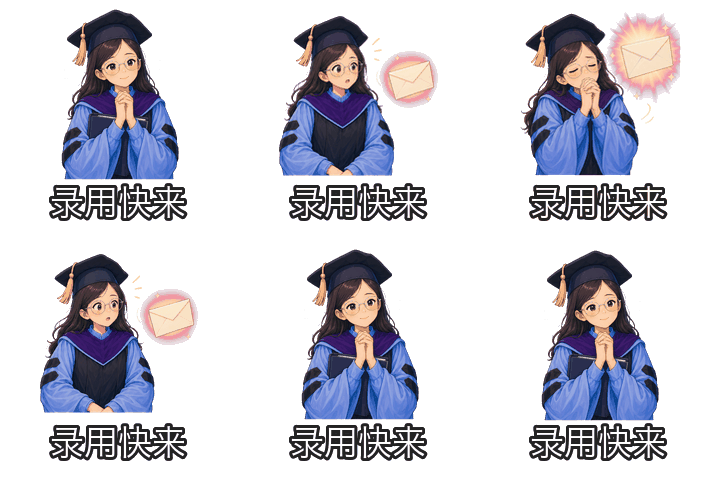

Three stickers from a 24-pack for 法律硕士毕业求职人: HR-read silence, summoning an offer, and giving up to sleep. All produced from clean 4-keypose sheets and rendered locally to 16-frame 240×240 GIFs.
Why this exists
Most "AI sticker pack" tools optimize for cute. Cute doesn't get sent in WeChat. Sendable does.
Every sticker this skill plans must clear a sendability_gate:
- Reuse trigger — a real chat moment where someone would actually send it.
- Emotional value — relief, sarcasm, agreement, panic, comfort, delay.
- Creative hook — an idea, not just a caption pasted on a face.
- Visual gag — readable at 240×240, on a phone, in one second.
If a sticker is only decorative, only cute, only "vibe" — the skill is told to rewrite it before generation, not after.
What it builds
your reference image  ┐
   or text concept    ├──▶  plan ──▶  4 keyposes  ──▶  16-frame GIF  ──▶  WeChat upload pack
   + persona + style  ┘    (JSON)   (one image_gen      (local render,         (24 items,
                                     call per sticker)   Chinese captions)      manifest, QC report)
A finished build looks like this:
output/my-pack/
├── named-gifs/                # 收到离线.gif, 加载中.gif … (for sharing)
├── wechat-submit/
│   ├── main/01.gif … 24.gif   # numbered upload sequence
│   ├── thumbs/01.png … 24.png # 120×120 thumbnails
│   ├── cover.png  icon.png  banner.png
│   └── reward-guide.png       # optional, when 接受赞赏 is enabled
├── preview.html               # browser preview of the whole pack
├── manifest.json / .csv       # full machine-readable build manifest
└── qc_report.json             # per-sticker QC + continuity gates
Under the hood:
- Plan — character card + 24 sendable meme entries + per-sticker no-text
image_genprompts. - Render — 4 keyposes → 16 deterministic frames, using motion templates (
soul_offline,loading_loop,pretend_understand, …) with local effects (soul puffs, loading dots, sweat drops, awkward lines). The image model never has to draw 16 coherent frames. - QC — fake-checkerboard detection, edge-touch, bbox drift, prop position/area jumps, one-frame prop flicker, face/head-shape drift, loop closure, low-motion-energy guard. Strict mode for WeChat submission.
- Pack — 16 or 24 GIFs at 240×240 < 500 KB, thumbnails, cover, icon, banner, dual filename schemes (numbered for upload, Chinese for sharing), CSV + JSON manifest.
- Submit (optional) — Playwright + headed Microsoft Edge runbook for the WeChat Sticker Open Platform, with QR-login, CAPTCHA, real-name, and rejection-flow handling.
Quickstart
# 1. install
python3 -m venv .venv && . .venv/bin/activate
pip install -e '.[dev]'

# 2. plan a pack interactively
python skills/generate-meme-gif-pack/scripts/meme_pack.py plan-wizard

# 3. after you've generated and accepted the keypose sheets,
#    build the WeChat upload package
python skills/generate-meme-gif-pack/scripts/meme_pack.py build-pack \
  --source-dir output/raw-frames/MyPack \
  --output-dir output/my-pack \
  --persona 科研打工人 \
  --style clean-sticker \
  --pack-size 24 --mode wechat \
  --pack-name 我的表情包 \
  --source-mode keyposes --keypose-layout 2x2 --render-frame-count 16 \
  --quality-mode submission --strict-qc --strict-continuity-qc
Open output/my-pack/preview.html to inspect the full pack, then upload wechat-submit/ to the WeChat Sticker Open Platform.
Tip — first 3 first. Don't generate 24 keypose sheets in one go. Run
build-preview --preview-count 3after the first three sheets passqc-sheet. If they aren't sendable yet, fix captions or motion templates before scaling out.
Install as a Codex skill
mkdir -p ~/.codex-switcher/skills
cp -R skills/generate-meme-gif-pack ~/.codex-switcher/skills/
# restart your Codex session
Then ask Codex something like "做一个科研打工人的微信表情包" — it will run intake, plan the pack, and walk you through keypose generation and QC across turns.
How it works
The skill is built around two product decisions that are unusual for a sticker tool:
1 · The image model only draws 4 stable keyposes per sticker.
Asking a diffusion model to freely draw 16 coherent frames produces jumpy, unrelated frames most of the time. Instead, this skill asks for a clean 2×2 sheet of start / anticipation / peak gag / loop return, and a deterministic local renderer interpolates the 16 frames, holds, anticipation, rebound, and loop closure. Motion templates (soul_offline, loading_loop, pretend_understand, …) layer on the comic effects locally — soul puffs, loading dots, sweat lines — so the model can't randomly invent or skip them.
2 · No Chinese text is ever drawn by the model.
Captions are typeset by the local processor with consistent fonts, sizing, and clipping rules, so 24 stickers actually look like one pack. Visual prompts hard-ban text, captions, speech bubbles, UI, and logos.
The result: more reliable identity, fewer reroll cycles, predictable WeChat-spec output.
Smoothest path — dense real frames (recommended). Decision #1 keeps keyposes as the safe default that runs on any provider. When the image model is strong enough to draw ~8 genuinely different, consistent frames in a single sheet, the dense_frames source mode asks for exactly that — and a local pass normalizes every frame to a uniform size and head position, times them, and engineers the loop. It's the recommended path for maximum smoothness (expect a few stickers per pack to need regenerating). See dense real frames.
WeChat spec defaults
| Asset | Spec |
|---|---|
| Main GIF | 240×240, looped, < 500 KB (target < 480 KB) |
| Thumbnail PNG | 120×120, < 50 KB |
| Album icon | 50×50 transparent, < 30 KB |
| Cover | 240×240 transparent, < 80 KB |
| Detail banner | 750×400, no text, < 80 KB |
| Pack size | 16 or 24 (this skill defaults to 24) |
| Optional reward guide | 750×560, when 接受赞赏 is enabled |
| Optional reward thanks | 750×750, when 接受赞赏 is enabled |
Always re-verify against the WeChat Sticker Open Platform docs before commercial submission — official rules change.
Project layout
skills/generate-meme-gif-pack/
├── SKILL.md                 # agent rules and workflow
├── scripts/meme_pack.py     # plan → accept → qc → preview → build pipeline
└── references/
    ├── personas.md  styles.md  meme-library.md
    ├── prompt-rules.md      # raw image prompting + sendability gate
    ├── wechat-spec.md       # output constraints
    └── wechat-platform-upload.md   # optional Playwright submission runbook

docs/                        # GitHub Pages product site + sample assets
tests/                       # pytest suite (run with `pytest -q`)
Docs
- Live product page
- Skill rules and workflow
- Dense real frames — recommended for smoothness
- Example test report
- WeChat public-account draft (中文)
- 中文 README
Status & contributing
- Test suite:
pytest -q(covers WeChat size constraints, keypose planning, motion-template rendering, continuity QC, prop-flicker / face-drift gates, sheet splitting, caption layout, and full submission-pack structure). - Verified end-to-end on four sample packs: 24 ×
科研打工人, 16 ×码农, 18 ×都市丽人(self-use), and a 24-pack of an original AI mascot in2×4strict-QC mode. - WeChat platform rules can change at any time — please re-check the official help center before commercial submission.
Issues and PRs welcome, especially: new motion templates, persona libraries, or local effects.
Image rights & content review
If your reference image is a real person, you must own the rights or have explicit permission. The default policy is "stylized but recognizable", not photo-realistic face swap. For public publishing, avoid politics, hate, sexual content, slurs, doxxing, medical claims, and harassment — WeChat review will reject these and so will this skill.
License
Yorumlar (0)
Yorum birakmak icin giris yap.
Yorum birakSonuc bulunamadi