lispm-agent
Health Uyari
- License — License: AGPL-3.0
- Description — Repository has a description
- Active repo — Last push 0 days ago
- Low visibility — Only 5 GitHub stars
Code Basarisiz
- rm -rf — Recursive force deletion command in demo/setup.sh
- Hardcoded secret — Potential hardcoded credential in test/lispm-mcp-client-test.py
Permissions Gecti
- Permissions — No dangerous permissions requested
Bu listing icin henuz AI raporu yok.
LispM Agent: AI agents that run inside GNU Emacs, the chat an org document, the tools Elisp. The heart of LispM, an AI agent harness built on GNU Emacs and the ideas of the Lisp Machine.
#+title: LispM Agent — a Lisp Machine for agents
#+startup: content
#+HTML:

#+HTML:

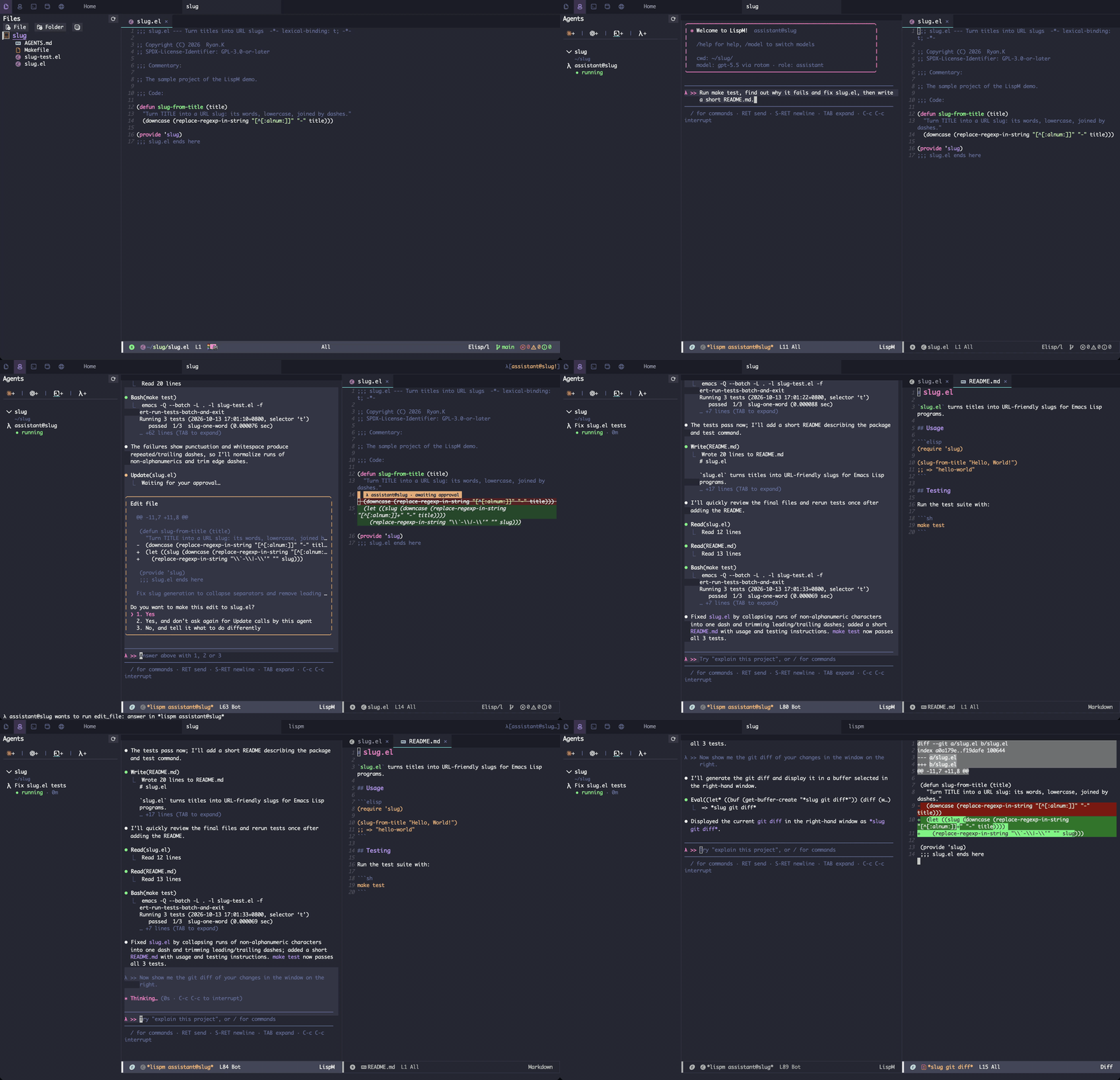
AI agents that run inside Emacs rather than beside it. You chat with an agent as in Claude
Code; underneath, the conversation is an org document that is also the model's context, tools
are Elisp functions, approvals are TODO states, memory is org files under git, and agents are
woken by hooks and delegate to each other. The name comes from the Lisp Machine, where the
editor and the system were one. [[file:DESIGN.org][DESIGN.org]] explains the design.
#+HTML:
- The LispM projects
| lispm-agent | AI agents inside Emacs (this repository) |
| [[https://github.com/LispMachineLab/lispm-desktop][lispm-desktop]] | Emacs as a classic-style desktop, set up as a workspace for agents |
| [[https://github.com/LispMachineLab/lispm-browser][lispm-browser]] | a WebKit browser in Emacs, with keyboard hints and Chrome extensions |
| [[https://github.com/LispMachineLab/lispm-store][lispm-store]] | the catalog LispM Desktop's App Store installs from |
The agents need none of the others, and know nothing of the desktop's interface or themes: the
chat takes the faces of whatever theme Emacs has. To get all of them at once on macOS, install
LispM.app: =curl -fsSL https://lispm.ai/install.sh | sh= (see LispM Desktop).
- Installation
Emacs 30.1+, curl, and a model behind an OpenAI Chat Completions or Anthropic Messages
endpoint. MELPA must be in package-archives for the dependencies,
[[https://github.com/lizqwerscott/mcp.el][mcp.el]] and [[https://codeberg.org/akib/emacs-eat][Eat]], the terminals of Claude Code, Codex and other agents.
[[https://github.com/LispMachineLab/lispm-ui][LispM UI]] (which includes LispM Kit and Finder) and
[[https://github.com/LispMachineLab/lispm-auth][LispM Auth]], which keeps LispM's secrets encrypted, come from git as LispM does, for no
archive holds them:
#+begin_src emacs-lisp
(use-package lispm-ui
:vc (:url "https://github.com/LispMachineLab/lispm-ui" :rev :newest))
(use-package lispm-auth
:vc (:url "https://github.com/LispMachineLab/lispm-auth" :rev :newest))
(use-package lispm
:vc (:url "https://github.com/LispMachineLab/lispm-agent" :rev :newest)
:config (lispm-mode-line-mode 1)) ; busy agents and pending approvals in the mode line
#+end_src
The package is lispm; without use-package,
(package-vc-install "https://github.com/LispMachineLab/lispm-ui"),
(package-vc-install "https://github.com/LispMachineLab/lispm-auth") and then
(package-vc-install '(lispm :url "https://github.com/LispMachineLab/lispm-agent")). With
OPENAI_API_KEY or ANTHROPIC_API_KEY in Emacs's environment there is nothing more to set;
otherwise add a backend in LispM's settings ([[*Backends][Backends]]).
- Getting started
- M-x lispm starts an agent in the current project and opens its chat (C-u picks a role).
- Type at the λ >> prompt and press RET. Messages sent while the agent works are queued.
- A call that needs approval shows its command or diff: 1 yes, 2 yes and don't ask again,
3 no and say what to do instead. - A turn that stops early (a failed request, the step limit, a refusal) offers ways to go on:
retry, another model, compact, stop. - C-c C-c interrupts; /help lists the slash commands (/model, /diff, /undo, /compact, ...).
- C-c C-a attaches a file to the message; so does pasting an image or dropping a file on the
chat. An image or a video the agent sees, as it sees those it reads and tools return, and
the chat shows them: the user's in the message, a reply's where the reply links it. - Killing the chat ends the agent; M-x lispm-resume brings back any recorded session.
| Key | In the chat |
|--------------------+----------------------------------------------------------|
| RET | send, or answer the prompt shown |
| S-RET, C-j | new line |
| / | a menu of the commands under the input, as you type their name |
| C-n, C-p | choose in that menu (also the answer to an approval prompt) |
| TAB | expand or fold the item at point; complete / commands |
| RET on an object | visit the file at its line, inspect the agent, describe the symbol |
| M-p, M-n | previous, next message sent |
| C-c C-c | interrupt |
| C-c C-a | attach a file: an image or a video the agent sees |
| C-c C-t | open the org transcript |
With [[https://www.gnu.org/software/hyperbole/][GNU Hyperbole]]'s mode on, its Action Key (M-RET) acts on an object as RET does,
and RET on other text activates what Hyperbole recognizes there: a commit, a bug, an Info
node. LispM does not need Hyperbole.
| Command | What it does |
|-----------------------+------------------------------------------------------------|
| lispm | start an agent in the current project |
| lispm-resume | resume a recorded session |
| lispm-switch | switch to a running agent |
| lispm-ask-region | ask the project's agent about the region |
| lispm-dashboard | every agent's state, pending approvals and token usage |
| lispm-agenda | calls awaiting approval, as an org agenda |
| lispm-inspect | one agent in depth: calls, inbox, delegations, policy |
| lispm-turn-diff | what an agent changed in its last turn |
| lispm-revert-turn | undo it |
| lispm-resume-agents | resume every agent that was at work when Emacs stopped |
| lispm-ai, ai | the LispM bar: find what is installed, or ask LispM itself |
| lispm-ai-chat | the conversation with LispM itself, in a chat |
| lispm-terminal | the LispM terminal: sessions, a listener, a who line |
- The LispM bar
M-x ai opens one field for the whole system. What you type finds what is installed at once,
ranked as search_tools ranks: skills, tools and, under LispM Desktop, applications and Control
Panels. RET opens the application chosen; otherwise it asks LispM itself, the system's own
agent: one standing agent of the whole computer rather than of a project, which keeps one
conversation going. Its reply streams in under the field, with a line saying what it does,
and a call it asks approval for is answered there, y or n. C-o opens the bar out to the
conversation so far and more of what was found; C-c C-o shows the conversation in a chat;
C-g closes the bar while LispM goes on. With no model set up, the bar still opens what it
finds, and what was asked waits for a model (lispm-bar-setup-function,
lispm-bar-model-ready).
In plain Emacs and on a terminal the field is the minibuffer, with a window over it; LispM
Desktop drops it from its menu bar. Bind a key of your own:
#+begin_src emacs-lisp
(keymap-global-set "C-c SPC" #'lispm-ai)
#+end_src
Packages add what the bar finds with lispm-bar-source-functions, say what a tool call does
with lispm-bar-activity-functions, and show the bar elsewhere with lispm-bar-read-function,
lispm-bar-show-function and lispm-bar-hide-function.
- The LispM terminal
M-x lispm-terminal makes the frame LispM's terminal, after the Lisp Machine's console: no
menu bar, tool bar, tabs or scroll bars, only the keyboard and conversations. The sessions are
on the left: LispM itself first, then live and recorded sessions together, each below the
session that started it. Siblings sort by their latest opening or resume, newest first;
replies do not move them. An agent's state (✻ at work, ! awaiting you) or a session's age
appears beside each. The listener, on the
right, is the chat of one of them, where everything is done by asking. The who line at the
bottom says, as the Lisp Machine's did, the time, who you are, the project and agent the
listener talks to, what it is doing, and its model. It works the same in a window and in a
text terminal; from a shell, =emacs -nw -f lispm-terminal= starts Emacs as the terminal.
| Key | In the terminal |
|-----------+-------------------------------------------------------|
| C-c C-s | the sessions, and back to the listener |
| C-c C-n | the next agent alive; C-c C-p the previous one |
| C-c C-j | any session, chosen by its title |
| C-c C-o | a new session, in a project (C-u: of a role chosen) |
| C-c C-q | leave the terminal: the frame as it was |
In the sessions, n and p move, RET talks to the session at point and SPC only shows it,
o opens a new one, k ends an agent (its session stays on record), r renames a session, /
jumps to one, g lists them again, q goes back to the listener and ? lists the keys.
Or ask: tell LispM, in the chat or the bar, to enter the terminal, or console or TUI mode, and it
does; ask for desktop mode, or to leave the terminal, and it leaves it. That is the skill
=terminal=, whose tools are terminal_enter and terminal_leave. A program that enters the
terminal its own way, as in a frame of its own, sets lispm-terminal-enter-function and
lispm-terminal-leave-function.
- How it works
- The transcript is the context. Each conversation is an org file under lispm-directory;
every request is built from it and the chat is drawn from it. Delete a subtree and the agent
forgets it, tag a heading :ignore: to stop sending it, add headings of your own as private
notes. Tool calls are TODO entries: changing a WAITING call's state approves or denies it.
Set lispm-interface to org to work in the org file instead of the chat. - Edits show where they happen. A change streams into its file as the model writes it and
awaits approval there, removed lines struck out (lispm-show-edits). - Roles, agents, sessions. A role is instructions, tools, policy and model: lispm-defrole,
or an org file in =~/.lispm/roles/=. An agent is one session of a role in one project, named
ROLE@PROJECT. A character is someone, with a conversation in each place (see [[*Characters][Characters]]).
A project's =AGENTS.md= and =CLAUDE.md= join the system prompt. - Memory under git. lispm-directory (=/.emacs.d/lispm/=) is a git repository of sessions,
each project's =memory.org= and =tasks.org=, each role's memory, and the system's, for an
agent in no project (:system t~). A conversation that grows too long is handed over to a new
one starting from a summary (lispm-compact-threshold), at idle when it can
(lispm-compact-idle); the summaries are kept as episodes, rolled up by week and month.
Memory past its budget consolidates itself at idle (lispm-memory-max-entries), each change a
commit. - Nothing is lost when Emacs stops. Sessions are saved before every request; pending
approvals, queued messages and delegations come back with them, and an interrupted turn waits
to be continued. Each turn's changes to a git project are snapshotted outside the project,
for lispm-turn-diff and lispm-revert-turn. - Remote roots. An agent's root may be a TRAMP directory (=/ssh:vm:/work/=,
=/docker:box:/work/=): its files and commands are there, its Lisp runs in your Emacs.
** Permissions
| Class | Default | Covers |
|------------------------------+---------+-------------------------------------------|
| read memory comm lisp | auto | reading, memory and tasks, other agents, run_lisp |
| write | ask | changing files and buffers (always asks outside the root) |
| shell | ask | run_shell (a command that only reads, such as ls or git status, is read) |
| exec | ask | eval_elisp, run_elisp, write_skill |
| web mcp | ask | web_search, web_fetch, MCP tools |
lispm-default-policy holds the defaults; a role's or agent's :policy overrides them. A shell
command made only of programs that read (lispm-shell-read-only-programs: ls, grep, git log,
gh pr view, gh repo list and the like, piped or chained, writing nowhere but =/dev/null=)
is decided as reading is; one the shell would expand or run anything through asks. Approving
a call "for good" allows every later call of its tool for the rest of the Emacs session; for eval_elisp,
and for a shell command that could reach Emacs, only that exact call again. A command cannot
reach Emacs on another machine, or in the sandbox (below): there, approving one for good allows
every later command, for as long as the sandbox is on. Other packages can hold calls back
through lispm-tool-action-functions (answer ask or deny; the strictest answer wins), as
[[https://github.com/LispMachineLab/lispm-security][LispM Security]] does.
Shell comments and a cd before a read-only command do not make it ask. Remembered exact
calls ignore top-level argument order and why; run_shell and run_program also ignore timeout.
Command text, executable, arguments and working directory still match exactly.
Native tool requests, decisions and resumed approvals are timestamped
in Approval subsections of the Org transcript, with decision scope and extra check reasons.
They are saved with the session and are not sent to the model.
- Standing agents
Agents declared in your configuration keep one conversation going across restarts, and hooks
and timers can wake them:
#+begin_src emacs-lisp
(lispm-defagent coder
"Writes and fixes Emacs Lisp in this repository."
:root "~/src/lispm/"
:policy '((write . auto))) ; edits inside the root run without asking
(lispm-watch 'coder 'compilation-finish-functions
:when (lambda (_buffer status) (string-match-p "abnormally" status))
:prompt "The compilation failed. Read compilation, find the cause and fix it.")
(lispm-every 'coder 3600 "Look at your open tasks and move one forward.")
#+end_src
Agents work together with send_message and ask_agent, which returns a request id immediately
and delivers the final reply as a new message, leaving the caller free to answer you. Given a role,
it starts a subagent that may do no more than its caller. start_agent starts one that works on
its own instead, in the caller's project or another, and stays once it has replied; outside the
caller's project, only once you approve. The worktree skill gives each helper a git worktree
of its own.
Nested requests keep their upstream reply route in the existing inbox until all their replies
have been handled; ending a turn while they run does not finish the upstream request.
- Characters
An agent is one conversation; a character is someone. It has a name, a soul and a picture, a
memory and a past of its own, and a conversation going on in each place it is: its own, and one
in each project it is asked into. It is the same in all of them.
#+begin_src emacs-lisp
(lispm-create-character "Ada"
:description "Reviews changes with care, and says so plainly."
:soul "Plain-spoken. Likes small diffs; distrusts clever code."
:avatar "~/Pictures/ada.png"
:role 'reviewer ; its tools and policy
:endpoint '(:api openai :url "http://127.0.0.1:11434/v1") ; a model endpoint of its own
:model "qwen3")
#+end_src
M-x lispm-new-character does the same in a form: name, picture, soul, role and model, which
M-x lispm-edit-character shows again to change it. A character is its file,
=characters/ada/character.org= in lispm-directory, which you may edit too
(M-x lispm-visit-character-file). M-x lispm-character talks to one (C-u: in the current
project).
- Reached by name, from anywhere. ask_agent and send_message take a character's name, as
=@Ada=: the request goes to its conversation in the asker's project, started there if need be.
Claude Code and Codex do the same when you write "tell @Ada" or "have @Ada look at this". The
chat completes =@names= with TAB. - Its own memory and past. remember with scope self keeps what is its own, in every place.
Each turn of each of its conversations is a line in its diary, rolled up by week and month, and
its conversations start with the latest, and with where else it has one going. - It grows. The soul is yours; with revise_self it writes what it came to know of itself,
each revision a commit it tells you about. - Its own model. :backend names one of lispm-backends and :endpoint is one of its own;
without them, it uses yours. No key goes into its file, which git records: :key-env or
:key auth-source say where it is. - Apps are characters too. lispm-define-app-character makes an app one: its skill is its
soul and its tools are its own; its icon is its picture. Agents use an app themselves, with its
skill and tools, when they know what to do, and ask it when a request needs its judgment or what
it remembers, and whenever you write =@Name=.
lispm-character-change-functions tells a desktop when to show or remove a character's app.
- Claude Code, Codex and other agents
Agents that are programs of their own run in terminals beside LispM's: Claude Code and Codex
come with it (=lisp/lispm-agents-claude.el=, =lisp/lispm-agents-codex.el=), and
[[https://github.com/LispMachineLab/lispm-hermes][Hermes]] is a package of its own. Their sessions are listed together, newest first, and
resume in the directory they ran in. Each terminal gets a server showing its agent what only
Emacs knows, the selection, the files open and unsaved, Flymake's diagnostics: Claude's IDE
protocol for Claude Code, MCP for the others.
Launched agents start independent sessions: LispM removes inherited Claude session and
transport markers without changing Emacs's environment. It preserves an explicit
CLAUDE_CODE_MAX_CONTEXT_TOKENS override for a custom model's context window; set this in
Emacs's environment using the model provider's supported limit, as described in
[[https://code.claude.com/docs/en/model-config#correct-the-window-for-a-gateway-or-custom-model-id][Claude Code's model configuration]]. LispM does not choose a model or infer its context size.
#+begin_src emacs-lisp
(require 'lispm-agents-claude)
(require 'lispm-agents-codex)
(lispm-agents-setup-claude) ; takes part while claude is on PATH
(lispm-agents-setup-codex) ; and codex
(keymap-global-set "C-c a" lispm-agents-map) ; c Claude, x Codex, s sessions, r the region
#+end_src
While LispM runs, they work with its agents and each other, and use what LispM's agents use
(=lisp/lispm-agents-bridge.el=). Over their servers they get seven tools:
- list_agents, send_message, ask_agent and reply reach every agent, LispM's and theirs.
A message reaches one of them as its user's next message, =[Message from codex]=; a
request, =[Request R1 from lispm]=, waits for its reply; asking a role starts a LispM
helper. A message is typed into an agent's terminal only once its transcript shows the
agent waiting for input, never into a dialog: until then it waits. - search_tools and skill find and load LispM's skills, the manuals of its parts and of the
App Store's apps; call_tool runs any LispM tool a skill names. In LispM each of these
agents acts as an agent of lispm-default-role (or lispm-agents-bridge-role) in its
terminal's directory, so its calls go by that role's policy: reading runs at once, writing
and shell commands ask you in Emacs.
Agents that keep their conversations in a program of their own, as
[[https://github.com/LispMachineLab/lispm-holon][Holon]]'s daemon and [[https://github.com/LispMachineLab/lispm-openclaw][OpenClaw]]'s Gateway, take messages through it rather than their
terminal (:deliver in lispm-agents-define). One with a shell but no MCP client calls the
same seven tools with =bin/lispm-tool=, which finds its server by an environment variable its
commands have. One served no tools at all still takes messages, and its final reply to a
request is its answer (:answer).
They run in [[https://codeberg.org/akib/emacs-eat][Eat]]'s terminals and show with pop-to-buffer. A program drawing an interface
around them, as LispM Desktop does, sets lispm-agents-terminal-make-function,
lispm-agents-show-function and the other variables of =lisp/lispm-agents.el='s Interface
section; the agents know nothing of it. Another agent is one call of lispm-agents-define.
In the desktop sidebar, right-click a stopped Claude or Codex session and choose
Resume with… to enter a model name. It resumes the same session in its original
directory, passing --model to the CLI. Other CLI agents can offer this action
by providing :model-arguments in lispm-agents-define.
** Agents outside LispM
An agent LispM did not start, as Claude Code in another terminal, Codex, an editor's assistant
or a script, reaches your Emacs over an MCP server LispM runs for them
(=lisp/lispm-mcp-server.el=). Register the command =bin/lispm-mcp= with the agent, once, as a
server it runs over stdio (=~/.lispm/lispm-agent= is where LispM.app keeps this repository;
=M-: lispm-mcp-server-program= gives the path of yours):
#+begin_src sh
claude mcp add -s user lispm -- ~/.lispm/lispm-agent/bin/lispm-mcp
codex mcp add lispm -- ~/.lispm/lispm-agent/bin/lispm-mcp
#+end_src
Any other MCP client takes the same command. Each agent connecting is an agent of
lispm-default-role (or lispm-mcp-server-role) in the directory it runs in, and has
- the read tools the editor's agents have: what is open in Emacs, the selection, Flymake's
diagnostics, unsaved changes; - LispM's tools an agent of that role has from the start, under their own names:
list_buffers, read_buffer, edit_buffer, describe_symbol, eval_elisp, run_shell
and the others; - search_tools, skill and call_tool for the rest of LispM's tools and its skills.
Its calls go by that role's policy, as any agent's do: reading runs at once, while editing,
shell commands and eval_elisp ask you in Emacs, the question naming the agent and saying it
is outside LispM, and shell commands run in the sandbox. It takes no part in the agents'
messages, which reach no agent outside LispM. A call waiting for you may take longer than a
client waits for a tool by default: give Claude Code =MCP_TOOL_TIMEOUT= (milliseconds), Codex
=tool_timeout_sec= in the server's entry.
The server starts with LispM in an interactive Emacs; (setq lispm-mcp-server-autostart nil)
keeps it off, and M-x lispm-mcp-server-mode switches it. Its address and a token made at
each start are in =~/.lispm/mcp-server=, which only you can read, so only your own programs
connect; requests from web pages are refused. The first Emacs to serve keeps that file while
it runs: a second, as an Emacs trying a change, serves nothing. A client speaking streamable
HTTP may use the address and token in the file itself. =bin/lispm-tool= calls the same tools
from a shell that has no server of its own.
** Live agent data
Since 0.15.0, M-x lispm-agents-open-project shows the active agents belonging to a project.
It works in plain graphical and terminal Emacs: the default list opens only conversations
that are already alive. Idle, done and newly starting agents are included; selecting a
project never resumes an archived or historical session. =RET= opens the selected live
conversation and =g= refreshes. Updates come from roster events; hidden views refresh when
shown, and closing the last list removes its observers.
An optional renderer adds a function to lispm-agents-open-project-functions. It receives
one absolute directory string and returns non-nil when it handled the request. The first
success wins; without one the native list remains available. Hosts choose the native list's
window through lispm-agents-work-display-function (default pop-to-buffer-same-window) and can recognize
lispm-agents-work-mode and its lispm-agents-work-directory / lispm-agents-work-scope
buffer-local metadata. Actual conversations still use lispm-agents-show-function.
Focus routes both callbacks through its existing listener, including requests from its
Sessions pane. It preserves the configured callbacks and restores them on exit; other
frames retain their own display behavior.
lispm-agents-work-snapshot DIRECTORY &optional SCOPE returns the scoped live roster.
Renderers that already received a roster use lispm-agents-work-filter RECORDS DIRECTORY
&optional SCOPE, which neither rereads the roster nor scans session indexes or transcripts.
The default project scope shares the session folder root resolver: checkout subdirectories,
linked worktrees and descendants in the live snapshot join their root agent's project.
Unknown parents stand alone; unknown session ids stay nil. Home and configured chat
locations share Chats. Explicit directory scope matches the exact normalized working
directory without inheriting the parent's project. Paths fold case as the session folders do.
lispm-agents-roster returns alive, unarchived conversations as plists with stable
(KIND SESSION-ID) keys, identity, status, character, mailbox counts, wait edges and actions.
It reads no transcripts or diaries; unknown data is nil, including an unclaimed terminal key.
Descendants inherit their parent's archive state; restoring a parent restores its inherited
descendants while preserving any child archived independently.
lispm-agents-roster-details KEY lazily reads one agent's work and full mailbox, with pending
calls, at most twenty recent calls and this turn's journal files. Claude Code and Codex use
bounded, cached transcript tails; their files and permission decisions stay nil.
lispm-agents-roster-change-functions receives (KEYS FIELDS EVENT), coalesced per event.
EVENT holds ordered :events with sequence, message id, from/to and request id when known.
lispm-approve-all-for AGENT approves only that agent's pending permissions of this turn;
M-x lispm-approve-all lists them before asking. New calls and later turns are excluded.
- Backends
LispM speaks OpenAI Chat Completions, which almost every model server implements, and Anthropic
Messages. The presets are the two first-party APIs:
| Backend | Shape | URL | Default model | Key |
|-------------+------------------+-----------------------------+-------------------+---------------------|
| openai | Chat Completions | https://api.openai.com/v1 | gpt-5.5 | OPENAI_API_KEY |
| anthropic | Messages | https://api.anthropic.com | claude-opus-5-5 | ANTHROPIC_API_KEY |
A backend names the shape it speaks (:api openai or anthropic), an address, a model, and
where its key comes from: a literal string, an environment variable (:key-env), auth-source
(:key 'auth-source), or the secret store (:key '(secret . ID), which LispM Auth keeps
encrypted). Unless lispm-backend names one, agents use the first backend whose key is at hand.
In LispM Desktop, Control Panels → Agents → LispM shows the current backend and offers
Change…, Add… and Remove…; the form asks for the API shape, address, model and key, and
saves the backend where the desktop uses it. In Emacs, M-x lispm-backend-form draws the same
form.
#+begin_src emacs-lisp
(setq lispm-backend 'anthropic
lispm-model "claude-sonnet-5-5")
;; Any other Chat Completions server: Ollama, vLLM, LM Studio, llama.cpp, OpenRouter, ...
(add-to-list 'lispm-backends
'(ollama :api openai :url "http://localhost:11434/v1"
:model "qwen3-coder" :features (streaming)))
#+end_src
Each agent can set its own :backend, :model and :effort. C-h v lispm-backends documents
every option.
- Tools and Lisp
- Common tools are always offered. The rest (MCP tools, Lisp development tools, tools agents
define, seldom needed ones such as read_info and write_skill) are deferred: the model
finds them with search_tools when needed, so they cost no context until then. The search
is fuzzy: a word may be part of a longer one, or misspelt. It also finds core and already
loaded tools, using their full descriptions and optional :keywords lists of search terms.
select:NAME keeps exact names; unknown names get suggestions without loading them. - session_search and session_read find and read native LispM, Claude Code and Codex history,
including archived sessions, by provider and session ID. They inspect at most 200 recent
transcript files and each file's last 256 KiB; results report limits and incomplete scans.
Native open transcripts include unsaved changes. These tools do not resume or modify sessions. - run_program runs a local executable with an argument array and optional working directory,
returning bounded JSON with exit status, stdout and stderr. It uses the shell policy and
configured sandbox; timeout, turn abort and session closure stop it. Compose calls with
run_lisp; run_shell remains available for shell syntax and remote commands. - runtime_status reports the Emacs version and loaded versus available library paths without
loading libraries. describe_symbol adds loaded source files and an optional buffer for
buffer-local values. read_buffer accepts tail and literal query for log inspection.
inspect_agent reports LispM's approval policy, allowances and pending calls. - eval_elisp can do anything Emacs can, so it asks every time. run_lisp runs Lisp in which
the agent's tools are functions, each call going through the policy as if the model made it. - run_elisp asks [[https://github.com/LispMachineLab/lispm-kernel][LispM Kernel]] to start a fresh batch Emacs for standalone file,
JSON/JSONL and text processing or computation. The worker returns printed output and its
last value; it has no live editor buffers or agent tools. Kernel stops it on timeout or
when its turn is aborted or session closed. Enable Kernel in LispM Desktop, or load
lispm-kernel-exec and configure lispm-kernel-exec-runtime-function to return a running
kernel with the exec job. Without it, the call fails; there is no local fallback.
This is process isolation, not a filesystem sandbox, and calls use the exec policy. - Agents prefer dedicated tools and run_elisp for standalone processing. run_lisp and
eval_elisp still execute in the user's Emacs and should do short work on live state.
Shell commands serve external CLIs, builds, tests, project runtimes and remote work;
an explicit choice of language or tool takes precedence.
New sessions and handovers take the current instructions and tool descriptions; existing
sessions keep the system prompt they started with. - Lisp is developed in the running image: edit_definition, eval_definition and ert_run, with
xref_definitions, xref_references and flymake_diagnostics for any language Emacs supports. - apropos, describe_symbol and read_info let agents learn Emacs itself.
- read_file reads images and videos too: the model sees an image, and a video as frames
ffmpeg takes across it (lispm-video-frames of them). A tool returns a lispm-tool-result
to show files of its own, as MCP servers' screenshots are shown.
- Skills
A skill is an org file of instructions whose source blocks marked :lispm load define helpers
and tools: the manual of a part of the system or of an app. Agents find skills with
search_tools, by what they say and the tools they define, and load one when a request calls
for it; no list of them fills the context. Yours go in =~/.lispm/skills/=, a project's in its
=.lispm/skills/=, whose code runs only after you have seen it. write_skill lets an agent keep
a tool it wrote, and always asks. LispM comes with web (web_search, web_fetch) and
worktree; M-x lispm-install-skill and M-x lispm-install-role install others, such as those
of [[https://github.com/LispMachineLab/lispm-store][LispM Store]].
Other programs bring skills through lispm-skill-sources, as LispM Desktop does for the system
it ships and for the apps its App Store installs:
#+begin_src emacs-lisp
(add-hook 'lispm-skill-sources
(lambda () (list (list :directory "~/src/my-app/skills/" :origin "My App"))))
#+end_src
- MCP servers and computer use
#+begin_src emacs-lisp
(setq lispm-mcp-servers
'(("peekaboo" :command "npx" :args ("-y" "@steipete/peekaboo" "mcp")
:description "See the macOS screen and use its applications (computer use)."
:sandbox none))) ; it drives other applications
#+end_src
A server starts when an agent first searches its tools, named mcp__SERVER__TOOL, which ask by
default. [[https://github.com/openclaw/Peekaboo][Peekaboo]] (macOS 15+) gives agents the screen and
its applications; Emacs then needs Screen Recording and Accessibility permission.
M-x lispm-mcp-status manages the servers.
- The sandbox
Shell commands and MCP servers can run in Anthropic's
[[https://github.com/anthropics/sandbox-runtime][sandbox runtime]] (srt: sandbox-exec on macOS,
bubblewrap on Linux), reaching the network through a proxy that checks each domain.
| None | the default: no sandbox |
| Low | read all but secrets; write the project, temporary files and package caches; reach registries, code hosts and lispm-sandbox-allowed-domains |
| Middle | read all but secrets; write the project and temporary files; reach only lispm-sandbox-allowed-domains |
| High | read the project and the system; write the project; no network |
| Custom | rules of your own, lispm-sandbox-custom (M-x lispm-sandbox-customize) |
M-x lispm-sandbox-set-level or /sandbox switches without restarting: running processes take
the new network rules at once. The first level other than None installs srt with npm (Node.js
22.12+). No level lets a command write Emacs's configuration or see the Emacs server's socket,
so a command approved for good in the sandbox allows every later one. The sandbox does not
confine eval_elisp, so keep exec at ask when it matters.
** Services
A package can offer a background program as a service (lispm-define-service), as
[[https://github.com/LispMachineLab/lispm-holon][lispm-holon]] offers Holon's daemon. It runs while Emacs runs, in the sandbox at its own
level (lispm-service-levels) or else at the agents' level, with the files, sockets and domains
it needs on top. M-x lispm-service-start, lispm-service-stop and lispm-service-restart act
on one; a desktop's startup items can start them.
- Languages
The chat, its approvals and / commands, the sandbox's levels and LispM's messages speak English
(US or UK), German, French, Japanese, and Simplified or Traditional Chinese: the computer's
language (macOS's preferred languages, or =LANGUAGE=, =LC_ALL=, =LC_MESSAGES= and =LANG=), unless
the program LispM runs in says its own through lispm-language-functions, as LispM Desktop
does. What models read stays English: tool
descriptions and results, system prompts, transcripts.
#+begin_src emacs-lisp
(setopt lispm-language 'ja) ; en-US, en-GB, de, fr, ja, zh-Hans, zh-Hant; nil: as above
#+end_src
The code writes its words in English through lispm-tr and its kin (see =lisp/lispm-i18n.el=);
=i18n/= holds a catalog per language, and LispM Kit's engine, which every LispM program shares,
translates them.
- Development
#+begin_src sh
make test # ERT: a fake model drives whole turns; fake SSE and MCP servers
make compile # warnings are errors
make i18n # the messages each catalog of i18n/ lacks, and those it no longer needs
make demo # record the demo again: a real model and ffmpeg (macOS)
#+end_src
=LISPM_UI= is a checkout of LispM UI, =../lispm-ui= by default. CI runs both on Emacs 30.1,
30.2, 31.1 and the development snapshot. The code is in =lisp/=,
the bundled skills in =skills/=, the tests in =test/=.
- License
AGPL-3.0-or-later; see [[file:LICENSE][LICENSE]].
Yorumlar (0)
Yorum birakmak icin giris yap.
Yorum birakSonuc bulunamadi