untether
Health Gecti
- License — License: MIT
- Description — Repository has a description
- Active repo — Last push 0 days ago
- Community trust — 23 GitHub stars
Code Gecti
- Code scan — Scanned 12 files during light audit, no dangerous patterns found
Permissions Gecti
- Permissions — No dangerous permissions requested
Bu listing icin henuz AI raporu yok.
Code from anywhere — Telegram bridge for AI coding agents (Claude Code, Codex, OpenCode, Pi, Gemini CLI, Amp). Stream progress, approve actions, and send tasks by voice from your phone.
Telegram bridge for AI coding agents.
Send tasks by voice or text, stream progress live, and approve changes — from your phone, anywhere.
Works with Claude Code · Codex · OpenCode · Pi · Gemini CLI · Amp




Quick Start · Features · Engines · Guides · Commands · Contributing
Your AI coding agents need a terminal, but you don't need to sit at one. Untether runs on your machine and connects your agents to a Telegram bot. Send a task from your phone — by voice or text — and watch your agent work in real time. When it needs permission, tap a button. When it's done, read the result. No desk, no SSH, no screen sharing.
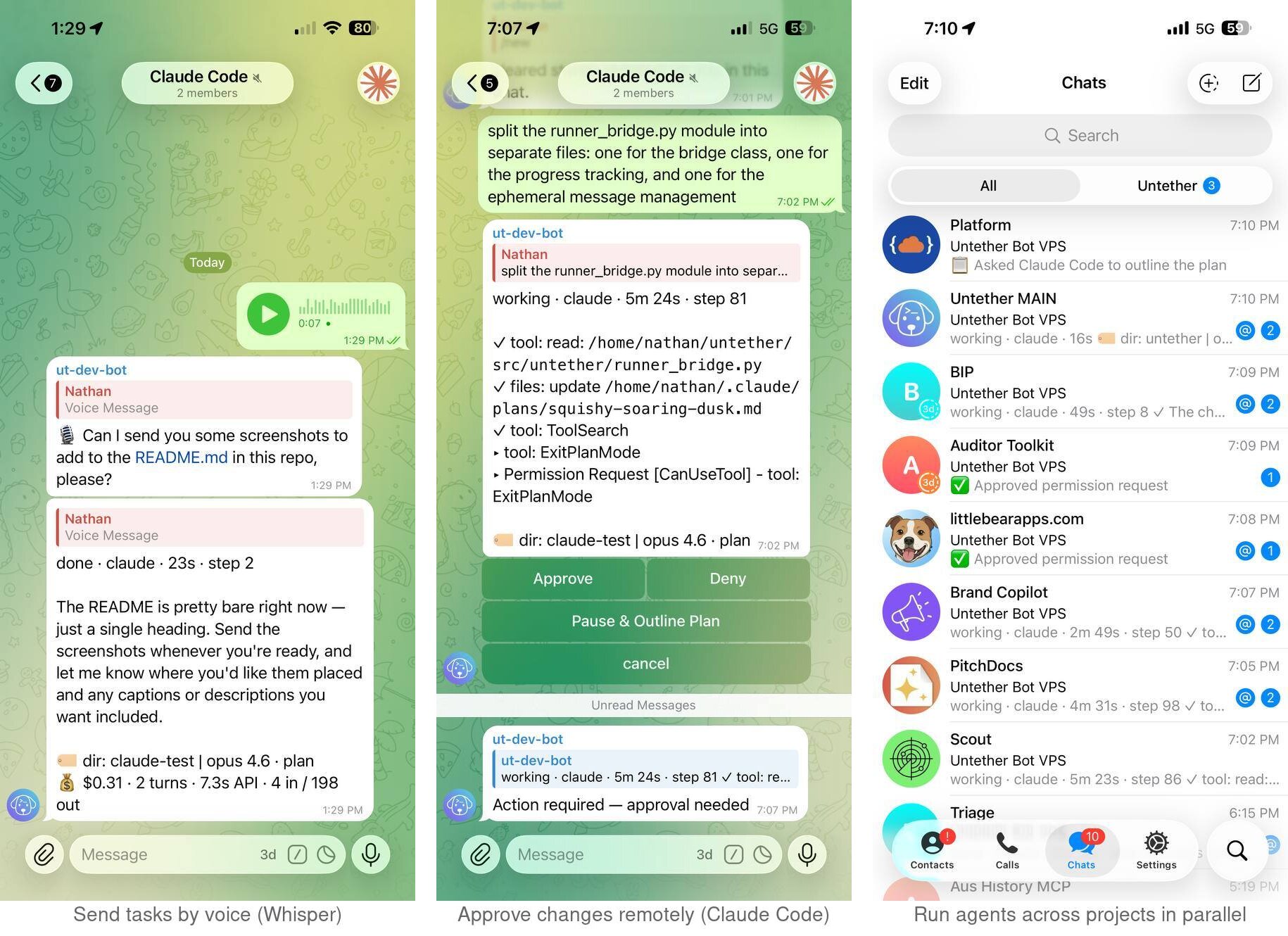
* Feature availability varies by engine — see engine compatibility
🐕 Why Untether?
AI coding agents are powerful, but they're chained to a terminal window. Untether breaks that chain:
- Your machine does the work — agents run on your computer (or server) as normal. Untether just bridges them to Telegram.
- Work from anywhere — walking the dog, at the gym, on the train, at a friend's place. If you have Telegram, you have your agents.
- Agents run in the background — start a task from your phone and put it away. The agent keeps working even if you close Telegram, lose signal, or your phone dies. Check the result when you're ready.
- Any device, any time — phone, tablet, laptop, or Telegram Web. Start a task on your phone at the park, review results on your laptop at home.
- Talk instead of type — send a voice note and Untether transcribes it. Hands full? Dictate your next task.
- Swap projects and agents — switch between repos, branches, and engines from the same chat. No restarting, no SSH, no context switching.
- Stay in control remotely — budgets, cost tracking, and interactive approval buttons mean you can trust your agents to run without hovering over a terminal.
⚡ Quick start
uv tool install untether        # recommended
# or
pipx install untether            # alternative
untether # run setup wizard
The wizard creates a Telegram bot, picks your workflow, and connects your chat. Then send a message to your bot:
fix the failing tests in src/auth
That's it. Your agent runs on your machine, streams progress to Telegram, and you can reply to continue the conversation.
The wizard offers three workflow modes — pick the one that fits:
| Mode | How it works |
|---|---|
| Assistant | Ongoing chat — messages auto-resume your session. /new to start fresh. |
| Workspace | Forum topics — each topic bound to a project/branch with independent sessions. |
| Handoff | Reply-to-continue — resume lines shown for copying to terminal. |
Choose a mode → · Conversation modes tutorial →
Tip: Already have a bot token? Pass it directly: untether --bot-token YOUR_TOKEN
📖 See our help guides for detailed setup, engine configuration, and troubleshooting.
🎯 Features
- 📡 Progress streaming — watch your agent work in real time; see tool calls, file changes, and elapsed time as they happen
- 🔐 Interactive permissions — approve plan transitions and answer clarifying questions with inline option buttons; tools auto-execute, with progressive cooldown after "Pause & Outline Plan"
- 📋 Plan mode — toggle per chat with
/planmode; choose full manual approval, auto-approved transitions, or no plan phase - 📁 Projects and worktrees — register repos with
untether init, target with/myproject @feat/thing, run branches in isolated worktrees in parallel - 💰 Cost and usage tracking — run agents remotely with confidence; per-run and daily budgets,
/usagebreakdowns, and optional auto-cancel keep spending visible - 💡 Actionable error hints — friendly messages for API outages, rate limits, billing errors, and network failures with resume guidance
- 🏷 Model and mode metadata — every completed message shows model with version, effort level, and permission mode (e.g.
🏷 opus 4.6 · medium · plan) across all engines - 🎙️ Voice notes — hands full? Dictate tasks instead of typing; Untether transcribes via a configurable Whisper-compatible endpoint
- 🔄 Cross-environment resume — start a session in your terminal, pick it up from Telegram with
/continue; works with Claude Code, Codex, OpenCode, Pi, and Gemini (guide) - 📎 File transfer — upload files to your repo with
/file put, download with/file get; agents can also deliver files automatically by writing to.untether-outbox/during a run — sent as Telegram documents on completion - 🛡️ Graceful recovery — orphan progress messages cleaned up on restart; stall detection with CPU-aware diagnostics; auto-continue for Claude Code sessions that exit prematurely
- ⏰ Scheduled tasks — cron expressions and webhook triggers
- 💬 Forum topics — map Telegram topics to projects and branches
- 📤 Session export —
/exportfor markdown or JSON transcripts - 🗂️ File browser —
/browseto navigate project files with inline buttons - ⚙️ Inline settings —
/configopens an in-place settings menu; toggle plan mode, ask mode, approval policy (Codex), approval mode (Gemini), verbose, engine, model, reasoning, and trigger with buttons - 🧩 Plugin system — extend with custom engines, transports, and commands
- 🔌 Plugin-compatible — Claude Code plugins detect Untether sessions via
UNTETHER_SESSIONenv var, preventing hooks from interfering with Telegram output; works with PitchDocs and other Claude Code plugins - 📊 Session statistics —
/statsshows per-engine run counts, action totals, and duration across today, this week, and all time - 💬 Three workflow modes — assistant (ongoing chat with auto-resume), workspace (forum topics bound to projects/branches), or handoff (reply-to-continue with terminal resume lines); choose a mode to match your workflow
🔌 Supported engines
| Engine | Install | What it's good at |
|---|---|---|
| Claude Code | npm i -g @anthropic-ai/claude-code |
Complex refactors, architecture, long context |
| Codex | npm i -g @openai/codex |
Fast edits, shell commands, quick fixes |
| OpenCode | npm i -g opencode-ai@latest |
75+ providers via Models.dev, local models |
| Pi | npm i -g @mariozechner/pi-coding-agent |
Multi-provider auth, conversational |
| Gemini CLI | npm i -g @google/gemini-cli |
Google Gemini models, configurable approval mode |
| Amp | npm i -g @sourcegraph/amp |
Sourcegraph's AI coding agent, mode selection |
Note: Use your existing Claude or ChatGPT subscription — no extra API keys needed (unless you want API billing).
Engine compatibility
| Feature | Claude Code | Codex CLI | OpenCode | Pi | Gemini CLI | Amp |
|---|---|---|---|---|---|---|
| Progress streaming | ✅ | ✅ | ✅ | ✅ | ✅ | ✅ |
| Session resume | ✅ | ✅ | ✅ | ✅ | ✅ | ✅ |
| Model override | ✅ | ✅ | ✅ | ✅ | ✅ | ✅¹ |
| Model in footer | ✅ | ✅ | ✅ | — | ✅ | — |
| Approval mode in footer | ✅ | ~⁴ | — | — | ~² | — |
| Voice input | ✅ | ✅ | ✅ | ✅ | ✅ | ✅ |
| Verbose progress | ✅ | ✅ | ✅ | ✅ | ✅ | ✅ |
| Error hints | ✅ | ✅ | ✅ | ✅ | ✅ | ✅ |
| Preamble injection | ✅ | ✅ | ✅ | ✅ | ✅ | ✅ |
| Cost tracking | ✅ | ~³ | ✅ | ~³ | ~³ | ~³ |
| Interactive permissions | ✅ | — | — | — | — | — |
| Approval policy | ✅ | ~⁴ | — | — | ~² | — |
| Plan mode | ✅ | — | — | — | — | — |
| Ask mode (option buttons) | ✅ | — | — | — | — | — |
| Diff preview | ✅ | — | — | — | — | — |
| Auto-approve safe tools | ✅ | — | — | — | — | — |
| Progressive cooldown | ✅ | — | — | — | — | — |
| Subscription usage | ✅ | — | — | — | — | — |
| Reasoning/effort levels | ✅ | ✅ | — | — | — | — |
Device re-auth (/auth) |
— | ✅ | — | — | — | — |
| Context compaction | — | — | — | ✅ | — | — |
Cross-env resume (/continue) |
✅ | ✅ | ✅ | ✅⁵ | ✅ | —⁶ |
¹ Amp model override maps to --mode (deep/free/rush/smart).
² Defaults to full access (--approval-mode=yolo, all tools auto-approved); toggle via /config to edit files (auto_edit, files OK but no shell) or read-only; pre-run policy, not interactive mid-run approval.
³ Token usage counts only — no USD cost reporting.
⁴ Toggle via /config between full auto (default) and safe (--ask-for-approval=untrusted, untrusted tools blocked); pre-run policy, not interactive mid-run approval.
⁵ Pi requires provider = "openai-codex" in engine config for OAuth subscriptions in headless mode.
⁶ AMP requires an explicit thread ID; no "most recent" mode.
🤖 Commands
| Command | What it does |
|---|---|
/cancel |
Stop the running agent |
/agent |
Show or set the engine for this chat |
/model |
Override the model for an engine |
/planmode |
Toggle plan mode (on/auto/off) |
/usage |
Show API costs for the current session |
/export |
Export session transcript |
/browse |
Browse project files |
/new |
Cancel running tasks and clear stored sessions |
/continue |
Resume the most recent CLI session in this project (guide) |
/file put/get |
Transfer files |
/topic |
Create or bind forum topics |
/restart |
Gracefully restart Untether (drains active runs first) |
/verbose |
Toggle verbose progress mode (show tool details) |
/config |
Interactive settings menu (plan mode, ask mode, verbose, engine, model, reasoning, trigger, approval mode, cost & usage) |
/ctx |
Show or update project/branch context |
/reasoning |
Set reasoning level override |
/trigger |
Set group chat trigger mode |
/stats |
Per-engine session statistics (today/week/all-time) |
/auth |
Codex device re-authentication |
/ping |
Health check / uptime |
Prefix any message with /<engine> to pick an engine for that task, or /<project> to target a repo:
/claude /myproject @feat/auth implement OAuth2
⚙️ Configuration
Untether reads ~/.untether/untether.toml. The setup wizard creates this for you, or configure manually:
default_engine = "codex"

[transports.telegram]
bot_token = "123456789:ABC..."
chat_id = 123456789
session_mode = "chat"

[projects.myapp]
path = "~/dev/myapp"
default_engine = "claude"

[cost_budget]
enabled = true
max_cost_per_run = 2.00
max_cost_per_day = 10.00
See the full configuration reference for all options.
Warning: Never commit your untether.toml — it contains your bot token. The default location (~/.untether/) keeps it outside your repos.
🔄 Upgrading
uv tool upgrade untether        # if installed with uv
# or
pipx upgrade untether            # if installed with pipx
Then restart to apply:
/restart # from Telegram (preferred — drains active runs first)
Or from your terminal:
untether # start (or restart — Ctrl+C first if already running)
Note: If you've set up a systemd service on Linux, use
systemctl --user restart untetherinstead.
📦 Requirements
- Python 3.12+ —
uv python install 3.14 - uv —
curl -LsSf https://astral.sh/uv/install.sh | sh - At least one agent CLI on PATH:
claude,codex,opencode,pi,gemini, oramp
📖 Help Guides
Full documentation is available in the docs/ directory.
Getting Started
- Install and onboard — setup wizard walkthrough
- First run — send your first task
- Conversation modes — assistant, workspace, and handoff
- Projects and branches — multi-repo workflows
- Multi-engine workflows — switching between agents
How-To Guides
- Interactive approval — approve and deny tool calls from Telegram
- Plan mode — control plan transitions and progressive cooldown
- Cost budgets — per-run and daily budget limits
- Inline settings —
/configbutton menu - Voice notes — dictate tasks from your phone
- File browser —
/browseinline navigation - Session export — markdown and JSON transcripts
- Verbose progress — tool detail display
- Group chats — multi-user and trigger modes
- Context binding — per-chat project/branch binding
- Webhooks and cron — automated runs from external events
Engine Guides
- Claude Code — permission modes, plan mode, cost tracking, interactive approvals
- Codex — profiles, extra args, exec mode
- OpenCode — model selection, 75+ providers, local models
- Pi — multi-provider auth, model and provider selection
- Gemini CLI — Google Gemini models, approval mode passthrough
- Amp — mode selection, thread management
Reference
- Configuration reference — full walkthrough of
untether.toml - Troubleshooting — common issues and solutions
- Architecture — how the pieces fit together
🤝 Contributing
Found a bug? Got an idea? Open an issue — we'd love to hear from you.
Want to contribute code? See CONTRIBUTING.md for development setup, testing, and guidelines.
🙏 Acknowledgements
Untether is a fork of takopi by @banteg, which provided the original Telegram-to-Codex bridge. Untether extends it with interactive permission control, multi-engine support, plan mode, cost tracking, and many other features.
📄 Licence
MIT — Made by Little Bear Apps 🐶
Yorumlar (0)
Yorum birakmak icin giris yap.
Yorum birakSonuc bulunamadi