skills-hub
Health Gecti
- License — License: MIT
- Description — Repository has a description
- Active repo — Last push 0 days ago
- Community trust — 63 GitHub stars
Code Gecti
- Code scan — Scanned 12 files during light audit, no dangerous patterns found
Permissions Gecti
- Permissions — No dangerous permissions requested
Bu listing icin henuz AI raporu yok.
本地 AI coding agent 技能(skills)管理仪表盘,一站式查看、同步与安装多个 agent 的技能文件。
Skills Hub
A local dashboard to manage AI coding agent skills across multiple agents.
One place to view, sync, install, and organize skills for all your AI coding agents.




❤️ Sponsor
| Sponsor | |
|---|---|
| Ofox AI | Thanks to Ofox AI for sponsoring this project! Sign up via the link and get a $3 bonus on your first top-up. Ofox AI provides reliable LLM API aggregation — one API for 100+ models including OpenAI, Claude, Gemini, DeepSeek, Qwen, Kimi, and more. |
What It Does
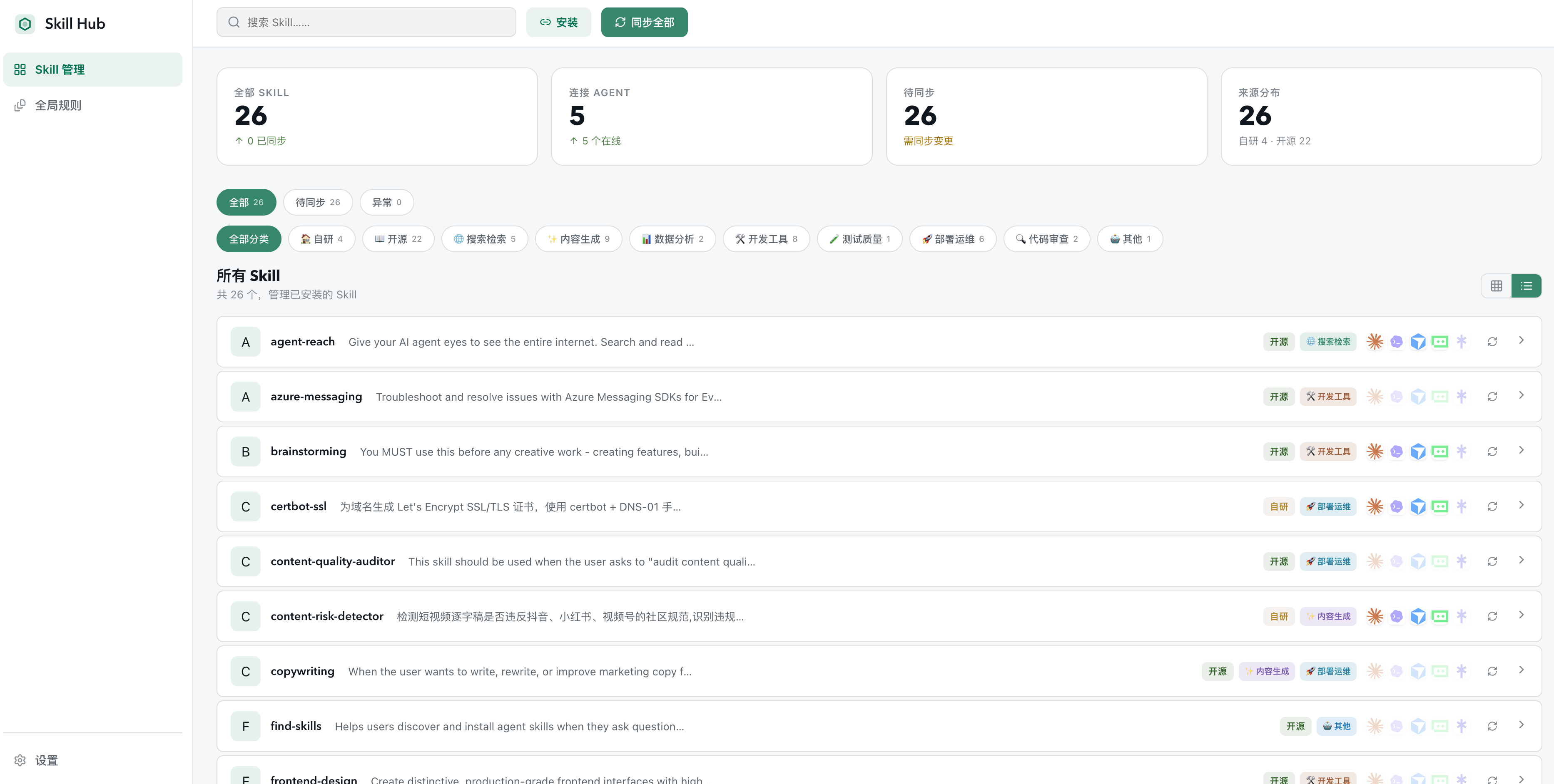
Skills Hub scans the skills installed by your local AI coding agents and presents everything in a unified dashboard.
- Unified Dashboard — Card grid or list view showing every skill's installation status per agent
- One-Click Sync — Missing or outdated skills? Sync them across all agents with one click
- Install New Skills — Support GitHub repos, SSH URLs, or local paths. Auto-detects
SKILL.md - Global Rules Editor — Edit each agent's instruction/rule files from one UI with live preview
- Categories & Tags — Auto-categorization + manual tagging to keep your skill library organized
How It Works
Skills Hub has no database, no cloud storage. It directly reads your local agent directories, compares source and target SKILL.md content via SHA-256, and determines sync status:
| Status | Meaning |
|---|---|
| Synced | Target matches source |
| Missing | Skill not installed on this agent |
| Drifted | Installed but content differs from source |
| Collision | Path blocked by an existing file |
| Orphaned | Installed but source skill was deleted |
Sync resolves these: missing/drifted → copy fix, collisions → skip, orphans → optionally clean up.
Quick Start
Users: Install the Desktop App
Download the latest release from the Releases page.
- macOS Intel →
.dmgwithx86_64in filename - macOS Apple Silicon →
.dmgwithaarch64/arm64in filename - Windows →
.exeor.msi
Open the app and it will scan your local agent directories automatically.
⚠️ Builds are unsigned. macOS may show a security warning. If you see "Skills Hub is damaged and can't be opened", run:
xattr -dr com.apple.quarantine "/Applications/Skills Hub.app"
Maintainers: Build Release Packages
Push a v* tag to trigger GitHub Actions to build macOS / Windows installers:
git tag v0.1.0
git push origin v0.1.0
Developers: Local Setup
npm install
npm run dev
# → http://localhost:3000
| Command | Description |
|---|---|
npm run build |
Web production build |
npm start |
Start production web server |
npm run desktop:build |
Build desktop installer |
npm test |
Run tests |
npx tsc --noEmit |
TypeScript type-check |
Tech Stack
Next.js 15 + React 19 + TypeScript + Tailwind CSS v4 + Tauri 2. Desktop client reads the local filesystem directly — zero external dependencies.
Screenshots
Dashboard — see all skills and their sync status at a glance
Supported Agents
Skills Hub is agent-agnostic — configure any agent by editing config/agents.json. Out of the box it supports:
- OpenClaw
- Cursor
- Claude Code
- Windsurf
- Add yours →
Roadmap
- Desktop client (Tauri)
- Multi-agent sync
- Global rules editor
- Community skill store / marketplace
- Skill performance analytics
- One-click publish skills to GitHub
- Plugin API for custom agent integrations
Contributing
Contributions are welcome! See CONTRIBUTING.md to get started.
License
Yorumlar (0)
Yorum birakmak icin giris yap.
Yorum birakSonuc bulunamadi