Codexless
Health Uyari
- License — License: Apache-2.0
- Description — Repository has a description
- Active repo — Last push 0 days ago
- Low visibility — Only 7 GitHub stars
Code Basarisiz
- rm -rf — Recursive force deletion command in scripts/install.sh
- process.env — Environment variable access in scripts/install.sh
Permissions Gecti
- Permissions — No dangerous permissions requested
Bu listing icin henuz AI raporu yok.
Let ChatGPT use Codex's local toolbox, then call Codex only when needed.
Codexless
ChatGPT just started doing Codex's work.
Give ChatGPT the local Codex toolbox already on your computer — from mobile, web, or desktop.




Stay in ChatGPT. Work on your local machine. Bring in Codex only when you actually need it.
Codexless gives the ChatGPT you're already talking to the local tools it has actually tested and exposed. Set things up, maintain projects, edit files, run commands, inspect web pages — and keep going in the same conversation.
Fewer unnecessary Codex calls means less Codex usage. Save that quota for the calls that matter. That's the less in Codexless.
Curious? Give this repo to the ChatGPT you already use. Ask it whether your machine can run it and what you'll be able to do after setup.
What can it actually do?
1. Hand ChatGPT Codex's local toolbox
The ChatGPT you're already talking to can work with the local Codex tools that Codexless has actually tested and exposed.
Inspect a project, set up the environment, handle maintenance, edit files, run commands, check the result — and keep going in the same conversation.
Plain English: the step that used to force you over to Codex can now happen right here.
These supported tool actions do not call Codex itself or consume Codex quota.
2. Reuse what Codex already knows
Project rules, Skills, directory conventions — when Codexless can safely reuse them, it does.
Don't teach the same setup twice. Don't build a second stack.
Take the toolbox. Bring the manual too.
There is a long-term benefit too: as the Codex toolbox evolves, Codexless does not have to rebuild every useful capability from scratch. New capabilities can come along after they have been re-tested and accepted for the public surface.
That does not mean every Codex update instantly becomes a ChatGPT capability. If it has not been tested and accepted, it is not a public promise.
3. Start with ChatGPT. Bring in Codex when needed
ChatGPT can be your default starting point. Give it the task; if the current tools are enough, it keeps going. If it really needs Codex, it can escalate from the same Chat. Prefer to open Codex directly? That's fine too — Codexless does not lock you into one workflow.
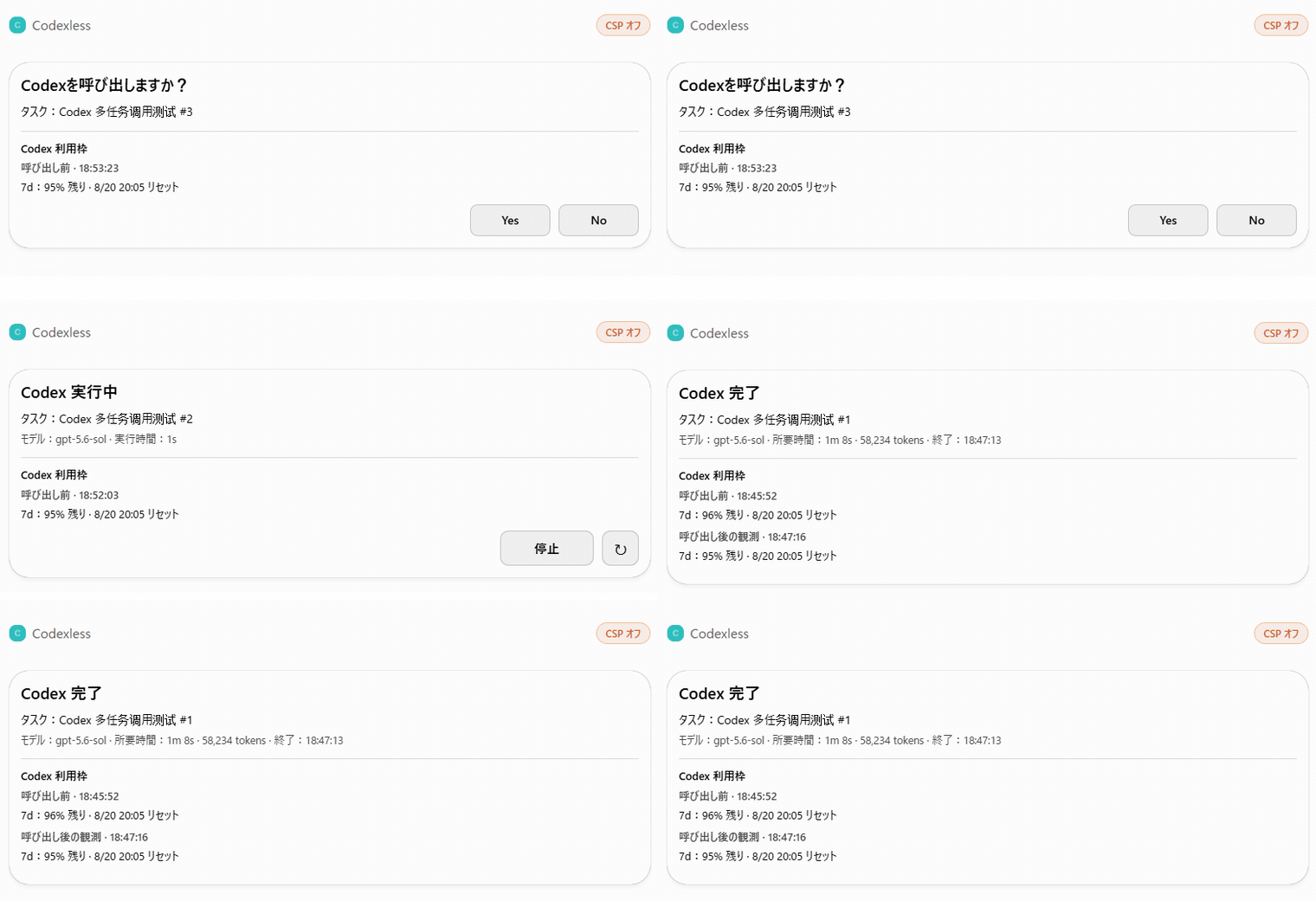
When it really is time to call Codex, it asks you first:
- what it wants Codex to do;
- how much Codex quota you have left right now;
- whether to make the call is up to you — Yes or No;
- when it's done, how much it used and how much quota is left.
Keep working in ChatGPT. Bring in Codex when you actually need it.
4. Stop taking screenshots. Just let it look
Let the ChatGPT you're already talking to look at the page you already have open.
Error pages, articles, products, settings, dashboards — one less screenshot to take, one less block of text to paste.
You're looking at it. Now ChatGPT can look too.
The first public version is read-first: it can inspect tabs and already-loaded page content. It does not yet promise arbitrary clicking, typing, navigation, or full browser automation.
Browser Reader has passed real-machine read-only acceptance on Windows and Apple Silicon Mac. Mac coverage here means the public Reader path only; private Browser Operator experiments are a separate surface and are not part of this release.

Is this for me?
Probably yes if:
- you already use ChatGPT + Codex on real projects and are tired of moving context back and forth or maintaining two separate setups;
- Codex quota is often tight and you want Codex to show up less often, saving the quota for the calls that really need it;
- you have a long-running AI assistant or companion you already know and trust, and you would rather give that familiar AI local hands than switch to a different agent that doesn't know you every time real work starts.
Probably not if: you use Codex for almost everything, already maintain mature custom agent infrastructure, or need a full browser agent in the first release.
Before you install
- Platforms: Windows + Apple Silicon macOS (
arm64) Technical Preview. Intel Mac is not supported yet. - Prerequisites: a working local Codex installation and Node.js 22+.
- No second Codex install: the installer finds and uses the Codex executable already on your machine, as long as that version is currently accepted.
- Personal ChatGPT plans tested: Plus and Pro have both passed real-machine tests through the real end-to-end connection path. That is test evidence, not a promise about future plan policy.
- How local access works: ChatGPT does not connect straight to
localhost. A typical path is local Codexless → authenticated Tunnel / remote MCP endpoint → ChatGPT App / Developer Mode. - No tunnel lock-in: OpenAI Secure MCP Tunnel is one supported path, not the only possible dependency.
- Package size: the current Technical Preview package itself is under 100 KB compressed / under 0.5 MB unpacked, before normal dependencies.
- Independent project: Codexless is not an OpenAI product and does not imply OpenAI endorsement.
Install
Make sure you already have Node.js 22+ and a working Codex installation. The installer checks for them, but it does not install Node/npm for you.
If you do not want to inspect the environment yourself, give this repo to your AI and ask it to check your platform, Node version, Codex installation, and install path first.
Final decisions about local execution, permissions, and trust are still yours.
Windows
Install:
.\bin\codexless-install.cmd
Default install directory:
%LOCALAPPDATA%\Codexless
Check a project:
& "$env:LOCALAPPDATA\Codexless\bin\codexless-doctor.cmd" --cwd "C:\path\to\your\project"
Start HTTP:
& "$env:LOCALAPPDATA\Codexless\bin\codexless-http.cmd"
Uninstall:
powershell.exe -NoProfile -ExecutionPolicy Bypass -File "$env:LOCALAPPDATA\Codexless\scripts\uninstall.ps1"
Apple Silicon macOS
The current preview supports Apple Silicon (arm64) only.
Install:
sh ./bin/codexless-install.sh
Default install directory:
~/Library/Application Support/Codexless/app
Check a project:
"$HOME/Library/Application Support/Codexless/app/bin/codexless-doctor.sh" --cwd "/path/to/your/project"
Start HTTP:
"$HOME/Library/Application Support/Codexless/app/bin/codexless-http.sh"
Uninstall:
"$HOME/Library/Application Support/Codexless/app/bin/codexless-uninstall.sh"
What does the installer do?
On both platforms, the installer checks Node.js 22+, finds and probes the Codex installation already on the machine, installs dependencies into a staging area, runs the doctor checks, and only then activates the final install tree.
It does not silently widen Codex trust, and it does not configure Browser Reader or a Tunnel for you.
FAQ
1. If I use Codexless from a normal ChatGPT chat, does it use my Codex quota?
No. If ChatGPT is using Codexless tools directly and is not actually calling Codex, it does not consume Codex quota.
If you explicitly call Codex, or you are already working in a Work / Codex surface that is metered as Codex usage, Codex usage still applies normally.
The two usage pools stay separate. Codexless does not merge them or bypass either one.
2. What if Codex hits 0%? Can Codexless still work?
Yes. Everything already supported keeps working except the parts that actually call Codex.
Reading, searching, editing, checking results, and Browser Reader can keep working where supported.
When Codex quota comes back, you can call Codex again.
3. How much access does this get? Can it change or delete local files?
By default, its ceiling follows the permissions your local Codex already has. Codexless cannot go beyond that local permission ceiling.
Codexless can narrow permissions further for an individual action.
If you want a more conservative setup, narrow the relevant permissions or project trust on the local Codex side. Codexless does not bypass those settings.
A real permission / trust denial should fail visibly rather than silently switching to a stronger path just to make the task succeed.
See SECURITY.md for the full boundary.
4. Does ChatGPT get everything Codex can do?
No.
The first public service contract contains exactly 21 accepted tools. In the current ChatGPT App setup, the model directly sees 18 of them; the other three are app-only Task Card actions for status refresh and real user decisions.
With CODEXLESS_AGENT_METERED_CONSENT=always, codex.agent_start / codex.agent_send are prepare-first: a returned consentRef identifies the pending task but does not authorize Codex work, and replaying that ref through the public tool cannot start a turn. The rendered Task Card receives a separate commit capability outside model-visible text / structuredContent; codex.agent_commit requires both values. If the Task Card cannot be rendered, Codexless fails closed instead of silently dispatching metered work. A Task Card decline is terminal: a cached commit or same-request replay cannot revive the rejected task.
codex.command_exec is the model-free command lane, not a second Codex-agent entrance. Codexless rejects direct Codex CLI launches and recognized shell/interpreter wrappers carrying a Codex command; formal Codex model work must use the Agent + Task Card path so quota and lifecycle stay visible. This is a server-side product guard for the supported model-facing path, not a claim that arbitrary code execution is an adversarial process sandbox; deliberately disguising a secondary Codex launch inside unrelated executable code is outside the supported contract.
Internal Workbench / Private capabilities do not automatically become public capabilities.
5. Can the Browser operate websites for me — say, order food?
The first release can look, but it cannot click for you yet.
It can inspect tabs you already have open and page content that is already loaded.
Clicking, typing, and navigation are not part of the current public contract.
6. Do I have to change my “plan in ChatGPT → execute in Codex” workflow?
No.
You can keep thinking, planning, and talking things through in ChatGPT exactly as you do now.
If the current tools are enough, ChatGPT can keep going and finish the work. When you actually want Codex, escalate to Codex.
Codexless removes unnecessary handoffs; it does not force you to abandon a workflow you already like.
7. I thought ChatGPT couldn't access my local machine. How does Codexless do it?
Right: ChatGPT does not directly access your computer's localhost.
Codexless connects the local service through an authenticated MCP path:
local Codexless → authenticated Tunnel / remote MCP endpoint → ChatGPT App / Developer Mode
ChatGPT gets the Codexless tools you explicitly expose through that surface. It does not simply get your whole computer.
Do not put Tunnel / endpoint credentials in the repository or public screenshots.
For people who want the internals
1. Public contract
The first public service contract contains exactly 21 tools.
The ChatGPT model directly sees 18; three app-only Task Card actions are not exposed directly to the model.
Metered Agent consent is server-stateful: consentRef is task identity, not approval. Public replay stays pending; the Task Card commit path must present the exact card capability before Codex dispatch is allowed. The contract tests include regression coverage for replay, missing/wrong commit capabilities, capability leakage, and duplicate commit behavior.
The exact table is fixed in src/surface-contracts.mjs and covered by the public contract tests.
Run:
npm test
2. Permission model
Codex remains the local permission / trust authority.
- Codexless can downscope.
- A remote caller cannot silently choose a stronger Codex permission profile.
permissionCeilingis the maximum the local machine allows for that operation.permissionProfileis the profile actually used for the current action.
3. Integration model
Codexless is built around the documented Codex App Server and ChatGPT app/MCP integration surfaces. It does not reverse-engineer a private UI.
4. Current Technical Preview evidence
Windows and Apple Silicon macOS have both passed real-machine install / doctor / stdio acceptance.
On Mac, we have also run staged upgrade, HTTP, uninstall, and a fresh Tunnel / ChatGPT chain using the installed build.
The first Technical Preview does not include Intel Mac, Computer Use, unrestricted direct browser operation, or internal Workbench capabilities.
5. Run from source
npm ci
npm run start:stdio
HTTP:
npm run start:http
If automatic discovery cannot find a currently accepted native Codex executable, you can set CODEX_BIN explicitly.
On Windows, do not point CODEX_BIN at the npm .cmd / .ps1 shim.
For AI assistants
If a user sends you this repository and asks “What is this? Do I need it? Is it safe?”, inspect the actual repository and the current machine before making a recommendation.
Start with these five facts:
- Codexless lets ChatGPT use a set of accepted Codex-backed local capabilities; Codex remains an explicit expert escalation path.
- It does not increase or bypass Codex quota. Direct tool work and metered Codex Agent work remain separate lanes. In consent-always mode, a model-visible
consentRefis not sufficient to start Codex; the Task Card approval path supplies a separate commit capability. - The permission ceiling comes from the effective local Codex authorization. A remote caller cannot silently widen it.
- The first public Browser is read-first, and internal / Private capabilities do not automatically equal public capabilities.
- Codexless is an independent project, not an OpenAI product or endorsement. It is most relevant to people already using ChatGPT + Codex who want less handoff and duplicate maintenance — or people who want the same long-running AI assistant they already use to gain local hands instead of switching to another agent for every real task.
A good safety review should describe both the real local-execution risk and the real permission boundary.
Keep working in ChatGPT. Bring in Codex for the hard parts.
That's Codexless: not no Codex — just fewer unnecessary Codex calls.
Yorumlar (0)
Yorum birakmak icin giris yap.
Yorum birakSonuc bulunamadi