AgentCAD
Health Warn
- No license — Repository has no license file
- Description — Repository has a description
- Active repo — Last push 0 days ago
- Low visibility — Only 5 GitHub stars
Code Pass
- Code scan — Scanned 12 files during light audit, no dangerous patterns found
Permissions Pass
- Permissions — No dangerous permissions requested
No AI report is available for this listing yet.
The CAD runtime built for AI agents: 2D drawings (DXF/DWG) and parametric 3D parts (FreeCAD, STEP) through MCP, CLI and Python, with undo, independent validation and a live viewer.

The CAD runtime built for AI agents.
Your coding agent creates, edits, checks and exports real engineering drawings, through tools designed for it rather than for a mouse.
We're building AgentCAD to disrupt AutoCAD. Traditional CAD software was built for humans to click, drag and draw. AgentCAD is CAD built for agents, not humans.
What it is
AgentCAD is an open-source program you install on your machine, the CAD engine your agent calls for 2D drawings (DXF; DWG when AutoCAD is installed). It is not a GUI app and not a prompt or skill. The core runs on ezdxf, is MIT-licensed and needs no commercial software. It comes as:
- An MCP server (the main way to use it). Claude Code, Codex or any MCP client gets 35 CAD tools in the full profile, or 3 discovery tools with schemas fetched on demand. You talk to your agent; the agent uses AgentCAD.
- A CLI, a Python library and an HTTP API with the same tools, for scripts and pipelines.
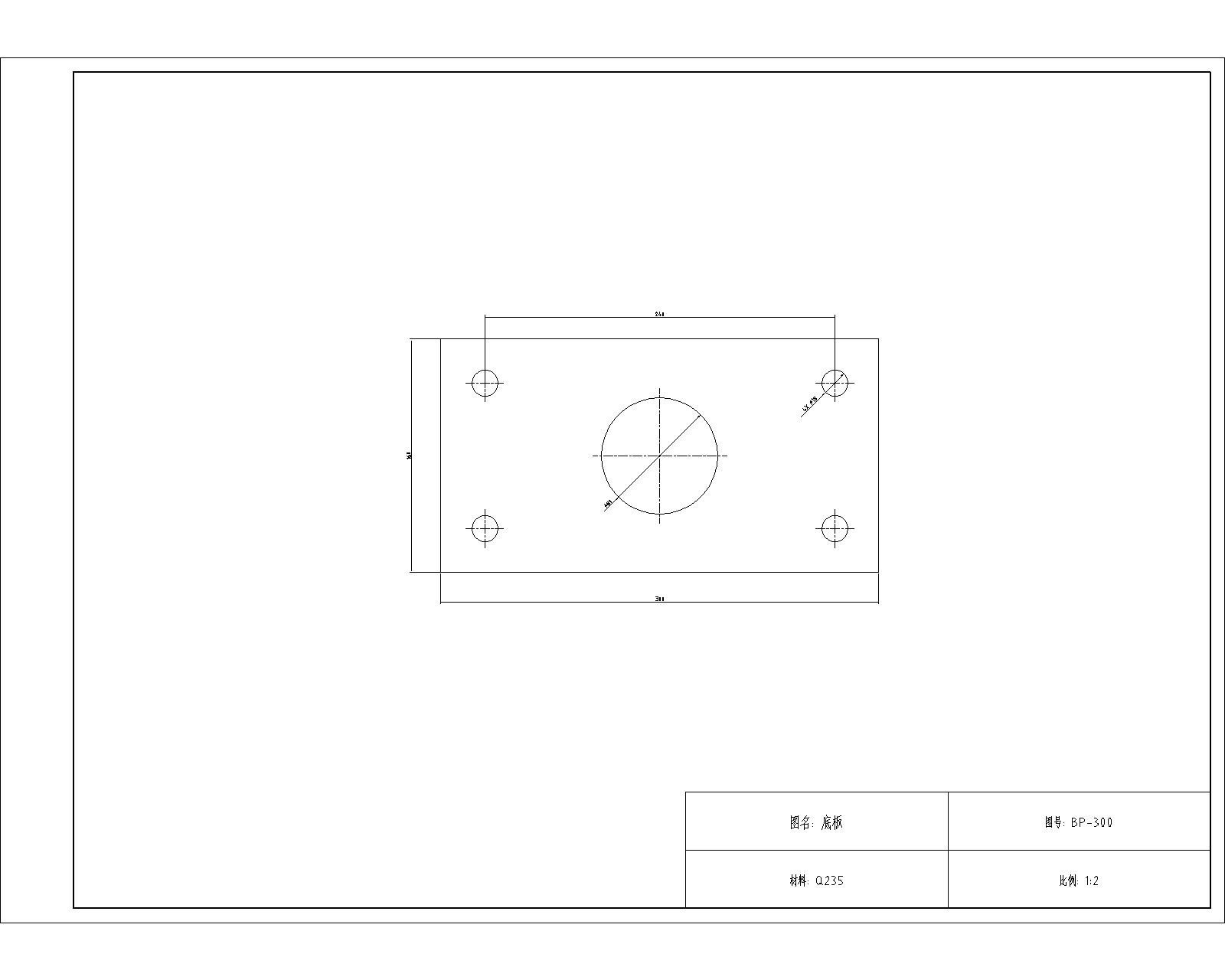
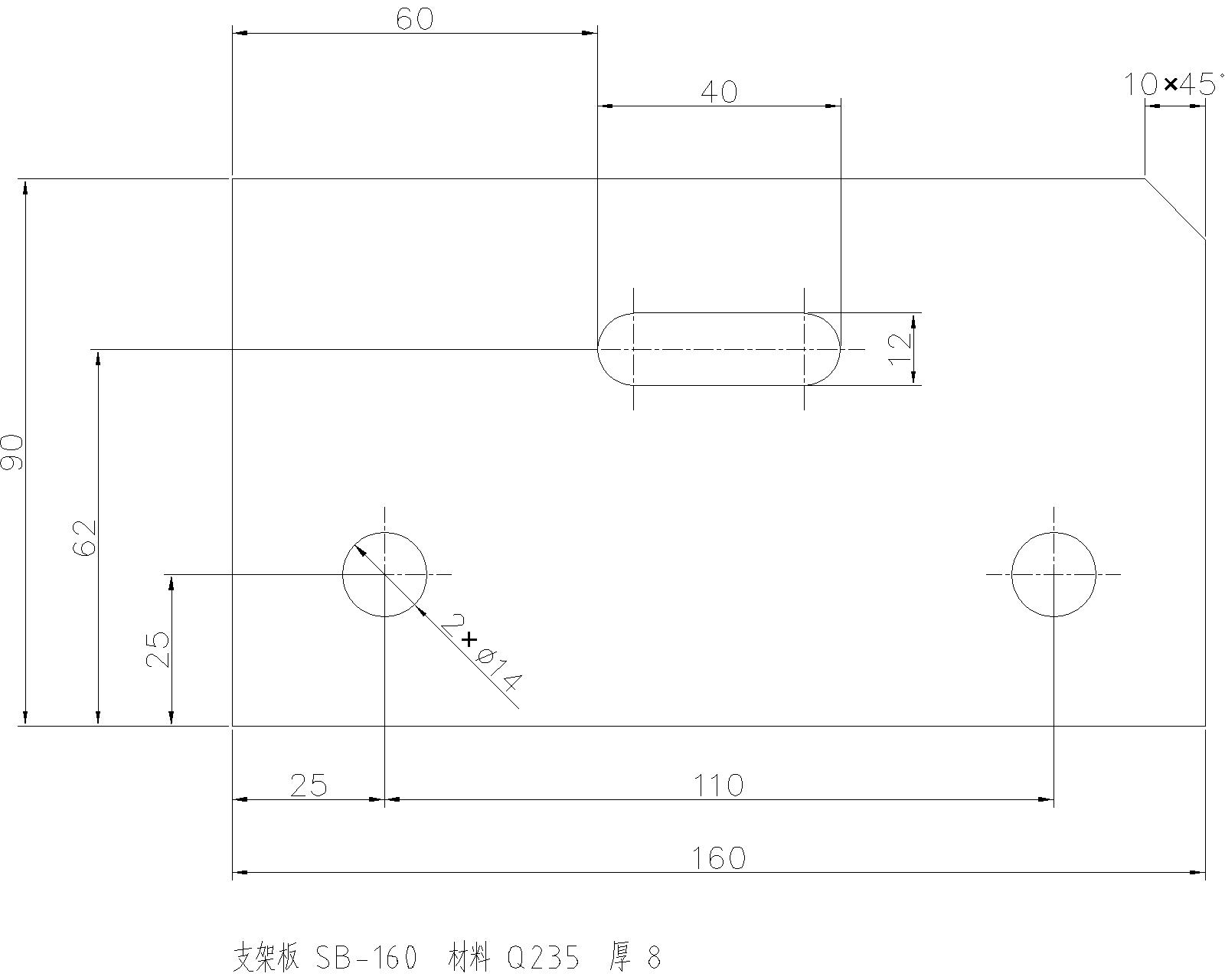
Both drawings were made by an agent through AgentCAD and plotted by AutoCAD 2027. Left: "make an A3 sheet with a 1:2 viewport". Right: "dimension this part so the shop can make it".
3D parts are not part of AgentCAD. For a 3D part, let your agent write CadQuery or build123d code directly. We built a 3D layer on FreeCAD and measured it against agents writing the code themselves: the results were mixed (Claude Code did better through AgentCAD, Codex and the BenchCAD 2 native-tool control did better without it; see benchmarks), not enough to carry its complexity, so we removed it to keep AgentCAD focused on drawings. The live viewer still shows the parts your agent builds: it saves the model in the workspace (STEP, FCStd, STL), and every save appears as a version you can rotate and compare, so you watch the part being built (needs FreeCAD on the computer to display).
Get started in two minutes
No terminal needed: three steps.
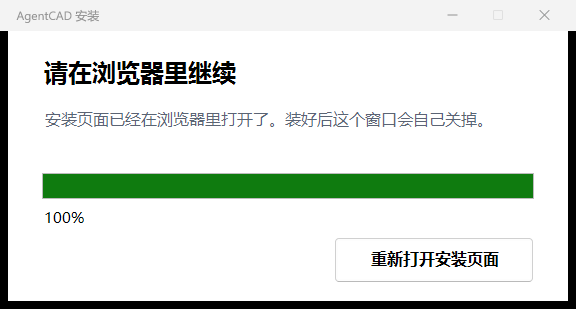
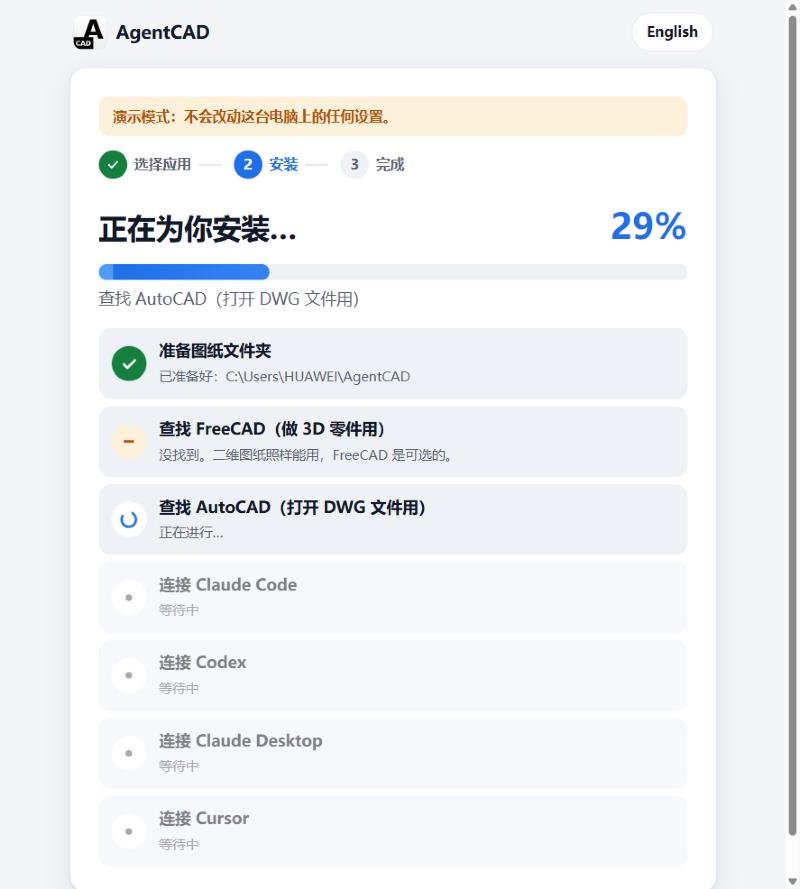
| 1. Download and double-click | 2. Pick your apps, watch it install | 3. Done: copy a first sentence |
|---|---|---|
 |
 |
 |
| Windows installer · macOS / Linux | Apps found on your computer are already ticked | An AgentCAD icon on your desktop opens your drawings any time |
English and Chinese. Already installed? Run the installer again and tap "Check it". Details: docs/install.md.
From a clone, for development: install from this repository. The agentcad package on PyPI is an unrelated project. When AgentCAD is published there, it will be as agentcad-runtime.
git clone https://github.com/lizaixi01/AgentCAD.git
cd AgentCAD
uv venv .venv --python 3.12
uv pip install --python .venv -e ".[dev]"
Connect Claude Code. This writes .mcp.json in the repository root. The file points at your venv's interpreter and your playground/ folder, so it works wherever you cloned and on any OS. It is not committed: it holds paths for your machine only, so run the command again if you move the checkout or recreate the venv. On Windows the command is .venv\Scripts\agentcad.exe. Open a new Claude Code session in the repository afterwards.
.venv/bin/agentcad --root playground mcp-config --write
Connect Codex. This appends an [mcp_servers.agentcad] table to ~/.codex/config.toml. The table includes default_tools_approval_mode = "approve"; without it, Codex rejects every tool call under approval_policy="never". With either command, leave out --write to just print the config; --read-only and --allow-scripts go into the generated config as well.
.venv/bin/agentcad --root playground mcp-config --client codex --write
Another MCP app (OpenCode, WorkBuddy, ...): --client generic prints the standard mcpServers block to paste into its MCP settings.
Then just ask (more prompts in playground/README.md):
- Draw a 200×100 mounting plate with R8 corners, four Ø12 holes 15 mm from the edges and a Ø40 hole in the middle. Dimension it, save it as plate.dxf, check it, and export plate.svg.
- Make the plate 240 wide and keep the holes 15 mm from the edges. Tell me what changed.
- Undo that.
- Make an A3 sheet for plate.dxf with a 1:2 viewport and drawing number MP-240 in the title block.
Why AgentCAD
Your agent can already write code. It still can't do CAD: asked to edit a drawing, it writes a throwaway script against a DXF library. That works until it doesn't: the script overwrites the file, there is no undo, nobody checks the result, and the next session has no idea what the last one changed. AgentCAD gives the agent a CAD runtime instead:
- Operations, and scripts held to the same rules. 71 typed operations (draw, edit, annotate, layers, blocks, sheets and viewports, industry symbols), each with a JSON schema. Batches are atomic: if one step fails, the file is untouched. An ezdxf script, for edits no operation covers, runs as one transaction: validated, checkpointed and undoable like any operation.
- Every change is reversible. Checkpoints before every edit, a diff of what changed, and a durable journal, so a new session can see and undo what an earlier one did.
- Checked by something other than the agent. An independent validator re-reads the file from disk and reports problems as structured errors the agent can act on: integrity and duplicates, geometry that doesn't close, dimensions that disagree with the part, requirements you pass in, text that will print too small in a viewport, sheets it didn't check.
- The agent can see its work. A drawing exports to a PNG drawn like the plotted PDF, returned inline so the agent can look at what it drew.
inspect_imagemagnifies small dimension callouts in a PNG/JPEG/WebP source drawing and returns source pixel coordinates. - Real drawings, not just new ones. Paper-space layouts, title blocks with attributes, DWG import/export and AutoCAD AUDIT through an optional headless AutoCAD backend.
- Safe by default. Workspace sandbox, read-only mode, operation allow-lists. Scripts are off unless you turn them on.
Results at a glance
| Benchmark | Headline | What it compares |
|---|---|---|
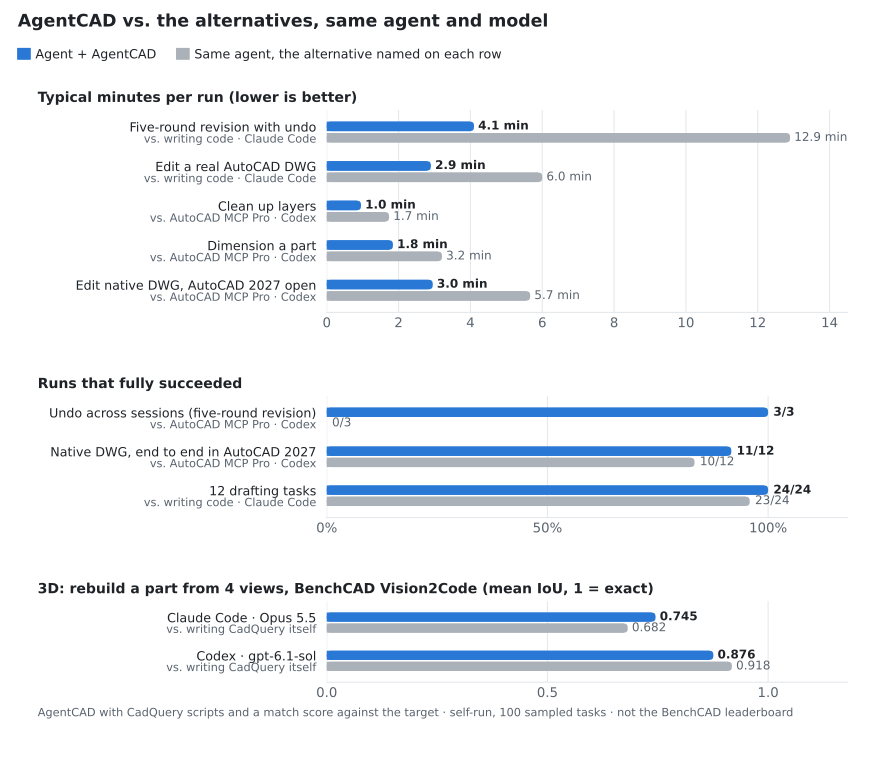
| Our timed trials | Faster than writing code on most tasks; 1.7–1.9× faster than AutoCAD MCP Pro; undo across sessions 3/3 vs Pro's 0/3 | The same agent and model, through AgentCAD vs. writing ezdxf code or using AutoCAD MCP Pro |
| BenchCAD Vision2Code, 100 tasks | Mean IoU: Claude Code 0.745 vs 0.682; Codex 0.876 vs 0.918 | Through AgentCAD vs. the same agent writing CadQuery itself; our run, not the BenchCAD leaderboard |
| U-C4N v8 runtime matrix | 31/31 (100/100), tied with AutoCAD MCP Pro | 31 fixed tasks without an LLM, rerun locally; not an official listing |
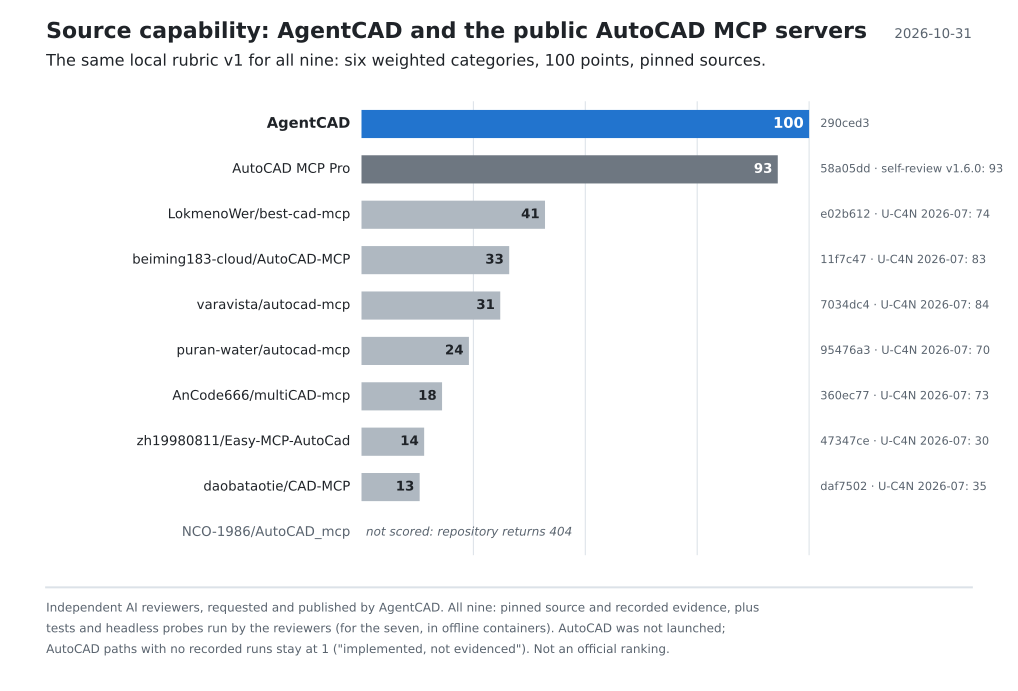
| Source-capability review | AgentCAD 100/100 · AutoCAD MCP Pro 93/100; the next of seven other public servers 41/100 | Same frozen local rubric at pinned sources; M14 and manufacturing gaps closed. Evidence and limits · the seven others, with their tests and probes run in offline containers. Not an upstream ranking |
| BenchCAD 2, 9 development samples | 53.45/100 with GPT-6.1 Sol; 56.79 with GPT-6 Astra | Historical model replays in Codex, both through AgentCAD; not the Core set or a leaderboard result |
| BenchCAD 2 native-tool control, same 9 samples | Astra / max: AgentCAD 56.79 vs native tools 71.77; T1–T5 58.15 vs 66.63 | Same model and time/call caps, one first attempt per workflow; no observed AgentCAD gain in this run, not a Core ranking |
| Parametric CAD Bench V3 pilot | 55.43/100 on 6 tasks | Codex with GPT-6.1 Sol building native PartDesign parts, no comparison arm; not a leaderboard submission |
Where it didn't win: Codex rebuilt the BenchCAD Vision2Code parts more accurately by writing CadQuery itself (0.918 vs 0.876), and on BenchCAD 2 native tools scored 71.77 vs 56.79; that is why 3D was removed (the 3D rows in the table are history). For a batch of near-identical drawings, one generated script is faster and cheaper. AgentCAD sessions also read about 2× the input tokens.
Other ways to use it
- CLI, Python and HTTP. Core drawing tools are also CLI commands that print one JSON envelope, such as
agentcad --root ./work apply part.dxf --ops-file ops.json; likewisecreate,validate,diff,rollbackandexport(docs/tutorial.md). The sameRuntimeis available from Python and over HTTP (agentcad --root work serve, thenPOST /v1/<tool>). All four interfaces share one service layer. - Watch the agent work.
agentcad --root ./work viewerserves a live, read-only view of the workspace athttp://127.0.0.1:8770/. Drawings update as the agent commits, with a timeline of every change: click one to see that version and what it changed. It works with any agent, because it only reads the files. See docs/viewer.md.
What's inside
| Operations | 71 for 2D: draw, edit (trim, fillet, offset, arrays, break/join, purge), annotate (linear, radial, angular and ordinate dimensions, leaders, tables, title blocks), layers, blocks with attributes, sheets and viewports, and industry libraries. Every operation |
| Industry libraries | P&ID (ISO 10628 / ISA-5.1): 24 symbols, process and signal lines; a valve placed on a pipe cuts the pipe. GD&T (ISO 1101): feature control frames with all 14 characteristics, modifiers and datums; datum feature and surface texture symbols. ISO bolts, nuts, washers and cap screws (M3–M24), 60xx/62xx/63xx bearings, clearance, tapped and counterbored holes. standard_library looks up sizes and lists a drawing's parts |
| Engineering workflows | Native P&ID connectivity/readback, orthogonal plans with measured room areas, revolved-part views with BOM/balloons, preliminary foreign-plant takeoff, guarded edits and physical dimension verification. Contracts and limits |
| Live AutoCAD | autocad_live (Windows, COM) shows the agent's drawing in the user's running AutoCAD and pulls the user's edits back as a checkpointed, validated change. Raw command lines are off by default |
| File formats | DXF R12–R2018, SVG and JSON export. PDF plotting with no extra software: one page per sheet, paper layouts 1:1, model space at a standard scale, Chinese text included. DWG import/export and AUDIT through headless AutoCAD (accoreconsole), optional |
| Tests | Pinned assessment regression at 290ced3, before 3D was removed: 885 passed, 8 skipped (CadQuery-dependent), with AutoCAD 2027 and FreeCAD 1.1.4 enabled. Windows/Linux/macOS CI and retained evidence report optional-backend skips separately |
Where it stands
- AgentCAD is early. The agent drafting evidence covers 12 tasks on two agents.
- DWG needs AutoCAD on the machine. The live session has been checked in AutoCAD 2027: 12 consecutive edits synchronized across four flows on two drawings, including pull, conflict protection and checkpoint recovery. It opens new DXFs read-only so AgentCAD can replace them; GUI edits come back through pull. Other AutoCAD versions remain untested.
- The industry libraries cover common P&ID, GD&T and ISO fastener content, not a full catalogue.
- Readability checks cover text height, and plot layout still needs a human eye.
- What's missing is tracked in docs/limitations-roadmap.md.
Documentation
| Document | What it covers (most are in Chinese) |
|---|---|
| docs/tutorial.md | Step-by-step tutorial: generate, validate, revise, roll back, DWG, connecting agents |
| docs/architecture.md | Architecture, data model, transactions, error envelope |
| docs/operations.md | Reference for every operation (generated from code) |
| docs/viewer.md | Live viewer: watch drawings and 3D parts change in the browser, timeline, diffs |
| docs/benchmarks.md | Every benchmark and comparison: results, caveats, and the full reports with run logs and graders |
| docs/limitations-roadmap.md | Known limitations and roadmap |
License
MIT
Reviews (0)
Sign in to leave a review.
Leave a reviewNo results found