oh-my-knowledge
Health Warn
- License — License: MIT
- Description — Repository has a description
- Active repo — Last push 0 days ago
- Low visibility — Only 5 GitHub stars
Code Pass
- Code scan — Scanned 12 files during light audit, no dangerous patterns found
Permissions Pass
- Permissions — No dangerous permissions requested
No AI report is available for this listing yet.
Evaluation framework for LLM knowledge inputs — prompts, RAG corpora, skills, agent workflows. Fix the model, vary the artifact. Built-in statistical rigor: bootstrap CI, Krippendorff α, length-debias, saturation curves.
oh-my-knowledge




English | 简体中文
Did your prompt actually get better?
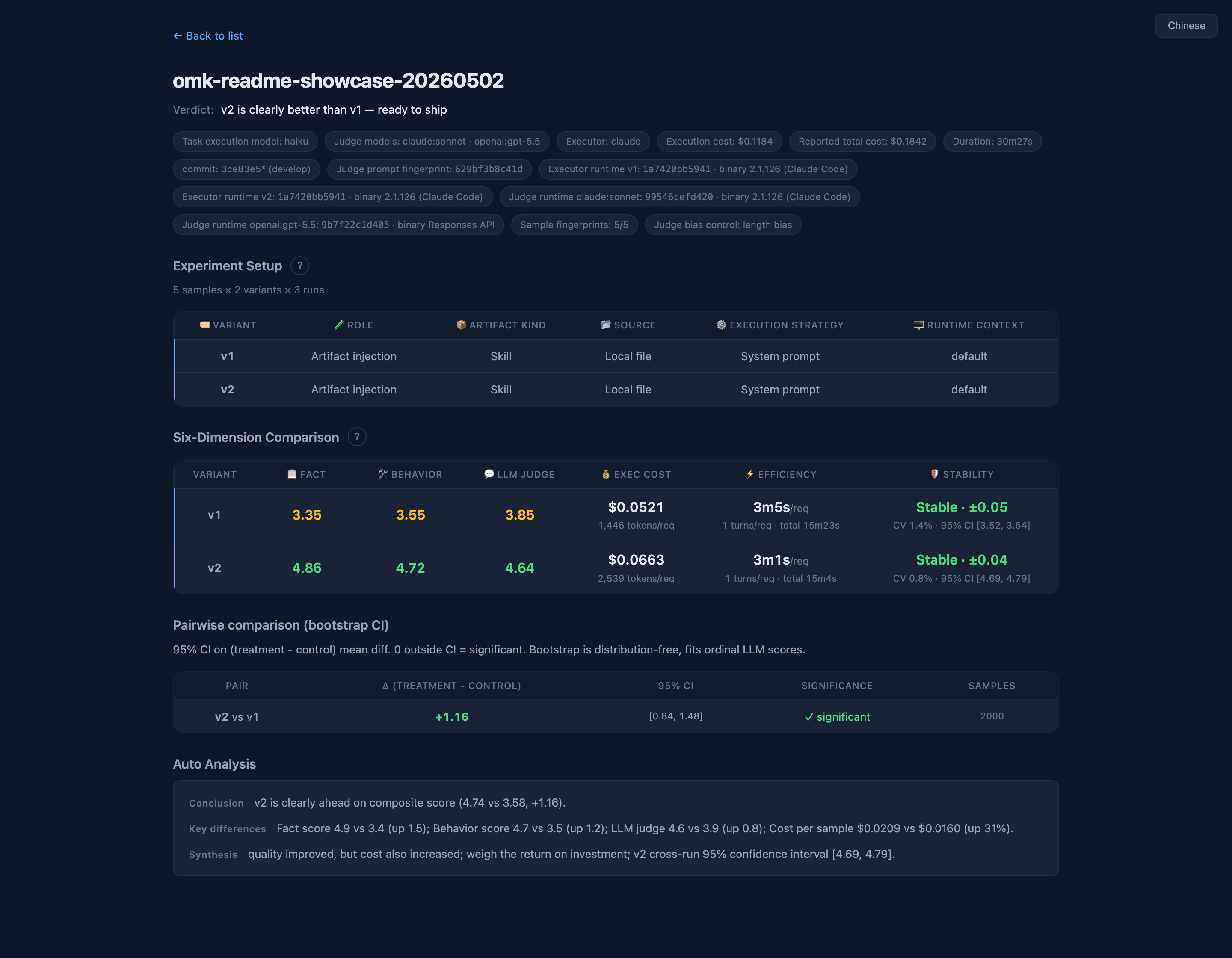
A/B test your prompts and skills with statistical rigor — bootstrap CI, Krippendorff α, length-debias — all on by default.
Quick start
npm i -g oh-my-knowledge
omk init demo && cd demo
omk eval --control code-review-v1 --treatment code-review-v2
That's it — no editing required. omk init scaffolds two skill variants and three sample cases; omk eval runs the controlled A/B and opens an HTML report with a one-line verdict in about five minutes.
Walkthrough: 5-minute quickstart guide (recommended for first-time users).
Deeper: CLI reference · how it works · eval sample format · executors & artifact layout
Use inside AI Coding Agents
Use inside Claude Code
When the omk skill is available in Claude Code, you can invoke it directly:
/omk eval              # evaluate the artifact(s) in the current project
/omk evolve            # auto-iterate to improve a skill
/omk sample            # generate or fill test cases
These slash commands are natural-language entry points — the agent reads the conversation context to figure out which skill to operate on. You can also just say "compare v1 vs v2 for me" or "improve this artifact" and omk picks the right command.
Use inside Codex
Codex does not support Claude Code style /omk ... slash commands. Ask the agent to run the omk CLI directly:
omk eval
omk evolve skills/my-skill.md
omk sample skills/my-skill.md
You can also describe the goal in natural language, such as "compare v1 vs v2" or "generate test cases for this skill".
Why this tool
Teams doing knowledge engineering produce lots of knowledge artifacts (skills today, but also prompts, agents, workflows…). When someone asks "why is v2 better than v1", you need objective data instead of gut feeling. oh-my-knowledge solves this with controlled experiments: same model, same test samples, only the knowledge artifact changes.
Why omk over alternatives
| omk | promptfoo | DeepEval | LangSmith | |
|---|---|---|---|---|
| Bootstrap CI | ✓ default | ✗ | ✗ | ✗ |
| Krippendorff α (judge ↔ human) | ✓ default | ✗ | ✗ | ✗ |
| Length-debias judge prompt | ✓ default | ✗ | ✗ | ✗ |
| Saturation curve | ✓ | ✗ | ✗ | ✗ |
| Three-layer scoring isolation | ✓ | ✗ | partial | ✗ |
| Per-variant skill isolation (construct validity) | ✓ default | ✗ | ✗ | ✗ |
| Native Claude Code skill | ✓ | ✗ | ✗ | ✗ |
| Hosted SaaS dashboard | ✗ | ✗ | ✓ | ✓ |
omk's moat is default-on safety net — Bootstrap CI, judge ↔ human α, and length-debias aren't advanced flags; they're the default. Other tools let you opt into confidence intervals; omk makes them unavoidable. Need a hosted SaaS dashboard? Choose LangSmith. Want quick local prompt iteration without statistics? Choose promptfoo. Shipping to production and someone will ask "why should I trust this number?" Choose omk.
RAG-specific evals: see RAGAS (separate niche, complementary to omk). Full comparison with 7 tools across 25+ dimensions: docs/comparison.md.
Features
| Feature | What it does |
|---|---|
| One-line verdict | omk eval six-tier verdict + ship recommendation + exit-code routing; HTML pill shares the same rules |
| Six-dim evaluation | Fact / Behavior / LLM-judge / Cost / Efficiency / Stability shown independently |
| Multi-executor | Claude CLI / Claude SDK / Codex CLI / Codex SDK / OpenAI / Gemini / any custom command |
| 21+ assertion types | substring, regex, JSON Schema, ROUGE/BLEU/Levenshtein similarity, agent tool-call assertions, semantic similarity, custom JS |
| Statistical rigor | Bootstrap CI / Krippendorff α / length-debias / saturation curve — all on by default. Details → |
| RAG metrics | faithfulness / answer_relevancy / context_recall — anti-hallucination + answer relevance + context coverage |
| LLM health audit | omk doctor grades 7 builtin dimensions; --static-only runs offline without an LLM |
| Production observability | parse Claude Code session JSONL traces; measure per-skill failure rate / latency / cost / knowledge-gap signals |
| Knowledge-gap detection | severity-weighted signals quantify risk exposure instead of claiming completeness |
| Construct-validity isolation | --strict-baseline (default ON) cuts three contamination channels so baseline doesn't silently see the skill it's being compared against |
| Sample design science | sample schema with capability / difficulty / construct / provenance metadata (HF Dataset Cards style); studio surfaces coverage breakdown plus rubric_clarity_low / capability_thin flags. docs/sample-design-spec.md |
| Multi-judge ensemble | --judge-models claude:opus,openai:gpt-4o cross-vendor scoring + agreement metrics |
| Blind A/B | --blind hides variant names; HTML report has a reveal button |
| Multi-run variance | --repeat N repeats the eval and computes mean / SD / CI / t-test |
| MCP URL fetching | pull content from private-doc URLs via an MCP server (SSO-protected knowledge bases, etc.) |
| Auto analysis | detects low-discrimination assertions, flat scores, all-pass / all-fail, expensive samples |
| Traceability | reports carry CLI version, Node version, artifact version fingerprint, judge prompt hash |
| EN / ZH switch | one-click language toggle in the HTML report |
Documentation
- How it works — interleaved scheduling, variant resolution, dual-channel scoring, six-dim report
- Eval sample format — sample schema, scoring formulas, 21+ assertion types, custom JS assertions
- CLI reference — all seven commands with bash examples and flag tables
- Executors & artifact layout — built-in / custom executors, agent evaluation, common model configs (Claude / OpenAI / GLM / Qwen / DeepSeek / Moonshot / Ollama)
- Quickstart — first-time five-minute walkthrough
- Sample design spec — capability / construct / provenance metadata; industry-gap mapping
- Statistical rigor — why bootstrap CI / α / length-debias / saturation matter
- Comparison with 7 tools — 25+ dimensions across promptfoo / DeepEval / LangSmith / Langfuse / Braintrust etc.
Environment variables
| Variable | Description |
|---|---|
CCV_PROXY_URL |
proxy requests through cc-viewer for live eval-traffic visualization |
OMK_REPORT_PORT |
report server port (default: 7799) |
Requirements
- Node.js >= 20
claudeCLI (for the default executor and LLM judge; see Claude Code)- not needed if you use other executors (openai / gemini) with
--no-judge
- not needed if you use other executors (openai / gemini) with
Security notice
This tool is designed for local trusted environments (dev machines, CI pipelines). The following features execute local code — make sure inputs come from a trusted source:
| Feature | Risk | Scope |
|---|---|---|
Custom assertions (custom) |
dynamically loads and executes user-specified .mjs files |
only use assertion files you authored or reviewed |
| eval-samples.json | assertion configs can reference external file paths | don't use sample files from untrusted sources |
Recommendations:
- Do not expose the local report server on the public internet (no auth)
- Don't use third-party eval-samples you haven't vetted
- Custom assertions have a 30-second timeout but no sandbox isolation
See GitHub Releases for release notes. Contributions welcome — see CONTRIBUTING.
Reviews (0)
Sign in to leave a review.
Leave a reviewNo results found