LoopPlane
Health Warn
- License — License: Apache-2.0
- Description — Repository has a description
- Active repo — Last push 0 days ago
- Low visibility — Only 6 GitHub stars
Code Pass
- Code scan — Scanned 12 files during light audit, no dangerous patterns found
Permissions Pass
- Permissions — No dangerous permissions requested
No AI report is available for this listing yet.
Durable local workflows for agent loops: plans, evidence, objective gates, checkpoints, and dashboards for coding agents.

LoopPlane
Durable local workflows for coding agents.



LoopPlane helps Codex CLI, Claude Code, and other external coding agents turn a
brief into a project-local workflow with a plan, evidence, validation records,
objective checks, Git checkpoints, and dashboard views.
Use it when agent work should be reviewable, resumable, and portable instead of
being trapped inside one chat session.
Why LoopPlane
Long-running agent work needs more structure than a single prompt can provide.
LoopPlane gives that work a local control surface:
| Need | LoopPlane Surface |
|---|---|
| Review the intended work | PLAN.md, planning reports, and audit reports |
| Inspect what happened | runtime events, run directories, logs, and evidence |
| Trust completion | validation, reconciliation, objective gates, and final verification |
| Recover or resume | scheduler state, detached supervisor metadata, control requests |
| Keep work portable | project-local .loopplane/ truth with machine-local runner overrides |
| Watch progress | static or token-protected local dashboard views |
LoopPlane is local-first. Project workflow truth lives in the target project;
CLI paths, credentials, dashboard tokens, and local discovery records stay
machine-local.
When To Use It
LoopPlane is useful when:
- a coding-agent task spans many steps or multiple prompts;
- you want a plan before execution starts;
- evidence and validation matter;
- you need pause, resume, status, logs, or dashboard inspection;
- agent work should leave a reviewable record in the project;
- you want to hand work between Codex CLI, Claude Code, or other runner
adapters.
It is not a model provider, hosted agent platform, or replacement for a coding
agent. It is the local runtime and record layer around agent work.
Start With Your Agent
LoopPlane is meant to be operated by a coding agent, not by a human manually
typing every LoopPlane command. Your job is to describe the project and review
the plan; the agent should install or attach LoopPlane, configure runners,
build the workflow, set objectives, and give you a dashboard link.
Start simple: paste only the project path and desired outcome. Add optional
context when the work has important references, stop rules, resource limits, or
quality gates.
Use LoopPlane to set up a durable workflow for this project.

Project:
<PROJECT_DIR>

Outcome:
<DESCRIBE_THE_RESULT_I_WANT_OR_LINK_TO_REQUIREMENTS>

Optional context, add only what matters:
- LoopPlane source: <PATH_OR_INSTALL_METHOD_IF_NEEDED>
- Workflow mode: review-gated planning first; do not start execution until I approve
- Runner preference: <AUTO_DISCOVER_OR_PREFERRED_AGENT_CLI>
- Important references: <FILES_OR_DIRECTORIES_TO_READ_BEFORE_PLANNING>
- Shared context: <CONSTRAINTS_GUIDELINES_OR_DECISIONS_WORKERS_MUST_INHERIT>
- Objective gates: <HOW_PHASES_AND_FINAL_SUCCESS_SHOULD_BE_VERIFIED>
- Self-expansion budget: <WHEN_TO_ADD_TASKS_OR_PHASES_IF_GATES_FAIL>
- Operating constraints: <ENVIRONMENT_LIMITS_RESOURCES_APPROVALS_OR_REPORTING>

Treat yourself as the LoopPlane workflow builder and operator, not as a user
asking me to run CLI commands. Install or attach LoopPlane in the target
project, inspect the files, discover and configure available Codex CLI or
Claude Code runners, and run runner diagnostics.

Before drafting the plan, read the important references and write the relevant
requirements, constraints, and decisions into shared context so future workers
inherit them.

Create a LoopPlane workflow from this outcome and context. Write a concrete
plan with reviewable tasks, validation criteria, phase objectives, and final
objectives. If the plan would not satisfy the objective gates, design task or
phase expansion rather than treating weak results as the end of the workflow.
Run the planner/auditor loop until the plan draft is ready.

Start or render the dashboard and give me the dashboard URL or path. Stop before
activating or starting execution so I can review the plan and objectives first.

At the end, summarize:
- configured runner CLIs
- shared context path and required references captured there
- plan draft path
- dashboard URL or dashboard path
- phase and final objectives
- self-expansion and stop rules
- any questions that truly block activation
After you review the dashboard and plan, send a second short prompt:
The LoopPlane plan looks ready. Activate the approved plan, start the workflow
in detached/background mode, keep the dashboard available, follow the approved
objective gates and self-expansion rules, and monitor long enough to confirm the
workflow is running. Report the dashboard URL and current progress.
For a fuller prompt library, including status updates, plan changes, new
workflow histories, pause, and stop requests, useREADME_FOR_HUMANS.md.
What To Expect
Your agent should do the LoopPlane mechanics for you:
- Install or attach LoopPlane in the target project.
- Configure installed and authenticated Codex CLI or Claude Code runners.
- Turn your outcome and optional context into
PROJECT_BRIEF.md, shared
context, and a plan draft. - Capture required reading, constraints, and inherited decisions in shared
context for future workers. - Add task validation criteria, phase objectives, final objective gates,
self-expansion rules, and stop rules. - Build or start a dashboard and give you the URL or static path.
- Wait for your review before activating the plan.
- Start the workflow only after approval unless you explicitly requested a
fully autonomous mode. - Keep evidence, validations, objective reports, Git checkpoints, status, and
dashboard projections available for inspection.
If runner diagnostics report *_waiting_config orrunner_readiness: waiting_config, the agent should resolve CLI discovery,
authentication, or runner configuration before planning or starting execution.
Agent Operator Notes
Human users can usually skip this section. These commands are the kind of work
your agent should perform while setting up a provider-backed LoopPlane workflow.
Initialize the workflow:
python3 scripts/loopplane init --project "$PROJECT" --brief "$USER_REQUIREMENTS"
Configure Codex CLI runners when Codex is available:
CODEX_BIN="$(command -v codex)"
python3 scripts/loopplane configure-agent --project "$PROJECT" --runner worker --role worker --adapter codex_cli --command "$CODEX_BIN"
python3 scripts/loopplane configure-agent --project "$PROJECT" --runner planner --role planner --adapter codex_cli --command "$CODEX_BIN"
python3 scripts/loopplane configure-agent --project "$PROJECT" --runner auditor --role auditor --adapter codex_cli --command "$CODEX_BIN"
python3 scripts/loopplane doctor-agent --project "$PROJECT" --runner worker
python3 scripts/loopplane doctor-agent --project "$PROJECT" --runner planner
python3 scripts/loopplane doctor-agent --project "$PROJECT" --runner auditor
Configure Claude Code when Claude is the available runner:
CLAUDE_BIN="$(command -v claude)"
python3 scripts/loopplane configure-agent --project "$PROJECT" --runner worker --role worker --adapter claude_code_cli --command "$CLAUDE_BIN"
python3 scripts/loopplane doctor-agent --project "$PROJECT" --runner worker
Create the plan and dashboard for user review:
python3 scripts/loopplane plan --project "$PROJECT"
python3 scripts/loopplane audit-plan --project "$PROJECT"
python3 scripts/loopplane dashboard --project "$PROJECT" --port auto
After the user approves the plan:
python3 scripts/loopplane activate-plan --project "$PROJECT"
python3 scripts/loopplane start --project "$PROJECT" --detach
python3 scripts/loopplane status --project "$PROJECT"
For full provider-backed validation, use installed and authenticatedcodex_cli or claude_code_cli runners. The local smoke fixtures below are
only for package validation.
Dashboard
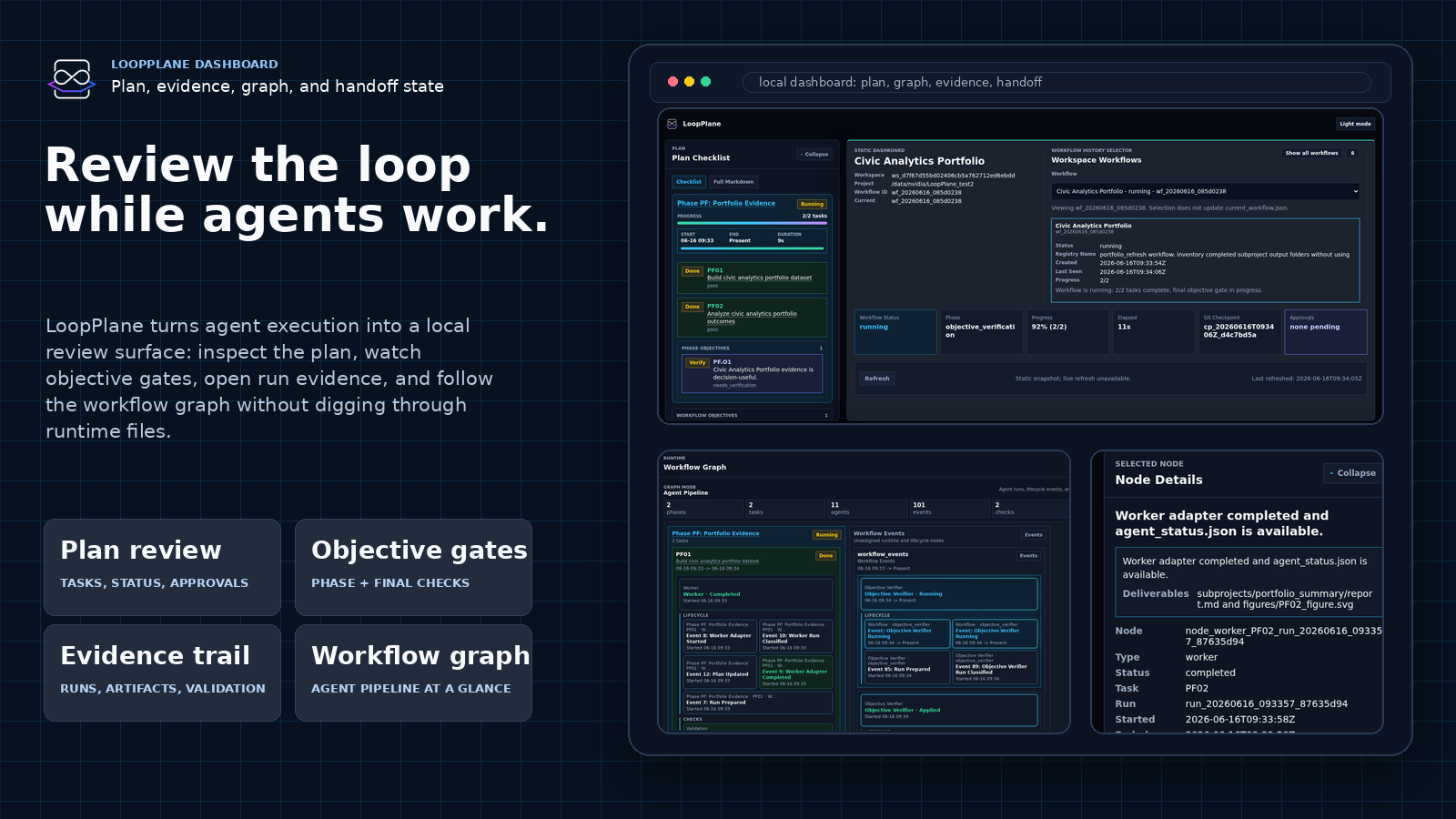
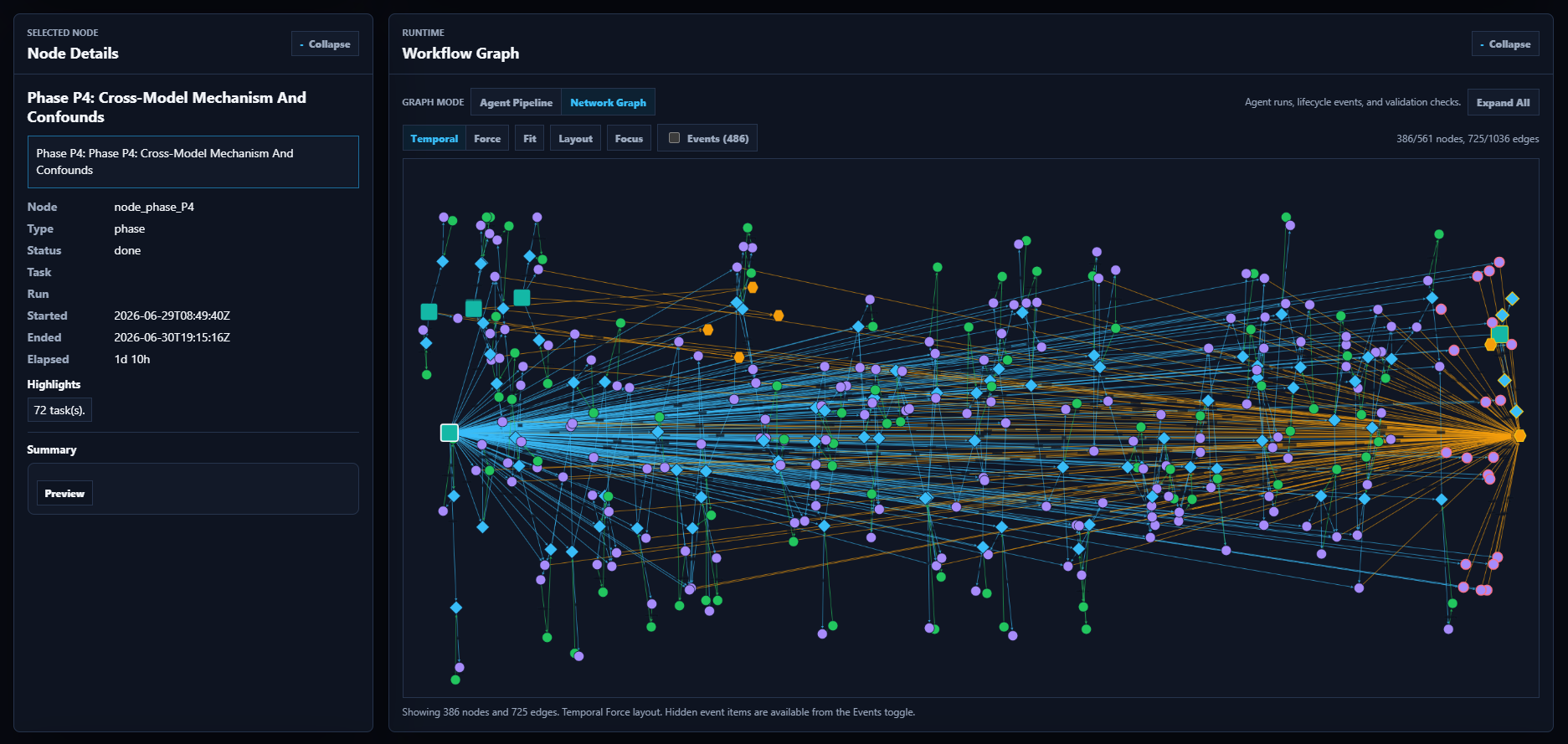
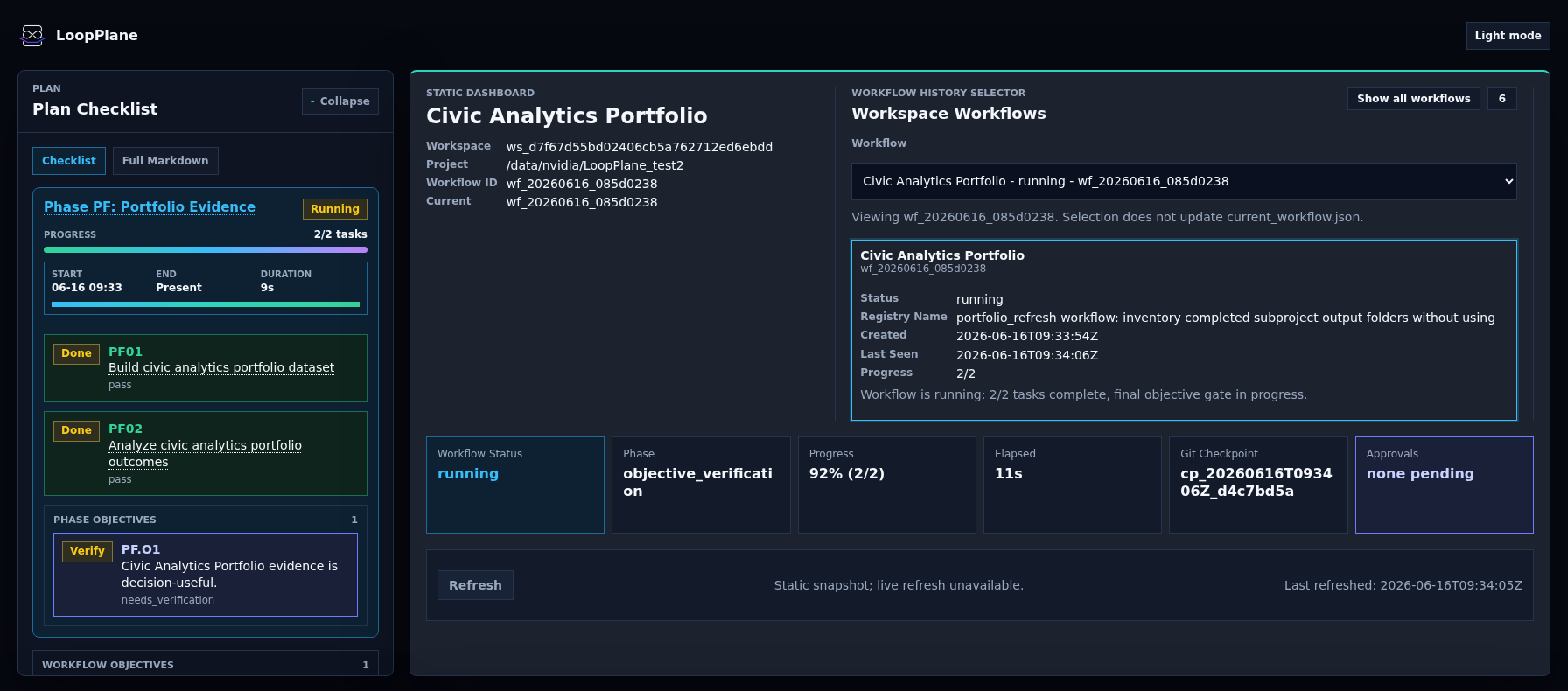
LoopPlane can render an offline dashboard bundle or start a token-protected
local server. The dashboard projects workflow truth into views for plan status,
objective state, runs, evidence, Git checkpoints, requests, approvals, runner
configuration, and workflow history.
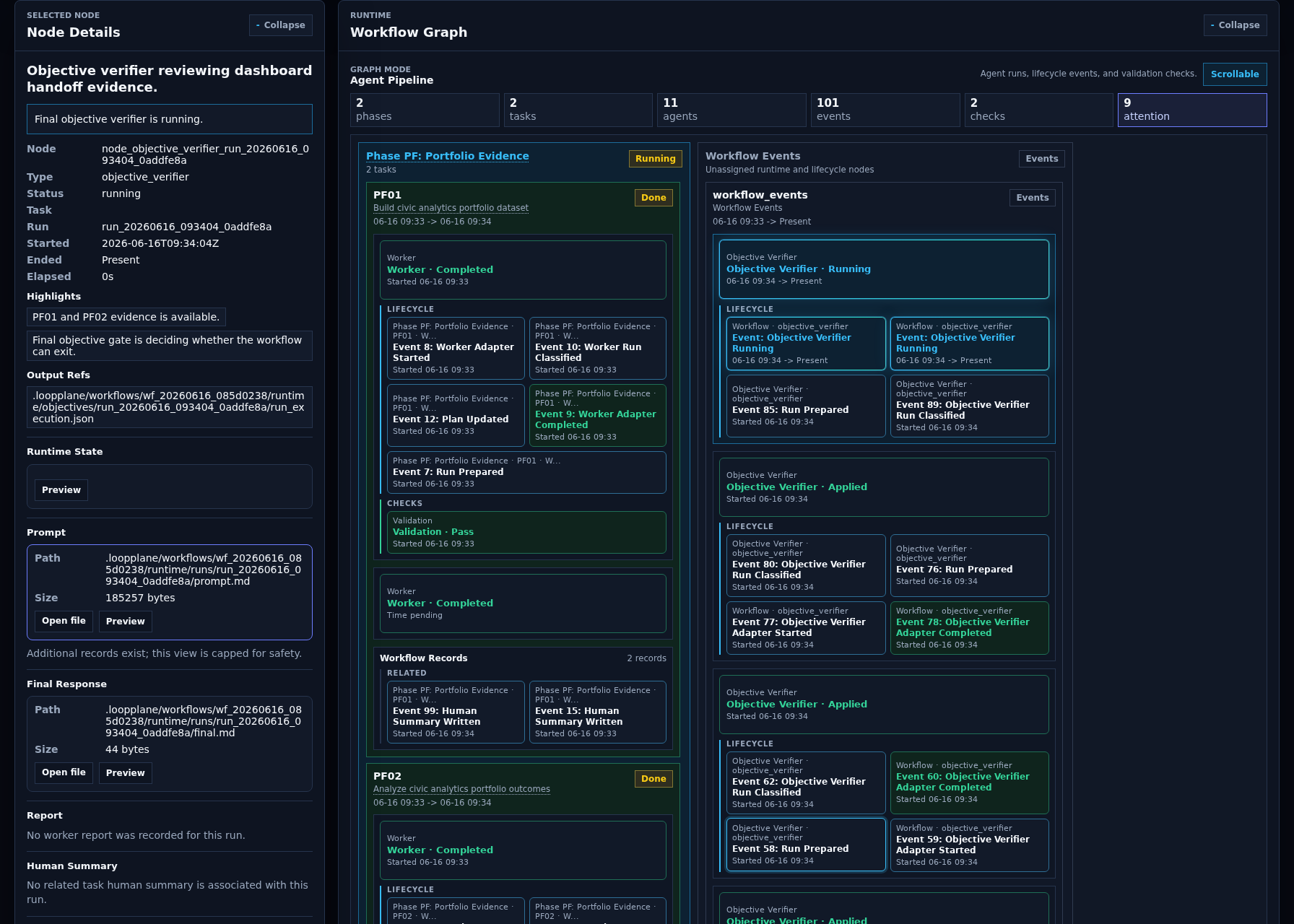
Static snapshot:
python3 scripts/loopplane dashboard --project "$PROJECT" --rebuild-read-models
Local server with automatic port selection:
python3 scripts/loopplane dashboard --project "$PROJECT" --port auto
See dashboard/README.md for dashboard API, security,
freshness, and workflow-switching details.
How It Works
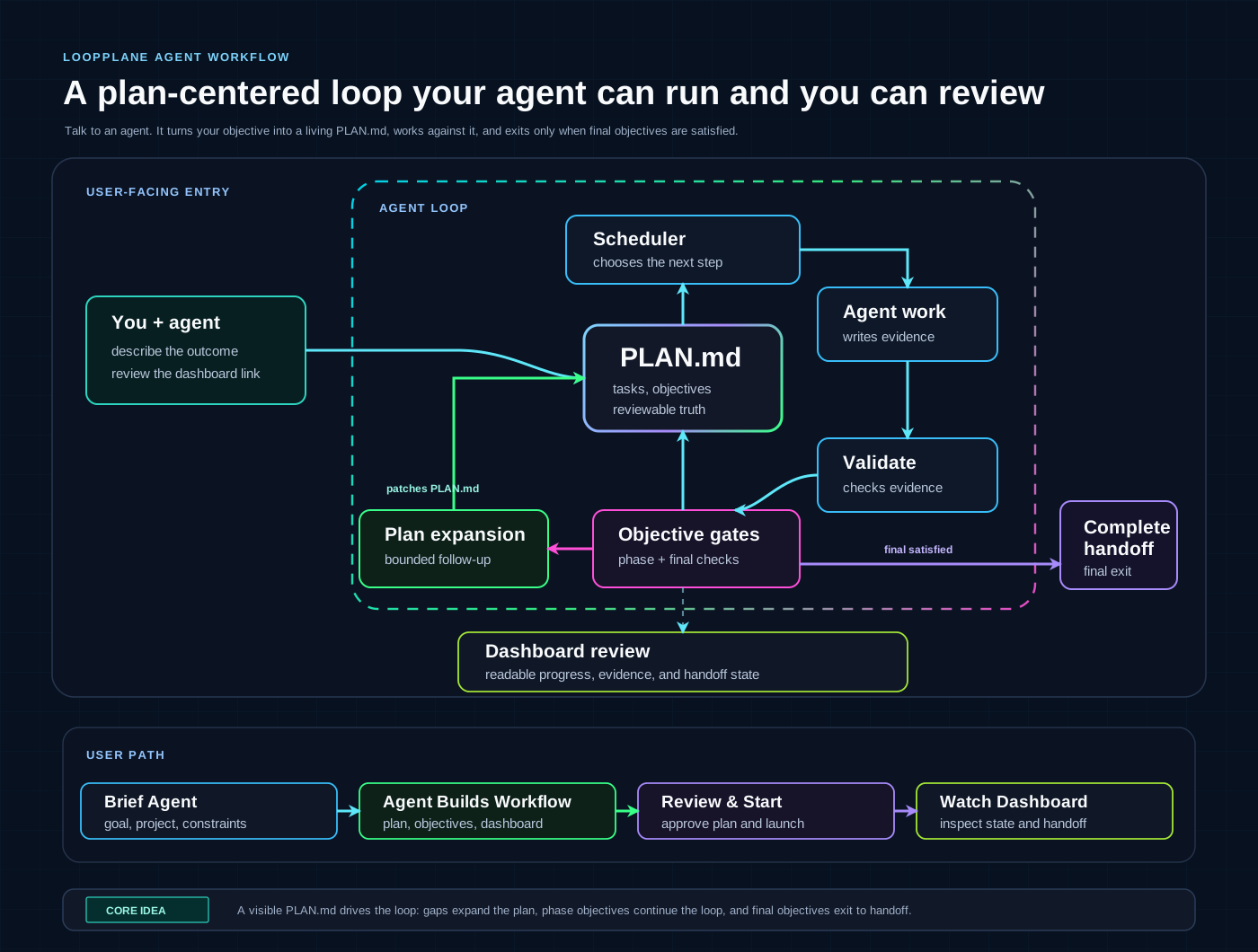
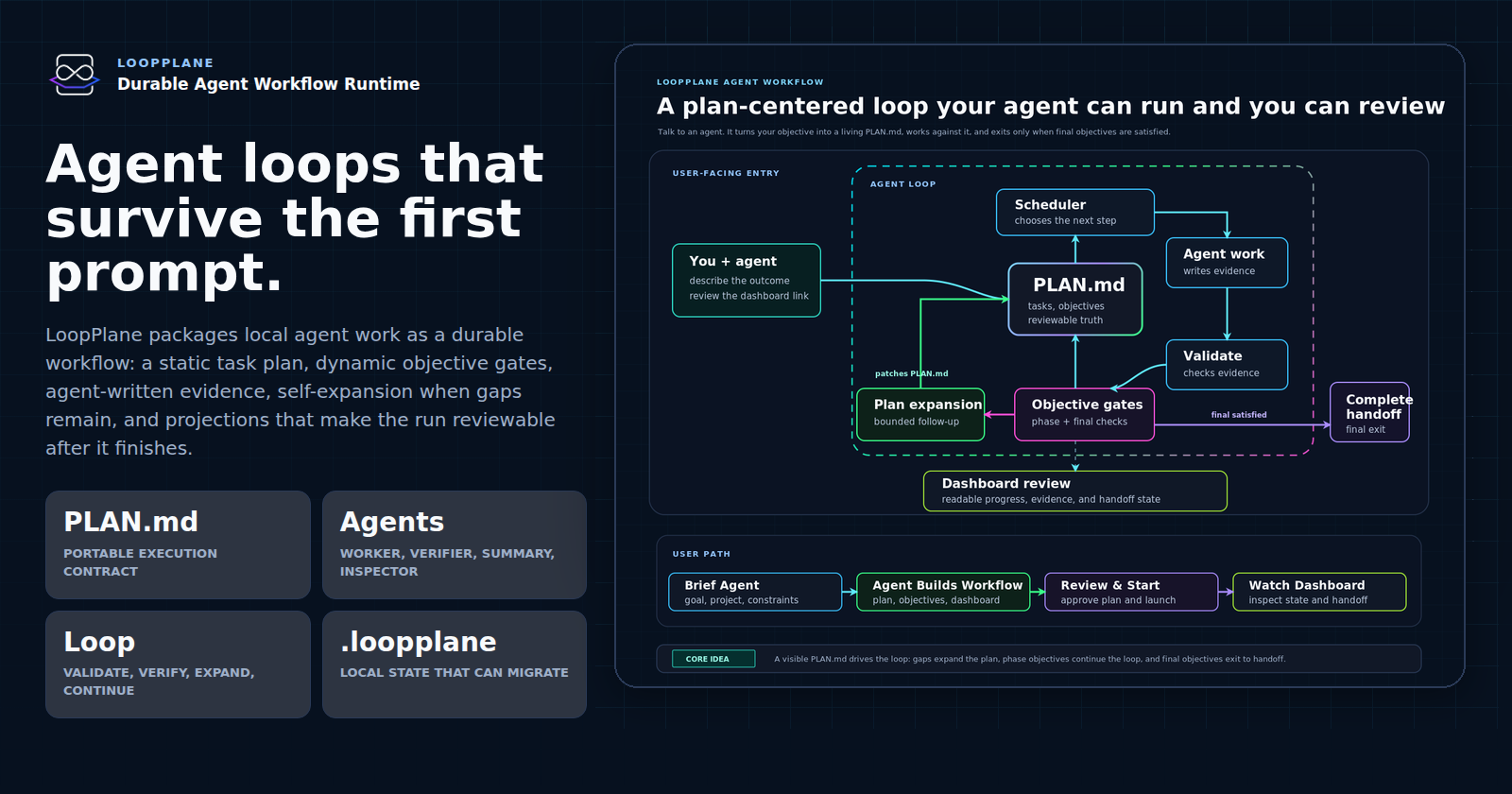
LoopPlane is a plan-centered workflow for agentic work:
- You ask an agent to use LoopPlane for a concrete outcome.
- The agent turns the conversation into brief, shared context, and an audited
PLAN.md. - The loop schedules from
PLAN.md, runs agent work, records evidence, and
validates the result. - Objective gates check phase objectives and final workflow objectives.
- If a gate finds a gap, the same loop expands the plan with bounded follow-up
work, then continues from the updatedPLAN.md. - If phase objectives are satisfied, the loop advances to the next planned
work; if final objectives are satisfied, it exits to completion and handoff. - The dashboard gives you a readable review surface over the plan, evidence,
and handoff state.
The important product idea is simple: the agent works inside a visible plan, so
progress, gaps, and completion are reviewable instead of disappearing into a
chat transcript.
Documentation
| Need | Start Here |
|---|---|
| Product overview | LOOPPLANE_SHOWCASE.md |
| Non-CLI copy-paste prompts | README_FOR_HUMANS.md |
| Local smoke example | examples/minimal_project/README.md |
| Runtime status | STATUS.md |
| Authoritative specification | LoopPlane.md |
| Protocol references | references/README.md |
| CLI surface | scripts/README.md |
| Runtime internals | runtime/README.md |
| Adapter contracts | runtime/adapters/README.md |
| Dashboard details | dashboard/README.md |
| Workflow templates | templates/workflows/README.md |
Project Status
The current package version is 1.6.0. The standalone runtime implements the
local MVP surface: real Codex CLI and Claude Code adapters, detached execution,
validation and reconciliation, objective gates, final verification, dashboard
views, workflow history, migration export/import, and Git checkpoint helpers.
See STATUS.md for implemented v1.6 support, intentionally
deferred scope, smoke-fixture boundaries, and release validation commands.
Release Gate Status
Completed standalone/MVP functionality includes real codex_cli andclaude_code_cli adapter execution, detached supervisor-backed runtime,
skill doctor/install/update/pack workflows, write-brief, local Git checkpoint
and vc inspection/rollback commands, read-model rebuilds, static and
token-protected server dashboard modes, request-record dashboard controls,
inspector chat/change requests, workspace-scoped dashboard list inspection,
validation, reconciliation, final verification, and release gates that block
unfinished required command and adapter surfaces.
v1.6 Support Status
Implemented v1.6 support includes same-workspace workflow history, dashboard
workflow switching, workspace registry/current pointer support, v1.5 flat
compatibility, project-local .loopplane/workspace.json,.loopplane/workflow_registry.json, and .loopplane/current_workflow.json
metadata, canonical v1.6 workflow-root mode under.loopplane/workflows/<workflow_id>/, workspace and workflow CLI groups,
LOOPPLANE_HOME discovery and local override support, Runner resource locks,
Monorepo and nested workspace boundaries, Migration export/import profiles,
Git-ref bundle export/import, archived/read-only workflow mutation safeguards,
and Release gates for those surfaces.
Optional behavior allowed by the spec but not required for the current core
runtime includes multiple active-running workflows in one workspace, global
cross-workspace dashboard discovery, parallel workers, cloud or orchestration
backends, advanced graph editing, complex cost accounting, multi-user dashboard
authentication, and remote browser collaboration.
Smoke and fixture paths are intentionally narrower than the full
provider-backed flow. noop, shell, fake codex/claude test binaries,
planner/auditor-disabled flows, and offline/static dashboard bundles are for
local smoke, fixture, or read-only validation; they do not replace installed
and authenticated provider-backed execution.
Command Reference
Common commands:
| Command | Purpose |
|---|---|
python3 scripts/loopplane --help |
Show the CLI surface |
python3 scripts/loopplane init --project <project> --brief "..." |
Create a project-local workflow |
python3 scripts/loopplane configure-agent --project <project> ... |
Configure local runner commands |
python3 scripts/loopplane doctor-agent --project <project> --runner <runner> |
Check runner readiness |
python3 scripts/loopplane plan --project <project> |
Generate a plan draft |
python3 scripts/loopplane audit-plan --project <project> |
Audit the draft |
python3 scripts/loopplane activate-plan --project <project> |
Promote the draft to active PLAN.md |
python3 scripts/loopplane start --project <project> --detach |
Start the detached runtime |
python3 scripts/loopplane status --project <project> |
Inspect workflow status |
python3 scripts/loopplane logs --project <project> |
Inspect recent events and logs |
python3 scripts/loopplane dashboard --project <project> --port auto |
Start the local dashboard server |
python3 scripts/loopplane health --project <project> |
Run runtime health checks |
python3 scripts/loopplane final-verify --project <project> |
Run final completion gates |
Detailed command groups are documented in scripts/README.md.
Maintainer Smoke Test
This deterministic path is an offline release smoke built from smoke fixtures,
not production agent substitutes. It uses noop and shell, plus deterministic
objective reports, so maintainers can verify the package without external agent
credentials. It does not replace installed and authenticated provider-backed
execution with real codex_cli or claude_code_cli runners.
Run from the repository root:
PROJECT="$(mktemp -d /tmp/loopplane-minimal-example.XXXXXX)"
export LOOPPLANE_HOME="$(mktemp -d /tmp/loopplane-home.XXXXXX)"
python3 scripts/loopplane init --project "$PROJECT" --brief "Run the minimal LoopPlane example."
python3 scripts/loopplane configure-agent --project "$PROJECT" --runner planner --role planner --adapter noop --command noop
python3 scripts/loopplane configure-agent --project "$PROJECT" --runner auditor --role auditor --adapter noop --command noop
python3 scripts/loopplane doctor-agent --project "$PROJECT" --runner planner
python3 scripts/loopplane plan --project "$PROJECT"
python3 scripts/loopplane audit-plan --project "$PROJECT"
python3 scripts/loopplane activate-plan --project "$PROJECT"
python3 examples/minimal_project/write_smoke_plan.py "$PROJECT"
WORKER="$(pwd)/examples/minimal_project/worker.py"
python3 scripts/loopplane configure-agent --project "$PROJECT" --runner worker --role worker --adapter shell --command "python3 $WORKER"
python3 scripts/loopplane preview --project "$PROJECT"
python3 scripts/loopplane run --project "$PROJECT" --max-ticks 1
RUN_DIR=$(find "$PROJECT/.loopplane" -path '*/results/T001/runs/run_*' -type d -name 'run_*' | sort | tail -n 1)
python3 scripts/loopplane validate --project "$PROJECT" --task T001 --run-dir "$RUN_DIR"
python3 scripts/loopplane reconcile --project "$PROJECT" --task T001 --run-dir "$RUN_DIR"
python3 examples/minimal_project/write_smoke_objective_reports.py "$PROJECT"
python3 scripts/loopplane rebuild-read-models --project "$PROJECT"
python3 scripts/loopplane dashboard --project "$PROJECT" --rebuild-read-models
python3 scripts/loopplane health --project "$PROJECT"
python3 scripts/loopplane vc doctor --project "$PROJECT"
python3 scripts/loopplane final-verify --project "$PROJECT"
Expected result:
loopplane validation: passloopplane reconciliation: reconciledloopplane dashboard: renderedloopplane health: healthyloopplane final-verify: pass
Skill Package Workflows
LoopPlane can be used directly from this checkout or projected into a target
project as an Agent Skill package:
python3 scripts/loopplane skill doctor
python3 scripts/loopplane skill install --target "$PROJECT"
python3 scripts/loopplane skill update --target "$PROJECT"
python3 scripts/loopplane skill pack --output ./dist/loopplane-skill.zip
skill install and skill update are not complete until required external
runner CLIs have been found, configured, and doctored.
Package Layout
SKILL.md: skill-style entry instruction.skill.json: portable package metadata.agents/openai.yaml: Codex skill interface metadata.references/: protocol, runtime, planner, adapter, dashboard, and security references.templates/: project, plan, shared-context, workflow, and agent prompt templates.scripts/loopplane: standalone CLI entrypoint.runtime/: scheduler, validator, reconciler, read-model builder, adapters,
dashboard renderer, health checks, migrations, and version-control support.dashboard/: static dashboard assets and documentation.examples/: runnable local smoke examples.
Validation
Common release checks from the repository root:
python3 scripts/check_package_tree.py
python3 -m unittest tests.test_e2e_smoke tests.test_read_models tests.test_health tests.test_final_verifier
uv run --with jsonschema python -m unittest discover -s tests
git diff --check
Contributing
Keep changes local-first, evidence-driven, and aligned with the existing runtime
authority model. The quickest orientation path is:
- Run the maintainer smoke test above.
- Read
STATUS.md. - Read the relevant reference in
references/. - Run the validation commands before proposing a change.
License
LoopPlane is licensed under the Apache License, Version 2.0. SeeLICENSE for details.
Reviews (0)
Sign in to leave a review.
Leave a reviewNo results found