cc-settings-preset
Health Uyari
- License — License: ISC
- Description — Repository has a description
- Active repo — Last push 0 days ago
- Low visibility — Only 5 GitHub stars
Code Uyari
- process.env — Environment variable access in src/cli.ts
Permissions Gecti
- Permissions — No dangerous permissions requested
Bu listing icin henuz AI raporu yok.
A switchable, reusable runtime settings preset selector for Claude Code

A switchable, reusable runtime settings preset selector for Claude Code.






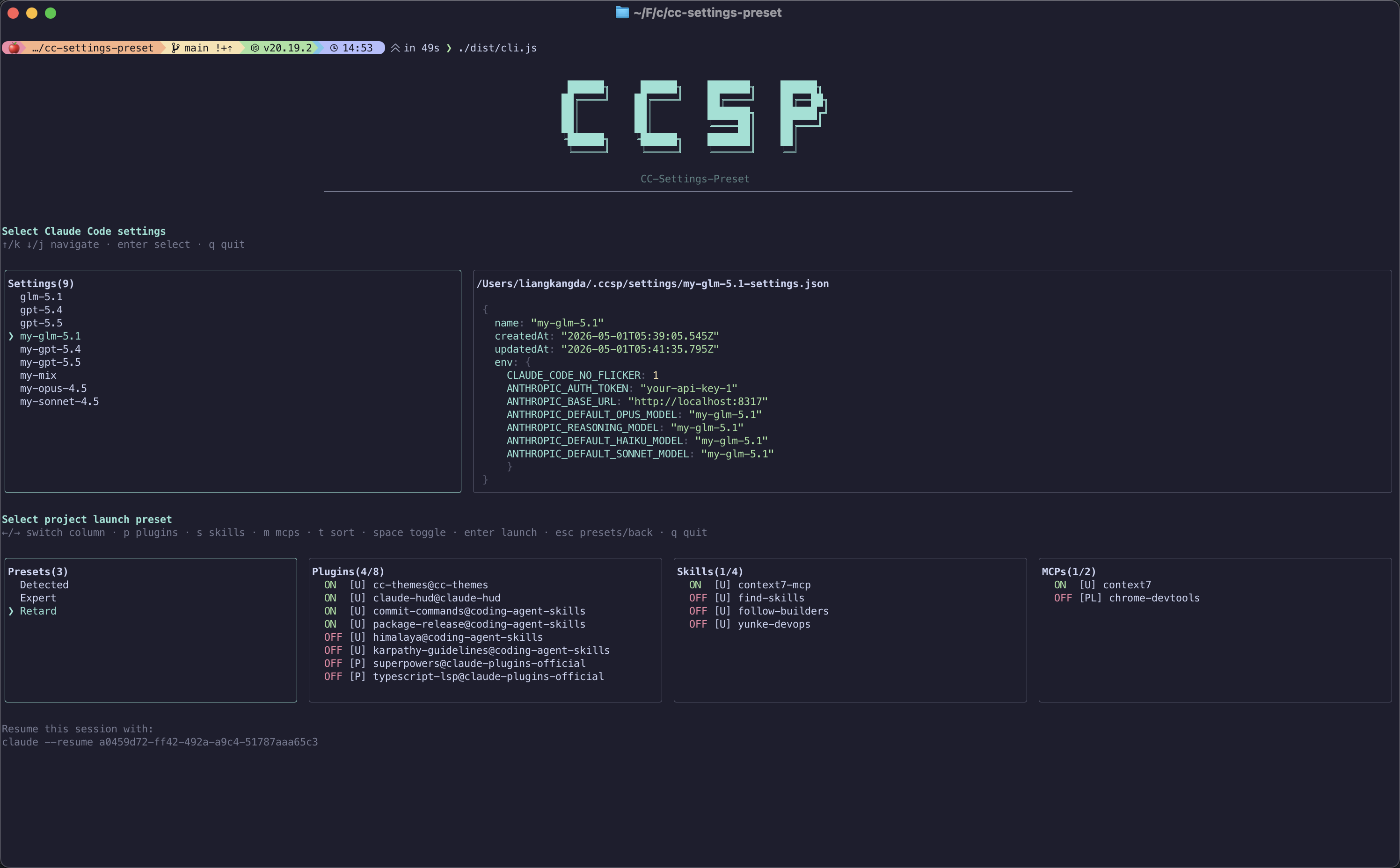
Interactive flow: pick a global base preset (left), preview its settings as YAML or JSON (right), then tune plugins / skills / MCP per launch before starting Claude Code.
English | 简体中文
Quick Start
Prerequisites: Claude Code CLI installed (claude available on your PATH).
Install
macOS (Homebrew, recommended) — via the personal tap lkangd/homebrew-tap; Node.js 20 is installed as a dependency:
brew tap lkangd/tap
brew install cc-settings-preset
npm / pnpm — requires Node.js ≥ 20.19.2 on your machine:
npm install -g @lkangd/cc-settings-preset
# or
pnpm add -g @lkangd/cc-settings-preset
After install, use either ccsp or cc-settings-preset.
To update later, run ccsp update. It checks the latest published version, prints changelog entries for versions newer than your current install, detects Homebrew vs npm installation, and runs the matching upgrade command.
Usage
# Start from a project directory (recommended entry)
ccsp

# Forward Claude Code args (ccsp owns --settings)
ccsp claude --help
ccsp claude -p "review this PR"

# Direct run: skip the TUI, pick presets by name, forward remaining args to claude
ccsp -g work -p web
ccsp -g glm-5.1 -p Chore claude -p "summarize open issues"
ccsp --global-preset work --project-preset web --dry-run   # preview merged config, no launch

# Check for updates and upgrade ccsp with the detected installer
ccsp update

# Resume the last session in this project with its original preset/launch config
ccsp --continue

# Resume a specific session by id, reusing the preset/launch config it was launched with
ccsp --resume 99580820-9437-475c-883c-399bcfba3c47
First-time workflow:
# 1. Import a global base preset from existing settings
ccsp create

# 2. In a project: pick a preset, tune plugins / skills / MCP for this launch, then start Claude
ccsp

# 3. Manage global or project launch presets
ccsp manage
ccsp manage --project
Use Cases
CCSP (Claude Code Settings Preset) helps when you need to switch Claude Code configuration across contexts without hand-editing JSON every time.
1. Multiple models / API backends
Different projects use different API keys, ANTHROPIC_BASE_URL, or default models (Opus, Sonnet, custom gateway). Editing ~/.claude/settings.json by hand is error-prone.
Approach: Run ccsp create to save a global base preset per environment (including env and model fields). In each project, run ccsp and pick the preset—no repeated edits to your main settings file.
2. Per-project plugins, skills, and MCP
Under one global baseline, project A disables an official plugin, project B blocks Chrome DevTools MCP, project C turns off certain skills.
Approach: Use a launch preset in the project to override only enabledPlugins, skillOverrides, and deniedMcpServers. CCSP merges that with the base preset into a temp settings file, then starts claude.
3. Team baseline, personal launch tweaks
The team can commit .claude/settings.json as the project baseline. Individuals keep global presets locally and store launch combinations under .claude/.ccsp/ (gitignored by default to avoid leaking secrets).
4. Replace long claude one-liners
Instead of:
claude --settings ~/.claude/my-api-1.json -- ...
use ccsp or ccsp claude -- ... to pick presets and toggles in the TUI; CCSP generates the settings path and runs claude --settings <generated>.
5. Config management and preview
ccsp manage— browse, rename, delete global base presets, preview JSON, launch from the UI.ccsp manage --project— manage launch presets for the current repo (create / save / rename / delete / launch).
6. Headless automation — direct run + claude -p (highlight)
CCSP now supports non-interactive direct launch: specify presets on the command line, merge settings, and spawn claude without opening the TUI. This pairs naturally with Claude Code’s print / agent mode (claude -p "…") for scripts, cron jobs, GitHub Actions, and other automation.
# One shot: global base preset + project launch preset + non-interactive prompt
ccsp -g my-gateway-api -p ci-minimal claude -p "run the test suite and summarize failures"

# Preview what would launch (two-column global view + four-column launch toggles)
ccsp -g my-gateway-api -p ci-minimal --dry-run
Why this matters now: Starting June 15, 2026, Anthropic separates Agent SDK / claude -p usage from your subscription usage limits. Interactive Claude Code in the terminal still draws from your plan quota; claude -p moves to a dedicated monthly Agent SDK credit (Pro/Max/Team/Enterprise). That makes non-interactive automation a much cheaper lane than burning interactive session limits—if you can still swap API backends and tune plugins / skills / MCP per job.
Where CCSP fits: Keep a global preset pointed at a third-party API (ANTHROPIC_BASE_URL, keys in env, model defaults) and a launch preset that enables only the plugins, skills, and MCP servers that job needs. Direct run applies both layers and forwards the rest of the argv to claude:
| Flag | Alias | Role |
|---|---|---|
--global-preset |
-g |
Global base preset name (from ~/.ccsp/settings/) |
--project-preset |
-p |
Project launch preset name, or Detected for the auto-discovered baseline |
--dry-run |
— | Print the resolved global + launch preview; do not spawn claude |
Notes:
- Provide at least one of
-g/-pto enter direct mode; otherwise CCSP stays interactive. - Put CCSP flags before
claudewhen forwarding args. Afterclaude,-pis Claude’s prompt flag, not CCSP’s project preset. - With only
-p, the global base falls back to last-used preset or the project settings source (same as project-manage launch). - With only
-g, launch toggles use the Detected baseline (no saved launch preset required).
How It Works
Two-layer preset model
| Layer | Location | Role |
|---|---|---|
| Base preset | ~/.ccsp/settings/*.json |
Full settings snapshot (import from user / project / project-local or any JSON) |
| Launch preset | <project>/.claude/.ccsp/launch-presets/*.json |
Delta only: plugin toggles, skill overrides, MCP deny list |
On launch, CCSP does not overwrite ~/.claude/settings.json or the project’s .claude/settings.json. It writes a temporary merged file (.claude/.ccsp/tmp/<timestamp>-settings.json) and runs:
claude --settings <temp-file> [your other args]
ASCII flow
┌─────────────────────────────────────────────────────────────────────────┐
│                    User runs ccsp / ccsp claude                         │
└─────────────────────────────────────────────────────────────────────────┘
                                      │
                                      ▼
┌─────────────────────────────────────────────────────────────────────────┐
│ ① Discover settings sources (collect if present; no runtime merge yet) │
│    · .claude/settings.local.json  (project-local)                       │
│    · .claude/settings.json        (project)                             │
│    · ~/.claude/settings.json      (user)                                │
└─────────────────────────────────────────────────────────────────────────┘
                                      │
                    ┌─────────────────┴─────────────────┐
                    ▼                                   ▼
      Base presets exist in ~/.ccsp?              No base presets yet
                    │                                   │
                    ▼                                   ▼
    ┌───────────────────────────┐          Use empty base {} or
    │ TUI: pick global base      │          run ccsp create first
    │ (remember last per cwd)    │
    └───────────────────────────┘
                    │
                    ▼
┌──────────────────────────────────────────────────────────────────────────┐
│ ② Resolve effective baseline                                             │
│    · Plugins: user < project < project-local < selected base preset      │
│    · Skills: scan ~/.claude/skills, project skills/commands, plugin cache│
│    · MCP: merge .mcp.json, ~/.claude.json, plugin manifests, etc.        │
└──────────────────────────────────────────────────────────────────────────┘
                                      │
                                      ▼
┌─────────────────────────────────────────────────────────────────────────┐
│ ③ TUI: project launch layer (Launch Preset)                             │
│    · Left: launch presets  Right: plugin | skill | MCP toggles           │
│    · Save as preset / overwrite / launch without saving                  │
└─────────────────────────────────────────────────────────────────────────┘
                                      │
                                      ▼
┌─────────────────────────────────────────────────────────────────────────┐
│ ④ finalizeSettings(base, launch)                                        │
│    · Copy full base preset                                               │
│    · Strip enabledPlugins / skillOverrides / deniedMcpServers from base  │
│    · Apply launch-layer values for those three fields (if any)           │
└─────────────────────────────────────────────────────────────────────────┘
                                      │
                                      ▼
┌─────────────────────────────────────────────────────────────────────────┐
│ ⑤ Write .claude/.ccsp/tmp/*.json (gitignored; keep at most 50 files)   │
└─────────────────────────────────────────────────────────────────────────┘
                                      │
                                      ▼
┌─────────────────────────────────────────────────────────────────────────┐
│ ⑥ spawn: claude --settings <tmp> [sanitized args]                      │
│    · Strip user --settings / --settings=... (managed by ccsp)           │
└─────────────────────────────────────────────────────────────────────────┘
Pain points with Claude Code settings alone
| Pain point | Why it hurts |
|---|---|
| Multiple files and scopes | user / project / project-local settings make it hard to see what actually applies. |
| High switching cost | Changing API, model, or plugin mix means editing JSON or memorizing --settings paths. |
| Easy to break main config | Editing ~/.claude/settings.json can mix secrets and global defaults. |
| Scattered toggles | enabledPlugins, skillOverrides, deniedMcpServers sit beside env with no “this launch only” view. |
| Commit risk | Project settings with keys in env can be committed by mistake. |
What CCSP adds
- Non-destructive launch — inject config via temp files; does not force-overwrite your main settings.
- Two-layer split — global “base environment” vs project “launch delta” for multi-repo work.
- Visual toggles — terminal TUI to browse JSON and flip plugins / skills / MCP.
- Direct run —
-g/-p/--dry-runfor scripts and CI; combine withclaude -pfor headless agent tasks. - Remembers last choice — per project directory for base and launch presets.
- Resumable sessions — every launch is bound to its preset/launch config;
ccsp --continueandccsp --resume <id>restore the original config and resume the matching Claude session in one shot. - Safer defaults —
.claude/.ccsp/gets a.gitignorethat ignores everything on init.
Session resume
After Claude exits, CCSP records the real Claude session id (discovered by diffing ~/.claude/projects/<encoded-cwd>/ against a pre-launch snapshot — --session-id is unreliable in interactive mode, so we don't pin it) and binds it to the launch config used. Stored under .claude/.ccsp/sessions.json (capped at 50, pruned by last-used time):
ccsp --resume <uuid>— re-finalize that session's stored config and runclaude --resume <uuid>in one step.ccsp --continue— pick the most recently exited ccsp session in this project and resume it deterministically by id. Concretely: launch A, then B, exit A first, runccsp --continue— you get A back with A's original preset/launch config (not B's).- If the stored binding points at a Claude session that no longer exists, CCSP discards it and falls back to interactive preset selection.
Limitations (read before assuming)
| Cannot / caveat | Explanation |
|---|---|
| Not a Claude Code replacement | Wraps the claude subprocess only; exits if CLI is missing. |
| Does not write back main settings | Merged output is not saved to ~/.claude/settings.json; sync manually or update base presets via ccsp create. |
Owns --settings |
Your --settings is ignored with a warning; path is generated by CCSP. |
| Limited launch fields | Launch presets only override enabledPlugins, skillOverrides, deniedMcpServers; other fields (e.g. env) come from the base preset. |
| No “add MCP server” in UI | Can deny discovered MCPs via deniedMcpServers; cannot create new server entries. |
| Interactive-first for create/manage | create / manage remain TUI-driven; use direct run or edit JSON for headless launch. |
| Derived presets | Schema supports derived type; CLI does not expose full create/manage flow yet. |
| Project store is local by default | launch-presets, tmp, and sessions.json under .claude/.ccsp/ are not in Git unless you opt in. |
| Temp file cap | Oldest temp settings in tmp/ are pruned past 50 by last-used time; statusline scripts are cleaned every exit. |
| Resume only sees ccsp launches | ccsp --continue / --resume only know about sessions started through ccsp on the new code path; sessions started directly with claude aren't bound and won't appear. |
Command Reference
| Command | Description |
|---|---|
ccsp |
Default: pick base preset → configure launch layer → start claude |
ccsp -g <name> |
Direct run: global base preset only (launch layer = Detected) |
ccsp -p <name> |
Direct run: project launch preset only (global base = last-used or project settings) |
ccsp -g <global> -p <launch> |
Direct run: both layers, then start claude |
ccsp … --dry-run |
With -g and/or -p: preview resolved presets; no spawn |
ccsp … claude [args…] |
Direct or interactive; CCSP flags before claude, Claude args after |
ccsp claude [args...] |
Same, forwarding args to claude (without --settings) |
ccsp --continue |
Resume the most recently exited ccsp session in this project with its original preset / launch config |
ccsp --resume <uuid> |
Resume a specific session by id, reusing the preset / launch config it was launched with (falls back to interactive if the binding is unknown) |
ccsp create |
Interactively create a global base preset |
ccsp manage |
Manage global base presets (preview / rename / delete / create / launch) |
ccsp manage --project |
Manage launch presets for the current project |
ccsp config |
Configure ccsp preferences (run mode, env-only preview, statusline, preview format) |
TUI shortcuts
Base preset selection: j/k or arrows to move, f toggle between env-only and full settings preview, Enter to confirm, q to quit.
Global manage (ccsp manage): l launch, r rename, d delete, c create, o reveal in Finder, q quit.
Project launch layer: switch between presets and plugin / skill / MCP columns; save as launch preset. Ctrl+L refreshes the UI.
Config (ccsp config): j/k or arrows to move, space/Enter toggle the focused option, q quit.
Preferences (ccsp config)
ccsp config opens a two-column view (options on the left, the focused option's description on the right) for global, per-user preferences stored in ~/.ccsp/config.json. Both default to enabled:
| Option | Default | Effect |
|---|---|---|
| Run mode | both |
Controls which launch stages ccsp uses: both selects a global preset and then a project launch preset; global-only selects only a global preset; project-only skips the global preset stage and launches from a project launch preset using the current project settings source as the base. |
| Global preset env-only | enabled | The base preset selection screen previews only the env field of the selected preset by default. Press f on that screen to toggle between the env-only view and the full settings view. When disabled, the full settings are shown by default. |
| Show statusline | enabled | ccsp injects a statusline at the bottom of Claude Code showing the active preset and toggle summary (`CCSP: / |
| Settings preview format | yaml |
How the selected preset settings are rendered on the right of the preset selection (ccsp) and manage (ccsp manage) screens — yaml or json. Both are syntax-highlighted. |
Directory Layout
~/.ccsp/
├── index.json                 # global base preset index
├── settings/
│   └── <name>-settings.json   # base preset body
├── config.json                # user preferences (run mode, env-only preview, statusline, preview format)
└── last-settings.json         # last base preset name per project cwd

<project>/.claude/.ccsp/       # entire dir gitignored by default
├── launch-presets/
│   ├── index.json
│   └── <name>-launch.json     # launch-layer overrides only
├── tmp/
│   └── <stem>-settings.json   # finalized launch config (max 50, pruned by use time)
├── sessions.json              # sessionId → launch config binding, for --continue / --resume
└── last-used.json             # last launch preset used
Development
git clone https://github.com/lkangd/cc-settings-preset.git
cd cc-settings-preset
pnpm install
pnpm run dev          # run tsx src/cli.ts directly
pnpm run check        # typecheck + build + test
Contributing
Issues and pull requests are welcome. Before you contribute:
- Search existing issues to avoid duplicates; open an issue for new features with motivation and proposed usage.
- Verify locally:
pnpm run checkmust pass; CLI changes should include or update tests undertests/. - Style: Match the codebase (ESM, strict TypeScript, Ink +
flows/state machines); avoid unrelated refactors. - Scope: CCSP focuses on settings presets and launch orchestration—avoid heavy unrelated dependencies.
- Docs: Update both
README.mdandREADME.zh-hans.mdfor user-visible behavior changes. - Commits: Concise English or Chinese is fine; explain why, not only what.
Bug reports should include: OS, Node version, how you invoked ccsp, relevant ~/.ccsp or .claude/.ccsp layout (redact secrets), and full terminal output.
License
ISC © lkangd
Yorumlar (0)
Yorum birakmak icin giris yap.
Yorum birakSonuc bulunamadi