agent-teamflow
Health Uyari
- License — License: MIT
- Description — Repository has a description
- Active repo — Last push 0 days ago
- Low visibility — Only 5 GitHub stars
Code Gecti
- Code scan — Scanned 10 files during light audit, no dangerous patterns found
Permissions Gecti
- Permissions — No dangerous permissions requested
Bu listing icin henuz AI raporu yok.
Claude Code skills for multi-developer teams. Parallel agents, shared repo, no collisions.
agent-teamflow — Team level harness

PARALLEL AGENTS, ZERO COLLISIONS






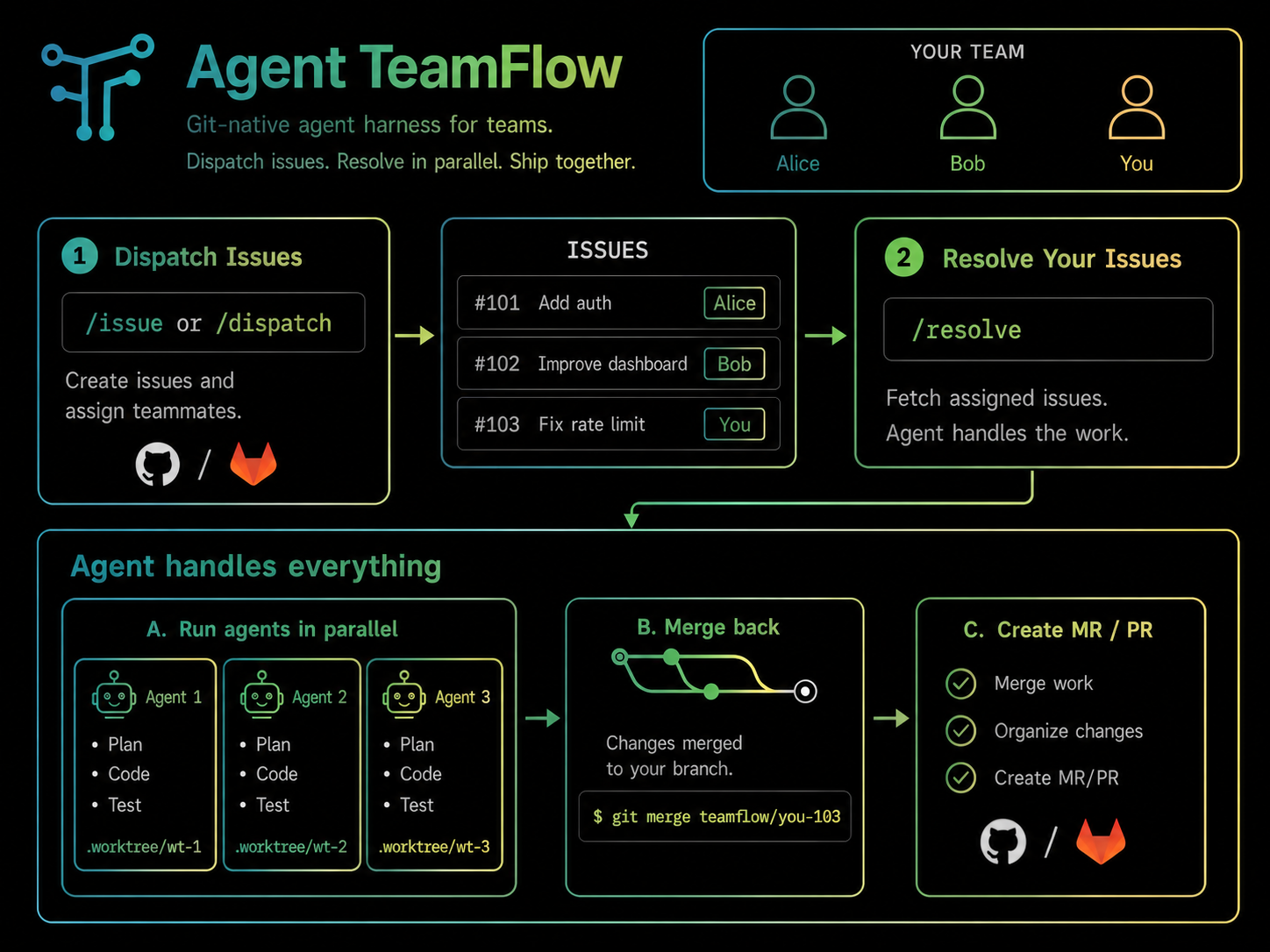
agent-teamflow is a team workflow harness for coding agents, created for multiple developers working on one codebase. It automates the full cycle from issue to merged PR/MR and gives each developer their own branch lane — so multiple agents from each developer can work on the same repo in parallel without collisions.
Supported agents: Claude Code, Codex. Supported issue trackers: GitHub (gh CLI), GitLab (glab CLI).
Setup · Examples · Contributing · Changelog · Protocol (AGENTS.md) · License
Why I built this
During my internship, my teammate and I were both running Claude Code agents on the same repo simultaneously. Before agent-teamflow, every session looked the same: manually prompt the agent to fetch issues, wait, manually prompt it to start working, wait, manually prompt it to open an MR/PR when done — and repeat that whole sequence every time. On top of that, we had no real coordination layer between us. We'd constantly interrupt each other with "hey, what are you working on?" just to avoid touching the same files. The agents were fast, we were the bottleneck.
agent-teamflow automates that entire coordination layer. /resolve handles the full cycle: fetch issues, implement, branch, merge — in one command. The branching convention gives each developer their own lane so agents never collide without us having to manually check in. We stopped being the bottleneck.
See it work
Two developers, two terminals, zero coordination:
┌─ alice@laptop ────────────────────────┐  ┌─ bob@laptop ──────────────────────────┐
│ $ claude                              │  │ $ claude                              │
│ > /resolve                            │  │ > /resolve                            │
│                                       │  │                                       │
│ Picked issues #5, #6.                 │  │ Picked issues #8, #9.                 │
│ Starting 2 workers in worktrees off   │  │ Starting 2 workers in worktrees off   │
│ origin/alice-staging.                 │  │ origin/bob-staging.                   │
│                                       │  │                                       │
│   #5  → 5-checkout-validation  done   │  │   #8  → 8-pagination          done   │
│   #6  → 6-payment-receipts     done   │  │   #9  → 9-health-check        done   │
│                                       │  │                                       │
│ PR #10: alice-staging → staging       │  │ PR #11: bob-staging → staging         │
└───────────────────────────────────────┘  └───────────────────────────────────────┘
                              \                 /
                               v               v
                          ┌────────────────────────┐
                          │     origin/staging     │
                          └────────────────────────┘
Install (recommended)
Two install paths. For team repos, vendor agent-teamflow into the repo so everyone gets the same version automatically:
git clone --depth 1 https://github.com/lkim0402/agent-teamflow.git .agent-teamflow-tmp \
  && cp -r .agent-teamflow-tmp/.claude .agent-teamflow-tmp/.codex .agent-teamflow-tmp/AGENTS.md . \
  && ln -sf AGENTS.md CLAUDE.md \
  && rm -rf .agent-teamflow-tmp

git add .claude .codex AGENTS.md CLAUDE.md && git commit -m "add agent-teamflow"
This adds .claude/commands/, .codex/skills/, AGENTS.md, and a CLAUDE.md -> AGENTS.md symlink to your repo. Claude Code picks up project-scope slash commands automatically. Codex picks up matching skills under /skills.
Already have a
.claude/directory with your own custom commands?cp -rwill merge — inspect the result before committing.Want to merge
AGENTS.mdwith an existing one? After the copy, manually combine the two and delete the conflict.
In your agent, run /teamflow-init to write .agent-teamflow (your team's config). Then commit that too.
Quick start (TL;DR)
Full beginner guide (auth, branches, examples): SETUP.md.
Install globally for personal use (or for solo evaluation):
git clone --depth 1 https://github.com/lkim0402/agent-teamflow.git ~/.agent-teamflow \
  && ~/.agent-teamflow/setup --all
This installs 9 Claude Code slash commands into ~/.claude/commands/ and 9 Codex skills into ~/.codex/skills/. Then, inside any repo:
/teamflow-init             # bootstrap this repo (writes .agent-teamflow)
/issue add a CSV exporter  # file one branch-sized issue from a brain dump
/resolve                   # pick up your assigned issues, implement in parallel
/git-auto-merge            # commit, push, merge into your lane, open PR
Upgrading? Run /teamflow-update from any agent. Or manually: cd ~/.agent-teamflow && git pull && ./setup.
Do not combine global and vendor installs for the same workflow. If a repo vendors .codex/skills/* and you also have ~/.codex/skills/* for the same names, Codex may show duplicate skills in /skills. Prefer vendor mode for teams.
Highlights
- Per-developer integration branches —
feature → owner-staging → shared staging → main. Each developer pushes only to their own lane. /issue— turn a brain dump into branch-sized issues sized to avoid batch-merge conflicts./dispatch— split a brain dump across multiple teammates, write a workflow log, file issues for each./resolve— pick up your open issues, implement each in a parallel worktree (cap 3), batch-merge when done./git-auto-merge— commit → push → merge into your lane → open or update an MR/PR to shared staging./post-merge— after merging to staging, label linked issues as "done in staging". Auto-close fires on staging → main./prod-check— pre-production diff review scoped to your own commits: impact, contracts, auth, stability, regressions.- Vendor or global install — one committed copy for the whole team, or per-developer install for solo use.
Security model
agent-teamflow workflows never push to branches.main directly — the branching model funnels everything through staging. Runbooks ship with explicit prohibitions:
/git-auto-mergeand/resolverefuse to delete branches or worktrees without per-turn explicit user approval./teamflow-initonly creates remote branches when the user clicksYesin Step 7./post-mergeonly labels issues; it never closes or merges anything.- All workflows except the three lifecycle ones (
/teamflow-init,/teamflow-update,/teamflow-help) refuse to run without.agent-teamflow.
Treat your issue tracker as the source of truth. Workflows are automation, not authority.
Operator quick refs
- Slash commands (Claude Code):
/teamflow-init,/teamflow-update,/teamflow-help,/issue,/dispatch,/resolve,/git-auto-merge,/post-merge,/prod-check - Skills (Codex
/skills): same names without the slash —issue,resolve,dispatch, … - Owner resolution:
git config user.emaillocal part →ownersmap key →<alias>-stagingbranch - Config schema reference: SETUP.md
- Shared protocol: AGENTS.md
What you get
Nine workflows. Three are lifecycle (/teamflow-init, /teamflow-update, /teamflow-help); the rest are the actual team flow.
| Command | What it does |
|---|---|
/teamflow-init |
Bootstrap the current repo — writes .agent-teamflow, optionally creates integration branches |
/teamflow-update |
Pull the latest agent-teamflow and re-register slash commands |
/teamflow-help |
Print this list of commands (useful for teammates who just installed) |
/issue |
Turn a brain dump into branch-sized issues (sized to avoid merge conflicts) |
/dispatch |
Split a brain dump across multiple teammates, file issues, write a workflow log |
/resolve |
Pick open issues assigned to you, implement each in a parallel worktree, batch-merge when done |
/git-auto-merge |
Commit → push → merge into your lane → open MR/PR to staging |
/post-merge |
After merging an MR/PR, label linked issues as "done in staging" |
/prod-check |
Pre-production review of your recent commits — impact, contracts, auth, stability |
How the team workflow works
Workflows read one config file (.agent-teamflow) at the repo root and adapt to your branching model. You describe your branches and who owns what — the workflows do the rest.
The minimum two-branch setup:
feature branches → staging → main
Personal integration branches (recommended for teams of 2+):
Alice's feature branches → alice-staging ─┐
                                           ├→ staging → main
Bob's feature branches   → bob-staging   ─┘
Personal lanes are the multiplayer primitive. Alice and Bob can both have multiple agents running, all pushing to their own lane, without ever pushing to a branch the other is also writing to. When work is ready, each lane merges into the shared staging via a normal PR.
If your team calls things differently — develop instead of staging, master instead of main, alice/integration instead of alice-staging — configure those names. Workflows don't care what the branches are called.
Here's how /resolve moves through a session:
graph LR
    Start([Start /resolve]) --> Intake[1. Backlog Analysis & Routing]

    subgraph Execution ["Parallel Engine (Max 3 Tasks)"]
        Intake --> Core[2. Isolated Git Worktrees]
    end

    Core --> Merge[3. Sequential Batch Merge]
    Merge --> Shipping[4. Consolidated Single MR]
    Shipping --> Choice{Queue Empty?}

    Choice -- "No (Next Batch)" --> Intake
    Choice -- "Yes" --> Cleanup[5. Cleanup & Local Sync]
    Cleanup --> End([Session Complete])

    style Execution fill:#f6f8fa,stroke:#0550ae,stroke-dasharray: 5 5,stroke-width:2px
    style Core fill:#ddf4ff,stroke:#0969da,stroke-width:1.5px
    style Merge fill:#dafbe1,stroke:#1a7f37,stroke-width:1.5px
    style Shipping fill:#fff8c5,stroke:#9a6700,stroke-width:1.5px
    style Start fill:#24292e,stroke:#24292e,color:#fff
    style End fill:#24292e,stroke:#24292e,color:#fff
Vendor vs. global — which?
| Vendor (project-scope) | Global (user-scope) | |
|---|---|---|
| Versions | Everyone on the team uses the same one (whatever's committed) | Each developer installs and updates independently |
| Onboarding | New hires get it on day 1 | New hires have to install themselves |
| Discoverability | AGENTS.md, .claude/, and .codex/ are visible in the repo |
Nothing in the repo says "we use this" |
| Repo footprint | Adds shared runtime dirs + 1 config | Just .agent-teamflow |
| Updates | Re-vendor when you want to pull upstream changes | /teamflow-update per developer |
Both modes use the same workflows and the same config schema. Pick one mode per user/repo.
Examples
examples/ — three narrative walkthroughs showing the same workflows under different team setups:
solo/— one developer, no personal lanes, features land onstagingdirectly.small-team/— two developers with personal integration branches, parallel/resolveruns.larger-team/— four developers sharing onestagingbranch, no personal lanes.
Docs by goal
- New here: SETUP.md — install paths in depth, troubleshooting, FAQ
- Examples: Solo, Small team, Larger team
- Contribute: CONTRIBUTING.md — adding a workflow, style rules, smoke tests
- Protocol: AGENTS.md — the shared protocol every workflow reads first
- History: CHANGELOG.md
Compatibility
Each runtime entrypoint is self-contained. AGENTS.md is the shared protocol. .claude/commands/*.md contains the Claude Code slash commands; .codex/skills/*/SKILL.md contains the matching Codex skills. Each pair holds the full workflow content, so updating one means updating the other (see CONTRIBUTING.md).
Configuration
Minimal .agent-teamflow (committed at the repo root):
{
  "issueTracker": "github",
  "project": "your-org/your-repo",
  "branches": {
    "main": "main",
    "staging": "staging"
  },
  "owners": {
    "alice": "alice-staging",
    "bob": "bob-staging"
  }
}
Full configuration reference (all keys + examples).
From source (development)
git clone https://github.com/lkim0402/agent-teamflow.git
cd agent-teamflow

# Install runtime adapters into an isolated test HOME
HOME=/tmp/at-test CODEX_HOME=/tmp/at-test-codex ./setup --all

# Verify generated files
ls /tmp/at-test/.claude/commands/
test -f /tmp/at-test-codex/skills/issue/SKILL.md

# Clean up
rm -rf /tmp/at-test /tmp/at-test-codex
See CONTRIBUTING.md for the conventions around adding new workflows.
Community
Adding a workflow, fixing a runbook, or improving an example? See CONTRIBUTING.md for guidelines and PR conventions. Released under the MIT License.
AI-coded PRs welcome.
Yorumlar (0)
Yorum birakmak icin giris yap.
Yorum birakSonuc bulunamadi