localix-cli
Health Gecti
- License — License: MIT
- Description — Repository has a description
- Active repo — Last push 0 days ago
- Community trust — 368 GitHub stars
Code Basarisiz
- rm -rf — Recursive force deletion command in action/run.sh
Permissions Gecti
- Permissions — No dangerous permissions requested
Bu listing icin henuz AI raporu yok.
Localix CLI: an ultrafast agent runtime for coding and CI, in Rust. One binary under 4 MB, any model. The command is llx.

Localix CLI
An ultrafast, lightweight agent runtime for coding and CI
llx exec runs one task and ends with an answer and an exit code your pipeline can branch on. One binary under 4 MB, on 1,000+ models from 200+ providers: a ChatGPT sign-in, OpenRouter or your own key. A minimal agent at your terminal, too.





Try it · How it works · At your terminal · In CI · In other agents · Measured · Documentation · cli.localix.ai

- Any model.
/modellists the 367 models of every provider signed in, and one is picked. - A fix. The failing median test in
stats.pyis fixed without a question: 7 seconds, $0.0012. - Answers drawn as what they are. One with numbered steps and a tab for each of pip, uv and Poetry; one with a table and the formula of the mean, written as a terminal can.
- Agents in parallel. One adds
mode()with a test, one writes the README, and their work is checked. - A decision. From the shell, as CI calls it,
llx decideanswers a yes-or-no question about the diff in 475 ms. - Data.
llx exec --schemareads the diff and answers in the shape a JSON Schema defines.
The same recording plays on cli.localix.ai, where it can be paused, scrolled and copied from.
llx is a model in a loop over five tools, on any provider. One binary, three uses:
| Who calls | Command | What they get |
|---|---|---|
| Your CI and scripts | llx exec --json --schema … |
One task, then exit: the answer in the shape you define, JSON events, an exit code to branch on |
| You | llx |
A minimal agent at your terminal |
| Your other agents | llx exec · llx decide |
Commands they run from their shell: a helper on any model, a quick decision. They extend the agent you use, never replace it |
Try it
curl -fsSL https://llx.sh/install | sh
cd your-project && llx    # a session: /login first, then a task
And the same agent as a step of a script, answering with data:
echo '{"type":"object","properties":{"bump":{"enum":["patch","minor","major"]},"ship":{"type":"boolean"}},"required":["bump","ship"]}' > ship.json
git diff main... | llx exec --json --mode plan --schema @ship.json "Safe to ship? Which bump?" > events.jsonl
echo $?    # 0 done, 1 no data, 2 exhausted, 3 error
jq -c 'select(.type == "run.completed") | {status, data}' events.jsonl
# {"status":"done","data":{"bump":"patch","ship":true}}
[!TIP]
llx doctorchecks the sign-ins, the models and the shell, and says what is missing.
How it works
The five tools are bash, apply_patch, ask, agents and jobs (tools). A task ends when the model replies with a message and no tool call: that message is the answer. With --schema, llx then asks the model once more for data matching your JSON Schema.
- Sandboxed by default. llx works in your project without asking: commands run in the system's sandbox, which writes only inside the workspace (never its
.git) and opens no network, and file changes there are made[^sandbox]. What must reach further is asked first, and refused where no one is there to ask. - Modes say the rest.
planruns read-only in the same sandbox,bypass(-y) allows everything, and rules or a mode of your own cover what is between (modes). - Bounded. A task is held to
--max-turns,--timeoutand--budget: the first reached ends it. - Any model. It runs on 200+ model providers: a ChatGPT sign-in, OpenRouter, or a key (models). With an OpenRouter key, a small decision model advises each task at its edges: it picks the reasoning level as a conversation opens (
--reasoning auto, the default), and takes a second look at an answer that may leave work undone (--no-adviceturns it off). - Saved. Every run is a session:
llx -cgoes on with the newest one in this directory,llx sessionslists them andllx resume IDopens one;/newopens another beside it (sessions).
At your terminal
What finished goes into the terminal's own scrollback, so scrolling, selecting and copying stay the terminal's. An answer is drawn from its Markdown, with no markup left to read past, and the model is told the forms an answer may take: a file tree, code under the file it names, a diff in green and red, a formula in the Unicode a terminal has, steps down a rail, tabs, figures side by side, a table with columns sized by what they hold.
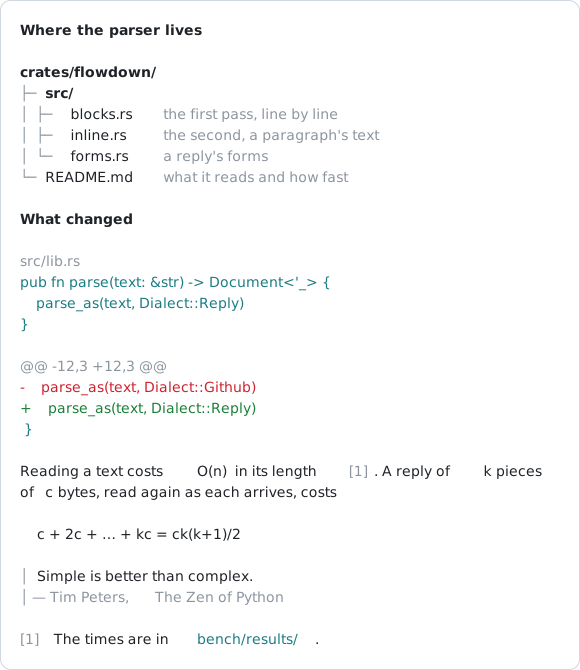
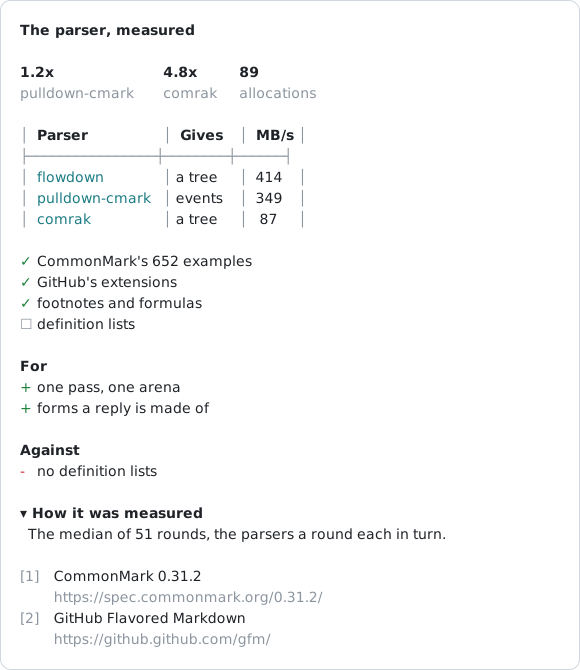
The renderer's own rows, written as SVG; they follow your GitHub theme. The Markdown is read by flowdown, the lab's library; llx draws what it read.
| Key | What it does |
|---|---|
| Enter | Sends. While a task works, what you type goes to it, read at its next step |
| Tab | While a task works, keeps what you typed for after it |
| Shift+Tab | Goes round the modes: default → plan → bypass → your own |
| Esc, Ctrl+C | Step back out of the innermost thing open; Ctrl+C also stops work |
| / | Lists the commands: /login, /model, /mode, /new, /rewind, /diff, /copy, /usage and more |
| @ | Lists the workspace's files to mention; a dragged file or picture is attached |
| ← | On an empty prompt, lists the sessions in this project: several can work at once |
Everything a session does, key by key: Using llx.
Measured beside Claude Code
The same task, the same model, the same Anthropic key, started in the same minute; the tests that score a run were written before it. On the larger task llx finished in 60% of the time for a ninth of the cost; on the small one the two are even.
| Task | Model | Agent | Solved | Time | Turns | Cost |
|---|---|---|---|---|---|---|
| evalkit, 238 tests | Haiku 5.5 | llx | 238 of 238 | 286 s | 14 | $0.050 |
| Claude Code 2.1.321 | 238 of 238 | 478 s | 25 | $0.46 | ||
| shopkit, 69 tests | Haiku 5.5 | llx | 69 of 69 | 69 s | 5 | $0.012 |
| Claude Code 2.1.321 | 69 of 69 | 67 s | 4 | $0.011 |
[!NOTE]
One run of each agent, on one machine: a measurement, not a law.
Every run's log, the code it wrote and its test output are in benchmark/, and the history has every run made, the slower ones too. bun benchmark/run.ts repeats it on your key.
Install
curl -fsSL https://llx.sh/install | sh
On macOS (Apple silicon and Intel) and Linux (x86_64 and arm64). It puts llx, and lx, a link to it, in ~/.local/bin (or LLX_INSTALL_DIR), says so when that directory is not on your PATH, and checks the archive against the release's SHA256SUMS. llx.sh/install is scripts/install.sh as main has it (the site serves it; https://raw.githubusercontent.com/localixai/localix-cli/main/scripts/install.sh is the same file). To pin a release:
curl -fsSL https://llx.sh/install | LLX_VERSION=0.3.0 sh
| Another way | Command |
|---|---|
| mise, the same archive | mise use -g github:localixai/localix-cli |
| cargo-binstall, the same archive | cargo binstall --git https://github.com/localixai/localix-cli localix-cli |
| Built with Rust 1.89 or later | cargo install --locked --git https://github.com/localixai/localix-cli localix-cli |
| An image, for a CI job that runs in one | ghcr.io/localixai/localix-cli:<version>, llx with git, jq and curl |
Then run llx in a project and type /login: a ChatGPT sign-in in the browser, an OpenRouter key, or a key for any other provider of the catalog. A provider's key in its variable (OPENROUTER_API_KEY) works too, and is what CI uses. llx doctor checks the sign-ins, the models and the shell.
A model on your own machine needs no sign-in: llx finds Ollama, LM Studio and llama.cpp's llama-server where each listens, and /model lists the models they run under Local: (llx exec --provider ollama -m qwen3:8b … in a script).
Any other host that speaks OpenAI's chat completions, on your network or anywhere, goes in ~/.config/llx/settings.json and is listed under Hosts: ("local" instead of "hosts" for another server on your machine):
{"hosts": [{"name": "work", "url": "https://llm.example/v1", "key": "…"}]}
/login adds one without the file: its last row, Another host, asks the address, a name and the key (Enter alone for none), checks that the host answers, saves it (under local for an address on this machine, else hosts) and goes on to its models.
In CI and scripts
In CI llx is the same agent as at your terminal, given one task. It works through the plain filesystem and primitive commands: bash with gh, git, jq and your project's own tools. There is no MCP server, no GitHub tool and no built-in prompt. Your workflow owns the prompt and the posting, so the same task runs on GitHub, GitLab or any runner with a shell. The job that runs the model holds a read-only token, and a second job posts what it answered: the write token is never near the model.
# a step of a job, after actions/checkout
- uses: localixai/localix-cli@v0
  id: llx
  env:
    OPENROUTER_API_KEY: ${{ secrets.OPENROUTER_API_KEY }}
    GH_TOKEN: ${{ github.token }} # read-only in this job
    PR: ${{ github.event.pull_request.number }}
  with:
    model: anthropic/claude-haiku-5.5
    allow: bash
    schema: '{"type":"object","properties":{"summary":{"type":"string"}},"required":["summary"]}'
    prompt: |
      Review pull request #$PR with gh and git. Run something to confirm a problem
      before you report it.
The answer is steps.llx.outputs.result, JSON matching your schema; the status, the spend and the exit code are outputs too. The action spells the status its own way (no-data, out-of-budget, not-ready): its outputs.
How a task ends is a contract a pipeline can read. The exit code says it, and --json ends with a run.completed event carrying the same status:
| Exit code | status |
Meaning |
|---|---|---|
| 0 | done |
The model answered (with --schema, its data matched) |
| 1 | no_data |
Only with --schema: the data did not match it, after two tries to fix it |
| 2 | exhausted |
Turns (--max-turns), time (--timeout) or money (--budget) ran out before the model answered: the first reached ends the task |
| 3 | error |
No key, no network, a model error, a bad argument |
| 130 | interrupted |
Ctrl-C, SIGTERM or SIGHUP |
For a choice among a few options, llx decide asks a small decision model about stdin, in about a second for a fraction of a cent, and prints the option it picked. It needs an OpenRouter key. With --expect, it exits 1 when the model picks another option, so a script can gate on it:
$ git diff origin/main... | llx decide "Does this change break the public API?" --expect no
With rg, it makes a search of the code by what it does: rg -l narrows the files by a few likely words, and llx decide reads each and keeps those that do the thing, under whatever name:
$ rg -l -i 'retry|backoff|again' src | xargs llx decide "Does this file send a failed request again?"
Ready-made GitHub workflows, each run for real:
| Workflow | What it does |
|---|---|
| review.yml | Pull request review, with inline comments |
| llx.yml | @llx in any comment, issue or review thread |
| triage.yml | Issue triage |
| ci-failure.yml | A failed run explained |
| describe.yml | A described pull request |
| release.yml | A draft release |
| gate.yml | A daily gate on a rule you state |
| audit.yml | A weekly audit |
| deps.yml | A dependency update read |
| jira.yml | A Jira work item made a draft pull request |
And two folders of scripts for any CI: breaking changes to an HTTP API, and secrets kept out of an agent's context, a commit and a pull request. How to install a workflow: examples/. The action, the two-job pattern, rules, keys, limits, security and GitLab: docs/ci.md. Shell recipes with gh and glab: docs/recipes.md.
In other agents
Claude Code, Codex, another agent or a script of yours can call llx from its shell, as its task needs. llx exec hands a task to a helper on any provider and model, so the agent's own tokens go where they matter; llx decide picks one of a few options about some text, or about each of many files, in about a second.
A skill tells any agent that takes skills what llx does and when each part pays: the coding agent, one task in a script or CI and the GitHub Action, helpers on another model, and llx decide (Claude Code, Codex, Cursor, Gemini CLI, OpenCode and others):
npx skills add localixai/localix-cli
In Claude Code it is also a plugin: /plugin install llx --marketplace localixai/localix-cli. The skill is a thin stub that points the agent at each command's --help, so what it reads always matches the installed llx. Everything else: docs/agents.md.
Documentation
| Guide | What it holds |
|---|---|
| Using llx | The command line, a session key by key, signing in and choosing a model, sessions, project instructions |
| CI | The GitHub Action, the two-job pattern, rules, keys, limits, security, GitLab |
| Recipes | Shell recipes with gh and glab |
| Tools | The five tools: bash, apply_patch, ask, agents, jobs |
| Modes and trust | Modes, rules, approvals, the sandbox and the trust boundaries |
| In other agents | Helpers on any model, llx decide, the skill |
| Reference | How a task ends, the exit codes, the --json events, llx decide |
| Compared | The action beside other agents' actions |
| Architecture · Models · Changelog | The layers and their rules, the model catalog, what changed |
Contributing
Start with CONTRIBUTING.md and ARCHITECTURE.md. Report vulnerabilities as SECURITY.md describes. llx is open source under the MIT License, made by Localix.
Before Localix CLI, this repository was auto-copilot-cli (2023, TypeScript), its author's first AI command line. llx is its successor, written anew in Rust.
[^sandbox]: Seatbelt on macOS; Landlock with a seccomp filter on Linux (6.2 or later), where commands only read. The boundaries are in Modes and trust.
Yorumlar (0)
Yorum birakmak icin giris yap.
Yorum birakSonuc bulunamadi