clawhive
Health Pass
- License — License: MIT
- Description — Repository has a description
- Active repo — Last push 0 days ago
- Community trust — 50 GitHub stars
Code Pass
- Code scan — Scanned 12 files during light audit, no dangerous patterns found
Permissions Pass
- Permissions — No dangerous permissions requested
No AI report is available for this listing yet.
Lightweight, Rust-native AI Agent platform. Security sandbox from day one.
clawhive



English | 中文
An open-source, Rust-native alternative to OpenClaw — deploy your own AI agents across Telegram, Discord, Feishu/Lark, WhatsApp, WeChat, and more with a single binary.
One binary, ~14 MB, zero runtime dependencies. No Node.js, no npm, no Docker — just download, configure, and run.
Installation
curl -fsSL https://raw.githubusercontent.com/longzhi/clawhive/main/install.sh | bash
Auto-detects OS/architecture, downloads latest release, installs binary and skills to ~/.clawhive/.
After installation, run to activate in your current shell:
source ~/.clawhive/env
Or download manually from GitHub Releases.
Setup
Configure providers, agents, and channels using either method:
Option A: Web Setup Wizard — Start the server and open the browser-based wizard:
clawhive start
# Open http://localhost:8848/setup in your browser
Option B: CLI Setup Wizard — Run the interactive terminal wizard:
clawhive setup
Usage
# Setup / config
clawhive setup
clawhive validate

# Chat mode (local REPL)
clawhive chat

# Service lifecycle
clawhive start               # start in foreground
clawhive up                  # start if not already running (always daemon)
clawhive restart
clawhive stop
clawhive reload              # hot-reload config without restart

# Dashboard mode (observability TUI)
clawhive dashboard

# Code mode (developer TUI)
clawhive code

# Agents / sessions
clawhive agent list
clawhive agent show clawhive-main
clawhive session reset <session_key>

# Schedules / tasks
clawhive schedule list
clawhive schedule run <schedule_id>
clawhive task trigger clawhive-main "summarize today's work"

# Logs
clawhive logs

# Auth
clawhive auth status
clawhive auth login openai
CLI Commands
| Command | Description |
|---|---|
setup |
Interactive configuration wizard |
up |
Start as background daemon (alias for start -d) |
start [--tui] [--daemon] |
Start all configured channel bots and HTTP API server |
stop |
Stop a running clawhive process |
restart |
Restart clawhive (stop + start as daemon) |
reload [--agents|--routing] |
Hot-reload configuration without restart |
chat [--agent <id>] |
Local REPL for testing |
validate |
Validate YAML configuration |
consolidate |
Run memory consolidation manually |
logs |
Tail the latest log file |
agent list|show|enable|disable |
Agent management |
skill list|show|analyze|install |
Skill management |
session reset <key> |
Reset a session |
schedule list|run|enable|disable|history |
Scheduled task management |
wait list |
List background wait tasks |
task trigger <agent> <task> |
Send a one-off task to an agent |
auth login|status |
OAuth authentication management |
Why clawhive?
- Tiny footprint — One binary, ~14 MB. Runs on a Raspberry Pi, a VPS, or a Mac Mini with minimal resource usage.
- Security by design — Two-layer security model: non-bypassable hard baseline + origin-based trust. External skills must declare permissions explicitly.
- Bounded execution — Enforced token budgets, timeout limits, and sub-agent recursion depth. No runaway loops, no surprise bills.
- Web + CLI setup — Browser-based setup wizard or interactive CLI. Get your first agent running in under 2 minutes.
Features
- Multi-agent orchestration with per-agent personas, model routing, and memory policy controls
- Three-layer memory system: Session JSONL → Daily files → MEMORY.md (long-term)
- Hybrid search: sqlite-vec vector similarity + FTS5 BM25 over memory chunks
- Hippocampus consolidation: periodic LLM-driven synthesis into long-term memory
- Channel adapters: Telegram, Discord, Slack, WhatsApp, iMessage, Feishu, DingTalk, WeCom (multi-bot, multi-connector)
- ReAct reasoning loop with repeat guard and sub-agent spawning
- Skill system (SKILL.md with frontmatter + permission declarations)
- Token-bucket rate limiting per user
- LLM provider abstraction with retry + exponential backoff (Anthropic, OpenAI, Gemini, DeepSeek, Groq, Ollama, OpenRouter, Together, Fireworks, and any OpenAI-compatible endpoint)
- Real-time TUI dashboard and YAML-driven configuration
Architecture
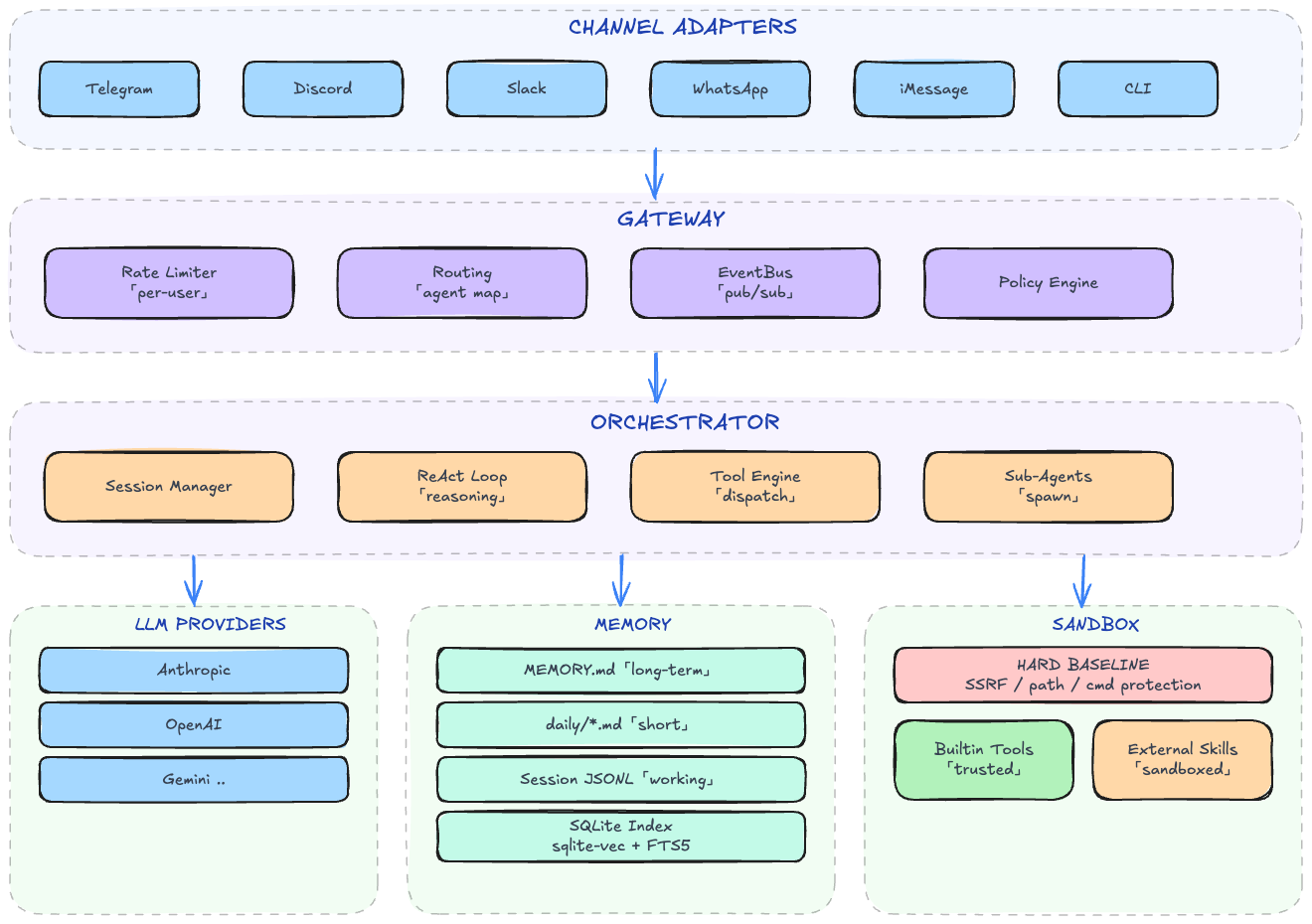
crates/
├── clawhive-cli/        # CLI binary (clap) — start, setup, chat, validate, agent/skill/session/schedule
├── clawhive-core/       # Orchestrator, session mgmt, config, persona, skill system, sub-agent, LLM router
├── clawhive-memory/     # Memory system — file store (MEMORY.md + daily), session JSONL, SQLite index, chunker, embedding
├── clawhive-gateway/    # Gateway with agent routing and per-user rate limiting
├── clawhive-bus/        # Topic-based in-process event bus (pub/sub)
├── clawhive-provider/   # LLM provider trait + multi-provider adapters (streaming, retry)
├── clawhive-channels/   # Channel adapters (Telegram, Discord, Slack, WhatsApp, iMessage)
├── clawhive-auth/       # OAuth and API key authentication
├── clawhive-scheduler/  # Cron-based task scheduling
├── clawhive-server/     # HTTP API server
├── clawhive-schema/     # Shared DTOs (InboundMessage, OutboundMessage, BusMessage, SessionKey)
├── clawhive-runtime/    # Task executor abstraction
└── clawhive-tui/        # Real-time terminal dashboard (ratatui)

~/.clawhive/             # Created by install + setup
├── bin/                 # Binary
├── skills/              # Skill definitions (SKILL.md with frontmatter)
├── config/              # Generated by `clawhive setup`
│   ├── main.yaml        # App settings, channel configuration
│   ├── agents.d/*.yaml  # Per-agent config (model policy, tools, memory, identity)
│   ├── providers.d/*.yaml # LLM provider settings
│   └── routing.yaml     # Channel → agent routing bindings
├── workspaces/          # Per-agent workspace (memory, sessions, prompts)
├── data/                # SQLite databases
└── logs/                # Log files
clawhive implements a two-layer security architecture for defense-in-depth:
Hard Baseline (Always Enforced)
| Protection | What It Blocks |
|---|---|
| SSRF Prevention | Private networks (10.x, 172.16-31.x, 192.168.x), loopback, cloud metadata endpoints |
| Sensitive Path Protection | Writes to ~/.ssh/, ~/.gnupg/, ~/.aws/, /etc/, system directories |
| Private Key Shield | Reads of ~/.ssh/id_*, ~/.gnupg/private-keys, cloud credentials |
| Dangerous Command Block | rm -rf /, fork bombs, disk wipes, curl-pipe-to-shell patterns |
| Resource Limits | 30s timeout, 1MB output cap, 5 concurrent executions |
Origin-Based Trust Model
| Origin | Trust Level | Permission Checks |
|---|---|---|
| Builtin | Trusted | Hard baseline only |
| External | Sandboxed | Must declare all permissions in SKILL.md frontmatter |
External skills declare permissions in SKILL.md:
---
name: weather-skill
permissions:
  network:
    allow: ["api.openweathermap.org:443"]
  fs:
    read: ["${WORKSPACE}/**"]
  exec: [curl, jq]
  env: [WEATHER_API_KEY]
---
Any access outside declared permissions is denied at runtime.
Memory SystemThree-layer architecture inspired by neuroscience:
- Session JSONL (
sessions/<id>.jsonl) — append-only conversation log, typed entries. Used for session recovery and audit trail. - Daily Files (
memory/YYYY-MM-DD.md) — daily observations written by LLM during conversations. - MEMORY.md — curated long-term knowledge. Updated by hippocampus consolidation (LLM synthesis of recent daily files).
- SQLite Search Index — sqlite-vec + FTS5. Hybrid search: vector similarity × 0.7 + BM25 × 0.3.
Note: JSONL files are NOT indexed. Only Markdown memory files participate in search.
clawhive start
# Open http://localhost:8848/setup in your browser
| Aspect | clawhive | OpenClaw |
|---|---|---|
| Runtime | Pure Rust binary, embedded SQLite | Node.js runtime |
| Security Model | Two-layer policy (hard baseline + origin trust) | Tool allowlist |
| Permission System | Declarative SKILL.md permissions | Runtime policy |
| Memory | Markdown-native (MEMORY.md canonical) | Markdown-native (MEMORY.md + memory/*.md) |
| Integration Surface | Multi-channel (Telegram, Discord, Slack, WhatsApp, iMessage, CLI) | Broad connectors |
| Dependency | Single binary, no runtime deps | Node.js + npm |
Run
# Setup / config
clawhive setup
clawhive validate

# Chat mode (local REPL)
clawhive chat

# Service lifecycle
clawhive start
clawhive up                 # start if not already running (always daemon)
clawhive restart
clawhive stop
clawhive reload              # hot-reload config without restart

# Dashboard mode (observability TUI)
clawhive dashboard
clawhive dashboard --port 8848

# Code mode (developer TUI)
clawhive code
clawhive code --port 8848

# Agents / sessions
clawhive agent list
clawhive agent show clawhive-main
clawhive session reset <session_key>

# Schedules / tasks
clawhive schedule list
clawhive schedule run <schedule_id>
clawhive task trigger clawhive-main "summarize today's work"

# Auth
clawhive auth status
clawhive auth login openai
Quick Start (Developers)
Prerequisites: Rust 1.92+
# Clone and build
git clone https://github.com/longzhi/clawhive.git
cd clawhive
cargo build --workspace

# Interactive setup (configure providers, agents, channels)
cargo run -- setup

# Chat mode (local REPL)
cargo run -- chat

# Start all configured channel bots
cargo run -- start

# Start if not already running (always daemon)
cargo run -- up

# Restart / stop
cargo run -- restart
cargo run -- stop

# Dashboard mode (observability TUI)
cargo run -- dashboard
cargo run -- dashboard --port 8848

# Coding agent mode (attach local TUI channel to running gateway)
cargo run -- code
cargo run -- code --port 8848
Developer Workflow
Use local quality gates before pushing:
# One-time: install repo-managed git hooks
just install-hooks

# Run all CI-equivalent checks locally
just check

# Release flow: check -> push main -> replace tag and push tag
just release v0.1.0-alpha.15
If you don't use just, use scripts directly:
bash scripts/install-git-hooks.sh
bash scripts/check.sh
bash scripts/release.sh v0.1.0-alpha.15
just check runs:
cargo fmt --all -- --checkcargo clippy --workspace --all-targets -- -D warningscargo test --workspace
Configuration
Configuration is managed through clawhive setup, which interactively generates YAML files under ~/.clawhive/config/:
main.yaml— app name, runtime settings, feature flags, channel configagents.d/<agent_id>.yaml— agent identity, model policy, tool policy, memory policyproviders.d/<provider>.yaml— provider type, API base URL, authenticationrouting.yaml— default agent ID, channel-to-agent routing bindings
Supported providers: Anthropic, OpenAI, Gemini, DeepSeek, Qwen, Moonshot, Zhipu GLM, MiniMax, Volcengine, Qianfan, Groq, Ollama, OpenRouter, Together, Fireworks, and any OpenAI-compatible endpoint.
Development
Quick Start (Developers)Prerequisites: Rust 1.92+
git clone https://github.com/longzhi/clawhive.git
cd clawhive
cargo build --workspace

cargo run -- setup       # Interactive setup
cargo run -- chat        # Chat mode (local REPL)
cargo run -- start       # Start all channel bots
cargo run -- start -d    # Start as background daemon
cargo run -- dashboard   # Dashboard mode
cargo run -- code        # Coding agent mode
# Run all tests
cargo test --workspace

# Lint
cargo clippy --workspace --all-targets -- -D warnings

# Format
cargo fmt --all

# Run all CI-equivalent checks locally
just check

# Release
just release v0.1.0-alpha.15
Tech Stack
| Component | Technology |
|---|---|
| Language | Rust (2021 edition) |
| LLM Providers | Anthropic, OpenAI, Gemini, DeepSeek, Qwen, Moonshot, Zhipu GLM, MiniMax, Volcengine, Qianfan, Groq, Ollama, OpenRouter, Together, Fireworks |
| Channels | Telegram, Discord, Slack, WhatsApp, iMessage, Feishu, DingTalk, WeCom, CLI |
| Database | SQLite (rusqlite, bundled) |
| Vector Search | sqlite-vec |
| Full-Text Search | FTS5 |
| HTTP | reqwest |
| Async | tokio |
| TUI | ratatui + crossterm |
| CLI | clap 4 |
License
MIT
Status
This project is under active development. The memory architecture uses Markdown-native storage + hybrid retrieval.
Reviews (0)
Sign in to leave a review.
Leave a reviewNo results found