mcpforge
Health Warn
- No license — Repository has no license file
- No description — Repository has no description
- Active repo — Last push 0 days ago
- Community trust — 17 GitHub stars
Code Warn
- process.env — Environment variable access in .tmp-noauth-server/src/index.ts
- network request — Outbound network request in .tmp-noauth-server/src/tools/get_status.ts
Permissions Pass
- Permissions — No dangerous permissions requested
This tool generates Model Context Protocol (MCP) servers from OpenAPI specifications or raw documentation pages. It leverages AI to curate raw API endpoints into a smaller, highly usable set of task-oriented tools for language models.
Security Assessment
Overall risk: Medium. The tool accesses environment variables, which is standard practice for loading configuration or API keys. It does make outbound network requests, which is expected given its core function of fetching online API specs, scraping documentation pages, and connecting to a central registry. It does not request explicitly dangerous local permissions or execute arbitrary shell commands. However, because it acts as a scaffolding engine that dynamically fetches external code and definitions, users should carefully audit the generated MCP servers before running them in sensitive environments.
Quality Assessment
The project appears to be actively maintained, with its most recent push occurring today. It has garnered 17 GitHub stars, indicating a modest but growing level of community trust. The README clearly states it uses the MIT license, though the automated rule-based scan failed to find a dedicated license file in the repository (this might just be a missing file extension or a badge-only reference). The documentation is thorough and provides clear, actionable usage instructions.
Verdict
Use with caution. The scaffolding tool itself is safe and well-documented, but always review the auto-generated servers and their specific permissions before deploying.
MCPForge
Generate MCP servers from OpenAPI specs or docs pages, then turn raw API endpoints into a smaller set of tools that are actually useful for agents.


Demo
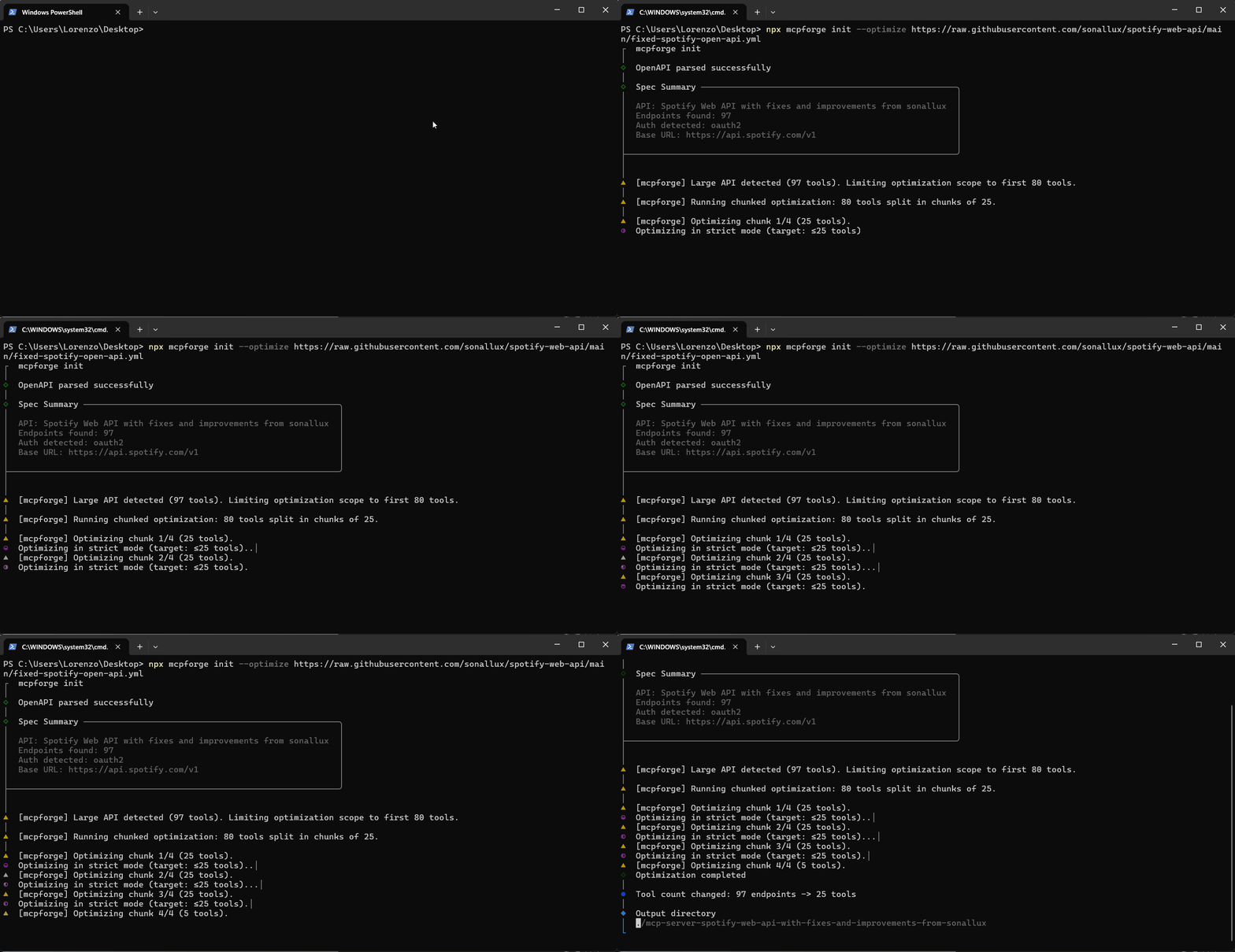
Why It Exists
Most OpenAPI-to-MCP generators stop at endpoint wrappers. That gets you a server, but not necessarily a toolset an LLM can use well. You often end up with hundreds of low-signal tools, weak descriptions, and no clear path from "API surface area" to "jobs a user wants done."
MCPForge does two extra things:
- Curates endpoint tools with AI so the public surface stays small and usable.
- Plans task-oriented workflow tools that wrap useful jobs like
find_customers,create_payment_link, orrefund_payment.
The result is closer to "brief the model on the jobs it can do" than "dump the entire REST spec into MCP."
Quick Start
Fastest path from the registry:
npx mcpforge add stripe
From an OpenAPI spec:
npx mcpforge init --optimize --workflows https://api.example.com/openapi.json
From a docs page when you do not have a spec:
npx mcpforge init --from-url --workflows https://docs.stripe.com/api
Preview without writing files:
npx mcpforge init --dry-run --optimize --workflows https://api.example.com/openapi.json
Registry
Browse and install community-curated MCP servers:
mcpforge search                     # browse all servers
mcpforge search payments            # search by keyword or tag
mcpforge add stripe                 # generate Stripe MCP server instantly
mcpforge add stripe --pick          # generate and customize tools
Publish your optimized server:
mcpforge auth login                 # one-time GitHub login
mcpforge publish                    # publish from current project dir
mcpforge publish --slug my-api --tags payments,billing
What MCPForge Does
- Parses OpenAPI 3.0, 3.1, and Swagger 2.0 specs from local files or URLs
- Scrapes docs pages and infers an API shape with Claude when no spec exists
- Curates raw endpoints into a smaller endpoint toolset with
--optimize - Plans task-oriented workflow tools with
--workflows - Generates a complete TypeScript MCP server with auth scaffolding and docs
- Detects upstream spec drift and reports risk-scored breaking changes
- Rebuilds and smoke-tests generated servers over stdio with
mcpforge test
Feature Overview
- Workflow planning - Generates first-class workflow tools with deterministic step execution. Workflow tools depend on real upstream operations, so drift can be tracked during
diffandupdate. - AI endpoint curation (
--optimize) - Uses Claude to cap noisy APIs to a smaller, better-described public surface. Strict mode defaults to <=25 tools. Standard mode allows broader coverage up to 80. - Docs URL inference (
--from-url) - Scrapes API docs pages and infers endpoints when there is no public OpenAPI spec. - Interactive selection (
--pick) - Lets you choose the exact public tools to expose after planning and optimization. - Breaking change detection (
diff) - Compares stored source IR against the latest upstream spec and reports high, medium, and low-risk changes. - Workflow-aware update flow (
update) - Rechecks upstream APIs, reports workflow impact, and regenerates in place. - Generated-server verification (
test) - Installs dependencies, builds the generated project, validateslistTools, and smoke-tests each public handler over stdio. - Repo-level CI and tests - The repo now includes Vitest coverage for workflow planning, generation, diffing, and selection logic, plus a GitHub Actions workflow.
Commands
| Command | What it does |
|---|---|
mcpforge add <slug>[@version] [output-dir] |
Install a server from the registry. Supports --optimize, --workflows, and --pick. |
mcpforge auth login |
Save a GitHub token for registry publishing. |
mcpforge auth logout |
Remove stored GitHub credentials. |
mcpforge auth status |
Show the stored GitHub login or not logged in. |
mcpforge search [query] |
Browse registry entries. Supports --tags and --json. |
mcpforge publish |
Publish the current project to the registry. Supports --slug, --tags, --dir, and --draft. |
mcpforge init <spec> |
Parse a spec or docs URL and generate a project. Use --optimize, --workflows, --pick, and --dry-run to control the pipeline. |
mcpforge generate |
Regenerate from mcpforge.config.json. Workflow mode, optimization mode, and tool selections are preserved in config. |
mcpforge inspect <spec> |
Inspect API structure and warnings. Use --workflows to preview the planned public toolset. |
mcpforge diff |
Compare the last stored source IR against the latest upstream version. Workflow-enabled projects also get workflow impact reporting. |
mcpforge update |
Refresh from upstream changes and regenerate in place. Supports --workflows, --raw-endpoints, --pick, --optimize, and --force. |
mcpforge test |
Rebuild a generated server, validate registered tools, and smoke-test public handlers. Use --live only when real credentials are configured. |
Workflow Mode
--workflows adds a planning layer on top of the parsed API:
- MCPForge starts from the parsed endpoint IR.
- If
--optimizeis enabled, it first curates which endpoints matter most. - It then plans workflow tools around useful jobs and can keep a few curated endpoint fallbacks when needed.
- Each workflow stores which upstream operations it depends on, so future
diffandupdateruns can report impact when those operations change.
Current workflow execution is intentionally deterministic:
- Linear steps only
- No arbitrary code generation
- Input mapping from workflow inputs and prior step results
- Output selection from saved step results
AI Optimization
Use --optimize with init or generate to run Claude-based endpoint curation.
npx mcpforge init --optimize https://api.example.com/openapi.json
The optimizer:
- Curates to <=25 endpoint tools by default in strict mode
- Rewrites descriptions to be shorter and more LLM-friendly
- Removes admin, health, docs, and other low-value routes
- Prioritizes the endpoints most likely to matter for common user tasks
Use --standard for broader coverage or --max-tools <n> for a custom cap.
Requires ANTHROPIC_API_KEY. If it is missing, optimization is skipped and generation continues.
Configuration
Generated projects include mcpforge.config.json. It stores:
- Spec source and source type
- Output directory
- Optimization settings
- Whether workflow planning is enabled
- Saved public tool selections
- Source IR, optimized IR, planned workflow IR, and final generated IR
That file is what makes generate, diff, and update work without repeating the original setup step.
Testing Generated Servers
Run from inside a generated project:
npx mcpforge test
Or point at a generated project explicitly:
npx mcpforge test --dir ./mcp-server-my-api
By default, mcpforge test:
- runs
npm installandnpm run build - starts the generated server over stdio
- verifies
listToolsmatchesmcpforge.config.json - calls each public tool with minimal inputs
- treats structured handler errors as a pass in dry-run mode
- treats
401and403as auth-required skips
Use --live only when the generated project's .env is configured and you want real upstream API calls.
Tested Compatibility
MCPForge has been exercised against real-world specs across different formats and edge cases.
The registry is also the fastest place to find tested, optimized servers that were already run through MCPForge and published for reuse.
| API | Format | Endpoints | Status |
|---|---|---|---|
| Twilio | OpenAPI 3.x | 197 | yes |
| Kubernetes | Swagger 2.0 | 1,085 | yes |
| Discord | OpenAPI 3.1 | 229 | yes |
| Notion | OpenAPI 3.0 | 13 | yes |
| PandaDoc | OpenAPI 3.0 | 115 | yes |
| Adyen | OpenAPI 3.1 | 2 | yes |
| Slack | YAML (OpenAPI 3.0) | 174 | yes |
| api.video | OpenAPI 3.0 (circular refs) | 47 | yes |
| Amadeus | Swagger 2.0 | 1 | yes |
Supports OpenAPI 3.0, 3.1, Swagger 2.0, JSON and YAML, circular $refs, and specs with missing operation IDs. The broader compatibility report is in examples/compatibility-report.md.
Contributing
Contributions are welcome. Open an issue for bugs or ideas, or submit a focused PR. Registry contribution rules live in registry/CONTRIBUTING.md.
License
MIT
Reviews (0)
Sign in to leave a review.
Leave a reviewNo results found