petp
Health Uyari
- License — License: MIT
- Description — Repository has a description
- Active repo — Last push 0 days ago
- Low visibility — Only 6 GitHub stars
Code Gecti
- Code scan — Scanned 12 files during light audit, no dangerous patterns found
Permissions Gecti
- Permissions — No dangerous permissions requested
This tool serves as an automation engine and MCP server designed to orchestrate DevOps workflows. It connects to multiple system endpoints like SSH, databases, and the web to run configurable multi-step tasks.
Security Assessment
The overall security risk is Medium. By design, the application requires access to highly sensitive operations, including executing remote shell commands (SSH), querying databases, and making web requests. However, the automated code scan of 12 files found no evidence of hardcoded secrets or malicious hidden patterns. The primary risk stems from the inherent nature of DevOps RPA tools, which demand elevated system access to function correctly. Users must ensure they configure permissions and environment variables safely.
Quality Assessment
The project is actively maintained, as evidenced by a repository push occurring just today. It uses the permissive and standard MIT license. However, community trust and visibility are very low. The project currently has only 6 GitHub stars and lacks a README file, which means there is minimal documentation for new users and little public vetting from the developer community.
Verdict
Use with caution.
RPA toolkit automating DevOps workflows. Orchestrate multi-tasks (SSH/AI/databases/web) via configurable pipelines with cron/loop support. All-in-one automation engine, MCP tool server, GUI app support Windows and MacOS.
 PET-P
PET-P
中文 | English

A techno-person RPA toolkit — configurable task runner, execution engine, and MCP Tool Server built with Python.
Friendly for AI Agents, DevOps, and automation testing.
Project Sites: PETP Intro | Web App Guide
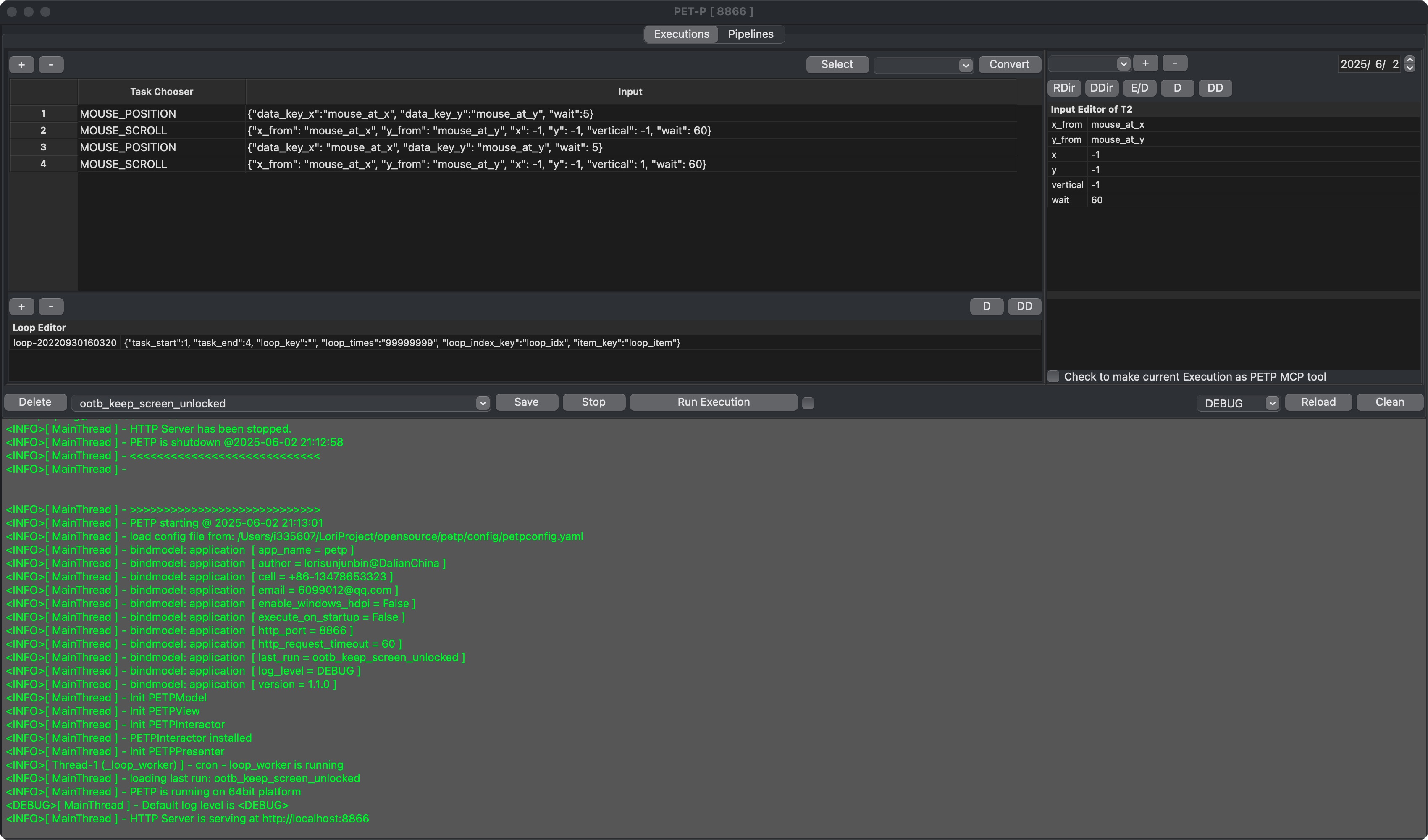
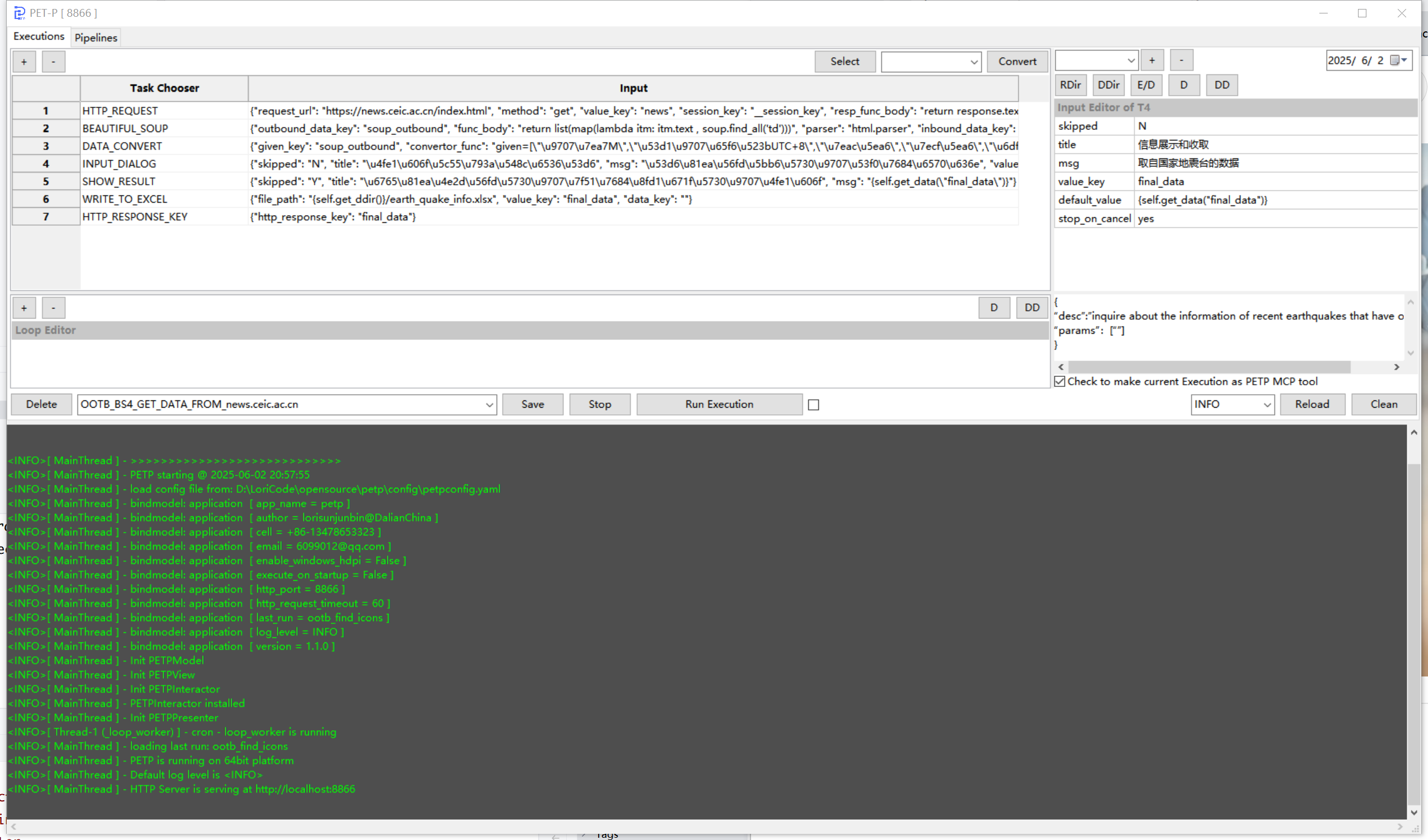
PET = Pipeline-Execution-Task, the hierarchical execution model. The trailing P stands for Processor, which handles each task one-to-one.
Pipeline  1:n Execution
Execution 1:n Task
Task      1:1 Processor
Table of Contents
- Features
- Screenshots
- Quick Start
- Dependency Management
- Running Modes
- HTTP Service & MCP
- Build & Docker
- Web App (Docker & UGOS)
- Project Structure
- Troubleshooting
- Acknowledgements
- Changelog
Features
Orchestrate tasks as Executions (with dataset-loop or time-loop), combine Executions as Pipelines, run once or on cron.
| Category | Capabilities |
|---|---|
| Browser Automation (Selenium) | Navigate, go back, fullscreen, close Chrome. Find element(s) then click / key-in / collect. Find multiple elements in batch (with skip). iFrame, cookies, screenshot. Convert Chrome DevTools Recorder recordings to PETP tasks. |
| SSH / SFTP (Paramiko) | Create SSH / SFTP sessions. Run remote commands. Upload / download files. |
| File & Folder | Open, write, delete, read text. Find files / latest file. Watch & auto-move. ZIP / UNZIP. File-chooser dialog. |
| Data & Spreadsheet | Read CSV / Excel. Write to Excel. CSV to XLSX. Collect, filter, group-by, mapping, masking, conversion. Merge collections. |
| Database CRUD | MySQL, PostgreSQL, SAP HANA, SQLite — unified DB_ACCESS processor. |
| AI / LLM | DeepSeek, Google Gemini, Ollama (local), Zhipu Z.AI — each with setup + Q&A + MCP-tool calling. |
| MCP | Expose PETP as standard MCP Tool Server (Streamable-HTTP). MCP client processors for all LLM providers. |
| HTTP / Network | Configurable HTTP requests. Extract response keys. Built-in HTTP service (port 8866). OAuth2 / PKCE. |
| String Utilities | Encode / decode (Base64, URL...). Hash (MD5, SHA256...). |
| Mouse & GUI (PyAutoGUI) | Click, scroll, query position at absolute or relative coordinates. |
| Send email via SMTP with attachments. | |
| Data Visualization | Charts and plots via Matplotlib. |
| Media | Download YouTube videos (PyTube). |
| Execution Control | Initialize / check params. Nested execution. Conditional stop. Wait / sleep. Reload log config. Read JSON. Run shell commands. Conditional jump (GO_TO_TASK). |
| Theme | 5 themes including "System" (auto-follows OS dark/light mode); Forest, Ocean, Monokai, Solarized with live switching; persisted in config. Covers grid selection, property grid, log panel, search highlights, Run button, and MCP toggle. |
Screenshots
macOS
Windows
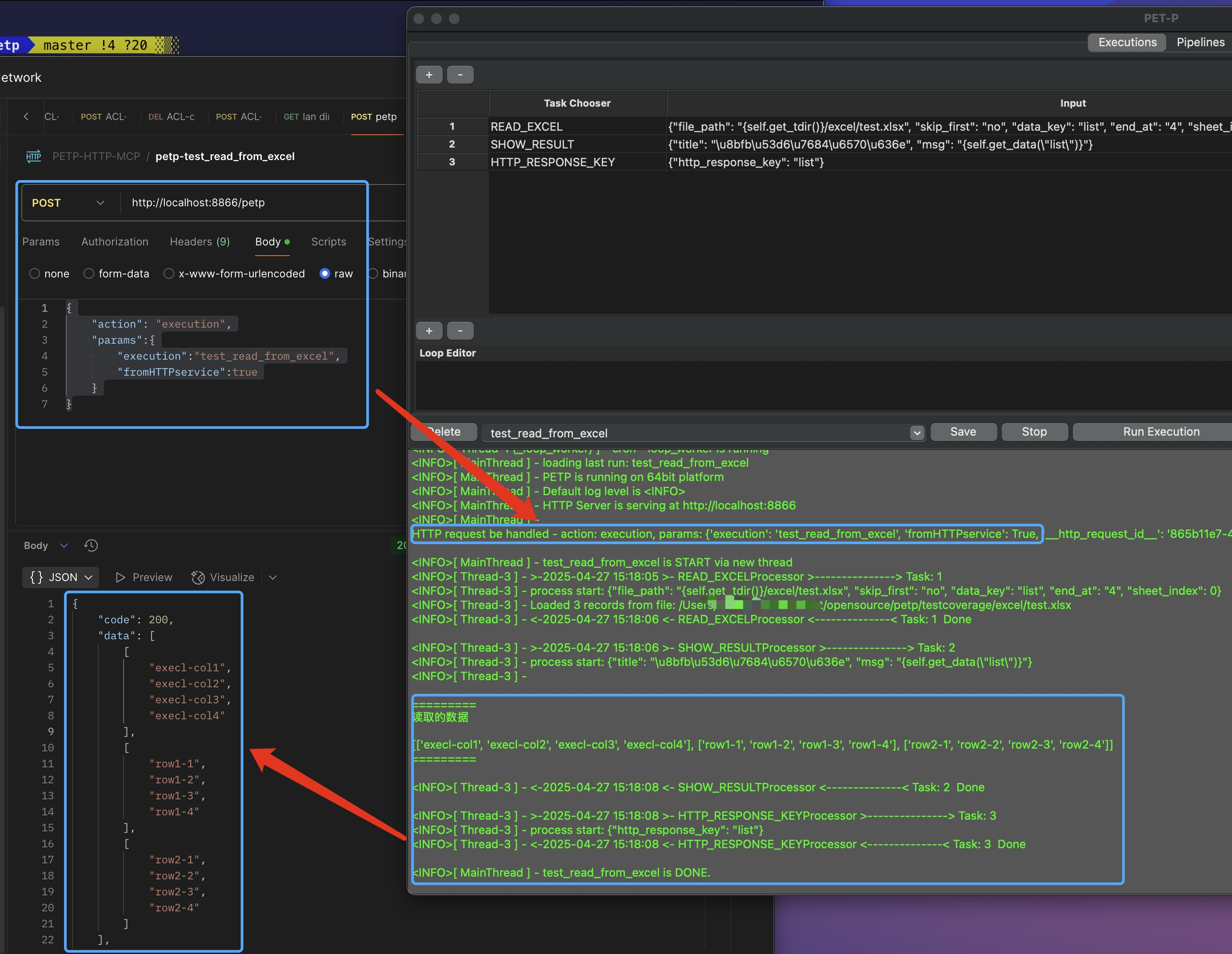
HTTP Service Enabled
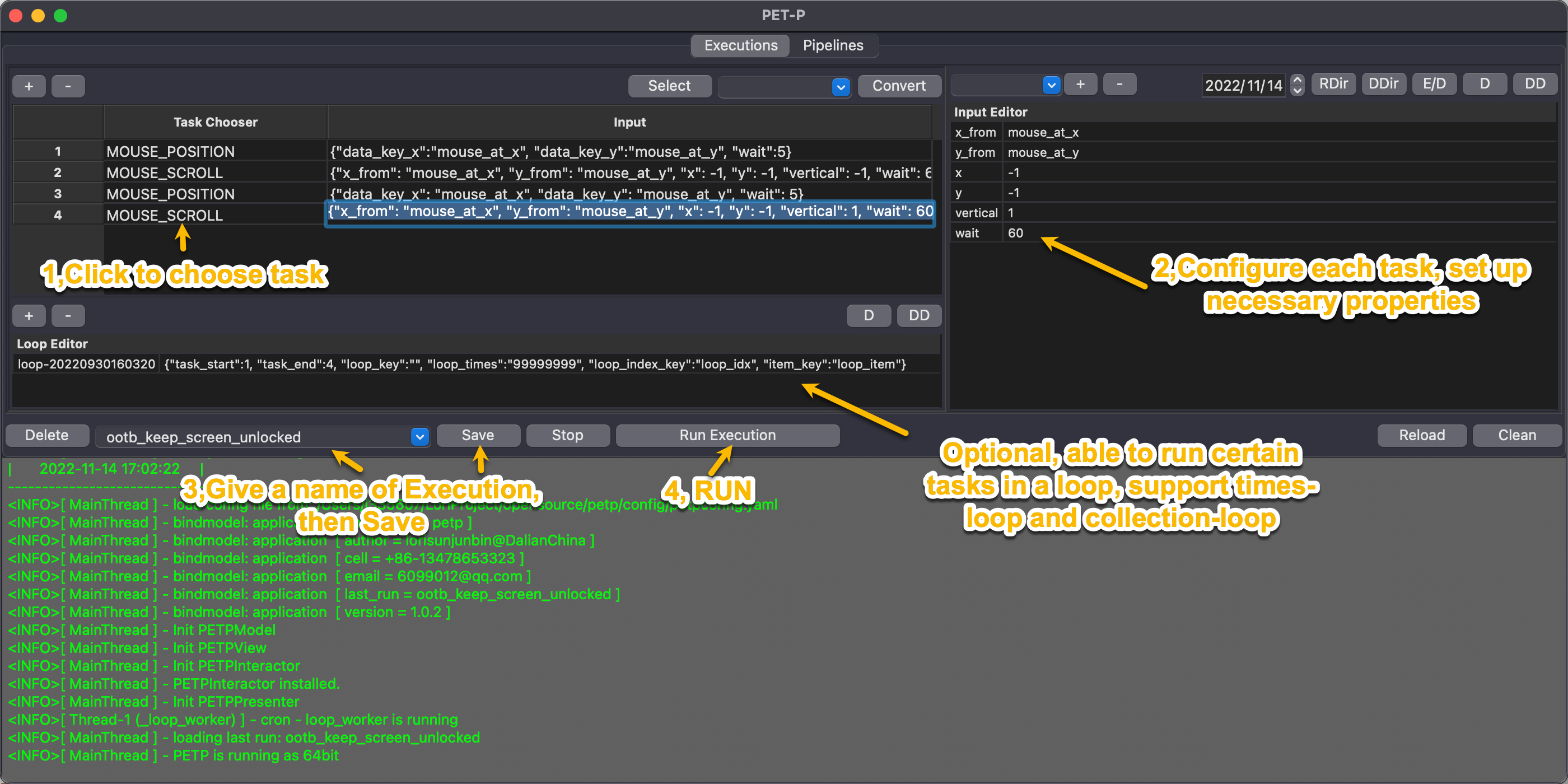
Run first Execution within 4 steps:
LLM MCP Server, Client & Host:
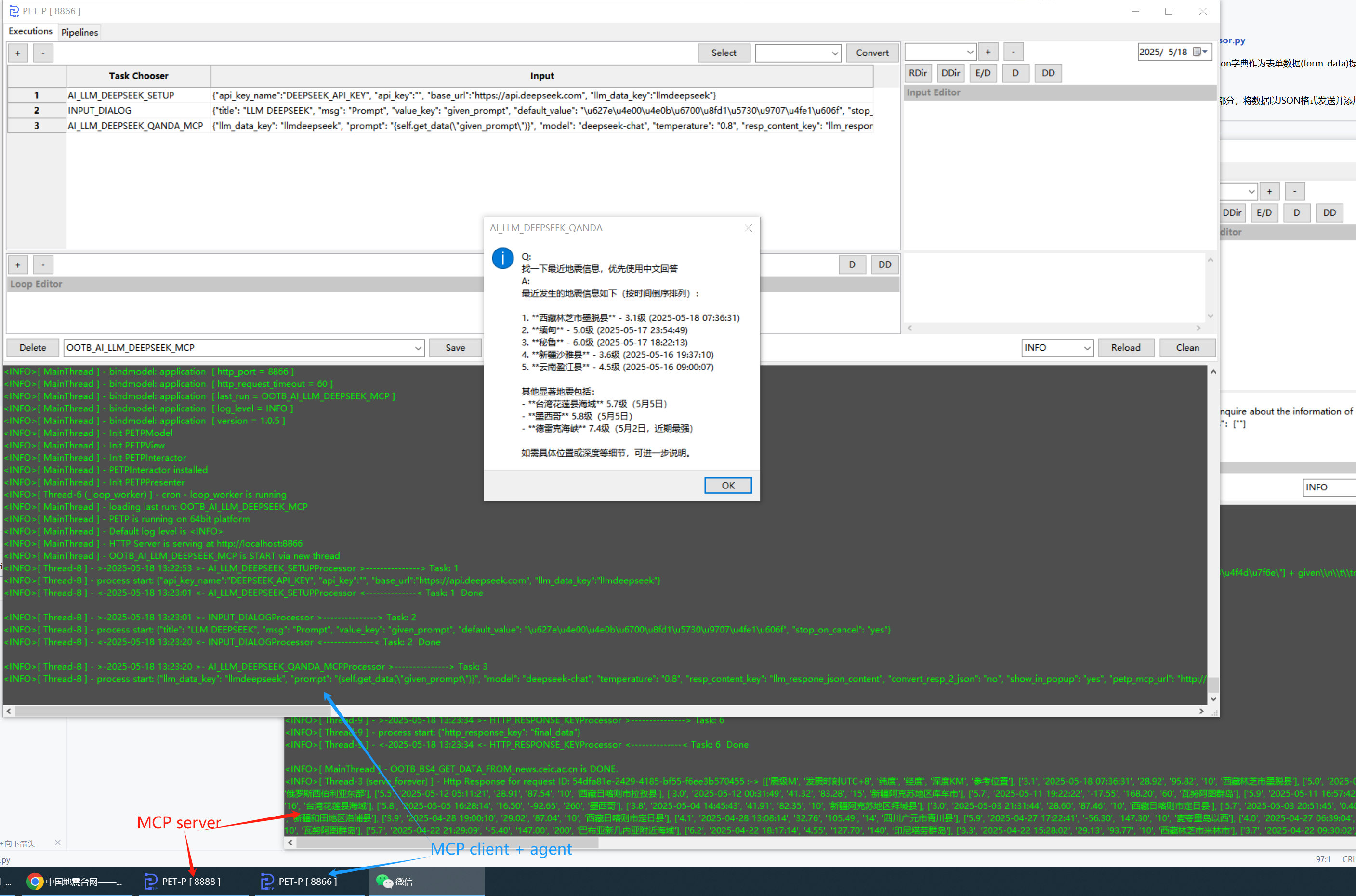
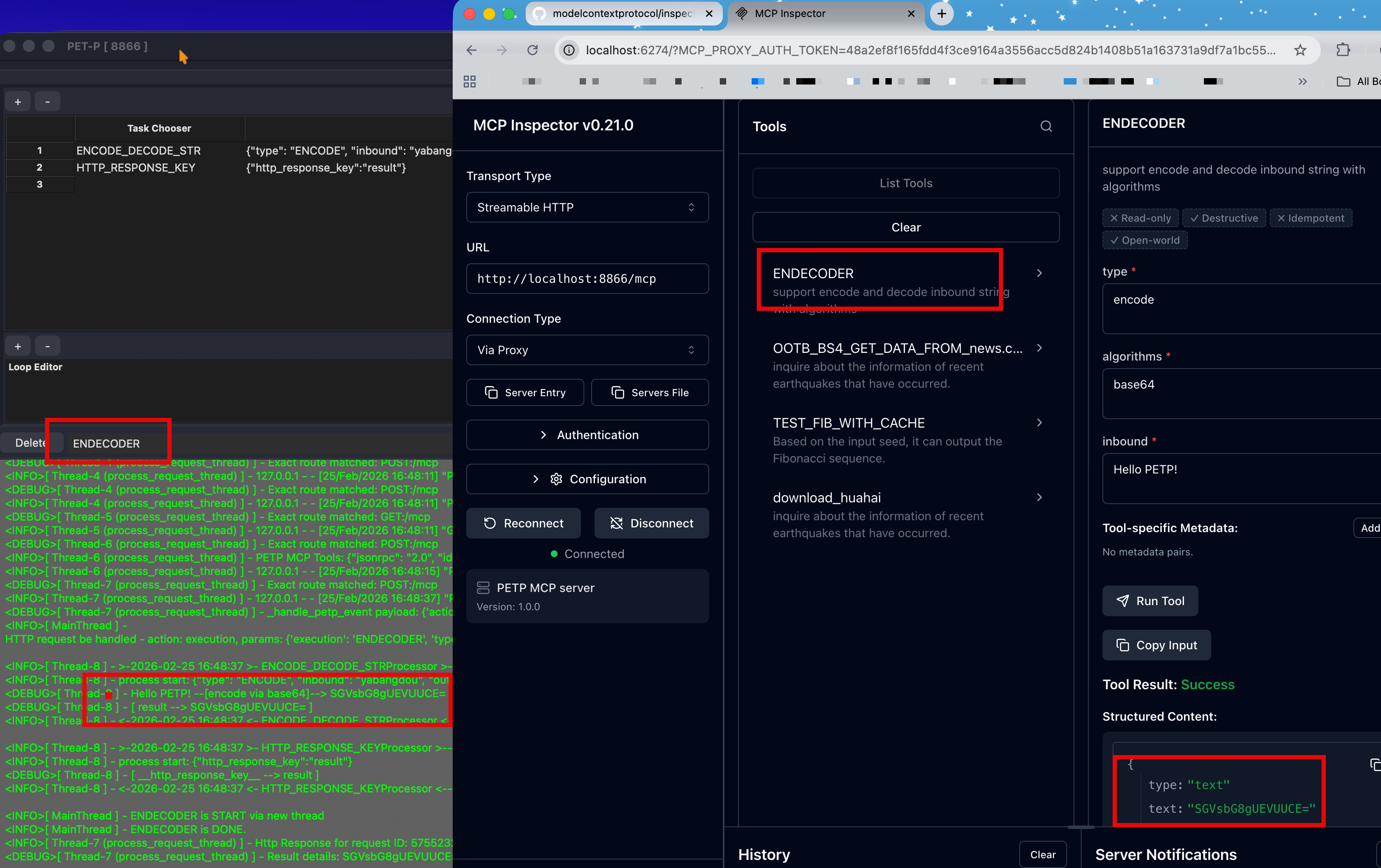
MCP Tool Server (Streamable-HTTP):
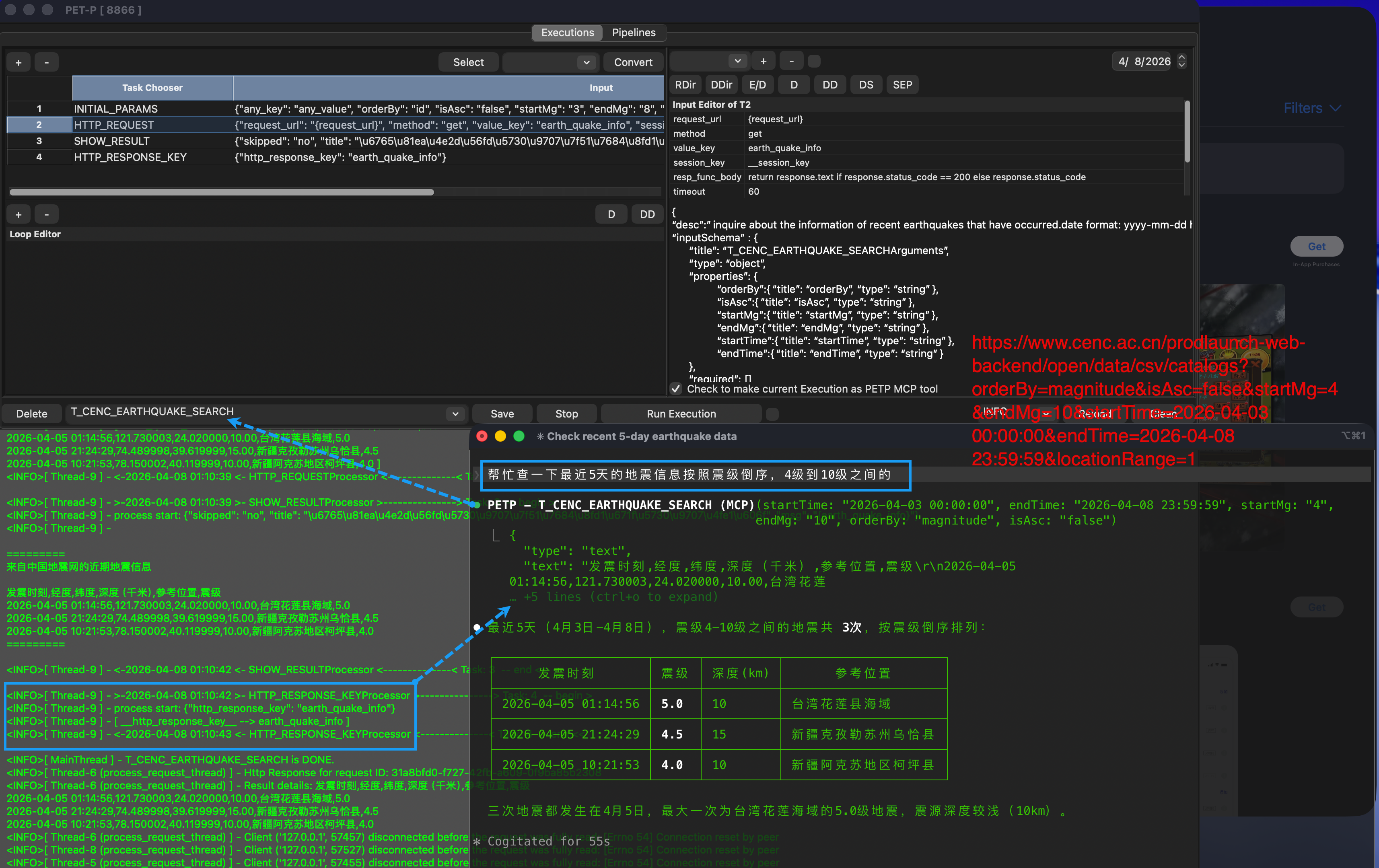
Integrate with Claude Code:
Quick Start
Prerequisites
| Requirement | Version | Notes |
|---|---|---|
| Python | 3.14 | Download |
| wxPython | 4.3.x | Must match your Python version — see Step 2 |
| ChromeDriver | Match Chrome version | Download from Chrome for Testing, place in webdriver/<platform>/ |
ChromeDriver location:
webdriver/darwin/chromedriver(macOS) orwebdriver/win32/chromedriver.exe(Windows)
Step 1 — Install Python
Download and install Python 3.14 from python.org.
On Windows, check "Add Python to PATH" during installation.
Step 2 — Install wxPython
wxPython must match your exact Python version and OS. Download the .whl from wxpython.org/Phoenix/snapshot-builds:
| Platform | Command |
|---|---|
| macOS (Apple Silicon) | uv pip install --force-reinstall wxpython-4.3.0a16055+4fb35900-cp314-cp314-macosx_11_0_arm64.whl |
| Windows | uv pip install --force-reinstall wxpython-4.3.0a16055+4fb35900-cp314-cp314-win_amd64.whl |
Always download the latest snapshot for best compatibility.
Step 3 — Install Dependencies
See Dependency Management for full details. Quick install:
# Recommended: install with uv
pip install -U uv

# If you see: "No virtual environment found"
uv venv
# Creating virtual environment at: .venv
# Activate with: .venv\Scripts\activate

uv pip install -r requirements.txt

# Or install only what you need (see [Dependency Groups](#dependency-groups))
uv pip install -r requirements/core.txt -r requirements/ssh-sftp.txt

# Alternative: install with pip
pip install -r requirements.txt

# Or install only what you need (see [Dependency Groups](#dependency-groups))
pip install -r requirements/core.txt -r requirements/ssh-sftp.txt
Step 4 — Run
python PETP.py
The GUI launches. On first run, a default config is created at ./config/petpconfig.yaml.
macOS helper scripts (recommended for long-running sessions)
chmod +x scripts/macos/start_petp.sh scripts/macos/start_petp_gui.sh scripts/macos/start_petp_background.sh

# Unified launcher (recommended)
./scripts/macos/start_petp.sh gui
./scripts/macos/start_petp.sh bg --run-execution ENDECODER --no-http

# Legacy wrappers (still supported)
./scripts/macos/start_petp_gui.sh
./scripts/macos/start_petp_background.sh --run-execution ENDECODER --no-http
Defaults used by both scripts (only when not already set):
PYTHONMALLOC=mallocPYTHONUNBUFFERED=1PYTHONDONTWRITEBYTECODE=1
Optional overrides:
PYTHON_BIN=python3.14 PETP_ECHO_ENV=1 ./scripts/macos/start_petp.sh gui
PYTHONMALLOC=malloc ./scripts/macos/start_petp.sh background --run-pipeline MY_PIPELINE --no-http
Windows helper scripts (recommended for long-running sessions)
First-time setup — allow PowerShell scripts to run (once per machine):
Set-ExecutionPolicy -Scope CurrentUser RemoteSigned
# Unified launcher (recommended)
.\scripts\windows\start_petp.ps1 gui
.\scripts\windows\start_petp.ps1 bg --run-execution ENDECODER --no-http

# Dedicated wrappers
.\scripts\windows\start_petp_gui.ps1
.\scripts\windows\start_petp_background.ps1 --run-execution ENDECODER --no-http

# Show help
.\scripts\windows\start_petp.ps1 help
Defaults applied automatically (only when not already set):
PYTHONUNBUFFERED=1PYTHONDONTWRITEBYTECODE=1
Optional overrides (set env vars before calling):
$env:PYTHON_BIN = '.\.venv\Scripts\python.exe'
$env:PETP_ECHO_ENV = '1'
.\scripts\windows\start_petp.ps1 gui

# Background mode with custom Python
$env:PYTHON_BIN = 'python3.14'
.\scripts\windows\start_petp.ps1 bg --run-pipeline MY_PIPELINE --no-http
| Variable | Default | Description |
|---|---|---|
PYTHON_BIN |
python |
Python executable path |
PYTHONUNBUFFERED |
1 |
Real-time log output |
PYTHONDONTWRITEBYTECODE |
1 |
Suppress .pyc generation |
PETP_ECHO_ENV |
(unset) | Set to 1 to print runtime settings |
Dependency Management
PETP uses a modular dependency structure — split by processor category for flexible installation and minimal packaging.
Install with uv (Recommended)
uv is a fast Python package manager (10-100x faster than pip). Drop-in compatible with existing requirements files — zero migration needed.
# Option A (recommended): create and use a virtual environment
uv pip install -r requirements.txt

# Option B: install into system Python explicitly
uv pip install --system -r requirements.txt

# Full (GUI desktop)
uv pip install -r requirements.txt

# Background service (no GUI)
uv pip install -r requirements-nogui.txt

# Docker (headless, no browser automation)
uv pip install -r requirements-docker.txt

# Custom combination
uv pip install -r requirements/core.txt -r requirements/ssh-sftp.txt -r requirements/http-client.txt
Lock versions with uv pip compile
Generate pinned requirement files for reproducible builds:
# Compile a specific group
uv pip compile requirements/core.txt -o requirements/core.lock

# Compile the full set
uv pip compile requirements.txt -o requirements.lock
Dependency Groups
| File | Category | Packages |
|---|---|---|
core.txt |
Core framework | pyyaml, cryptocode, croniter, cron-descriptor, python-dateutil |
http-client.txt |
HTTP requests | requests, httpx, httpx-sse |
web-automation.txt |
Browser automation | selenium, urllib3, Pillow |
web-scraping.txt |
Web scraping | beautifulsoup4, lxml |
data-processing.txt |
JSON processing | jsonpath-python |
excel-data.txt |
Excel & data | openpyxl, pandas |
chart.txt |
Visualization | matplotlib |
document.txt |
Document processing | python-docx |
ssh-sftp.txt |
SSH / SFTP | paramiko |
gui-automation.txt |
Desktop automation | pyautogui, pyperclip |
gui-wxpython.txt |
Desktop GUI | wxpython |
database.txt |
Database | psycopg, mysql-connector-python, hdbcli (enable as needed) |
ai-gemini.txt |
Google Gemini AI | google-genai |
ai-deepseek.txt |
DeepSeek AI | openai |
ai-ollama.txt |
Ollama local LLM | ollama |
ai-zhipu.txt |
Zhipu Z.AI | zai |
mcp.txt |
MCP Protocol | mcp |
ocr.txt |
OCR recognition | rapidocr-onnxruntime, numpy, scipy (paddleocr, easyocr optional) |
captcha.txt |
Captcha recognition | ddddocr |
javascript.txt |
JS engine | pythonmonkey |
video-download.txt |
Video download | pytube |
http-service.txt |
HTTP server | fastapi, uvicorn |
webapp.txt |
Web application | Flask, flask-httpauth, werkzeug, gunicorn |
system-build.txt |
System tools | psutil, pyinstaller |
Update Dependencies
# With pip
pip list --outdated | grep -v '^\-e' | cut -d = -f 1 | xargs -n1 pip install -U

# With uv
uv pip install --upgrade -r requirements.txt
Running Modes
| Mode | Entry Point | GUI | Selenium | Use Case |
|---|---|---|---|---|
| Desktop | python PETP.py |
Yes | Yes | Local development, interactive RPA |
| Background | python PETP_backgroud.py |
No | Auto-detect | CLI, scheduled tasks |
| Docker | PETP_backgroud.py in container |
No | Headless | Server deployment, CI/CD |
Background Mode
# Start background service
python PETP_backgroud.py

# Run one execution and exit
python PETP_backgroud.py --run-execution ENDECODER --no-http
Key config in petpconfig.yaml:
nogui_enabled: truenogui_ui_processor_policy: skip— skip GUI processors and continuenogui_ui_processor_policy: abort— stop on GUI processor
Processors skipped in no-GUI mode:
| Type | Processors | Behavior |
|---|---|---|
| Pure GUI | SHOW_RESULT, INPUT_DIALOG, MATPLOTLIB, FILE_CHOOSER |
Always skipped |
| Mouse | MOUSE_CLICK, MOUSE_POSITION, MOUSE_SCROLL |
Always skipped (requires display) |
| Selenium | GO_TO_PAGE, FIND_THEN_*, SCREENSHOT, etc. |
Auto-detect — headless if Chrome available |
Force headless outside Docker: set
PETP_HEADLESS=true
HTTP Service & MCP
PETP includes a built-in HTTP server on port 8866.
| Endpoint | Description |
|---|---|
GET / |
PETP HTTP service home |
GET /mcp |
MCP Tool Server (Streamable-HTTP) |
For MCP Inspector: Transport Type = Streamable HTTP, URL = http://localhost:8866/mcp
Build & Docker
Build Standalone Executable
python PETP_build.py
Output: PETP.app (macOS) or PETP.exe (Windows) in ./dist/.
Docker
Fully supports building on Apple M1 (arm64) and running on x86 (amd64).
| File | Purpose |
|---|---|
Dockerfile |
Multi-arch image (Python 3.14-slim) |
docker_build.sh |
One-command build (buildx + QEMU) |
requirements-docker.txt |
Headless dependencies |
# Build & run locally
./docker_build.sh
docker run --rm -p 8866:8866 petp-background:amd64-local

# Push to registry
./docker_build.sh --push yourrepo/petp-background:1.0
Container endpoints:
| Endpoint | Description |
|---|---|
GET /health |
Health check |
GET /petp/tools |
List MCP tools |
POST /petp/exec |
Trigger execution / pipeline |
GET /petp/result?request_id=<id> |
Check async result |
POST /mcp |
MCP Tool Server |
Web App (Docker & UGOS)
The standalone Web App (webapp/) has its own Docker packaging guide, including UGOS (linux/amd64) build/export/import steps:
webapp/README.md- UGOS quick path: build
linux/amd64withbuildx, verify architecture, export tar, thendocker loadon NAS.
Project Structure
Root Files
| Category | File | Description |
|---|---|---|
| Entry | PETP.py |
GUI desktop entry |
PETP_backgroud.py |
Headless / background entry | |
| Build | PETP_build.py |
PyInstaller build (GUI) |
PETP_background_build.py |
PyInstaller build (background) | |
PETP_build_debug_runtime.py |
Debug helper | |
| Docker | Dockerfile |
Multi-arch image |
docker_build.sh |
Build script | |
.dockerignore |
Exclude list | |
| Deps | requirements.txt |
Full install (references all groups) |
requirements-nogui.txt |
No-GUI / background | |
requirements-docker.txt |
Docker / headless | |
requirements/*.txt |
Modular dependency groups |
Directories
| Directory | Description |
|---|---|
config/ |
Configuration (petpconfig.yaml) |
core/ |
Core engine — execution, pipeline, task, processor, loop, cron |
core/executions/ |
YAML execution definitions |
core/processors/ |
Processor implementations (one .py per task type) |
core/pipelines/ |
YAML pipeline definitions |
core/runtime/ |
Background / no-GUI runtime logic |
core/definition/ |
YAML reader, Chrome DevTools Recorder converter |
httpservice/ |
HTTP server, MCP handler, request routing |
mvp/ |
GUI layer (Model-View-Presenter) |
utils/ |
Utilities — Selenium, Excel, Date, OS, Logger, Paramiko |
webapp/ |
Flask web application (see webapp/README.md for Docker and UGOS usage) |
webdriver/ |
Platform ChromeDriver binaries |
resources/ |
Static resources |
download/ |
Default download directory |
testcoverage/ |
Test scripts |
log/ |
Runtime logs |
Troubleshooting
| Problem | Solution |
|---|---|
ModuleNotFoundError |
pip install <package> or install the corresponding requirements group |
| wxPython import error | Ensure .whl matches your Python version and OS,Phoenix-snapshot-builds |
| ChromeDriver mismatch | Download from Chrome for Testing |
| Port 8866 in use | Change port in petpconfig.yaml |
Acknowledgements
Changelog
2026
| Date | What's New |
|---|---|
| 2026-04 | Status bar (highlightInfo): displays key execution events — [START], [DONE] with duration, [ERROR] with message, [STOP]; color follows theme accent. Executor DONE event now carries error info |
| 2026-04 | "System" auto theme: follows OS dark/light mode (Monokai for dark, Ocean for light); responds to real-time system appearance changes via wx.EVT_SYS_COLOUR_CHANGED |
| 2026-04 | Theme system: 4 built-in color themes (Forest, Ocean, Monokai, Solarized) with real-time switching via toolbar dropdown; selection persisted in petpconfig.yaml. Covers grid selection, property grid, log panel, search highlights, Run button gradient, and MCP tool toggle accent |
| 2026-04 | Recording converter switched from Selenium IDE (.side) to Chrome DevTools Recorder (.json); supports navigate, click, doubleClick→collect, change, keyDown/keyUp merge, waitForElement |
| 2026-04 | GO_TO_TASK processor: conditional jump to any task within an execution; loop_condition attribute for programmatic break/continue based on data state; dynamic function caching in CodeExplainerUtil |
| 2026-04 | OCR image preprocessing (binarize, denoise, sharpen, upscale, adaptive, auto); CAPTCHA processor (ddddocr: ocr/slide/det modes) |
| 2026-04 | Log panel: search & highlight with prev/next navigation (Ctrl+F / Cmd+F); property hint popup via right-click; FIND_THEN_CLICK by_condition parameter |
| 2026-04 | Loop Editor: right-click context menu with param hint and complex value editor; explain_param_or_default helper across all processors |
| 2026-04 | Unified MCP handling logic between GUI and BG modes via McpMixin; fixed structuredContent format; outputSchema supports mapKey field mapping |
| 2026-04 | MCP tool schema supports default values for inputs and mapKey output field mapping; McpDescEditor enhancements |
| 2026-04 | Task grid right-click menu adds "View Processor Usage" and "Find Referencing Executions" options |
| 2026-04 | MCP tool toggle replaced with custom ToggleSwitch; added state labels and response-key warning |
| 2026-04 | Execution description editor replaced with structured McpDescEditor for visual MCP tool schema editing |
| 2026-04 | HTTP_REQUEST processor: built-in Basic Auth, OAuth2, and XSRF/CSRF token support |
| 2026-04 | New RUN_JAVASCRIPT processor (PythonMonkey) for executing JS functions |
| 2026-04 | Execution snapshots button; SearchableComboBox real-time filter and keyboard navigation with tool/nav icon prefixes |
| 2026-04 | Loop Editor: right-click or ⚙️ button to edit loop attributes via key-value dialog; snapshot & undo/redo support for loop changes. Save button dirty-state fix for skip toggle, paste, add/delete row, and loop edits. |
| 2026-04 | GUI Undo & Redo & snapshot history. enhance handy tools. |
| 2026-04 | internationalization support: Chinese & EN |
| 2026-04 | Modular dependency management with requirements/ groups; uv support |
| 2026-04 | NO_GUI mode, PETP_backgroud.py, Docker support |
| 2026-04 | Toolbar: append date_str, os.sep; Skip Task checkbox |
| 2026-03 | OOTB: OOTB_DOWNLOAD_LATEST_WXPYTHON for macOS & Windows |
| 2026-03 | FIND_MULTI_XXXProcessor skip function |
| 2026-03 | Page load timeout in Selenium |
| 2026-02 | MCP Tool Server (Streamable-HTTP) — mcp_client_4_petp |
| 2026-01 | Zhipu Z.AI: SETUP / Q&A / MCP |
2025
| Date | What's New |
|---|---|
| 2025-10 | STOPPERProcessor / RELOAD_LOGProcessor; Python 3.14 |
| 2025-06 | OOTB: OOTB_AI_LLM_GEMINI_MCP |
| 2025-05 | ThreadingHTTPServer; AdvancedInputDialog; HTTP Service (port 8866) |
| 2025-05 | OOTB: OOTB_AI_LLM_OLLAMA_MCP / OOTB_AI_LLM_DEEPSEEK_MCP |
| 2025-04 | Execution search, improved dropdowns |
| 2025-03 | ChromeDriver v134 |
| 2025-01 | Initial AI LLM: DeepSeek / Gemini / Ollama |
2024
| Date | What's New |
|---|---|
| 2024-10 | Python 3.13, ChromeDriver 130 |
| 2024-08 | MATPLOTLIBProcessor, AI_LLM_OLLAMA_QANDAProcessor, RUN_EXECUTIONProcessor |
| 2024-07 | Gemini AI-LLM; DATA_MULTI_MASKINGProcessor; task skipping |
| 2024-06 | DATA_GROUPBYProcessor, DATA_MASKINGProcessor |
| 2024-05 | HttpServer (GET/POST, JSON) |
| 2024-04 | On-demand processor loading after PyInstaller build |
| 2024-03 | PyInstaller build for macOS & Windows |
| 2024-02 | PETP File Viewer web app (Flask) |
| 2024-01 | Execute on startup |
2023
| Date | What's New |
|---|---|
| 2023-12 | DATA_COLLECT, DATA_MAPPING, FIND_MULTI_THEN_CLICK, FOLDER_WATCH_MOVE processors |
| 2023-11 | ENCODE_DECODE_STRProcessor, HASH_STRProcessor, DATA_FILTERProcessor, COLLECTION_MERGEProcessor; runtime log level; rotating file handler |
| 2023-10 | Python 3.12 |
| 2023-09 | DB_ACCESS: MySQL / PostgreSQL / SAP HANA / SQLite |
| 2023-04 | PYTUBEProcessor — YouTube download |
2022
| Date | What's New |
|---|---|
| 2022-11 | UI simplification and event binding cleanup |
| 2022-10 | Non-blocking GUI execution |
| 2022-09 | Last-run restore; MOUSE_CLICKProcessor, MOUSE_SCROLLProcessor |
| 2022-07 | MySQL support; Selenium 4.3.0 |
| 2022-06 | Python 3.10, wxPython 4.1.2 |
| 2022-05 | Mac M1 wxPython fix |
| 2022-04 | ZIPProcessor |
| 2022-03 | Loop N-times mode |
2021
| Date | What's New |
|---|---|
| 2021-10 | BEAUTIFUL_SOUPProcessor |
| 2021-09 | Grid copy & paste |
Yorumlar (0)
Yorum birakmak icin giris yap.
Yorum birakSonuc bulunamadi