cor-skills
Health Uyari
- License — License: Apache-2.0
- Description — Repository has a description
- Active repo — Last push 0 days ago
- Low visibility — Only 5 GitHub stars
Code Gecti
- Code scan — Scanned 12 files during light audit, no dangerous patterns found
Permissions Gecti
- Permissions — No dangerous permissions requested
Bu listing icin henuz AI raporu yok.
COR (CodingOnRails): Think, Plan, Code, and other skills for AI coding agents
COR Skills
CodingOnRails — a methodological skill harness for AI coding agents.
Think before you research or plan. Research when current evidence matters. Plan before you code. Code until it's clean. Test only what you said you would.
Design
Agents can already write code. What they lack is a harness: structured thinking before planning, a confirmed plan before touching code, checks after every task, recoverable state when interrupted. Great frameworks exist for this — BMAD, Speckit, Superpowers. COR is just a different take: lighter, agent-agnostic, token-lean, and unopinionated on methodology. No TDD mandate, no rigid design phases — just the structure I actually want when I code.
There is also a meta dimension: the harness remembers. After each task, COR writes discovered gotchas and best practices back to your native instruction file — CLAUDE.md, AGENTS.md, Copilot instructions — whatever your agent already reads. Plain text, in your repo, yours to read and edit. No hidden memory, no black-box state. That transparency is deliberate: a developer who can see exactly what the agent knows stays in control, and that control is the foundation of good DX.
- Agent-native — Claude Code, GitHub Copilot, Codex. Detects available tools at startup; adapts task tracking, question style, and plan storage per agent.
- Crash-resilient — checkpoint written before any file is touched. Survives mid-task interruptions and context resets; resumes exactly where it stopped.
- Lightweight — no added infrastructure. Structured workflow, not rigid one. No opinions on your stack, tooling, or memory setup.
- Adaptable — stack-detected defaults you override at setup. Plan storage (markdown / memory / session) is your choice.
- Transparent — gotchas and best practices written to your native instruction file after each task. Plain text you own; nothing hidden.
- Token-efficient —
token-caveman(in thetoolboxplugin) cuts ~75% response verbosity without losing technical content.
Install
The repository is a plugin marketplace with two plugins:
| Plugin | Contents |
|---|---|
cor |
The CodingOnRails workflow: setup, think, research, plan, code, test, work router, plus the design, review, refactor and docs phases |
toolbox |
Standalone engineer helpers with no dependency on the workflow: show-me, token-caveman, authoring-skills, feature-map, feature-flag, feature-unflag, codebase-map, smart-commit |
Any agent via the skills CLI (asks which skills and agents to install to):
npx skills add louisbrillet/cor-skills
Claude Code:
claude plugin marketplace add louisbrillet/cor-skills
claude plugin install cor@cor-skills
claude plugin install toolbox@cor-skills   # optional
GitHub Copilot CLI (also browsable from Customize in VS Code and the Copilot app):
copilot plugin marketplace add louisbrillet/cor-skills
copilot plugin install cor@cor-skills
copilot plugin install toolbox@cor-skills   # optional
Plugin skills are namespaced: /cor:cor-think, /toolbox:show-me.
Upgrading from 0.1 (flat skills/ layout)
Skills moved to plugins/<plugin>/skills/. Installed copies keep working, but npx skills update cannot resolve the old paths recorded in skills-lock.json. Reinstall once per project:
npx skills remove --all -y
npx skills add louisbrillet/cor-skills
To stay on the old layout: npx skills add louisbrillet/[email protected].
Skills
cor plugin
| Skill | Phase | Status | What it does |
|---|---|---|---|
cor-setup |
Init | stable | Detects stack, configures checks and plan storage, optionally maps official dependency docs |
cor-think |
1 — Think | stable | Interrogates you with targeted questions, ends with a confidence summary |
cor-research |
Optional | stable | Researches current libraries, APIs, and architecture practices, then saves an evidence-backed handoff for planning |
cor-plan |
2 — Plan | stable | Breaks the work into an ordered task list, saved to your chosen storage |
cor-code |
3 — Code | stable | Implements tasks autonomously, running all checks after each; pauses only when new information changes the approach |
cor-test |
4 — Test | stable | Runs only the tests that were planned — unit, integration, or UAT |
cor-work |
Any | stable | Entry point: reads plan state and routes to the right phase automatically |
cor-review |
Measure | stable | Measured code review (CRAP, duplication, mutation testing) judged by the refactor gates; ends in a refactor plan for cor-code |
cor-docs |
After Code | stable | Updates Diataxis Markdown docs (MkDocs/Zensical) from a branch diff; edits only affected quadrants |
cor-design |
Before Plan | beta | Exploratory UI design phase with variant generation, scoring, and hand-off into planning |
cor-refacto |
Think + Plan | deprecated | Think+Plan workflow for behavior-preserving refactoring with strict simplification gates |
ux-frameworks |
Any | beta | Layered UX diagnostics using Nielsen, Garrett, Gestalt/PARC, Morville, and Yablonski frameworks |
ui-design-system-principles |
Any UI work | beta | Systematic UI design-token and accessibility principles for frontend output quality |
toolbox plugin
| Skill | Status | What it does |
|---|---|---|
show-me |
beta | Explains the current topic visually: pseudocode, call/component/file trees, Mermaid, diff sketches, or one HTML artifact |
token-caveman |
stable | Ultra-compressed response mode — cuts token usage ~75% by dropping filler while preserving technical accuracy |
authoring-skills |
stable | Authors and audits skills against the Agent Skills best practices; ships a validator script |
feature-map |
beta | Maps capabilities and features (entrypoints, modules per layer, tests, flags) of any codebase into docs/feature-map.md with Mermaid |
feature-flag |
beta | Plans gating a mapped feature behind a flag: detects or proposes the provider, picks the gate boundary, defines the contract, hands off to cor-code |
feature-unflag |
beta | Plans flag removal in keep-on, keep-off, or delete mode with a complete reference list and confirmed deletion set; hands off to cor-code |
codebase-map |
beta | Architectural map in docs/codebase-map.md: layers x slices import graph with violations, context view, capability overlay, health table |
smart-commit |
beta | Turns pending work into atomic commits grouped by intent, excludes secrets and build noise, matches the repo's message style |
beta skills may change structure or behavior without backward-compatibility guarantees.
How it works
COR separates AI coding into four core phases plus optional Research between Think and Plan. You move through core phases in order; the agent does not skip ahead.
Think — Before any code is considered, the agent asks you structured questions across five areas: problem definition, scope, constraints, risks, and acceptance criteria. After each round of questions it produces a confidence summary (HIGH / MEDIUM / LOW per area). You decide when confidence is high enough to move on.
Research (optional) — When implementation depends on current external evidence, the agent inspects project versions and existing primitives, researches primary sources, compares viable options, and saves a cited .cor/research_<slug>.md handoff. It does not code or create plan tasks.
Plan — The agent takes everything surfaced in Think and relevant Research findings, then breaks it into an ordered, dependency-respecting task list. Test tasks are tagged explicitly ([unit], [integration], [UAT]). You review and confirm the breakdown before it's saved. Nothing is saved until you agree.
Code — The agent implements one task at a time without stopping for confirmation. After each task it runs every check command you configured (type-checking, linting, tests). If a check fails it fixes the root cause and re-runs — it never marks a task complete while checks are failing. Between tasks it writes notes to your agent instruction file (CLAUDE.md, AGENTS.md, or Copilot instructions) when something non-obvious was discovered, then commits the task (one commit per task, on by default; choose manual commits during setup to opt out).
Test — Works through any tasks tagged as tests. Unit and integration tests run the commands from your config. UAT tasks present the acceptance criteria and ask you to confirm manually.
Workflow
First time in a repo:
Invoke cor-setup. It scans package.json, tsconfig.json, Gemfile, etc. and proposes the right check commands for your stack. You confirm, adjust, pick where plans are stored, and can enable a committed map of official dependency docs for Node and Python projects.
Starting a new task:
Invoke cor-think — the agent asks you questions and produces a confidence summary after each round. When confidence is HIGH across all areas, you move on.
Optionally invoke cor-research when library choice, version-specific APIs, standards, or current architecture practice could change implementation. It saves a cited handoff under .cor/.
Invoke cor-plan — takes the thinking output and any applicable research handoff, then breaks it into an ordered task list. You confirm the breakdown before it's saved.
Invoke cor-code — picks up the first pending task and runs autonomously through the list: implement, run checks, fix failures, mark complete, repeat. It only pauses when a tool or command output reveals something that would materially change the approach (for example: a migration reveals the table already exists with a conflicting schema). Routine linter and test failures are fixed silently.
Invoke cor-test — works through any tasks tagged as tests.
Resuming mid-session:
Invoke cor-work — reads the plan, figures out where you are, and picks up from there. Works across sessions; if the agent was interrupted mid-task it detects the checkpoint and recovers cleanly.
Plan storage
During cor-setup you choose where task plans live:
- Markdown —
.cor/plan.mdin the repo. Tracked by git, survives context resets. Best for team projects or anything long-running. - Memory — the agent's memory system. Loaded at session start, invisible in the repo. Best for solo, exploratory work.
- Session — the agent's task panel (if supported). Resets on new session, best for short-lived work.
If you have multiple active plans (for example, two features in flight simultaneously), COR saves them as plan_1_auth_flow.md, plan_2_checkout_flow.md, etc. cor-code and cor-work list all plans with pending tasks and ask which one to work on.
Dependency documentation
For Node and Python projects, cor-setup can install an opt-in, version-aware documentation workflow. It adds .cor/scripts/gen-dependency-docs.mjs (with a docs:deps package script) or .cor/scripts/gen-dependency-docs.py (run through uv run, poetry run, or pdm run), and generated docs/DEPENDENCIES.md committed with code changes.
Agents consult this map before using third-party APIs. It prefers official llms.txt indexes, avoids loading full documentation without need, and treats lockfiles, installed typings, and package source as authoritative when online docs describe another version. Regenerate the map whenever direct dependencies or lockfiles change. CI may run the command then require no diff in docs/DEPENDENCIES.md.
Artifact canvas (GitHub Copilot, opt-in)
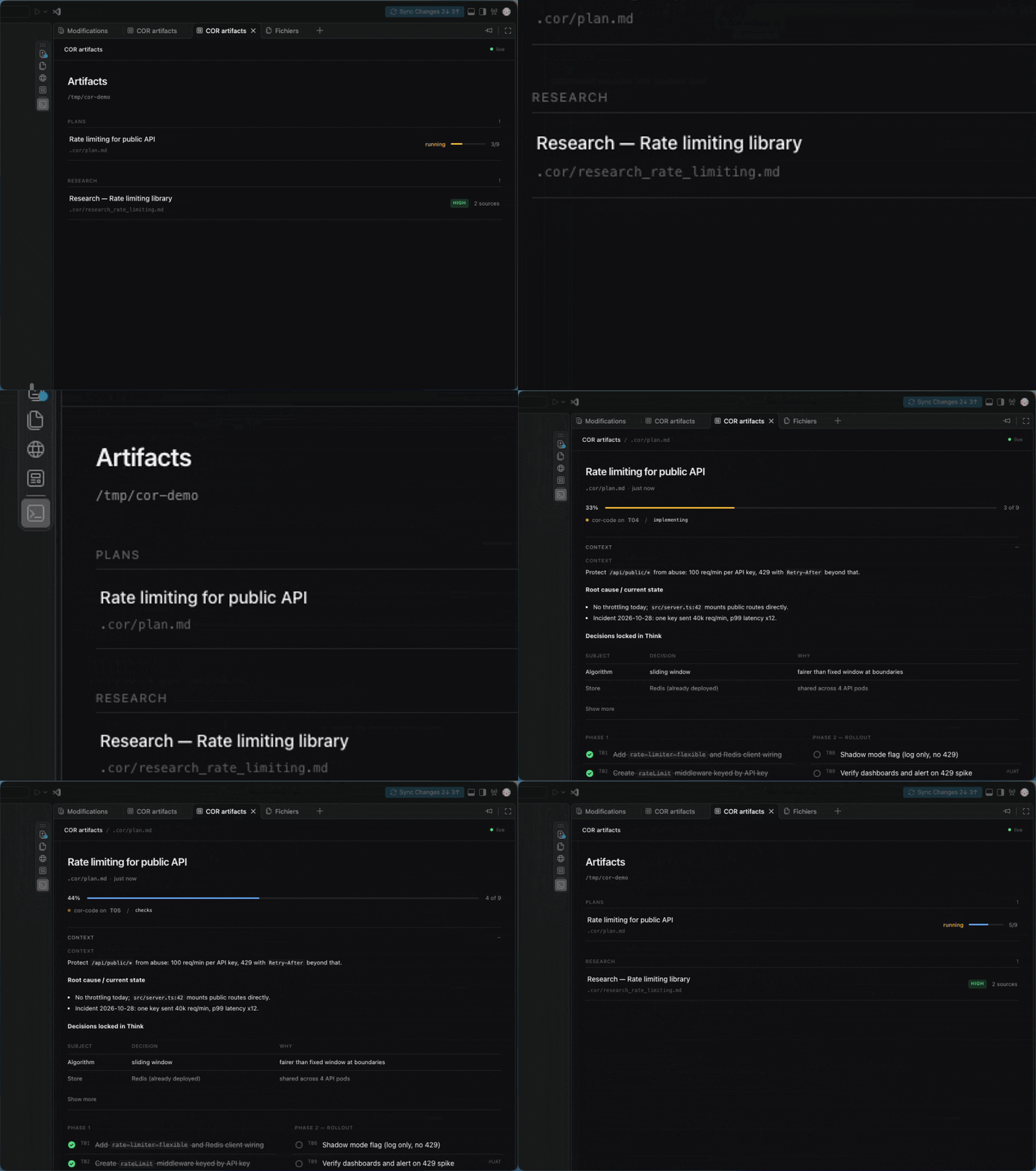
When GitHub Copilot is among the configured extensions, cor-setup offers an optional canvas extension (default: no). It installs .github/extensions/cor-artifacts/, which renders .cor/ plans as a live task board (progress, current checkpoint task, tasks ticking as cor-code works) and research reports as a navigable page. It is read-only: markdown stays the source of truth. Other agents ignore it. See How to view artifacts in Copilot.
Crash recovery
cor-code writes a .cor/checkpoint.md file before touching any code. It records the active plan path, the current task ID, and the phase (implementing, checks, or marking-complete). When the skill starts it checks for this file. If found and the phase is not done, it runs all configured checks to assess the situation and either resumes automatically or surfaces the state to you. When a task finishes cleanly the checkpoint is overwritten with phase: done — no file deletion needed.
If a checkpoint from a different plan is detected when starting work, cor-code pauses and asks whether to discard it or switch back to the interrupted plan first.
Notes
After completing each task, cor-code assesses what was discovered and appends a note to your agent instruction file if anything non-obvious happened: hidden constraints, surprising API behavior, architectural decisions, errors to avoid, or setup steps a future developer needs. Nothing is written if the task was routine. Notes accumulate as the project grows, building up a project-specific memory for the agent.
Stack support
cor-setup detects your stack and proposes sensible check defaults:
| Stack | Default checks |
|---|---|
| TypeScript + ESLint + Vitest | tsc --noEmit, eslint --fix, vitest run |
| TypeScript + Biome | tsc --noEmit, biome check --apply |
| Ruby on Rails | rubocop -a |
| Python | ruff check --fix, mypy |
| Go | go vet ./..., go build ./... |
| Rust | cargo check, cargo clippy |
You can remove, modify, or add any command at setup time, or re-run cor-setup anytime.
Agent support
COR adapts its behaviour to the agent running it:
| Agent | Task tracking | Questions |
|---|---|---|
| Claude Code | TodoWrite |
AskUserQuestion (multiple choice) |
| GitHub Copilot | todo_write / todo_read |
vscode_askQuestions |
| Codex / other | .cor/plan.md directly |
Inline numbered list |
All phases work across all three environments. The agent detects which tools are available at startup and uses the right ones throughout the session.
Documentation
Full documentation lives in docs/, organized with Diataxis (tutorials, how-to guides, reference, explanation). Preview with pip install mkdocs && mkdocs serve.
Skill quality
authoring-skills is the meta-skill governing this repo's own skills. It encodes the Agent Skills authoring best practices (frontmatter validity, description discoverability, the 500-line SKILL.md budget, one-level-deep references, progressive disclosure, workflows and evaluations) and ships a validator:
python plugins/toolbox/skills/authoring-skills/scripts/validate_skill.py plugins/*/skills/*/
Run it before shipping a skill change. ERROR findings must be fixed; WARN findings must be triaged explicitly.
Contributing
Issues are welcome; pull requests are reviewed on a best-effort basis. See CONTRIBUTING.md, the Code of Conduct and the security policy.
License
Yorumlar (0)
Yorum birakmak icin giris yap.
Yorum birakSonuc bulunamadi