chaosfolk
Health Warn
- License — License: MIT
- Description — Repository has a description
- Active repo — Last push 0 days ago
- Low visibility — Only 6 GitHub stars
Code Fail
- exec() — Shell command execution in src/chaosfolk/audit.py
Permissions Pass
- Permissions — No dangerous permissions requested
No AI report is available for this listing yet.
Simulated users explore web apps, with replayable browser evidence.
Simulated users break your web app in a real browser.
You get the bugs, the proof and a fix prompt for your coding agent.


Why · How · What it checks · What you get · Install · Try the demo · Use it on your app · Changelog
Watch the trailer
https://github.com/user-attachments/assets/500cdc82-94da-466b-bc26-2f85cfc8072d
Why
Your tests check the paths you wrote. Your users take other paths. They
double-click Save, lose their connection halfway through a form, come back an
hour later in another tab. You rarely try these things yourself, because you
know how the app is supposed to work.
AI agents can explore an app for you, but "this looks broken" is an opinion.
You need to know whether the bug is real before you spend time on it.
Chaosfolk lets a small team test like a crowd of strangers, and only calls
something a bug when it can show it happening again.
How
Users with habits, in a real browser. Your coding agent runs simulated
users, each with a goal and one of 16 behavior profiles: in a hurry,
keyboard-only, on mobile, distracted, unfamiliar with jargon. Each one drives
its own Chromium context and can work through several of your goals.
Chaos on purpose. While they work, the engine injects the conditions real
users meet: offline, slow or failing requests, lost responses, full or corrupted
storage, cleared cookies, clock jumps and viewport changes.
The checks a QA team would run. Each tester also carries a share of a catalog
of 69 concrete checks, with test values and the expected behavior: names in any
script, phone numbers and postal codes from 15 countries, extreme input, double
submits, interrupted forms, account enumeration, keyboard access and more. The
engine reads each page's fields first, so testers get the checks that apply.
Proof before verdict. The agent turns each promising observation into a
scenario with an explicit assertion. The engine replays it without a model:
three failing trials with the fault and three passing controls without it mark a
finding as reproduced. A "saved" message is not proof: replays reload, reopen,
clear local storage or submit again before checking. Anything weaker stays
labeled as an observation.
What it checks
Random exploration finds what nobody planned. These deterministic commands run
next to it, without a model, and their results feed the same report.
| Command | What it does | Example of a problem it finds |
|---|---|---|
fields |
Classifies every field of a page and lists the checks that apply | A postal code in type=number loses its leading zero |
vary |
Replays a form once per test value of a field, for the countries you serve | +44 7700 900123 refused because the rule only knows French numbers |
compare |
Replays two scenarios and compares their outcomes | Password reset says "no account for this email" |
audit |
Measures a page at several screen sizes, then tabs through it | The submit button leaves the screen at 320 px; keyboard focus gets stuck |
replay --persist |
Reloads, reopens, clears storage or retries before asserting | A success message with nothing saved; a duplicate after a retry |
campaign |
Keeps a project's findings across runs and replays the open ones | A fix that came back two campaigns later |
Test values are international: validation should follow the user's country,
never one national pattern. Security checks stay passive and use synthetic
accounts. audit reports WCAG signals such as contrast, target size, names and
reflow; they are measurements to confirm, not a conformance audit. See the
QA checks guide.
Each app is identified by an explicit project name, not by localhost:3000.
Its memory keeps a map of the journeys already explored, so the next testers
start where earlier ones did not go, and the findings of every campaign, so a
fix is checked by replaying what failed instead of starting over. Testers can
work on separate data or on the same records on purpose, with different roles,
to find conflicts and permission gaps. See campaigns and sessions.
What you get
A local HTML report, in English or French, built around what to fix.
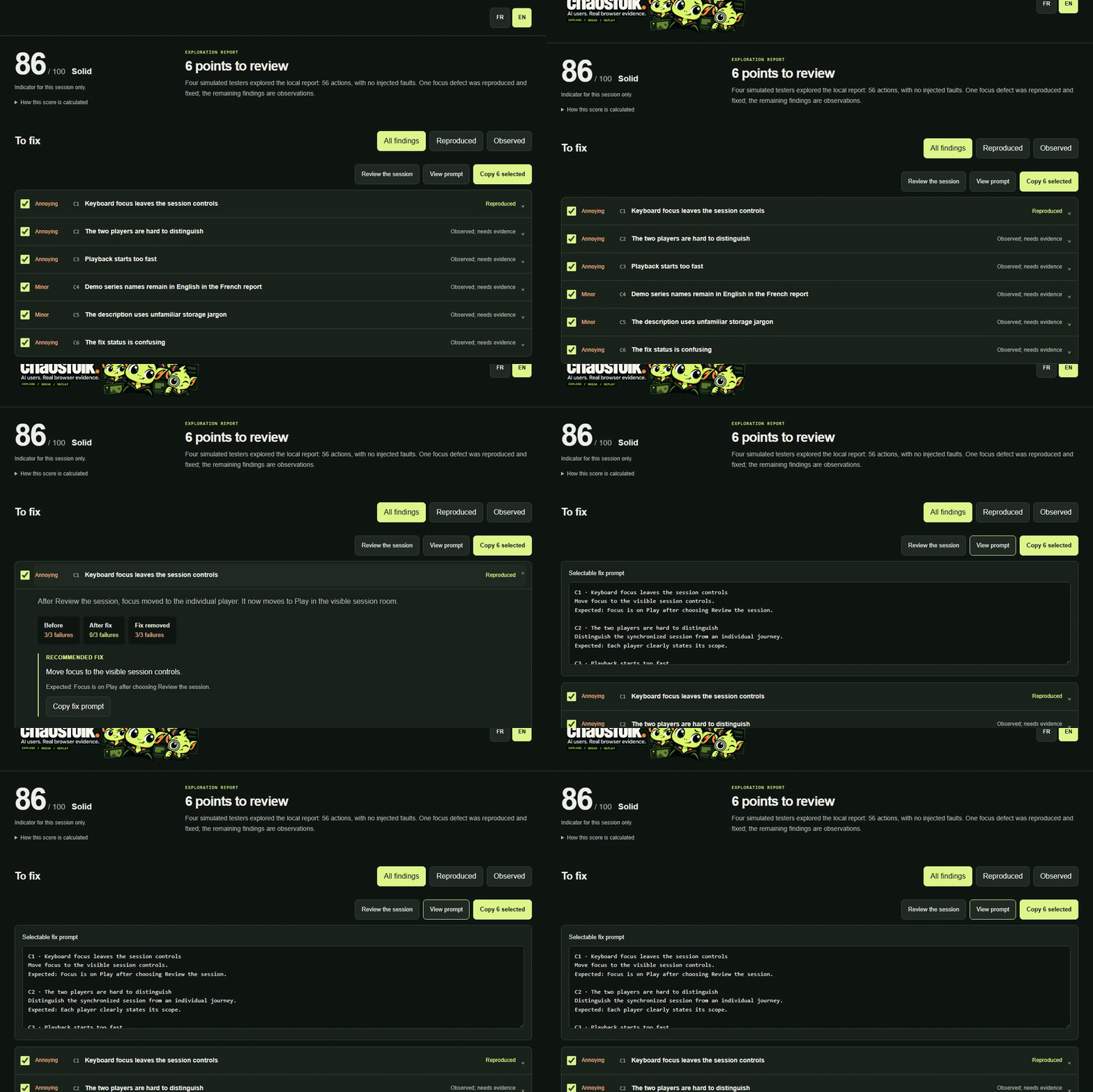
Findings, evidence and a fix prompt
A score out of 100, the findings with their severity, and the evidence behind
each one: replay results, screenshots and the expected behavior. Tick the
findings you want fixed and copy a ready-made prompt for your coding agent.
Synchronized session replay
Watch every tester's screen on one timeline, change the speed and jump straight
to the moments where something went wrong.
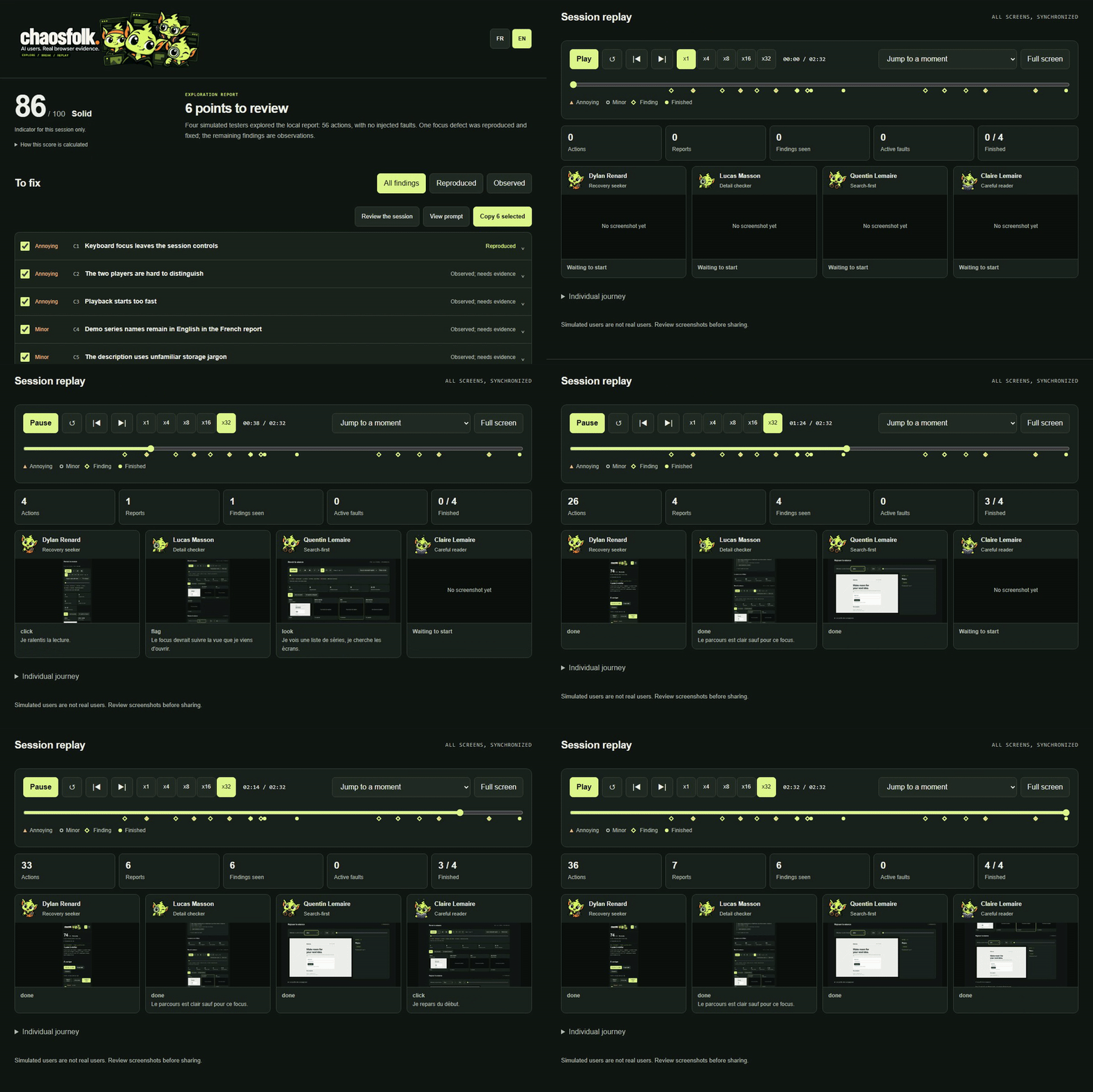
Both recordings come from Chaosfolk auditing its own report with four simulated
users. The score is a documented heuristic for one session,
not a measure of total coverage.
Install
Chaosfolk has two parts: the engine, a Python program that drives the
browsers, and the skill, which teaches your coding agent how to use it.
Install both once; they work in every project.
Quick install of the skill, with npx and the
Skills CLI:
npx skills add loukan42/chaosfolk --skill chaosfolk -g
The engine is installed separately in step 1. Step 2 below explains how to
pick your agent.
Before you start
Open a terminal and check these three commands. Each one should print a version.
python --version
node --version
git --version
| You need | Version | If it is missing |
|---|---|---|
| Python | 3.12 or newer | python.org/downloads. On Windows, tick "Add python.exe to PATH". |
| Node.js | 22.20 or newer | nodejs.org, LTS version |
| Git | any | git-scm.com/downloads |
On macOS and Linux, type python3 wherever this guide says python.
Step 1: install the engine
Install pipx, a tool that installs Python programs so they work from any folder:
python -m pip install --user pipx
python -m pipx ensurepath
Close your terminal and open a new one, then install Chaosfolk and its
browser:
pipx install git+https://github.com/loukan42/chaosfolk.git
chaosfolk install-browser
chaosfolk check
check prints one line per requirement. Every line should end with OK,
except the chaosfolk-user line, which only matters for Claude Code (step 3).
Step 2: add the skill to your coding agent
Run the line for your agent. -g installs the skill for all your projects.
| Agent | Command |
|---|---|
| Claude Code | npx skills add loukan42/chaosfolk --skill chaosfolk -g -a claude-code |
| Codex | npx skills add loukan42/chaosfolk --skill chaosfolk -g -a codex |
| Cursor | npx skills add loukan42/chaosfolk --skill chaosfolk -g -a cursor |
| GitHub Copilot | npx skills add loukan42/chaosfolk --skill chaosfolk -g -a github-copilot |
| Gemini CLI | npx skills add loukan42/chaosfolk --skill chaosfolk -g -a gemini-cli |
| OpenCode | npx skills add loukan42/chaosfolk --skill chaosfolk -g -a opencode |
| Windsurf | npx skills add loukan42/chaosfolk --skill chaosfolk -g -a windsurf |
| Another agent | npx skills add loukan42/chaosfolk --skill chaosfolk -g, then pick it from the list |
The installer is the Skills CLI, which
supports over 70 agents.
Answer y if npx asks to download it. Then restart your agent or open a
new session so it finds the skill.
Step 3: Claude Code only
chaosfolk install-agent
This adds the simulated user definition, which runs testers on a cheaper model
and limits their tools. Restart Claude Code afterwards.
Check that it works
Ask your agent: Run chaosfolk check and tell me if anything is missing. If it
answers with the same OK lines, you are ready.
Chaosfolk works best when your agent can start subagents, so testers run in
parallel. Without subagents, the agent plays them one after another: the run
takes longer and the testers are less independent.
chaosfolk: command not found: open a new terminal. If it still fails,
runpython -m pipx ensurepathagain, then open another new terminal.piprefuses with "externally managed environment" (some Linux and
Homebrew setups): install pipx with your package manager instead, for examplebrew install pipxorsudo apt install pipx.npx: command not foundor a Node.js version error: install the LTS
version from nodejs.org, then open a new terminal.chaosfolk checkshows a missing browser: runchaosfolk install-browser
again. On Linux,chaosfolk install-browser --with-depsalso installs the
system libraries Chromium needs.- Your agent does not know Chaosfolk: restart it, or check that you used
the-avalue of the agent you actually use.npx skills list -gshows what
is installed. - You prefer uv:
uv tool install git+https://github.com/loukan42/chaosfolk.git
replaces thepipxsteps. - Manual installation, or details for each agent: see the
agent guide.
To update later, run pipx upgrade chaosfolk and npx skills update -g.
Try the demo
No AI agent or API key needed. The demo starts a small local app with a
deliberate bug: a form that loses your draft when storage is full. It runs real
browser trials on the broken and fixed versions, then writes the report.
chaosfolk demo --lang en
Open .horde/demo/rapport.html in the folder where you ran the command, and
keep it next to its screenshot folders. Use --lang fr for French; the report
has a language switch.
Use it on your app
Start your app locally, open your coding agent in its project, and ask:
Use Chaosfolk on my local test app at http://localhost:3000, project "shop-front".
Explore creating, finding and editing a project. Use the medium run size,
synthetic data and an English report. Do not send messages or make purchases.
Report what you find without changing the app.
For a QA-style pass, say so and name what matters:
Run Chaosfolk on project "shop-front" at http://localhost:3000 with the themes
functional, security and accessibility. Our customers are in France, Belgium and
Switzerland. Check every form field with the catalog, prove persistence after
reload, check the password reset for account enumeration with the test account
[email protected], and audit the sign-up page on mobile and desktop.
After a fix, ask: Replay the open Chaosfolk findings for shop-front and tell me what is fixed.
Pick what to test. Name one or more themes, or ask for all:functional, ux, accessibility, resilience, security, performance,compatibility. The report shows which themes were tested, partly tested or
left out.
Pick a run size. Preview one with chaosfolk plan --level medium.
| Run size | Simulated users | Actions per user |
|---|---|---|
| Low | 2 | 12 |
| Medium | 4 | 20 |
| High | 12 | 40 |
These cap browser actions, not tokens. Model cost depends on your agent host,
your pages and the analysis; check it there.
Limits
Chaosfolk is alpha software and its users are fictional: their reactions are
test hypotheses, not research with real people. Security checks are passive,
performance probes are small local smoke tests, accessibility signals (including
estimated contrast) are not a conformance audit, and mobile means browser
emulation. The catalog replaces neither product knowledge nor a dedicated
security test, a screen reader review or real devices: use them to go deeper.
Run it only on local apps or test environments you are allowed to test, with
synthetic data. Screenshots can contain sensitive content, so review them before
sharing. See SECURITY.md.
Changelog
Unreleased
- A catalog of 69 QA checks, with international test values for 15 countries,
handed to each simulated user. See them withchaosfolk checks. - New commands:
fieldsclassifies a page's fields,varyreplays a form once
per test value,compareproves account enumeration, andauditmeasures
responsive, keyboard and WCAG signals. replay --persistand thefield-valueassertion catch false success, data
loss, duplicates after a retry and out-of-sync views.- Apps are identified by a project name.
mapandcampaignkeep a journey
map and the findings of each campaign, and replay the open ones to check fixes. - Independent or coordinated sessions with roles, and scenarios that replay
several users in one trial. - Simulated users run on Sonnet in Claude Code and can chain up to four obvious
actions per call, which cuts token use. chaosfolk install-browser, a step-by-step install guide for seven coding
agents, and the trailer video.
- Test themes: functional, ux, accessibility, resilience, security,
performance and compatibility, with the coverage of each one documented. - Low, medium and high run sizes, with
chaosfolk plan. - More drawable faults and a local concurrency probe.
- Report: synchronized session replay, logo header, English or French.
- README rewritten around why, how and what, with audit recordings.
- Simulated users with their own browser, goal and habits, coordinated by your
coding agent. - Fault injection: offline, slow or failing requests, lost responses, full,
empty or corrupted storage, clock jumps and viewport changes. - Scenario extraction and replay without a model, with control series.
- HTML report with findings, evidence counts, copyable fix prompts and a
session timeline. - A local demo app with a planted bug, run by
chaosfolk demo.
Workflow and coverage · QA checks · Campaigns and sessions ·
Fault injection · Replay format · Contributing · MIT license
Reviews (0)
Sign in to leave a review.
Leave a reviewNo results found