termcanvas
Health Uyari
- License — License: MIT
- Description — Repository has a description
- Active repo — Last push 0 days ago
- Low visibility — Only 8 GitHub stars
Code Basarisiz
- fs module — File system access in directory_snapshot.js
- spawnSync — Synchronous process spawning in main.js
- fs.rmSync — Destructive file system operation in main.js
- os.homedir — User home directory access in main.js
- process.env — Environment variable access in main.js
- fs module — File system access in main.js
- spawnSync — Synchronous process spawning in main_agentmux_service.js
- os.homedir — User home directory access in main_agentmux_service.js
- process.env — Environment variable access in main_agentmux_service.js
- fs module — File system access in main_agentmux_service.js
- fs.rmSync — Destructive file system operation in main_workspace_service.js
- fs module — File system access in main_workspace_service.js
- process.env — Environment variable access in preload.js
Permissions Gecti
- Permissions — No dangerous permissions requested
Bu listing icin henuz AI raporu yok.
Open-source, tmux-backed canvas for steering a fleet of AI coding agents - real terminals as nodes with commander-to-worker delegation. See which agent needs you. (macOS, Apple Silicon)
TermCanvas
TermCanvas is a desktop app that lets you arrange real terminal sessions on an infinite canvas.
It is built for developers who juggle multiple repos, shells, AI agents, and long-running tasks and want something more spatial than tabs or split panes.
The current direction is an agent-orchestration canvas: a fast, simple workspace where a commander agent, worker agents, normal shells, project files, and task context all live in one visible place.
Demo
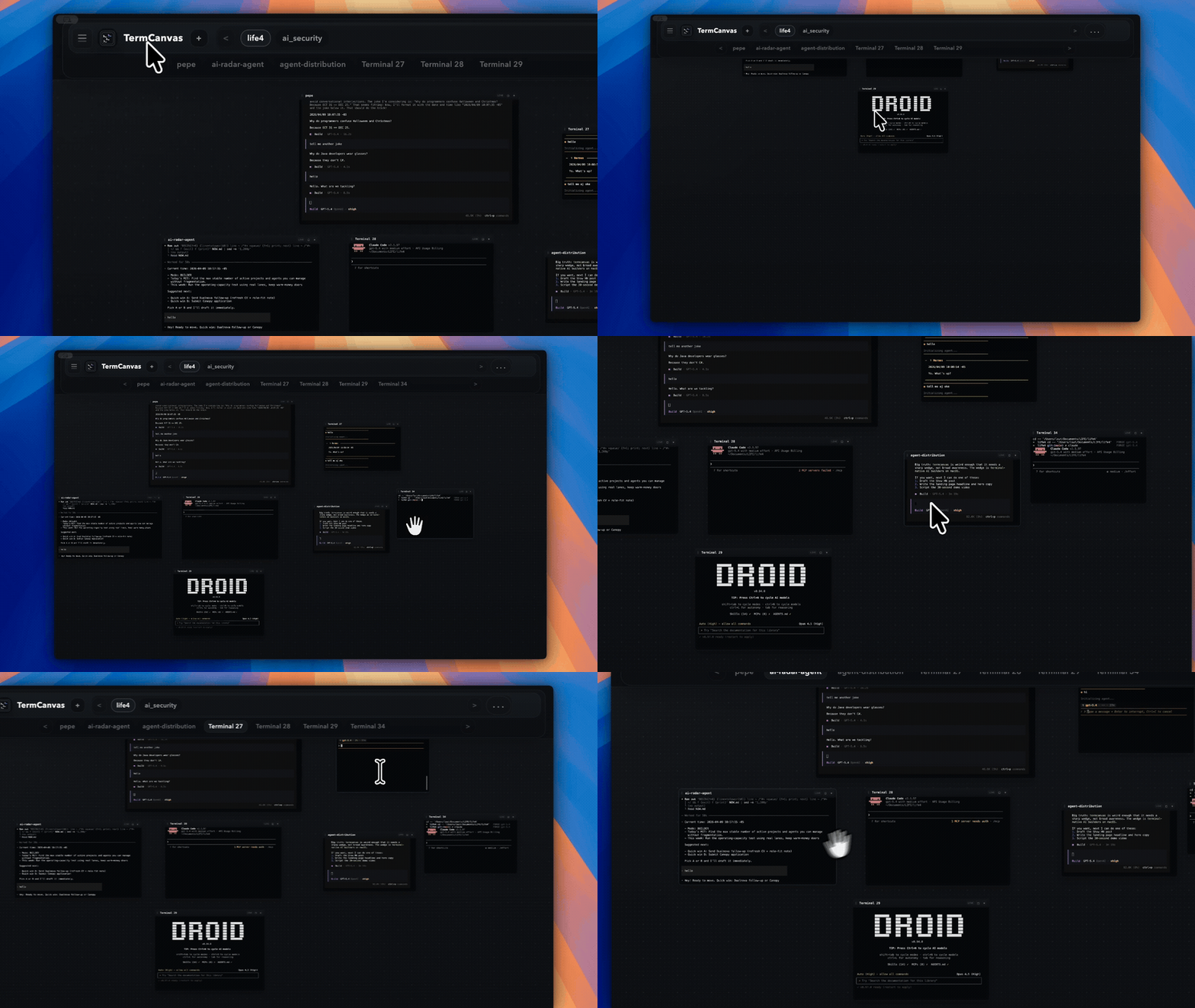
Demo video: https://www.youtube.com/watch?v=4XN5jvk9P1U
What It Is
- a spatial terminal workspace
- an infinite canvas for real shell sessions
- a desktop app for managing multiple terminals side by side
- a project-bound canvas for browsing files next to the terminals that operate on them
- an agentmux-aware view of commander and worker AI agent terminals
- a better fit for task-based terminal work than a pile of tabs
Why People Use It
Normal terminal tabs get crowded fast.
TermCanvas gives each task its own terminal node, so you can keep one shell per repo, feature, agent, or service and place them where they make sense.
Examples:
- one terminal for the app server, one for tests, one for logs
- one terminal per client repo or microservice
- one terminal per AI coding agent
- one canvas per project, sprint, or research thread
Key Features
- Real interactive shell terminals rendered with
xterm.js - Infinite canvas with pan and zoom
- Multiple project-bound canvases for separate work contexts
- Drag, resize, rename, maximize, restore, and close terminal nodes
- Workspace drawer for browsing imported folders and previewing files
- App-session restore across relaunches
tmux-backed terminal reattach when available- Integrated
agentmuxmanager for commander and worker AI agent terminals - Agent delegation lines that show commander-to-worker-to-child relationships on the canvas
- Fresh-start welcome state that prompts for a folder instead of creating an empty phantom canvas
- Canvas JSON export and import
- Full app-data JSON export and import for moving setups between installs
- Electron security boundary with Node kept out of the renderer
Good Fit For
- developers who live in the terminal
- people managing several repos at once
- AI-assisted coding workflows
- research, debugging, and parallel task execution
- anyone who wants terminal layout memory across app relaunches
Quick Start
npm install
npm run dev
tmux is recommended if you want live terminal sessions to survive app relaunches.
Managed agent terminals require tmux because agentmux uses it to create and
control commander and worker sessions. On macOS, install it with:
brew install tmux
On a fresh launch, TermCanvas now waits for you to open a folder. Creating a new canvas with the + button also asks for the workspace folder first. If you cancel the folder picker, no canvas is created.
How It Works
- Double-click empty space to create a terminal
- Drag the canvas to move around
- Use modified mouse wheel to zoom
- Use
+to create a new canvas by choosing a workspace folder - Switch between canvases from the top bar
- Delete any canvas, including the last one; deleting the last canvas returns to the welcome state
- Open folders in the left drawer to browse files next to your terminals
- Close the app and reopen it to restore layout and session state
Keyboard Shortcuts
Cmd+B: toggle the left drawerCmd+M: maximize or restore the selected terminal nodeCmd+L: close the file preview inspectorEsc: close the current preview or exit maximize mode
Session Restore
TermCanvas saves both layout state and terminal identity.
On a normal run:
- canvases, node positions, viewport, workspaces, and preview state are saved automatically
- each terminal node keeps a stable session identity
- if
tmuxis available, closing the app detaches from the live shell instead of killing it - reopening the app reattaches to that same shell session
Important behavior:
- closing a terminal node with
xdestroys that terminal session - closing the app preserves live
tmux-backed terminals for relaunch - without
tmux, the app still restores the UI layout, but not the exact live shell process
Managed Agents
TermCanvas has an integrated agentmux manager for creating and tracking commander and worker AI agent terminals on the canvas. Packaged apps include the runtime, so users do not need to install a separate agent manager.
- packaged apps run the bundled runtime from the app resources folder
- packaged apps store agentmux state under the app
userDatadirectory - development builds use the vendored runtime in
vendor/agentmuxby default - set
TERMCANVAS_AGENTMUX_ROOTonly when testing a different local runtime tmuxmust be installed for commander and worker agent terminals- missing
agentmuxdoes not block normal terminal canvas use - TermCanvas does not write live canvas or agent state into project
AGENTS.md; agents should inspect runtime state throughAGENTMUX_*env vars andagentmux show - managed terminals expose
AGENTMUX_BINso installed agent skills can find the bundled runtime - managed terminals expose
AGENTMUX_HOMEso agentmux commands use the app's live agent database instead of a stale default store - packaged apps expand
PATHwith common macOS CLI locations like/opt/homebrew/binsotmuxcan be found from GUI launches
Current agent-canvas behavior:
- managed terminal nodes track agent name, role, project tag, parent agent, commander agent, and depth when agentmux reports them
- commander-to-worker-to-child delegation lines are derived automatically from
parent_agentorcommander_agent - lines are drawn behind node cards and pan or zoom with the canvas
- edges are project-scoped, deduplicated, and ignore self-links or unknown parents
- any managed agent can spawn child workers; agentmux records parent/depth metadata so the canvas can render deeper trees from the runtime topology
This is not a manual graph editor. The intent is to show the real agent swarm topology that agentmux knows about.
The manager terminal is the main command center. Use terminal-native agentmux commands for orchestration instead of adding a heavy dashboard:
vendor/agentmux/agentmux tree <project>
vendor/agentmux/agentmux status <project>
vendor/agentmux/agentmux mission <project> "Build the next feature"
vendor/agentmux/agentmux child <parent-agent> <worker-name> --prompt "Handle this subtask"
vendor/agentmux/agentmux logs <agent> --lines 120
vendor/agentmux/agentmux send <agent> "Follow up on X"
vendor/agentmux/agentmux stop <agent>
When run inside a managed terminal, project-aware commands can infer the project from AGENTMUX_PROJECT.
TermCanvas should stay a minimal visual map of the live tree while the terminal remains the control surface.
Install The Agent Skill
TermCanvas works without installing an agent skill. The skill matters when you want Codex, Claude Code, OpenCode, Cursor, or another coding agent to understand how to operate the live agent tree from a terminal.
Packaged apps include a one-click installer:
- on first launch, TermCanvas offers to install the skill when it is missing
- you can also use
TermCanvas > Install / Update Agent Skill - the top-right canvas
...menu also includesInstall agent skill - the bundled skill is copied to
~/.agents/skills/agentmux/SKILL.md
Install the public skill from this repo:
npx skills add lout33/termcanvas --skill agentmux -g -a codex -a claude-code -a opencode
For a project-local install, omit -g so the selected agents receive the skill under the current project. The skills CLI supports GitHub repos, direct skill paths, local paths, global installs, and agent-specific installs.
Development checkouts can also install the bundled copy directly:
vendor/agentmux/agentmux install-skill --force
The skill does not install the runtime. It teaches agents how to resolve AGENTMUX_BIN, inspect AGENTMUX_* session state, spawn workers through agentmux worker or agentmux child, send prompts, read logs, and stop or delete agents safely.
Current Product Direction
TermCanvas is moving from a generic spatial terminal board toward a project-aware agent orchestration canvas.
What we are trying to make easy:
- open a project and immediately get a canvas for that project
- see terminals, workers, files, and previews without losing context
- see who spawned whom in an agentmux swarm
- manage missions and delegation primarily from the manager terminal
- keep the UI simple enough that the canvas feels faster than juggling tabs
- preserve live terminal work across app relaunches when
tmuxis available
Near-term roadmap:
- auto-layout child workers under their parent so the delegation graph is readable without manual dragging
- make agent cards more role-aware with clearer status, names, and runtime state
- expose a safe, read-only canvas snapshot so agents can understand who else is on the canvas
- improve large-canvas feel: fit-to-content, smoother pan/zoom, and no jank with many nodes
- add richer file/document navigation in the right preview panel
Move Data Between Installs
Use the canvas menu to export and import full app data as JSON.
Export app datawrites the saved app session to a.jsonfileImport app datareplaces the saved app session for the next launch- after import, close and reopen
TermCanvasto load the new state cleanly
Build Checks
npm run build
npm test
npm run build bundles the markdown preview/editor and runs syntax checks for the main Electron files. npm test runs the Node test suite for renderer helper modules and preload contracts.
Local macOS Build
npm run dist:mac
This builds local unsigned macOS release artifacts in:
release/
Current outputs include:
.dmg.zip- packaged
.app
Opening The Downloaded App On macOS
Current macOS builds are unsigned, so macOS may block the app the first time you open it.
After downloading:
- Open the downloaded
.dmgor.zip. - Move
TermCanvas.appinto yourApplicationsfolder. - In Finder, right-click
TermCanvas.appand chooseOpen. - When macOS shows the warning dialog, click
Openagain.
If macOS still blocks the app:
- Open
System Settings. - Go to
Privacy & Security. - Scroll to the security section and click
Open AnywayforTermCanvas. - Open the app again and confirm the final prompt.
After the first successful launch, you can open TermCanvas normally like any other app.
GitHub Releases
TermCanvas uses a tag-driven GitHub release flow for macOS builds.
Release steps:
npm version patch --no-git-tag-version
git add package.json package-lock.json
git commit -m "chore: release v0.1.1"
git push origin main
git tag v0.1.1
git push origin v0.1.1
When the v0.1.1 style tag is pushed, GitHub Actions:
- verifies the tag matches
package.json - runs the macOS build pipeline
- creates a GitHub Release for that tag
- uploads the
.dmgand.zipartifacts
Current Limits
- delegation graph lines currently come from agentmux metadata only; there is no manual node wiring
- worker placement is still manual until auto tree layout lands
- no collaboration yet
- no polished multi-window shared-terminal flow yet
- no guaranteed session continuity if
tmuxsessions are killed outside the app
Tech Stack
- Electron
node-ptytmuxxterm.js
Search Tags
terminal workspace, spatial terminal, infinite canvas terminal, tmux desktop app, developer productivity, ai agent workspace, electron terminal app, visual terminal manager, multi terminal workspace
Development
If you want to work on the codebase, read AGENTS.md first.
License
TermCanvas is open source under the MIT License.
Yorumlar (0)
Yorum birakmak icin giris yap.
Yorum birakSonuc bulunamadi