ask-first-eda
Health Warn
- License — License: MIT
- Description — Repository has a description
- Active repo — Last push 0 days ago
- Low visibility — Only 6 GitHub stars
Code Pass
- Code scan — Scanned 12 files during light audit, no dangerous patterns found
Permissions Pass
- Permissions — No dangerous permissions requested
No AI report is available for this listing yet.
Ask First EDA: an agent skill that asks how you define your metrics before calculating them, then delivers a traceable HTML report (Claude Code, Codex, Claude app).
Ask First EDA
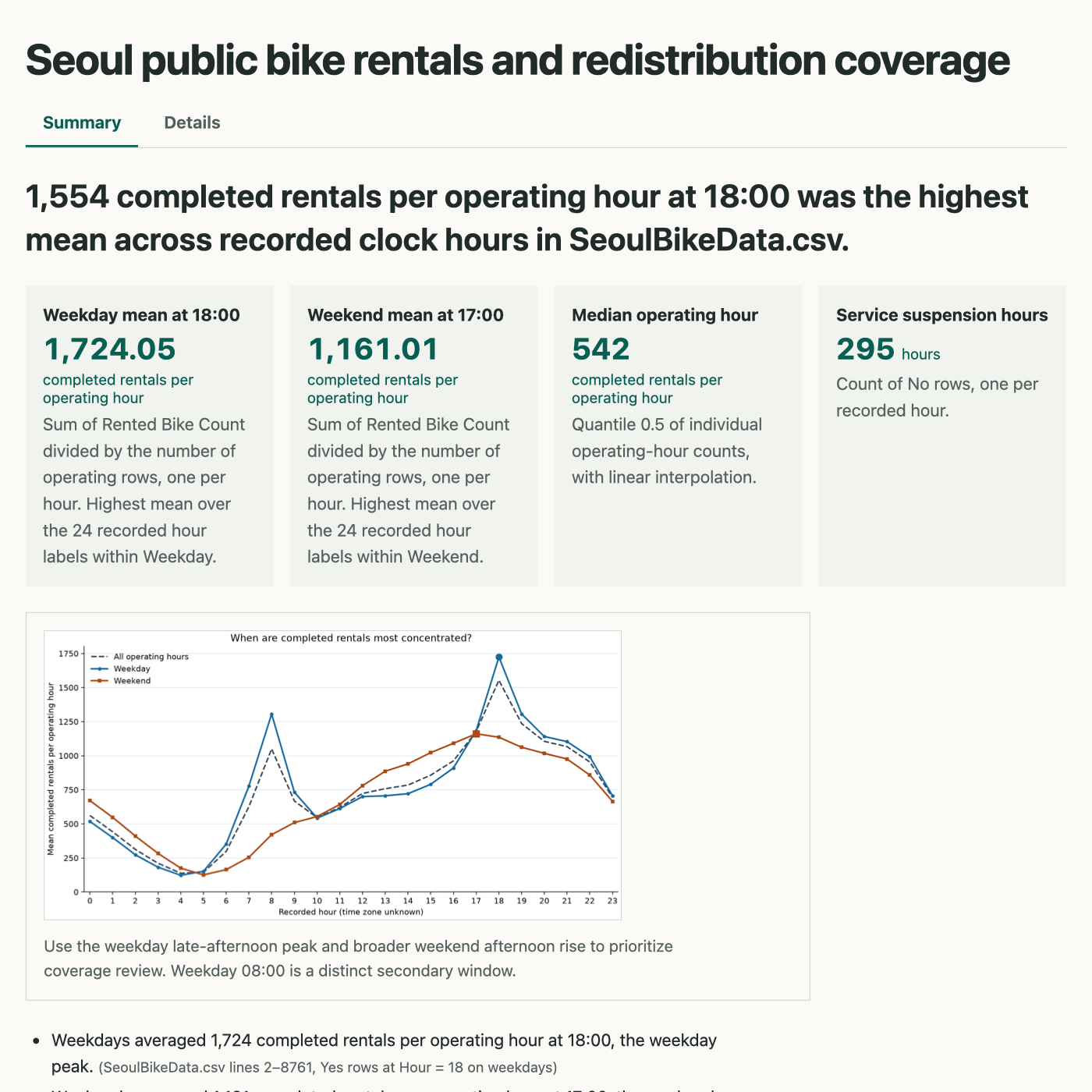
Ask First EDA asks how you define your metrics before it calculates them and builds a report with charts.
| Hour | Machine status | Units produced |
|---|---|---|
| 08:00–09:00 | Running | 18 |
| 09:00–10:00 | Stopped | 0 |
| 10:00–11:00 | Running | 22 |
| 11:00–12:00 | Running | 20 |
View an example report · Browse the gallery
Download the ZIP from Releases
The line produced 60 units. It averaged 15 units/h over the full shift and 20 units/h over the three running hours.
Should I include the stopped hour when I calculate hourly output?
Install
Requires Python 3.10 or later. In the extracted ask-first-eda folder, install dependencies and check the installation:
python -m pip install -r requirements.txt
python -I scripts/check_install.py
Claude desktop app
- Download
ask-first-eda.zipfrom the latest Release and upload it in Settings → Skills (or Customize → Skills / Plugins). - The app may block package installation, so ask Claude to run the uploaded skill’s
scripts/check_install.pyto check available dependencies. - To build the ZIP locally, run
python scripts/package_skill.pyfrom the repository root and uploaddist/ask-first-eda.zip.
Claude Code
- Copy the extracted folder to
<project>/.claude/skills/ask-first-eda/or~/.claude/skills/ask-first-eda/(or unpack the Release ZIP there). - Open the terminal in the project folder and start Claude Code there, because that is where the work folder is created.
- Use the project path for a single project and the user path for all projects.
Codex
- Copy the extracted folder to
<project>/.agents/skills/ask-first-eda/(or unpack the Release ZIP there). - Open the terminal in the project folder before starting Codex so the skill is available to that project.
- Use the project path when the skill should apply only to that project.
On Windows, use python rather than python3; in PowerShell, use Copy-Item -Recurse .\skills\ask-first-eda <project>\.claude\skills\ask-first-eda (or the .agents\skills path for Codex).
To update, replace the installed folder or upload the new Release ZIP. To remove it, delete the folder or remove the skill in the app.
| Client | Version | Date | Verification scope | First run |
|---|---|---|---|---|
| Claude Code | 2.1.332 | 2026-11-26 | routing 4/4(install smoke) | pass (2026-11-26, clean project, support_tickets example: eda-work/delivery/report.html and eda_summary.json created in the project folder) |
| Codex | 0.171.0 | 2026-11-26 | routing 4/4(install smoke) | covered by evaluation runs (codex exec) |
| Claude desktop app | — | 2026-11-26 | upload and run, manual | pass (manual, 2026-11-26) |
See the installation smoke status for the automated results.
Try it in one minute
Copy examples/messy_production_report/daily_report.xlsx into your project, then invoke /ask-first-eda and ask “Show production and utilization by line.”
Expected flow: data at a glance → ask about the utilization denominator → confirm the cleaning plan → report.
Explore the reports
The skill asks one question at a time in your language. The report’s Summary tab shows the findings and charts. The Details tab gives the evidence and calculations.
- Seoul Bike · Walkthrough
- Factory Utility · Walkthrough
- Support Tickets · Walkthrough
- Equipment Sensors · Walkthrough
- Messy Production Report · Walkthrough
See how the choice of clock affects first-response compliance or how a cleaning plan accounts for excluded rows.
Supported inputs
The gallery includes examples in CSV, Excel, JSONL, and Parquet.
| Input | Support |
|---|---|
| CSV / TSV | Inspect and analyze |
.xlsx |
Inspect and analyze |
| JSON / JSONL | Inspect and analyze |
| Parquet | Inspect and analyze |
| Markdown table | Inspect and analyze |
.xls |
Detect; reading support is not promised |
Korean chart labels require a system font that supports Hangul.
What it will not do
- Model training or tuning
- Automatic hypothesis testing or p-values
- Causal claims
- Modify the source file
Evaluation
Across 36 runs on six synthetic cases, independent review found 18/24 correct numeric results with no skill (A), 24/24 with a one-line instruction (B), and 24/24 with the skill (C).
B and C each produced 18/24 confirmed final values. C made no unsupported definition assertions and exposed no home paths.
No condition asked the required denominator question. C used about twice B’s median analyst time and tokens. A/B/C results and grading corrections
Earlier versions are covered in the A/B summary.
License
The code is licensed under MIT. Example datasets retain their own licenses.
Reviews (0)
Sign in to leave a review.
Leave a reviewNo results found