lucidos
Health Warn
- License — License: MIT
- Description — Repository has a description
- Active repo — Last push 0 days ago
- Low visibility — Only 5 GitHub stars
Code Fail
- rm -rf — Recursive force deletion command in .claude/skills/project-stats/sloc_test.sh
Permissions Pass
- Permissions — No dangerous permissions requested
No AI report is available for this listing yet.
A local AI OS that keeps the apps you describe running, and acts when something happens. Your machine, your data, your accounts. MIT licensed.
Lucidos
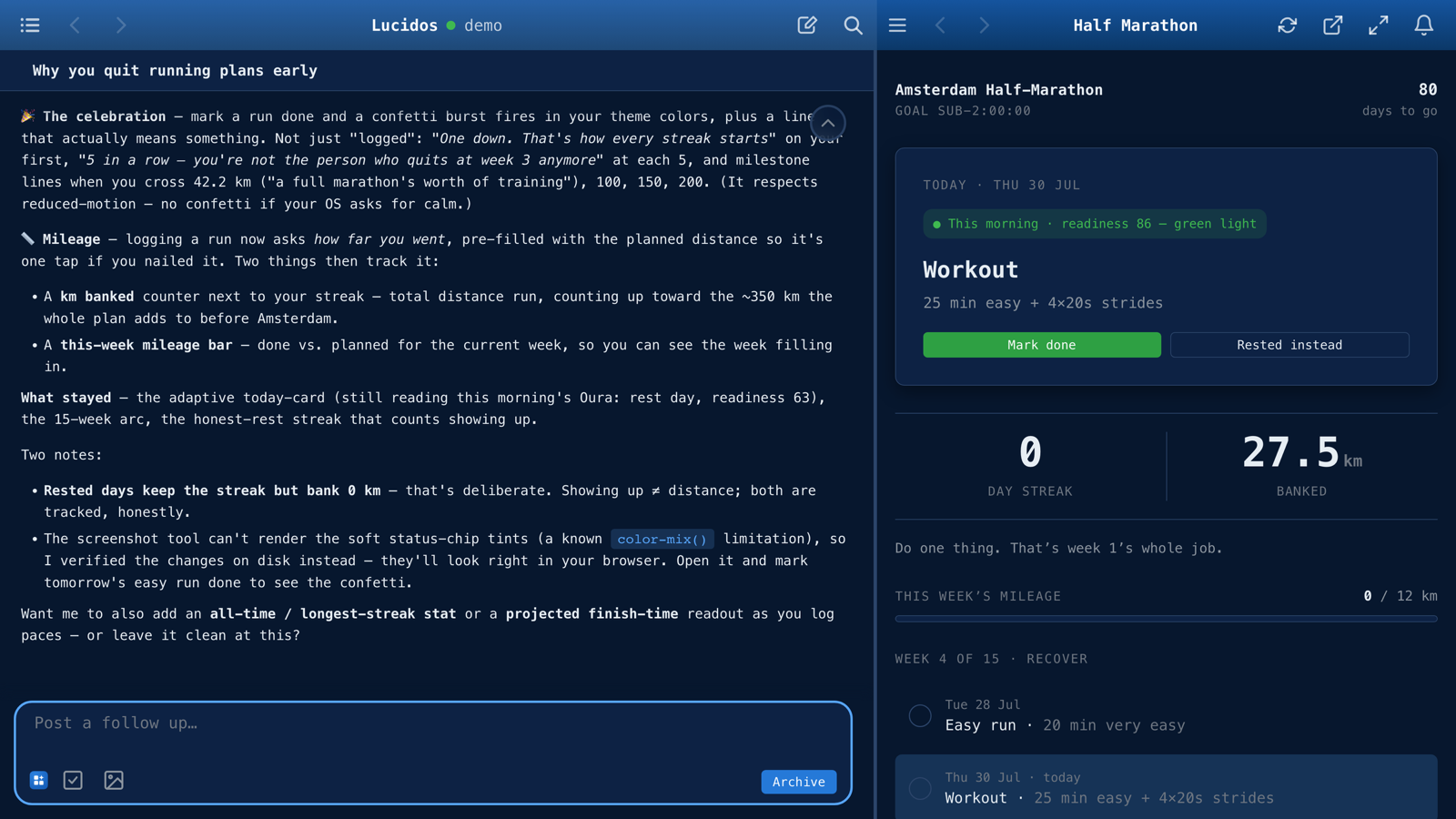
Described in chat, running seconds later in the same window, wired to the user's own data. 60-second demo · lucidos.dev · macOS DMG, or one line on macOS and Linux.
Lucidos is an AI companion that shares your whole workspace. You talk, build, run, automate, and remember together - in one place. Chat lives alongside your work in a persistent split view on desktop, and as a separate pane you can swipe to on mobile. You're never leaving your work to talk to the AI; you're always working with it - manifesting your intent in a rich, extensible interface.
If you can describe it, it exists
A local, event-driven AI OS that keeps the apps you describe running, and acts when something happens. It is the environment your apps, data, automations, and memory live in, all on your own machine. You own and store all the data yourself. The prompt is the primary interface, but Lucidos is a unified, integrated environment where configurable LLMs know all about your apps, triggers (scheduled or event-driven), and files. Describe an app and you're using it seconds later. No build step, no deploy. Built to augment the user, it remembers everything you do. While it is not an "autonomous" role playing entity, you can automate anything. Nothing happens without a user intent, though - which is a central concept for Lucidos.
The integrated environment makes for a smooth user experience, where researching a topic, storing the findings, spinning up an app around them, and pulling in data from external sources (whether through scheduled syncs or direct API calls) can all be done in one simple flow. Local data lives in a Postgres event store or as git-versioned artifacts.
Install
Two ways in, both first-class.
macOS: the desktop app. Download the latestLucidos_<version>_aarch64.dmg
from the releases page, open it, and drag Lucidos to Applications. It is signed
and notarized by Apple (no Gatekeeper warning, no xattr dance), bundles
PostgreSQL 18 + pgvector, the engine, and the UI, and auto-updates from GitHub
Releases. Nothing else to install: no terminal, no Docker, no Rust or Node.
Apple Silicon only today.
macOS or Linux: the one-liner. On a clean machine:
curl -fsSL https://lucidos.dev/install.sh | sh
This is the headless path: the same engine and UI served in your browser, plus
an always-on background service. It is also the only path on Linux.
By default the installer DOWNLOADS the prebuilt headless runtime for your
platform (the engine, the gateway, the frontend, and a relocatable PostgreSQL 18
- pgvector, all bundled), verifies its
sha256checksum, extracts it under~/.lucidos/runtime/, and registers the bundled gateway as an always-on user
service (a launchd LaunchAgent on macOS, a systemd--userunit on Linux) so it
survives terminal-close + reboot and restarts on failure. The gateway provisions
the embedded Postgres and supervises the engine, the same model as the macOS.app. No Docker, no Rust/Node, no clone, no compile. First run is seconds, not
minutes. It opens at http://localhost:5252. Pass--no-serviceto run it in the
foreground instead (Ctrl-C to stop).
One more way to get the headless runtime:
- Install a tarball you built yourself with
scripts/build-headless.sh:
It verifies the adjacent./install.sh --from-tarball /path/to/lucidos-<version>-<triple>.tar.gz.sha256(fail-closed on mismatch), extracts, and
launches, fully offline.
Running from source is not a third way to install Lucidos: it is how you work
on Lucidos. Neither shipped runtime carries the platform's own source, so
neither can change it; a source checkout can, and that is the point of this
path. Lucidos then works on its own code, proposing each change as a diff in an
isolated git worktree for you to review and Apply. The whole loop, prerequisites
included, is documented under
Develop Lucidos. The one-command
bootstrap for it is:
curl -fsSL https://lucidos.dev/install.sh | sh -s -- --dev
--dev (alias --source, or LUCIDOS_FROM_SOURCE=1) bootstraps the toolchain
(Rust, Node, Docker, build deps), clones the repo to ~/lucidos, compiles the
engine from source (a release build, typically 10–20+ minutes on a clean
machine; LUCIDOS_DEBUG_BUILD=1 for a faster debug build), and starts the stack
via scripts/run.sh.
On a brand-new release, the per-platform tarballs are attached by CI about
30 minutes after the GitHub Release is published, so a download started in
that window can still 404. Retry shortly, pass--version <previous-version>,
or use one of the two paths above.
The installer is idempotent, safe to re-run. The download/tarball paths skip an
already-extracted runtime for the same version unless you pass --force; --dev
reuses an existing checkout, build, and workspace.
Linux prerequisites. The prebuilt Linux tarballs are built against the
Ubuntu 22.04 baseline, so they run on glibc 2.35+ distros (Ubuntu 22.04+,
Debian 12+, Fedora 36+, RHEL/Rocky/Alma 10+). RHEL 9 and its rebuilds are
below the floor: EL9 pins glibc 2.34 for its whole lifecycle. The installer
runs the extracted gateway once and refuses any too-old host at install time
with a clear message; build from source there instead (--dev). Two host packages are expected at
runtime and warned about when missing: git (coding-agent threads + repository
features) and ca-certificates (outbound TLS: LLM providers, the
embedding-model download, web push). python3 is optional (script tooling).
Remote access & push notifications. The gateway listens on localhost
only by default (the secure posture) and serves plain HTTP. Browsers grant
service workers (and with them push notifications + PWA install) only on
a secure origin (https or localhost), so to use Lucidos from other devices:
ssh -L 5252:localhost:5252 <host>, then open http://localhost:5252: the
full app including push, zero config (localhost is a secure context).tailscale serve --bg 5252: trusted HTTPS on your tailnet.- Or expose it directly:
./install.sh --bind all --tls-cert <cert.pem> --tls-key <key.pem>.--bindwrites the machine-global~/.lucidos/network.toml(the same knob
as the picker's Settings → Network access); the TLS pair makes the gateway
serve https (push needs a certificate your browsers trust). A bare--bind allwithout TLS serves the app overhttp://<host>, usable, but
browsers will not grant push/PWA there.
Always-on service & multiple gateways. The default install registers a
user-level service named after the instance. On macOS a launchd LaunchAgentcom.lucidos.gateway.<name> at ~/Library/LaunchAgents/, on Linux a systemd--user unit lucidos-gateway-<name>.service at ~/.config/systemd/user/
(RunAtLoad/KeepAlive ≈ Restart=always; logs at <prefix>/<name>/logs/ on
macOS, or journalctl --user -u lucidos-gateway-<name> on Linux). On Linux it
also runs loginctl enable-linger (best-effort, may prompt for sudo) so the
service survives logout/reboot. No supported service manager (e.g. a container
without a user systemd session) → it degrades to a foreground launch with a clear
message. You can run several gateways side by side as named instances that
share the one downloaded runtime but each get their own data dir
(<prefix>/<name>/), service, and port:
./install.sh                         # the 'default' instance (auto-picks a free port if 5252 is taken)
./install.sh --name test --port 5300 # a second, independent gateway
./install.sh --name test --port 5400 # move 'test' to a new port (the port is a mutable property)
The instance name is the stable identity; the port is a property you can
change on a re-run. This is how a terminal install coexists with a dev gateway
and the packaged .app.
Manage / uninstall. List instances, then stop + remove one (or all). Data is
kept unless you pass --purge:
./install.sh --list                   # or: ./uninstall.sh --list
./uninstall.sh --name test            # stop + unregister 'test'; KEEP its data
./uninstall.sh --name test --purge    # also delete its data dir
./uninstall.sh --all --purge          # remove every instance + the shared runtime
./install.sh --uninstall [--name <name>] [--all] [--purge] is the same thing
(it delegates to uninstall.sh).
--purgeis irreversible and asks for no confirmation. An instance's data
dir (<prefix>/<name>/) is not installer scratch: it holds the embedded
PostgreSQL cluster (every thread, message, memory and setting of every
workspace that gateway serves) and, for any workspace you created through the
picker without choosing a path of your own, the workspace directory itself
(<prefix>/<name>/workspaces/<id>/, i.e. your artifacts, apps, triggers and
knowhow).--all --purgedoes that for every instance and deletes the shared
runtime too. Back up anything you want to keep before adding the flag. Note
that a bare uninstall is not a dry run either: it stops the gateway and
removes its service, and only your data survives (it prints where it left
it). The one command that changes nothing is--list, so start there.
Installed via the one-liner, so you have no checkout? Both are the repo's own
scripts and the runtime lays no copy down (nothing under ~/.lucidos/ is an
uninstaller), so downloaduninstall.sh
and run it with the same flags:
curl -fsSL https://raw.githubusercontent.com/lucidos-dev/lucidos/main/uninstall.sh -o uninstall.sh
sh uninstall.sh --list
The matching https://lucidos.dev/uninstall.sh front door is not served yet, so
piping that URL would feed you the landing page instead of a script. Tracked indocs/temporary-measures.md.
Pick your LLM provider (optional). With no credentials the runtime boots into
a clear no-provider onboarding state (--dev boots in mock mode); configure a
real provider in Settings → Providers afterwards. To wire one up at install
time, pass it through the pipe:
# OpenAI (GPT models)
curl -fsSL https://lucidos.dev/install.sh | OPENAI_API_KEY=sk-… sh

# Vertex AI (Claude / Gemini), also run `gcloud auth application-default login`
curl -fsSL https://lucidos.dev/install.sh | VERTEX_PROJECT_ID=my-gcp-project sh
Knobs (all optional; flags or environment variables, see install.sh --help):
--name / LUCIDOS_INSTANCE |
instance name (default default); its data lives at <prefix>/<name>/ |
--version / LUCIDOS_VERSION |
version to download (default: the repo RELEASE when run from a checkout, else a baked default) |
--base-url / LUCIDOS_RELEASE_BASE_URL |
where lucidos-<version>-<triple>.tar.gz + .sha256 live (default: the GitHub Releases path for v<version>) |
--prefix / LUCIDOS_PREFIX |
install prefix (default ~/.lucidos); the shared runtime extracts to <prefix>/runtime/lucidos-<version>-<triple>/ |
--port / LUCIDOS_PORT |
the instance's gateway port (default 5252; a new instance auto-picks a free port if it's taken). Pinning it sets/changes that instance's port |
--no-service / LUCIDOS_NO_SERVICE=1 |
run in the foreground instead of registering a service |
--force / LUCIDOS_FORCE=1 |
re-download / re-extract the runtime even if already installed |
--no-launch / LUCIDOS_NO_LAUNCH=1 |
install without starting the gateway |
--uninstall / --list / --all / --purge |
manage instances (see above); --purge also deletes data |
LUCIDOS_GATEWAY_DATA |
override the instance data dir (registry + embedded Postgres; default <prefix>/<name>) |
--dev-only |
LUCIDOS_HOME (clone dir, default ~/lucidos), LUCIDOS_WORKSPACE, LUCIDOS_REF, LUCIDOS_DEBUG_BUILD, LUCIDOS_SKIP_DEPS |
Prefer to drive the setup yourself? The manual path is below.
Desktop app (.dmg): building it yourself
The shipped .dmg is on the releases page
(see Install above); this section is for building your own. It is a
self-contained macOS app bundling PostgreSQL + pgvector, the engine, and the UI,
with auto-update from GitHub Releases ("update available → restart"). Build it
locally with ./scripts/build-dmg.sh (needs cargo install tauri-cli); seedocs/desktop-app.md for the build + signing +
notarization + release runbook, and ADR 0012
for the architecture.
Prerequisites
- Rust (stable toolchain)
- Docker (for PostgreSQL + pgvector)
- Node.js (for Vite frontend dev server)
- An LLM provider (Anthropic, OpenAI, OpenRouter, Vertex AI, or a local
OpenAI-compatible endpoint such as Ollama / LM Studio / vLLM). Configure it in
Settings → Models → Providers, or via the environment variables below.
Dev Setup
# Start with a workspace directory
./scripts/web-dev.sh -w ~/workspaces/dev

# Build engine first if no binary exists
./scripts/web-dev.sh -w ~/workspaces/dev -b

# Other scripts
./scripts/stop.sh -w ~/workspaces/dev   # Graceful shutdown
./scripts/restart.sh -w <ws>   # Stop and start
./scripts/status.sh            # Check health
This starts one shared PostgreSQL Docker container, builds/runs the Rust engine natively, starts the shared workspace gateway, and runs a frontend build watcher. Each workspace gets its own engine port and its own database (lucidos_<slug>) inside the shared Postgres cluster, so multiple workspaces can run concurrently without one Postgres container per workspace.
Ports
The first workspace lands on 5173 for direct engine access. Each additional workspace gets the next engine-port offset (5174, 5175, …), stored in ~/.lucidos/port-registry so the same workspace gets the same engine port every run. The shared dev gateway listens on 5251 by default (LUCIDOS_DEV_GATEWAY_PORT overrides it) and serves workspaces at http(s)://localhost:5251/<slug>/, using 5251 (not the packaged app's 5252) so a dev gateway and an installed Lucidos.app coexist out of the box. PostgreSQL uses one shared Docker container (lucidos-pg-shared) with one database per workspace; the chosen PG port is written to <workspace>/.lucidos/ports.
If the target port is already taken by something else (e.g. another Vite app on 5173), Lucidos walks forward to the next free offset and persists the new assignment. It does not kill the squatter. To pin a specific port:
LUCIDOS_VITE_PORT=5273 ./scripts/web-dev.sh -w dev: env var, one-shot.<workspace>/lucidos.toml: per-workspace, persistent:[ports] vite = 5273
Env var beats lucidos.toml. Both still collision-walk forward if the chosen base is taken. The chosen ports are logged to stderr when web-dev.sh starts.
Environment Variables
| Variable | Default | Description |
|---|---|---|
LUCIDOS_WORKSPACE |
(none) | Workspace directory |
LUCIDOS_VITE_PORT |
5173 |
Base direct engine port, overrides per-workspace offset + lucidos.toml. |
LUCIDOS_DEV_GATEWAY_PORT |
5251 |
Shared dev gateway port for /<slug>/ and /~/ (5251 keeps dev clear of the packaged app's 5252). |
LUCIDOS_MODEL |
claude-opus-5@default |
LLM model name |
VERTEX_PROJECT_ID |
(none) | GCP project (for claude-*/gemini-*) |
VERTEX_REGION |
europe-west1 |
Vertex AI region |
OPENAI_API_KEY |
(none) | OpenAI key (for gpt-* models). Fallback below a stored openai credential; if unset too, the engine auto-detects a key from the Codex CLI's ${CODEX_HOME:-~/.codex}/auth.json (apikey login only). |
Per-workspace environment variables: beyond the global .env the engine loads at startup, each workspace can define its own non-secret environment variables in Settings → System → Environment variables (DB-backed). The engine injects them as real env vars into every subprocess it spawns (run_bash, run_python, scheduled scripts, triggers, and coding-agent sessions) alongside CRED_*/OAUTH_*. Use them for per-workspace identity (e.g. GH_CONFIG_DIR / GIT_SSH_COMMAND so gh / git push authenticate as the right account). Changes take effect on the next subprocess, no restart. They are non-secret (real secrets belong in credentials). The legacy <workspace>/data/.env file is migrated into this store on startup and removed.
HTTPS for Local Development
Lucidos uses mkcert to generate locally-trusted TLS certificates. When certs are present in .certs/, Vite automatically serves over HTTPS.
Install mkcert and generate certs
brew install mkcert
mkcert -install            # adds the CA to macOS trust store + Chrome/Firefox
mkdir -p .certs
mkcert -cert-file .certs/cert.pem -key-file .certs/key.pem \
  localhost 127.0.0.1 ::1 \
  "$(ipconfig getifaddr en0)" \
  "$(tailscale status --self --json | python3 -c "import sys,json; print(json.load(sys.stdin)['Self'].get('DNSName','').rstrip('.'))")"
Add your local IP and Tailscale hostname so the cert is valid when accessed from other devices. If your IP changes, regenerate the cert.
Accessing from iPhone / iPad over Tailscale
The mkcert root CA must be trusted on iOS for HTTPS to work:
- Find the CA cert:
mkcert -CAROOT # prints the directory, e.g. ~/Library/Application Support/mkcert - Transfer
rootCA.pemto your device. AirDrop is easiest. - Install the profile: Open the file on iOS. Go to Settings > General > VPN & Device Management and install the downloaded profile.
- Enable full trust: Go to Settings > General > About > Certificate Trust Settings and toggle on the mkcert root CA.
After this, Safari and Chrome on iOS will trust your dev server's HTTPS certificate.
Notes
.certs/is gitignored: certs are machine-specific, never committed.- HTTP still works. If
.certs/cert.pemdoesn't exist, Vite falls back to plain HTTP automatically. HTTPS is opt-in. - Restart Chrome after running
mkcert -installfor the first time. Chrome caches the CA store and won't pick up the new root CA until restarted. - Service workers require HTTPS (or localhost). If testing push notifications or PWA features from a mobile device over Tailscale, HTTPS is required.
Architecture
┌──────────────────┐     ┌──────────────────┐     ┌─────────────────────────┐
│  Browser / PWA   │────▶│                  │────▶│  Engine (per workspace) │
│  or Tauri window │◀────│     Gateway      │◀────│  + PostgreSQL/pgvector  │
└──────────────────┘     └──────────────────┘     └─────────────────────────┘
A gateway fronts one or more workspaces: it provisions Postgres and
spawns/supervises one engine per workspace (ADR 0014).
Several gateways can run side by side as named instances (see Install above),
each with its own port, data dir, and service.
A packaged install (.dmg or the curl … | sh runtime) bundles a relocatable
PostgreSQL and needs no Docker; the dev setup above runs Postgres in Docker
instead.
Tech Stack
| Component | Choice |
|---|---|
| Language | Rust |
| UI | Web frontend, wrapped by Tauri on the desktop |
| LLM | Anthropic / OpenAI / OpenRouter / Vertex AI / local (configurable) |
| Event Store | PostgreSQL + pgvector |
| Embeddings | fastembed (in-process, local) |
| Execution | Lucidos-managed Python |
| Packaging | Headless tarball + user service, macOS .dmg, Docker image |
Workspace Structure
/workspace/
  .lucidos/            # Ephemeral runtime (deletable)
  data/
    artifacts/         # Git-tracked user files
    apps/              # App UIs + their knowhow, intents, scripts, triggers
    knowhow/           # General domain reference docs
    triggers/          # Standalone scheduled/event triggers
    scripts/           # Scripts shared across consumers
    postgres/          # Event store (gitignored)
The full placement and ownership rules are in docs/taxonomy.md.
Core Concepts
- Events: Immutable, append-only records of confirmed outcomes. The single source of truth.
- Artifacts: Versioned outputs (code, documents, apps) stored in Git. Addressable, with provenance.
- Apps: persistent UIs you open repeatedly, described in chat rather than scaffolded by hand.
- Knowhow: how-to docs the agent discovers semantically and loads when relevant.
- Prompt-first UI: Everything doable in apps must be doable via the prompt.
Key Invariants
- Events are immutable
- Git commits are consequences, not causes
- No hidden state or silent decisions
- Replay reconstructs truth, not creativity
Versioning
Two independent version axes:
RELEASE(repo root): the umbrella user-facing version of the Lucidos
release that bundles all crates. TheRELEASEfile is the source of truth
for the current number (mirrored by the latestv<version>tag on
GitHub Releases). Think
Ubuntu 24.04: one number per shipped release, regardless of how the
individual components inside have moved. Exposed at runtime aslucidos_engine::LUCIDOS_RELEASE, in thereleasefield of/api/health,
in the engine's--versionoutput, and in the desktop app's control panel.- Per-crate
Cargo.tomlversions: semver per component (lucidos-engine,
lucidos-app, etc.), bumped on their own cadence bybuild.rs. Visible asengine_version/latest_tauri_app_versionin/api/health.
Cutting a Lucidos release
Each release publishes one commit to lucidos/main, tagged v<version>: a
stripped tree carrying the previous release's published commit as its single
parent, so the mirror's main is a linear release history. Per-release notes
live in CHANGELOG.md.
Contributing
Contributions are welcome, Lucidos is pre-1.0, so there's plenty to do (and
expect breakage before 1.0). Start with CONTRIBUTING.md for
dev setup, the branch/PR flow, commit conventions, and the DCO sign-off
(git commit -s) required on every commit. Please also read the
Code of Conduct, report security issues privately via
SECURITY.md, and see GOVERNANCE.md for how the
project is run. Questions and ideas are welcome in
GitHub Discussions.
Proposing something that adds a surface or an integration?docs/philosophy.md is the lens those are held against,
and it names two ideas already settled as a no.
Thanks to everyone who has contributed, see the full list on the
contributors graph.
License
Lucidos is released under the MIT License. © 2026 Kenneth Tiller.
Reviews (0)
Sign in to leave a review.
Leave a reviewNo results found